
Travel push notifications are automated messages sent directly to travelers’ devices (desktop or mobile) to re-engage them throughout their booking journey and travel experience. Unlike email marketing, these notifications appear instantly on users’ screens—even when they’re not on your website—creating immediate touchpoints that drive action.
Here’s how they work: When someone visits your travel site, they opt-in to receive notifications with a simple click. You can then send them timely, relevant messages about price drops, booking reminders, travel updates, or personalized recommendations based on their browsing behavior.
For travel businesses, push notifications solve four critical challenges:
- Increase Average Order Value (AOV) by 25-40% through strategic upselling and cross-selling
- Reduce Customer Acquisition Costs (CAC) by re-engaging existing visitors instead of paying for new traffic
- Improve retention rates by maintaining engagement throughout the customer journey
- Combat cart abandonment (which affects 70% of travel bookings) with timely recovery messages
PushEngage is the leading customer engagement platform that makes this possible—no coding required, with seamless integration for WordPress, Shopify, WooCommerce, and custom travel apps.
Send Multichannel Messages Today!
Push and WhatsApp messaging are super effective, low-cost marketing tools to help you grow your repeat traffic, engagement, and sales on autopilot.
- Why Travel Businesses Need Push Notifications
- How Push Notifications Work for Travel Websites and Apps
- How Travel Push Notifications Drive Revenue
- Travel Industry Push Notification Strategies by Niche
- Setting Up Push Notifications: A Step-by-Step Guide
- Advanced Travel Push Notification Tactics
- Measuring Success: Key Metrics for Travel Push Notifications
- Common Mistakes to Avoid in Travel Push Notifications
- Push Notification Best Practices for Travel Businesses
- The Future of Travel Push Notifications
- Frequently Asked Questions About Travel Push Notifications
- Related Resources
Why Travel Businesses Need Push Notifications
The travel industry faces unique engagement challenges that push notifications solve better than any other marketing channel:
Mobile-First Travel Planning: 60% of travel bookings now happen on mobile devices, where push notifications have 90% visibility compared to just 20% for emails.
Price-Sensitive Decision Making: Travel purchases involve significant comparison shopping. Push notifications let you reach customers with price drops and limited-time offers at the exact moment they’re most likely to book.
Complex Customer Journeys: The average traveler visits 38 sites before booking. Push notifications keep you top-of-mind throughout their entire research process without relying on them remembering to check their email.
Time-Sensitive Opportunities: Travel deals, availability changes, and booking deadlines require immediate communication. Push notifications deliver instantly, with average open rates of 80% within the first hour.
How Push Notifications Work for Travel Websites and Apps
Think of push notifications like having a direct phone line to your customers — but better.
Here’s the simple process:
- Visitor arrives on your travel website
- Opt-in prompt appears (one-time setup)
- User clicks “Allow” to subscribe
- You can now reach them anytime, anywhere
- Messages appear instantly on their device
Web Push vs App Push: Web push notifications work through browsers (no app needed), while app push requires users to download your app. For most travel businesses, web push is more effective because it has lower barriers to entry.
The Technical Magic: When someone subscribes, their browser creates a unique identifier that lets you send messages directly to their device. PushEngage handles all the complex technical infrastructure, so you just focus on crafting great messages.
How Travel Push Notifications Drive Revenue
With a lot of customer engagement platforms, it can be difficult to determine ROI. And that happens a lot because the users don’t know how to attribute revenue using different metrics. So, let’s look at metrics that matter for all travel websites and apps.
Increasing Average Order Value (AOV) Through Strategic Timing
Smart travel businesses use push notifications to increase basket size through strategic timing:
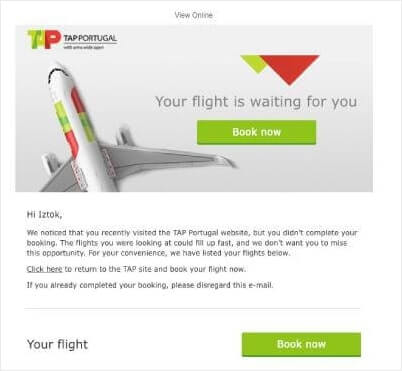
Last-Minute Upsells: Send notifications 2-4 hours before booking expires
- “Complete your Paris trip—add airport transfer for just $45”
- Result: 35% increase in AOV for hotel + extras bundles
Cross-Sell During Planning Phase: Target users browsing flights
- “Flying to Tokyo? Save 20% on hotel bookings made today”
- Result: 28% higher booking values when flight + hotel booked together

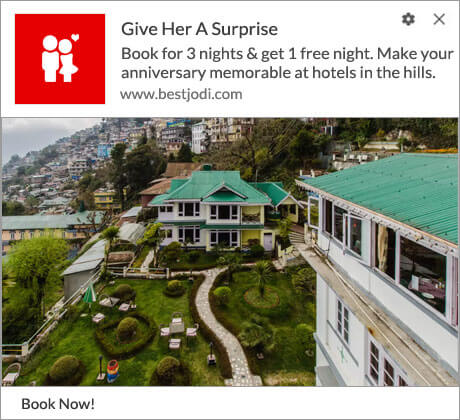
Premium Upgrade Offers: 24-48 hours after initial booking
- “Upgrade to ocean view for just $30/night—limited availability”
- Result: 18% upgrade rate with average $150 revenue increase
Reducing Customer Acquisition Costs (CAC) with Re-engagement
Instead of paying for new traffic, push notifications bring back existing visitors:
Cost Comparison:
- New Google Ads visitor: $15-45 CAC
- Push notification re-engagement: $0.10-0.30 CAC
- ROI improvement: 1,500% better cost efficiency
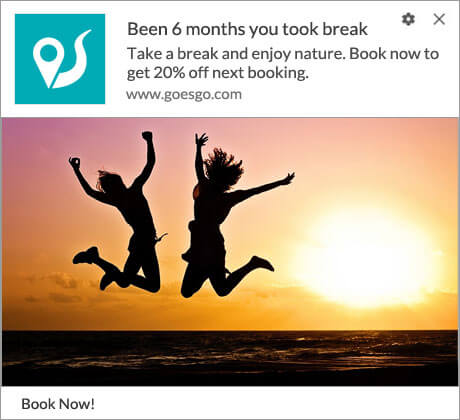
Re-engagement Campaign Performance:
- Day 1 visitors who don’t book: 45% re-engagement rate
- Day 7 follow-up: 22% conversion rate
- Day 30 “We miss you”: 12% reactivation rate
Improving Retention Rates Across the Customer Journey
Push notifications create continuous touchpoints that keep customers engaged:
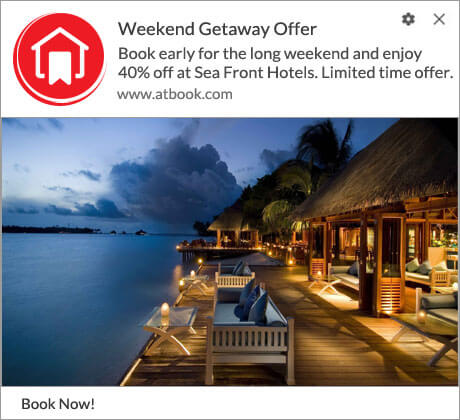
Pre-Travel Phase (14-30 days before departure):
- Travel tips and destination guides: 65% open rate
- Weather updates and packing suggestions: 58% engagement
- Local experience recommendations: 42% click-through
During Travel (real-time engagement):
- Flight delay notifications: 89% open rate
- Local weather alerts: 76% engagement
- Restaurant and activity suggestions: 51% conversion
Post-Travel (relationship building):
- Photo sharing prompts: 34% engagement
- Review requests: 28% completion rate
- Future destination suggestions: 41% click-through
Combating Cart Abandonment in Travel Bookings
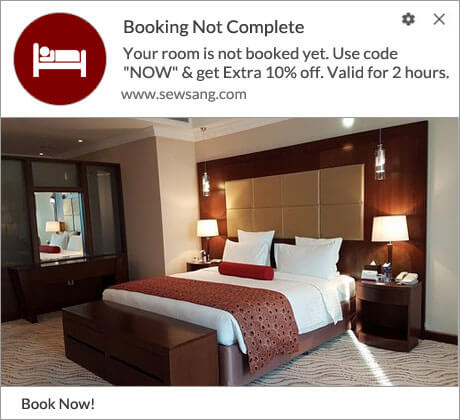
Travel has the highest cart abandonment rate (70%) of any industry. Push notifications recover these lost bookings:
Abandonment Recovery Sequence:
- 1 hour: “Still interested? Your Tokyo flight is held for 23 more hours”
- 12 hours: “Price alert: Your selected flight increased by $67”
- 24 hours: “Last chance—only 3 seats left at this price”
- 7 days: “New dates available with 15% savings”
Recovery Results:
- 1-hour reminder: 28% recovery rate
- Price urgency: 19% recovery rate
- Scarcity messaging: 15% recovery rate
- Alternative offers: 11% recovery rate
Combined recovery rate: 45-52% of abandoned bookings
Travel Industry Push Notification Strategies by Niche
Let’s look at a few tactics by specific niches in the travel industry.
Hotels & Accommodation Platforms
Booking Stage Notifications:
- Price drop alerts: “Your saved hotel in Barcelona dropped $40/night”
- Limited availability: “Only 2 rooms left at The Grand Plaza”
- Seasonal promotions: “Book summer dates now—25% early bird discount”
Guest Experience Notifications:
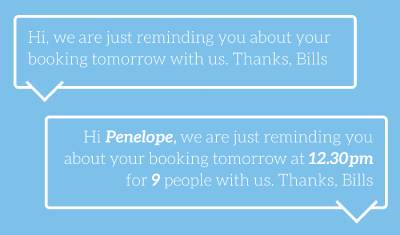
- Check-in reminders: “Check-in tomorrow at 3 PM—upgrade to suite for $50?”
- Local recommendations: “5 must-try restaurants within walking distance”
- Amenity promotions: “Spa treatment 30% off for hotel guests today”
Post-Stay Engagement:
- Review requests: “How was your stay at The Grand Plaza?”
- Loyalty program updates: “Earn free nights—book your next stay”
- Return visit offers: “Miss Barcelona? 20% off your next booking”
Best Times to Send:
- Booking reminders: 9 AM – 11 AM local time
- Experience suggestions: 6 PM – 8 PM (dinner planning)
- Promotional offers: Tuesday – Thursday (highest conversion)
Flight Comparison & Booking Services
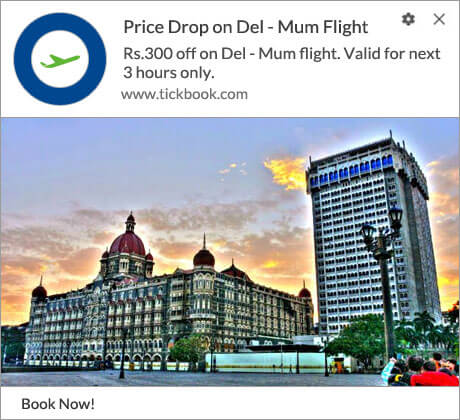
Price Tracking Excellence:
- “Flight to Paris dropped $127—book now before it rises”
- “Your watched route: New dates available at $89 less”
- “Price prediction: Tokyo flights likely to increase 15% next week”
Travel Day Assistance:
- Check-in reminders: “Check in now for your flight to Miami”
- Gate change alerts: “Gate changed to B12—45 minutes to boarding”
- Alternative flight options: “Flight delayed? We found 3 earlier options”
Trip Planning Support:
- Multi-city suggestions: “Add Rome to your Europe trip for just $78”
- Seasonal opportunities: “Shoulder season flights to Japan—save $400”
- Group booking alerts: “Book 4+ seats together—unlock group discounts”
Timing Strategy:
- Price alerts: Send immediately when detected
- Check-in reminders: 24 hours + 2 hours before flight
- Rebooking offers: Within 30 minutes of disruption
Vacation Rentals & Homestays
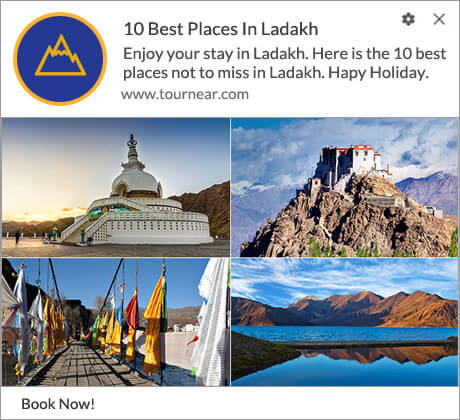
Booking Journey Optimization:
- Host response time: “Sarah typically responds in 15 minutes”
- Instant book availability: “Book immediately—no waiting for approval”
- Cancellation policy clarity: “Free cancellation until Dec 15th”
Guest Communication Flow:
- Booking confirmation: “Confirmed! Here’s your host’s welcome message”
- Pre-arrival info: “Arriving tomorrow? Here’s the WiFi password and local tips”
- Check-out instructions: “Check-out at 11 AM—leave keys in lockbox”
Experience Enhancement:
- Local insider tips: “Your host recommends this hidden beach (5-min walk)”
- Emergency information: “Host contact: +1-555-0123 | Emergency: 911”
- Extension offers: “Extend your stay 2 more nights—same rate”
Adventure & Outdoor Travel

Weather-Dependent Strategies:
- Activity alerts: “Perfect hiking weather tomorrow—book your Yosemite tour”
- Safety notifications: “High winds forecasted—kayaking trips rescheduled”
- Equipment reminders: “Pack waterproof gear—rain expected during your camping trip”
Seasonal Availability:
- “Ski season opening Dec 1st—reserve your cabin now”
- “Northern Lights tours—best viewing next week”
- “Peak wildflower season—book your photography workshop”
Safety & Preparation:
- Gear checklists: “Climbing tomorrow? Don’t forget your headlamp”
- Trail conditions: “Trail update: Moderate snow on Mt. Whitney”
- Emergency contacts: “Save this: Park ranger emergency line”
Business Travel Management
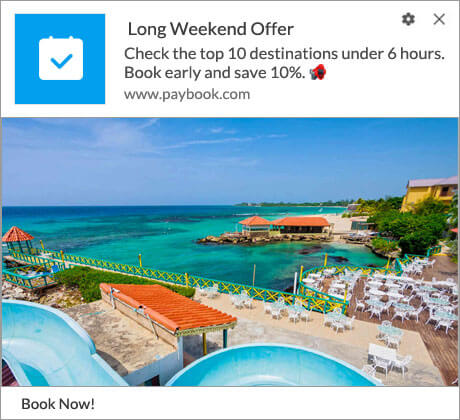
Corporate Traveler Efficiency:
- Policy compliance: “Your hotel choice exceeds policy by $45—see alternatives”
- Expense tracking: “Receipt reminder—photo your dinner receipt”
- Itinerary updates: “Meeting location changed—updated in your app”
Travel Day Optimization:
- Traffic alerts: “Leave 20 minutes early—heavy traffic to airport”
- Lounge access: “Your Priority Pass includes 3 lounges at JFK Terminal 4”
- Ground transport: “Pre-booked car arrives in 10 minutes”
Cost Management:
- Budget tracking: “You’re $200 under budget—upgrade available”
- Approval notifications: “Expense report approved—$1,247 processed”
- Policy updates: “New travel policy effective Jan 1st—review changes”
Setting Up Push Notifications: A Step-by-Step Guide
Now that you have an idea of some creative campaigns you can send to increase your revenue and reduce your CAC (Customer Acquisition Costs) at the same time, let’s look at how you can get set up for success.
Choosing the Right Customer Engagement Platform for Push Campaigns
Why PushEngage Leads for Travel Businesses:
✅ Travel-Specific Templates: Pre-built campaigns for bookings, price drops, and travel updates
✅ Behavioral Triggers: Automatic messages based on browsing patterns and booking stages
✅ Global Time Zone Management: Send notifications at optimal local times across regions
✅ Integration Ready: Works with all major travel booking platforms and WordPress travel themes
✅ Compliance Built-In: GDPR and privacy law compliance handled automatically
Platform Comparison:
- PushEngage: Best for travel businesses
- OneSignal: Developer-focused, requires technical setup
- Klaviyo: Email-first platform with limited push features
- Firebase: Google’s solution, needs extensive development
Technical Implementation for Travel Websites
Step 1: Install PushEngage on Your Travel Site
For WordPress travel sites:
- Install the PushEngage WordPress plugin
- Connect your account (2-minute setup)
- Customize the opt-in prompt for travel context
- Add your travel site’s branding
For Custom Travel Platforms:
- Add PushEngage JavaScript code to your header
- Configure service worker for your domain
- Customize notification appearance
- Test on staging environment first
Check out this installation guide for more setup details.
Step 2: Design Your Opt-In Strategy
For web push, you need an explicit opt-in to collect subscribers. App users are subscribed by default. You just have to start sending notifications.
Travel-Optimized Opt-In Messages:
- “Get instant alerts when prices drop on your watched flights”
- “Never miss travel deals—get notified of flash sales”
- “Receive booking confirmations and travel updates”
Timing Your Opt-In Prompt:
- After 30 seconds on booking pages (high intent)
- When users add items to wishlist or compare
- On departure from high-value pages (exit intent)
Step 3: Set Up Your First Campaign
Choose your primary use case:
- Price Drop Campaign: For flight/hotel comparison sites
- Booking Abandonment: For reservation platforms
- Travel Updates: For full-service travel sites
Creating Your First Travel Push Notification Campaign
PushEngage has some amazing campaign templates to help you get started.
Campaign Template: Price Drop Notification
Trigger: When saved item price decreases by 10% or more
Timing: Send immediately upon price change detection
Message: “✈️ Price Drop Alert: Your Tokyo flight is now $127 less!”
Action Button: “Book Now” (links directly to booking page)
Follow-up: Send reminder if not clicked within 4 hours
Campaign Template: Booking Abandonment Recovery
Trigger: User leaves booking page without completing purchase
Sequence:
- 1 Hour: “Complete your booking—we’re holding your selection”
- 6 Hours: “Still planning your trip to Paris? Your cart expires soon”
- 24 Hours: “Last chance—prices may increase tomorrow”
- 7 Days: “New dates available with better prices”
Campaign Template: Travel Day Assistance
Trigger: 24 hours before departure date
Message Flow:
- “Travel day reminder: Flight to Miami tomorrow at 2:15 PM”
- “Check-in now available—tap to complete”
- “Traffic update: Leave 30 minutes early today”
Advanced Travel Push Notification Tactics
Personalization and Segmentation Strategies
Behavioral Segmentation for Travel:
By Travel Style:
- Budget travelers: Focus on deals, discounts, savings opportunities
- Luxury travelers: Emphasize exclusivity, upgrades, premium experiences
- Business travelers: Highlight efficiency, reliability, time-saving features
- Adventure seekers: Promote unique experiences, off-the-beaten-path destinations

By Booking Stage:
- Researchers: Price tracking, destination guides, comparison tools
- Ready-to-book: Scarcity messaging, limited-time offers, booking incentives
- Booked travelers: Trip preparation, upgrades, add-on services
- Past customers: Loyalty rewards, return visit promotions, referral programs
By Geographic Patterns:
- Domestic travelers: Regional deals, weekend getaways, seasonal promotions
- International travelers: Visa reminders, currency updates, cultural guides
- Frequent travelers: Loyalty program benefits, status upgrades, exclusive access
Timing Optimization for Global Travel Audiences
Time Zone Strategy Matrix:
Booking-Related Notifications:
- Best Times: 9-11 AM and 7-9 PM in recipient’s local time
- Avoid: Very early morning (before 7 AM) and late night (after 10 PM)
- Day Preference: Tuesday-Thursday for promotional offers, any day for urgent updates
Check out this article on the best time to send push notifications.
Travel Day Notifications:
- Flight reminders: 24 hours, 4 hours, and 1 hour before departure
- Check-in alerts: Exactly when online check-in opens (usually 24 hours prior)
- Gate updates: Immediate delivery regardless of time zone
Promotional Campaign Timing:
- Flash sales: Launch at 8 AM EST, extend through all major time zones
- Weekly deals: Tuesday 10 AM in each region’s local time
- Seasonal promotions: Align with local seasons and holidays
A/B Testing Your Travel Notifications
High-Impact Elements to Test:
Message Content Testing:
- Emotional vs. logical appeals: “Don’t miss out!” vs. “Save $200 today”
- Urgency levels: “Limited time” vs. “Only 3 seats left” vs. “Prices rising”
- Personalization depth: First name vs. destination interest vs. travel history
Visual Elements:
- Icons: ✈️ vs. 🏨 vs. 🌴 for different message types
- Colors: Red for urgency, blue for information, green for deals
- Images: Destination photos vs. price graphics vs. branded elements
Timing Experiments:
- Send time variations: Morning vs. evening vs. weekend
- Frequency testing: Daily vs. weekly vs. triggered only
- Sequence timing: 1-hour vs. 24-hour follow-ups
Call-to-Action Testing:
- “Book Now” vs. “View Deal” vs. “Check Availability”
- Single CTA vs. multiple options
- Direct booking vs. comparison page links
Read our detailed guide to push notification A/B testing.
Measuring Success: Key Metrics for Travel Push Notifications
Essential Analytics to Track
Engagement Metrics:
- Click-through Rate (CTR): Industry average 7-12% for travel
- Open Rate: Expect 40-60% for targeted travel notifications
- Conversion Rate: Measure bookings directly attributed to push notifications
- Subscriber Growth: Track opt-in rates across different site pages
Revenue Metrics:
- Revenue Per Notification: Calculate total revenue divided by notifications sent
- Customer Lifetime Value (CLV) Impact: Track repeat booking rates
- Average Order Value (AOV) Increase: Compare push vs. non-push customers
- Cost Per Acquisition (CPA): Measure against other marketing channels
Retention Metrics:
- Subscriber Retention: Track unsubscribe rates over time
- Re-engagement Success: Monitor dormant customer reactivation
- Booking Frequency: Compare repeat booking rates with/without push campaigns
Tools and Dashboards for Monitoring Performance
PushEngage Analytics Dashboard:
- Real-time campaign performance tracking
- Audience segmentation analysis
- Revenue attribution reporting
- A/B test results visualization
Google Analytics Integration:
- Set up UTM parameters for push notification traffic
- Create custom conversion goals for push-driven bookings
- Track user behavior flow from notification to booking
- Monitor assisted conversions across the customer journey
Travel Business Intelligence Tools:
- Hotjar: Understand user behavior after clicking push notifications
- Google Data Studio: Create comprehensive push notification ROI reports
- Mixpanel: Track detailed user journey analytics
- Klaviyo: Combine email and push performance data
Common Mistakes to Avoid in Travel Push Notifications
Over-Messaging and Notification Fatigue
The Problem: Sending too many notifications destroys subscriber trust and increases unsubscribe rates.
Travel-Specific Issues:
- Multiple price alerts for the same route within hours
- Promotional messages during active trip bookings
- Generic travel deals unrelated to user interests
Solutions:
- Frequency Capping: Maximum 1 promotional message per day, 3 per week
- Relevance Filtering: Only send notifications matching user’s travel preferences
- Smart Timing: Pause promotional messages when users are actively booking
Poor Timing and Frequency Issues
Common Timing Mistakes:
- Sending international flight deals to domestic-only travelers
- Price alerts for dates that have already passed
- Travel day reminders sent in wrong time zones
Also, consider: how many push notifications are too many?
Best Practices:
- Respect user’s local time zone settings
- Send urgent notifications immediately, promotional ones during optimal hours
- Create timezone-based scheduling for global audiences
Generic Messages That Don’t Convert
Generic Message Examples (What NOT to Do):
- “Great travel deals available!”
- “Book your next trip now”
- “Limited time travel offers”
Personalized Alternatives:
- “Tokyo flights dropped $89—your saved search”
- “Complete your Paris booking—cart expires in 2 hours”
- “Beach weather forecast perfect for your Cancun trip next week”
Check out this list of personalized notifications that work.
Push Notification Best Practices for Travel Businesses
Message Crafting Guidelines
Write Compelling Headlines:
- Start with benefit: “Save $200” not “Flight Update”
- Include specific destinations: “Paris hotels” not “Hotels” only” or “2 seats left”
- Use emojis strategically: ✈️ 🏨 ⚡ 💰
Craft Clear Call-to-Actions:
- Be specific: “View Rome Hotels” vs. “Click Here”
- Create urgency: “Book Before Price Increases”
- Offer value: “Save Your Spot” vs. “Reserve Now”
Message Length Best Practices:
- Keep title under 50 characters for mobile visibility
- Limit body text to 125 characters total
- Front-load the most important information
Design and Visual Elements
Visual Hierarchy:
- Use destination images when possible
- Include brand logo for recognition
- Choose colors that align with your travel brand
- Ensure text remains readable on all devices
Icon Strategy:
- ✈️ for flight-related notifications
- 🏨 for accommodation messages
- 🌴 for vacation and leisure content
- ⚡ for urgent or time-sensitive alerts
- 💰 for deals and savings
Compliance and Privacy Considerations
GDPR Compliance for European Travelers:
- Explicit consent required for all push notifications
- Clear opt-out mechanisms on every message
- Privacy policy must explain push notification data usage
- Right to data deletion includes push subscription data
Privacy Best Practices:
- Never share subscriber data with third parties
- Use secure HTTPS connections for all notifications
- Provide easy unsubscribe options
- Be transparent about data collection and usage
Industry Regulations:
- Follow local advertising laws in target markets
- Include required disclaimers for promotional content
- Respect “Do Not Disturb” preferences
- Maintain opt-out lists across all campaigns
The Future of Travel Push Notifications
Emerging Trends for 2025 and Beyond
AI-Powered Personalization:
- Machine learning algorithms will predict optimal send times for each individual traveler
- Dynamic content generation based on real-time travel data and preferences
- Predictive analytics for proactive travel assistance (flight delays, weather changes)
Voice-Activated Interactions:
- Integration with smart speakers for hands-free travel updates
- Voice commands to manage notification preferences
- Audio notifications for visually impaired travelers
Augmented Reality Integration:
- AR-enhanced notifications showing real-time travel information
- Visual wayfinding assistance through push notifications
- Interactive destination previews triggered by location
AI and Personalization Evolution
Current AI Applications:
- Behavioral pattern recognition for optimal timing
- Dynamic pricing alerts based on booking likelihood
- Automated A/B testing of message variants
2025+ Predictions:
- Conversational AI responding to notification interactions
- Emotional state recognition influencing message tone
- Cross-platform journey orchestration (email + push + SMS + WhatsApp)
Integration with New Travel Technologies
Emerging Technology Connections:
- Blockchain: Verified travel credentials and loyalty programs
- IoT Devices: Smart luggage tracking notifications
- Wearable Tech: Health and safety alerts during travel
- 5G Networks: Instantaneous, rich media notifications
Travel Industry Innovations:
- Real-time translation of push notifications
- Integration with digital travel assistants
- Sustainable travel choice recommendations
- Carbon footprint tracking and offset suggestions
Frequently Asked Questions About Travel Push Notifications
Q: How much do travel push notifications cost?
Answer: Push notification costs vary by platform and volume:
- PushEngage: 9/monthforupto2,500subscribers,9/monthforupto2,500subscribers,19/month for 10,000 subscribers
- Cost per notification: Approximately 0.001−0.001−0.01 per message
- ROI comparison: 50-100x cheaper than paid advertising with similar conversion rates
- Free options: Most platforms offer free tiers for small travel businesses (up to 500-1,000 subscribers)
Q: What’s the average open rate for travel push notifications?
Travel Industry Benchmarks:
- Overall open rate: 40-60% (compared to 15-25% for travel emails)
- Time-sensitive notifications: 70-85% (flight updates, booking confirmations)
- Promotional messages: 25-45% (deals, offers, destination content)
- Personalized notifications: 55-75% (based on user preferences and behavior)
Q: Can push notifications work for small travel businesses?
Absolutely! Small travel businesses often see better results because:
- Higher personalization: Smaller audience allows for more targeted messaging
- Better customer relationships: Direct communication builds trust faster
- Cost-effective growth: No need for large advertising budgets
- Niche advantage: Specialized travel services benefit from direct customer connection
Success Examples:
- Local tour operators: 45% increase in repeat bookings
- Travel blogs: 200% improvement in content engagement
- Small travel agencies: 30% reduction in customer acquisition costs
Q: How do I avoid annoying my customers with notifications?
Best Practices to Prevent Notification Fatigue:
- Frequency Control: Limit to 1-2 notifications per week for promotional content
- Value-First Approach: Only send notifications that provide clear customer benefit
- Preference Management: Allow users to choose notification types and frequency
- Timing Respect: Honor user’s time zone and avoid late-night messages
- Easy Opt-Out: Make unsubscribing simple and respect the decision immediately
Warning Signs to Watch:
- Unsubscribe rates above 2% per campaign
- Low engagement rates (under 10% CTR)
- Customer complaints about notification frequency
Q: What’s the ROI timeline for travel push notification campaigns?
Typical ROI Timeline:
- Week 1-2: Setup and initial subscriber acquisition (investment phase)
- Month 1: First revenue attribution from abandoned cart recovery (15-25% ROI)
- Month 2-3: Automated campaigns begin showing consistent returns (50-150% ROI)
- Month 6+: Mature campaigns with optimized segments (200-500% ROI)
Factors Affecting Timeline:
- Website traffic volume: Higher traffic = faster subscriber growth
- Campaign sophistication: Advanced automation accelerates returns
- Travel business type: Booking platforms see faster returns than content sites
- Seasonal factors: Peak travel seasons boost performance significantly
Ready to transform your travel business with push notifications?
PushEngage makes it simple to start engaging your audience with automated, personalized messages that drive real results. Set up your first campaign today and watch as forgotten visitors become loyal customers.
Start Your Free PushEngage Trial →
No credit card required. Install in under 5 minutes.
Related Resources
Now that you know how to create travel push notifications that convert, you should start setting up the marketing campaigns immediately. The worst thing for you to do is sit on the idea and wait for your traffic to grow all on its own.
As you’ve already seen, push notifications are a great tool for growing traffic, engagement, and sales.
Not convinced? Check out these amazing resources on push notification campaigns:
- How to Increase Hotel Sales in Low Season
- How to Do Multichannel Marketing for Hotels in 2025
- How to Convert Subscribers To Buyers Using Web Push Notifications
- How to Notify Subscribers of New WordPress Posts
- How to Send Back-in-Stock Notifications to Get More Sales
- How to Clean Up Push Notifications Subscriber Lists (Easy)
- How to Automatically Send RSS Push Notifications
- How to Use Push Notifications to Promote a News Site
- How to Use Cross Selling Push Notifications to 2x Your Sales
- How to Use Browse Abandonment Push Notifications (4 Steps)


