You added a chat widget to your website. You configured the settings, picked a color scheme, and hit publish.
Then you waited for the conversations to roll in.
Except they didn’t.
Here’s the thing most businesses miss: simply having a chat widget doesn’t guarantee anyone will use it. In fact, most chat widgets sit ignored in the corner of your website, quietly collecting dust while your visitors bounce without ever starting a conversation.
The difference between a chat widget that converts and one that gets ignored isn’t about having the feature. It’s about understanding why people start conversations in the first place and removing every barrier that stands in their way.
In this post, I’ll walk you through five practical strategies that actually get people talking. These aren’t theoretical best practices. They’re proven tactics we’ve seen increase chat engagement across hundreds of websites using PushEngage Chat.
Let’s get into it.
Send Multichannel Messages Today!
Push and WhatsApp messaging are super effective, low-cost marketing tools to help you grow your repeat traffic, engagement, and sales on autopilot.
Tip #1: Meet People on Their Preferred Channel
Most chat widgets force everyone into the same conversation flow. You click the bubble, a chat window opens, and you’re stuck typing in a proprietary interface that only works on that one website.
That’s a problem.
Because here’s what actually happens: your visitor is already on their phone with WhatsApp open. Or they prefer email. Or they want to send you a quick SMS and move on with their day.
When you force them into a single channel, you’re not making it easier to talk to you. You’re creating friction.
The solution is simple: give people options.
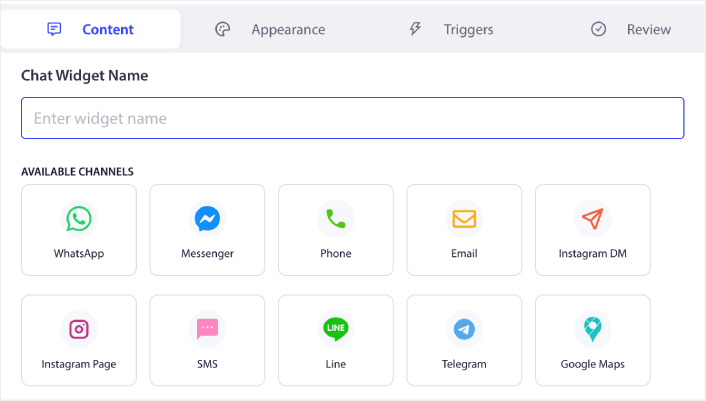
Let them choose how they want to reach you. Some people love the immediacy of WhatsApp. Others prefer the formality of email. Gen Z might want to DM you on Instagram. Your B2B prospects might expect LinkedIn.
This is exactly why PushEngage Chat supports 22 different communication channels. When someone clicks your chat widget, they can choose to continue the conversation on WhatsApp, Messenger, SMS, Telegram, email, or even channels like Discord, Slack, and Microsoft Teams.
The impact of this approach is measurable. When you meet people where they already are, engagement rates go up because you’ve eliminated the learning curve. There’s no new interface to figure out. No app to download. No “please create an account to continue” nonsense.
They click. They choose their channel. The conversation starts immediately in an app they already know and trust. That’s how you turn passive browsers into active conversations. Not by forcing everyone into your preferred system, but by adapting to theirs.
Tip #2: Trigger Chat at High-Intent Moments
Generic chat bubbles that sit in the corner of your screen aren’t strategic. They’re just there, waiting for someone to notice them.
And most people won’t.
If you want more conversations, you need to surface chat at moments when people are actually likely to engage. That means understanding visitor behavior and using it to your advantage.
Here’s what works: triggering chat based on specific actions that signal intent or hesitation. Exit intent is the obvious one. When someone’s about to leave your pricing page without converting, that’s the exact moment to offer help. A well-timed chat prompt at exit can recover conversions you would have otherwise lost.
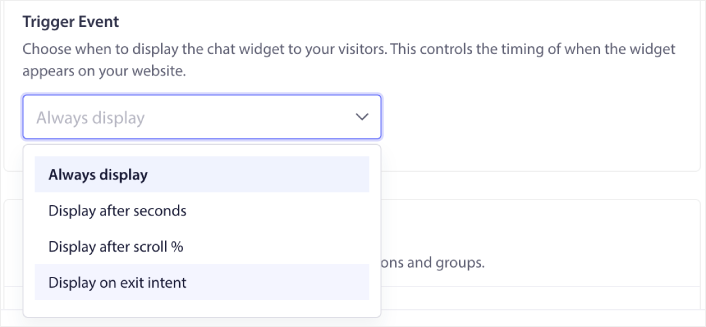
Scroll depth is another powerful trigger. If someone scrolls 75% down a long-form landing page, they’re clearly engaged with your content. That’s a high-intent moment. Surface the chat widget and offer to answer questions or schedule a demo.
Time delays work too, especially on pages where visitors need time to absorb information. Set your chat to appear after 30 seconds on a product page, giving people enough time to look around before you interrupt them.
With PushEngage Chat, you can configure all of these triggers on a per-widget basis. You’re not stuck with one-size-fits-all timing. You can set exit intent triggers on pricing pages, scroll-based triggers on blog posts, and time delays on landing pages — all running simultaneously with different messaging for each scenario.
The result is chat that feels helpful, not intrusive. Because you’re not just throwing a widget at people and hoping they click. You’re strategically surfacing conversation opportunities at the moments when they’re most likely to convert.
Tip #3: Match the Widget to the Page Intent
Not every page on your website serves the same purpose. So why would you show the same chat widget everywhere?
Your pricing page has high-intent visitors who are evaluating whether to buy. Your blog has researchers who are still learning about the problem. Your post-purchase confirmation page has customers who might need support. Your homepage has a mix of everyone.
Each of these audiences needs a different conversation.
On your pricing page, the chat widget should be aggressive and sales-focused. “Questions about pricing? Let’s talk” or “Schedule a demo with our team.” The goal is to close the deal or move them further down the funnel.

On a blog post, the widget should be lighter. “Want more tips like this? Subscribe to our newsletter” or “Have questions? We’re here to help.” You’re nurturing, not selling.
On a support or FAQ page, the widget should route people directly to your support channels. “Need help? Message us on WhatsApp” or “Talk to our support team on Messenger.”
PushEngage Chat makes this easy with page-level targeting. You can create multiple widgets, each with its own messaging, channels, and design, then control exactly where each one appears. Show your sales-focused widget on commercial pages. Display your support widget on help documentation. Use a lightweight contact prompt on content pages.
This level of customization does two things. First, it makes your chat feel relevant instead of generic. Visitors see messaging that actually matches what they’re trying to accomplish on that specific page. Second, it increases engagement because the call-to-action aligns with their current intent.
The best chat experiences don’t treat every visitor the same. They adapt to context. And when you match your widget to the page, you’re respecting your visitor’s journey instead of interrupting it.
Tip #4: Remove Friction from Starting Conversations
You know what kills chat engagement faster than anything else? Waiting.
Traditional chat tools require someone to be online, sitting in an inbox, ready to respond. When visitors click that chat bubble and see “We’ll be with you shortly” or “An agent will respond when available,” they’ve already mentally checked out.
Because here’s the reality: people don’t want to wait around in a chat window hoping someone shows up. They have other things to do. If you’re not ready to engage immediately, they’ll bounce.
This is why the inboxless approach matters. Instead of funneling conversations into yet another dashboard where agents have to be “online,” PushEngage Chat routes people directly to channels your team already monitors—WhatsApp, Messenger, email, SMS, or wherever you actually work.
The difference is night and day. When someone clicks to message you on WhatsApp, the conversation starts immediately in their WhatsApp app. No waiting in a browser window. No wondering if anyone’s there. They send a message, it shows up in your team’s WhatsApp, and you respond when you see it—just like any other message.
This eliminates the biggest friction point in traditional chat: the expectation of instant, synchronous response. With channel-based routing, conversations happen asynchronously. People can message you, close the tab, and get a notification when you reply. That’s how modern communication actually works.
From a business perspective, this also means you don’t need agents sitting idle in an inbox all day. Your team can handle conversations in their normal workflow, across the tools they already use, without the overhead of managing yet another dashboard.
Lower friction. Faster engagement. Better conversations. That’s what happens when you stop forcing people into an inbox model that was designed for support teams, not modern buyers.
Pro tip: You can offer a multilingual chat experience by adding agents as well.
Tip #5: Make It Clear What Happens Next
People don’t click on things when they don’t know what to expect.
If your chat widget is just a mysterious bubble with no context, visitors have to guess what happens when they click it. Will they be talking to a bot? A person? Will someone respond immediately or in 24 hours? What kind of questions can they ask?
Uncertainty kills action.
The solution is to set clear expectations before the conversation even starts. Show agent profiles so people know who they’ll be talking to. Display availability schedules so they understand when they can expect a response. Use language that clarifies the purpose—”Talk to our sales team,” “Get support,” or “Ask a question.”
PushEngage Chat lets you build this kind of transparency into the experience. You can add agent profiles with names, photos, languages they speak, and their areas of expertise. You can set availability schedules that show when your team is online. You can even display different agents for different widgets—sales agents on pricing pages, support agents on help docs.
This does more than reduce uncertainty. It builds trust. When visitors see a real person with a name and a face, they’re more likely to start a conversation because it feels human. When they see clear hours of availability, they know you’re not wasting their time. When they understand which team member handles which topic, they feel confident they’re reaching the right person.
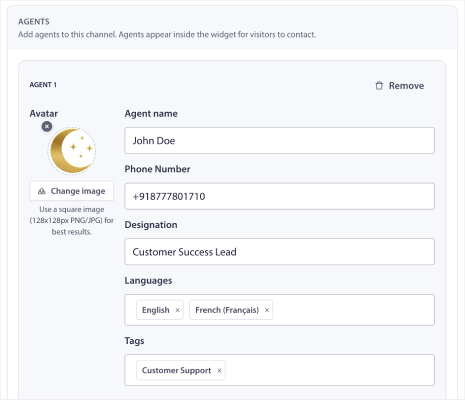
Combine this with the multi-channel approach from Tip #1, and you’re giving people both choice and clarity. They can see who’s available, pick their preferred channel, and start a conversation knowing exactly what to expect.
That’s how you turn hesitant browsers into engaged conversations. Not by hiding behind a generic chat bubble, but by being transparent, human, and accessible.
Stop Waiting for Chat Engagement to Happen
Here’s the bottom line: chat widgets don’t drive engagement by themselves. You drive engagement by understanding how people actually want to communicate and removing every barrier that stops them.
Meet them on their preferred channel. Surface chat at high-intent moments. Match your messaging to page context. Eliminate friction from the conversation flow. Set clear expectations about what happens next.
Do these five things, and you’ll see more conversations, higher conversion rates, and better outcomes from every chat interaction.
PushEngage Chat was built specifically to make this easy. With 22 communication channels, behavioral triggers, page-level targeting, inboxless routing, and agent profiles, you have everything you need to turn your chat widget from a passive feature into an active revenue driver.
If you’ve been frustrated with low chat engagement, it’s not because chat doesn’t work. It’s because most chat tools weren’t designed for how people actually communicate in 2026.
Not convinced? Check out these amazing resources on push notification campaigns:
- How to Increase Hotel Sales in Low Season
- How to Do Multichannel Marketing for Hotels in 2026
- How to Convert Subscribers To Buyers Using Web Push Notifications
- How to Notify Subscribers of New WordPress Posts
- How to Send Back-in-Stock Notifications to Get More Sales
- How to Clean Up Push Notifications Subscriber Lists (Easy)
- How to Automatically Send RSS Push Notifications
- How to Use Push Notifications to Promote a News Site
- How to Use Cross Selling Push Notifications to 2x Your Sales
- How to Use Browse Abandonment Push Notifications (4 Steps)
Try a different approach. Get started with PushEngage Chat and see what happens when you build conversations around your customers, not your inbox.


