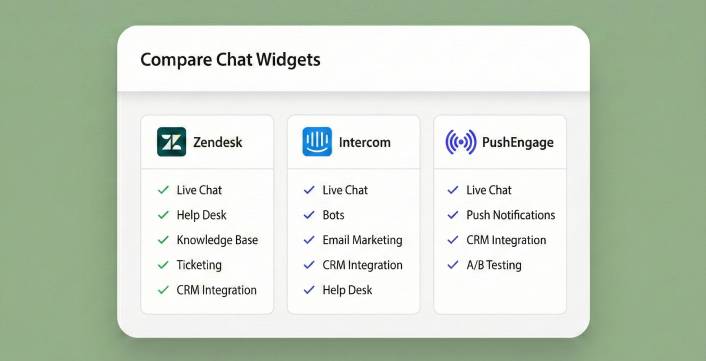
Zendesk and Intercom are two of the biggest names in customer support software. If you’re comparing them, you’ve probably got a growing team, an increasing volume of support tickets, and a budget that can handle $50–$150 per agent per month.
And if that describes your situation, this article will help you pick between them.
But here’s what we’ve noticed: a huge number of people Googling “Zendesk vs Intercom” aren’t running 20-person support departments. They’re small business owners with 1–5 people who need to answer customer questions on their website. They land on these comparison articles, see the pricing tables, and quietly close the tab — because spending $1,000–$5,000+ per year on a customer support platform isn’t in the budget.
If that’s you, stay with us. We’ll give you the honest Zendesk vs. Intercom breakdown first. Then we’ll introduce a third option — PushEngage —that costs $49 for the entire year and does the one thing that actually matters for small businesses: getting customer messages to your phone.
Send Multichannel Messages Today!
Push and WhatsApp messaging are super effective, low-cost marketing tools to help you grow your repeat traffic, engagement, and sales on autopilot.
Zendesk vs Intercom: Quick Overview
Zendesk is one of the oldest and most established customer service platforms on the market. Founded in 2007, it’s built around a traditional ticketing system—every customer interaction becomes a “ticket” that gets routed, prioritized, tracked, and resolved. Zendesk’s strength is structure: SLA management, multi-channel ticket routing, reporting dashboards, and a massive integration ecosystem with 1,000+ apps. It’s the backbone of support operations for thousands of mid-market and enterprise companies.
Intercom takes a different approach. Founded in 2011, it started as a customer messaging platform—built around real-time conversations rather than tickets. Over the years, Intercom has added ticketing, a help center, and AI-powered automation (Fin AI), but its DNA is still conversational. It’s strongest in scenarios where you want to engage users inside your product with in-app messaging, chatbots, product tours, and proactive outreach.
In short: Zendesk is a ticket-first platform that added messaging. Intercom is a messaging-first platform that added ticketing. Which approach fits you depends on how your customers reach out and how your team prefers to work.
Zendesk vs Intercom: Feature Comparison
| Feature | Zendesk | Intercom |
|---|---|---|
| Core approach | Ticket-based support | Conversation-based messaging |
| Live chat | ✅ (Suite plans) | ✅ (All plans) |
| Ticketing system | ✅ Industry-leading | ✅ Added later, less mature |
| Knowledge base / Help center | ✅ Built-in (Guide) | ✅ Built-in |
| AI chatbot | AI Agents (outcome-based pricing) | Fin AI ($0.99/resolution) |
| Phone / voice support | ✅ Built-in (Talk) | ✅ Add-on |
| In-app messaging | Basic | ✅ Core strength |
| Product tours | ❌ No | ✅ Add-on ($99/mo) |
| Proactive outreach | Limited | ✅ Banners, tooltips, in-app messages |
| SLA management | ✅ Strong (Professional+) | ✅ (Advanced+) |
| Reporting / Analytics | ✅ Deep (Explore) | ✅ Good |
| Integrations | 1,000+ (marketplace) | 300+ (app store) |
| Best for | Structured, high-volume support teams | Product-led SaaS, conversational support |
Where Zendesk Wins
Ticketing depth. If your support operation runs on tickets—with escalation paths, SLA timers, multi-brand routing, and CSAT surveys—Zendesk’s system is more mature and battle-tested. It’s been the industry standard for almost two decades.
Phone support. Zendesk Talk gives you built-in voice support with call recording, IVR, and callback. Intercom offers phone as an add-on, but it’s not a core strength.
Integration ecosystem. With 1,000+ integrations in its marketplace, Zendesk connects to virtually any tool in your stack. Intercom’s 300+ is solid but doesn’t match the breadth.
Structured reporting. Zendesk Explore offers deeper, more customizable analytics—especially useful for enterprise teams that need granular performance data across agents, teams, and channels.
Where Intercom Wins
Modern messaging experience. Intercom’s messenger feels more natural and conversational. For companies where customer support looks more like chat than formal ticket submissions, Intercom’s UX is superior.
In-app engagement. Product tours, tooltips, banners, and proactive messages—Intercom gives you tools to engage users inside your product, not just when they file a complaint. Zendesk doesn’t play in this space.
AI innovation. Intercom’s Fin AI agent can resolve common questions by drawing on your knowledge base—and you only pay per successful resolution. Zendesk’s AI offerings are catching up but have historically lagged behind Intercom’s conversational AI.
Onboarding and lifecycle messaging. If you’re a SaaS company that wants to guide users through onboarding, trigger messages based on behavior, and reduce churn proactively, Intercom was purpose-built for this. Zendesk was not.
Zendesk vs Intercom: The Real Cost
Both platforms use per-seat pricing with add-ons that can significantly inflate your bill. Let’s break it down.
Zendesk Pricing
Zendesk splits its plans into two product lines: Support (basic ticketing) and Suite (omnichannel support). Most businesses end up on Suite because the Support plans are too limited for real-world use.
- Support Team: $19/agent/month – Email + social only. No live chat, no phone, no AI. Very limited.
- Suite Team: $55/agent/month – Adds live chat, messaging, help center, and basic AI.
- Suite Professional: $115/agent/month – SLAs, CSAT, custom analytics, skills-based routing.
- Suite Enterprise: $169/agent/month – Custom roles, sandbox, advanced security.
On top of base plans, common add-ons include:
- Advanced AI: $50/agent/month
- Quality Assurance: $25/agent/month
- Workforce Management: $25/agent/month
- Advanced Data Privacy: $50/agent/month
A 3-person team on Suite Team pays $1,980/year. On Suite Professional with Advanced AI, that jumps to $5,940/year. And these costs multiply linearly with every agent you add.
Intercom Pricing
Intercom uses seat-based pricing plus usage-based charges for AI and messaging channels:
- Essential: $29/seat/month – Basic inbox, ticketing, help center, messenger.
- Advanced: $85/seat/month – Workflows, multiple inboxes, AI chatbot, multilingual help center.
- Expert: $132/seat/month – SSO, HIPAA, multi-brand, SLA rules.
Additional costs that stack up:
- Fin AI: $0.99 per resolution (100 resolutions/month = ~$1,188/year)
- Proactive Support Plus: $99/month
- SMS, WhatsApp, phone: Per-message/minute usage fees
A 3-person team on Essential with moderate Fin AI usage pays roughly $2,200–$2,800/year. On Advanced, expect $4,200–$5,500/year including AI and channel fees.
Cost Comparison for Small Teams
| Scenario (3 agents) | Zendesk | Intercom | PushEngage |
|---|---|---|---|
| Entry plan (annual) | $1,980/yr (Suite Team) | $1,044/yr (Essential) | $49/yr |
| + AI/automation | +$1,800/yr (Advanced AI) | +$1,188/yr (Fin AI est.) | $0 |
| + Common add-ons | +$900/yr (QA) | +$1,188/yr (Proactive) | $0 |
| Realistic annual total | $3,500–$5,500+ | $2,200–$4,500+ | $49 |
That last column isn’t a typo. Let’s talk about why it exists.
The Third Option: PushEngage ($49/Year)
Here’s the question neither Zendesk nor Intercom wants you to ask: do you actually need a customer support platform?
If you have 50+ agents, thousands of tickets per day, SLA requirements, and a dedicated support department—absolutely. Zendesk and Intercom are built for that reality. Pick the one that fits your workflow and budget.
But if you’re a small business with a handful of people, fewer than 500K monthly visitors, and your “support team” is you plus maybe one or two colleagues? You don’t need a ticketing system. You don’t need SLA management. You don’t need AI-powered ticket triage. You need customer messages to reach you so you can reply. That’s it.
PushEngage’s chat widget does exactly that—and nothing more than that—for $49/year.
How PushEngage Is Different
Both Zendesk and Intercom require you to work inside their dashboard. Conversations live in their inbox. You log in, you manage tickets or threads, you reply from their interface.
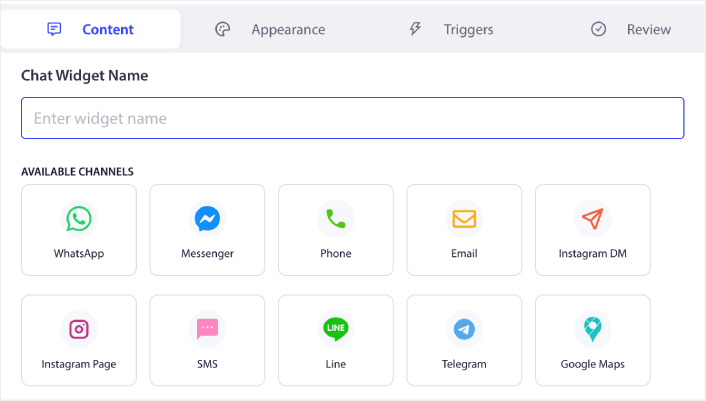
PushEngage is inbox-free. When a visitor sends a message through your chat widget, it routes instantly to the channel you already use:
- Email – reply from Gmail, Outlook, whatever you use
- WhatsApp – reply from your phone
- SMS – reply from your messages app
- Slack – reply from your workspace
- Telegram – reply from the app
No dashboard. No new inbox. No new app. Customer conversations flow to the tools you already live in, and you reply from wherever you already are.
For the solo founder answering customer questions between shipping orders and updating the website, this isn’t a convenience feature—it’s the difference between catching inquiries and missing them entirely because you forgot to check another tab.
PushEngage vs Zendesk vs Intercom: What Small Businesses Actually Need
| Capability | Zendesk | Intercom | PushEngage |
|---|---|---|---|
| Chat widget on your website | ✅ (Suite plans) | ✅ (All plans) | ✅ |
| Inbox-free (no dashboard needed) | ❌ | ❌ | ✅ |
| Messages route to your existing tools | ❌ | ❌ | ✅ |
| No per-seat pricing | ❌ | ❌ | ✅ |
| No usage or AI fees | ❌ | ❌ | ✅ |
| Multichannel routing | ✅ (paid) | ✅ (paid) | ✅ (included) |
| Multi-agent support | ✅ (per seat) | ✅ (per seat) | ✅ (included) |
| Setup time | 30 min–hours | 10–30 min | 5 minutes |
| Annual cost (small business) | $2,000–$5,500+ | $2,200–$4,500+ | $49 |
PushEngage doesn’t have ticketing, SLA management, knowledge bases, or AI chatbots. It doesn’t try to. It does one thing exceptionally well: it makes sure you never miss a customer message, no matter where you are.
When to Choose Zendesk
Zendesk is the right fit if:
- You have a dedicated support team (5+ agents) handling high ticket volumes across email, chat, phone, and social
- You need formal ticketing with SLAs, escalation paths, and resolution tracking
- You want deep analytics on agent performance, ticket trends, and customer satisfaction
- You run multiple brands and need separate help centers for each
- You rely on phone support as a primary channel
- You have the budget for $55–$169/agent/month plus add-ons
Zendesk is the industry workhorse for structured, high-volume support operations. If your support team operates like a well-oiled machine with queues, routing rules, and performance dashboards, Zendesk is built for that world.
When to Choose Intercom
Intercom is the right fit if:
- You’re a SaaS or product-led company that wants to engage users inside your app
- You want conversational support that feels like messaging, not formal ticket submissions
- You need proactive engagement—onboarding flows, product tours, in-app banners
- You want AI to auto-resolve common questions and can absorb usage-based AI fees
- Your support style is modern and chat-first rather than ticket-first
- You can budget $29–$132/seat/month plus AI and channel fees
Intercom shines when support isn’t just about resolving problems—it’s about guiding users through your product, reducing churn, and driving engagement. If you think of customer communication as an ongoing conversation rather than a series of tickets, Intercom’s approach will feel more natural.
When to Choose PushEngage
PushEngage is the right fit if:
- You’re a small business, solopreneur, or lean team (1–10 people)
- You need a chat widget on your website to answer customer questions and close sales
- You don’t want another dashboard to log into—you want messages in your existing tools
- You want flat, predictable pricing with no per-seat fees, no AI charges, and no add-on surprises
- You value simplicity—5-minute setup, zero coding, no sales calls required
- You’d rather spend $49/year than $2,000–$5,500/year on chat
PushEngage doesn’t pretend to replace Zendesk’s ticketing or Intercom’s in-app engagement. It replaces the need for those platforms entirely for businesses that never needed them in the first place.
The Bottom Line: Zendesk vs. Intercom vs. PushEngage
Here’s the honest verdict:
Zendesk is the go-to platform for structured, ticket-based support at scale. It excels at managing high volumes across multiple channels with formal workflows, and its reporting and phone support are best-in-class. The trade-off: it’s expensive, complex to set up, and requires ongoing administration. The pricing feels transparent at first but creeps up fast with per-agent fees and essential add-ons.
Intercom is the modern, conversation-first alternative. It’s ideal for SaaS companies and product-led businesses that want to blend support with proactive engagement. Its AI agent (Fin) is impressive, and the in-app messaging tools are unmatched. The trade-off: usage-based AI fees make your monthly bill unpredictable, and the platform’s complexity has grown significantly from its “simple messaging tool” origins.
PushEngage is for the businesses that both Zendesk and Intercom overlook: the small shops, the solopreneurs, the lean teams that just need customers to be able to reach them. No ticketing system. No AI agent. No product tours. Just a chat widget that sends messages to your DMs for $49/year.
- How to Set Up Multilingual Chat Support on Your Site
- A Complete Guide to Page-Level Chat Targeting for WordPress Stores
- How to Add Custom Icons for Chat Widgets (And Why It Matters)
- How to Get More People to Start Live Conversations (5 Tips)
- Why Inbox-Free Chat Widgets Work Better
Intercom is a fantastic product for companies with $50K+ software budgets and dedicated support teams. But if you’re a small business trying to answer customer questions and close more sales? You don’t need a $2,000/year customer engagement platform. You need a $49/year chat widget that sends messages to your phone.
Ready to stop missing customer questions?


