It’s Tuesday afternoon and you’re planning Friday’s flash sale. You want to send a push to everyone who’s looked at your pricing page in the last week — not your whole list, just that pocket of warm intent — but building that segment means opening the dashboard, finding the segment builder, typing the URL pattern, setting the date range, saving, and checking that it populated with real subscribers before you trust it. That’s ten minutes you don’t have between two other meetings.
Push notification segmentation with AI, as most of the internet describes it, means something else entirely: an algorithm scoring your subscribers and deciding for itself who belongs in which bucket. That’s not what happens here. With @pushengage/mcp, PushEngage’s official Model Context Protocol server, you tell an AI assistant exactly what segment you want, in plain English, and it builds that exact segment through a real API call. No model decides who’s in it. You decide, and the assistant executes.
Creating push notification segments with an AI assistant, in this specific sense, is closer to dictation than automation. Natural language segment creation means the words you type become the segment rule, word for word — not a suggestion the system interprets loosely.
This post walks through what that mechanism actually does, how to get an AI assistant connected to PushEngage in the first place, and four segment requests you can make today that map directly to real tool behavior — nothing invented, nothing algorithmic.
“Push notification segmentation with AI” almost never means what it sounds like
Search for “push notification segmentation with AI” and nearly everything you find is about the same thing: a platform’s machine-learning layer analyzing behavior, scoring engagement, and assembling micro-segments on its own. That’s a real capability some tools ship, and it’s worth knowing about — but it’s a different product than the one this post covers, and PushEngage’s MCP server doesn’t do it.
What pushengage_create_segment does is closer to giving a very literal assistant a rule to follow. You describe the segment (which pages, which time window), and the assistant translates that description into a real segment definition and creates it through the PushEngage API.
Nothing about subscriber behavior gets scored or predicted. If you ask for visitors of /pricing in the last 7 days, you get exactly visitors of /pricing in the last 7 days, not a model’s best guess at who’s likely to convert. The distinction matters because it changes what you’re trusting: not an algorithm’s judgment, but your own instructions, executed correctly. For background on the broader taxonomy of segmentation approaches (behavioral, demographic, geographic), PushEngage’s own customer segmentation models guide covers that ground; this post stays narrowly on the mechanism.
What pushengage_create_segment actually builds
The tool is URL-rule based. A segment is defined by which pages a subscriber visited and, optionally, a date window — the same shape as the README’s own example: “Create a segment for visitors of /pricing.” pushengage_list_segments shows you what already exists on the current site, so you can check before creating a near-duplicate.
Those two tools are the entire surface area of PushEngage MCP segments as of this writing: one to build a URL-rule segment, one to see what’s already there. There’s no third mode where the assistant proposes segments you didn’t ask for.
That’s the whole scope of this specific tool, and it’s worth being precise about the boundary. A URL-rule segment answers “who visited which pages, and when.” It does not answer “which subscribers are on the gold plan,” “which subscribers are in the US,” or “which subscribers have a loyalty-tier attribute above a threshold” — that’s a different tool, pushengage_create_audience_group, which builds saved targeting groups from device, country, engagement, dates, and custom attributes.
That tool gets its own post in this series covering custom attributes and audience groups; if you need to target by anything other than pages visited, that’s where to look next. If you’d rather build the same URL-rule segment by hand in the dashboard, PushEngage’s segment builder does the same job through a form instead of a sentence.
Getting started: connect an AI assistant to PushEngage
Any MCP-capable client works — Claude Desktop, Claude Code, or Cursor — and each connects the same way: one config entry that runs npx -y @pushengage/mcp, no separate install step. The first time you use it, you ask the assistant to log you in, which opens a browser tab where you authorize the connection; your password never passes through the assistant.
After that, you list your sites and pick one to work against, and every segment tool call after that runs against the site you selected. The full walkthrough, including the exact config JSON and a fix for the most common connection error, lives in the guide to set up the PushEngage MCP server — this post assumes that step is already done.
What changes when a segment is one sentence instead of a dashboard session
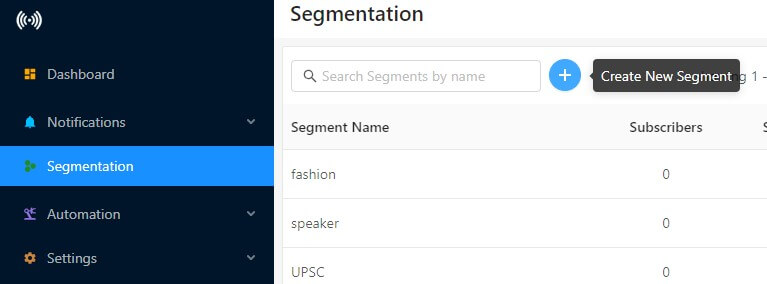
Building a URL-rule segment by hand isn’t hard, but it isn’t fast either: open the dashboard, find the segment builder, define the URL pattern, set the date window, save, then check the subscriber count to confirm it populated correctly. Call it a few minutes of dedicated attention, on top of however long it takes to remember exactly where that screen lives.
The AI-assistant version compresses that into one sentence and a confirmation message. That compression matters more than it looks, because a segment like “pricing-page visitors in the last 7 days” has a shelf life — those visitors are warm right now, and the segment is only worth building while the intent it captures is still fresh. A segment you finally get around to building next Thursday, for visitors from two Tuesdays ago, has already lost most of its value. The time you save isn’t the point on its own; it’s that the segment gets built while it still matters, instead of queued behind everything else on your Tuesday.
There’s also a second, smaller cost the dashboard version carries that’s easy to overlook: context switching. Leaving whatever you’re doing, opening a new tab, navigating to the right settings screen, and finding the segment builder each cost a few seconds of attention that add up across a week of ad-hoc segment requests. Typing a sentence to an assistant you’re likely already using for something else removes that switch entirely — the request happens in the same window as the work you were already doing.
Four segment requests that map to real tool behavior
Every one of these maps directly to pushengage_create_segment or pushengage_list_segments — no invented fields, no attribute or device targeting (that’s the audience-group tool’s job, not this one).
- “Create a segment for visitors of /pricing.” The README’s own example. Builds a URL-rule segment with no date restriction, so it captures pricing-page visitors going forward from whenever you create it.
- “Create a segment for visitors of /pricing in the last 24 hours.” The same rule, narrowed to a same-day window — useful right before a flash sale when you want only today’s warm traffic, not last month’s.
- “List my segments before you create a new one.” Runs
pushengage_list_segmentsfirst, so you’re not building a near-duplicate of something that already exists on the site. - “Create a segment for visitors of /checkout in the last 3 days.” A different URL pattern, same mechanism — checkout visitors who didn’t convert are a distinct, useful group from pricing-page browsers.
Each of these is a single, exact instruction. The assistant isn’t inferring who’s likely to buy; it’s building the segment you described, nothing more.
Why the exact segment matters (and where the deliverability case lives)
There’s a reason segmentation is worth this much attention beyond convenience. Chrome and Android both now weigh how relevant your sends are before deciding how much reach you keep — an unsegmented list that gets blasted regardless of relevance loses reach it already paid to build. That argument, and the mechanics behind it, is covered in full in why an unsegmented list is losing you reach; this post won’t re-run it here.
What changes once segment creation is a sentence: the deliverability case stops being a task that sits behind an engineering ticket or a free afternoon and becomes something you can act on the same day you learn about it. The gap between knowing you should segment and actually having the segment built shrinks to however long it takes to type the request.
Start with the one segment that pays for itself this week
If you don’t have a single segment built yet, start with pricing-page visitors from the last 7 days. Those visitors already cost you something real to reach — ad spend, content that ranked, a referral that sent them there — and a blast that treats them the same as everyone else either misses the message that would move them or wastes the send entirely on people who never showed that intent. Segmenting them isn’t extra work at that point; it’s making sure the acquisition cost you already paid doesn’t go to waste on the follow-up.
PushEngage runs this same segmentation mechanism for 75,000+ businesses across 150+ countries, and you can build this first segment on the free plan today — no budget approval needed to prove the mechanism works before you commit to anything larger. Ask your assistant to create it, confirm it populated, and send your next relevant push to exactly the people who are already looking.
That’s the entire case for push notification segmentation with AI in this specific sense: not a smarter algorithm deciding your audience for you, but a faster, exact path from “here’s who I want to reach” to a real segment your next campaign can target. See PushEngage pricing for what’s included on the free tier and every plan above it.


