PushEngage vs MoEngage:
which one fits a mid-market retention team?
MoEngage is an agentic customer engagement platform for email, SMS, push, and analytics, sold on a quoted contract. PushEngage is web push, app push, in-app, WhatsApp, and chat that your marketing team runs itself, at prices on the page. Here is where each one wins.
75,000+ businesses Prices published for every tier 14-day money-back guarantee
Reliability and trust
What a retention team needs before it signs a year.
A new vendor still has to pass the security review and the budget meeting. Here is what you can check today, without a sales call.



Prices you can put in the budget today
Every public tier is on the pricing page, billed on active subscribers, web and app combined. The number in the proposal is the number on the invoice.
- Published tiers from 1,000 to 250,000 subscribers
- No per-message fees on push; each plan includes a monthly sending volume
- Inactive Subscriber Cleanup on every plan
- Enterprise quoted above 250,000
Send controls that protect the channel
Browsers now throttle senders who over-message. Cap how often each subscriber hears from a triggered campaign and send in their timezone.
- Daily and weekly frequency caps on triggered campaigns, Growth and above
- Quiet hours inside Workflows
- Subscriber-timezone sending on Premium and above
GDPR and CCPA in the defaults
Every subscription is a browser or device permission grant. Add a pre-permission consent overlay where your audience needs one.
- Configurable pre-permission overlay per site
- One-click unsubscribe at the device level
A dashboard for marketers, an API for engineers
Your team runs campaigns from the dashboard. When you would rather hand it off, an MCP server lets Claude or Cursor work the account.
- AI Copywriter through AI-powered campaigns (add-on on paid plans)
- First-party MCP server for Claude, Claude Code, and Cursor
- REST API, SDKs, and Zapier on every plan, webhooks on Growth
- Open-source Agent Skills for SDK integration
Support that scales with the plan
Standard email support on Business, priority email and chat on Premium, VIP onboarding with your first campaign set up on Growth, and a dedicated success manager on Enterprise.
A 14-day money-back guarantee
Over the next 14 days, if PushEngage isn’t the best fit, simply reach out. We’ll refund 100% of your money. No questions asked.
Built by Awesome Motive, the team behind WPForms, AIOSEO, OptinMonster, and MonsterInsights.
Trusted by 75,000+ businesses








The 30-second version
Two different tools, two different buyers.
MoEngage is built to analyze customers and message them on every channel from one platform. PushEngage is built to run the retention channels a marketing team owns, fast, at a published price. Pick on the job, not on the logo.
Your marketing team runs push itself
Plugins for WordPress, WooCommerce, and Shopify, or one snippet, then campaigns from the dashboard. No SDK project before the first web push.
You want a price before a contract
Every tier from Free to Growth is on the pricing page, billed on active subscribers. MoEngage builds a quote, with a one-year minimum on its Growth and Enterprise plans.
Email, SMS, push, and analytics in one place
MoEngage sends app push, web push, email, SMS, in-app, on-site messages, and cards, with funnels, retention, and path analytics. PushEngage does not send email or SMS.
Data residency and warehouse-native data
MoEngage lists data centers in the EU, North America, and India, plus warehouse imports and segments. If regional hosting or warehouse data drives the decision, that counts.
Side by side
MoEngage and PushEngage, row by row.
Every MoEngage cell comes from MoEngage’s own pricing page and documentation, checked on September 30, 2026. Where MoEngage is stronger, the table says so.
| MoEngage | PushEngage | |
|---|---|---|
| How it describes itself | An “Agentic Customer Engagement Platform” (its site navigation) for cross-channel marketing, with separate Personalize (web personalization) and Inform (transactional alerts) products. | Web push, app push, in-app, WhatsApp, and a chat widget for marketing teams at eCommerce stores, publishers, and SaaS products that want retention channels without an engineering queue. |
| Published prices | No. The Growth and Enterprise plans both go to “Let’s Talk”, and add-ons are priced in a custom quote. | Yes, every public tier. Free, Business, Premium, and Growth are priced on /pricing/. Enterprise is quoted. Budget before the first call |
| What the bill is based on | Monthly Tracked Users: each unique user profile with at least one session or defined event in a calendar month. | Active subscribers on a fixed tier, web and app combined. No per-message fees on push; each plan includes a monthly sending volume. Inactive Subscriber Cleanup keeps dormant devices off the bill. |
| Contract term | Minimum commitment of one year on the Growth and Enterprise plans, per MoEngage’s pricing FAQ. | Pay monthly or yearly, with a 14-day money-back guarantee on paid plans and a free plan for 1 site and 200 subscribers. Try before you commit |
| Channels | Mobile app push, web push, email, SMS, in-app messages, on-site messages, and cards (add-on). WhatsApp, RCS, LINE, Viber, and Telegram through Connected Channels (add-on). Broader | Web push, app push, in-app messaging (Business plan and up, Android SDK first), WhatsApp automation (Growth plan and up), and a chat widget with 21 channels plus custom links. No email or SMS sending. |
| Journeys and send controls | Flows: a cross-channel builder with A/B branches, conditional splits, and waits. Campaign-based and tag-based frequency capping, do-not-disturb rules, and throttling. | Workflows on every plan (Free: 1 active workflow, up to 5 steps; Business: 5 active workflows, 10 steps, wait and decision nodes). Split Path and Workflow Chaining on Premium and up. Daily and weekly frequency caps on triggered campaigns (Growth and up), timezone sending (Premium and up). |
| Analytics and AI | Funnels, retention, user paths, and custom dashboards (add-ons on the plan table), predictions, best time to send, Merlin AI agents (add-on), and an MCP server. Deeper analytics | Campaign and workflow reports, goal tracking with revenue on Premium and up, AI Copywriter through AI-powered campaigns (add-on on paid plans), AI opt-in timing, and a first-party MCP server for Claude and Cursor. |
| Web push setup | Add a serviceworker.js file at your site root, update the Web SDK initialization script, and keep both on the same SDK version. | Plugins for WordPress, WooCommerce, and Shopify, or one snippet on any site, with a no-code opt-in prompt builder. No developer needed |
| Shopify and WooCommerce | A MoEngage app for Shopify 2.0, authenticated with your workspace ID and Data API key. WooCommerce connects through Google Tag Manager. | A Shopify and Shopify Plus app, a WooCommerce plugin, and ready cart abandonment, browse abandonment, price drop, and back-in-stock campaigns on Growth. |
| SDKs | Android, iOS, Web, React Native (and Expo), Flutter, Cordova, Capacitor, Ionic, and Unity, plus TV and OTT integrations. | Web, iOS, Android, Flutter, and React Native, all five on every plan, with the REST API and Zapier. Webhooks on Growth. |
| Support | Online guides and email helpdesk. Implementation services and consultation with business reviews are listed as add-ons. | Email support on Business, priority email and chat on Premium, VIP onboarding on Growth, and a dedicated success manager on Enterprise. |
MoEngage details checked on moengage.com/plans-and-pricing and the MoEngage documentation on September 30, 2026. Features and packaging change, so confirm with MoEngage before you buy. PushEngage details are from the live pricing page and developer hub.
Pricing
What you can budget before a sales call.
MoEngage does not publish prices, so there is no honest dollar-for-dollar comparison. What we can show is what PushEngage costs at three common sizes, at the standard annual renewal rate you pay from year two. First-year pricing is lower, from $8 a month billed yearly.
The growing store
20,000 active subscribers, web and app combined
quote on request, priced on Monthly Tracked UsersQuote
lowest plan that fits, standard annual renewal, billed yearly$1,020/yr
adds cart, browse, price drop, back in stock$1,828/yr
MoEngage prices this profile in a sales conversation. PushEngage prices it on the page.
The established brand
50,000 active subscribers, web and app combined
quote on request, one-year minimum on Growth and EnterpriseQuote
lowest plan that fits, standard annual renewal, billed yearly$1,920/yr
adds cart, browse, price drop, back in stock$3,489/yr
Past 50,000 subscribers Business stops and Premium or Growth takes over.
The multi-site retailer
100,000 active subscribers, web and app combined
quote on request, add-ons quoted separatelyQuote
lowest plan that fits, standard annual renewal, billed yearly$4,412/yr
adds cart, browse, price drop, back in stock$6,258/yr
Premium covers 2 sites; Growth covers 3 and the eCommerce automations.
PushEngage prices are the standard annual renewal rate for each plan at that subscriber cap, from the live plans API on September 30, 2026. Taxes excluded. The pricing page has the calculator and the current first-year offer.
Where we will not pretend
Three things a fair MoEngage comparison says out loud.
- MoEngage does more. Email, SMS, cards, on-site surveys, web personalization, transactional alerts, and product analytics are real capabilities PushEngage does not have. If one platform for every channel and every chart is the goal, MoEngage is built for it.
- A quote is not a verdict. MoEngage prices by contract, so we cannot tell you it costs more for your profile. Get the quote, then compare it against the numbers above.
- Two tools can be the right answer. Keeping MoEngage for email and analytics and adding a dedicated push tool is a valid setup. If you do that, cap frequency in both.
What the published price includes
Everything a push program needs, run from one dashboard.
Every paid tier includes web and app push on one subscriber profile, Workflows, behavior-based segmentation, and Inactive Subscriber Cleanup. Premium adds goal tracking and timezone sending. Growth adds triggered campaigns with frequency caps and the eCommerce automations.

One composer for the browser and the lock screen
Write it once and send it to Chrome, Firefox, Edge, and Safari, and to iOS and Android, from the same screen. One audience, one report.
- Native SDKs for iOS, Android, React Native, and Flutter on every plan
- Live preview per platform, plus AI-powered campaigns (add-on on paid plans)
- Scheduling and recurring sends, with timezone delivery on Premium and above
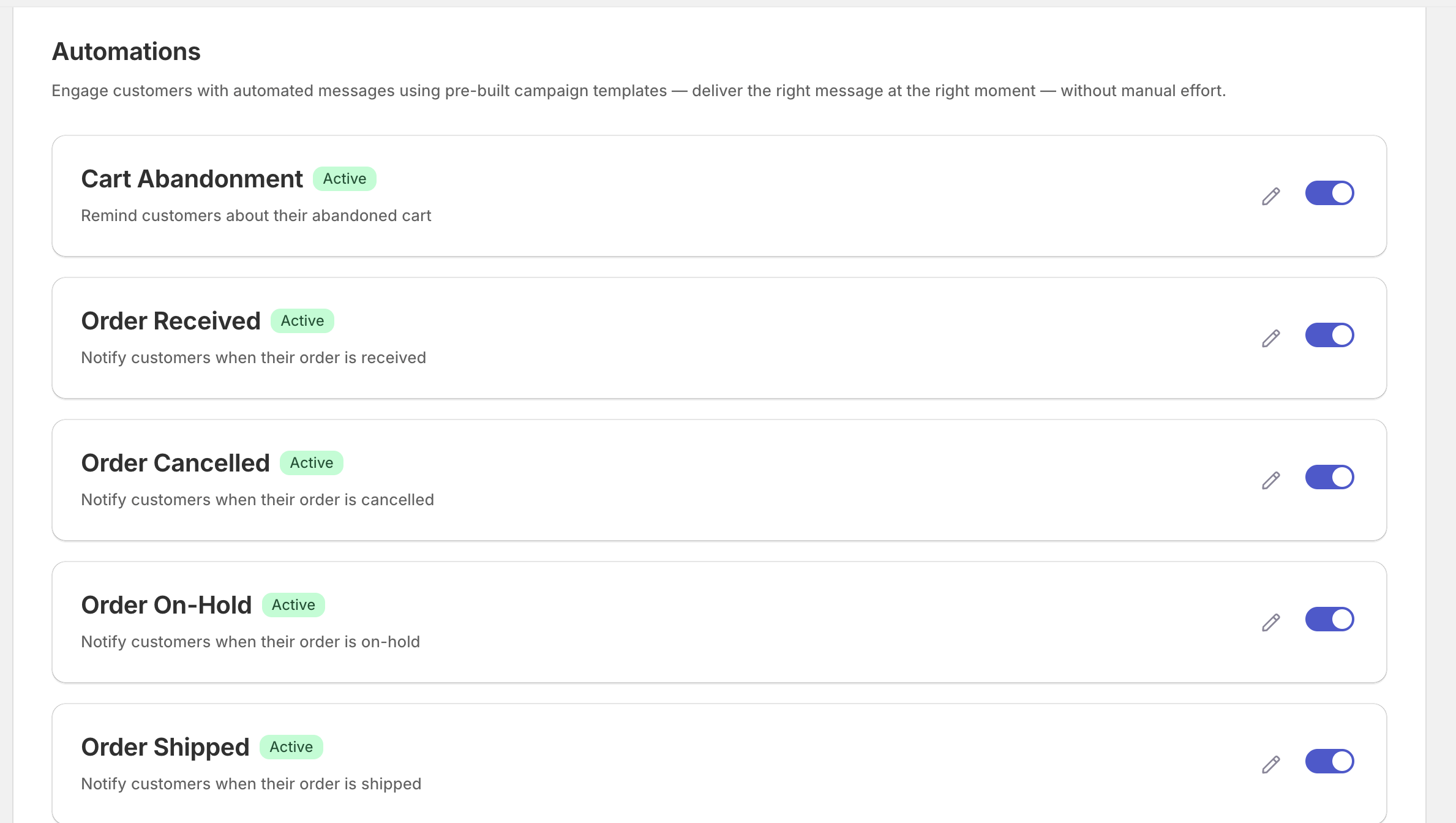
eCommerce automations you switch on
Order received, on hold, cancelled, shipped, plus cart abandonment. Each is a ready campaign behind a toggle, and each reports the revenue it brought back.
- Cart and browse abandonment, price drop, and back in stock on Growth
- Order and shipping updates that answer where-is-my-order before the ticket
- Goal tracking on Premium and above ties revenue to the campaign that earned it
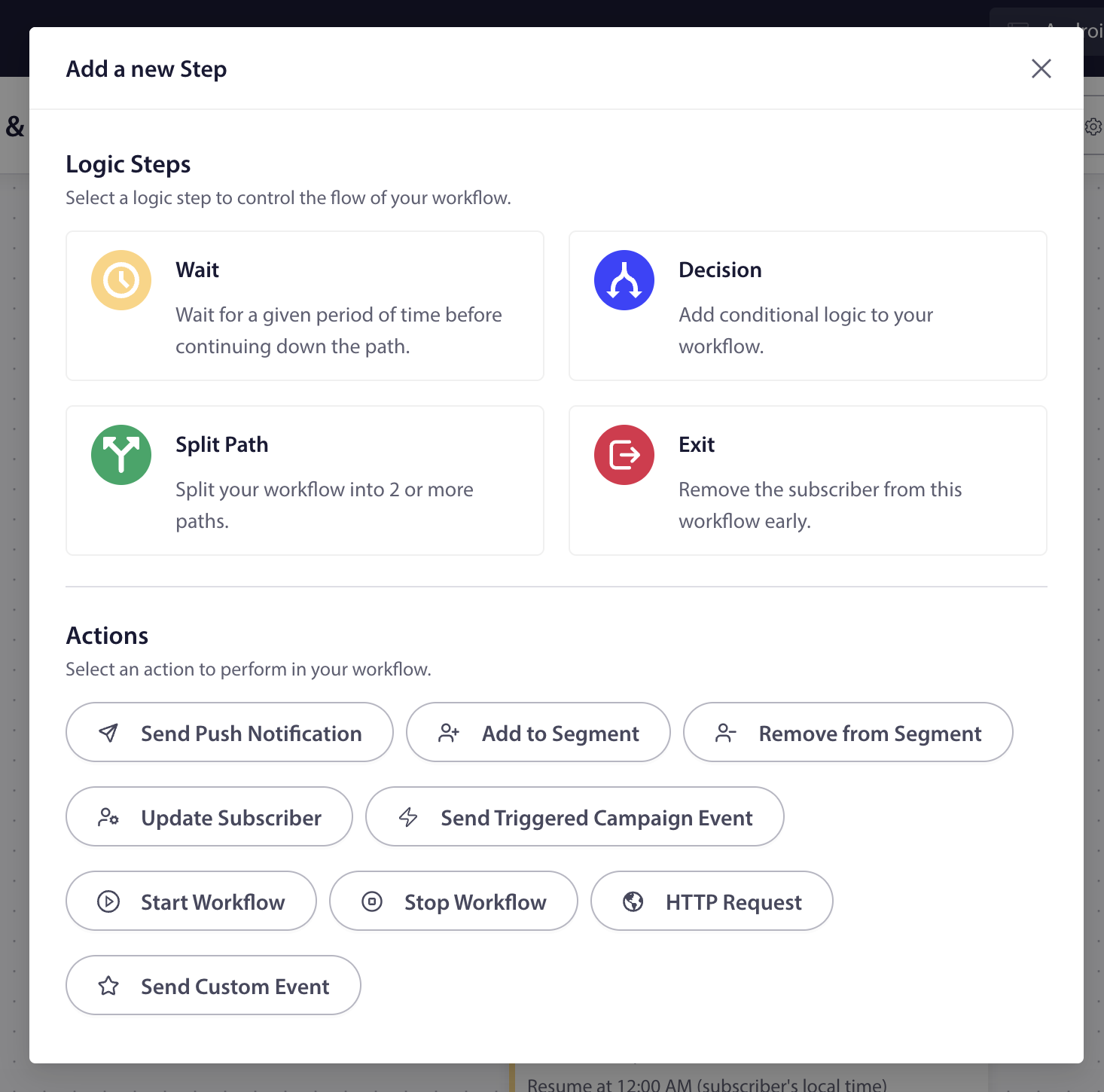
Workflows: wait, decide, act
A drag-and-drop canvas for welcome series, cart recovery, and win-backs. Wait, branch on behavior, then send or move the subscriber to a segment. Higher plans add split paths, starting another workflow, and HTTP requests.
- The builder is on every plan: Free runs 1 active workflow of up to 5 steps
- Business: 5 active workflows, 10 steps each, with wait and decision nodes
- Split Path and Workflow Chaining on Premium and above; HTTP request actions on Growth
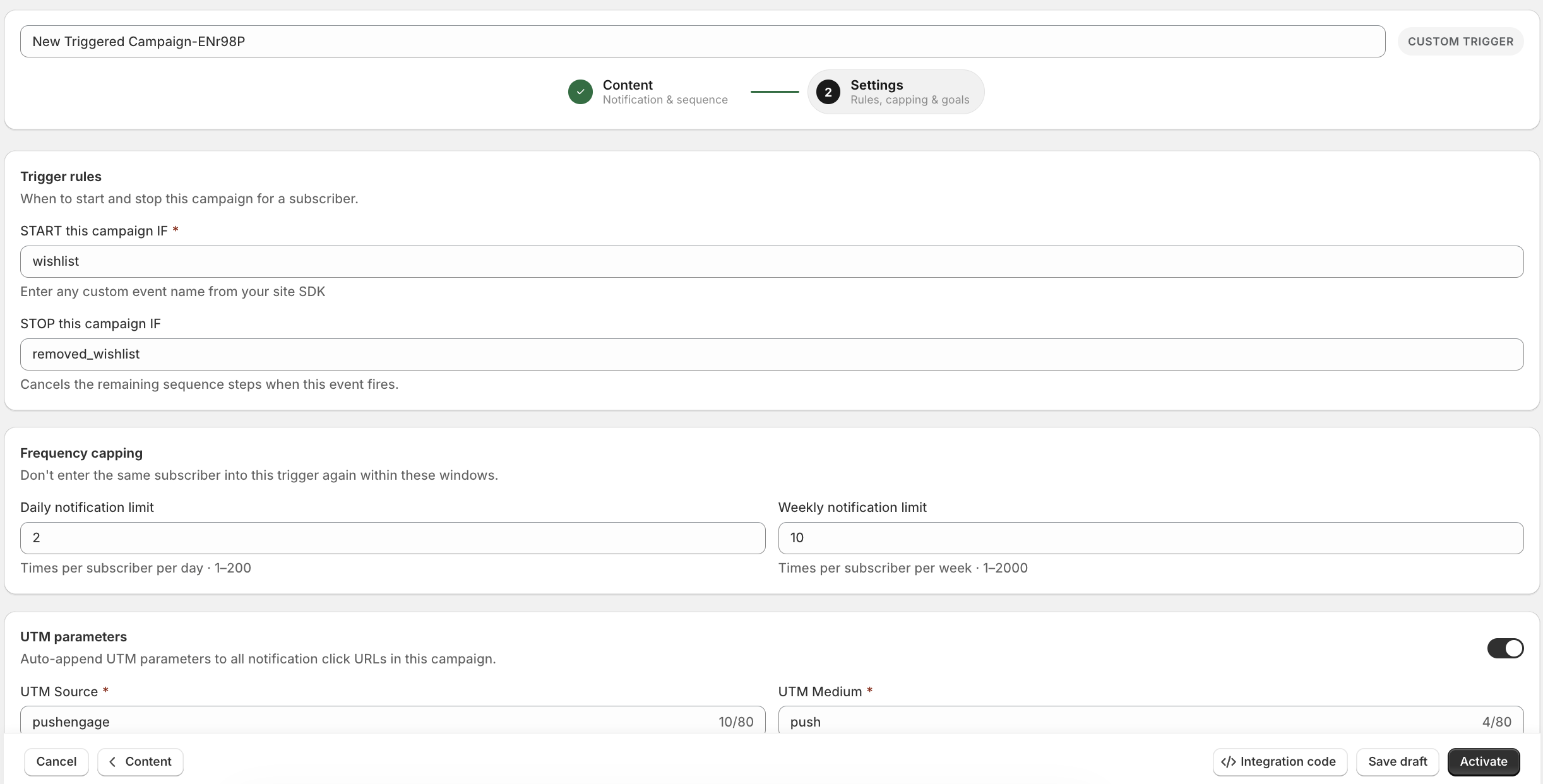
Trigger rules your team sets without a ticket
On Growth and above, start a campaign on any event your site or app fires, stop it on another, and cap how often one subscriber hears from you.
- Custom start and stop events from the SDK or REST API
- Daily and weekly frequency capping on triggered campaigns
- UTM parameters added to every click URL
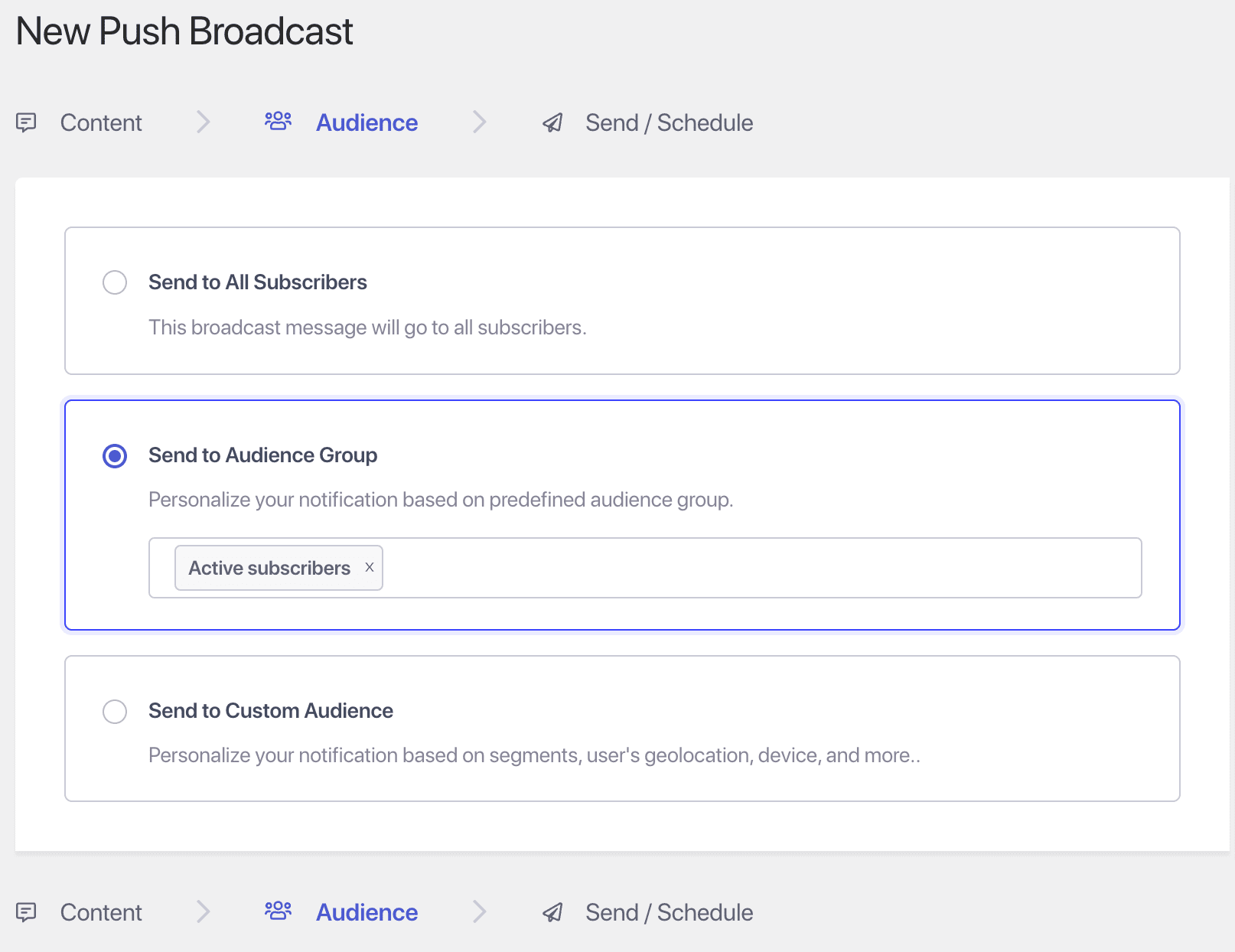
Segments built on active subscribers
Send to everyone, to a saved audience group such as active subscribers, or to a segment by URL, geography, device, or purchase behavior. Groups update themselves.
- Dynamic segments and audience groups without a developer
- Attributes set from the SDK or API for one-to-one copy
- Inactive Subscriber Cleanup keeps the count and the bill honest

A/B tests that pick their own winner
Test two headlines, images, or calls to action on a sample. After the delay you set, the better click rate goes to everyone else.
- Sample size and delay under your control
- Winner chosen on click-through rate
- On Premium and above

Opt-in prompts that earn the Allow click
When the prompt fires matters more than what it says. Trigger it by time on page, scroll depth, or a click, match it to your site, and segment subscribers as they join.
- Popup templates with desktop and mobile previews
- Triggers by time on page, scroll depth, or button click
- Segment on subscribe so the first campaign is already targeted
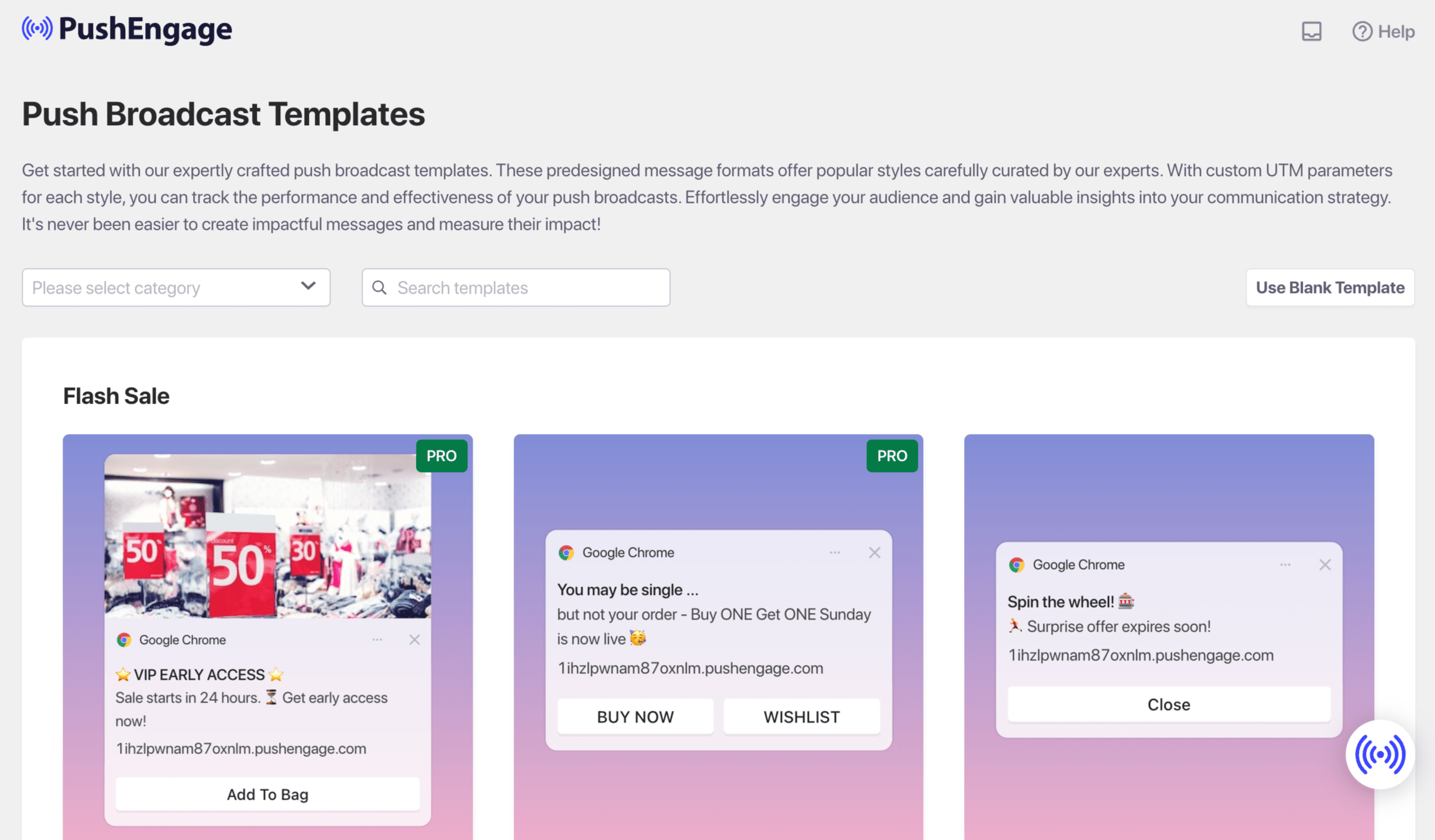
Start from a template, not a blank field
Broadcast templates by category, each tagged with its own UTM so you can see which style earns the click. Pick one, swap the copy, send.
- Templates for sales, launches, content, and win-backs
- UTM tracking per template for clean attribution
- Blank template when you want full control
Also in the product
The tools you would otherwise brief an engineer to build.
Templates, timing, alerts, compliance, and agent access come with the product.
Goal tracking and revenue analytics
Tie orders and signups to the notification that drove them, per campaign and per workflow. Premium and above.
See goal trackingTimezone delivery
Every subscriber gets the campaign at their own 9 AM, not yours. Premium and above.
See timezone deliveryBrowse abandonment
Catch the shopper who looked but never added to cart, while the intent is warm.
See browse abandonmentPrice drop alerts
Shoppers subscribe to a product and the alert fires itself when the price falls.
See price drop alertsBack in stock alerts
Turn a sold-out page into a waitlist that converts the moment stock returns.
See back in stockPersonalization and attributes
Merge tags for name, product, price, and any attribute you store on a subscriber.
See personalizationGDPR and CCPA tooling
Consent controls and data handling designed into the product, not bolted on.
See complianceChrome and Firefox extension
Draft, schedule, and send a push from any browser tab, with UTM fields filled in.
See the extensionMCP server and Agent Skills
Let Claude or Cursor build segments, run campaigns, and pull analytics, on top of the REST API.
See the developer hubChannels
Web push, app push, in-app, WhatsApp, and chat. One subscriber profile.
MoEngage covers more channels, email and SMS included. PushEngage covers the channels a retention team uses to bring a shopper back in seconds, in the same dashboard and reports.
Web push notifications
Browser notifications on Chrome, Firefox, Edge, and Safari, including home-screen web apps on iOS 16.4+, with plugins for WordPress, WooCommerce, and Shopify.
See web push notificationsMobile app push notifications
Native SDKs for iOS, Android, Flutter, and React Native, on the same subscriber profile and reports as web push.
See mobile app push notificationsIn-app messaging
Top banner, bottom banner, center modal, or full screen, triggered on real events. From the Business plan, shipping first in the Android SDK.
See in-app messagingWhatsApp automation
Abandoned-cart, order-update, and post-purchase campaigns on the Meta Cloud API. Connect your WhatsApp Business account inside PushEngage, with no BSP contract. Growth plan and above.
See WhatsApp automationChat widget
Routes visitors to WhatsApp, Messenger, Telegram, email, or SMS: 21 channels plus custom links, with no hosted inbox to staff.
See the chat widgetPWA push notifications
Push for progressive web apps installed to the home screen, including home-screen web apps on iOS 16.4+.
See PWA push notificationsSetting up push for a progressive web app? Read the PWA push notifications guide.
Switching or adding
Run it next to MoEngage first, then decide.
You do not have to rip anything out to find out. Install PushEngage alongside your current setup, move one program, and compare on real traffic before your MoEngage renewal date.
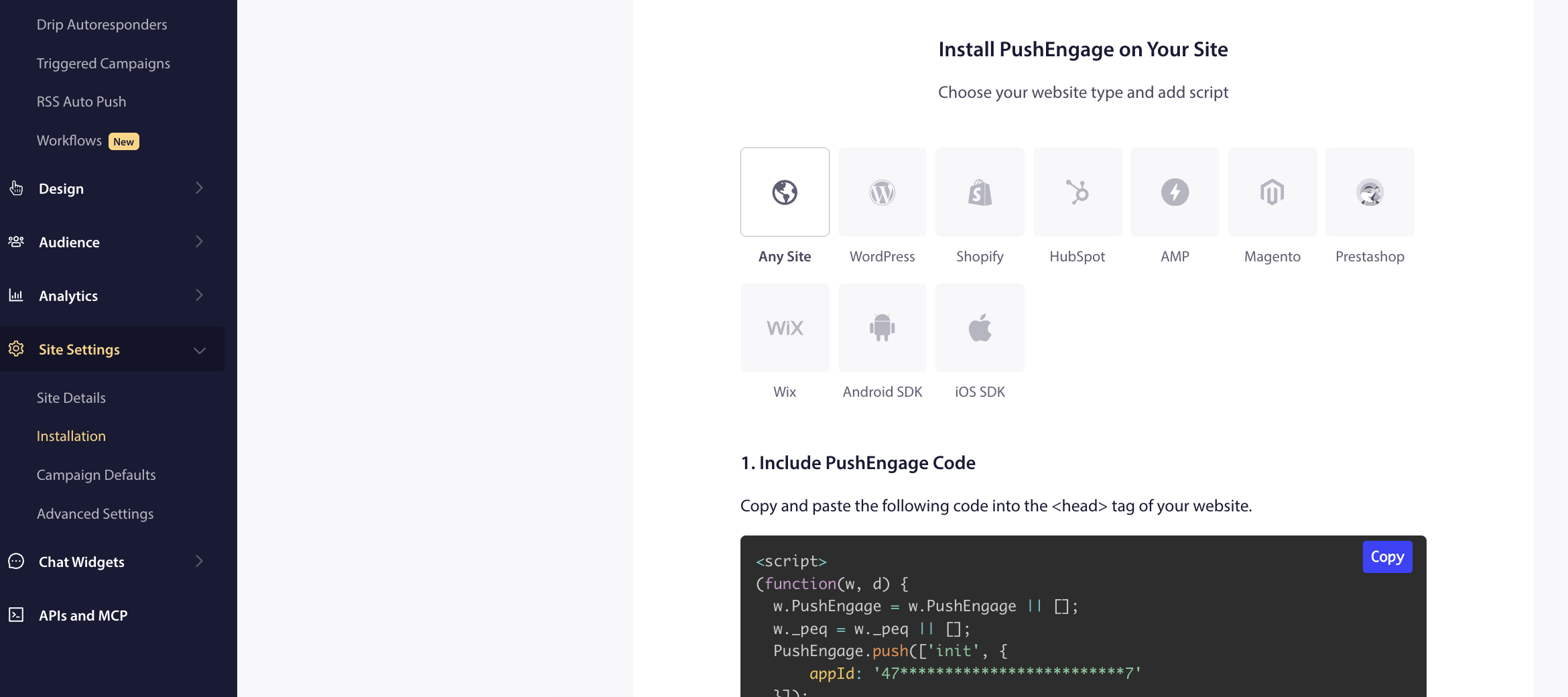
One installer for every platform you run
Pick your platform, paste one snippet or install the plugin, and you are live. Mobile follows the same path with the native SDKs.
- WordPress, Shopify, HubSpot, AMP, PrestaShop, Wix, or any site
- iOS, Android, Flutter, and React Native SDKs for app push
- Service worker and install code generated in the dashboard
Pick the program to move
Start where setup time hurts most. For most teams that is web push, cart recovery, or app push campaigns waiting on a developer.
- Keep email, SMS, and analytics where they are
- Map the segments you need to recreate
- Book a demo to scope it with our team
Install alongside, not instead
PushEngage runs next to your existing setup. Ship the PushEngage SDK in an app update and run both while subscribers register. For iOS apps moving from FCM, our migration guide has the steps.
- WordPress, WooCommerce, Shopify, and Shopify Plus plugins
- iOS, Android, Flutter, and React Native SDKs
- REST API and Zapier for your engineers, webhooks on Growth
Compare on real traffic, then cut over
Run both for a few weeks, compare clicks and attributed revenue, then decide what moves. Paid plans carry a 14-day money-back guarantee.
- Goal tracking on Premium and above
- Frequency caps on triggered campaigns (Growth)
- Our team walks through Android and web subscriber moves with you
The short version
Published prices. No annual minimum to find out.
MoEngage prices every account in a sales conversation. PushEngage puts the price on the page and the setup in a plugin, for the team that wants retention running this week.
Keep comparing
Other comparisons, same honest format.
PushEngage vs OneSignal
Two usage meters against one fixed tier, with a calculator and worked examples.
Compare with OneSignalPushEngage vs Braze
An enterprise customer engagement suite against push, in-app, and chat your marketing team runs itself.
Compare with BrazePushEngage vs CleverTap
MAU-priced engagement and analytics against subscriber-priced push, in-app, and chat.
Compare with CleverTapPushEngage vs Airship
Enterprise mobile app engagement against web and app push on one published plan.
Compare with AirshipPushEngage vs iZooto
Web push for publishers, with ads in push, against retention push for stores and publishers.
Compare with iZootoPushEngage vs Klaviyo
Email and SMS first for eCommerce, and where browser and app push fit next to it.
Compare with KlaviyoPushEngage vs PushOwl
A Shopify web push app against push for Shopify, WooCommerce, any site, and your app.
Compare with PushOwlPushEngage vs Firebase Cloud Messaging
Free delivery infrastructure against the marketing layer that runs on top of it.
Compare with FCMPush notification service
The push notification service built for eCommerce retention teams.
See the servicePush notification software
A buyer’s checklist for evaluating push notification software.
Read the checklistFAQ
Questions, answered.
Is PushEngage a MoEngage alternative?
For web push, app push, in-app, WhatsApp, and chat, PushEngage covers the job for many mid-market retention teams, and your marketing team can run it without an SDK project for web push. It is not a replacement for all of MoEngage: PushEngage does not send email or SMS and does not have MoEngage’s product analytics. If you need those in one contract, MoEngage is the better fit.
How much does MoEngage cost?
MoEngage does not publish prices. Its pricing page lists Growth and Enterprise plans, both through a sales conversation, priced on Monthly Tracked Users, with add-ons in a custom quote and a one-year minimum commitment. PushEngage publishes every tier from Free to Growth and bills on active subscribers.
What is a Monthly Tracked User?
MoEngage defines an MTU as each unique user profile that performs at least one session or a defined event in a calendar month, counted once per month. Events MoEngage generates itself, such as notification received, do not count. PushEngage bills on active subscribers instead: people who opted in to push and can still receive it.
Can we run PushEngage alongside MoEngage?
Yes. Keep MoEngage for email, SMS, and analytics and run web push, app push, and in-app from PushEngage, or the reverse split. Set frequency caps in both tools so one customer does not hear from you twice for the same cart. In PushEngage, caps apply to triggered campaigns on Growth and above.
Which is faster to set up for web push?
On PushEngage, install the WordPress, WooCommerce, or Shopify plugin, or paste one snippet, then design the opt-in prompt in the dashboard. MoEngage’s web push guide has you host a serviceworker.js file at your site root and update the Web SDK initialization script, keeping both on the same version.
How does PushEngage pricing scale?
By active subscribers, web and app combined. At standard annual renewal, 20,000 subscribers is $1,020 a year on Business, 50,000 is $1,920, and 100,000 is $4,412 on Premium. First-year pricing is lower, from $8 a month billed yearly. Above 250,000 subscribers the Enterprise plan is quoted.
Does PushEngage work with Shopify and WooCommerce?
Yes. PushEngage has a Shopify and Shopify Plus app and a WordPress and WooCommerce plugin. Cart abandonment, browse abandonment, price drop, and back-in-stock campaigns are ready to switch on from the Growth plan. MoEngage offers a Shopify 2.0 app and connects WooCommerce through Google Tag Manager.
What does MoEngage do that PushEngage does not?
Email, SMS, cards, on-site messages and surveys, web personalization, transactional alerts through Inform, funnels and path analytics, predictions, and warehouse segments. If those are on your list, keep MoEngage or evaluate it. If your list is push, in-app, WhatsApp, and chat, PushEngage is built for that job.
Retention channels your marketing team can run this week.
See every tier on the pricing page, or book a demo and we will map your MoEngage push programs to PushEngage. If it is not the best fit within 14 days, we refund 100%. No questions asked.
Prices published for every tier 14-day money-back guarantee One subscriber profile for web and app