Do push notification character limits make a difference?
Short answer: Yes, it does.
You want to make the most use of the advertising space available to you in each notification. At the same time, if you overshoot the character limit, your subscribers won’t be able to see a chunk of your message.
But it’s a pain to remember push notification character limits across different platforms.
The worst part? Character limits are different for web and app push notifications. So, you’ll probably spend a lot of time drafting notifications that look great on Chrome browser, but look horrible on other browsers.
In this article, we’re going to give you a cheat sheet for quick reference. You may want to bookmark this article. And then, dive right in.
Send Android and iOS Mobile App Push Notifications Today!
Push notifications are a super effective, low-cost marketing tool to help you grow your repeat traffic, engagement, and sales on autopilot.
What Are Web Push Notification Character Limits?
The character limits for web push notifications vary by browser, operating system, and device type. Across the browsers below, titles get roughly 30 to 70 characters and descriptions 65 to 200 before the text is cut off.
Here’s your cheat sheet:
| Title Character Count | Description Character Count | |
| Android, Chrome | 30 | 65 |
| Android, Firefox | 30 | 65 |
| Android, Opera | 50 | 65 |
| Android, Yandex | 35 | 65 |
| Windows 8, Chrome | 57 | 126 |
| Windows 10, Chrome | 69 | 139 |
| Windows, Firefox | 54 | 200 |
| macOS, Safari | 49 | 103 |
| macOS, Chrome | 43 | 88 |
| macOS, Firefox | 42 | 90 |
| iOS 16.4+, Safari (Home Screen web app) | ~40 | ~178 (4 lines, expanded) |
On Windows 10, Chrome gives you the most room of any browser: up to 69 characters in the title and 139 in the description before the text gets truncated, with or without a hero image. Firefox on Windows shows a shorter title (54) but a longer description (200).
Android is the tightest surface. In the collapsed notification, Chrome and Firefox show about 30 characters of title and 65 of description; Opera stretches the title to 50 and Yandex to 35. Write the title so it lands in 30 characters and front-load the description.
When a subscriber expands the notification, Android reveals more of the description. A hero image takes over most of that expanded space, so with an image attached you should assume only the collapsed 65 characters will be read.
Mac supports different character limits for the title and description for different browsers. It’s best if you keep your title to around 40 characters and the description to below 80 characters.
iOS web push works differently. Since iOS 16.4, Safari can deliver web push notifications only after the visitor adds your site to their Home Screen as a web app. Those notifications render exactly like native iOS app notifications: about 40 characters of title on one line, and roughly 178 characters (four lines) of description once expanded. On the Lock Screen, only the first two lines show, so put the payoff in the first sentence.
What Are App Push Notification Character Limits?
So, now that we know a little about web push notification character limits, let’s talk about app push notifications and their character limits.
For iOS devices, the character limit is 178 before the text gets cut off. This means four lines of text in all. There’s no separate title or description.
On Android, the character limits are 65 characters for titles and 240 for descriptions.
| Title Character Count | Description Character Count | |
| Android | 65 | 240 |
| iOS | 178 |
NOTE: You’ll want to use emojis for your push notification campaigns. But that is going to reduce the number of text characters available for your notifications.
You can use PushEngage to create your push notification campaigns. PushEngage gives you a real-time picture of how many characters you can use:
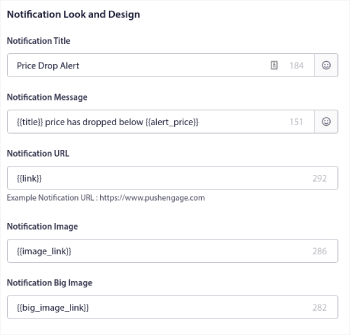
You also get a preview of your notification on multiple devices and operating systems.
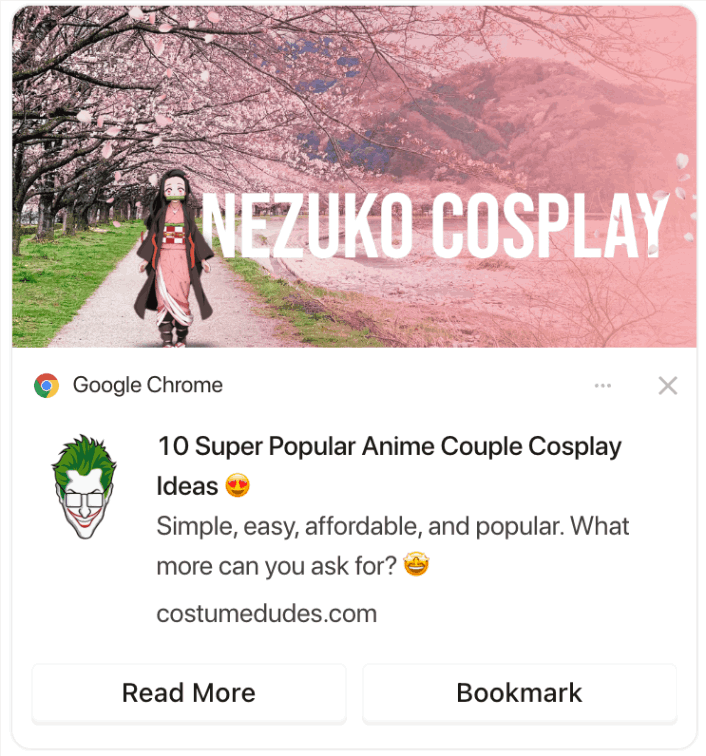
Most apps use notifications for transactional and promotional messages.
So, it’s always a great idea to create notifications that don’t go overboard with the character count. This is especially true for iOS app push notifications. There’s a total of 4 lines of text that you can use. But if you create a notification that huge, no one’s going to read it.
So, what makes for a really epic push notification campaign?
That’s up next!
What Makes for Epic Push Notification Campaigns?
Every great push notification campaign has to be snappy, pointed, and well-timed.
Pro-Tip: You’ll want to create rich push notifications that include rich media such as hero images, GIFs, videos, and emojis. In such instances, you’ll get a lot more engagement. But you’ll also need to use fewer characters in your notification text.
We cover this in much more detail in our article on push notification best practices.
So, now that you have a push notification character limits cheat sheet, you should check out this article on some of the most creative push notification campaigns.
Now That You Know About Push Notification Character Limits
By now, you have a ready cheat sheet on push notification character limits.
You should head into the PushEngage dashboard now and start creating your own campaigns. PushEngage is the #1 push notifications software in the world. So, your campaigns will be in safe hands.
And if you’re running a WordPress site, you can simply use the push notification WordPress plugin to start sending and managing your push campaigns from your WordPress dashboard and post editor.
Check out how to create other automated push notification campaigns as well. Most push campaigns are simple and effective. So, we recommend setting up multiple campaigns for your site. Here are a few great ones to start with:
- How to Automatically Send RSS Push Notifications
- How to Setup Cart Abandonment Push Notifications Using GTM
- How To Schedule Push Notifications the Easy Way [5 Min. Guide]
And if you haven’t already, you should get started with PushEngage today!


