It is Tuesday afternoon and the retention review wrapped at 2:15 PM. Your booking-conversion rate slipped 1.4 points last quarter — from 3.6% to 2.2%. The loyalty team thinks the recovery-email cadence is firing too late. The mobile team thinks the abandoned-booking push is overlapping with the price-drop alerts. Nobody can prove either is the cause. Two hours into the post-meeting Slack thread, the only thing everyone agrees on is that the dashboard is not granular enough to settle the argument.
Push notification automation for travel sits at the center of this argument, and nobody on the retention team is sure how to defend it. The booking-confirmation auto-push fires when a reservation completes. The abandoned-booking trigger re-pings the same itinerary 24 hours later — and sometimes that itinerary is no longer at the price the traveler abandoned, because the fare changed overnight. The churn-warning trigger somebody set up two years ago still fires when DAU drops on the app, but it does not know the subscriber is currently in-trip and not actually churning, just on vacation. Three “automated” mechanisms, none of them aware of each other, none of them holding a coherent view of where the traveler sits in the trip lifecycle.
This article walks through what travel push automation should actually look like — workflow architecture, not booking-confirmation broadcasts with an abandoned-booking trigger bolted on — and ships five travel-shaped workflow blueprints with timing, exit criteria for the fare-change moment, geolocation-triggered in-trip handling, and the revenue math that turns each one into a defensible line item for ad ops and the loyalty team.
- Why your travel "automated push notifications" are leaking revenue at the fare-change moment
- The anatomy of a travel push notification workflow
- Five workflow blueprints for travel
- Blueprint 1 — Welcome + first-booking nurture
- Blueprint 2 — Abandoned-booking with fare-change exit (booking abandonment push notification automation)
- Blueprint 3 — Pre-trip nurture (departure-date math)
- Blueprint 4 — In-trip geolocation (geolocation push notification automation)
- Blueprint 5 — Post-trip review + lookalike re-booking
- Lifecycle-stage segmentation, A/B testing, quiet hours by destination timezone, and exit criteria live inside the workflow
- Multi-channel orchestration: web push, app push, SMS, WhatsApp, email
- The retention math: booking-conversion lift and repeat-booking LTV at travel ticket sizes
- Build it in PushEngage Workflows for your travel brand
- What this changes
Why your travel “automated push notifications” are leaking revenue at the fare-change moment
The word automation has been doing the same unearned work in travel that it has in eCommerce, SaaS, and publishing. When most travel CRM teams talk about automated push notifications for travel, what they mean is event-triggered broadcast scheduling: a notification fires when a known event happens, with no state, no segmentation, no waits between touches, no exit conditions, and — critically — no awareness that the underlying offer may no longer be valid by the time the second touch fires.
A workflow is something different. A workflow is a multi-step journey with state. It knows when the traveler abandoned the booking, what fare they saw, what fare is currently quoted on that itinerary, what their trip status is, and what conditions cancel the journey. The abandoned-booking workflow does not just fire one reminder push 24 hours later. It checks whether the fare is still valid before each touch, exits the workflow the moment the booking completes, and exits separately if the fare changes — because sending “complete your $399 booking” to a traveler when the fare is now $529 destroys trust in a way no recovered booking ever justifies.
That last clause is the difference. Event triggers have no memory of external state. Workflows do. If your abandoned-booking automation keeps re-pinging travelers at the old fare after the fare has moved, you do not have an automation. You have a trigger that nobody told to check.
For a mid-market travel CRM team, this distinction is the difference between a repeat-booking LTV that compounds and one that gets eroded by trust-destroying mistakes at the fare-change moment. Three triggers running in parallel produce three channels of friction. Five workflows running in coordination produce one journey per traveler per trip stage, branched and bounded by booking state, fare validity, and trip status. The page-one search results for this keyword frame the problem as “5 travel use cases” and answer with a tool listicle. That is not the question your Tuesday retention review is asking.
The anatomy of a travel push notification workflow
Before the blueprints, the vocabulary. A travel push notification workflow is built from six node types. Once you know what each does, every blueprint reads as a diagram, not a description.
START. The entry point. A START node defines how the workflow is triggered, either by a subscriber event (booking_initiated, booking_abandoned, fare_changed, geolocation_changed, trip_completed) or by an audience filter (lifecycle_stage, loyalty_tier, last_active). A workflow has exactly one START.
WAIT. A delay. A WAIT node holds the subscriber for a specified duration (minutes for in-trip reactivity, hours for abandoned-booking pacing, days for pre-trip cadence) or until a specific calendar time using wait_until semantics tied to a subscriber attribute — departure_date - 7 days, departure_date - 1 day, trip_completion_date + 1 year. Waits are how a workflow honors a known future event, not just a known past one.
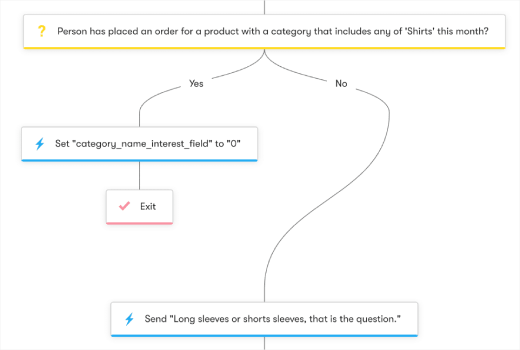
DECISION. A two-way branch. A DECISION node checks a per-subscriber condition: has the booking completed, is the fare still valid (read from a subscriber attribute the reservation system updates), is the loyalty tier above silver, is the traveler currently in-trip. DECISION nodes evaluate event filters and audience filters; they do not consume HttpRequest response bodies directly. The pattern that brings external state into a workflow is HttpRequest action triggers the external system, the external system writes back to a subscriber attribute via the PushEngage REST API, and the DECISION reads the attribute.
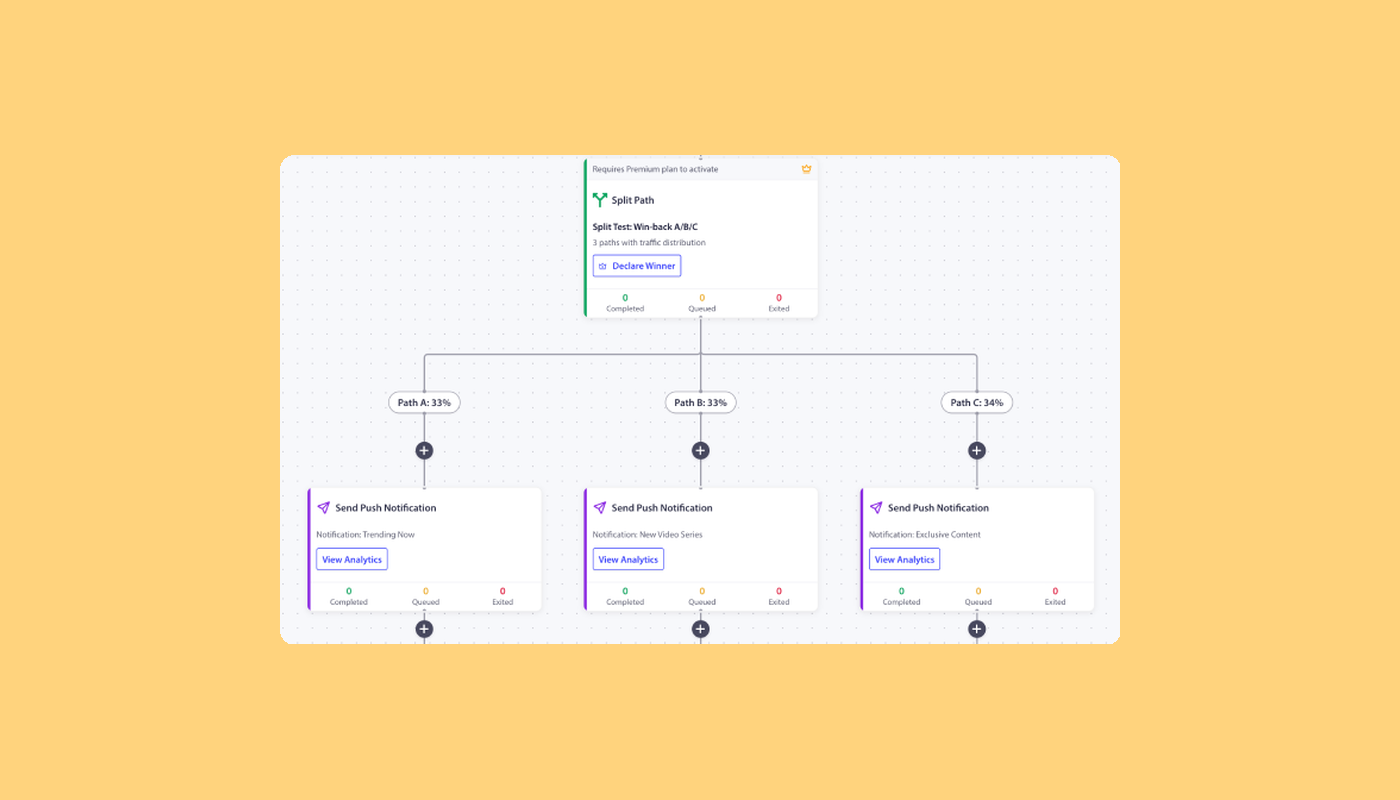
SPLIT_PATH. A percentage-based fork. SPLIT_PATH nodes route subscribers across paths based on configured percentages: 50/50 for an A/B test on abandoned-booking discount amounts, 33/33/34 for a three-way send-time test on pre-trip reminders. Once you have a winner, you promote that path to 100%.
ACTION. The work itself. ACTION nodes send a push notification, add the subscriber to a segment, update custom attributes, fire an HttpRequest to a reservation system or SMS gateway, start another workflow, or stop one. PushEngage Workflows supports eleven action types. The most useful for travel are SendPushNotification, UpdateAttribute, HttpRequest, and Workflow.Start (for chaining pre-trip into in-trip into post-trip).
END / EXIT. The terminal. END marks the natural conclusion. EXIT marks an early termination — on the NO path of a Decision when the traveler no longer qualifies, when the cooldown rule fires, or when the goal is met (booking completed, trip cancelled, fare invalidated).
Every blueprint below composes from these six pieces.
Five workflow blueprints for travel
These are not templates. They are working blueprints. Each one lists its trigger, run type, node sequence, exit criteria, and the travel retention metric it is built to move. You can lift each one into the PushEngage Workflows builder and ship the first version in under an hour. The legacy travel push notifications guide covers the broader use cases these blueprints implement.
Blueprint 1 — Welcome + first-booking nurture
- Trigger (START): Event
PushEngage.Subscriber.AddedORbrowse_destination_page_view - Run type: Single (one welcome journey per traveler per 90-day window)
- Flow: Welcome push with most-popular-destinations → WAIT 1 day → destination-preference push asking which trip types matter (beach, ski, city break, business) → WAIT 2 days → DECISION: has the subscriber initiated a booking? → YES path: chain into Blueprint 2 if they abandon, otherwise let the pre-trip workflow take over after booking_completed → NO path: send a curated three-destination recommendation push, add to
active_browserssegment, END - Exit criteria: Goal
booking_completed - Travel metric: Browse-to-first-booking conversion rate at day 7.
Blueprint 2 — Abandoned-booking with fare-change exit (booking abandonment push notification automation)
- Trigger (START): Custom event
booking_abandonedwithitinerary_idpayload - Run type: Multiple Parallel (each abandoned booking is its own workflow instance)
- Flow: WAIT 1 hour → ACTION: HttpRequest GET to your reservation system’s fare-check endpoint for the
itinerary_id. The reservation system writes back to a subscriber attribute via the PushEngage REST API —fare_status = validorfare_status = invalidated— within seconds → DECISION: audience filterfare_status = valid? → NO path: send a “your fare changed, here are similar options at the new price” push and EXIT (graceful re-route, no trust violation) → YES path: reminder push with the original fare → WAIT 24 hours → repeat the HttpRequest fare-check, then DECISION onfare_status = validAND audience filterbooking_completed = false→ YES path: reminder #2 with a 10% promo code → WAIT 48 hours → final reminder with a stronger offer → END - Exit criteria: Goal
booking_completedmatching theitinerary_idfrom the trigger OR audience filterfare_status = invalidated - Travel metric: Recovered booking value per abandoned booking. This is the workflow with the most defensible revenue line on the page. The 6 tips to reduce booking abandonment post covers the manual-tactic version of this blueprint; the workflow version adds the fare-validity exit that turns a tactical recovery into a brand-trust-preserving one.
Blueprint 3 — Pre-trip nurture (departure-date math)
This is the pre-trip push notification workflow that demonstrates wait_until semantics tied to a subscriber attribute.
- Trigger (START): Custom event
booking_completed(which writesdeparture_dateto a subscriber attribute) - Run type: Single per booking
- Flow: WAIT until
departure_date - 14 days→ “your trip is in two weeks” push with packing recommendations and weather forecast → WAIT untildeparture_date - 7 days→ ancillary-revenue push (seat upgrade, room upgrade, car rental add-on, airport transfer) → WAIT untildeparture_date - 1 day→ check-in reminder push with mobile boarding-pass link → WAIT untildeparture_date→ bon-voyage push, END - Exit criteria: Goal
booking_cancelled - Travel metric: Ancillary revenue per booking. The 7-day-pre touch is the highest-leverage moment for ancillaries.
Blueprint 4 — In-trip geolocation (geolocation push notification automation)
- Trigger (START): Custom event
geolocation_changed(fired by your mobile app when the device reports a new lat/lng) AND audience filtertrip_in_progress = true - Run type: Multiple Parallel
- Flow: DECISION: has the traveler arrived at the destination city (audience filter compares geolocation coordinates against a destination geofence stored as a subscriber attribute)? → YES path: ACTION send local-recommendations push (hotels, restaurants, local activities tied to the destination), ACTION HttpRequest to weather API → if a weather alert is warranted, ACTION send weather notification → END → NO path: EXIT (traveler is in transit, not at destination)
- Quiet hours: subscriber-timezone-aware. Workflows.md §9.4 resolves quiet hours by subscriber timezone first, then site timezone, then UTC. For in-trip workflows, this means the timezone honors the destination’s local time, not the brand’s home market. Non-critical pushes use
skip; safety and weather alerts userescheduleto ensure delivery - Exit criteria: Goal
trip_completed - Travel metric: In-trip engagement rate and in-trip ancillary revenue. Note:
geolocation_changedis not a built-in trigger type — it is aPushEngage.CustomEventyour mobile app fires when the device location updates, and the at-destination check is an audience filter on subscriber attributes the app maintains. The geolocation push notifications post covers the segmentation foundation this blueprint extends.
Blueprint 5 — Post-trip review + lookalike re-booking
- Trigger (START): Custom event
trip_completed - Run type: Multiple Sequential
- Flow: WAIT 3 days → review-request push referencing the destination by name → WAIT until
trip_completion_date + 365 days(one year later) → “ready for your next trip?” push with a destination-similar offer based on the prior trip type → WAIT 7 days → DECISION: did the traveler initiate a booking? → YES path: chain into Blueprint 1 or 2 → NO path: EXIT - Exit criteria: New
booking_initiatedevent ORunsubscribed - Travel metric: Repeat-booking rate at 12 months. This is the longest-running blueprint — about 13 months — and the one with the highest LTV impact. The year-over-year lookalike pattern is the travel analog of eCommerce post-purchase win-back, adapted to the seasonal cadence travel buyers actually follow.
Lifecycle-stage segmentation, A/B testing, quiet hours by destination timezone, and exit criteria live inside the workflow
The dominant pattern across travel push articles is to list these four concepts as “best practices” — generic bullets at the end of a strategy post, divorced from the campaigns that use them. That is the wrong frame. They are not best practices that sit next to the workflow. They are the workflow.
| Concept | Best-practice framing (wrong) | Workflow-node framing (correct) |
|---|---|---|
| Lifecycle-stage segmentation | “Segment travelers by trip stage” | A DECISION node on the subscriber attribute lifecycle_stage (browsing / booking-initiated / pre-trip / in-trip / post-trip / lapsed) that routes pre-trip travelers to ancillary nudges, in-trip travelers to geolocation workflows, post-trip travelers to review and lookalike re-booking |
| A/B testing | “Always A/B test your abandoned-booking copy” | A SPLIT_PATH node with 50/50 allocation, load-balanced subscribers per path, and a winner_edge_id field that promotes the winner to 100% once the test reaches significance — most travel A/B tests run on the discount amount in reminder #2 |
| Quiet hours by destination timezone | “Don’t push at 3 AM” | A workflow-level option with timezone: subscriber and a fallback setting that either skips the send (non-critical pushes) or reschedules it to one minute after quiet hours end (safety, weather, gate change) — critical for in-trip workflows where the subscriber’s local timezone is the destination, not the brand’s home market |
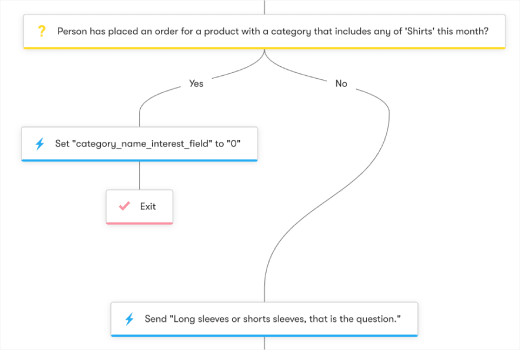
| Exit criteria | “Stop the abandoned-booking sequence once they book” | A workflow-level rule that checks the traveler against the booking_completed goal AND the fare_status = invalidated attribute before each node, and cancels the workflow if either matches — the second condition is what no SERP result describes |
The difference matters because best-practice bullets are easy to nod at and hard to enforce. Workflow nodes get enforced by the engine. The DECISION runs every time. The SPLIT_PATH balances every traveler. The quiet-hours fallback engages without anyone remembering to check the destination timezone. The exit rule cancels the abandoned-booking workflow whether or not the campaign owner is paying attention.
For Blueprint 2’s abandoned-booking flow, this means the moment a traveler books — at hour 1, hour 30, or hour 73 of the workflow — the exit rule fires, the workflow cancels for that traveler, and no more “complete your booking” push goes to someone who already paid yesterday. Separately, the moment the fare changes and the reservation system updates fare_status = invalidated, the workflow exits gracefully and sends the “fare changed, here are similar options” recovery push. No trust violation. No angry call to customer service.
Multi-channel orchestration: web push, app push, SMS, WhatsApp, email
Travel brands run more channels than eCommerce, SaaS, or publisher teams. Web push for the desktop booking flow. App push for travelers who downloaded the brand app. SMS as the data-roaming-resilient channel for in-trip critical alerts (gate change, flight delay, weather). WhatsApp for high-touch customer service and international travelers in regions where WhatsApp is the default messenger. Email as the long-form pre-trip itinerary container. Composing all five inside one workflow — picking the channel that matches subscriber state — is what makes the difference between a CRM team that delivers a coherent journey and one that has to apologize for a 3 AM “your flight is on time” push that woke up a traveler in a destination timezone.
A composed in-trip gate-change journey reads like this:
- START: Custom event
gate_changefor an itinerary wheretrip_in_progress = true - DECISION: is the traveler on the brand’s mobile app currently?
- YES: ACTION fire app push (lowest friction, data-roaming-aware delivery)
- NO: continue
- DECISION: is the traveler internationally roaming (audience filter on
countrynot equal tohome_country)?- YES: ACTION send SMS via HttpRequest to Twilio or Plivo (SMS rides cellular voice, not data — resilient when roaming-data is limited)
- NO: ACTION fire web push (traveler may be on hotel Wi-Fi)
- ACTION: HttpRequest to ESP to update the next email itinerary recap
- EXIT on
gate_acknowledgedorflight_boarded
One traveler identity, one workflow, four channels chosen by state. The cheapest viable channel goes first. SMS — the most expensive per send — only fires when the traveler is internationally roaming and the message is time-critical. Booking.com framed mobile messaging as “real-time customer interaction” rather than broadcast marketing; this composed workflow is the same philosophy expressed as workflow architecture.
Running this with separate tools means five vendor logins, two segmentation engines that disagree about who is currently in-trip, and no single revenue attribution per traveler per channel. Doing it inside one workflow engine means one traveler identity, one set of decision logic, and one funnel report that shows where the journey actually breaks. The HttpRequest action (Workflows.md §5.7) is what makes the cross-channel orchestration possible — it bridges the workflow engine to the SMS gateway, the ESP, and the reservation system without requiring a separate orchestration tool.
The retention math: booking-conversion lift and repeat-booking LTV at travel ticket sizes
Travel monetization is high-ticket. Booking values range from $300 short-haul flights to $5,000+ vacation packages — which changes the cost math against eCommerce ($50–$200 carts) and SaaS ($99–$999 ARR). PushEngage Workflows tracks the same three numbers at each node — queued, completed, exited — and the same node-level analytics pattern applies. The per-recovered-booking revenue dwarfs the per-recovered-cart revenue, which makes the workflow’s P&L contribution easier to defend.
Here is what node-level analytics look like for an active abandoned-booking workflow at a mid-market OTA with 5,000 monthly abandoned bookings at an average $1,200 ticket (illustrative numbers):
| Node | Queued | Completed | Exited | Notes |
|---|---|---|---|---|
| START (booking_abandoned) | 0 | 5,000 | 0 | All abandoned itineraries enter |
| WAIT 1 hour | 92 | 4,900 | 8 | 8 booked in the first hour without a touch |
| ACTION: HttpRequest fare-check | 0 | 4,900 | 0 | Reservation system updates fare_status attribute |
| DECISION: fare_status valid | 0 | 4,410 | 490 | 490 itineraries fare-invalidated before the first touch — graceful exit via “fare changed” push |
| ACTION: reminder #1 (original fare) | 0 | 4,410 | 0 | First reminder sent |
| WAIT 24 hours | 134 | 3,950 | 326 | 326 booked after reminder #1 |
| Second fare-check + DECISION | 0 | 3,720 | 230 | Another 230 itineraries fare-invalidated — graceful exit |
| ACTION: reminder #2 + 10% promo | 0 | 3,720 | 0 | Second reminder |
| WAIT 48 hours | 78 | 3,200 | 442 | Another 442 booked after reminder #2 |
| ACTION: final reminder + stronger offer | 0 | 3,200 | 0 | Final push |
| END | n/a | 3,200 | n/a | 3,200 did not book |
In this cohort, 776 abandoned itineraries converted to bookings while inside the workflow — a 15.5% recovery rate. At $1,200 average booking value, that is $931,200 in recovered revenue per month, or $11.2M annualized. The fare-change exits saved an additional 720 traveler relationships from receiving a misleading “complete your $399 booking” push when the fare had already moved higher — 720 customer-service tickets and brand-trust violations the workflow prevented, separately from the booking-conversion lift.
The cost math reframes for travel. Web push and app push cost nothing per send after opt-in. SMS via Twilio runs roughly $0.0079 per US-domestic message and $0.05–$0.30 per international message — at 5,000 abandoned-booking cohorts a month with a 10% in-trip SMS share, that is $40–$150 per cohort in SMS spend. WhatsApp Business Platform pricing is session-based. Email scales with ESP contract. The workflow’s job is to use the cheapest viable channel first and escalate to SMS or WhatsApp only when state demands it. The line item that reads “abandoned-booking workflow recovered $931K in monthly bookings at a $1,500 all-in channel cost” is the kind of P&L statement that wins next year’s budget conversation.
Build it in PushEngage Workflows for your travel brand
Each of the five travel blueprints maps directly to PushEngage Workflows components. The mapping:
| Blueprint | Node types used | Action types used | Workflow option |
|---|---|---|---|
| Welcome + first-booking nurture | START, WAIT, DECISION, ACTION, END | SendPushNotification, AddSegment | Run type: Single |
| Abandoned-booking with fare-change exit | START, WAIT, ACTION, DECISION, END | SendPushNotification, HttpRequest, UpdateAttribute | Run type: Multiple Parallel; exit on goal booking_completed OR audience filter fare_status=invalidated |
| Pre-trip nurture (departure-date math) | START, WAIT (wait_until), ACTION, END | SendPushNotification | Run type: Single per booking; wait_until tied to departure_date attribute |
| In-trip geolocation | START, DECISION, ACTION, END | SendPushNotification, HttpRequest, UpdateAttribute | Run type: Multiple Parallel; CustomEvent + audience filter trigger |
| Post-trip review + lookalike re-booking | START, WAIT, ACTION, WAIT (wait_until), ACTION, DECISION, END | SendPushNotification | Run type: Multiple Sequential |
The Workflows engine ships with 60+ shipped templates that cover the building blocks for each blueprint. Most templates are eCommerce-shaped, but the adaptation to travel is straightforward: the cart-abandonment template logic becomes an abandoned-booking workflow by swapping the trigger event to booking_abandoned, adding the HttpRequest-and-attribute-update fare-check pattern from Blueprint 2, and using a fare-invalidation exit criterion alongside booking_completed. The welcome template fits Blueprint 1 directly. The geolocation drip template — already in the catalog — is the foundation for Blueprint 4’s in-trip workflow.
For the broader travel push context — niche-specific use cases (hotels, flights, vacation rentals) and seasonality strategies — the legacy travel site push notification playbook catalogs the campaign types these blueprints implement.
For the immediate trial path, the free plan gives you 200 subscribers, all channels (web push, app push, WhatsApp, live chat), and the full Workflows engine on day one. That is enough to ship Blueprints 1 and 2 on your next cohort of abandoned itineraries and capture node-level analytics before the next QBR. For PushEngage’s travel-vertical positioning — pricing, integrations, customer examples — PushEngage for travel is the canonical landing page.
What this changes
If you take one thing from this article, take this: push notification automation for travel is workflow architecture, not booking-confirmation broadcasts with an abandoned-booking trigger bolted on. The abandoned-booking journey that exits gracefully on a fare change, the pre-trip workflow that fires at departure_date - 7 days, the in-trip geolocation workflow that respects destination timezone — they are all the same shape. One START, some WAITs, some DECISIONs, some ACTIONs, an EXIT. Three standalone triggers cannot do this. One workflow engine can. The repeat-booking LTV compounds from there.
Start on the free plan to ship the first blueprint on your next cohort of abandoned itineraries.


