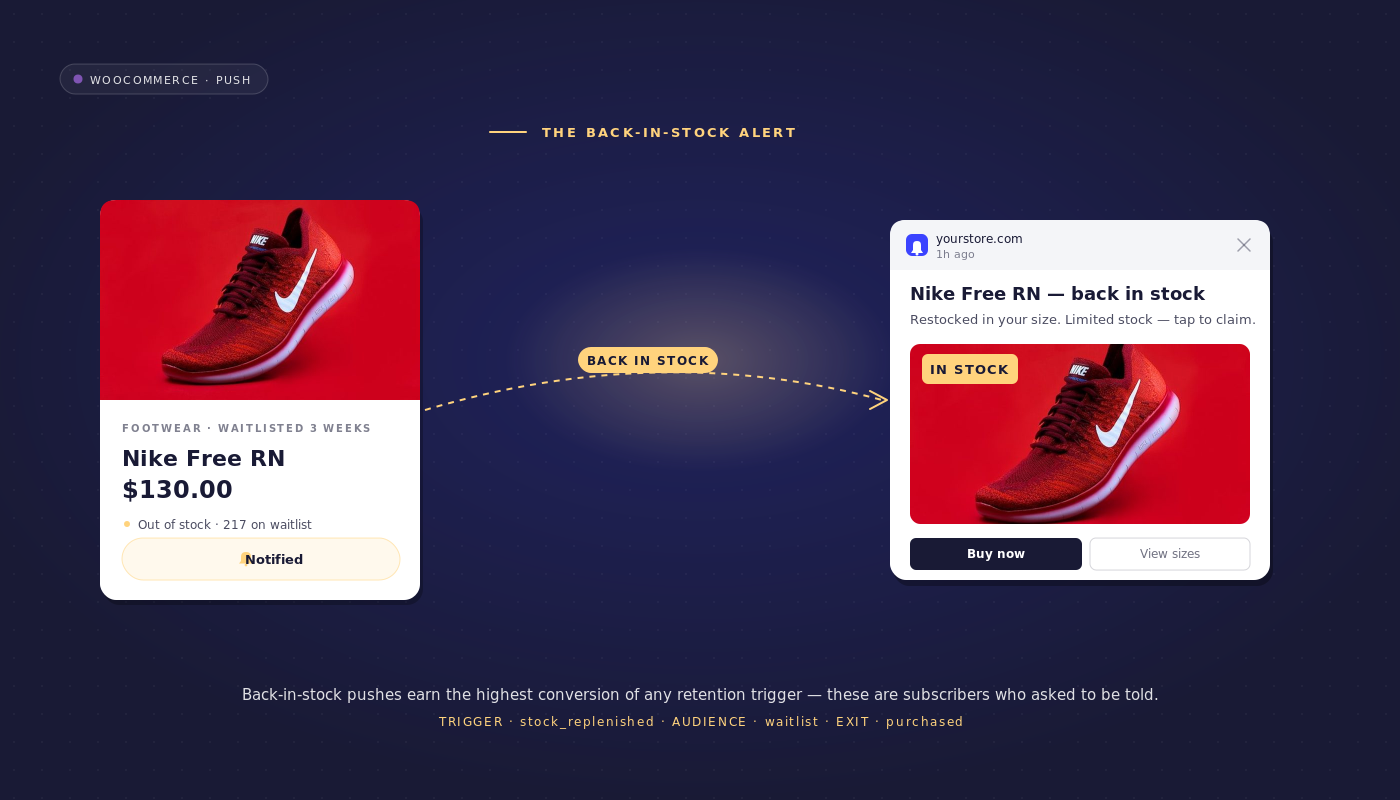
It is 4 PM Friday at a mid-market WooCommerce sneaker store. The Nike Pegasus 41 Black has been sold out for nine days. The merchandising team flips the stock status from outofstock to instock with 800 pairs in the warehouse feed. The WooCommerce back-in-stock notifications workflow is already running.
Within 30 seconds, push notifications fan out to 4,200 subscribers who had explicitly tapped “notify me” on the product detail page during the stock-out. By 4:05 PM, 2,800 of them have clicked. By 4:11 PM, 1,400 have purchased. The SKU sells out again. The retention manager spent zero hours on launch. The workflow had been running quietly since the previous restock.
That is the workflow. One trigger, two messages at most, a click-through rate north of 70%, and a conversion rate from clicks that lands between 25% and 40%. There is no other campaign in the retention stack that performs this consistently. The reason is not the copy and not the timing. It is the opt-in. A back-in-stock subscriber is the only subscriber in the entire portfolio who has named the specific SKU they want and asked, in writing, to be told the moment it returns.
This article ships the push-native back-in-stock workflow a WooCommerce retention manager can lift directly: the trigger event, the decision logic, the race-condition handling at restock, the variant-aware filtering, the opt-in design, and the per-SKU funnel analytics that defend the line item.
- Why back-in-stock is the highest-CTR push workflow in eCommerce
- The back-in-stock workflow, end to end
- The race condition: when stock returns and 4,200 subscribers all click in 30 seconds
- The variant problem
- Two-message vs one-message workflow
- Opt-in design: the "Notify me" button on out-of-stock PDPs
- Cross-channel orchestration
- Per-workflow analytics: read the funnel
- Build it in PushEngage
- What this changes
Why back-in-stock is the highest-CTR push workflow in eCommerce
Back in stock alerts post click-through rates that look like typos next to the rest of the eCommerce push portfolio. Cart-abandonment notifications land at 8–14% CTR. Browse-abandonment lands at 4–8%. Welcome series lands at 12–20%. Price-drop alerts land at 18–25%. Back-in-stock lands at 60–80%, and a well-tuned workflow on a high-demand SKU regularly clears 75%.
| Workflow | Typical click-through rate |
|---|---|
| Browse abandonment | 4–8% |
| Cart abandonment (message 1) | 8–14% |
| Welcome series | 12–20% |
| Price drop alerts | 18–25% |
| Back-in-stock | 60–80% |
Three reasons restock notifications outperform every other workflow on this list.
First, the opt-in is explicit. The subscriber tapped a button labeled “notify me when this is back” on a specific product detail page. There is no inferred intent and no segmentation guess. The system knows the subscriber wants this exact SKU.
Second, the subscriber asked to be told. Compare to a cart-abandonment subscriber, who may not actually want a follow-up. The back-in-stock subscriber is the rare push audience that explicitly invited the message.
Third, the copy is unambiguous. The message has one job: tell the subscriber the product is back and link to the PDP. There is no headline angle to test, no offer to construct, no urgency framing to over-tune. The product is the message.
The back-in-stock workflow, end to end
The workflow uses the PushEngage Workflows builder and the standard START / WAIT / DECISION / ACTION / END node vocabulary. The full specification:
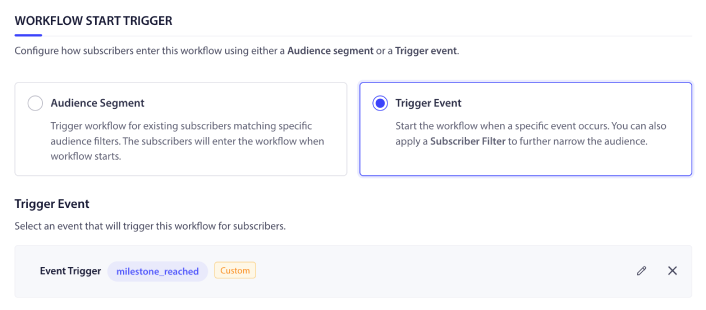
Trigger (START): PushEngage.CustomEvent with event_name = product_restocked. Fires from the WooCommerce-PushEngage integration when a product’s stock_status transitions from outofstock to instock and stock_quantity > 0. The integration plugin maps the WooCommerce woocommerce_product_set_stock_status hook to this custom event automatically.
Run type: Multiple Parallel. A subscriber can be opted in to several SKUs at once, and each restock fires its own concurrent workflow instance. A Pegasus 41 Black restock and a separate Pegasus 41 Red restock to the same subscriber run as two independent journeys.
Flow:
- DECISION node: is the subscriber on the notify-me list for this exact SKU (and variation_id, for variant-enabled products)?
- YES path: send the restock notification immediately. No wait. Back-in-stock is the one workflow where a wait is a bug, not a feature, because the SKU is most likely to be in stock in the first minutes after restock.
- WAIT 4 hours.
- DECISION node: did the subscriber click the first notification? Is the SKU still in stock?
- NO + still in stock: send the 4-hour reminder.
- All other paths: END.
Exit criteria: Goal purchase matching the product_id from the trigger event, or a click-then-add-to-cart event. The moment the subscriber buys (or commits to buying with an add-to-cart), the workflow cancels and the reminder does not fire.
Message 1 — friendly, immediate
- Title: Pegasus 41 Black is back in stock
- Body: You asked us to tell you the moment it returned. The Black colorway is live now. Tap to grab a pair.
Message 2 — 4-hour reminder for non-clickers
- Title: Still in stock: Pegasus 41 Black
- Body: It is going fast. You opted in for this restock. Tap if you still want a pair.
That is the entire workflow. Two messages maximum, one decision, one wait, one exit rule.
The race condition: when stock returns and 4,200 subscribers all click in 30 seconds
A popular SKU with 4,200 opt-ins, restocked with 800 units, will sell out before the slowest notification reaches the slowest subscriber. This is the single biggest operational gotcha in the back-in-stock workflow and the one that separates a 70% CTR campaign from a 12% one. Subscribers who see the notification after the SKU is gone do not click. They feel mocked. They become more likely to unsubscribe from the broader list. The first restock the retention team launches without race-condition handling is usually the last one they launch without it.
The handling has two parts. The first is workflow-level: the inventory alert workflow must send notifications in opt-in order, with the earliest “notify me” subscriber seeing the notification first. The send order keys off a wishlist_created_at timestamp captured at the opt-in event. The PushEngage workflow engine’s ordered-send mode handles this; not every platform does.
The second part is upstream of the push platform entirely. The actual bottleneck on most back-in-stock workflows is not notification delivery. It is inventory accuracy. The lag between the warehouse system, the ERP, and the WooCommerce storefront determines whether the SKU is genuinely still in stock when the notification lands. Stores that pre-allocate restock units to the notify-me list (so the first 500 of 800 units are reserved for subscribers, sold out before the public broadcast) materially raise the conversion rate on the workflow.
Inventory accuracy is the upstream problem. Ordered send is the workflow’s job. Both have to be right.
The variant problem
A subscriber who opts in to “Nike Pegasus 41 Black” wants the Black variant. Restocking the Pegasus 41 in Red should not fire a notification to the Black subscriber. The WooCommerce-PushEngage integration captures the specific variation_id at the moment of opt-in; the workflow trigger filters on variation_id, not just product_id, for variant-enabled products. If a store instruments on product_id only, every Red restock generates noise for every Black subscriber, and the workflow’s CTR drops from 70% to 20% within a quarter.
The opt-in event schema for woocommerce back in stock notifications should be:
{
  "event_name": "wishlist_added",
  "product_id": 14523,
  "variation_id": 14530,
  "sku": "PEG41-BLK-10",
  "wishlist_created_at": "2026-05-21T14:32:08Z",
  "subscriber_hash": "sub_2eHzK..."
}
The matching restock trigger fires the same shape:
{
  "event_name": "product_restocked",
  "product_id": 14523,
  "variation_id": 14530,
  "stock_quantity": 800,
  "restocked_at": "2026-05-26T16:00:14Z"
}
The workflow’s DECISION node filters on both product_id and variation_id. Subscribers on the notify-me list for variation 14530 (Black, size 10) match. Subscribers on the list for variation 14531 (Red, size 10) do not. The filter expression on the Decision node is the difference between a clean signal and a noisy one.
Two-message vs one-message workflow
The 4-hour reminder is not always the right choice. For ultra-hot SKUs that sell out in less than 30 minutes, the reminder is a worse experience than no message at all. The SKU is gone before the reminder lands, and the subscriber receives a “still in stock” notification on a product that is already out of stock again. For everyday restocks that hold for one to seven days, the reminder lifts conversion 15–25% on subscribers who saw the first notification but were in a meeting, on the train, or otherwise unable to act on the spot.
| Sell-out velocity | Recommended message count |
|---|---|
| <30 minutes (ultra-hot) | 1 (skip the reminder) |
| 30 minutes – 4 hours | 1 or 2 (test) |
| 4–24 hours | 2 (reminder valuable) |
| 1–7 days (everyday restock) | 2 (default) |
| >7 days (slow-moving) | 1 (one touch is enough) |
The decision is a workflow-level branch keyed off a sell_out_velocity flag on the product (set by the merchandising team based on historical restock data) or off a real-time stock-quantity check at the WAIT 4-hour gate. The out-of-stock recovery workflow’s job is to fire the right number of touches for the SKU type, not to fire the maximum number of touches the engine supports.
Opt-in design: the “Notify me” button on out-of-stock PDPs
The opt-in surface is what makes this workflow work. An out-of-stock PDP visitor has already decided they want the product. The only ask is whether they will let the store tell them when it returns. That is the highest-converting opt-in moment a WooCommerce store has, and treating it like any other generic push permission prompt is the most common mistake on this workflow.
PushEngage’s product-specific subscribe call, subscribeToProduct(productId, variationId), registers the push subscription to the specific SKU rather than the broader site list. The opt-in form should sit next to the out-of-stock badge on the PDP, not below the fold. The primary field is push permission. Email is the fallback for browsers that block push or for subscribers who want both channels. Capture the variation_id, the wishlist_created_at timestamp, and a subscriber hash at the moment of opt-in.
This is the moment where the broader subscriber-quality argument compounds. A higher-quality opt-in (explicit, SKU-specific, intent-confirmed) lifts every downstream workflow’s recovered revenue, not just this one. The sibling article on triggered subscription opt-in prompts walks through how the opt-in design at this moment of intent matters more than any retargeting that follows. The woocommerce push notifications stack compounds from the opt-in outward.
Cross-channel orchestration
Web push is the primary channel for the back-in-stock workflow because it is the fastest, the cheapest, and the channel the subscriber explicitly opted in to. But not every subscriber granted push permission, and a single-channel workflow cuts the reachable audience by 30–50% depending on the browser mix.
The full multi-channel routing in one journey:
- Push permission granted: web push fires immediately. END.
- No push permission but email captured: email fallback fires 15 minutes after the push batch completes. The 15-minute delay is the de-dupe window. Subscribers who received the push do not receive the email.
- High-ticket SKU ($300+ AOV) and WhatsApp opt-in on file: WhatsApp escalation fires 30 minutes after push. The higher-touch channel is justified by the AOV; the explicit WhatsApp opt-in is what makes the message welcome rather than intrusive.
Three channels, one workflow, one set of exit criteria, one subscriber identity. This is the kind of orchestration that requires a unified workflow engine; it is impossible to compose cleanly with three separate single-channel tools. For a deeper treatment of how push and email work together inside a retention plan, the push and email multi-channel orchestration post walks through the de-dupe logic and the channel-routing decision tree.
Per-workflow analytics: read the funnel
The retention manager’s job is to defend the line item. The per-SKU analytics for the back-in-stock workflow make that conversation short. Here is what the funnel looks like for the Pegasus 41 Black restock from the opening scenario:
| Stage | Count | Rate vs prior stage |
|---|---|---|
| Restocks fired | 1 | — |
| Opt-ins notified (push) | 4,200 | 100% |
| Push delivered | 4,150 | 98.8% (50 unsubscribed since opt-in) |
| Push clicked | 2,800 | 67.5% (CTR) |
| Add to cart | 1,580 | 56.4% of clickers |
| Purchase | 1,400 | 50.0% of clickers (notification-to-purchase: 33.7%) |
A 33.7% notification-to-purchase rate is the kind of number that, plotted against any other retention workflow’s funnel, shifts the budget conversation immediately. The cart-abandonment workflow at this same store recovers carts at 14%. The browse-abandonment workflow lifts browse-to-cart by 6%. The back in stock alerts workflow, at 33.7% notification-to-purchase, is doing 2–5x the work per impression of every other workflow on the dashboard.
The bottleneck on this workflow is almost never the push platform. When the conversion rate disappoints, the cause is upstream. The SKU was gone before the notification fanned out. The stock-quantity count in WooCommerce had drifted from the warehouse. The variation_id mapping was wrong and the wrong subscribers were notified. Most “the workflow doesn’t work” tickets resolve to “the SKU was already gone” or “the wrong subscriber got the message.” Both are inventory and integration problems, not push problems.
Build it in PushEngage
The setup path is short for a workflow this powerful. Install the WooCommerce-PushEngage integration plugin from the WordPress repository. The plugin auto-maps the woocommerce_product_set_stock_status hook to the product_restocked custom event.
Confirm the “notify me” opt-in button is enabled on out-of-stock PDPs. Lift the back-in-stock workflow template from the PushEngage Workflows template library. Test on one SKU before broadcasting.
What this changes
The free plan covers 200 subscribers, every channel, and the full Workflows engine on day one. That is enough to prove the channel on a controlled SKU before requesting budget. The first restock under the workflow usually pays the annual subscription back in a single afternoon. The math here is rarely the obstacle.
Sibling articles in the WooCommerce push series complete the retention picture. The WooCommerce cart abandonment workflow ships the 3-message cart sequence. The WooCommerce browse abandonment workflow covers product-detail page abandonment.
The WooCommerce price drop alerts post covers the wishlist-price-drop trigger that pairs naturally with restock notifications. The broader ecommerce push notifications hub maps how all of these workflows interlock.
A WooCommerce back-in-stock subscriber is the most valuable opt-in your store will ever get. They named the SKU, they asked to be told, and they will click at rates that make the rest of the retention stack look slow. The inventory alert workflow that serves them runs on one trigger, one decision, one wait, and one exit rule. The operational work (variant-aware triggers, ordered send, opt-in design, inventory accuracy) is what determines whether the workflow ships 70% CTR or 12%.
The retention math compounds from there. One restock alert workflow tuned for a $145-AOV SKU at 4,200 opt-ins and a 33% notification-to-purchase rate is roughly $200,000 in attributed revenue per restock. The merchandising team is the constraint, not the push platform. Out-of-stock recovery is the cheapest, highest-CTR, most-defensible workflow in the woocommerce push notifications stack, and the only one where the subscriber asked for the message.
Start on the free plan to ship the first restock notifications workflow in under an hour.


