
Let’s talk about triggered subscription prompts: the configured rules that delay the native browser permission ask until the visitor has shown intent. A 30-second time-delay opt-in. A scroll-based opt-in that fires at 50%. A click-based soft prompt the visitor opens themselves.
Each one of these will collect fewer subscribers than the instant browser prompt that fires on the first second of the first visit. Each one of these will also produce a higher-quality subscriber base that recovers more revenue per subscriber through every workflow downstream.
It is 9 AM on a Monday and your subscriber growth dashboard shows the line went up. Last week added 1,200 new opt-ins. The cart-abandonment workflow shipped 4,800 notifications to those subscribers and recovered $1,840 in carts. You ran the same math last quarter on a similarly sized cohort that came in before you flipped the opt-in prompt to instant, and that quarter the workflow recovered $14,600. Same number of new subscribers on the chart. Different subscribers on the P&L.
The chart is not lying. It really did add 1,200 opt-ins. The chart is just answering the wrong question. The question a retention manager at a mid-market eCommerce store should be asking is not “how many people opted in this week,” it is “how much recovered revenue per subscriber did this week’s opt-ins produce.”
Those two numbers move in opposite directions when you change the opt-in prompt.
The bad math of instant opt-in
The instant browser permission prompt is the cheapest mistake on the conversion side of a retention stack. It fires on the first second of the first visit. The visitor has done nothing yet. They have read no content. They have viewed no product. They have not even decided whether the site is the kind of site they want to hear from. The prompt asks them to commit anyway.
A meaningful fraction of those visitors hit Allow because they are confused, or because dismissing the prompt requires more clicks than accepting it, or because they assumed the prompt was a cookie banner. None of those reasons predicts that they will later open a cart-abandonment push and complete a purchase. When the workflow fires, the engagement rates collapse and the recovered revenue per subscriber collapses with them.
Most retention teams notice this six months in. The dashboard keeps growing. The recovered revenue per subscriber keeps shrinking. The cause is upstream of every workflow they have built. It is the push notification opt-in prompt that sits at the front door, and specifically what state the visitor is in when it fires.
A retention/CAC framing makes the choice obvious. The point of building a push channel is to reduce dependency on paid acquisition by growing retained revenue on an owned channel. A subscriber who never engages with the workflow does not reduce CAC dependency. They are a row in the count, not a real subscriber.
What a triggered subscription prompt actually means
A triggered subscription prompt is a configured rule that delays the native browser permission ask until the visitor has demonstrated intent. The trigger is the condition that has to fire first. Once the condition fires, the browser prompt (or a soft prompt that gates the browser prompt) appears.
PushEngage supports five trigger types. Each one captures a different intent signal:
| Trigger type | How it fires | Sweet-spot setting | Primary use case | Risk to watch |
|---|---|---|---|---|
| Time-delay | N seconds since page load | 20-45 seconds | Long-form content sites, deep product pages | Too short collects junk; too long misses bouncers entirely |
| Scroll-percentage | Visitor scrolls past N% of the page | 40-60% | Category pages, blog posts, product listings | Short pages hit 100% scroll in two seconds; pair with a time-delay floor |
| Click-based (soft prompt) | Visitor clicks a custom button or banner first | n/a (binary) | Stores willing to design a branded soft prompt | Lower opt-in rate, by far the highest subscriber quality |
| Exit-intent | Cursor moves toward browser chrome | n/a (binary) | Desktop publisher sites; rarely useful on mobile | Cursor signals do not exist on touch devices, so mobile triggers fire on accidental swipes |
| Page-count | Visitor’s Nth page view | 2nd or 3rd visit | Returning-visitor cohort, blogs with strong reader base | Anonymous visitors reset on cookie clear; under-counts the engagement |
The instant browser prompt has no trigger condition. It fires on the first paint of the first visit, regardless of who the visitor is, what they came for, or whether they have engaged with anything yet. Every other option on this list has a condition. The condition is what produces the intent signal.
A retention team that has only ever run the instant prompt does not have a baseline for what a triggered subscription prompt feels like in the funnel. The push subscription rate will drop. The number of subscribers added per week will drop. Those numbers being lower is the point. The number that moves the other direction is the one that matters.
The three triggers that work in eCommerce
Five trigger types are available. Three of them do real work on an eCommerce site. The other two have specific problems that make them weaker on the kind of traffic a mid-market eCommerce store actually sees.
Time-delay opt-in (20-45 seconds)
A time-delay opt-in is the most common triggered configuration in eCommerce. The visitor lands on the page, the timer starts, and the prompt fires at the configured mark. The 20-45 second window captures visitors who actually read the page (above the bounce noise floor) without waiting so long that mobile users have already swiped away.
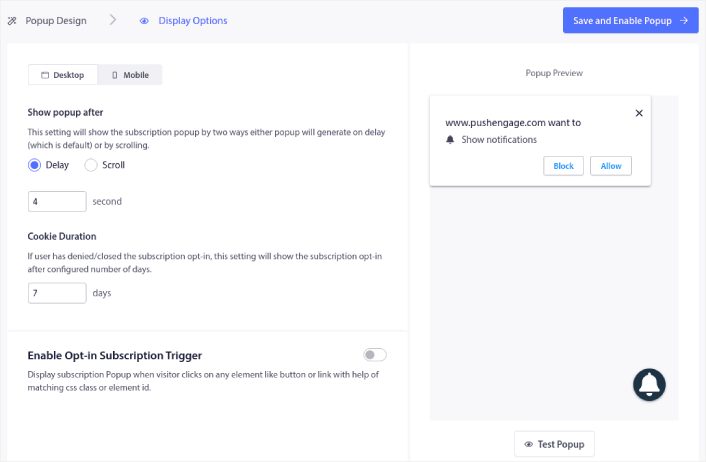
The right time-delay for a store is a function of its average product-page session length. A jewelry store where buyers spend 90 seconds comparing options gets a 30-second delay. A flash-sale store where buyers decide in 15 seconds gets a 10-second delay plus a scroll-percentage fallback. The right number is the one that captures visitors past the bounce window.
Scroll-based opt-in (40-60%)
A scroll-based opt-in fires when the visitor scrolls past a configured percentage of the page. The 40-60% range is the sweet spot because it captures visitors who actually engaged with the content (no bouncing visitor scrolls 50%) without requiring them to read the entire page (which most never will).
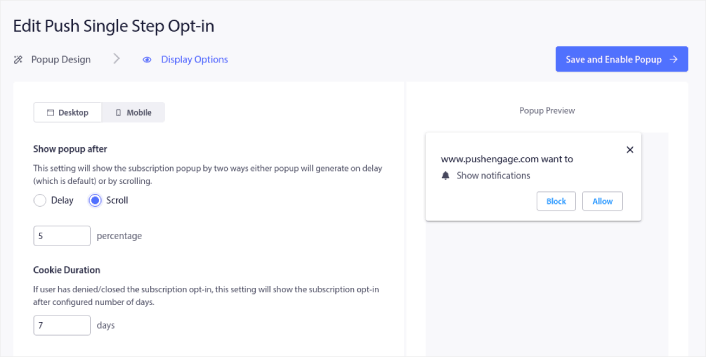
On product pages, 50% typically lands right after the gallery and the price block but before the reviews and the recommendations. That is a high-intent moment. On a blog post, 50% lands mid-article, after the introduction has done its job. Pair the scroll trigger with a time-delay floor (the prompt does not fire before, say, 5 seconds even on a short page) so it does not fire in the first second on a thin landing page.
Click-based soft prompt
A click-based soft prompt does not fire automatically at all. The visitor sees a custom banner, button, or interstitial somewhere on the page (typically in the header, or as a slide-in after some delay), and clicks it. The click opens the soft prompt. The soft prompt then triggers the native browser permission ask if the visitor commits.
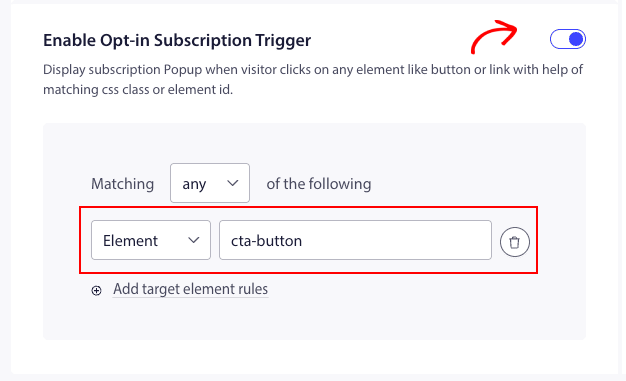
This is the highest-quality opt-in on the list, by a meaningful margin. A visitor who clicked has self-selected. They have stated, by their click, that they want notifications. The push subscription rate from a click-based prompt is the lowest of any option here, often 5-10% of what the instant prompt would have collected. Engagement per subscriber and recovered revenue per subscriber are materially higher. For stores with the design bandwidth to ship a branded banner, this is the right choice.
A note on exit-intent and page-count
Exit-intent triggers fire when the visitor’s cursor moves toward the top of the browser (the close-tab zone, the back-button zone). On desktop publisher sites, this works.
On mobile eCommerce traffic (which is the majority of most stores’ traffic now), there is no cursor. Mobile exit-intent implementations watch for fast upward swipes, which fire constantly on accidental gestures, so the prompt ends up firing on visitors who never intended to leave.
Skip exit-intent on eCommerce.
Page-count triggers fire on the visitor’s second, third, or Nth page view. The intent signal is real (a returning visitor is a more engaged visitor), but the implementation depends on cookie persistence.
Anonymous visitors who clear cookies reset, and the prompt under-counts the engagement. Use page-count only if your subscriber base skews returning-visitor (a blog or a publisher site); for first-time-visitor eCommerce traffic, scroll-percentage and time-delay produce the same intent signal more reliably.
What to do if you already have an instant prompt running
Most stores running the instant browser prompt did not choose it. The default in their push tool was instant, and nobody changed it. Switching to a triggered subscription prompt feels like a downgrade because the push subscription rate is going to drop visibly in the first week, and a retention manager who flips the switch without a baseline is going to get a question from the VP of Growth about why the dashboard line went down.
The right answer is not to flip the switch. The right answer is to run a 50/50 split for two weeks, measure both sides, and make the call on engagement per subscriber rather than on push subscription rate.
The two-week split test protocol is straightforward:
- Split traffic 50/50. Half of new visitors see the instant browser prompt. Half see a triggered subscription prompt with a 30-second time delay (or a 50% scroll trigger, whichever matches the site’s content shape).
- Measure four numbers on each side. Push subscription rate (opt-ins per 100 visitors). Engagement per subscriber (notifications opened per subscriber in the first 30 days). Push subscription rate of subscribers who later engage with at least one notification (“quality opt-ins” per 100 visitors). Recovered revenue per subscriber from the cart-abandonment workflow at 30 days.
- Make the call on subscriber quality, not on count. The instant side will win on raw push subscription rate. The triggered side will win on engagement per subscriber, on quality opt-ins per 100 visitors, and on recovered revenue per subscriber. The retention math is what matters at the P&L review.
Most retention teams that run this test find a 30-40% drop in push subscription rate alongside a 60-90% lift in engagement per subscriber. The net effect on recovered revenue per subscriber is typically a 25-40% lift. The chart line is shorter; the P&L line is longer. That is the trade you wanted.
A few stores find the opposite pattern (a steeper subscription drop with a smaller engagement lift). When that happens, the diagnosis is almost always that the triggered settings are too aggressive, or the site does not have the content depth to support a scroll trigger. The fix is to tune the trigger closer to the page’s actual engagement curve, not to abandon the triggered approach.
How triggered prompts compound through the retention workflow
Two subscribers. Same store. Same products. Same cart-abandonment workflow.
Subscriber A opted in via the instant browser permission prompt on the first second of their first visit. They were on the homepage, they had read nothing yet, and the prompt was easier to accept than to dismiss. They hit Allow. They are now a subscriber.
Subscriber B opted in via a scroll-based opt-in that fired at 50% of a product detail page. They had been on the site for 90 seconds. They had read the product description. They had scrolled past the gallery, the price block, and into the reviews. The prompt asked if they wanted notifications about price drops and back-in-stock on the products they were viewing. They hit Allow. They are now a subscriber.
Two weeks later both subscribers add a $120 item to their cart and leave. The same cart-abandonment workflow fires for both. Same notification copy. Same wait timing (1 hour, then 24 hours, then 48 hours). Same exit criteria (purchase cancels the workflow).
| Metric (30 days from cart event) | Subscriber A (instant prompt) | Subscriber B (50% scroll prompt) |
|---|---|---|
| Notifications delivered | 3 | 3 |
| Notifications opened | 0.4 (open rate ~13%) | 1.1 (open rate ~37%) |
| Click-through to site | 0.1 (CTR ~3%) | 0.5 (CTR ~17%) |
| Purchases attributed | 0.04 (recovery rate ~4%) | 0.18 (recovery rate ~18%) |
| Recovered revenue per subscriber | $4.80 | $21.60 |
The same workflow recovered 4.5x more revenue per subscriber on the triggered-prompt cohort. Not because the workflow is different. Because the subscriber-quality input to the workflow is different.
That gap does not stay isolated to cart abandonment. The browse-abandonment workflow, the price-drop alert, the win-back workflow six months later all inherit the same subscriber quality. Every downstream journey reads from the same subscriber base. Improving the input lifts every output that touches it. That is the compounding argument.
For retention teams running the PushEngage Workflows builder, the workflow configuration is identical regardless of where the subscriber came from. Subscriber A and Subscriber B sit in the same node sequence, same exit criteria. The difference is upstream. If the recovered revenue per subscriber inside the cart abandonment recovery sequence is not where it should be, the fix is rarely a copy tweak on the third reminder. The fix is usually a trigger tweak on the opt-in.
This is what the subscriber-quality-compounds argument looks like in practice. A higher-quality opt-in produces a higher-retention subscriber base, which lifts every downstream workflow’s recovered revenue per subscriber. The lift is not a 30% one-time win on the cart-abandonment line. It is a 30% lift across every line on the retention dashboard for as long as that cohort stays subscribed.
For more context on how push acquisition feeds the rest of the eCommerce retention stack, the eCommerce push notifications hub covers the broader workflow architecture that this article’s opt-in choice feeds.
Build it in PushEngage
Each of the three triggers that work in eCommerce maps to a specific PushEngage admin setting. Inside the dashboard, the path is:
Site Settings → Opt-in Type → Custom Prompt → Triggered settingsFrom there, the three working triggers are direct configurations:
| Trigger type | PushEngage setting | Recommended starting value |
|---|---|---|
| Time-delay opt-in | Triggered settings → “Time on page” → seconds | 30 seconds (tune to your average session length) |
| Scroll-based opt-in | Triggered settings → “Scroll percentage” → % | 50% (pair with a 5-second time-delay floor) |
| Click-based soft prompt | Custom Prompt → “Show on button click” + HTML banner | Banner in header or slide-in after 20 seconds |
A few safety bumpers worth setting alongside the trigger configuration. The trigger should NOT fire on these pages:
- Cart page (
/cart). Visitors here are mid-conversion, the last thing they want is a notification permission interruption. - Checkout flow (
/checkout/*). Same reason, plus the prompt can interrupt third-party payment scripts. - Legal pages (
/privacy/,/terms/,/refund/). High bounce, low intent signal, asking here is asking for a block. - Account / login pages (
/account/*,/login/). Known visitors who already have a relationship with the store.
Set these as exclusion URLs in the same triggered-settings panel. The triggered subscription prompts only fire where they should fire.
If you want to test the trigger before committing, the PushEngage free plan gives you 200 subscribers, every channel (web push, app push, WhatsApp, live chat), and the full triggered-prompt configurator on day one. Run the two-week 50/50 split test described above on your own list. Measure engagement per subscriber and recovered revenue per subscriber on each side. Make the call with the numbers in front of you.
For readers who want to see opt-in box layouts before configuring the trigger logic, the high-converting opt-in box examples post walks through the seven layout patterns (Safari style, large Safari, floating bar, bell-placed, single, location, segment). That post is the visual gallery; this article is the strategy that picks which one to ship and how to fire it.
For visitors who dismissed the first push notification opt-in prompt, the opt-in reminder prompt is the recovery mechanism. It gives the retention team a second swing at visitors who missed the first trigger fire. Used together with a triggered first prompt, the reminder pattern recovers a meaningful fraction of the visitors a single-shot trigger would have lost. For the broader optimization context (copy, design, segmentation across the entire opt-in funnel), the push opt-in rate playbook is the deeper reference.
The push subscription rate on the chart is a vanity metric when the recovered revenue per subscriber is not where it needs to be. Subscriber quality is the metric the retention manager defends at the P&L review. The triggered subscription prompt is the cheapest lever in the entire retention stack that moves that metric in the right direction.


