Are you seeing a bunch of website visitors add your products to the shopping cart and never buy any of them?
It’s natural to worry about sales. The biggest problem is probably not knowing why people aren’t buying right away. Welcome to the annoying world of online shopping cart abandonment.
If you’re facing this problem, you’re not alone. Shopping cart abandonment is a major problem for:
- Retails stores
- SaaS products
- Digital product subscriptions
- Group purchase coupons
… Pretty much any eCommerce store suffers from digital shopping cart abandonment.
The biggest problem is that there are many reasons why a shopper didn’t buy something. And it can be difficult to find the exact reason for dropping off without taking a close look at the entire funnel critically.
The good news is: You can recover some of those sales using straightforward campaigns called cart abandonment recovery campaigns.
We’ll talk about cart abandonment campaigns soon, but first, let’s talk about how you can reduce shopping cart abandonment in the first place using simple, actionable steps.
Let’s dive right in.
What Is Shopping Cart Abandonment?
Shopping cart abandonment is when a potential customer adds a product to the shopping cart and doesn’t complete the checkout process. In other words, they abandon your products for some reason and simply move on.
To clarify: If a web visitor browses a product and shows interest in it but doesn’t add it to the cart, that’s not cart abandonment. That’s a different problem called browse abandonment.
There are many reasons for shopping cart abandonment. Nearly 80% of shoppers will abandon their carts without completing a purchase, many because they just aren’t ready to buy at that moment.
Online shopping cart abandonment can be due to a significant problem in the user interface or a lack of trust, or even some hidden charges.
In any case, it’s a major problem for online retailers. Shopping cart abandonment usually points to a broken sales funnel. And this is going to cause you long-term and short-term pain.
Fortunately, we know 15 great ways to reduce shopping cart abandonment, and that’s up next!
Why Carts Get Abandoned: Every Cause Mapped to a Fix
Before you spend a dollar on recovery campaigns, diagnose the leak. Baymard Institute’s long-running checkout research shows the same causes surface in store after store, and each one maps to a specific fix. Some causes you prevent on-site. Others, like comparison shopping, you cannot prevent at all, and your only play is a recovery channel that brings the shopper back.
| Why the cart gets abandoned | Prevention fix (on-site) | Recovery channel |
|---|---|---|
| Unexpected shipping, tax, or fees at checkout | Show the full landed cost on the product page | Free-shipping or discount push notification |
| Forced account creation | Offer guest checkout, ask for the account after the order | Recovery email once you have an address |
| Low trust in the checkout | Trust badges, visible reviews, a stated reason for every form field | Social-proof reminder with review counts |
| Vague or slow delivery promise | Publish the delivery window on product and checkout pages | Reminder that restates the delivery date |
| Restrictive return policy | A 30-day, no-questions policy stated near the buy button | Follow-up that leads with the guarantee |
| Slow pages | Keep load time under 2 seconds | None. A bounced visitor who never subscribed is gone |
| Missing payment option | Offer cards, wallets, and pay-later options your market expects | Recovery push with payment options as CTA buttons |
| Comparison shopping, not ready to buy | Cannot be prevented. It is normal buying behavior | A timed push sequence with urgency and social proof |
Notice the pattern in the right-hand column. Prevention fixes stop the leak for future sessions, but for the roughly 70% of shoppers who abandon anyway, recovery is where the revenue is. That is why the second half of this guide covers recovery channels in detail.
The 10-Point Checkout Friction Checklist
Run your own checkout through this list before you launch any recovery campaign. Every item you fix here raises the conversion rate of every campaign you run afterward, because recovered shoppers land on the same checkout that pushed them away the first time.
- Upfront costs. Shipping, taxes, and fees visible on the product page, not revealed at the final step.
- Guest checkout. No forced registration. Forced account creation alone drives an estimated 37% of abandonment on stores that require it.
- Trust badges. Recognized payment and security marks on the cart and payment pages.
- Customer reviews. Visible on the product page. 88% of shoppers weigh reviews like a personal recommendation.
- Return policy. Plain-English, 30 days, linked next to the buy button.
- Delivery window. A concrete date range on the product page and again at checkout. Underpromise and overdeliver.
- Load time. Under 2 seconds on mobile. Every extra second of delay costs roughly 7% in conversions.
- Simple checkout. Product image, quantity, price, and delivery charge visible throughout, with no unnecessary form fields.
- Payment options. Cards, wallets, and the local favorites for every market you ship to.
- Field explanations. A one-line reason next to any personal detail you ask for, so the shopper knows why you need it.
With the friction fixed, you are ready for the 15 tactics below, and your recovery campaigns will convert measurably better. If you want to jump straight to the highest-ROI recovery play, the abandoned cart push notification setup guide gets a sequence live in about 10 minutes.
How to Reduce Shopping Cart Abandonment
Now that we all understand what shopping cart abandonment is and why it’s a serious problem let’s take a look at how we can reduce it.
NOTE: The tips in this article won’t stop shopping cart abandonment altogether. You’ll still see abandoned carts. But using these tactics, you can reduce the rate of abandonment. The best part is that most of these are simple to execute.
Let’s get started.
#1. Create Exit-Intent Popups to Improve Conversion Rates
You could recover 53% of abandoning visitors like OptinMonster customer Fastrack.
Exit-intent popups are full-screen popup windows that pitch your best offer when your customers are about to bounce from your website.
Popups might seem like an obvious idea, but exit-intent popups really work. There’s a reason why it’s at the top of our list. And it’s shocking how many people think that popups will “annoy their readers.” Done right, exit-intent popups can really reduce cart abandonment.
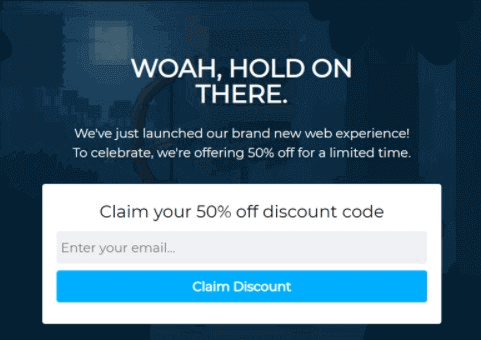
If you’re not sure how to get started, you should check out this article on exit popup hacks that you can use today. There are 40 different ideas on how to create powerful exit offers that work. So, you’ll have loads of great ideas to borrow.
We highly recommend using OptinMonster to create your exit-intent popups. They pretty much pioneered the exit-intent campaigns, and they have a bunch of other cool features. OptinMonster is the most powerful conversion optimization toolkit in the world.
So, check it out now!
#2. Setup Shopping Cart Abandonment Push Notification Campaigns
Push notification campaigns are what PushEngage specializes in. We’re proud to say that Wicked Weasel gets 9.58% conversion rates from their cart abandonment push campaign. So, let’s walk you through the basic idea first.
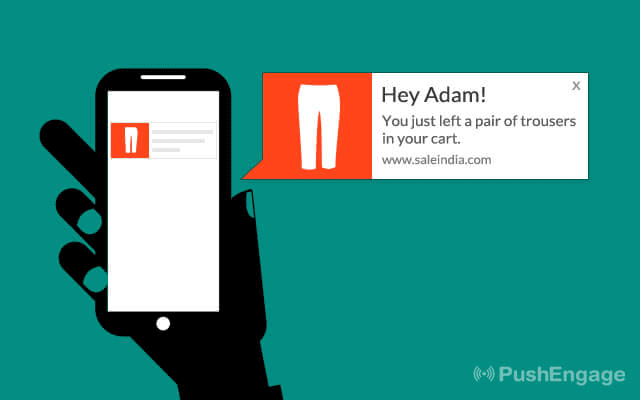
Cart abandonment push notifications are exactly like email cart abandonment campaigns. But the only difference is that you use push notifications. Push notifications get really high open rates and click rates. So, if you create a good campaign, you’ll recover a lot of abandoned sales.
The best part? You can set up a sequence of follow-ups just like an email campaign.
If you’d like a complete walkthrough, check out our article on how to set up abandoned cart notifications with PushEngage. It’s straightforward, and if you’re stuck with anything at any time, our Customer Success team can help sort things out for you.
And if you haven’t already, try out PushEngage today.
#3. Be Crystal-Clear About All Costs Upfront
A survey by UPS uncovered that all customers universally hate shipping charges. They hate hidden charges even more. This includes taxes and shipping costs alike. Be crystal-clear about all these costs upfront.
A common misconception is that showing these costs at various stages of the checkout process will convert better. Many stores assume that the audience is more invested in the process and are more likely to pay high shipping charges.
This is not a good idea.
Be clear about the exact offering as well. If you have different shipping options with different price brackets, be very specific about the nature of the shipping.
For instance, this is a common scenario in Shopify:
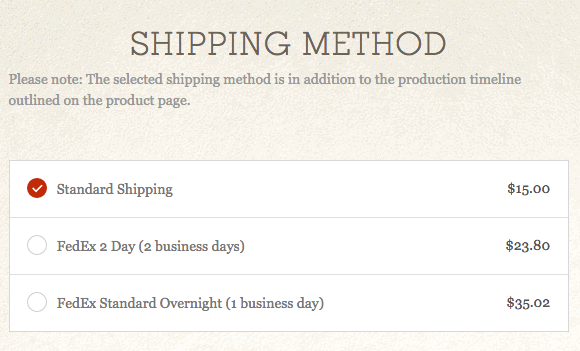
What does “standard shipping” even mean? How long does it take?
A little clarity goes a long way in building trust. Of course, transparency isn’t the only way to establish trust. We have another great tactic coming up next!
#4. Use Familiar Logos to Establish Trust
Everyone knows what these are:

Financial logos symbolize trust. These are organizations that have spent an eternity establish brand trust. And you can use these logos to develop trust for your brand as long as you offer these payment options.
It’s such a simple idea, but it really works. We use it too with a slight twist. We even tell our customers exactly what to expect from the financial transaction:

We’ve essentially combined ideas #3 and #4 to offer clarity, transparency, and trust at the same time.
You can use Stripe to offer multiple payment options. If you submit more payment options, you make it more accessible for different people to buy your product.
Of course, there are alternative payment gateways you can use for WooCommerce. We recommend Stripe because that’s what we use too.
#5. Use Social Proof to Make Purchase Decisions Easy
So far, we’ve already seen how important trust is for sales. Of course, any business understands this concept already. So, let’s explore another nice idea to establish more trust in your prospective customers so that they don’t add to shopping cart abandonment numbers.
An easy way to establish trust is to tell people who else is buying your product. It helps if you can showcase testimonials from celebrities. But most small businesses either can’t get that level of access or simply don’t know how to embed reviews and testimonials from famous people.
So, as a simple workaround, show your prospective customers how many other ordinary people are buying the product right now.
This concept is called social proof.
According to TrustPulse, the best social proof plugin for websites, “92% of people will trust a recommendation from a peer. If you’re not leveraging social proof on your website right now, then you’re missing out!”
TrustPulse captures recent buyer activity on your websites such as signups and purchases and displays it like a floating badge using a simple, non-intrusive popup:
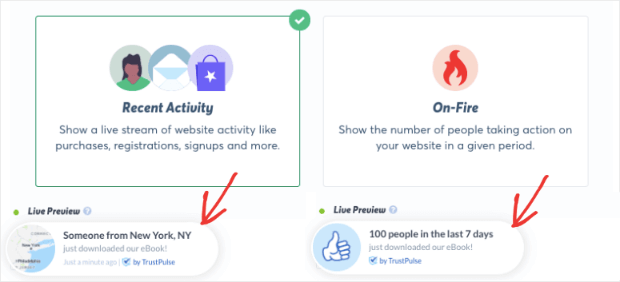
You can even customize the content in these popups to show specific statistics that give people the confidence to buy your product.
Understand this: These are NOT fake social proof. You can’t sell more products by lying about it. TrustPulse uses honesty to drive growth and reduce shopping cart abandonment in the process.
#6. Use Remarketing to Target Abandoners
Most of the tips we’ve given you so far are organic ways to remarket your product to cart abandoners. But you can run ads for remarketing as well. The big question is, which ad platform do you use to re-target the abandoned cart customers on WooCommerce?
A simple way is to use your Facebook page to run ads. Facebook uses a Javascript code snippet called Pixel that captures people who’ve visited your website. You can later use the Pixel to run ads.
Now, this only works if the cart abandoner came to your website from Facebook in the first place. So, a more universal approach is to use Google Ads for remarketing. Check out this ultimate guide to Google Retargeting Ads by MonsterInsights to get started.
Pro Tip: One solid piece of advice that we can offer is that you should set up retargeting ads only when your organic sources are taking way too long to be effective. If the other ideas in this article work out for you, consider using ads as a last resort.
Speaking of organic methods, you can even set up cookie retargeting ads for a WordPress website pretty quickly. Cookie retargeting allows you to show popups on your website if they revisit your website.
#7. Create Shopping Cart Abandonment Email Campaigns
We’ve already seen the push notification campaigns for cart abandonment. Cart abandonment email campaigns are an age-old tried and tested method.
Since we already understand the idea behind abandonment recovery campaigns, let’s look at how you can get it done. There’s a bunch of shopping cart abandonment software to choose from, but we recommend using WooCommerce Recover Abandoned Cart.
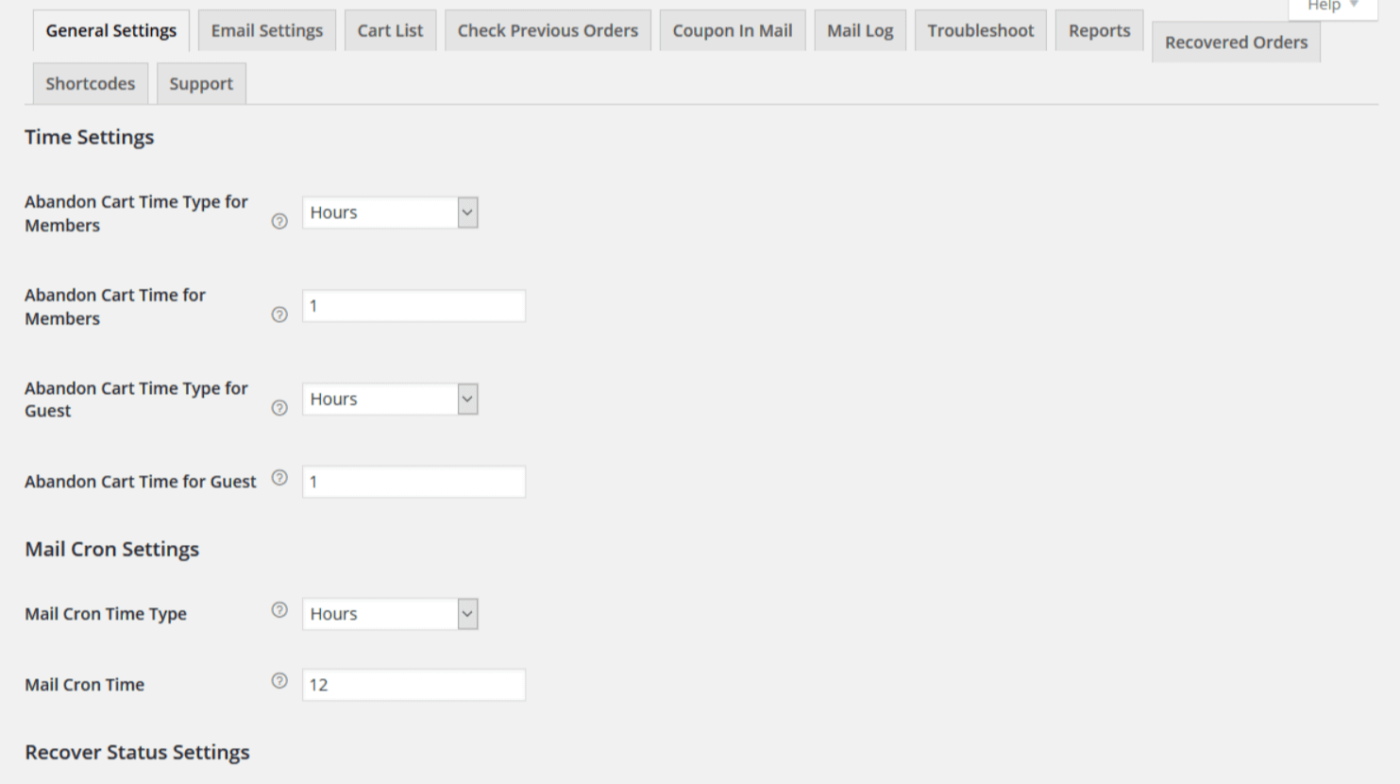
If you need some pointers with writing abandoned cart emails, then check out this article on some of the most effective abandoned cart email templates.
#8. Include a Progress Indicator on Checkout Pages
Ever get to the checkout counter at Target and get annoyed by the cashier asking you to:
- Get a “rewards card” to save 10%?
- Confirm your zip code?
- Give them your phone number?
That’s exactly what your customers feel when you have a lengthy checkout process.
A simple and helpful way to remove this problem is to give the customer a progress bar on your checkout pages. Well, technically, it doesn’t have to be a bar. Any indicator works just fine as long as it’s clear exactly how long the entire process is.
Use WooFunnels to create custom WooCommerce checkout pages with a progress indicator. It’s a simple WooCommerce funnel builder that takes 10 minutes to set up.
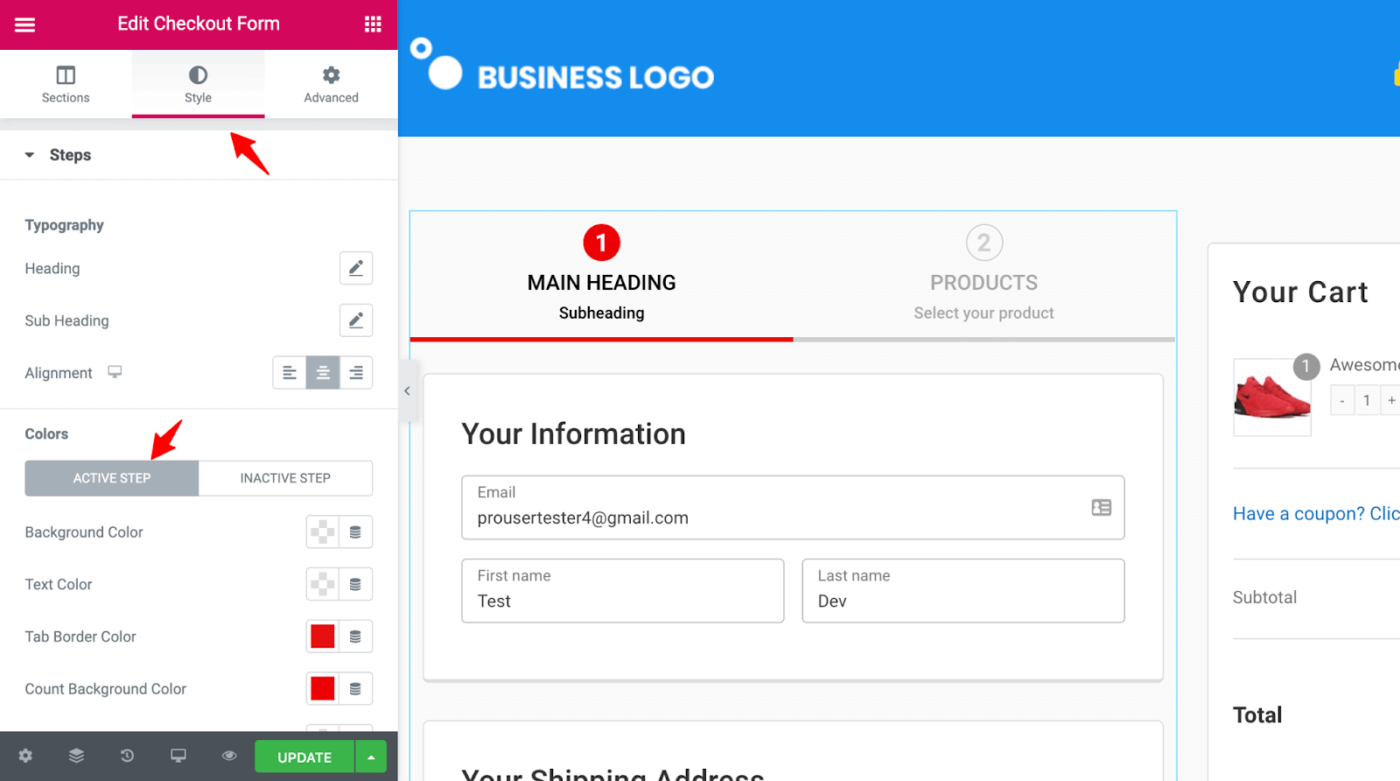
NOTE: Shopify does this by default. If you’re a Shopify user and you can’t see the progress bar, simply update to the latest version.
#9. Include Thumbnail Images of Products In the Checkout Process
One of the biggest issues with eCommerce checkouts is that, unlike an actual store, you can’t see the items you’re buying in front of you. Thankfully, there’s a very simple way to do this. You can display the thumbnail images of the products in the cart during checkout.
Now, this may not come as a default feature for all WooCommerce-compatible WordPress themes. Some store themes are built specifically for online shopping websites that may come with this feature. But more often than not, you’ll have to customize the checkout experience yourself.
One way to do this is to use a cart funnel builder such as CartFlows.
But if you’re setting up a new website on WordPress, you should try out SeedProd.
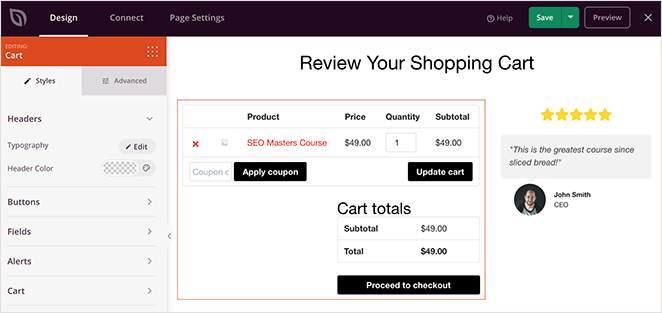
SeedProd is the ultimate drag-and-drop website builder for WordPress. The best part is that you can completely customize the checkout experience for an eCommerce site with SeedProd.
#10. Make Navigation Between Cart and Store Effortless
As we’ve already mentioned, shopping cart abandonment can often point to a broken user experience. And that’s a problem you’ll need to fix, pronto.
A simple way to improve your UX is to ensure that nothing is more than three clicks away for your website visitors. Let’s take a look at how you can make navigating between the cart and the store effortless in that same spirit.
If you paid attention to #9 and installed SeedProd, then this one’s going to be easy for you. SeedProd’s WooCommerce blocks allow you to create a custom flow and navigation between the product and cart pages.
And if you haven’t already, try SeedProd now and fix your website’s UX.
The easiest way to offer quick navigation is to use Add to Cart and Buy Now buttons on the product listing page.
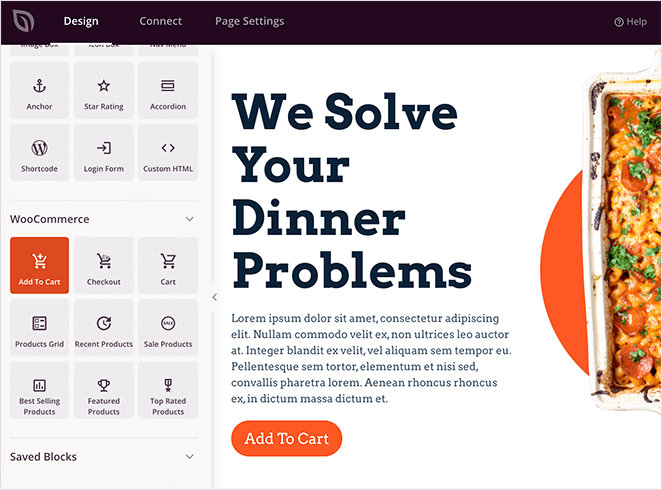
This gives the customer the option to either add a product to their cart and keep shopping or just checkout with one click.
Another way to do that is to include upsells and cross-sells during the checkout process.
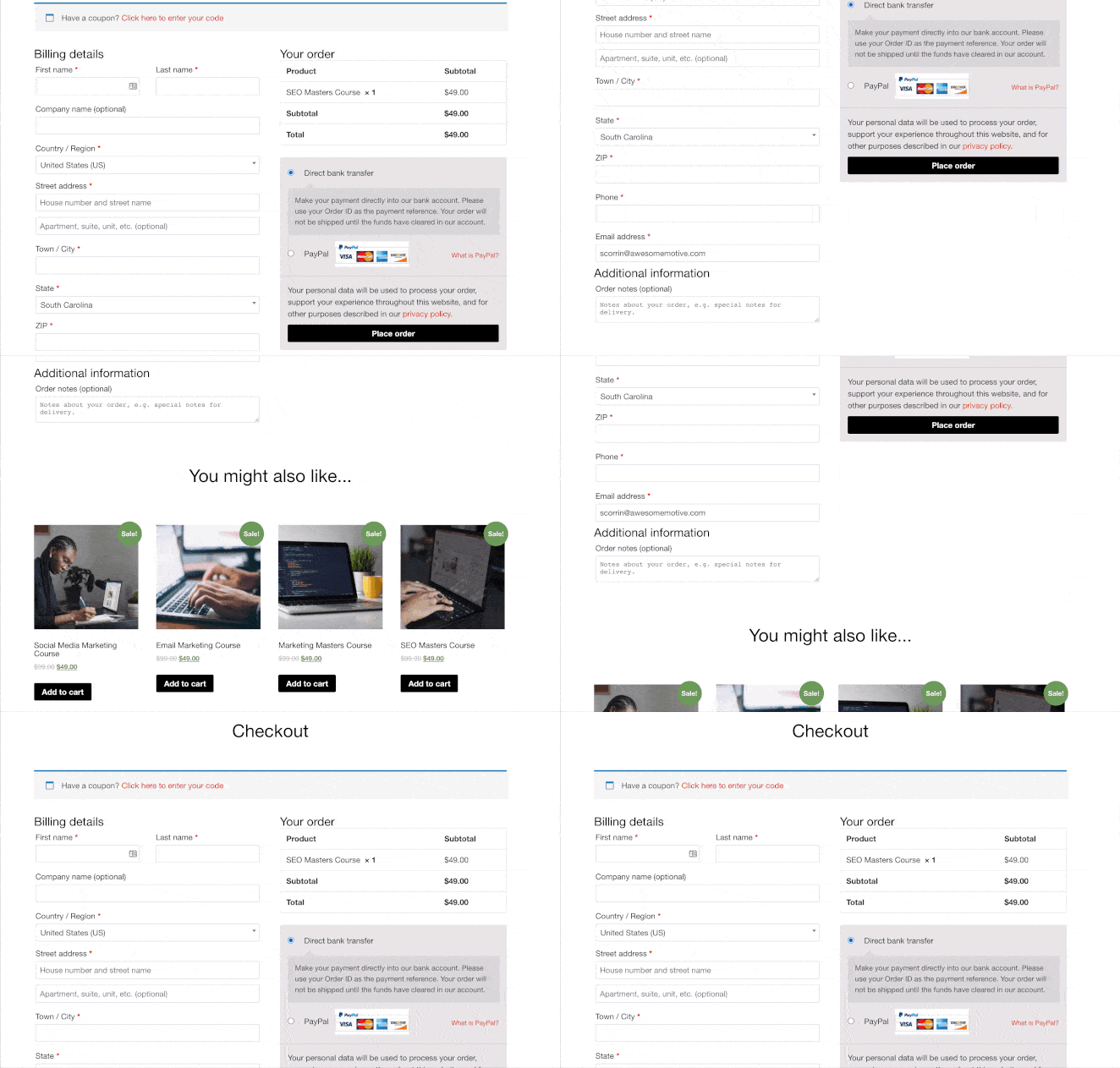
Since that’s a list of clickable product thumbnails, it’s easy to keep adding things to the cart.
Another way to do this is to have a Back to Store button on the cart page. This one’s a little complex and may need some custom coding on your part. But a simple workaround is to show the navigation menu in the cart pages as well.
#11. Use User-Generated Content to Convince and Convert
We’ve already covered live sales notifications and popups with TrustPulse. This idea is somewhat similar, but it takes a different approach altogether. We’re going to use what people post on social media to convince and convert prospective customers.
How do we do that? We use SmashBalloon! SmashBalloon is the world’s best social media feed plugin. Using SmashBalloon, you can post actual social media snippets of your reviews and testimonials online:
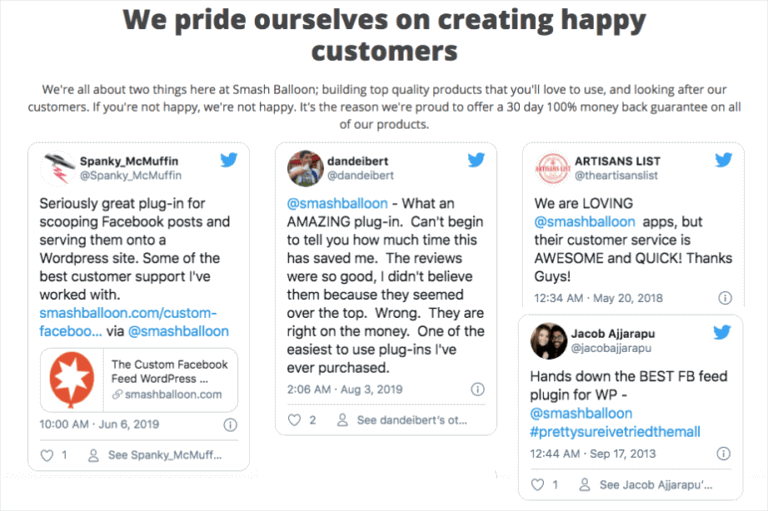
If you need some tips on how to get started, check out this article on 11 GENIUS examples of testimonials you can copy.
Pro Tip: Use 2-3 types of social proof across different stages of the checkout process to be more convincing. If you do a good job, it’ll give prospective customers the confidence to buy instead of abandoning the cart.
#12. Add Live Chat to Your Website to Reduce Shopping Cart Abandonment
Customers usually have a bunch of questions that they’d like answered before buying something. More often than not, it’s too much work to go find the FAQs, and the product description may not answer all their questions.
So, naturally, they’re not going to buy anything at all.
That’s where LiveChat for WooCommerce makes a major difference.
Using a live chat plugin, you can answer customer queries in real-time and convince them to buy the product.
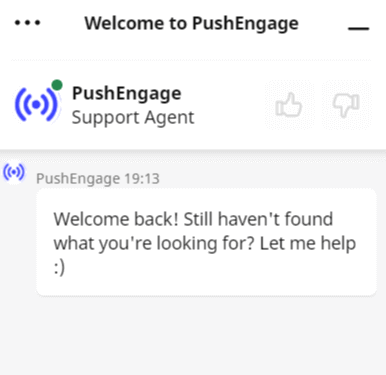
You can even set up triggers to initiate a chat if:
- A customer spends a lot of time on the product or checkout page
- A customer has added the product to the cart, but their payment isn’t coming through
- A customer’s cart value is high, and you can offer a coupon to help them buy right away
These are all automated and can help you convert a lot of sales very quickly.
#13. Showcase Your Most Popular Products
If you have more than one product listed on your website, you need to showcase your bestsellers. This tip is a great way to reduce shopping cart abandonment and increase the average order value.
Let’s take a look at how you can do this.
One very simple way to do it is to use SeedProd’s WooCommerce blocks again. You can actually customize the products you show on your cart page upsells. The Best Selling Products block will automatically fetch and display your bestsellers.
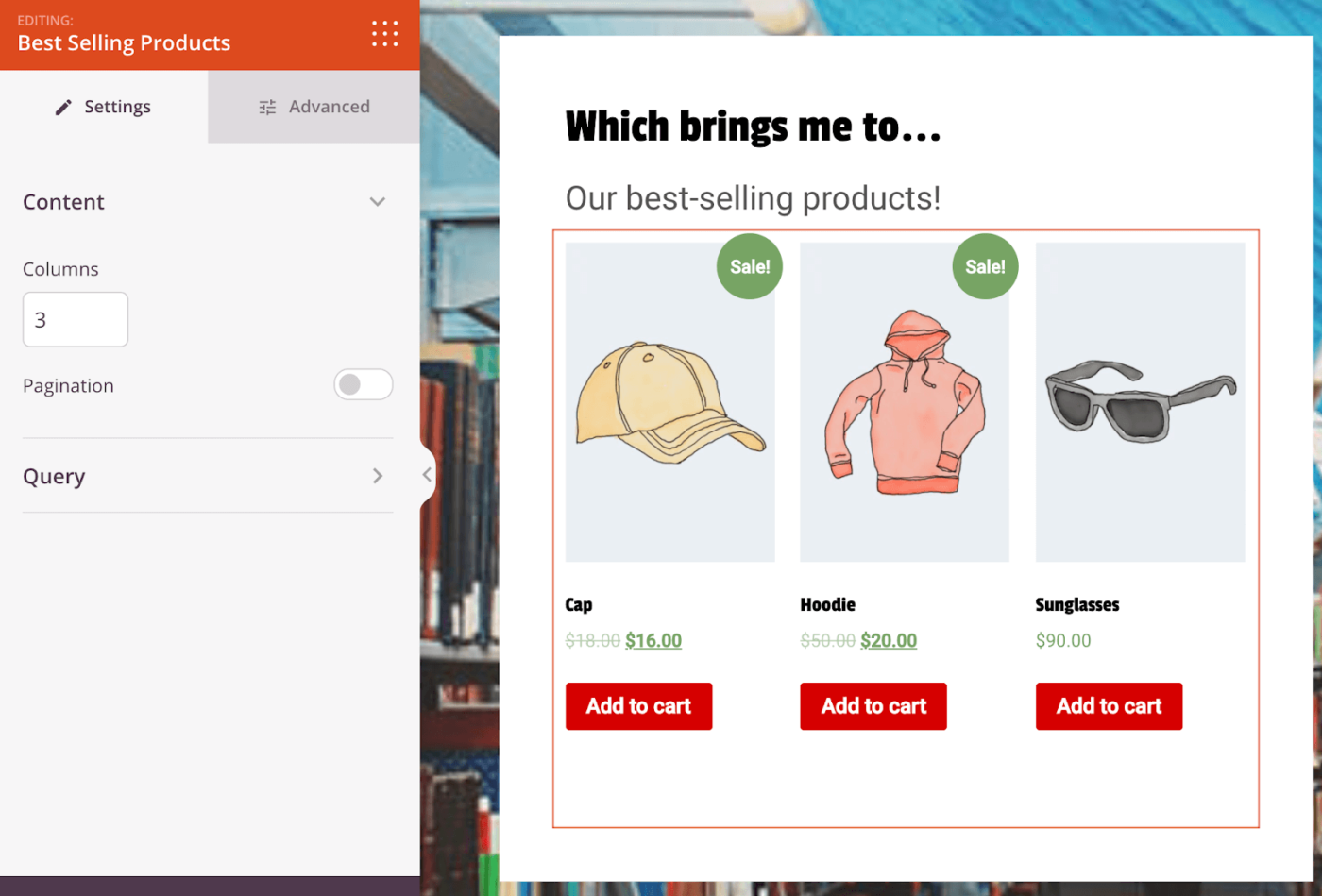
Another great way to do this is to use your analytics if you don’t have a page builder like SeedProd. Install MonsterInsights and enable eCommerce tracking on Google Analytics. Then just head over to the eCommerce report for your website:
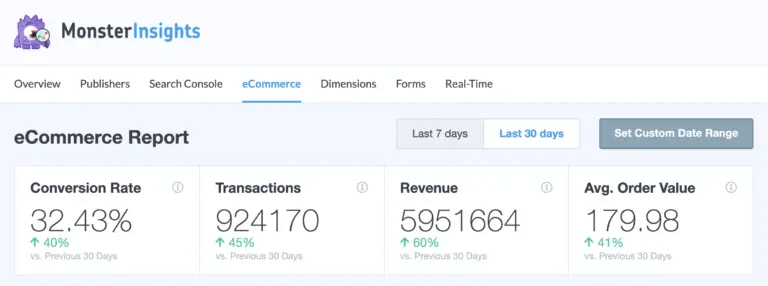
Looking at your analytics is a surefire way to find products that people already love and are eager to buy. Just scroll down in the eCommerce report, and you’ll see your top-selling products:
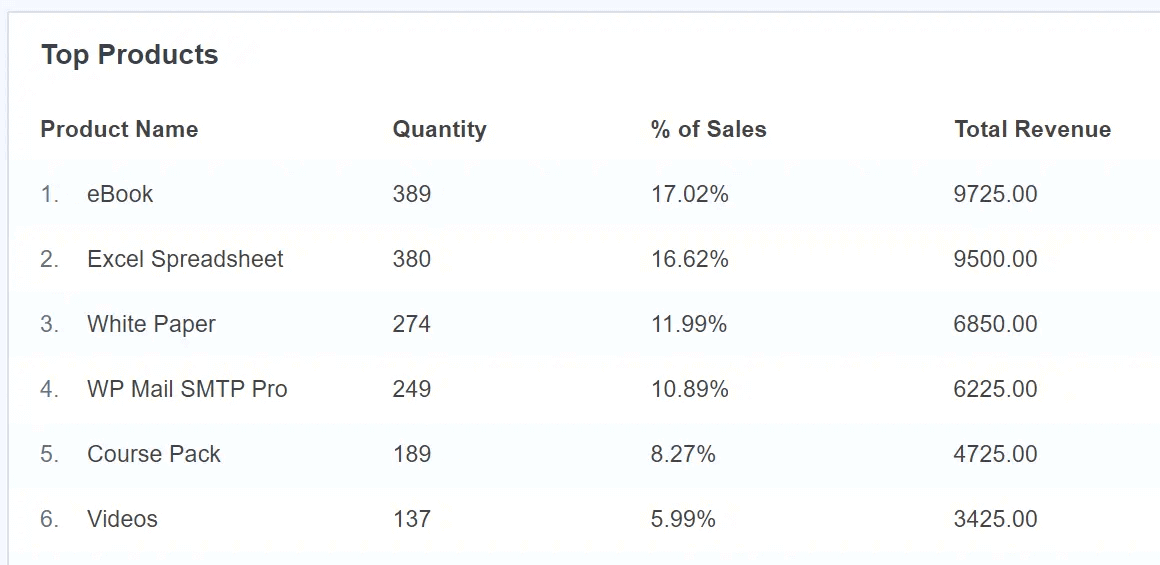
If you’re not sure how to get started, read this article on how to find your most popular products using Google analytics.
#14. Use Analytics to Find Faulty Conversion Funnels
In the last tip, we talked about MonsterInsights to find best-selling products. But you can do so much more than that.
MonsterInsights is the best Google Analytics plugin for WordPress. If you’ve ever found Google Analytics to be complicated and confusing, you NEED MonsterInsights in your life.
A great way to reduce shopping cart abandonment is to find faulty conversion funnels with high drop-off rates. Start by setting up Enhanced eCommerce tracking on your website.
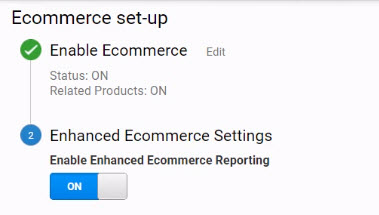
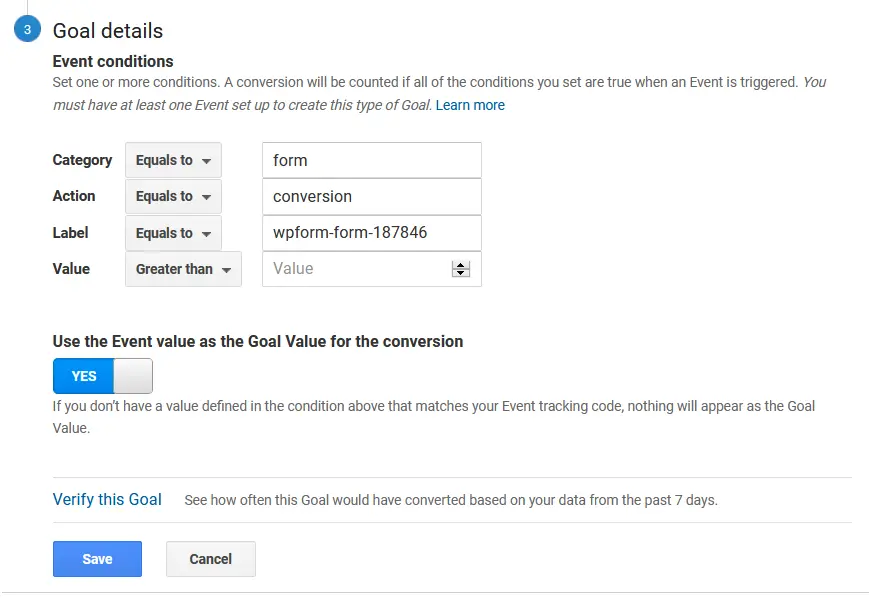
Then, you’ll want to set conversion goals on Google Analytics to flag every conversion.
Finally, head over to Conversion » Goals » Goal Flow to find faulty conversion funnels:
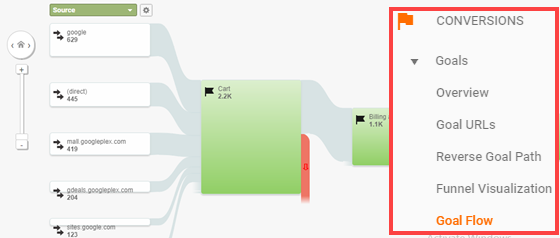
By checking your Goal Flow, you can identify how your visitors move from your product to the cart. Once you know this data, you can come up with practical ways to integrate shopping cart abandonment software with creative ideas to convert more prospective customers.
#15. Optimize Your Page Load Times
This may sound like an SEO tip, but it’s not. Optimizing your page load speed is a solution to broken User Experiences. Can you honestly remember the last time you waited for more than 3 seconds for a website to load? Your customers feel the same frustration.
Page speed optimization isn’t as easy as just install a caching plugin.
In all honesty, that’s an article in itself. So, just go and check out this article by WPBeginner on 24 Tips to Speed Up WordPress. It’s incredibly detailed and very actionable. There’s no nonsensical fluff about “what you may want to try.”
Instead, you get step-by-step instructions and plugin recommendations from experts who’ve tried out pretty much every plugin under the sun.
Push vs Email for Cart Recovery: The Reach Math
Most stores default to email for cart recovery because email came first. The math says otherwise. Your recovery campaign can only reach the shoppers who subscribed to the channel, and that is where the two channels diverge sharply.
Email list signup rates typically run 1% to 5% of traffic. Web push opt-in rates run far higher because subscribing is one click on a browser prompt, with no form and no inbox commitment. Across PushEngage campaign data, that opt-in gap gives cart abandonment push campaigns roughly 5 times the reach of email on the same traffic, and the campaigns themselves convert about 37% more effectively. The deeper numbers are in our email vs push notifications statistics breakdown.
| Channel | How shoppers join | Typical share of traffic reachable | Time to be seen | Best role in recovery |
|---|---|---|---|---|
| Web push | One-click browser prompt | Opt-in rates up to 4x email signup | Real time, on screen | First touch, 30 to 60 minutes after abandonment |
| Form with an address | 1% to 5% of traffic | Averages over 6 hours to be viewed | Detail-rich follow-up with the full cart | |
| Opt-in with phone number | Smaller list, near-total visibility | Minutes, 98% open rate | High-intent, high-AOV carts |
The takeaway is not push instead of email. It is push first, because it reaches shoppers email never sees, with email and WhatsApp layered behind it. A shopper who ignores all three was probably never going to buy.
How to Structure Your Cart Recovery Push Sequence
A single reminder blast leaves money on the table. The stores that recover the most revenue run a short sequence, where each notification does one job.
- Timing. Fire the first reminder 30 to 60 minutes after abandonment, while the purchase intent is still warm. Schedule later touches for the shopper’s local time zone, not yours. A discount landing at 8 am on a Sunday reads as noise.
- The three-notification arc. Notification one is a plain reminder with the product image. Notification two adds a time-limited incentive, such as a discount or free shipping. Notification three closes with scarcity, like low stock or an expiring offer. Stop the sequence the moment the shopper purchases.
- Urgency that is true. Real stock levels and real deadlines convert. Invented ones train subscribers to ignore you. Our guide to cart recovery urgency messaging covers the line between the two.
- Segmentation. In PushEngage campaign studies, segmented push notifications earned twice the click-through rate of broadcast sends. Segment by cart value, first-time vs returning buyer, and product category before you write a word of copy.
- Copy and image. You get roughly 40 to 120 characters. Lead with the product name, show the product image, and give the notification exactly one call to action.
- Payment options as CTA buttons. Around 6% of abandonment traces to a missing payment option. Push notifications support two CTA buttons, so route one to card checkout and one to an alternative like pay-on-delivery, and let the shopper pick.
- Social proof in the notification. A second-touch message such as “5 more shoppers bought this today” resolves hesitation that a plain reminder cannot.
The revenue impact of getting this right is documented, not theoretical. MyDeal grew revenue 20% with a cart abandonment push sequence, BollywoodKart lifted cart-recovery revenue 15%, SuperJeweler converts 8% of abandoners, and Charlton Athletic hit a 7.17% conversion rate on its campaign. To build your own, follow the 10-minute abandoned cart push setup, which includes nine ready-to-use notification templates.
What Next?
Most of these tips are incredibly powerful, and we highly recommend using all of them.
A nice way to implement them would be to try out one tactic at a time and measure the results from each of these ideas. (If your CRM is HubSpot, you can also automate abandoned cart recovery push notifications through HubSpot.) Just keep in mind that these tactics often have compounding effects. In other words, you’ll start seeing more dramatic results as you implement multiple ideas.
Channel playbooks: recover carts on WhatsApp without overpaying, set up WooCommerce cart abandonment campaigns, steal these WhatsApp cart abandonment templates, and follow the web push guide for eCommerce sites.
Hopefully, you’ll see a major spike in abandoned cart recovery once you implement these tips and tricks. You should take a look at these abandoned cart push notification templates to get your first cart abandonment campaign live in minutes.
Once you have the cart abandonment campaigns live, you should look at a similar problem called browse abandonment.
That’s all for this one. And if you haven’t already, get started with PushEngage today.


