It is Monday morning standup at a learner app — Coursera-Plus-shape, Skillshare-shape, Duolingo-shape — and the course-completion-rate slide is the second slide. It dropped from 31% to 24% over the last cohort. The product team blames the onboarding redesign that shipped six weeks ago. The lifecycle team has a different data point: 12% of new subscribers revoke push notification permission within seven days of their first lost streak. Two hours later, the trial-to-paid conversion number comes up at the leadership review — flat at 3% for three quarters running — and the same argument repeats itself in a different room.
Push notification automation for EdTech sits in the middle of both arguments and the lifecycle team is not sure how to defend the line item. The welcome push fires on signup. The lesson-reminder push fires every evening. The streak-warning push fires when the deadline approaches and another one fires after the streak breaks — the punishment push that triggers a meaningful share of the 12% revocation rate. The trial-end push fires once on day six and gives up.
Four mechanisms, none of them aware of each other, none of them holding a coherent view of where the learner sits in the lifecycle and — critically — none of them aware that the most engagement-destroying moment in the EdTech funnel is the “you lost your streak” notification that punishes the learner instead of saving them.
This article walks through what EdTech push automation should actually look like — workflow architecture, not lesson-reminder broadcasts plus a streak-warning trigger — and ships five learner-shaped workflow blueprints with timing, exit criteria, an anti-backfire streak-save mechanic that fires BEFORE the deadline rather than AFTER, and the revenue math that turns each one into a defensible line item for product growth and lifecycle.
- Why your EdTech "automated push notifications" are stalling course-completion rate
- The anatomy of an EdTech push notification workflow
- Five workflow blueprints for EdTech
- Learner-stage segmentation, A/B testing, anti-fatigue cooldowns, and exit criteria live inside the workflow
- Multi-channel orchestration: push, in-app (LMS surface), email, and parent SMS for K-12
- The retention math: course-completion lift and trial-to-paid conversion at learner-app scale
- Build it in PushEngage Workflows for your learner app
- What this changes
Why your EdTech “automated push notifications” are stalling course-completion rate
The word automation has been doing the same unearned work in EdTech that it has in the prior verticals. When most learner-app lifecycle teams say “automated push notifications for EdTech,” what they mean is event-triggered broadcast scheduling: a notification fires when a known event happens, with no state, no segmentation, no waits between touches, no exit conditions, and — most damaging in EdTech — no anti-backfire safeguards for the streak-mechanic moment that produces a meaningful share of permission revocations.
A workflow is something different. A workflow is a multi-step journey with state. It knows when the learner started the trial, what lessons they have completed, how close their streak is to breaking, whether they have already converted to paid, and what conditions cancel the journey — including the most important EdTech-specific exit, the one that fires the moment the learner revokes push permission and prevents the workflow from pushing them further toward complete unsubscription.
The lesson-streak workflow does not just send a “you lost your streak” push after the deadline. It fires three hours BEFORE the deadline with “your streak is safe — finish today’s 10-minute lesson,” waits, checks whether the learner engaged, and exits if they did. The punishment push never goes out because the workflow saved the streak before it broke.
That difference matters more in EdTech than in any other vertical. Winsome Marketing’s contrarian piece on EdTech push strategy puts it plainly: the streak mechanic, the frequency-without-discipline pattern, and the permission-revocation one-way door are the three patterns that destroy learner LTV faster than any other lifecycle mistake. The workflow architecture answers all three. Event triggers cannot.
For a mid-market learner-app lifecycle team, this is the difference between a course-completion rate that compounds and one that drifts down each cohort. Four triggers running in parallel produce four channels of fatigue. Five workflows running in coordination produce one journey per learner per lifecycle stage, branched and bounded by streak state, course progress, trial status, and permission state. The page-one search results for this keyword frame the problem as “5 push notification templates that work” and answer with a tool listicle. That is not the question your Monday standup is asking.
The anatomy of an EdTech push notification workflow
Before the blueprints, the vocabulary. An EdTech push notification workflow is built from six node types. Once you know what each does, every blueprint reads as a diagram, not a description.
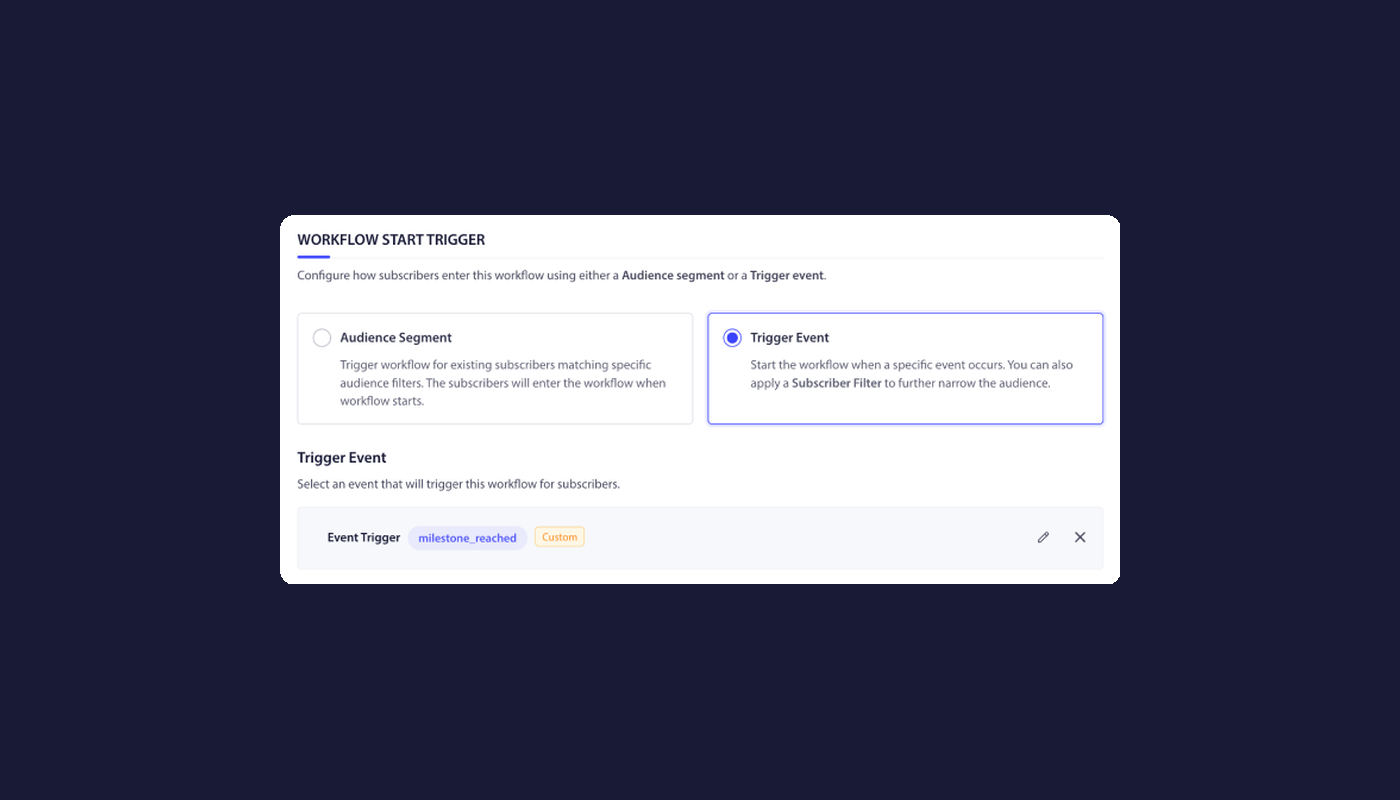
START. The entry point. A START node defines how the workflow is triggered, either by a subscriber event (lesson_completed, streak_at_risk — a CustomEvent the LMS fires when N hours have passed since the learner’s last engagement and the streak deadline is within four hours, module_completed, trial_started, live_class_scheduled, course_completed) or by an audience filter (learner_stage: trial / active / at-risk / lapsed / completed, permission_status, last_active). A workflow has exactly one START.
WAIT. A delay. A WAIT node holds the learner for a specified duration — minutes for streak-save windows, hours for lesson-cadence pacing, days for trial-to-paid sequencing — or until a specific calendar time using wait_until semantics tied to a subscriber attribute (streak_deadline - 3 hours, class_start_time - 1 hour, trial_end_date - 3 days). Waits are how a workflow honors a known future event.
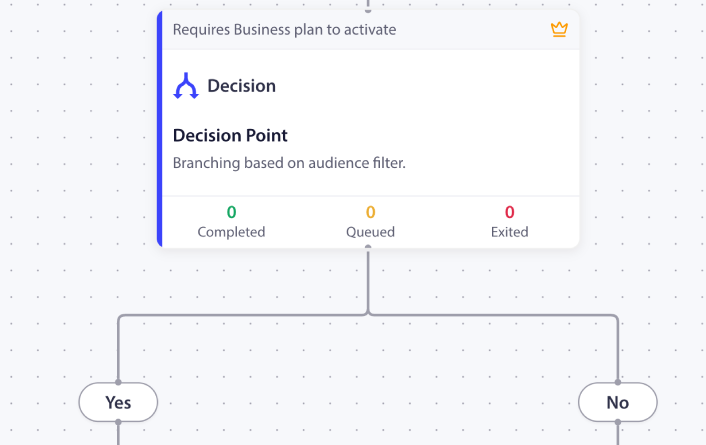
DECISION. A two-way branch. A DECISION node checks a per-learner condition: has the lesson been completed, did the learner engage in the last hour, is the trial converted, is push permission still granted. Per Workflows.md §7, DECISION nodes evaluate event filters and audience filters; they do not consume HttpRequest response bodies directly. To bring external LMS state into a workflow, the pattern is HttpRequest action triggers the LMS, the LMS writes back to a subscriber attribute via the PushEngage REST API, and the DECISION reads the attribute.
SPLIT_PATH. A percentage-based fork. SPLIT_PATH nodes route subscribers across paths based on configured percentages: 50/50 for an A/B test on streak-save copy, 33/33/34 for a three-way send-time test on lesson reminders. Once a winner emerges, you promote it to 100%.
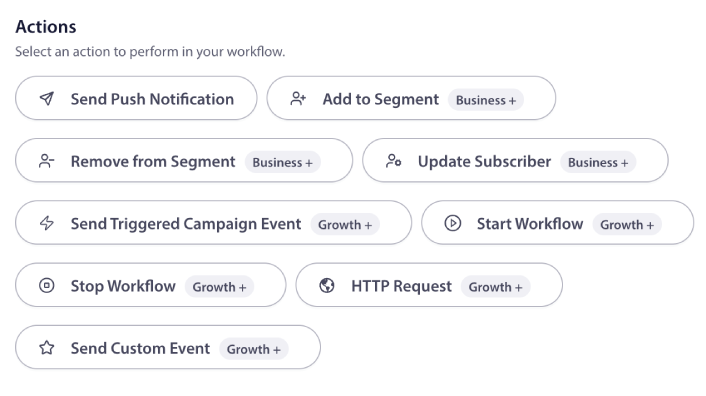
ACTION. The work itself. ACTION nodes send a push notification, send an in-app message on the LMS surface, add the learner to a segment, update custom attributes, fire an HttpRequest to the LMS for course-progress data or to a parent-SMS gateway, start another workflow (chain welcome into streak-retention), or stop one. PushEngage Workflows supports eleven action types; for EdTech the most useful are SendPushNotification, UpdateAttribute, HttpRequest, and Workflow.Start.
END / EXIT. The terminal. END marks the natural conclusion. EXIT marks an early termination — on the NO path of a Decision when the learner no longer qualifies, when the anti-fatigue cooldown rule fires, or when a goal is met (lesson_completed, trial_converted, course_completed). The EdTech-specific exit that matters most: permission_revoked — the workflow cancels the moment the learner revokes push, preventing the post-revocation phantom-send problem that destroys re-permission opportunities.
Every blueprint below composes from these six pieces.
Five workflow blueprints for EdTech
These are not templates. They are working blueprints for online course push notification automation. Each one lists its trigger, run type, node sequence, exit criteria, and the EdTech retention metric it is built to move. You can lift each one into the PushEngage Workflows builder and ship the first version in under an hour. The legacy e-learning push notification campaign ideas post catalogs the campaign types these blueprints implement; what follows is the journey architecture that strings those campaigns together.
Blueprint 1 — Welcome + first-lesson nurture
- Trigger (START): Event
PushEngage.Subscriber.AddedORaccount_created - Run type: Single (one welcome journey per learner per 90-day window)
- Flow: Welcome push with a one-tap link to the first recommended lesson → WAIT 1 day → DECISION: has the learner completed lesson 1? → YES path: congrats push and ACTION
Workflow.Startinto Blueprint 2 streak-building → NO path: send a “your first lesson is 10 minutes — start here” push, WAIT 2 days → DECISION: lesson 1 still incomplete? → YES path: send a “what brought you here?” push offering a different first-lesson option, END → NO path: chain into Blueprint 2 - Exit criteria: None for the welcome journey itself; the workflow chains into Blueprint 2 for engaged learners and ends gracefully for disengaged ones.
- EdTech metric: Lesson-1 completion rate at day 7. This is the highest-leverage moment in the learner lifecycle — the drip campaigns and autoresponders post covers the autoresponder mechanics this blueprint extends.
Blueprint 2 — Lesson-streak retention with anti-backfire mechanic (lesson streak push notification automation)
This is the blueprint nobody else on the SERP describes — and the one that fixes the biggest cause of permission revocation in EdTech.
- Trigger (START): Custom event
streak_at_risk(fired by the LMS when N hours have passed since the learner’s last lesson and the streak deadline is within four hours) - Run type: Multiple Parallel (each at-risk streak event is its own workflow instance)
- Flow: DECISION: did the learner engage in the last hour (audience filter on
last_lesson_completed_time)? → YES path: EXIT (no need to fire) → NO path: send a PREVENTIVE push — “your streak is safe — finish today’s 10-minute lesson” referencing the specific lesson queued for today → WAIT 3 hours (timed to streak deadline minus one hour) → DECISION: streak still at risk? → YES path: send a category-specific push — “1 hour left — your favorite category is queued” referencing the learner’s most-engaged category → END → NO path: EXIT - Exit criteria:
streak_extendedevent OR audience filterpermission_status = revoked(the workflow exits the moment the learner revokes push, preventing any further sends to a near-revocation state) - EdTech metric: Streak-retention rate and permission-revocation rate. The Winsome Marketing critique frames the standard industry pattern bluntly: “you lost your streak” pushes are punitive, they punish the learner for a missed deadline rather than saving them, and they drive a meaningful share of the permission-revocation rate. This blueprint inverts the timing — fire BEFORE the deadline to save the streak, not AFTER to mark the loss. The punishment push never sends because the workflow saved the streak before it broke. That inversion is what lesson streak push notification automation looks like when the workflow knows the deadline; the standalone trigger does not.
Blueprint 3 — Course-completion recovery
- Trigger (START): Custom event
module_completedfor module N, combined with audience filternext_module_not_started_in_72_hours - Run type: Single per course
- Flow: WAIT until 72 hours after
last_module_completed_time→ DECISION: has the learner started module N+1? → YES path: EXIT → NO path: send a “module N+1 picks up where you left off — 15 minutes” push referencing the specific next module → WAIT 5 days → DECISION → YES: EXIT → NO path: send a “your course is 40% complete — finish strong” push with a personalized progress visual → END - Exit criteria: Goal
course_completedOR audience filtercourse_abandoned_for_30_days - EdTech metric: Course-completion rate. The drop after module 2 or 3 is the highest-leverage moment in most EdTech course funnels — addressing it with a structured course completion push notification workflow rather than a single nudge is what moves the curve.
Blueprint 4 — Free-trial-to-paid conversion
- Trigger (START): Custom event
trial_startedwithtrial_end_datewritten to a subscriber attribute - Run type: Single per trial
- Flow: WAIT until
trial_end_date - 3 days→ “your trial ends in 3 days — here is what you have completed” push with a progress recap → WAIT 1 day → DECISION: subscription started? → YES path: EXIT → NO path: trial-ending-tomorrow push referencing the most-engaged category → WAIT 1 day → DECISION → YES: EXIT → NO path: final-day push with an annual-billing discount → END - Exit criteria: Goal
subscription_started - EdTech metric: Trial-to-paid conversion rate. Every 1% lift at a $19/month tier with 5,000 monthly trials is roughly $114,000 in incremental ARR. The cart-abandonment template from the eCommerce library translates directly: swap the trigger event to
trial_started, swap the exit goal tosubscription_started, and the wait cadence can stay close to the same shape with the timing pinned totrial_end_daterather than to elapsed-time-from-trigger.
Blueprint 5 — Cohort engagement for synchronous live classes
- Trigger (START): Custom event
live_class_scheduledwithclass_start_timeattribute - Run type: Single per class enrollment
- Flow: WAIT until
class_start_time - 24 hours→ “your live class is tomorrow — here is the prep” push with pre-class resources → WAIT untilclass_start_time - 1 hour→ “class starts in 1 hour — join link” push with a deep-link to the live-class URL → WAIT untilclass_start_time + 30 minutes→ DECISION: did the learner join? → YES path: EXIT (post-class follow-up is a separate workflow) → NO path: send a “you missed today’s class — here is the recording and key timestamps” push, END - Exit criteria:
live_class_attendedevent ORlive_class_cancelled - EdTech metric: Cohort attendance rate and missed-class recovery rate. Synchronous EdTech (Maven, Section, On Deck shape; university online cohorts) needs this workflow more than async self-paced platforms — adapt the trigger to your enrollment-cohort schedule and the WAIT-until pattern handles the rest.
Learner-stage segmentation, A/B testing, anti-fatigue cooldowns, and exit criteria live inside the workflow
The dominant pattern across EdTech push articles is to list these four concepts as “best practices” — generic bullets at the end of a strategy post, divorced from the campaigns that use them. That is the wrong frame. They are not best practices that sit next to the workflow. They are the workflow.
| Concept | Best-practice framing (wrong) | Workflow-node framing (correct) |
|---|---|---|
| Learner-stage segmentation | “Segment learners by stage” | A DECISION node on the subscriber attribute learner_stage (trial / active / at-risk / lapsed / completed) that routes trial learners to Blueprint 4, at-risk learners to Blueprint 2’s streak save, and lapsed learners to a re-engagement sequence — each branch has different cadence, copy, and exit criteria |
| A/B testing | “Always A/B test your streak-save copy” | A SPLIT_PATH node with 50/50 allocation, load-balanced learners per path, and a winner_edge_id field that promotes the winner to 100% once the test reaches significance — most EdTech A/B tests run on the preventive-streak-save copy (urgency vs. encouragement framing) |
| Anti-fatigue cooldowns | “Send fewer, better notifications” | A workflow-level exit rule that cancels the sequence if the learner received more than N pushes in the last 24 hours — the enforced version of the Winsome Marketing argument; the engine respects the cap whether or not the campaign owner is paying attention |
| Exit criteria | “Stop the streak-save sequence once the streak is saved” | A workflow-level rule that checks the learner against streak_extended goals AND the audience filter permission_status = revoked before each node, and cancels the workflow if either matches. The permission_revoked exit is the EdTech-specific differentiator — no other vertical loses permission at the same rate, and no other vertical’s workflows need to exit this aggressively to protect re-permission opportunities |
The difference matters because best-practice bullets are easy to nod at and hard to enforce. Workflow nodes get enforced by the engine. The DECISION runs every time. The SPLIT_PATH balances every learner. The anti-fatigue cooldown blocks the over-send without anyone remembering to check the count. The permission_revoked exit prevents the post-revocation phantom-send that would otherwise turn a recoverable disengagement into a permanent unsubscribe.
For Blueprint 2’s streak-save flow, this means the moment a learner revokes push permission mid-workflow — at hour 1, hour 3, or hour 3:59 of the journey — the exit rule fires, the workflow cancels, and no more streak-save pushes go to someone who already turned the channel off. The platform keeps the door open for re-permission later instead of slamming it shut with one last push.
Multi-channel orchestration: push, in-app (LMS surface), email, and parent SMS for K-12
EdTech channels differ from prior verticals. Web push and app push reach the learner outside the LMS. In-app messages reach the learner inside the LMS at the exact moment of engagement — the highest-friction-aware surface, since the learner is already in a learning context when the message lands. Email is the long-form pre-class or assignment-recap container. For K-12 platforms, parent SMS is a separate compliance-sensitive channel that requires explicit parental consent (COPPA for under-13). Composing all four — or five with K-12 parent SMS — inside one workflow is what makes the difference between a lifecycle team that delivers a coherent learner experience and one that sends the same nudge across three channels and apologizes the next quarter for the fatigue.
A composed streak-save workflow reads like this:
- START:
streak_at_riskevent for a learner withpermission_status = granted - DECISION: is the learner currently in the LMS (audience filter on
in_lms_session = true)?- YES: ACTION fire an in-app message on the lesson dashboard (lowest friction; learner is already in a learning context)
- NO: continue
- DECISION: is the learner subscribed to web push or app push?
- YES: ACTION fire a push to the device
- NO: ACTION fire an email with the same content (push fallback)
- DECISION (K-12 only): is the learner under 13 AND is
parent_consent_status = granted?- YES: ACTION HttpRequest to the parent-SMS gateway with a parent-appropriate message
- NO: EXIT (no parent SMS without explicit consent on file)
- WAIT 3 hours
- DECISION: streak still at risk?
- NO: EXIT
- YES: ACTION fire the urgent 1-hour-left push
- EXIT on
streak_extendedorpermission_revoked
One learner identity, one workflow, four (or five) channels chosen by state. The cheapest viable channel goes first — in-app while in the LMS, push if subscribed, email as fallback. For K-12, the parent-SMS branch only fires when consent is on file, which is the workflow-level expression of COPPA compliance. For more on the channel-choice math, the push vs in-app notifications comparison covers the personalization and cost tradeoffs.
Running this with separate tools means four vendor logins, two segmentation engines that disagree about who counts as a near-streak-loss learner, and no single revenue attribution per learner per channel. Doing it inside one workflow engine means one learner identity, one set of decision logic, and one funnel report that shows where the journey actually breaks. None of the top fifteen results for this keyword describes a cross-channel EdTech workflow as a single object — the universal push notification examples catalog covers individual notifications, not journey orchestration.
The retention math: course-completion lift and trial-to-paid conversion at learner-app scale
EdTech monetization spans a wide range — Khan Academy (free + donations), Duolingo Super ($7/month), Skillshare ($14/month), Coursera Plus ($59/month), MasterClass ($120/year), professional certificates ($2,000–$5,000) — which changes the retention math behind automated push notifications for EdTech against eCommerce ($50–$200 carts), SaaS ($99–$999 ARR), publishers (ad RPM or subscription), and travel ($300–$5,000 booking). PushEngage Workflows tracks the same three numbers at each node — queued, completed, exited — and the same node-level analytics pattern applies, but the EdTech metric set leads with course-completion rate and trial-to-paid conversion rather than recovered-cart value or NRR.
Here is what node-level analytics look like for an active trial-to-paid conversion workflow at a B2C learner app with 5,000 monthly trials at a $19/month tier (illustrative numbers):
| Node | Queued | Completed | Exited | Notes |
|---|---|---|---|---|
| START (trial_started) | 0 | 5,000 | 0 | All new trials enter |
| WAIT until trial_end_date – 3 days | 124 | 4,800 | 76 | 76 converted before the workflow’s first touch fired |
| ACTION: trial-ends-in-3-days push | 0 | 4,800 | 0 | Notification sent |
| WAIT 1 day | 88 | 4,250 | 462 | 462 converted after touch #1 (9.6% on touch alone) |
| DECISION: subscription_started | 0 | 4,250 | 0 | Branching |
| ACTION: trial-ending-tomorrow push | 0 | 4,250 | 0 | Notification sent |
| WAIT 1 day | 64 | 3,850 | 336 | Another 336 converted after touch #2 (7.9%) |
| ACTION: final-day push + annual discount | 0 | 3,850 | 0 | Final touch |
| END | n/a | 3,850 | n/a | 3,850 did not convert |
In this cohort, 874 trials converted to paid (out of 5,000) — a 17.5% trial-to-paid conversion rate driven by the workflow’s three touches. At $19/month, that is $16,606 in MRR added per cohort, or roughly $199,272 annualized if monthly cohort size holds. At a $59/month Coursera-Plus tier, the same 17.5% conversion is $51,566 in MRR per cohort. The two waits (24 hours and 24 hours) are the highest-exit nodes — the expected pattern.
The Springer Nature 2025 paper “You have a notification: the role of push notifications in shaping students’ engagement, self-regulation and academic procrastination” found that thoughtfully-timed notifications reduce academic procrastination and enhance self-regulation in higher-ed online learners — peer-reviewed evidence that the workflow timing decisions made in Blueprint 2 and Blueprint 3 are not just intuitive but causal. Separately, a 2025 paper in the International Journal of Human–Computer Interaction (Taylor & Francis) on optimizing push notification timing for online learning found that morning and evening sends materially outperformed midday sends for engagement and reaction time. Both findings translate directly into workflow-level SPLIT_PATH timing tests and quiet-hours windows.
The cost math behind online course push notification automation runs the same shape as articles 1-4 in this series. Web push and in-app messages cost nothing per send after opt-in. Email scales with ESP contract. Parent SMS via Twilio runs at ~$0.0079 per US-domestic message — at K-12 cohort scale, this is the most expensive channel and the workflow’s escalation logic must respect that. The workflow’s job is to use the cheapest viable channel first and escalate only when state demands it. When the line item reads “trial-to-paid workflow added $16K MRR per cohort at a $200 all-in monthly channel cost,” the QBR conversation is short.
Build it in PushEngage Workflows for your learner app
Each of the five EdTech blueprints maps directly to PushEngage Workflows components. The mapping:
| Blueprint | Node types used | Action types used | Workflow option |
|---|---|---|---|
| Welcome + first-lesson nurture | START, WAIT, DECISION, ACTION, END | SendPushNotification, Workflow.Start | Run type: Single |
| Lesson-streak retention (anti-backfire) | START, DECISION, ACTION, WAIT, DECISION, END | SendPushNotification | Run type: Multiple Parallel; exit on permission_revoked |
| Course-completion recovery | START, WAIT, DECISION, ACTION, END | SendPushNotification | Run type: Single per course |
| Free-trial-to-paid conversion | START, WAIT (wait_until trial_end_date), DECISION, ACTION, END | SendPushNotification | Run type: Single; exit on subscription_started |
| Cohort engagement for live classes | START, WAIT (wait_until class_start_time), ACTION, DECISION, END | SendPushNotification | Run type: Single per enrollment |
The Workflows engine ships with 60+ shipped templates that cover the building blocks for each blueprint. Most templates are eCommerce-shaped, but the adaptation to EdTech is straightforward: the welcome template fits Blueprint 1 directly; the abandoned-cart template logic becomes the course completion push notification workflow in Blueprint 3 by swapping the trigger to module_completed and the exit goal to course_completed; the same template becomes Blueprint 4 trial-to-paid by swapping the trigger to trial_started and the exit goal to subscription_started; the drip-autoresponder template fits Blueprint 5 cohort scheduling with wait_until pinned to class_start_time.
For the immediate trial path, the free plan gives you 200 subscribers, all the learner-facing channels (web push, app push, in-app on the LMS surface, email fallback, plus HttpRequest to a parent-SMS gateway for K-12 cohorts) plus the full Workflows engine on day one. That is enough to ship Blueprint 2 — the streak-save workflow — on a test cohort of 200 learners, capture node-level analytics for two weeks, and have a defensible permission-revocation-rate number for the next product review. For PushEngage’s web push capabilities specifically — the learner-facing channel that does the most lifecycle work — PushEngage web push notifications covers the feature set.
What this changes
If you take one thing from this article, take this: push notification automation for EdTech is workflow architecture, not lesson-reminder broadcasts plus a streak-warning trigger.
The streak-save workflow that fires three hours BEFORE the deadline rather than after it broke, the course-completion recovery that catches the drop at module 2, the trial-to-paid journey that exits the moment a learner converts, and the cohort workflow that pins to class_start_time are all the same shape — one START, some WAITs, some DECISIONs, some ACTIONs, an EXIT.
Four standalone triggers cannot do this. One workflow engine can. And that’s the same answer eCommerce, SaaS, publishers, and travel arrived at — the vertical changes, the architecture does not.
Start on the free plan to ship the first blueprint on your next learner cohort.


