Platform overview
Six ways to reach a customer,
one place to run them.
PushEngage is one platform for web push, app push, PWA push, in-app messages, WhatsApp and a chat widget, with the automation and reports that connect them.PushEngage runs all six channels, plus the automation and reports that connect them.
75,000+ businessesNearly 500 billion web push notifications delivered14-day money-back guarantee
News breaks. The site sends a push with PushEngageReader clicks, the story reopens with the update
Explore web pushGate changes. The app sends a push with PushEngageTap opens the boarding pass for gate B12
Explore app pushFan saves the club site to the home screenPushEngage sends the push. Line-ups open
Explore PWA pushOrder is confirmed in the appThe app shows a thank-you with PushEngage
Explore in-app messagingThe store sends a cart reminder with PushEngageShopper pays. Confirmation arrives on WhatsApp
Explore WhatsAppThe PushEngage widget lists your channelsWhatsApp opens with a message ready
Explore chat widgetTrusted by teams at








Set it up once. It keeps sending.
Welcome messages, cart reminders and back-in-stock alerts go out on their own, so you can spend your time on the next campaign.
Plan a message series once.
Lay out the steps on a canvas: wait an hour, check whether they bought, then send a reminder or stop. Start from 66 ready-made templates across nine categories. Turn on quiet hours and they follow each subscriber’s own time zone, so nobody gets a message at 3 a.m.
Explore workflows“The app has all the push notifications you would want to send. We can send out both browse and cart abandonment notifications, create drips to make sure we are interacting with customers. The dashboard is also very crystal clear. I liked it.”
Send the message the moment a shopper acts.
When someone leaves a cart, browses without buying, or watches a product that drops in price or comes back in stock, PushEngage sends the right message on its own. Set a daily and weekly limit on each campaign, so no one gets the same reminder too often.
See triggered campaigns“PushEngage allowed us to recover abandoned carts without even having to collect emails. The integration was seamless and I liked the app.”
Send each message to the people it is for.
Group subscribers by the pages they visit, where they are, the device they use and how they engage. Turn on page-visit updates and groups refresh as people browse.
Learn about segmentationSee what every channel earns.
Reports break down by channel and campaign, and goal tracking ties each send to the sale or signup it led to.
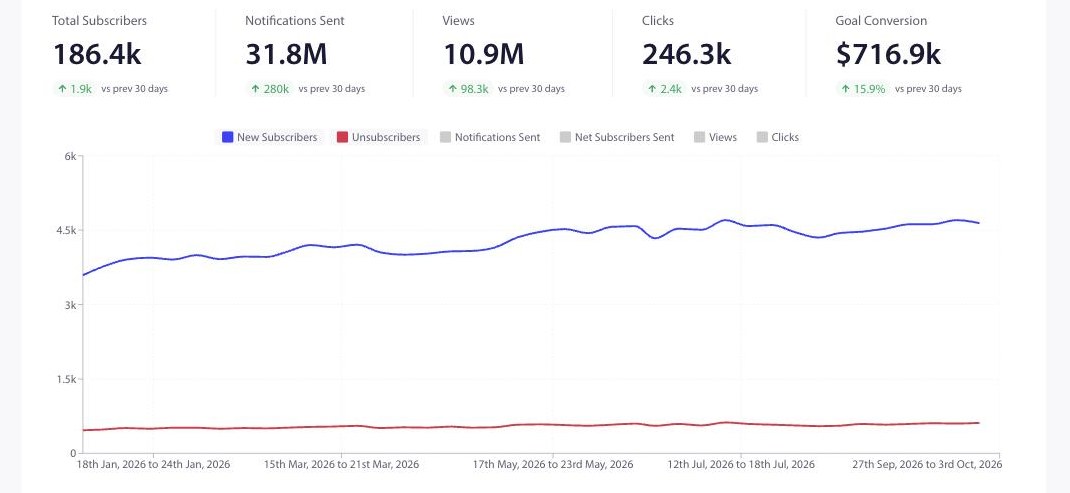
In the PushEngage web push benchmark, with data through August 2026, triggered sends drove 272,496 tracked conversions. For established senders (sites with 100,000 or more lifetime sends), the median click rate is 2.29% on viewed notifications and 0.81% on sent ones.
PushEngage platform data, web push, August 2026. Read the benchmark report
Subscribers, sends, views and clicks for each channel and campaign.
Attach a goal to any campaign and see the revenue it brought in.
Test two versions, and PushEngage sends the winner to the rest of your audience.
I had to design a custom app for tournaments where I needed specific information to go to different areas on the same screen for mobile app. The help I received from support allowed me to setup deep links so I could route the information to the correct area. I have tested it and it is working great.”
Works with the tools you already use.
Connect your store, your CRM and your AI assistant. Developers get APIs and SDKs for everything else.
Integrations
Stores, CMS and CRM.


AI tools
Work with PushEngage from the assistants you already use.
MCP server
Connect Claude, Cursor or another MCP client. Ask it to pull analytics, build a segment or draft a notification for your approval.
Set up MCPAdd PushEngage to your app and your stack.
SDKs for every platform, a REST API, and AI tooling that does the setup with you.
SDKs for every platform
Add app push and in-app messaging to your iOS, Android, React Native or Flutter app. A developer adds the SDK once, and every channel runs from the same dashboard. On a website, web push needs no SDK.
# React Native
npm install @pushengage/pushengage-react-native

# Flutter
flutter pub add pushengage_flutter_sdk

# iOS, in your Podfile (or Swift Package Manager)
pod 'PushEngage', '~> 1.1.0'

# Android, in build.gradle (via JitPack)
implementation 'com.github.awesomemotive:pushengage-android-sdk:1.0.0'
REST API
Send notifications, manage segments and read analytics from your own systems. Workflows can call your systems too, with the HTTP request step.
Read the API docscurl https://api.pushengage.com/apiv1/notifications \
-X POST \
-H 'Api-Key: <your_pushengage_api_key>' \
-H 'Content-Type: application/x-www-form-urlencoded' \
-d 'notification_title=Back in stock' \
-d 'notification_message=The bowl you saved is back.' \
-d 'notification_url=https://example.com/bowl'AI tooling
Agent Skills walk a coding assistant through app push setup. The MCP server and the WordPress plugin’s 23 abilities let AI assistants read reports and send notifications, with the permissions of the admin who connects them.
Read the AI guide# Give your coding assistant the app push setup steps
npx skills add awesomemotive/pushengage-skills
# Connect an AI assistant with the MCP server
github.com/awesomemotive/pushengage-mcpStart free. Grow into a plan that fits.
Plans are priced by the number of active subscribers you reach.
Up to 200 subscribers
Web push and app push for one site or app, with 30 campaigns in total.
Up to 250,000 subscribers
Pick the plan for the audience you reach, billed monthly or annually.
Above 250,000 subscribers
A contract built around your audience, with help to set up and migrate.
- GDPR and CCPA consent controls
- Your domain and branding on every prompt
- 14-day money-back guarantee on paid plans
Everything PushEngage does.
Every feature, channel and guide in one place.
Channels
Automation
Integrations
Developers
Questions people ask first.
What is PushEngage?
A platform businesses use to reach their customers with web push, app push, PWA push, in-app messages and WhatsApp, plus a chat widget on their site. You run every channel, automation and report from one dashboard.
I got a notification from a website. How do I turn it off?
In most browsers, click the icon next to the web address, open the site settings and set Notifications to Block. On an iPhone, open Settings, then Notifications, and turn them off for that site.
Which channels are included?
Web push, app push, PWA push, in-app messaging, WhatsApp and a chat widget with 21 channels plus custom links. You can use one channel or all six. WhatsApp messages carry conversation fees set by Meta.
How long does setup take?
Web push, PWA push, WhatsApp and the chat widget take minutes, and on WordPress or Shopify there is no code. App push and in-app messaging need our SDK in your app once, and our Agent Skills walk a coding assistant through it when your Apple and Firebase details are ready.
Do my customers need to install anything?
Not for web push. Visitors click Allow in their browser and they are subscribed. App push and in-app messaging reach people through your own app, once a developer adds our SDK.
Does web push work on iPhone?
Yes, for people who add your site to their iPhone or iPad home screen. PushEngage sends to those home screen web apps as PWA push. This needs PushEngage installed on your own domain, so it does not work with Quick Install.
What does the free plan include?
Web push and app push for one site or app, up to 200 subscribers and 30 campaigns in total, plus one chat widget and one workflow. Upgrade when you outgrow it.
Is there a money-back guarantee?
Yes. If PushEngage is not right for you within 14 days of buying a plan, we refund you in full.
Who is PushEngage built for?
Brands, publishers and app teams that want to reach customers on web, app and messaging from one platform. Many start on the free plan. Larger teams move to a custom contract with help to set up and migrate. Talk to us about a custom contract.
How is pricing set for a large audience?
Plans are priced by the number of active subscribers you reach. Self-serve plans go up to 250,000 subscribers. Above that, we agree a custom contract with you. See plans.
Can we move our subscribers from another push provider?
Yes, and our team handles the move with you. For web push, if your current provider can give you each subscriber’s endpoint and keys, we import them. If not, PushEngage re-subscribes people quietly the next time they visit your site, with no second opt-in prompt, so your reachable list builds up as subscribers return. Subscribers collected on another provider’s subdomain stay tied to that address. App push subscribers move over when you keep your existing Apple and Firebase credentials. Read the migration guide.
Does PushEngage connect to our CRM and our own systems?
HubSpot connects directly, so you can trigger push from HubSpot lists and events. For other CRMs and your own systems, use the REST API or the HTTP request step in workflows. SDKs cover web, iOS, Android, React Native and Flutter.
How do you handle consent and customer data?
Every opt-in prompt runs on your own domain with your branding, and consent controls cover GDPR and CCPA. Subscribers can turn notifications off at any time from their browser.
Can one account run several brands or sites?
Yes. One PushEngage account can hold several sites and apps, and you switch between them in the dashboard.
How do we see the revenue a campaign brings in?
Attach a goal to any campaign to track the sale or signup it led to. Reports break down subscribers, sends, views and clicks by channel and by campaign.
What help do we get during setup?
Our docs cover every channel and SDK, and Agent Skills walk a coding assistant through app push setup. Teams on a custom contract get help to set up and migrate.
Start free today.
Talk to us when you need more.
Start with web push or the chat widget in minutes, and add other channels when you are ready. If PushEngage is not right for you within 14 days of buying a plan, we refund you in full.
“With push, we can reach users directly at the right moment. Compared with email, there is less friction and no need for the user to actively check their inbox.”