Si les taux d'ouverture d'e-mails diminuent et que vos publications sur les réseaux sociaux sont noyées, il est peut-être temps d'essayer quelque chose de différent. Une campagne de notifications push web pourrait être exactement ce dont vous avez besoin.
Le push web est rapide, direct et s'affiche juste au moment où votre abonné est en ligne. Pas de boîte de réception. Pas d'algorithme. Juste un message rapide qui ramène les gens sur votre site quand cela compte le plus.
Dans ce guide, je vais vous montrer comment configurer votre première campagne de notifications push web à l'aide de PushEngage. C'est plus facile que vous ne le pensez, et vous verrez comment même une campagne simple peut produire des résultats concrets.
Cela vous semble bien ? Plongeons sans plus attendre.
Envoyez des notifications push web dès aujourd'hui !
Les notifications push sont un outil marketing super efficace et peu coûteux pour vous aider à augmenter votre trafic de retour, votre engagement et vos ventes en mode automatique.
Pourquoi le push web fonctionne (même lorsque les autres canaux échouent)
Les notifications push web se démarquent du bruit d'une manière que l'e-mail et les réseaux sociaux ne peuvent tout simplement pas.
- Vous n'avez pas besoin d'un numéro de téléphone ou d'une adresse e-mail pour développer votre liste
- Les messages s'affichent pendant que votre abonné navigue activement
- Vous pouvez tout automatiser — de la récupération de panier aux lancements de produits
- Cela fonctionne sur tous les appareils et navigateurs (aucune application requise)
C'est comme avoir votre propre canal de trafic privé… un canal qui est réellement remarqué. Pensez-y… quand avez-vous ignoré pour la dernière fois une notification de navigateur qui apparaissait avec votre nom, un titre accrocheur et un appel à l'action qui vous intéressait ?
⚡ Visibilité instantanée : Contrairement aux e-mails qui restent non lus pendant des jours, les notifications push arrivent instantanément. Directement sur l'écran de l'utilisateur. Ordinateur, mobile, peu importe. Vous n'attendez pas qu'ils ouvrent une boîte de réception. Vous apparaissez exactement quand cela compte.
🧠 Aucune mémoire requise : Les utilisateurs n'ont pas besoin de se souvenir de votre site web. Ou de votre produit. Ou même de leur connexion.
Une fois qu'ils se sont abonnés, vous pouvez les réengager à tout moment — sans formulaires, sans friction, sans tracas. C'est comme avoir une voie rapide directement dans leur capacité d'attention.
📈 Taux d'engagement ridiculement élevés : Les CTR du push web sont souvent 2 à 3 fois supérieurs à ceux de l'e-mail. Pourquoi ? Parce que c'est court. Inattendu. Et natif de la façon dont les gens naviguent. De plus, personne n'a encore la boîte de réception inondée de notifications push. Vous vous démarquez donc.
💸 Vous possédez le canal : Pas d'algorithmes. Pas d'enchères. Pas de manipulations du flux social. Les abonnés push vous appartiennent. Vous décidez ce qu'ils voient et quand. C'est votre audience, pas celle louée à Meta ou Google.
🧪 Parfait pour les tests : Besoin de savoir si un titre fonctionne ? Si les gens se soucient d'une nouvelle fonctionnalité ? Le push est l'outil de test A/B le plus rapide que vous ne saviez pas avoir. Envoyez une variation de titre. Voyez laquelle obtient le plus de clics. Apprenez vite. Agissez plus vite.
Le push web est le rare canal qui est bon marché, à forte conversion et brutalement efficace lorsqu'il est utilisé correctement.
Et le meilleur ? Il faut moins de 10 minutes pour lancer votre première campagne.
Construisons-en une.
La version courte : les notifications push web atteignent les abonnés sur leur écran au moment où vous appuyez sur envoyer, sans boîte de réception, algorithme ou installation d'application intermédiaire.
Une analyse des types de campagnes de notifications push web
Au sens le plus large, il existe 3 types de campagnes de notifications push web :
- Notifications de diffusion
- Campagnes de notifications push web en
- Campagnes de notifications push web déclenchées
Les diffusions sont des notifications push que vous envoyez en tant que notification unique. Vous pouvez les planifier, mais elles ne s'activeront qu'une seule fois. Les campagnes déclenchées impliquent la configuration d'une notification push, la définition d'un déclencheur pour l'activer et d'un flux de travail pour contrôler sa planification. Les notifications de goutte à goutte automatisées sont une série de notifications qui s'activent automatiquement à des moments spécifiques ou lorsque des conditions spécifiques sont remplies.
À toutes fins utiles, les campagnes déclenchées et les campagnes en goutte automatisées semblent identiques de l'extérieur. La différence essentielle est que les campagnes déclenchées sont beaucoup plus flexibles et personnalisables. Si vous considérez que les notifications push coûtent beaucoup moins cher que la plupart des autres canaux, il est tout à fait logique d'utiliser une combinaison des trois pour développer votre entreprise.
Si vous débutez avec les notifications push, nous vous recommandons vivement de commencer votre parcours en utilisant des modèles éprouvés.
NOTE : La plupart des campagnes déclenchées nécessitent une certaine expérience en développement. Vous devrez utiliser une API pour tirer le meilleur parti des notifications déclenchées. Cependant, il existe certaines notifications déclenchées que vous pouvez envoyer directement. Si vous êtes curieux, consultez notre article sur les notifications push pour le eCommerce pour une meilleure idée.
Le meilleur service pour envoyer une campagne de notification push Web
Commençons par dire que la plupart des « services gratuits de notification push » disponibles sont en fait des essais gratuits. Certains des fournisseurs que nous avons listés ici sont des logiciels d'essai, tandis que d'autres ont un plan gratuit à vie que vous pouvez choisir.
Il existe d'autres options freemium, telles que Firebase Cloud Messaging (FCM), mais ce n'est pas vraiment une bonne option. Vous pouvez en savoir plus sur la raison pour laquelle FCM ne peut pas rivaliser avec un fournisseur de services comme PushEngage. Mais pour l'instant, faites-nous confiance et optez pour les meilleures options.
Nous vous recommandons d'utiliser PushEngage.

PushEngage est le plugin de notifications push n°1 au monde.
Les notifications push vous aident à augmenter le trafic de votre site web et l'engagement en mode automatique. Et si vous gérez une boutique en ligne, PushEngage vous aide également à augmenter vos ventes en vous aidant à créer des notifications push e-commerce automatisées.
Vous pouvez commencer gratuitement, mais si vous êtes sérieux au sujet de la croissance de votre entreprise, vous devriez acheter un plan payant. De plus, avant d'acheter un service de notification push, vous devriez consulter ce guide sur les coûts des notifications push.
Voici un aperçu rapide de ce que vous obtenez avec PushEngage :
- Campagnes automatisées à forte conversion
- Plusieurs options de ciblage et de planification de campagnes
- Suivi des objectifs et analyses avancées
- Tests A/B intelligents
- Modèles de campagnes push
- Options de segmentation puissantes
- Un responsable du succès dédié
Et ce n'est qu'un aperçu. Consultez la liste complète des fonctionnalités de PushEngage avant d'aller plus loin.
Mais la partie la plus attrayante de PushEngage est que vous pouvez commencer avec un plan gratuit à vie. Et vous pouvez l'utiliser pour réellement développer votre entreprise grâce à de multiples options de personnalisation.
Vous verrez que PushEngage est de loin le meilleur choix si vous voulez générer du trafic, de l'engagement et des ventes pour votre entreprise. Et si vous avez un budget limité, vous pouvez toujours faire preuve d'un peu créativité avec vos notifications push.
REMARQUE : Si vous avez un site WordPress, vous devriez installer et activer le plugin WordPress PushEngage.
La version gratuite permet jusqu’à 200 abonnés et 30 notifications à vie. C’est suffisant pour que votre entreprise atteigne un point où vous pouvez facilement vous permettre les plans payants. Ils commencent à 9 $/mois pour la première année (1 000 abonnés, facturés annuellement) et évoluent avec votre nombre d’abonnés ; 100 000 abonnés correspondent au plan Premium, et les chiffres actuels figurent sur la page de tarification.

Et ne vous inquiétez pas si vous ne connaissez absolument rien au codage. Vous pouvez installer PushEngage en utilisant l'un des nombreux guides d'installation pour tout site Web et CMS.
L'optimisation de Pushengage basée sur l'IA vous aide à créer de meilleurs titres et messages, conduisant à un engagement accru et au succès de la campagne. Vous avez toujours souhaité que vos notifications push s'écrivent d'elles-mêmes ? Eh bien, c'est maintenant possible !
Très probablement, vous pouvez réduire le temps de création de campagne pour les diffusions push, les campagnes de goutte à goutte et les campagnes de déclenchement automatisées jusqu'à 50 % tout en améliorant la qualité de votre rédaction.
L'IA de PushEngage utilise les campagnes performantes comme point de référence pour toute la rédaction et respectera toujours les meilleures pratiques par défaut.
Et le meilleur, c'est que cela fonctionne pour les notifications push Web, les notifications natives Android, les notifications natives iOS, les notifications Flutter et les notifications React Native à partir du même tableau de bord !
Vous pouvez utiliser la génération de texte par IA pour tout type de campagne. Pour cet exemple, j'utilise une diffusion push pour démontrer les capacités. Mais si vous voulez voir son plein potentiel en action, regardez cette vidéo !
Créez une nouvelle campagne ou choisissez-en une parmi les Modèles. Vous pouvez ensuite cliquer sur le bouton Générer du texte.
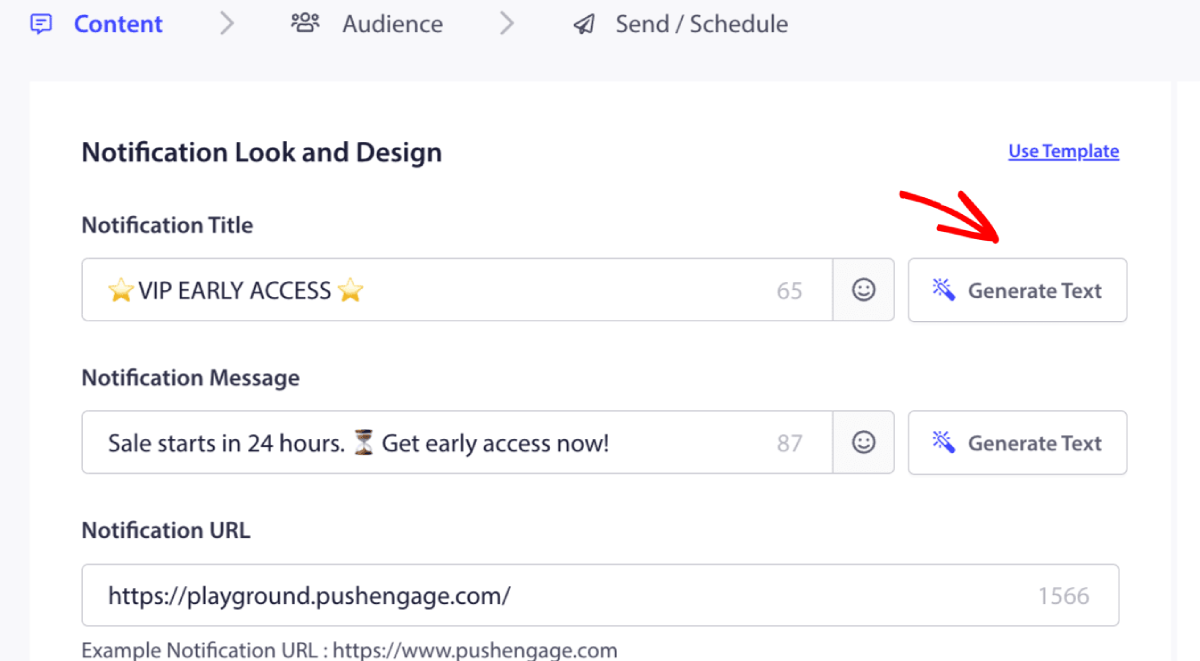
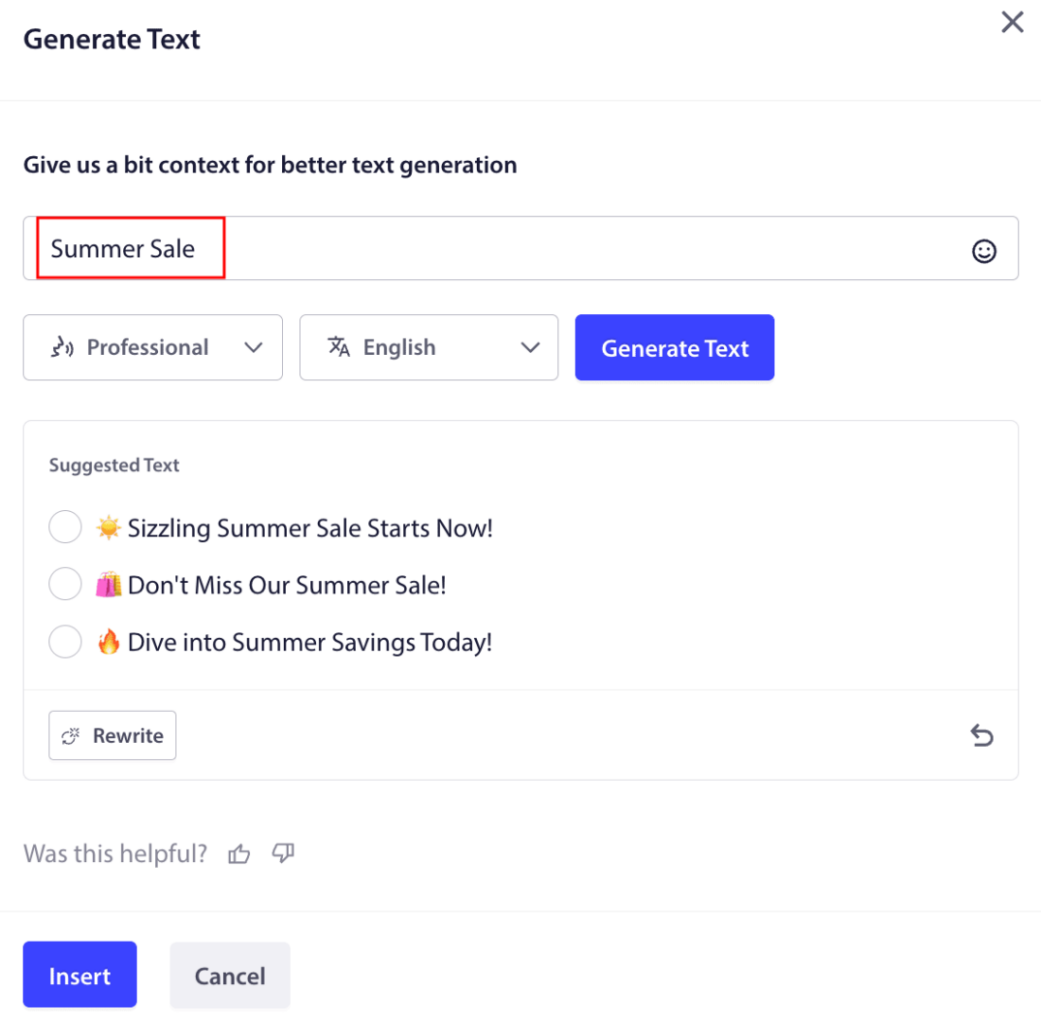
Cela ouvrira une petite fenêtre pour le titre et le message de la campagne de notification push Web. Vous pouvez commencer par ajouter des mots-clés qui serviront d'invite pour l'IA. L'invite peut être aussi détaillée que vous le souhaitez.
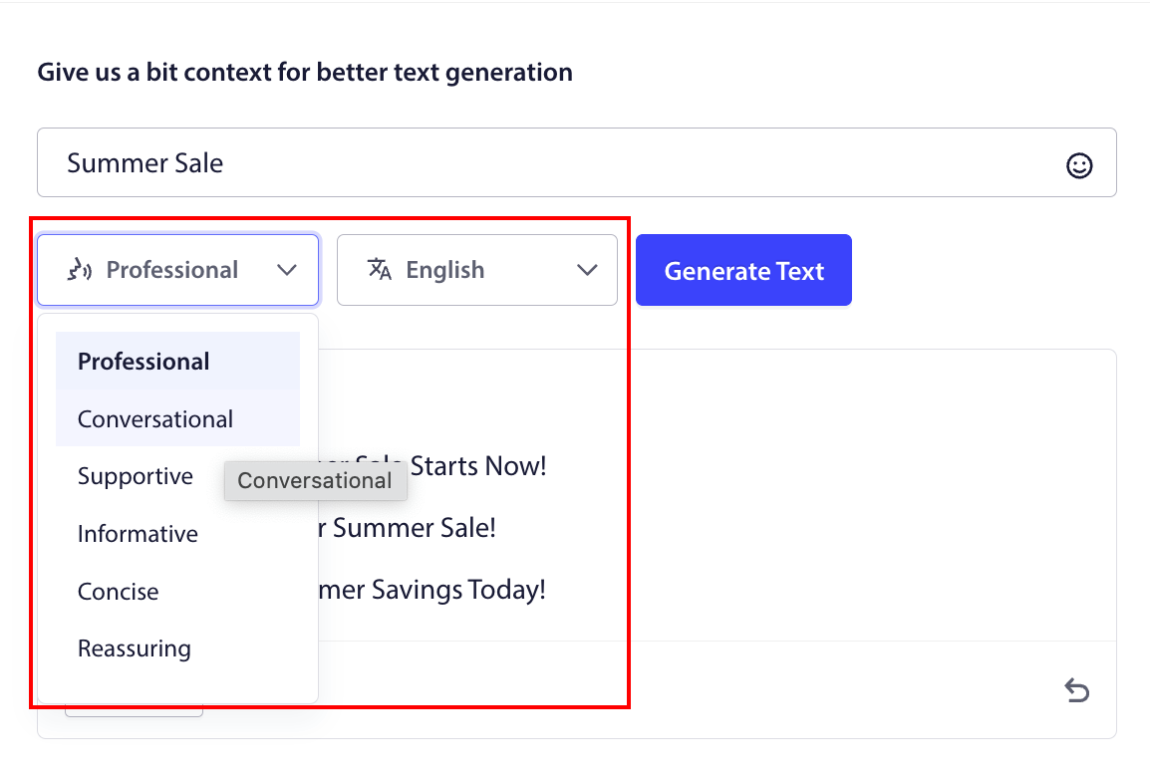
Vous pouvez également définir le ton du titre ou du message de la campagne de notification push Web. Le ton de la conversation est très important pour décider du type de campagne qui sera créé. Assurez-vous qu'il correspond au style de votre marque.
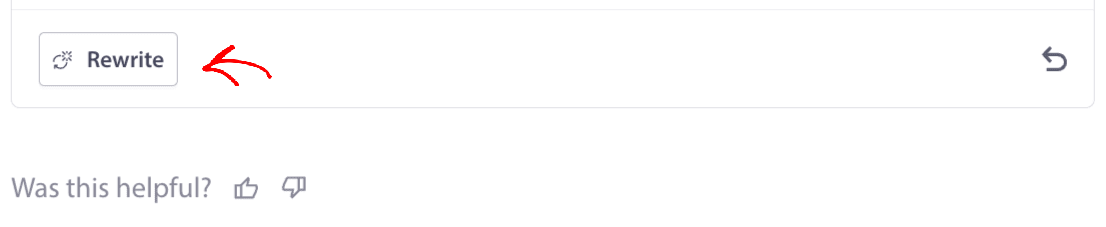
Une fois défini, vous pouvez cliquer sur le bouton Générer du texte. Pas satisfait du texte généré ? Cliquez simplement sur le bouton Réécrire !
Vous pouvez en fait rédiger du contenu dans TOUTES LES LANGUES !
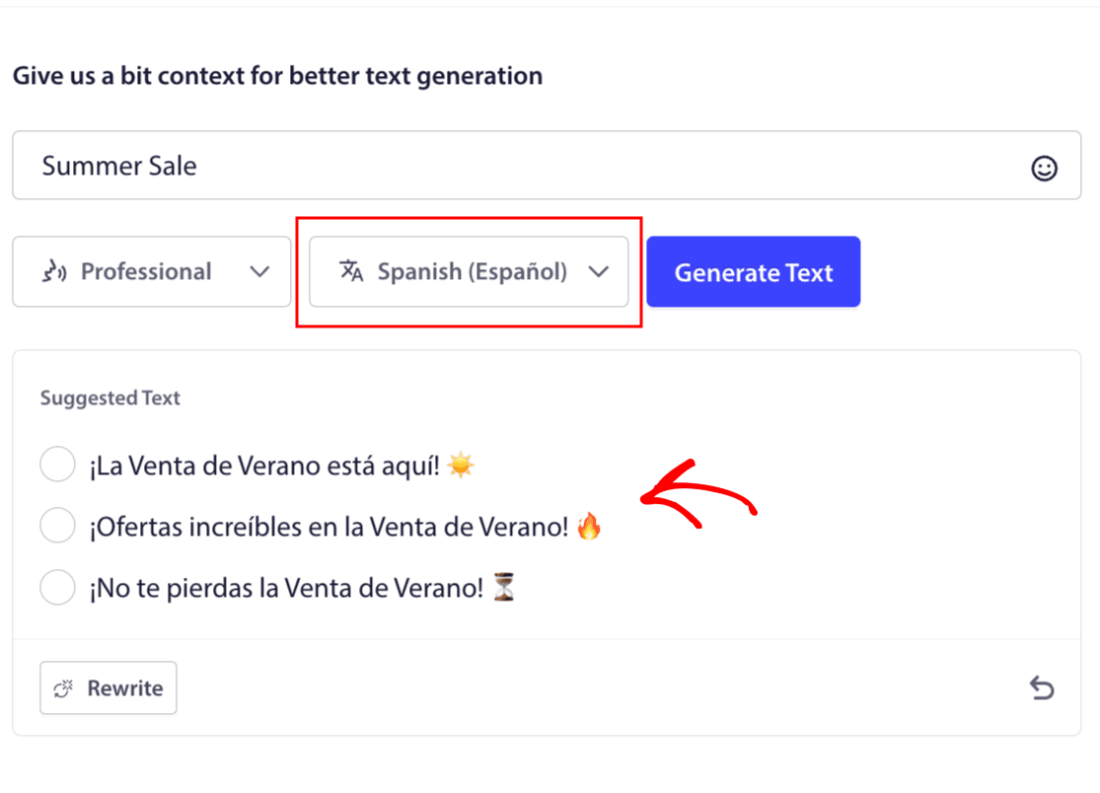
Ce niveau de support multilingue intégré n'existe tout simplement dans aucun autre logiciel de notification push. Et ne vous inquiétez pas, les traductions sont parfaites ! Ainsi, vous pouvez envoyer des campagnes géo-spécifiques très facilement maintenant. Sélectionnez le bon Groupe d'audience, sélectionnez la langue, et laissez notre IA faire sa magie.
Comment envoyer une campagne de notifications push web
Maintenant que vous savez ce qu'est une campagne de notifications push web et quel service vous avez besoin pour les envoyer, il est temps de découvrir comment envoyer différentes notifications.
Voici à quoi ressemblent les campagnes push web dans la nature :
🛒 E-commerce :
- Remise de bienvenue : « Merci de vous être abonné ! Voici 10 % de réduction. »
- Alerte de baisse de prix : « La veste que vous aimiez ? Elle est enfin en promotion. »
- Nouveautés : « Les nouveautés viennent d'arriver. Soyez le premier à acheter. »
📚 Éditeurs & Blogueurs :
- Alerte nouveau post : « Ne manquez pas l'analyse de cette semaine sur [Sujet]. »
- Résumé hebdomadaire : « Votre lecture du vendredi est arrivée. »
- Livraison de lead magnet : « Voici votre guide gratuit. Dites-nous ce que vous en pensez. »
💼 SaaS & Outils :
- Mises à jour de fonctionnalités : « Nous venons de lancer quelque chose de nouveau. Essayez-le gratuitement. »
- Rappels d'essai : « Votre essai gratuit se termine demain. »
- Abandonnistes : « Vous hésitez encore ? Voici 20 % de réduction pour nous essayer. »
Commencez petit. Copiez-les. Adaptez-les à votre ton. C'est fait.
À des fins pratiques, nous ne parlons pas ici des campagnes déclenchées personnalisées que vous pouvez créer à l'aide d'un service API. Si vous êtes plus intéressé par les notifications personnalisées, vous devriez consulter notre documentation.
#1. Campagne de notification push web de bienvenue
Une campagne de notification push web de bienvenue est une simple notification push destinée à accueillir tout nouvel abonné.
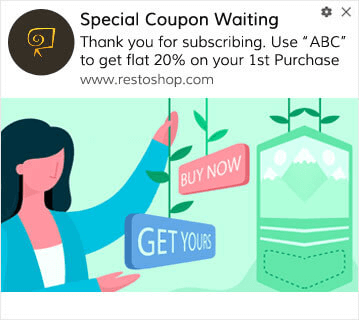
Vous pouvez également envoyer une offre ou un cadeau pour vous abonner à vos notifications push. C'est assez courant chez bon nombre de nos clients. Vous pouvez utiliser vos notifications push de bienvenue pour :
- Partager un coupon de bienvenue
- Offrir des fonctionnalités premium
- Envoyer une livraison gratuite
- Offrir des cadeaux gratuits
- Intégrer votre abonné avec une visite guidée
Maintenant, configurons votre première notification push de bienvenue à l'aide de PushEngage.
Voici comment activer les notifications de bienvenue dans PushEngage. Allez sur le tableau de bord PushEngage et dirigez-vous vers Campagne » Auto-répondeurs Drip et cliquez sur Créer un nouvel auto-répondeur Drip :

Ensuite, nommez votre campagne (nous suggérons quelque chose comme Drip de bienvenue), et sous Contenu, sélectionnez l'option qui dit : « Envoyer la notification immédiatement après l'abonnement de l'utilisateur ») :

À ce stade, vous pouvez cliquer sur la flèche à côté de la notification pour modifier le contenu de votre notification. Si vous avez un plan Premium ou Entreprise avec PushEngage, vous pourrez ajouter plus d'une notification pour créer une séquence de messages de bienvenue automatisés. Cliquez simplement sur Ajouter une nouvelle notification et modifiez le contenu.
Une fois que vous avez terminé, cliquez sur Paramètres de drip et sélectionnez l'option pour envoyer votre campagne de bienvenue à tous les abonnés :

Ensuite, faites défiler vers le bas pour définir vos propres paramètres UTM afin de suivre les notifications push :
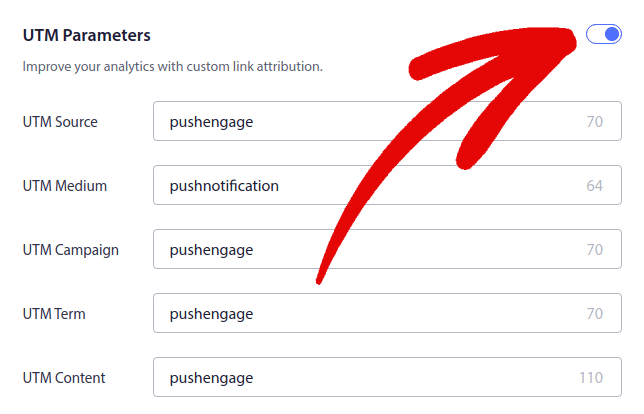
Et une fois que vous avez terminé, faites défiler vers le haut et cliquez sur le bouton Activer l'autorépondeur :

Vous savez maintenant pourquoi la mise en place d'une campagne de notification push de bienvenue est importante. Vous savez également comment la configurer. Allez-y et activez les notifications push de bienvenue pour réengager les nouveaux abonnés, ou consultez cet article sur les messages de bienvenue sur le site web pour vous inspirer.
#2. Campagne de notification push web de panier abandonné
L'abandon de panier d'achat se produit lorsqu'un client potentiel ajoute un produit au panier et n'achève pas le processus de paiement.
Votre travail consiste à réduire l'abandon de panier autant que possible.
Une façon de récupérer vos ventes perdues est d'utiliser une campagne de notification push web de panier abandonné. Les campagnes de récupération de panier abandonné ciblent les abonnés ayant un panier abandonné et leur envoient des suivis, des rappels, des offres, des coupons et des réductions.
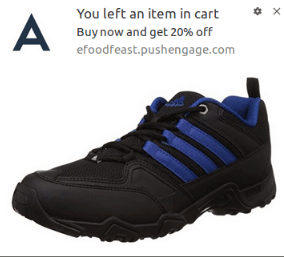
C'est une idée simple : Faites en sorte que le plus de personnes possible achètent quelque chose.
Les notifications push d'abandon de panier ont un impact très réel sur vos bénéfices. Par exemple, WickedWeasel génère 2 000 $ à 4 000 $ par semaine de ventes supplémentaires grâce à sa campagne de notifications push d'abandon de panier.
Alors, comment configurer des campagnes d'abandon de navigation ?
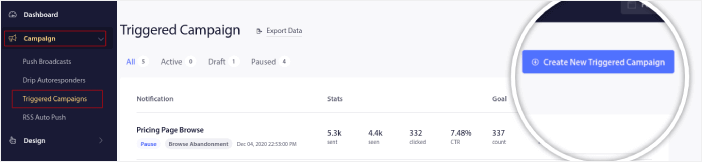
Accédez au tableau de bord PushEngage et allez dans Campagne » Campagnes déclenchées, puis cliquez sur Créer une nouvelle campagne déclenchée :
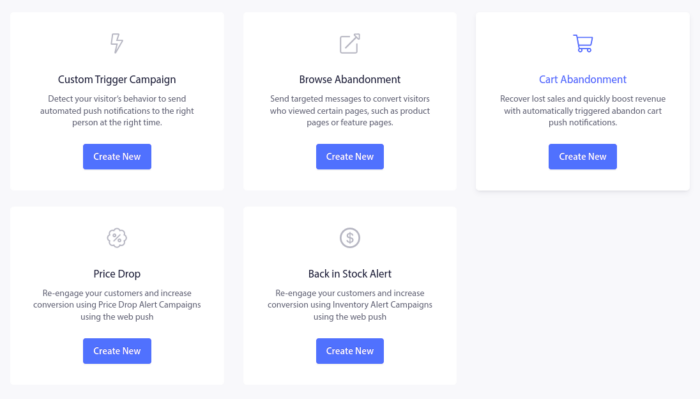
Ensuite, sélectionnez le modèle Panier abandonné et cliquez sur Créer :
Et vous pouvez commencer à rédiger un répondeur automatique pour panier abandonné. Sous l'onglet Contenu, vous pouvez créer une série de notifications push :
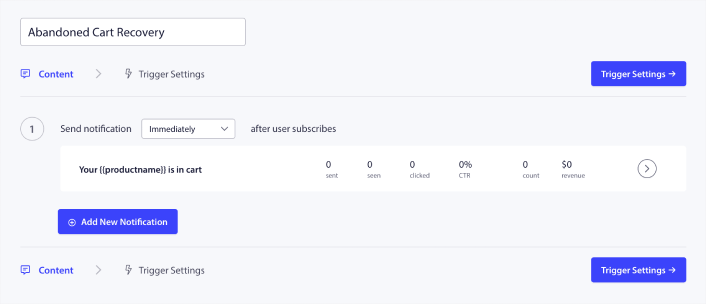
Pour modifier une notification, cliquez simplement sur la flèche à côté de celle-ci, et vous pourrez personnaliser la notification push :
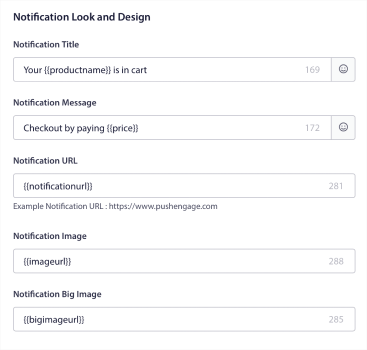
Pour un tutoriel plus détaillé, consultez cet article sur comment configurer les notifications push de panier abandonné.
#3. Campagnes de notifications push web d'abandon de panier
L'abandon de navigation est exactement ce que son nom indique. Il s'agit d'un visiteur de site web qui navigue sur votre site et décide de partir soudainement. Ces incidents sont également appelés abandon de tunnel par d'autres fournisseurs.
L'abandon de navigation est un phénomène très courant dans presque tous les secteurs d'activité.
Et il est très difficile de le réduire ou de le contrôler car il n'y a aucun moyen d'inciter un utilisateur aléatoire à rester sur votre site web. C'est là que les campagnes d'abandon de navigation sont si puissantes.
Voici un exemple de notifications push d'abandon de navigation pour un éditeur :
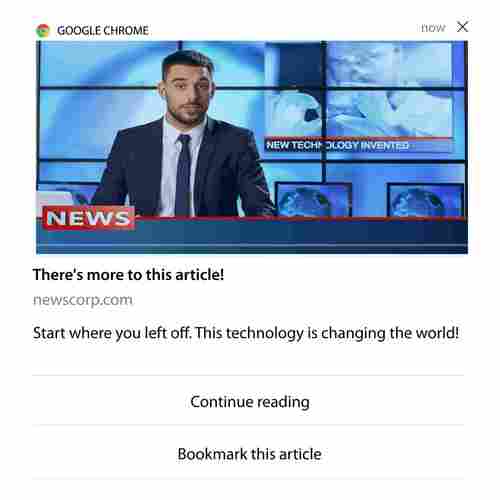
La partie impressionnante de PushEngage est que vous pouvez configurer des campagnes pour pratiquement n'importe quel secteur d'activité. Ainsi, vous pouvez envoyer des notifications push d'abandon de navigation pour les sites SaaS et de voyage.
Alors, comment configurez-vous les campagnes d'abandon de navigation ?
Avec l'abandon de panier, il existe un paramètre très clair pour déclencher vos notifications push. Pour l'abandon de navigation, vous pourriez envisager des paramètres tels que :
- Ajouté le produit à la Liste de souhaits
- Consulté le même produit plus de X fois
- Navigué sur plus de X produits de la même catégorie
- Recherché sur le site un produit spécifique
- Resté sur le site pendant au moins X minutes avant de rebondir
L'idée derrière cette campagne pour un site de commerce électronique est d'inciter l'abonné à ajouter le produit à son panier. Pour les éditeurs, il pourrait s'agir d'un clic ou d'un téléchargement sur l'article qu'ils lisaient.
Rendez-vous à nouveau sur le tableau de bord PushEngage et allez dans Campagne » Campagnes déclenchées pour créer une nouvelle campagne déclenchée :

Ensuite, créez une nouvelle campagne d'abandon de navigation en cliquant sur le bouton Créer :

Ensuite, vous pourrez configurer toute votre séquence de notifications push avec un délai entre chaque notification :
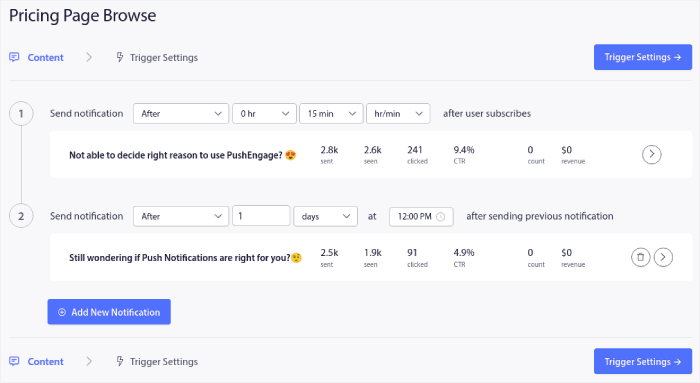
Si vous débutez avec les notifications push, vous devriez consulter notre article sur les meilleures pratiques en matière de notifications push. Lorsque vous êtes satisfait du contenu de vos notifications push, cliquez sur Paramètres de déclenchement. Vous verrez que les conditions d'une campagne d'abandon de navigation ont été préconfigurées dans la séquence.
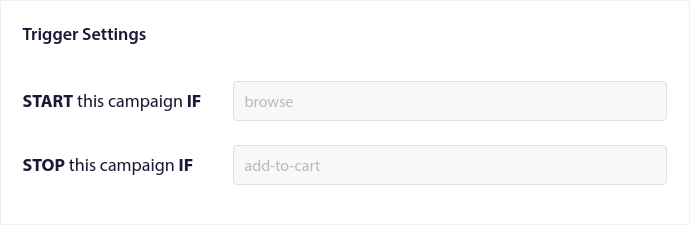
Cliquez sur le bouton Code d'intégration pour obtenir l'extrait de code dont vous avez besoin pour intégrer la campagne d'abandon de navigation sur votre site.
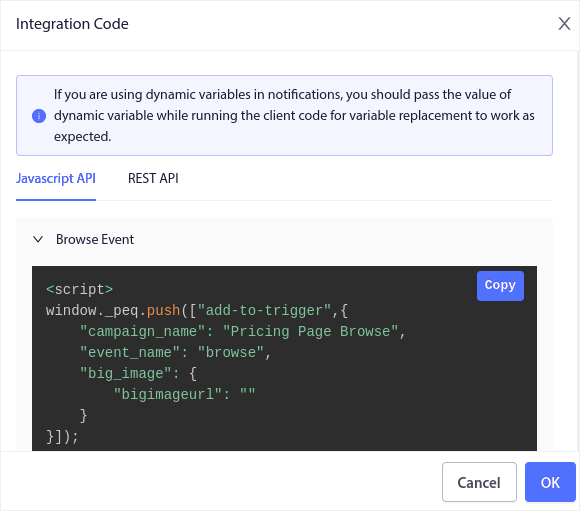
Ensuite, copiez le code et collez-le sur votre site. Vous devez coller ce code dans la section <head> HTML de la page que vous souhaitez suivre. Enfin, cliquez sur le bouton Activer la campagne déclenchée :
Et voilà !
#4. Campagne de notification push web de flux RSS
RSS Auto Push vous permet d'automatiser vos notifications via RSS.
PushEngage vérifie toutes les 10 minutes s'il y a un nouvel article ajouté à votre flux RSS. Si un nouvel article est trouvé, PushEngage le convertit en notification push et l'envoie à tous vos abonnés. Le meilleur, c'est que cela se fait en pilote automatique complet.
Les campagnes de flux RSS sont parfaites pour les éditeurs et les sites d'actualités :
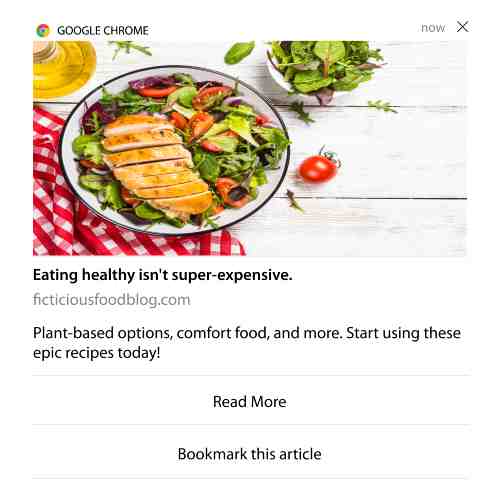
Si vous êtes un grand éditeur et que vous publiez plus d'un article toutes les 30 minutes, PushEngage maintient un délai de 5 minutes entre 2 notifications d'articles.
Avant d'aller plus loin, consultez cet article sur l'utilisation des flux RSS pour plus d'astuces et de conseils exceptionnels.
Maintenant, mettons en place une campagne de notification push web de flux RSS sur PushEngage.
Créer une nouvelle campagne de notification push web RSS
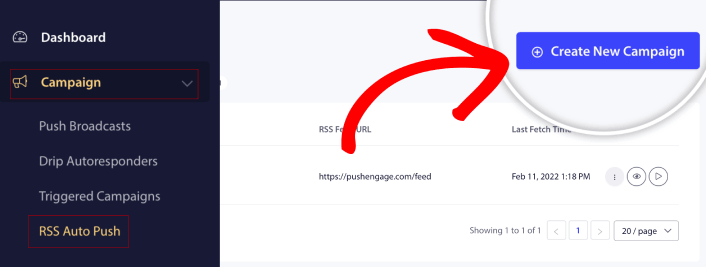
Une fois que vous avez installé PushEngage sur votre site, accédez à votre tableau de bord PushEngage et allez dans Campagne » RSS Auto Push et cliquez sur Créer une nouvelle campagne :
Cela créera une toute nouvelle campagne de notification push web RSS. Vous pouvez configurer plusieurs campagnes de flux RSS dans PushEngage. Commencez par donner un nom descriptif à votre campagne. Ensuite, collez l'URL de votre flux RSS :
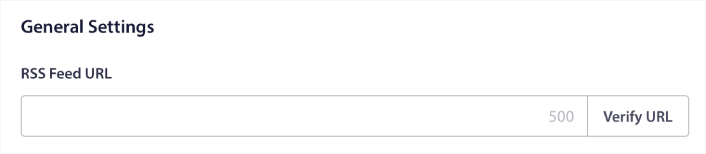
Configurer les paramètres de notification RSS
Ensuite, vous voulez définir la Fréquence de la campagne :
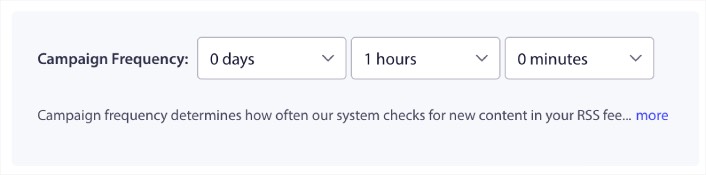
La Fréquence de la campagne définit la fréquence à laquelle la campagne de notification push web RSS recherche du nouveau contenu sur votre blog pour envoyer une notification push automatisée. La valeur minimale est de 15 minutes et la valeur maximale est de 7 jours.
Nous recommandons de rechercher du contenu à promouvoir tous les 2 jours, sauf si vous êtes une agence de presse. Pour les agences de presse, vous devriez la maintenir à 15 minutes. Gardez à l'esprit que PushEngage ne recherchera du nouveau contenu qu'après avoir configuré et publié votre campagne de flux RSS.
Sélectionner les articles à promouvoir
Vous pouvez sélectionner les articles à promouvoir. Vous pouvez choisir entre Uniquement le dernier article ou Tous les articles. Si vous configurez les notifications push RSS pour sélectionner uniquement le dernier article, PushEngage envoie uniquement le dernier article :
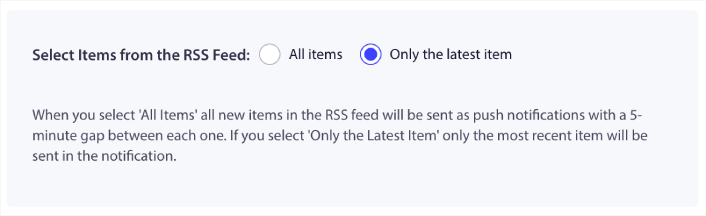
Ou, vous pouvez sélectionner l'option Tous les articles. Dans ce cas, la campagne sélectionnera tous les articles de votre site et enverra une campagne de notification push web pour chacun avec un intervalle de 5 minutes entre eux.
Définir une icône pour les notifications push RSS
Votre icône de notification push établit l'identité de votre marque dans vos notifications push RSS. Nous vous recommandons d'utiliser votre marque pour que vos abonnés sachent instantanément que la notification provient de votre marque.
Maintenant, il y a deux options ici. Vous pouvez soit télécharger l'icône de notification manuellement :
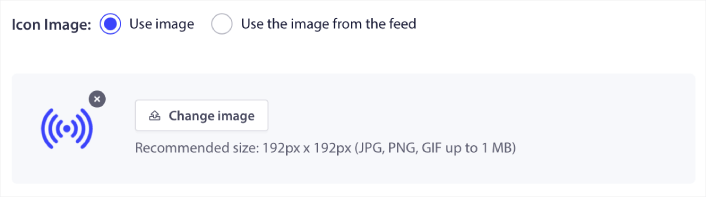
Et c'est très simple à faire. Cliquez simplement sur Changer d'image et téléchargez votre icône de notification. Ou, vous pouvez la récupérer à partir de votre flux RSS :
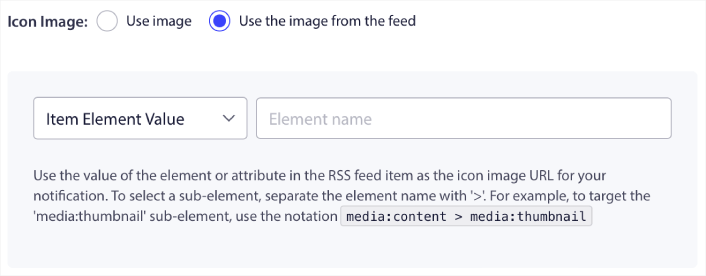
Vous pouvez soit sélectionner l'élément de l'article, soit l'attribut à l'intérieur d'un élément pour sélectionner dynamiquement votre icône de notification à partir du flux. Généralement, la plupart des flux RSS contiennent l'icône du site à l'intérieur de l'élément media:content. Plus spécifiquement, elle se trouve généralement dans l'attribut media:thumbnail de l'élément media:content.
Pour cibler l'élément, vous pouvez sélectionner l'option Valeur de l'élément et la définir sur media:content. Ou, vous pouvez sélectionner l'option Valeur de l'attribut de l'élément et la définir sur media:content > media:thumbnail.
NOTE : Nous vous recommandons d'utiliser cette option uniquement si vous savez lire le XML. Les flux RSS peuvent ne pas contenir l'icône du site dans les mêmes balises XML que notre exemple. Donc, si vous n'êtes pas sûr de la manière de récupérer l'icône de notification à partir du flux RSS, nous vous recommandons de la télécharger manuellement à la place.
Sélectionner une grande image pour les notifications de flux RSS
Maintenant, nous allons sélectionner la grande image pour les notifications push web de votre flux RSS. Encore une fois, il y a deux façons de faire cela. Vous pouvez laisser PushEngage trouver automatiquement l'image à partir du flux RSS :

Ou, vous pouvez sélectionner manuellement l'image que vous souhaitez à partir du flux :
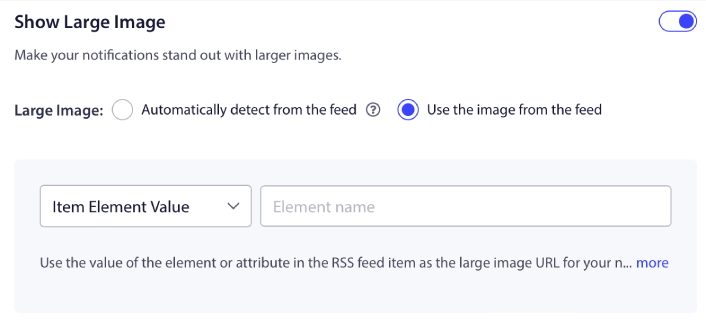
C'est exactement la même chose que de sélectionner l'icône de notification à partir du flux RSS. Vous pouvez encore une fois, sélectionner l'image à partir de l'élément XML qui la contient ou vous pouvez sélectionner l'attribut spécifique qui contient votre image préférée.
NOTE : Nous vous recommandons de sélectionner une URL de votre flux RSS uniquement si vous savez lire le XML. Si vous n'êtes pas sûr de savoir lire le XML, il est préférable de laisser PushEngage trouver la meilleure image pour vos notifications.
Définir la durée de la campagne de notification push web
La durée de la campagne de notification push web est le temps pendant lequel la notification reste dans le plateau de notification de votre abonné avant d'être automatiquement supprimée.
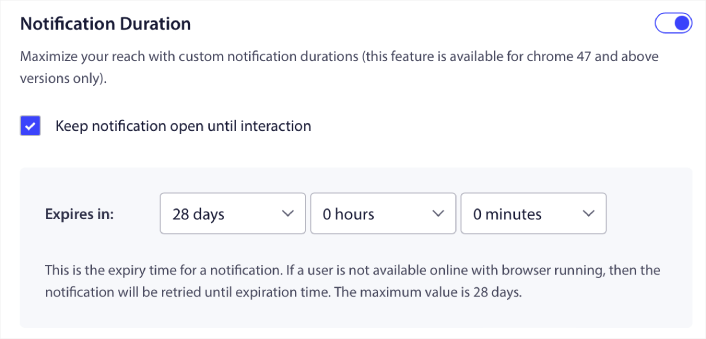
Si vous ne voulez pas submerger vos abonnés avec une tonne de notifications non lues, il est probablement préférable de laisser les notifications push expirer en quelques jours.
Contrairement aux notifications de diffusion ou même à d'autres notifications push web automatisées, vous ne pouvez pas vraiment planifier les notifications push RSS. Ainsi, vous avez toujours la possibilité de laisser la notification ouverte jusqu'à ce que votre abonné interagisse avec elle, même dans la limite d'expiration.
Définir les paramètres UTM
Nous avons presque terminé. Faites défiler vers le bas pour définir vos propres paramètres UTM afin de suivre les notifications push :
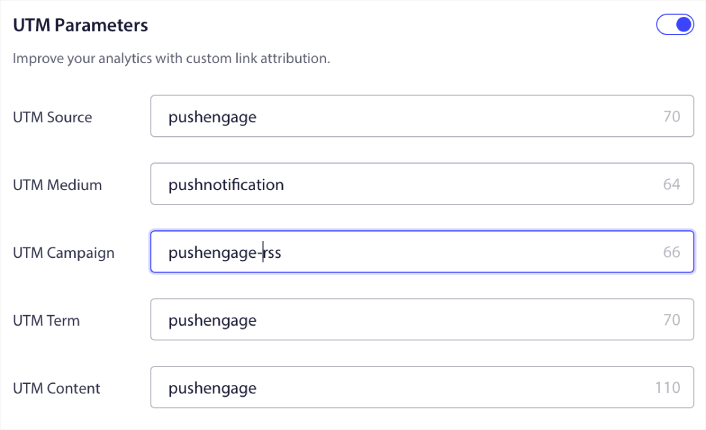
De cette façon, vous pouvez facilement attribuer votre trafic provenant de ces notifications push dans Google Analytics.
Sélectionner un groupe d'audience
Enfin, nous allons sélectionner un Groupe d'audience pour envoyer votre campagne de notification push web RSS. Vous pouvez soit envoyer la campagne de flux RSS à tous vos abonnés, soit créer des Groupes d'audience pour envoyer des notifications push personnalisées même à partir de votre flux RSS.
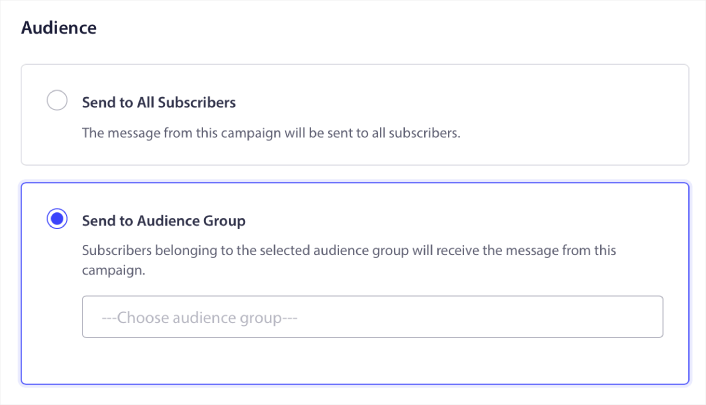
Et voilà ! C'est vraiment tout ce qu'il y a à savoir.
Maintenant, chaque fois que vous publiez un nouvel article, tous les abonnés aux notifications push du groupe d'audience sélectionné recevront automatiquement une notification push concernant votre nouveau contenu.
C'est tout ! Vous êtes prêt. Chaque fois que vous publierez un nouvel article, il sera automatiquement envoyé à tous vos abonnés.
#5. Notifications de réengagement automatisées
Vous pouvez configurer des campagnes de réengagement automatisées pour les abonnés qui n'ont pas interagi avec votre contenu depuis un certain temps.
Mais pourquoi le feriez-vous en premier lieu ?
Que diriez-vous de ceci :
- Le coût d'acquisition de nouveaux clients est 5 fois supérieur au coût de rétention des clients existants
- Il est facile de cibler et de remarketer une audience connue dont nous comprenons déjà les préférences personnelles.
- À long terme, les clients engagés apportent plus d'affaires à l'entreprise que quelqu'un qui se connecte à peine à votre marque.
Ofertia a réussi à augmenter ses utilisateurs récurrents de 39 % grâce aux notifications push offrant des offres personnalisées. Ils ne sont pas les seuls non plus. Vous pouvez l'utiliser pour un site de commerce électronique avec un grand effet :
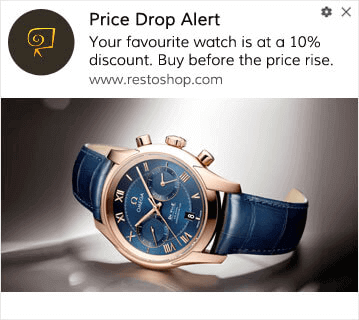
Il existe de nombreuses façons de réengager vos abonnés.
Imaginez ceci :
- Un utilisateur visite votre site. Voit une option d'adhésion subtile. Clique sur « Autoriser ».
- Reçoit instantanément une notification de bienvenue avec une réduction ou la prochaine étape.
- Quitte votre site…
- Plus tard dans la journée, il voit un rappel : « Vous y réfléchissez encore ? »
- Il clique, revient et achète.
C'est un entonnoir de push de base — et vous n'avez pas levé le petit doigt une fois qu'il était en ligne.
Maintenant, imaginez superposer la segmentation et les campagnes automatisées. C'est là que ça devient amusant. En utilisant les segments dynamiques, vous pouvez en apprendre beaucoup sur vos abonnés et leur envoyer du contenu personnalisé qu'ils aimeront.
Dans votre tableau de bord PushEngage, rendez-vous sur Segmentation et créez un nouveau Segment :
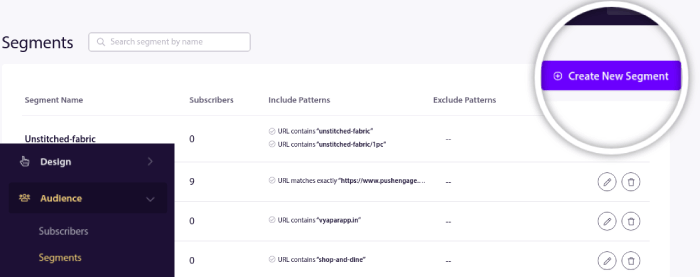
Cela vous permet de créer des segments basés sur le comportement et les habitudes de navigation. Vous pouvez en fait configurer une séquence d'opérations ET/OU qui décident quand certains segments reçoivent des notifications push automatisées.
Vous pouvez même segmenter vos utilisateurs lorsqu'ils s'abonnent aux notifications push. Rendez-vous sur Design » Modales Popup et sélectionnez le Grand style Safari avec segment.
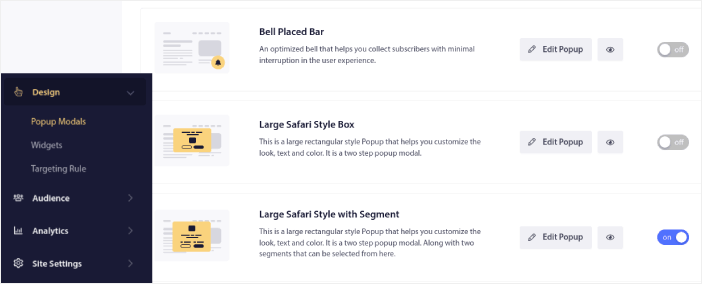
Si vous avez besoin d'encore plus de moyens de segmenter vos utilisateurs, vous pouvez créer des segments personnalisés basés sur les actions des utilisateurs à l'aide de l'API Javascript PushEngage.
#6. Campagne de notification push web de visite de page
Les déclencheurs de visite de page sont une extension des segments de notification push. Tout ce que vous avez à faire est de créer un segment lorsqu'un visiteur web parcourt une URL contenant une phrase ou un modèle particulier.
Ensuite, rendez-vous sur Audience » Segments et définissez votre audience sur un segment spécifique :
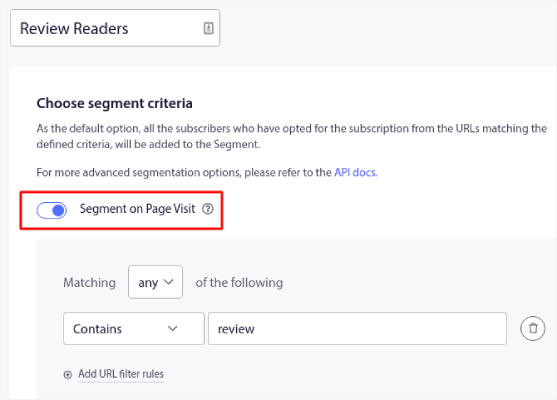
Cela vous permet de créer des notifications push vraiment personnalisées et automatisées.
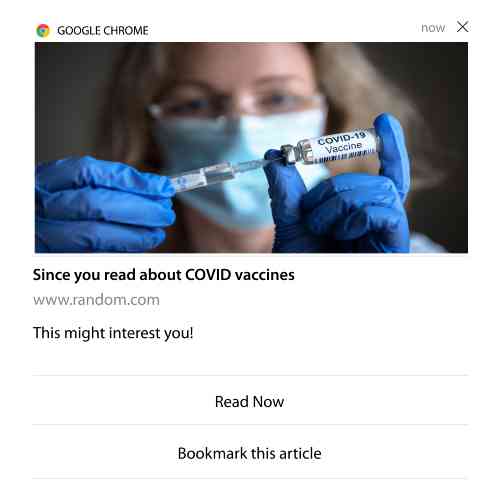
Et le meilleur, c'est que vous pouvez créer des segments personnalisés dans PushEngage en quelques minutes.
#7. Notifications push automatisées à partir de clics
Vous ne pouvez pas créer de notifications push qui sont déclenchées lorsque vos abonnés cliquent sur une notification délivrée à l'aide de PushEngage.
Mais il existe une solution de contournement très astucieuse.
Vous pouvez créer un segment basé sur l'URL vers laquelle mène une notification particulière. Chaque fois que quelqu'un atterrit sur cette URL, il est ajouté au segment, et vous pouvez utiliser ce segment pour envoyer des notifications ciblées.
Les campagnes de clics sur les notifications push sont essentiellement une extension de la segmentation d'audience standard pour les campagnes goutte à goutte.
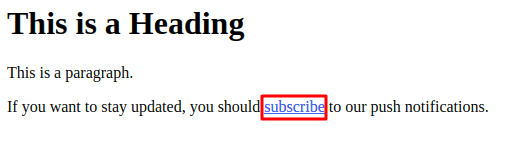
Consultez ce tutoriel sur comment créer un bouton de clic pour s'abonner.
#8. Notifications push automatisées répétées
Imaginez que vous ayez…
- Une vente hebdomadaire pour un marché aux puces ;
- Ou une vente de fin de semaine ;
- Ou une vente de déstockage ;
- Ou une vente flash mensuelle.
Quelle serait la gêne de devoir créer manuellement des notifications push pour chaque événement ?
Heureusement, vous pouvez définir des notifications répétitives avec PushEngage.
Les notifications répétitives sont des notifications push planifiées et automatisées pour un événement récurrent. Vous pouvez les configurer une fois, spécifier un calendrier, et c'est terminé.
Ce n'est qu'une des façons dont MyDeal utilise les notifications push. Assurez-vous de lire l'étude de cas complète !
Rendez-vous sur Campagne et ajoutez une notification automatisée dans votre tableau de bord PushEngage. Ensuite, faites défiler jusqu'à la section de planification et allez dans l'onglet Envoyer/Planifier :

Il suffit de régler l'heure et c'est fait !
#9. Notifications de fuseau horaire de l'abonné
Les notifications de fuseau horaire des abonnés sont exactement ce qu'elles semblent être. Vous envoyez des notifications push automatisées à vos abonnés dans leur fuseau horaire.
Pourquoi est-ce si important ?
Les notifications de fuseau horaire des abonnés ont des taux d'ouverture plus élevés. Généralement, toute notification push est livrée même si votre abonné est hors ligne. Ces notifications s'accumulent alors et sont ignorées lorsque votre abonné se connecte enfin.
D'un autre côté, une campagne de notification push web de fuseau horaire d'abonné sera livrée lorsque vous SAVEZ que votre abonné est le plus susceptible d'être en ligne.
Astuce de pro : Utilisez les tests A/B pour déterminer le moment idéal pour envoyer une notification push à vos abonnés.
Les notifications de fuseau horaire des abonnés semblent beaucoup plus personnalisées. Et si vous êtes malin, vous pouvez les combiner avec des données de géolocalisation pour personnaliser davantage vos notifications. C'est exactement ce que Phooto a fait en utilisant les langues locales pour faire monter en flèche leurs taux d'ouverture.
Mettons en place les notifications de fuseau horaire des abonnés dans PushEngage dès maintenant.
Lorsque vous créez une nouvelle notification, accédez aux options de planification et cochez la case qui dit Envoyer les notifications dans le fuseau horaire de l'abonné :
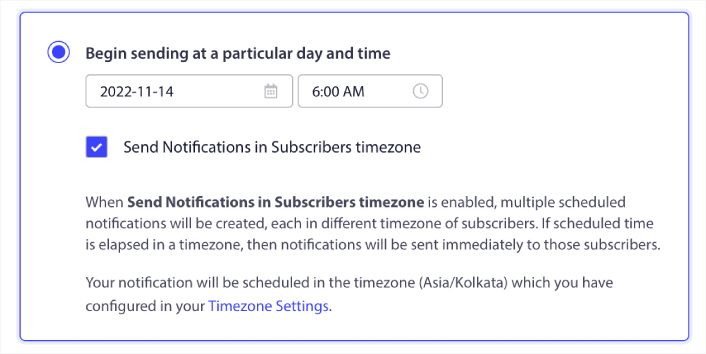
C'est tout ! Vous devrez faire de même pour vos campagnes goutte à goutte, mais les résultats valent bien l'effort de cliquer sur un bouton pour chaque campagne.
Commencez avec 1 à 2 messages par semaine. Augmentez une fois que vous voyez ce qui fonctionne.
Voici une cadence simple pour commencer :
- Semaine 1 : Message de bienvenue + 1 push de produit ou de contenu
- Semaine 2 : Suivi de rappel ou de réduction
- Semaine 3 : Nouvelle sortie, article de blog ou mise en avant de fonctionnalité
Si les utilisateurs arrêtent de cliquer, réduisez. S'ils continuent de cliquer ? Doublez la mise.
Astuce de pro : Les deux dernières tactiques concernaient la planification des notifications push. Mais ce ne sont pas les seules façons de planifier des notifications push automatisées. Consultez notre article sur comment planifier des notifications push pour plus d'astuces épiques.
#10. Notifications d'opt-in par e-mail
Le marketing par e-mail a longtemps été le meilleur moyen de générer et de nourrir des prospects. Le meilleur atout des notifications push automatisées est que vous pouvez générer plus d'abonnés par e-mail grâce à elles.
C'est très simple à configurer, et l'utilisation d'une combinaison de campagnes d'e-mails et de notifications push web est bien plus efficace que l'utilisation de l'une ou de l'autre.
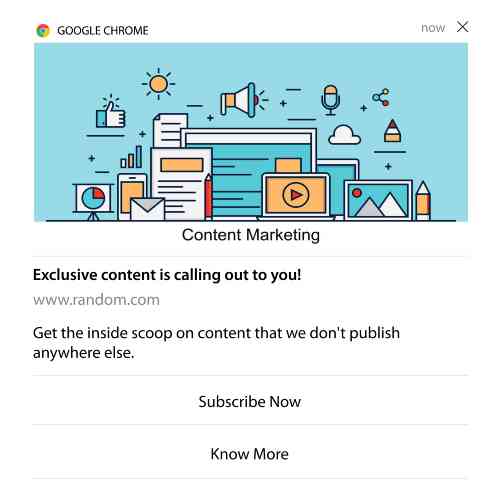
Tout ce que vous avez à faire est d'envoyer une notification de déclenchement qui demande à l'utilisateur d'opter pour les notifications par e-mail.
Créez simplement un bouton d'appel à l'action (CTA) personnalisé et insérez un lien d'abonnement comme URL du bouton. C'est vraiment tout ce dont vous avez besoin. Si vous n'êtes pas sûr de la façon d'obtenir un bouton d'abonnement, suivez simplement le guide.
Dans n'importe quelle notification, vous pouvez faire défiler vers le bas et activer les boutons Multi-actions :
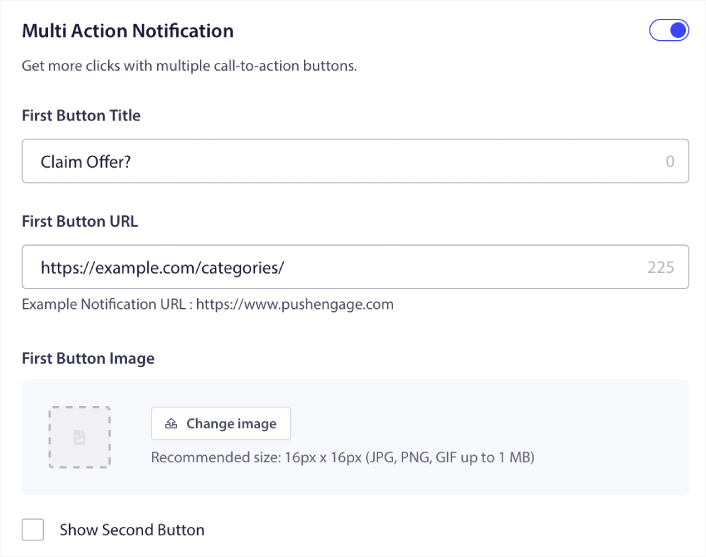
L'URL doit être un lien vers un formulaire d'inscription par e-mail. Vous pouvez en créer un en utilisant pratiquement n'importe quel fournisseur de services d'e-mail tel que Drip. Tout ce que vous avez à faire est de cliquer sur les options de partage du formulaire d'inscription et de copier cette URL. Ensuite, collez-la dans l'URL du bouton pour votre notification push.
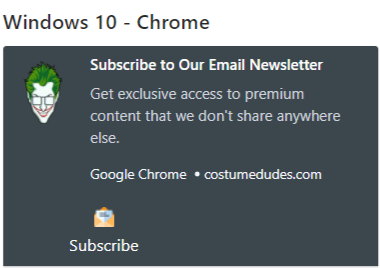
Consultez notre tutoriel sur les boutons multi-actions pour plus de détails. Vous pouvez même ajouter une icône d'e-mail à votre bouton pour indiquer clairement que vous demandez à vos utilisateurs de s'abonner à vos notifications par e-mail :
Astuce de pro : Vous pouvez utiliser la même idée pour développer votre chaîne YouTube. Ajoutez simplement « ?sub_confirmation=1 » à la fin de l'URL de votre chaîne et collez-la dans l'URL du bouton de votre notification push.
Chaque fois que quelqu'un clique sur le bouton d'abonnement de votre notification push, il sera redirigé vers votre chaîne YouTube et invité à s'y abonner.
Idées de segmentation que vous pouvez copier
Les segments sont un excellent moyen d'envoyer des campagnes push ciblées. Et cela devrait constituer une part importante de votre stratégie de marketing par notification push. Mais comment commencer ? Quels types de segments devriez-vous créer ?
Pour commencer, vous ne devriez pas vous concentrer sur la création d'un seul type de segment. Nous allons vous présenter les différents types de segmentation que nous avons trouvés être les plus efficaces.
Voici quelques segments à fort impact qui valent la peine d'être configurés :
- Acheteurs engagés : Personnes qui ont cliqué sur 2 notifications ou plus la semaine dernière
- Abandonneurs de panier : Personnes qui ont visité un produit mais n'ont pas acheté
- Fans de catégories : Utilisateurs qui continuent de consulter une catégorie de produits (par exemple, « Sneakerheads »)
- Ciblage géographique : Adaptez les messages en fonction du pays ou de la ville
Plus vous êtes précis, plus vous obtiendrez de clics. Si vous êtes un marketeur avancé, vous devriez créer des segments comme vous le feriez pour une campagne par e-mail avec différents modèles de segmentation :
- Segments géographiques
- Segments comportementaux
- Segments basés sur les occasions
- Segments culturels
- Segments démographiques
- Segments psychographiques
Les segments dynamiques vous permettent de parler aux abonnés comme à de vraies personnes… pas seulement comme à des statistiques de trafic.
Et si vous souhaitez personnaliser davantage vos messages, vous pouvez utiliser les groupes d'audience.
Comment créer un groupe d'audience pour les notifications push
Pour commencer, rendez-vous sur votre tableau de bord PushEngage et allez dans Audience » Groupes d'audience puis cliquez sur le bouton Créer un nouveau groupe d'audience :
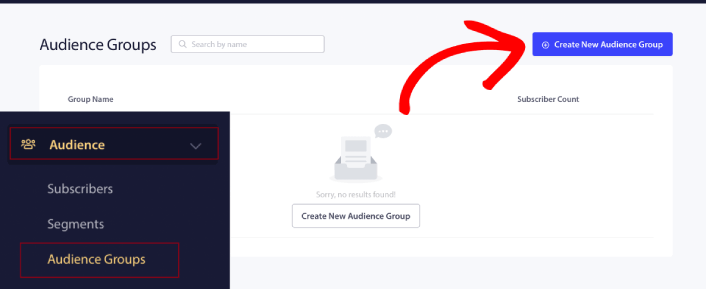
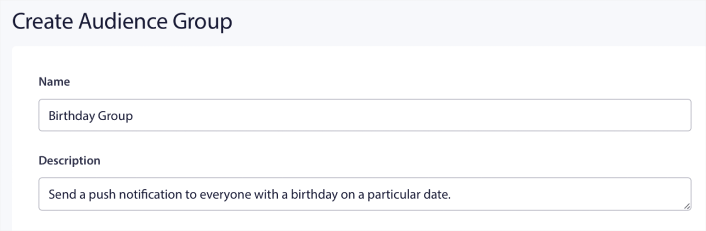
Avant de pouvoir utiliser vos groupes d'audience pour envoyer des diffusions ciblées, vous devrez créer un groupe d'audience avec des règles pour créer ce groupe. Vous pouvez commencer par un nom et une description pour votre groupe d'audience.
Créez un critère de sélection
Ensuite, créez un critère de sélection pour filtrer et cibler la bonne audience :
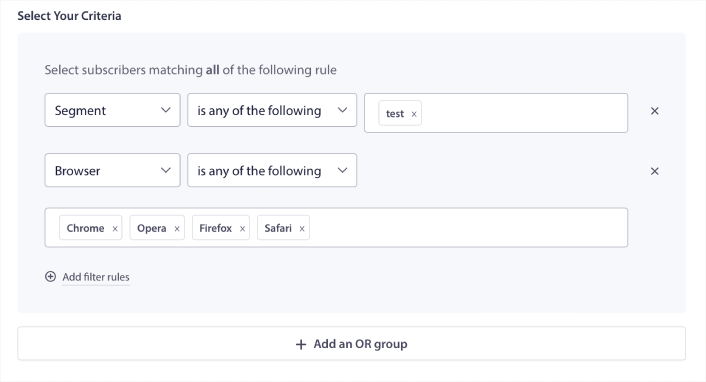
Vous pouvez cliquer sur Ajouter des règles de filtre pour sélectionner les abonnés qui correspondent à TOUTES les règles de filtre ou, vous pouvez cliquer sur Ajouter un groupe OU pour créer un filtre où les abonnés répondent à au moins un des critères de sélection.
Le comportement de l'utilisateur est la manière la plus fondamentale de cibler vos abonnés aux notifications push. Comme nous l'avons dit précédemment, les segments d'abonnés regroupent généralement les visiteurs qui aiment parcourir du contenu similaire. Mais même au sein de ce groupe d'abonnés qui aiment le même contenu, il existe de petites personnalisations que vous pouvez apporter.
Plus encore, vous pouvez regrouper plusieurs segments d'abonnés pour leur envoyer un message commun et pertinent.
Filtrer par segment d'abonné
Si ce n'est pas déjà fait, vous devriez commencer à segmenter vos abonnés aux notifications push immédiatement. Sinon, ce filtre ne fonctionnera tout simplement pas. Mais si vous avez déjà des segments, vous pouvez sélectionner plusieurs segments comme base pour votre groupe d'audience.

Après cela, vous pouvez ajouter d'autres filtres pour améliorer votre ciblage.
Filtrer par attribut d'abonné
Alors que les attributs sont principalement destinés aux notifications push en cascade, vous pouvez également les utiliser pour les diffusions push. Maintenant, les attributs de notification push sont surtout utiles pour les sites de commerce électronique. Mais vous pouvez également les utiliser pour envoyer des notifications push personnalisées si vous disposez d'un outil de gestion de la relation client (CRM).
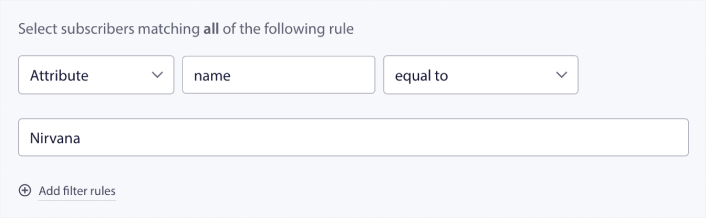
Les attributs peuvent contenir des informations personnelles telles que les noms des abonnés, la date de naissance, toute autre information que vous stockeriez dans votre CRM pour des campagnes marketing personnalisées.
Filtrer par appareil et navigateur de l'abonné
Dans de nombreux cas, il est crucial de savoir comment vos abonnés reçoivent vos messages.
Il y a une très belle histoire à propos de Michael Jackson. Chaque fois qu'il enregistrait une chanson, il l'écoutait à la radio. Pas dans sa suite d'enregistrement à un million de dollars avec une qualité audio optimale, mais sur une radio bon marché, comme la plupart de son public le ferait plus tard. S'il aimait comment la chanson sonnait, même sur l'appareil le moins cher du marché, il donnait le feu vert pour la sortir.
Pas étonnant que Billie Jean soit devenu Platine 29 fois !
Pour vos notifications push, ce n'est pas différent.
Filtrer par navigateur de l'abonné
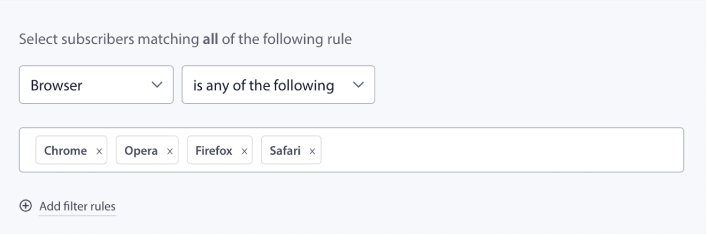
Les différents navigateurs ont des limites de caractères différentes pour les notifications push. Ainsi, lorsque vous envoyez une diffusion push, vous devez être conscient de ces limites. L'avantage est que vous pouvez enregistrer différents groupes d'audience pour recibler différents navigateurs. Vous n'avez pas besoin de créer des segments à chaque fois.
Filtrer par appareil de l'abonné
Il existe une différence dans les types de notifications push enrichies que vous pouvez envoyer aux appareils iOS, Android et Windows. Ainsi, toutes les campagnes que vous envoyez n'auront pas le même aspect sur tous les appareils. En fait, de nombreux types de notifications push ne s'afficheront même pas sur tous les appareils. Les différents appareils ont également des tailles d'écran différentes. Vous voudrez donc peut-être optimiser l'apparence de vos notifications push avant de les envoyer.
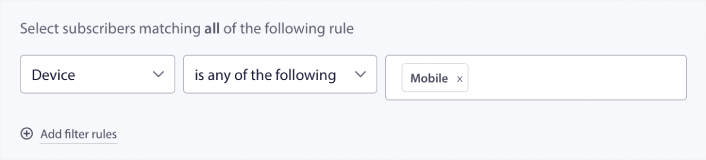
Mais maintenant que vous pouvez filtrer votre audience par son appareil, cela ne devrait plus être un problème.
Comment filtrer par géolocalisation
Vous pouvez également filtrer par géolocalisation pour personnaliser davantage vos campagnes. Le filtre vous permet de sélectionner un groupe d'audience par pays, ville et état :
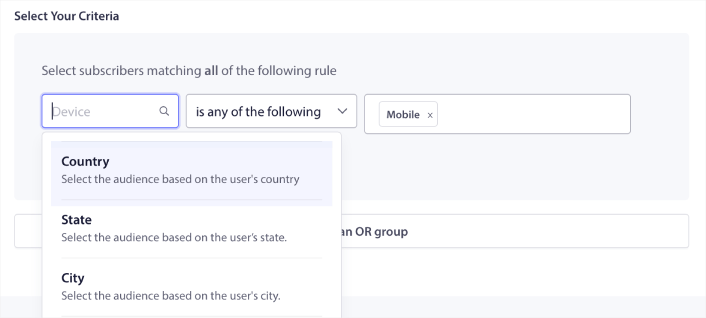
Phooto a utilisé la géolocalisation pour envoyer des notifications push dans les langues locales. Et cela les a aidés à faire monter en flèche leurs taux d'engagement rapidement. Lisez l'intégralité de l'étude de cas.
Comment filtrer par métriques d'engagement
L'une des meilleures choses concernant les groupes d'audience est qu'ils peuvent vous aider à créer des campagnes de reciblage à l'aide de notifications push. Vous pouvez filtrer votre audience par :
- Date de souscription
- Date du dernier envoi
- Date du dernier clic
- Date de la dernière vue
L'utilisation de ces métriques peut vous aider à recibler les abonnés ayant de faibles taux d'engagement ou à vendre aux abonnés ayant des taux d'engagement élevés.
Ou, vous pouvez filtrer l'audience par :
- Nombre total d'envois
- Nombre total de vues
- Nombre total de clics
Ces chiffres peuvent vous aider à trouver les abonnés qui reçoivent le moins de messages de votre part afin que vous puissiez trouver de meilleures façons de personnaliser les notifications. Vous pouvez également trouver les abonnés qui interagissent le plus souvent avec vos notifications push.
Astuce de pro : Combinez deux filtres ou plus pour trouver les meilleures façons de réengager vos abonnés. Par exemple, les abonnés avec un nombre total de vues élevé et un nombre total de clics élevé vous donneront des abonnés qui s'engagent avec vous depuis un certain temps. Ce sont des abonnés fidèles qui méritent une récompense.
Comment filtrer par identifiants
Les identifiants sont la façon dont PushEngage identifie vos abonnés. Comme PushEngage est conforme au RGPD par défaut, notre logiciel ne stocke jamais de données d'identification personnelle pour aucun de vos abonnés. Au lieu de cela, nous attribuons à chaque abonné un ID de profil et un hachage d'abonné.
Gardez à l'esprit que vous utiliserez principalement les identifiants de profil et les hachages d'abonnés dans le cadre de campagnes avancées. En d'autres termes, vous devrez utiliser l'API PushEngage pour créer des campagnes personnalisées qui utilisent ces identifiants.
Les identifiants sont parfaits pour envoyer des notifications push transactionnelles comme celle-ci :
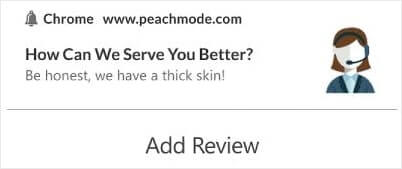
Ils sont parfaits pour les notifications push e-commerce personnalisées. Nous ne recommandons donc pas vraiment de les utiliser pour autre chose que pour tester les diffusions push depuis le tableau de bord.
Que faire après avoir configuré des campagnes de notifications push Web
Lancer une campagne de notifications push Web ne garantit pas le succès. Comme pour tout outil marketing, vous devez tester et améliorer votre messagerie et vos segments.
Ne vous perdez pas dans les détails. Concentrez-vous sur trois chiffres :
- Taux de clics (CTR) : les gens s'engagent-ils ?
- Taux d'opt-in : votre invite fonctionne-t-elle ?
- Désabonnements : envoyez-vous trop ?
Bonus si vous suivez les revenus par envoi - mais même sans cela, le CTR et le taux d'opt-in vous donnent une boucle de rétroaction rapide. Malheureusement, vous ne pouvez pas tester A/B les notifications automatisées directement. Mais ces ressources vous aideront à prendre de la vitesse :
- Comment installer un plugin WordPress de notifications Web sur votre site
- Comment faire des tests A/B de notifications push (Meilleures pratiques)
- 7 meilleures pratiques de notification push pour obtenir du trafic instantané
- 21 meilleurs plugins WordPress pour l'e-commerce en 2022 (gratuits et payants)
- 7 meilleurs plugins WordPress pour les actualités en 2022 (comparés)
De plus, PushEngage offre son lot d'intégrations. Vous pouvez même configurer des déclencheurs personnalisés à l'aide de Zapier. Il s'agit de campagnes assez avancées, et nous vous recommandons de les configurer uniquement une fois que vous êtes familiarisé avec nos autres automatisations intégrées.
Vous devez également savoir que l'API Javascript PushEngage est très flexible, et vous pouvez configurer des déclencheurs personnalisés pour pratiquement n'importe quelle action sur votre site Web.
Une fois que vous aurez parcouru toutes ces ressources, vous réaliserez que PushEngage est le logiciel de notifications push n°1 sur le marché.
Alors, si ce n'est pas déjà fait, commencez dès aujourd'hui avec PushEngage !


