
Ψάχνετε έναν απλό τρόπο να προσθέσετε ειδοποιήσεις push εφαρμογών web που μπορούν να σας βοηθήσουν να αναπτύξετε την επιχείρησή σας;
Η ρύθμιση ειδοποιήσεων push για εφαρμογές web μπορεί να είναι λίγο δύσκολη. Υπάρχει πάντα κάποια σύγκρουση με την αποστολή ειδοποιήσεων push web. Συνήθως, το μεγαλύτερο πρόβλημα είναι τα ποσοστά παράδοσης. Μπορείτε να προσθέσετε web push στην εφαρμογή web σας με πολλούς τρόπους. Αλλά πώς στέλνετε ειδοποιήσεις push web που παραδίδονται πραγματικά από την εφαρμογή web σας;
Μην ανησυχείτε! Σε αυτό το άρθρο, θα σας δείξουμε βήμα προς βήμα πώς μπορείτε να στείλετε ειδοποιήσεις push εφαρμογών web με αξιόπιστα ποσοστά παράδοσης σε λιγότερο από 10 λεπτά.
Ας ξεκινήσουμε.
Πώς να Εγκαταστήσετε Ειδοποιήσεις Push Εφαρμογών Web
Η προσθήκη ειδοποιήσεων push σε μια εφαρμογή web είναι αρκετά απλή. Απλώς ακολουθήστε τα βήματα σε αυτό το άρθρο. Εάν ακολουθήσετε κάθε βήμα, μέχρι το τέλος αυτού του άρθρου, θα πρέπει να μπορείτε να στέλνετε ειδοποιήσεις push όπως αυτή:
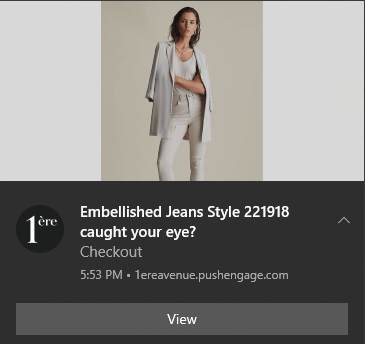
Η κύρια πρόκληση είναι ότι όλο το λογισμικό ειδοποιήσεων push web χρησιμοποιεί ένα αρχείο Javascript που ονομάζεται service_worker.js. Ο service worker σας βοηθά να συλλέξετε συνδρομητές ειδοποιήσεων push μέσω αναδυόμενων παραθύρων. Αλλά όλες οι εφαρμογές web έχουν ήδη ένα αρχείο service worker που εξυπηρετεί διαφορετικό σκοπό. Και σε μια δεδομένη στιγμή, η εφαρμογή web σας μπορεί να χρησιμοποιήσει μόνο έναν service worker.
Με απλά λόγια, οι υπηρεσίες push web μπερδεύουν την εφαρμογή web σας. Έτσι, μερικές φορές θα συλλέγει συνδρομητές ειδοποιήσεων push και μερικές φορές, δεν θα το κάνει. Μερικές φορές μπορείτε να στείλετε ειδοποιήσεις και μερικές φορές δεν μπορείτε. Μπορεί ακόμη και να καταλήξετε να στέλνετε μηνύματα push σε ολόκληρη τη λίστα συνδρομητών σας και να παραδοθούν μόνο σε λίγους συνδρομητές.
Φυσικά, οι δημιουργοί εφαρμογών web όπως το Mendix έρχονται με το δικό τους σύστημα ειδοποιήσεων push. Αλλά τι γίνεται αν θέλετε να μεταφέρετε σε κάποια άλλη υπηρεσία ειδοποιήσεων push; Τι γίνεται αν θέλετε μεγαλύτερη ευελιξία και έλεγχο στις καμπάνιες ειδοποιήσεων push;
Συνιστούμε τη χρήση του PushEngage για την αποστολή ειδοποιήσεων push εφαρμογών web. Το PushEngage είναι το λογισμικό ειδοποιήσεων push #1 στον κόσμο. Έτσι, γνωρίζετε ότι οι καμπάνιες σας είναι σε ασφαλή χέρια.
Ας ξεκινήσουμε.
Βήμα #1: Ρυθμίστε τον Λογαριασμό σας PushEngage
Μεταβείτε στην αρχική σελίδα του PushEngage και κάντε κλικ στο κουμπί Έναρξη:

Μπορείτε να δοκιμάσετε το PushEngage δωρεάν. Αν διαχειρίζεστε ένα μικρό blog που χρειάζεται επαναλαμβανόμενη επισκεψιμότητα και αλληλεπίδραση, αυτό είναι πιθανώς αρκετό. Αλλά αν σοβαρά ασχολείστε με τις πωλήσεις, θα πρέπει να αποκτήσετε το πακέτο Enterprise και να ξεκλειδώσετε τις αυτοματοποιημένες καμπάνιες.
Μόλις εγγραφείτε στον λογαριασμό σας PushEngage, κατευθυνθείτε στον πίνακα ελέγχου PushEngage και πηγαίνετε στο Ρυθμίσεις Ιστοτόπου » Λεπτομέρειες Ιστοτόπου:
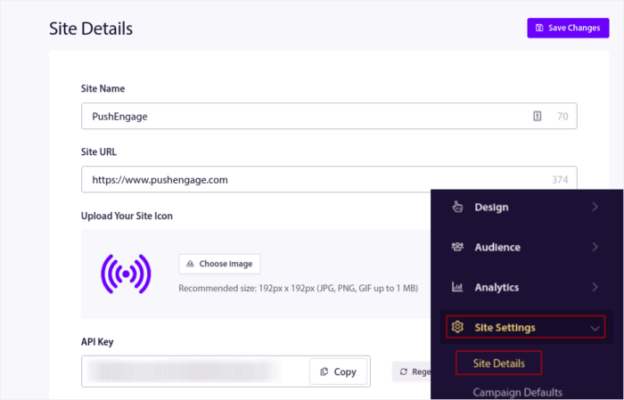
Μπορείτε να ορίσετε το λογότυπό σας, το όνομα του ιστοτόπου και τη διεύθυνση URL του ιστοτόπου εδώ. Είναι πραγματικά σημαντικό να τακτοποιήσετε αυτά τα πράγματα τώρα, ώστε να μπορείτε να δοκιμάσετε ολόκληρη τη ρύθμισή σας αργότερα.
Βήμα #2: Λάβετε τον Κωδικό Εγκατάστασης από το PushEngage
Για να εγκαταστήσετε τις ειδοποιήσεις push, θα χρειαστεί να λάβετε έναν κωδικό εγκατάστασης. Στην οθόνη Ρυθμίσεις Ιστοτόπου, κάντε κύλιση προς τα κάτω και κάντε κλικ στο κουμπί Κάντε Κλικ Εδώ για Οδηγίες Εγκατάστασης:

Στη συνέχεια, κάντε κλικ στην καρτέλα Οποιοσδήποτε Ιστότοπος:
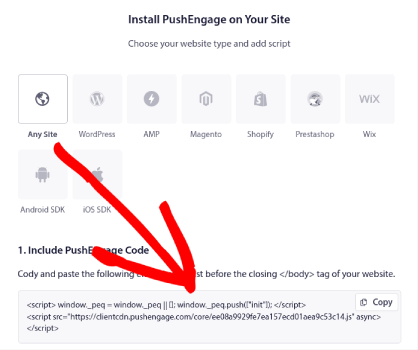
Μπορείτε να χρησιμοποιήσετε τον κωδικό Javascript για να αρχίσετε να στέλνετε ειδοποιήσεις push.
Βήμα #3: Προσθέστε τον Κώδικα Service Worker για Ειδοποιήσεις Push Εφαρμογών Web
Το πιο δύσκολο μέρος της διαδικασίας είναι επιτέλους εδώ. Στον πίνακα ελέγχου του PushEngage, στην ενότητα Οδηγίες Εγκατάστασης, θα δείτε επίσης μια επιλογή για λήψη του αρχείου service worker.
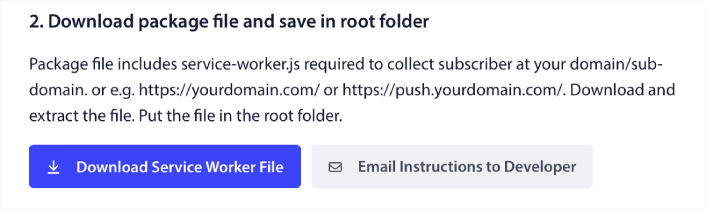
ΣΗΜΑΝΤΙΚΟ: Από προεπιλογή, μια εφαρμογή web δεν απαιτεί αρχείο service worker. Το μόνο που χρειάζεστε για να μετατρέψετε οποιαδήποτε ιστοσελίδα σε εφαρμογή web είναι ένα αρχείο manifest. Έτσι, εάν η εφαρμογή web σας δεν έχει αρχείο service worker, τότε μπορείτε απλώς να προσθέσετε τον service worker του PushEngage στον κύριο κατάλογο της ιστοσελίδας ή της εφαρμογής web σας.
Αλλά εάν η εφαρμογή web σας έχει ήδη έναν service worker σε ισχύ, τότε ΜΗΝ ανεβάσετε απευθείας το αρχείο service worker του PushEngage ως έχει. Ανοίξτε τον service worker του PushEngage σε έναν επεξεργαστή κειμένου όπως το Σημειωματάριο και αντιγράψτε τον κώδικα στο αρχείο service worker του PushEngage. Στη συνέχεια, βρείτε το αρχείο service worker για την εφαρμογή web σας και απλώς προσθέστε τον κώδικα service worker του PushEngage στο αρχείο.
Αν παραμελήσετε αυτό το βήμα, δεν θα μπορείτε να συλλέξετε συνδρομητές ειδοποιήσεων push.
Βήμα #4: Διαμορφώστε την εγγραφή στο PushEngage
Τώρα, επιστρέψτε στον πίνακα ελέγχου PushEngage. Πηγαίνετε στο Σχεδίαση » Αναδυόμενα Παράθυρα και επιλέξτε την επιλογή εγγραφής της επιλογής σας:
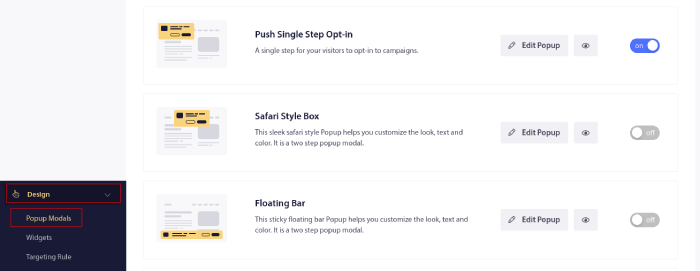
Η ιδέα εδώ είναι να δώσετε στους επισκέπτες σας έναν ισχυρό λόγο για να εγγραφούν. Εάν χρειάζεστε βοήθεια με αυτό, ελέγξτε το άρθρο μας σχετικά με το πώς να δημιουργήσετε μια προσαρμοσμένη φόρμα εγγραφής για ειδοποιήσεις push.
Και αν θέλετε κάποια πρότυπα για να ξεκινήσετε, θα πρέπει να δείτε αυτό το άρθρο σχετικά με πρότυπα εγγραφής ειδοποιήσεων push με υψηλές μετατροπές.
Βήμα #5: Δημιουργήστε την πρώτη σας καμπάνια
Τώρα που η εφαρμογή web σας μπορεί να στείλει ειδοποιήσεις push, θα πρέπει να δημιουργήσετε μια πραγματική καμπάνια.
Μια καμπάνια εγκαταλελειμμένου καλαθιού βοηθά στη δημιουργία επιπλέον εσόδων μετατρέποντας τα εγκαταλελειμμένα καλάθια. Είναι μια απλή υπενθύμιση που πουλάει πολλά προϊόντα αυτόματα. Έτσι, είναι μια εξαιρετική καμπάνια για να υποστηρίξετε οποιαδήποτε σελίδα προορισμού που φέρνει άμεσες πωλήσεις.
Απλά μεταβείτε στον πίνακα ελέγχου του PushEngage και πηγαίνετε στο Καμπάνιες » Αυτόματες Καμπάνιες » Δημιουργία Νέας Αυτόματης Καμπάνιας:
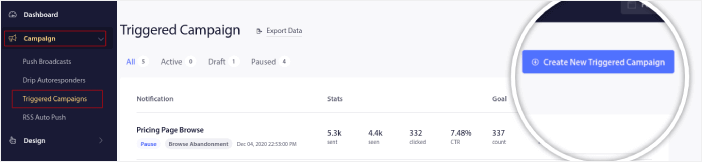
Και στη συνέχεια, επιλέξτε το πρότυπο καμπάνιας Εγκατάλειψη Καλαθιού:

Αν είστε νέος στη δημιουργία αυτοματοποιημένων καμπανιών μάρκετινγκ, μπορείτε απλώς να ακολουθήσετε το άρθρο μας σχετικά με το πώς να ρυθμίσετε μια καμπάνια ειδοποιήσεων push για εγκαταλελειμμένο καλάθι. Ακολουθήστε κάθε βήμα και μπορείτε να ρυθμίσετε ειδοποιήσεις push όπως αυτή:
Και για κάθε ενδεχόμενο να αναρωτιέστε, δεν χρειάζεται να είστε ένα γνωστό όνομα για να είναι αποτελεσματικές οι καμπάνιες ειδοποιήσεων push. Στην πραγματικότητα, το PushEngage δημιουργήθηκε για να βοηθήσει τις μικρές επιχειρήσεις να αναπτυχθούν χρησιμοποιώντας ειδοποιήσεις push.
Αλλά πριν ξεκινήσετε το μάρκετινγκ του ιστότοπού σας, θα πρέπει να διορθώσετε τυχόν προβλήματα με τη διαδικασία συνδρομής ειδοποιήσεων push. Δείτε αυτό το άρθρο σχετικά με τη δοκιμή των ειδοποιήσεων push. Αν όλα λειτουργούν τέλεια, έχετε τελειώσει!
Τι να Κάνετε Μετά την Προσθήκη Ειδοποιήσεων Push Εφαρμογών Web;
Αυτό ήταν για αυτό το θέμα, φίλοι!
Μπορείτε πλέον να στέλνετε ειδοποιήσεις push εφαρμογών web. Μέχρι τώρα, έχετε επίσης δημιουργήσει μια ισχυρή καμπάνια ειδοποιήσεων push web για να ενισχύσετε την ανάπτυξή σας. Όλα αυτά, σε λιγότερο από 10 λεπτά!
Δείτε πώς να δημιουργήσετε και άλλες αυτοματοποιημένες καμπάνιες ειδοποιήσεων push. Οι περισσότερες καμπάνιες push είναι απλές και αποτελεσματικές. Επομένως, συνιστούμε τη δημιουργία πολλαπλών καμπανιών για τον ιστότοπό σας. Ακολουθούν μερικές εξαιρετικές για να ξεκινήσετε:
- Πώς να στέλνετε αυτόματα ειδοποιήσεις push RSS
- Πώς να Ρυθμίσετε Ειδοποιήσεις Push Εγκατάλειψης Καλαθιού Χρησιμοποιώντας το GTM
- Πώς να Προγραμματίσετε Ειδοποιήσεις Push με τον Εύκολο Τρόπο [Οδηγός 5 Λεπτών]
Και αν δεν το έχετε κάνει ήδη, ξεκινήστε με το PushEngage. Το PushEngage είναι το λογισμικό ειδοποιήσεων push #1 στον κόσμο. Έτσι, οι καμπάνιες σας είναι σε ασφαλή χέρια.
Εκτέλεσέ το από τον βοηθό σας AI: όλα σε αυτό το playbook — η δημιουργία του τμήματος, ο προγραμματισμός της καμπάνιας, η εξαγωγή των αποτελεσμάτων — λειτουργούν μέσω του διακομιστή PushEngage MCP. Συνδέστε το Claude (ή οποιονδήποτε βοηθό συμβατό με MCP) στον λογαριασμό σας PushEngage μία φορά, στη συνέχεια περιγράψτε την καμπάνια και αφήστε τον να κάνει τα κλικ. Δείτε αποστολή ειδοποιήσεων push από τον βοηθό σας AI για ένα παράδειγμα.


