Aviso: Não há documentação legada disponível para este item, portanto, você está vendo a documentação atual.
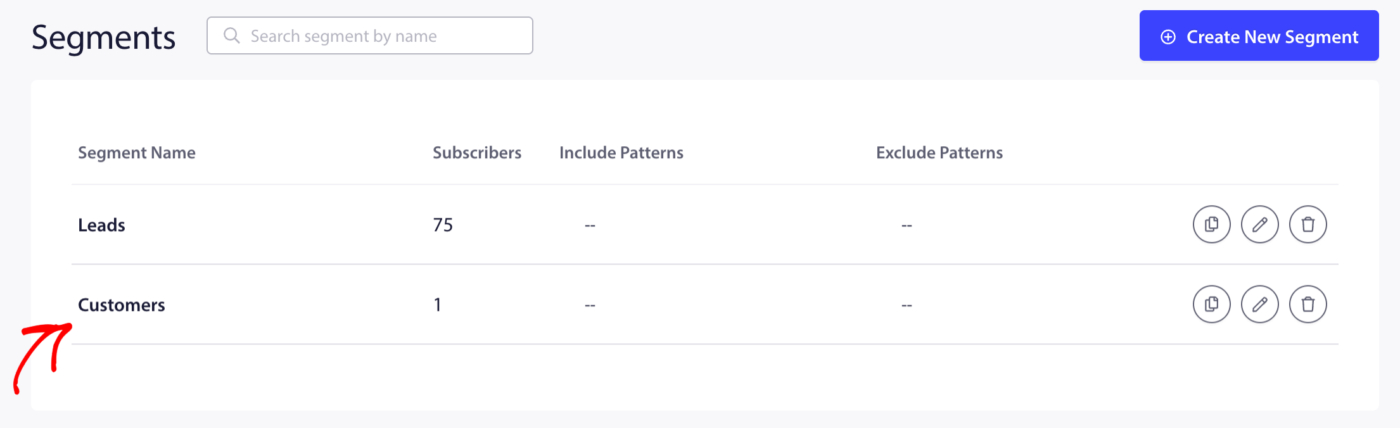
O PushEngage cria automaticamente dois segmentos quando você instala o aplicativo Shopify: Clientes (assinantes que compraram) e Leads (assinantes que não compraram). Além desses padrões, você pode criar segmentos personalizados com base em comportamentos de compra específicos – como o que um assinante comprou, quanto gastou ou com que frequência comprou usando segmentação dinâmica.
Este guia abrange os segmentos padrão e como criar segmentos personalizados baseados em compras usando a segmentação dinâmica do PushEngage.
Antes de Começar
- O PushEngage está instalado em sua loja Shopify com assinantes de push ativos.
- Os segmentos Clientes e Leads estão ativados. Veja Entendendo a Segmentação Padrão da Shopify e Grupos de Audiência se eles não estiverem.
- Segmentos personalizados baseados em compras exigem a adição de um snippet JavaScript à página de confirmação de pedido do seu tema Shopify. Esta é uma configuração única.
Segmentos Padrão: Clientes e Leads
Os dois segmentos criados automaticamente cobrem a divisão de compras mais ampla.
| Segmento | Quem ele inclui | Melhor usado para |
|---|---|---|
| Clientes | Assinantes que completaram pelo menos uma compra | Ofertas de fidelidade, campanhas de recompra, solicitações de avaliação |
| Leads | Assinantes que ainda não compraram | Boas-vindas com gotejamento para a primeira compra, desconto na primeira compra, descoberta de produtos |
Esses segmentos são atualizados automaticamente. Um assinante se move de Leads para Clientes assim que completa seu primeiro pedido.
Para visualizá-los, vá para Audiência » Segmentos no seu painel PushEngage.
Criando Segmentos Personalizados Baseados em Compras
Para uma segmentação mais precisa, você pode criar segmentos que agrupam assinantes por comportamentos de compra específicos. Estes usam o recurso de segmentação dinâmica do PushEngage, que adiciona assinantes a um segmento quando um evento definido ocorre em sua loja.
Etapa 1: Crie o Segmento no PushEngage
- Vá para Público » Segmentos.
- Clique em Criar Novo Segmento.
- Insira um nome descritivo.
- Clique em Salvar Segmento (deixe os padrões de URL em branco – este segmento será preenchido por evento, não por visita à página).

Etapa 2: Adicione o Snippet de Rastreamento ao seu Tema Shopify
Depois que o segmento for criado, você precisará disparar a API de segmento PushEngage na página de confirmação de pedido da Shopify (também chamada de página Obrigado) quando ocorrer uma compra qualificada.
O snippet JavaScript se parece com isto:
window._peq.push(["add-to-segment", "Segment Name"]);
Para segmentos dinâmicos (onde você deseja que o assinante saia do segmento após um número definido de dias):
window._peq.push(["add-to-dynamic-segment", "Segment Name", 30]);
O número 30 é o número de dias que o assinante permanece no segmento antes de ser removido automaticamente.
Para adicionar isso à Shopify, vá para Configurações » Checkout » Página de status do pedido em seu administrador Shopify e cole o snippet no campo Scripts adicionais, envolvido em uma condição para disparar apenas em pedidos concluídos.
Observação: Se precisar de ajuda para inserir este trecho, entre em contato com nossa equipe de suporte.
Segmentos Recomendados Baseados em Compras
Compradores Recentes (Dinâmico, 30 Dias)
Assinantes que concluíram uma compra nos últimos 30 dias. Use este segmento para excluir compradores recentes de campanhas de aquisição para que eles não recebam um desconto de primeira compra de que não precisam mais.
window._peq.push(["add-to-dynamic-segment", "Recent Buyers", 30]);
Compradores Recorrentes
Assinantes que fizeram mais de um pedido. Ative este segmento na confirmação do segundo pedido.
window._peq.push(["add-to-segment", "Repeat Buyers"]);
Caso de uso: Envie descontos exclusivos de fidelidade ou anúncios de produtos com acesso antecipado.
Clientes de Alto Valor
Assinantes cujo valor total do pedido excede um limite (por exemplo, mais de US$ 100). Use as variáveis Liquid do seu tema Shopify para ativar este segmento condicionalmente.
{% if order.total_price > 10000 %}
<script>window._peq.push(["add-to-segment", "High Value Customers"]);</script>
{% endif %}
(Em Shopify Liquid, os preços são em centavos — 10000 = US$ 100.)
Caso de uso: Campanhas exclusivas para VIPs, acesso antecipado a promoções, lançamentos de produtos premium.
Compradores de Categoria
Assinantes que compraram um tipo de produto ou coleção específica. Ative este segmento quando o pedido contiver um produto marcado com uma categoria específica.
{% for line_item in order.line_items %}
  {% if line_item.product.type == "Skincare" %}
  <script>window._peq.push(["add-to-segment", "Skincare Buyers"]);</script>
  {% endif %}
{% endfor %}
Caso de uso: Envie novidades ou reposições direcionadas, relevantes para o que cada assinante já comprou.
Usando Segmentos ao Enviar Campanhas
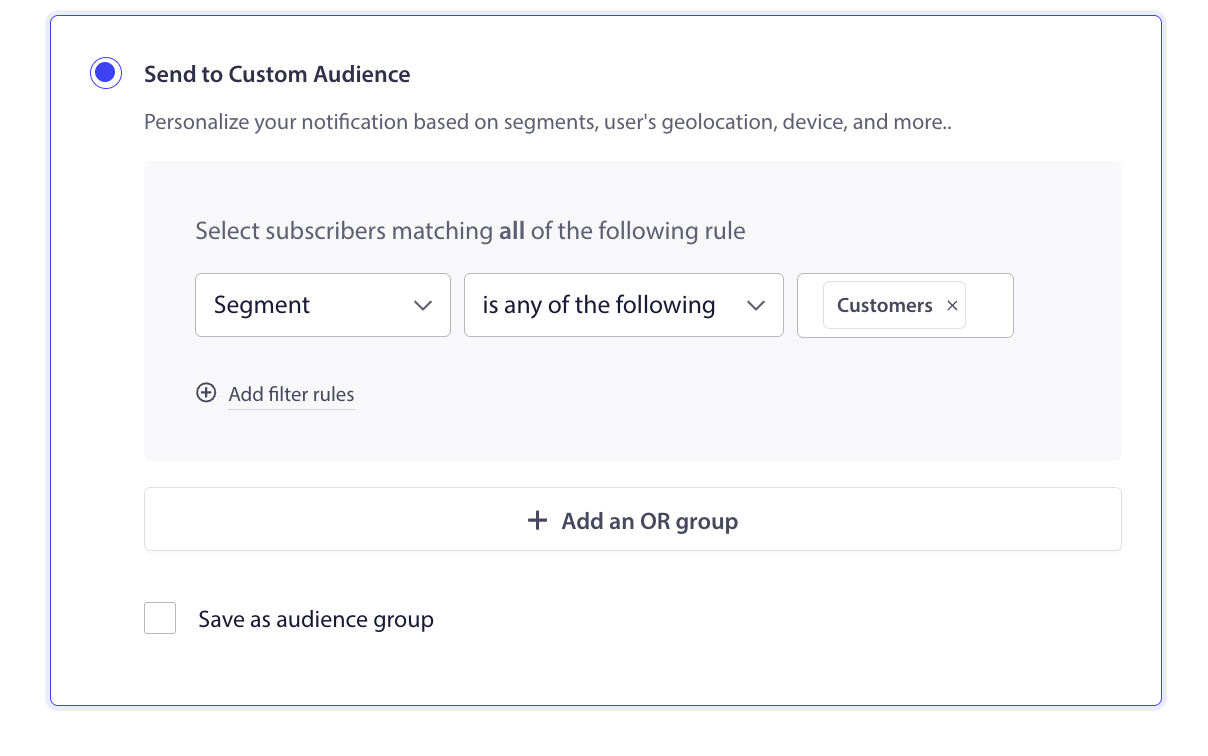
Uma vez que os assinantes estejam em seus segmentos, selecione-os ao criar qualquer tipo de campanha.
Para Transmissões Push:
- Vá para Campanhas » Transmissões Push » Criar Nova Transmissão Push.
- Na aba Público, selecione Segmento e escolha no menu suspenso.
Para Respostas Automáticas de Gotejamento:
- No editor de campanhas, navegue até a seção Público.
- Selecione o segmento de destino.
Para Grupos de Público: Combine um segmento de compra com outros critérios como geografia ou dispositivo. Vá para Público » Grupo de Público para construir um grupo. Veja Entendendo a Segmentação Padrão do Shopify e Grupos de Público para instruções completas.
Referência de Casos de Uso de Segmentos
| Segmento | Campanha | Objetivo |
|---|---|---|
| Leads | Gotejamento de boas-vindas de primeira compra com desconto | Converter assinante de primeira viagem em comprador |
| Compradores Recentes (30 dias) | Excluir de campanhas de aquisição | Evitar oferecer descontos para pessoas que acabaram de pagar o preço integral |
| Compradores Recorrentes | Recompensa de fidelidade ou acesso antecipado VIP | Recompense e retenha seus melhores clientes |
| Clientes de Alto Valor | Lançamento exclusivo de produto ou oferta premium | Gere receita do seu público com maior intenção |
| Compradores de Categoria | Alerta direcionado de novidade ou reposição | Aumente a relevância e as taxas de cliques |
Perguntas Frequentes
Os segmentos personalizados são atualizados automaticamente? Segmentos dinâmicos são atualizados automaticamente com base no disparo do snippet e na duração que você definir. Segmentos estáticos (sem duração) apenas adicionam assinantes e não os removem automaticamente.
Um assinante pode estar em vários segmentos ao mesmo tempo? Sim. Um assinante pode estar em Clientes, Compradores Recorrentes e Clientes de Alto Valor ao mesmo tempo.
E se eu não puder editar meu tema do Shopify? Se você não tiver acesso ao tema, pode pedir ao seu desenvolvedor para adicionar o snippet ou entrar em contato com nossa equipe de suporte para obter ajuda.
Os segmentos estão disponíveis em todos os planos? Segmentos básicos (Clientes, Leads) estão disponíveis em todos os planos. Segmentos personalizados e dinâmicos estão disponíveis nos planos Growth e superiores.
Se você encontrar algum problema, sinta-se à vontade para entrar em contato conosco clicando aqui. Nossa equipe de suporte poderá ajudá-lo.


