It is the second week of the quarter and your retention dashboard shows six “automated” triggers running, all green. The cart-abandonment trigger keeps firing at subscribers who already paid. The win-back overlaps with the price-drop alert for the same lapsed customer. The welcome series ships notifications independently of the first-purchase nudge. The post-purchase review request lands on subscribers who returned the order yesterday.
Each of the six triggered push campaigns is a pipeline pointing at the same subscriber list, each pretending the other five do not exist. The repeat-purchase rate stopped moving twelve months ago and nobody on the team can attribute revenue per trigger because the triggers do not share state.
This is the operational reality in most mid-market retention stacks. The problem is not strategy. The strategy is fine. The problem is architecture. A triggered notification in 2024 was a single message that fired on a single event. In 2026, that primitive is not enough. The journey has to remember what the subscriber did, branch on it, and exit when they convert.
This article makes the architectural case. It defines the boundary between broadcast, triggered, and contextual push notifications, walks through the difference between event triggers and audience triggers, names the six node types that turn a single trigger into a contextual workflow, and ships three migration patterns that consolidate six standalone triggers into three contextual journeys with shared exit criteria and per-workflow analytics.
- Contextual, triggered, broadcast: three primitives, not one
- Event triggers and audience triggers behave very differently
- The six nodes that turn a trigger into a contextual campaign
- Three migration patterns: six standalone triggers become three contextual workflows
- What contextual workflows do that standalone triggers cannot
- Per-workflow analytics: how to read the funnel
- Build it in PushEngage Workflows
Contextual, triggered, broadcast: three primitives, not one
Three primitives sit underneath every push notification program. Most teams collapse them into one bucket called “campaigns,” which is where the architecture problem starts.
Broadcast. The same notification goes to the entire matching audience, scheduled. Flash sale at noon. New collection alert on launch day. Broadcast is the right primitive for time-bounded announcements where every recipient gets the same payload. It is the wrong primitive for anything that depends on subscriber state.
Triggered. A single notification fires when a single event fires. Subscriber abandons a cart, the cart-abandonment notification fires. Subscriber views a product page, the browse notification fires. Subscriber purchases, the post-purchase notification fires. The trigger has no memory. It does not know what happened five minutes ago or what is scheduled for next Tuesday. Each trigger is a pipeline ignorant of every other trigger.
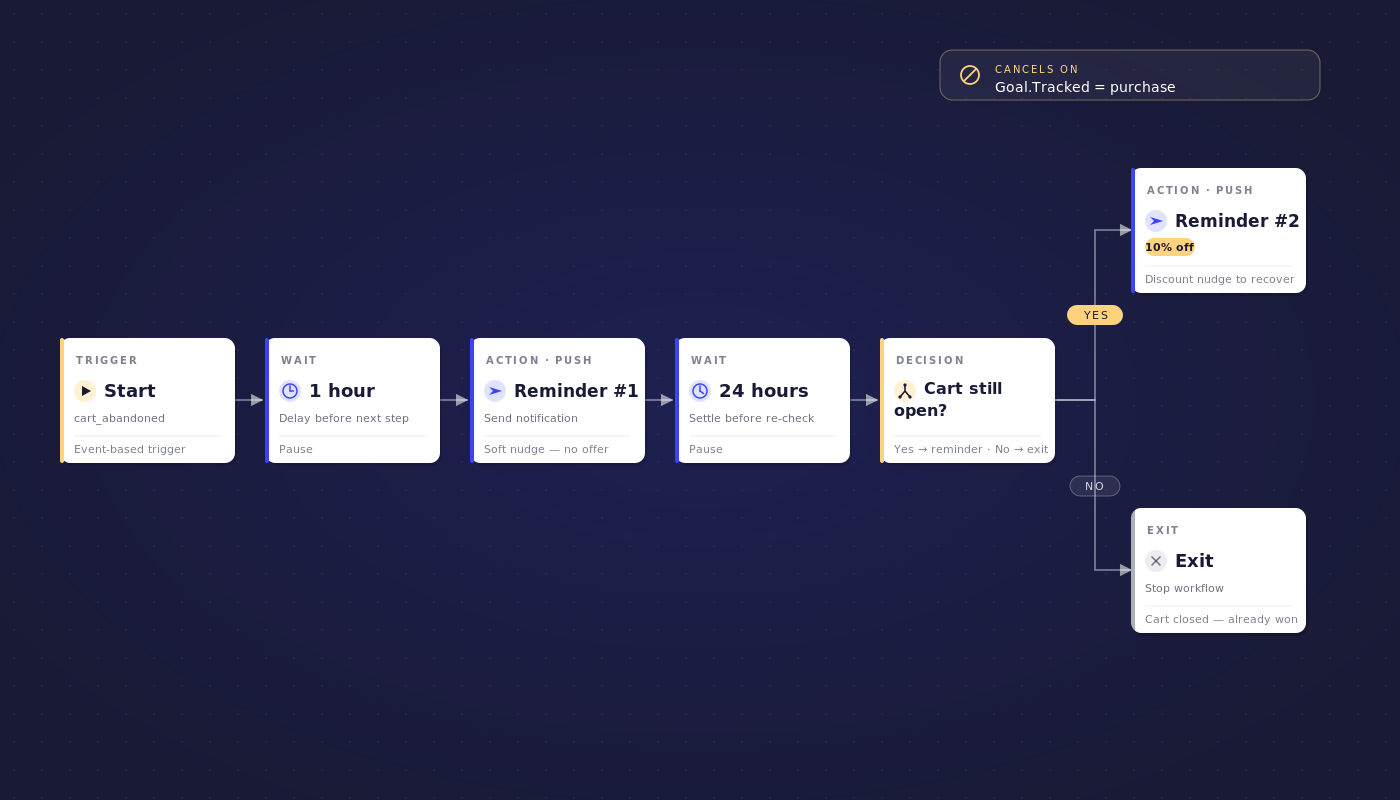
Contextual. A workflow uses the trigger as the entry point and then adapts on subscriber state. The same cart-abandonment event starts a multi-step journey: a one-hour wait, a first reminder, a 24-hour wait, a decision that checks whether the cart is still open, a second reminder with a discount, a 48-hour wait, a third reminder, and an exit rule that cancels the workflow the moment the subscriber buys. The campaign is the workflow, not the trigger. Contextual push notifications are how triggered messaging behaves once the architecture catches up.
The three primitives map cleanly to three workloads. Use this table when you audit your current stack.
| Capability | Broadcast | Triggered | Contextual |
|---|---|---|---|
| Per-subscriber state | No | No | Yes |
| Branches on behavior | No | No | Yes |
| Exit criteria | No | No | Yes |
| Multi-channel routing inside one campaign | No | No | Yes |
| Built-in A/B (send-time, copy, channel) | No | No | Yes |
| Right workload | Flash sales, launch announcements | One-off transactional pings (low volume) | Lifecycle journeys (welcome, cart, win-back, renewal) |
Most lifecycle programs need contextual. Most teams ship triggered. That gap is what this article is about. The marketing automation workflows that ship contextual journeys do not look like a longer list of triggers; they look like a smaller set of multi-step journeys composed from a shared vocabulary. The push notification workflows you actually want are three contextual journeys, not nine triggers.
Event triggers and audience triggers behave very differently
Before the node anatomy, one taxonomy point that almost every article on this topic gets wrong. A “trigger” in push notification workflows is not a single primitive. It is two primitives that look similar from the outside and behave very differently underneath.
Event triggers fire per subscriber on a real event. The supported events in PushEngage Workflows include PushEngage.Subscriber.Added, PushEngage.Subscriber.AddSegment, PushEngage.Subscriber.RemoveSegment, PushEngage.Subscriber.UpdateField, PushEngage.Subscriber.UpdateAttribute, PushEngage.Goal.Tracked, and PushEngage.CustomEvent. When the event fires, the system evaluates active workflows, checks event-filter criteria, checks exit rules, and queues the matching workflow for that subscriber. The trigger-to-queue gap is seconds. Event triggers are the right primitive for any reactive campaign: cart abandonment, browse abandonment, purchase follow-up, segment-join welcomes. Event-triggered push campaigns are the dominant case in eCommerce, SaaS onboarding, and any program with real-time signals.
Audience triggers fire on a filter at a scheduled time. The filter selects subscribers matching specific criteria, like last_active > 30 days, loyalty_tier = gold, or city = New York AND segments includes "vip". The scheduler poller fetches the matching subscriber set in batches of 1000, staggers execution by 15 seconds to 2 minutes, and creates one workflow instance per subscriber. Audience triggers are the right primitive for re-engagement, birthday campaigns, geographic promotions, and any program where the set is defined by attribute rather than by event.
The differences matter operationally, not just conceptually:
| Aspect | Event trigger | Audience trigger |
|---|---|---|
| Initiation | Real-time on subscriber event | Scheduled via poller |
| Speed | Within seconds | Batched, 1-2 minute delay |
| Subscriber selection | One subscriber per event | Bulk selection at workflow start time only |
| New subscribers after start | Automatically included on next event | NOT auto-included after workflow starts |
| Filter change after start | N/A | Editing the filter does NOT add new subscribers |
| Event data available | Yes (for variable replacement) | No |
The third row is the gotcha. An audience-based workflow selects its subscriber set once, at workflow start. Subscribers who become inactive after the workflow starts are not auto-added. Editing the audience filter on an active workflow does not pull in new candidates. A retention team that ships a “win-back for subscribers inactive 30+ days” workflow and lets it run for ninety days will see the same fixed cohort over the entire ninety days, even though new subscribers cross the 30-day threshold every day.
The architectural answer is to duplicate the audience workflow on a recurring schedule, monthly or weekly, so each duplicate captures the candidates who crossed the threshold since the last run. This is a one-line operational note in the documentation and a recurring source of “why didn’t this subscriber get the campaign?” support tickets in teams that treat audience triggers like event triggers.
The six nodes that turn a trigger into a contextual campaign
Once the trigger fires, the workflow itself is composed from six node types. The vocabulary is small enough to learn in five minutes and big enough to compose any contextual campaign a retention team has ever wanted to ship.
START. The entry point. A START node defines the trigger (event-based or audience-based) and the filter criteria. A workflow has exactly one START. The entry point determines the trigger taxonomy from the previous section and sets the event-data context that downstream nodes can read.
WAIT. A delay. A WAIT node holds the subscriber for a specified duration (minutes, hours, days) or until a specific calendar time. Waits are how a workflow respects subscriber state and subscriber timezone. The workflow can wait one hour for a cart-abandonment reminder, three days for a feature-highlight in a welcome series, or until Tuesday 10 AM in the subscriber’s local timezone for a business-hours send. Waits also let you compose a multi-step drip without firing every message in the first sixty seconds.
DECISION. A two-way branch. A DECISION node checks an event filter or an audience filter and routes the subscriber down the YES path or the NO path. Has the subscriber purchased? Are they still in the cart-abandoner segment? Did their loyalty tier change? Decision nodes are how behavioral push notifications stop treating every subscriber the same and start adapting to what each subscriber has actually done. The supported operators include equals, not-equals, in, not-in, greater-than, less-than, and exists, which is enough to express any decision logic a retention team needs.
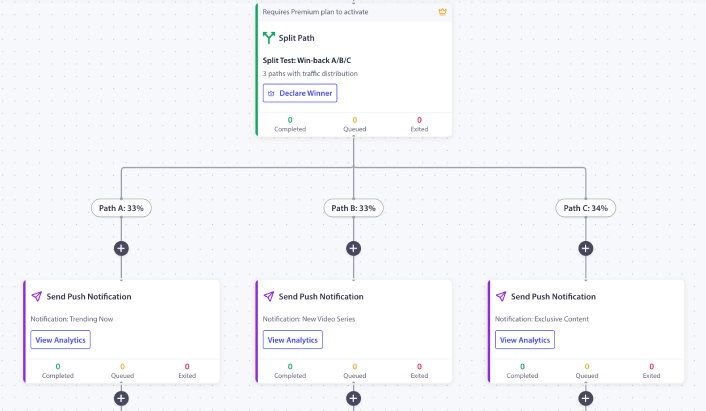
SPLIT_PATH. A percentage-based fork for A/B testing. A SPLIT_PATH node routes subscribers across two or more paths based on configured percentages: 50/50 for a two-way test, 33/33/34 for a three-way send-time test, 90/10 for a holdout group. The system uses a load-balancing algorithm that routes each new subscriber to the most under-utilized path, which keeps the distribution accurate even at small sample sizes. Once the test reaches significance, set winner_edge_id and the workflow promotes 100% of traffic to the winning variant without rebuilding the workflow.
ACTION. The work itself. ACTION nodes do more than send a push notification. PushEngage Workflows supports eleven action types: SendPushNotification, AddSegment, RemoveSegment, UpdateField, UpdateAttribute, Update (combined), HttpRequest, CustomEvent.Send, SendTriggerCampaignEvent, Workflow.Start, and Workflow.Stop. The four most common in retention programs are SendPushNotification, AddSegment (tag the subscriber as converted, onboarded, or churn-risk), UpdateAttribute (increment a loyalty counter or set a last-purchase date), and HttpRequest (sync state to a CRM, fire a Slack alert for a high-value lead, or call a downstream service).
END / EXIT. The terminal. END and EXIT nodes mark the workflow complete and update analytics. END is the natural conclusion. EXIT is typically placed on the NO path of a decision when the subscriber does not qualify, or on a split-path branch designed as a control group. The system also supports workflow-level exit criteria: an audience_filter or trigger_event that cancels the active workflow before each node runs. The exit rule fires regardless of which node the subscriber currently sits at. This is what stops the cart-abandonment workflow from firing reminders to subscribers who already bought.
Every contextual campaign in this article is composed from these six pieces. The migration patterns below read fast once the vocabulary is shared.
Three migration patterns: six standalone triggers become three contextual workflows
Most mid-market retention stacks have between four and eight standalone triggers running. The pattern is consistent: welcome notification, first-purchase nudge, cart abandonment, browse abandonment, post-purchase review request, win-back, reactivation, lapsed-VIP. Each of these is a separate trigger with its own copy, its own owner, and its own analytics. None of them know about each other. The same three contextual workflows can ship the same revenue with one-third the surface area.
Pattern 1 — Onboarding consolidation
Collapse the welcome series and the first-purchase nudge into one workflow with a decision on purchase status.
- START: Event
PushEngage.Subscriber.Added - Run type: Single (90-day cooldown after completion)
- Flow: WAIT 1 day → ACTION send welcome notification → WAIT 3 days → DECISION: has the subscriber purchased? → YES path: ACTION send thank-you + ACTION
AddSegmenttocustomers+ END → NO path: ACTION send first-purchase 10% discount → WAIT 4 days → DECISION: has the subscriber purchased? → YES path: ACTION send thank-you + END → NO path: ACTION send final nudge + END - Exit criteria: None at workflow level; the decision branches handle the converted subscriber
- Replaces: Welcome trigger + first-purchase trigger (2 triggers → 1 workflow)
The shared state is the entire point. The third notification only fires for subscribers who have not converted by day four. The first-purchase trigger in the old architecture fired for every new subscriber, including the ones who bought in their first session. The workflow stops bothering them.
Pattern 2 — Cart-to-review chain
Collapse cart-abandonment recovery and post-purchase review request into one workflow with a workflow-chaining handoff.
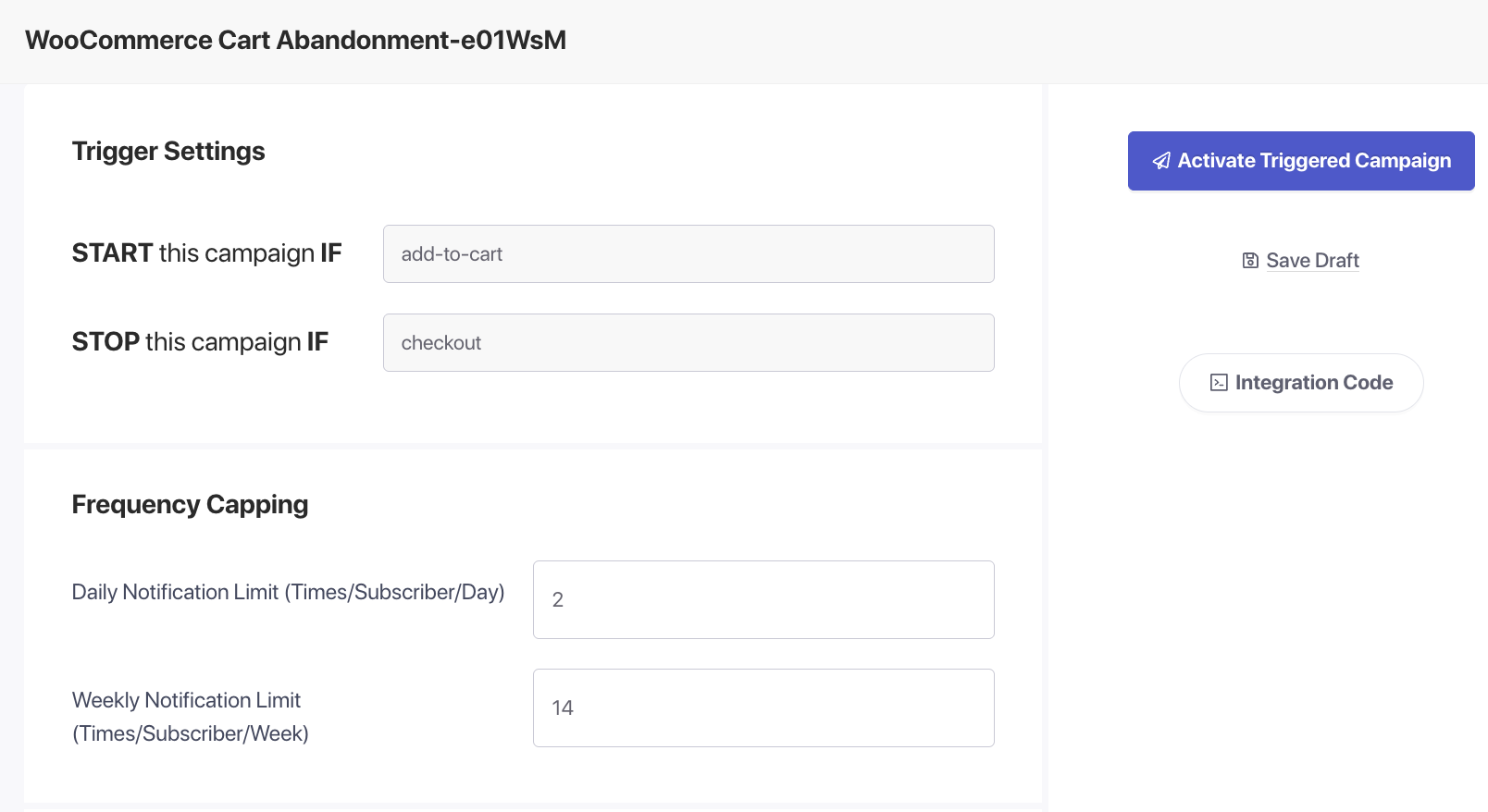
- START: Custom event
cart_abandoned - Run type: Multiple Parallel (each abandoned cart is its own instance)
- Flow: WAIT 1 hour → ACTION reminder #1 → WAIT 24 hours → DECISION: cart still abandoned? → YES path: ACTION reminder #2 with 10% → WAIT 48 hours → DECISION: cart still abandoned? → YES path: ACTION final reminder with 20% → END
- Exit criteria (workflow level):
Goal.Tracked = purchasematching thecart_idfrom the trigger event. The moment the subscriber buys, the workflow cancels. - Handoff: On exit due to purchase, the system fires
PushEngage.Workflow.Starttargeting the review-request workflow. The review workflow only starts for subscribers who actually purchased. The exit-due-to-not-buying path skips the handoff entirely. - Replaces: Cart trigger + post-purchase review trigger + the support ticket from review requests landing on subscribers who never bought (3 problems → 1 workflow)
The chaining via Workflow.Start is the architectural answer to lifecycle progression. Instead of two triggers firing independently and overlapping on the same subscribers, the cart workflow’s exit-on-purchase is what starts the review workflow. The review only fires for converted subscribers. The cart never fires after conversion. The handoff is enforced by the engine.
Pattern 3 — Re-engagement consolidation
Collapse the win-back, the reactivation, and the lapsed-VIP campaigns into one workflow with an audience trigger and three decision branches.
- START: Audience filter
last_active > 30 days - Run type: Single (one re-engagement attempt per subscriber per 90-day window)
- Flow: DECISION: loyalty tier? → Gold branch: ACTION send “we miss you, VIP” with 20% offer → Silver branch: ACTION send “we miss you” with 10% offer → No-tier branch: ACTION send standard “we miss you” with free-shipping offer → WAIT 5 days → DECISION (per branch): did the subscriber engage or visit the site? → YES path: ACTION
AddSegmenttore-engaged+ END → NO path: ACTION send “last chance” with deeper offer + END - Exit criteria (workflow level): Audience filter
last_active < 7 days. The subscriber became active on their own and the workflow’s job is done. - Replaces: Win-back trigger + reactivation trigger + lapsed-VIP trigger (3 triggers → 1 workflow)
- Operational note: Per the audience-trigger gotcha in the previous section, this workflow does not auto-include subscribers who cross the 30-day threshold after the workflow starts. Duplicate the workflow monthly so each duplicate captures the new candidates. A single long-running audience workflow is the wrong primitive here.
After these three migrations, the retention team owns three contextual journeys instead of six (or eight) standalone triggers. The total volume of push messaging stays roughly the same. The over-messaging disappears, because shared exit criteria and decision branches stop the workflow when the subscriber’s state no longer matches. The analytics fragment from “six dashboards I cannot reconcile” to “three funnels I can defend.” This is what event-triggered push campaigns look like when they grow up.

What contextual workflows do that standalone triggers cannot
Four capabilities exist inside a contextual workflow and cannot be composed across standalone triggers. Each one is a real source of revenue or savings.
Cross-workflow exit criteria. A standalone trigger fires when the event fires, full stop. Inside a workflow, the exit rule fires regardless of which node the subscriber sits at. The cart-abandonment workflow exits on purchase. The win-back exits on re-activation. The renewal workflow exits on early renewal. The trigger that nobody told to stop is the workflow that defines an exit rule.
Multi-channel routing inside one workflow. With separate single-channel tools, “fire web push, fall back to email, escalate to WhatsApp” requires three vendor logins, two segmentation engines, and at least one Zapier flow. Inside one workflow engine, it is three ACTION nodes with two DECISION nodes between them, sharing one subscriber identity and one set of exit criteria. For a deeper treatment, see the multi-channel push and email orchestration post.
Quiet hours with reschedule fallback. Push notifications that would land at 3 AM in the subscriber’s local timezone get held until 8:01 AM if quiet hours are configured with reschedule as the fallback. The alternative, skip, silently drops the notification and does not update notification analytics for the skipped action. For most retention teams, reschedule is the right default because dropped analytics mean dropped revenue attribution. The contextual push notifications a retention team actually wants to ship respect subscriber timezones without disappearing from the funnel.
Workflow chaining. The Workflow.Start and Workflow.Stop actions make lifecycle progression a real architecture. The welcome workflow ends, which starts the engagement workflow. The cart workflow exits on purchase, which starts the review workflow. Compared to a folder of triggers that all fire independently, this is a state machine: a graph of workflows, each with its own entry condition, exit condition, and handoff to the next stage. Triggers do not know about each other. Workflows do.
Per-workflow analytics: how to read the funnel
A workflow you cannot defend at the next P&L review is a workflow that gets killed. PushEngage Workflows tracks three numbers at each node (queued_users, completed_users, exited_users) plus workflow-level totals for total-entered, currently-active, completed, and exited. The retention manager’s job is to read this funnel and tell finance what each line item produced.
Here is what node-level analytics look like for the cart-to-review chain from Pattern 2 above. Illustrative numbers, drawn from a realistic 200,000-subscriber list with a 6% monthly cart-abandonment rate.
| Node | Queued | Completed | Exited | Notes |
|---|---|---|---|---|
| START (cart_abandoned) | 0 | 12,400 | 320 | 320 subscribers matched exit criteria at workflow start (purchased between the cart event and the workflow scan) |
| WAIT 1 hour | 180 | 11,900 | 320 | Normal queue depth |
| ACTION: reminder #1 | 0 | 11,900 | 0 | Sent |
| WAIT 24 hours | 240 | 9,800 | 1,860 | 1,860 subscribers purchased after reminder #1 (exit on goal purchase) |
| DECISION: cart still abandoned | 0 | 9,800 | 0 | Branch evaluated |
| ACTION: reminder #2 (10%) | 0 | 9,800 | 0 | Sent |
| WAIT 48 hours | 90 | 6,300 | 3,410 | 3,410 subscribers purchased after reminder #2 |
| ACTION: final reminder (20%) | 0 | 6,300 | 0 | Sent |
| END | n/a | 6,300 | n/a | 6,300 subscribers did not buy; review workflow not chained for these |
| Workflow.Start → review workflow | n/a | 5,270 | n/a | Fired for the 5,270 subscribers (1,860 + 3,410) who purchased |
The 5,270 chained-handoffs are the new metric this architecture surfaces. The cart workflow recovered a 42.5% cart rate (5,270 of 12,400 entered) and only those 5,270 subscribers receive the review-request workflow. The old architecture sent the review request to everyone who had ever purchased, including subscribers who never abandoned a cart, subscribers who returned the order, and subscribers who had already submitted a review. The architectural fix is small. The over-messaging savings are large.
Two bottleneck patterns are worth knowing. A high-exit node (like the two WAIT nodes above) is the workflow doing its job: subscribers are buying during the wait windows, exit criteria fires, the next reminder never sends. The inverse pattern, high exits at action nodes paired with low exits at wait nodes, means the timing is wrong and the waits should be shortened. A high-queue node means a quiet-hours stall, a long wait, or a downstream poller delay; check the timing configuration before assuming the workflow is broken.
For deeper eCommerce-specific treatment of these patterns, the companion post on five push notification workflows for eCommerce walks through cart, browse, post-purchase, welcome, and win-back as standalone journeys. The eCommerce push notifications hub covers the broader campaign-type landscape, the cart abandonment recovery sequence walks through cadence tuning by platform, and the automated push notifications overview surfaces the older listicle of automation types alongside this workflow architecture.
The same analytics shape works across verticals. SaaS has a renewal funnel and trial-to-paid conversion. Publishers have an article-engagement funnel and archive re-entry. Travel has a booking funnel and price-drop alert flow. The behavioral push notifications a SaaS team uses to drive trial-to-paid look structurally identical to the ones an eCommerce team uses to drive cart-to-purchase: one START on a real-time event, three or four steps with decision branches, exit criteria on conversion, optional handoff to the next workflow. The vertical changes the trigger names and the offer copy. The architecture stays.
Build it in PushEngage Workflows
Each of the three migration patterns above maps directly to PushEngage Workflows components.
| Pattern | Node types used | Action types used | Workflow option | Suggested template starting point |
|---|---|---|---|---|
| Onboarding consolidation | START, WAIT, DECISION, ACTION, END | SendPushNotification, AddSegment | Run type: Single | “Welcome series with first-purchase branch” |
| Cart-to-review chain | START, WAIT, DECISION, ACTION, END | SendPushNotification, Workflow.Start | Run type: Multiple Parallel; exit criteria Goal.Tracked = purchase | “Cart abandonment escalation” |
| Re-engagement consolidation | START (audience), DECISION, ACTION, WAIT, END | SendPushNotification, AddSegment | Run type: Single; audience trigger; duplicate monthly | “Re-engagement with tier-based offer” |
The Workflows engine ships with 60+ shipped templates covering each migration pattern above. Each template is a starting point. The patterns install in under five minutes on Shopify, Shopify Plus, WooCommerce, BigCommerce, and Magento inside the PushEngage Workflows builder, or on any SaaS, publisher, or travel stack via the JavaScript SDK and the events API.
The free plan gives you 200 subscribers, every channel (web push, app push, WhatsApp, and live chat), and the full Workflows engine on day one. That is enough to migrate one of the three patterns from your current trigger stack and prove the architecture before requesting budget. Start on the free plan and ship the first contextual workflow in under an hour.
If you take one thing from this article, take this: a triggered push campaign is no longer the notification. It is the workflow. Six standalone triggers running disconnected is six pipelines pointed at the same subscriber list, each ignorant of the others.
Three contextual workflows running with shared state, decision branches, exit criteria, and chained handoffs is one journey per subscriber, branched and bounded. The marketing automation workflows that produce a defensible per-workflow funnel and a repeat-purchase rate that compounds are not a longer list of triggers; they are a smaller, sharper set of contextual journeys. The architecture is the campaign. The trigger is the door.


