Looking for an easy way to set up Shopify abandoned cart push notifications for your website?
Using abandoned cart software is the perfect solution for you.
But setting up abandoned cart push notifications can be really difficult. Most of the tutorials out there are about abandoned cart emails and even those can be pretty complicated.
That’s exactly why we published this article.
We’re going to show you step-by-step how to set up Shopify abandoned cart notifications in simple and easy steps.
And you don’t need a lot of technical expertise to understand the steps in this article.
Also, if you ever get stuck with any of the steps, all you have to do is contact our Customer Success team and we’ll set up an abandoned cart campaign for you!
Sounds good?
Let’s dive in.
How Shopify Plus Merchants Reduce Cart Abandonment at Scale
Standard Shopify abandoned cart recovery works well at most volumes. On Shopify Plus, the variables shift: average order values are higher, cart abandonment often involves logged-in accounts rather than anonymous sessions, and the checkout itself is fully customizable via Checkout Extensibility.
Checkout Extensibility changes what you can recover — and when. Shopify Plus merchants can add trust signals, upsell blocks, and progress indicators directly inside checkout using checkout UI extensions. That reduces first-drop abandonment before the session ever ends. PushEngage handles what happens after: the subscriber who added to cart, reached checkout, and still didn’t buy.
Recovery sequencing for higher AOV. On a $200+ cart, a single 30-minute push notification is leaving money on the table. Shopify Plus merchants typically run three-touch sequences:
- Push notification at 30 minutes: low friction, no discount — just the cart reminder with the product image.
- Push notification at 4 hours: add social proof or a limited-time free-shipping offer. See push notification examples for eCommerce for copy ideas across all three touches.
- WhatsApp message at 24 hours: for subscribers who opted in to WhatsApp, this channel recovers carts push alone misses — especially on mobile-first international buyers.
Segmentation by cart value. PushEngage’s behavioral segmentation lets you fire a different recovery sequence depending on cart value. A $50 cart and a $500 cart should not receive identical messaging. Route high-value abandoners into a sequence that leads with urgency (“only 2 left”) rather than a discount you do not need to give.
Multi-store and international setups. Shopify Plus merchants running multiple storefronts or international expansions can run PushEngage across each store from one dashboard. Subscriber lists stay segmented by store; recovery sequences fire in the subscriber’s local timezone.
Send Shopify Abandoned Cart Notifications Now!
Push notifications are a low-cost recovery channel. A well-timed abandoned cart sequence recovers carts, drives repeat visits, and compounds revenue without ongoing spend.
How to Create A Shopify Abandoned Cart Campaign
In this article, we’re going to show you how to create an abandoned cart campaign using PushEngage.

PushEngage is the only Shopify app that lets you engage customers across web push, app push, and WhatsApp — helping you recover more sales, drive repeat purchases, and grow revenue without relying only on email or SMS.
With a single, easy-to-install integration, you can set up automated campaigns that reach customers at the right moment, whether they’re browsing on desktop, mobile, or chatting on WhatsApp.
Here’s what you can do with PushEngage on Shopify:
- Recover abandoned carts automatically with both push notifications and WhatsApp reminders (works with WhatsApp Business API).
- Send personalized product alerts like price drops, back-in-stock notifications, and flash sale updates to bring shoppers back when they’re most ready to buy.
- Run drip campaigns & post-purchase follow-ups to get more reviews, cross-sell products, and drive repeat orders.
- Engage app users instantly with native Android and iOS app push notifications.
- Convert casual visitors into subscribers with one-click opt-in for push or a free “Click to Chat” WhatsApp widget (no Business API needed).
- Target campaigns intelligently with customer segmentation, timezone sending, and personalized smart tags.
- Track ROI with ease using built-in goal tracking, A/B testing, and advanced analytics.
Why Shopify merchants choose PushEngage:
- Seamless one-click Shopify integration that auto-syncs your products, orders, and customer activity.
- Works across web, app, and WhatsApp—so you don’t need multiple tools.
- Proven to boost engagement and recover lost revenue at a fraction of the cost of email or SMS.
- Dedicated onboarding and success support, especially for Shopify Plus merchants.
👉 If you’re looking for a smarter way to bring customers back, increase LTV, and grow sales with less effort, PushEngage is your best bet. You can get started for free, and upgrade to unlock advanced automation when you’re ready to scale.
And if you’re running an online store, PushEngage also helps you grow your sales by helping you create automated eCommerce push notifications. You can get started for free, but if you’re serious about growing your business, you should buy a paid plan. The cool part is that push notifications cost very little to get started.
Step #1: Create A New Abandoned Cart Push Notifications Campaign
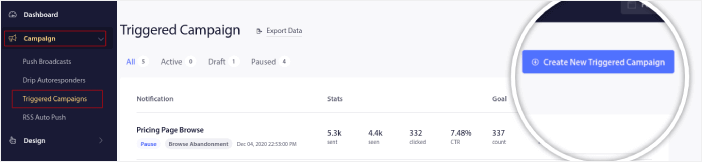
Go to the PushEngage dashboard and head over to Campaign » Triggered Campaigns and click on Create New Triggered Campaign:
Then, select the Cart Abandonment template and click on Create New:
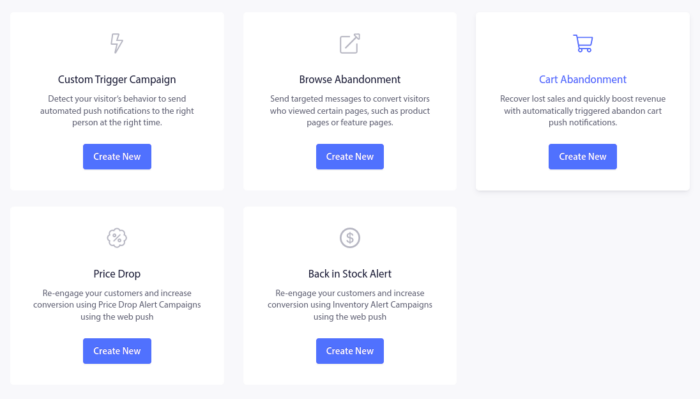
And you can start drafting an abandoned cart autoresponder.
Step #2: Draft a Shopify Abandoned Cart Campaign
Next, you’ll want to draft the campaign inside the PushEngage dashboard. Under Content, you can create a series of push notifications:
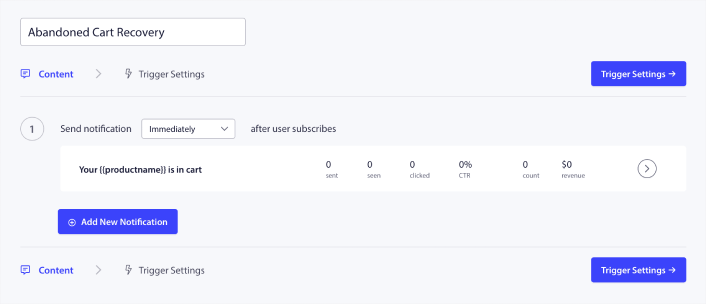
To edit a notification, simply click the arrowhead next to it and you can customize the push notification:
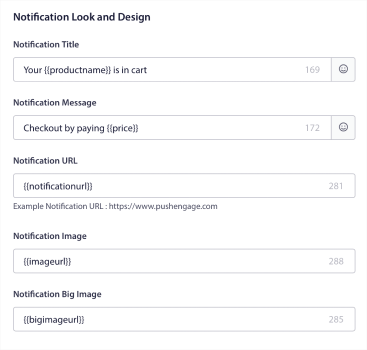
You can automatically fetch most of these fields using variables.
If you notice, there are multiple variables in brackets like {{productname}} and {{price}}. You can use these, later on, to define parameters for your code snippet. These fields will help you personalize your push notifications. For instance, {{bigimageurl}} fetches the product image automatically based on what product was abandoned.
As with any push notification, you can customize everything about the content here.
You can also add checkout buttons:
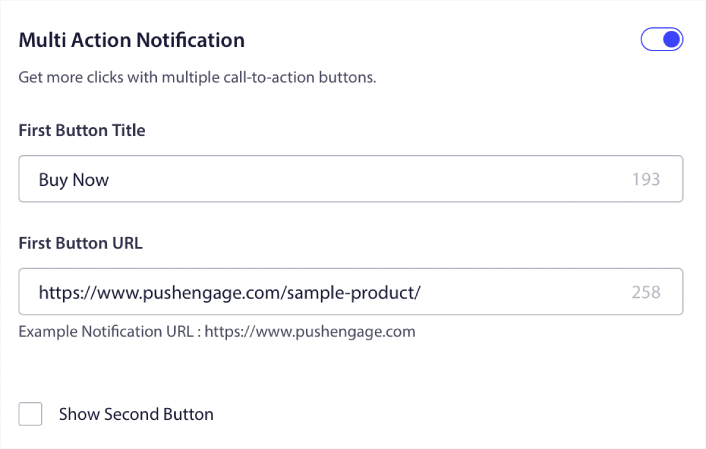
Or, you can add a custom notification duration:
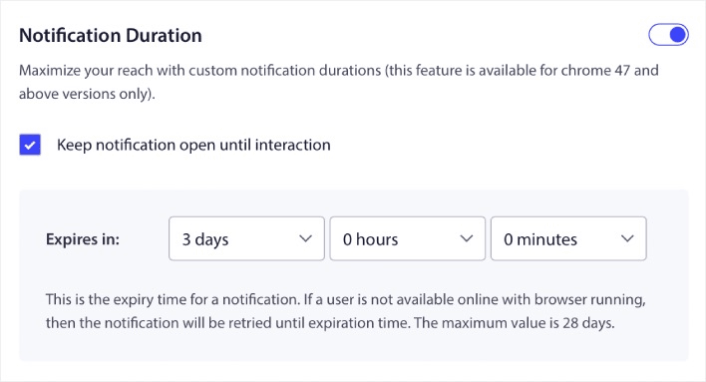
When you’re done, go to the Trigger Settings tab to activate your campaign. By default, our Shopify app will add any integration code you need to launch your Shopify abandoned cart campaign.
Step #3: Save and Launch the Campaign
That’s it!
Just hit the Activate Autoresponder button:

And you’re done.
How to Create Personalized Cart Abandonment Campaigns
You can create personalized cart abandonment campaigns using custom attributes.
This means that you can hook up PushEngage with your Customer Relationship Management (CRM) software to fetch personal details for each customer. By default, PushEngage captures the device and geolocation information for each customer. But you can extend the range of personalization using the PushEngage Attributes API.
You can create custom abandoned cart push notifications with the user’s name like this one:

Or add more elements such as a price drop or unused loyalty points:
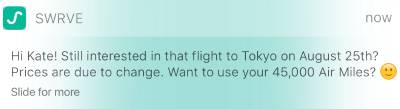
Or even cross-sell other products:
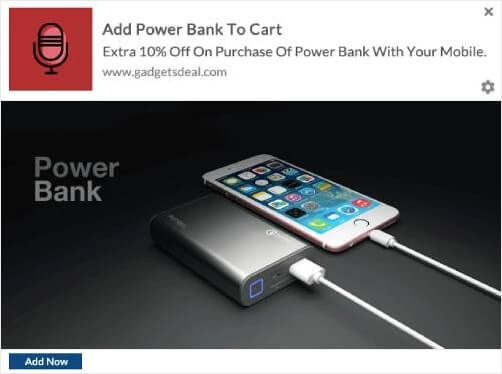
There are really no limits to the type of campaign you can set up using our APIs. Go nuts!
What to After You Launch a Shopify Abandoned Cart Campaign
That’s all for this one, folks! If you found this helpful, you should also check out our article on how to reduce cart abandonment. There are some really helpful ideas there.
And if you’re just starting out with push notifications, you should try out PushEngage. Check out these amazing resources to help you get started:
- How to Add Shopify Push Notifications to Your Site
- Best Shopify Apps for a Clothing Store
- Best Shopify Trust Badges to Boost Conversion Rates
- How to Send Automated Emails in Shopify (The Easy Way)
PushEngage is the #1 push notification software in the world and you can create a whole range of push notification campaigns using PushEngage.
So, if you haven’t already, get started with PushEngage today.


