
Vous cherchez un avis complet sur WP Simple Pay ?
Intégrer Stripe à votre site WordPress est l'un des moyens les plus simples d'accepter les paiements par carte de crédit. Mais que faire si vous en voulez plus ? Que faire si vous avez besoin de plus de devises, de langues et de types de paiement ?
WP Simple Pay peut vous aider à tirer le meilleur parti des paiements Stripe.
Dans cet article, nous allons mettre le plugin à l'épreuve et répondre à ces questions.
Plongeons dans le vif du sujet.
Un bref aperçu de WP Simple Pay
WP Simple Pay est exactement ce que son nom indique. Il simplifie les paiements en ligne sur votre site WordPress. Il est facile à utiliser, très fiable et ne nécessite aucune connaissance en codage pour être configuré.
Le meilleur ? WP Simple Pay vous aide à vous concentrer sur la création et la vente de produits sans avoir à vous soucier d'accepter des paiements du monde entier.
Toutes les informations client et de paiement sont stockées sur votre compte Stripe, pas sur votre site Web WordPress. Par conséquent, le plugin n'alourdira pas votre site comme d'autres alternatives. WP Simple Pay offre le moyen le plus simple d'ajouter des paiements Stripe à votre site WordPress.
Et la configuration de WP Simple Pay est très simple.
Jetons un coup d'œil rapide.
Comment configurer WP Simple Pay
WP Simple Pay est comme n'importe quel autre plugin WordPress. Il vous suffit de l'installer et de l'activer. Si vous ne savez pas comment faire, consultez cet article sur comment installer un plugin WordPress.
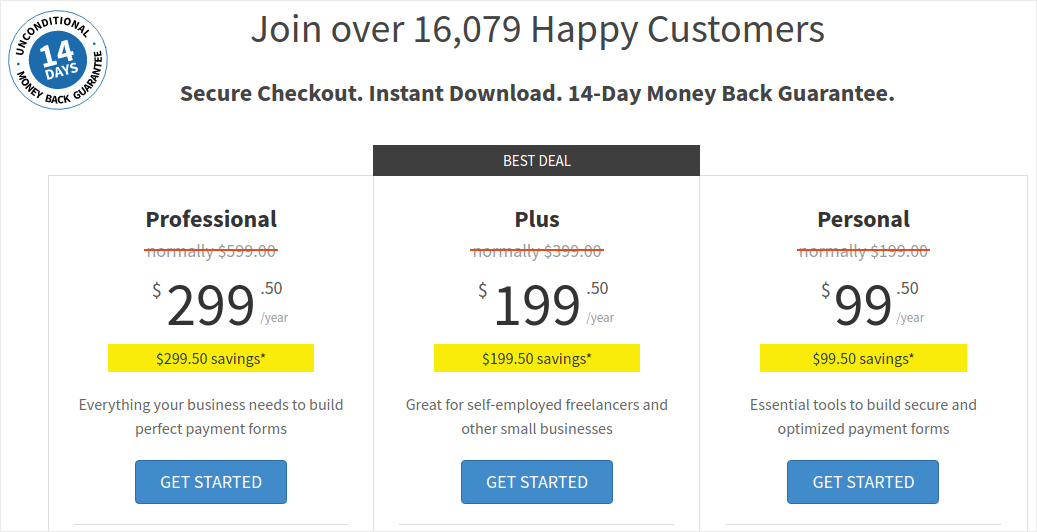
Commencez par vous rendre sur WP Simple Pay et choisissez votre plan :
Une fois le plugin installé, sur votre tableau de bord WordPress, allez dans WP Simple Pay » Paramètres et collez votre clé de licence :
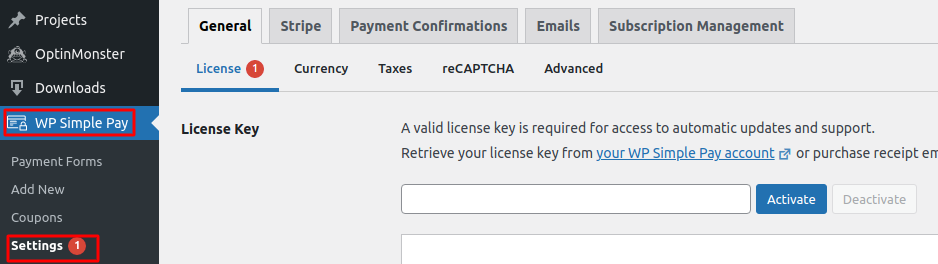
Lorsque vous avez terminé, cliquez sur Activer.
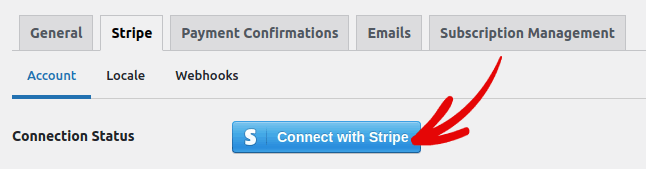
Ensuite, allez dans l'onglet Stripe et cliquez sur Se connecter avec Stripe :
Et voilà. Vous avez terminé la configuration du plugin. Ensuite, vous devriez explorer les différentes fonctionnalités du plugin.
Que peut faire WP Simple Pay pour votre marque ?
WP Simple Pay vous aide à créer des formulaires simples pour accepter les paiements de vos produits. Vous pouvez créer des formulaires de paiement instantanés et une multitude de types de paiement flexibles pour l'accompagner. La partie la plus impressionnante est que tout est facile à configurer et facile à utiliser pour vos clients.
Passons en revue chacune de ces fonctionnalités et expliquons ce qui rend le plugin génial.
#1. Générateur de formulaires de paiement
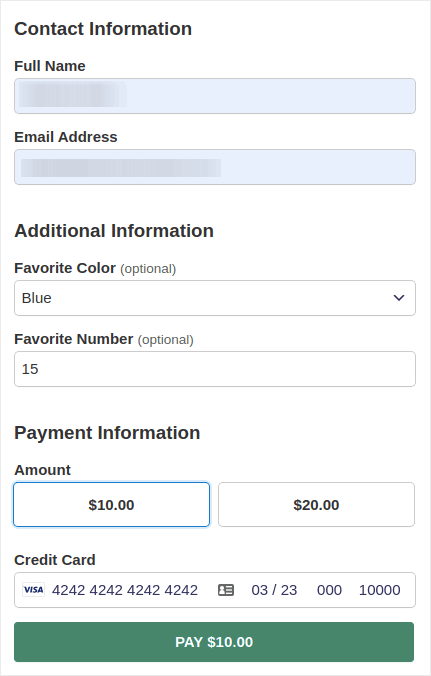
Vous pouvez créer un formulaire de paiement personnalisé en quelques clics avec WP Simple Pay. Et vous pouvez choisir différents types de formulaires tels que :
Formulaires intégrés :
Ou un formulaire de paiement pop-up :
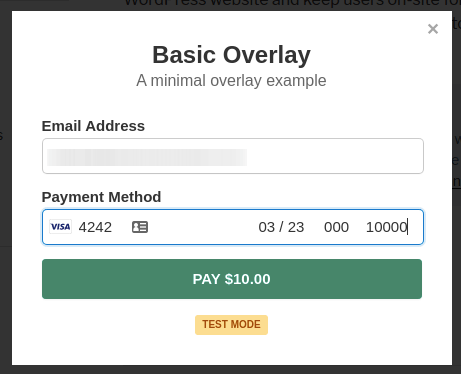
Et il faut littéralement 5 minutes pour créer un formulaire de paiement directement depuis votre tableau de bord WordPress.
#2. Pages de paiement Stripe Checkout
Si vous n'êtes pas intéressé par la création d'un formulaire de paiement personnalisé, vous pouvez également utiliser le formulaire de paiement Stripe par défaut :
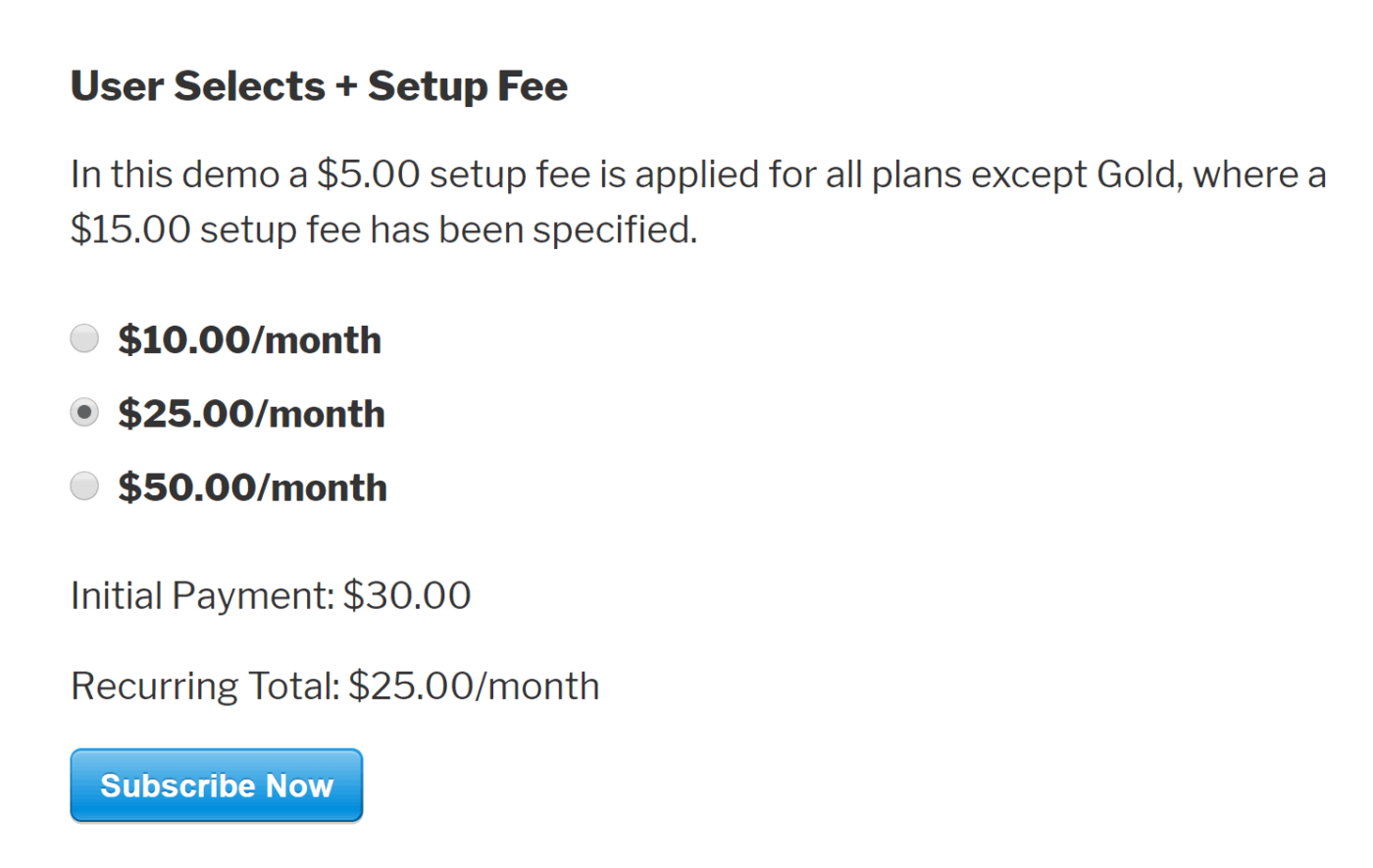
Il est simple, élégant et vous pouvez configurer des paiements récurrents et ponctuels en utilisant le formulaire de paiement Stripe par défaut.
#3. Paiements à montant personnalisé
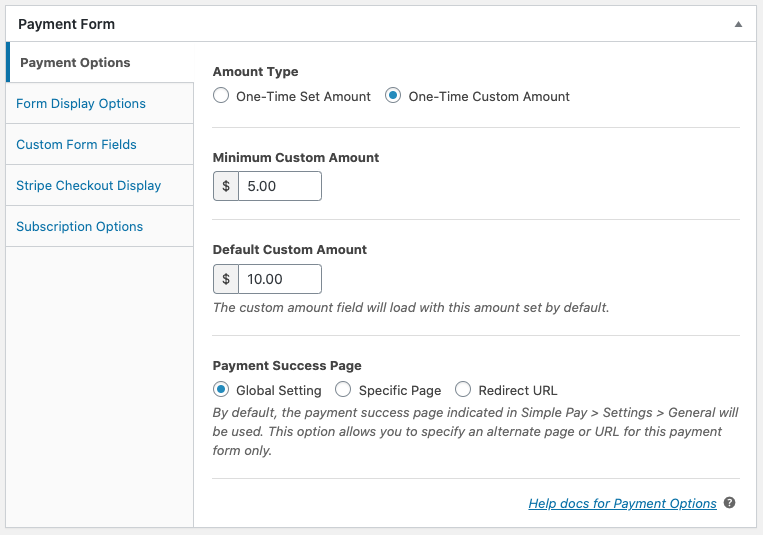
Vous pouvez définir un montant unique pour vos produits. Ou, vous pourriez spécifier des montants minimum et par défaut pour les modèles « payez ce que vous voulez ».
#4. Ajouter et personnaliser les options d'abonnement
La configuration des abonnements est super facile avec WP Simple Pay. Vous pouvez ajouter une option de montant personnalisé, facturer des frais d'installation ou offrir des essais gratuits.
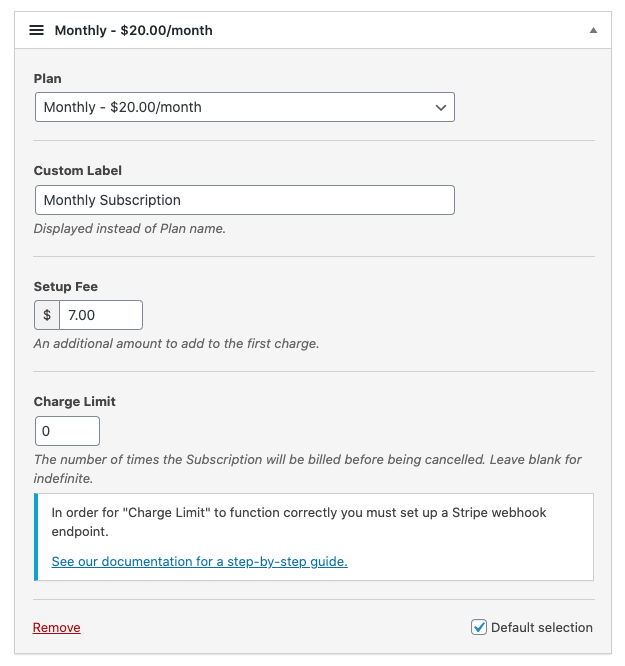
Vous pouvez même configurer des plans de paiement échelonné pour mettre fin aux abonnements après un nombre spécifique de paiements.
#5. Offrir des remises avec des codes promotionnels
Bien sûr, vous pouvez créer des remises sur WooCommerce et Easy Digital Downloads. Mais WP Simple Pay rend super facile la création de codes promotionnels pour les paiements d'abonnement.
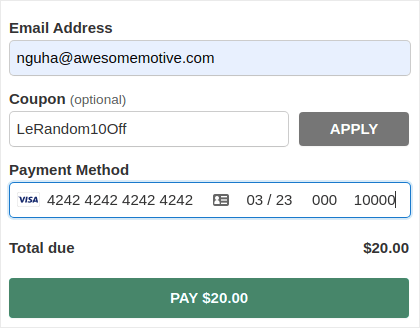
#6. Méthodes de paiement alternatives
En plus des paiements habituels par carte de crédit, vous pouvez également configurer plusieurs méthodes de paiement alternatives. Vous pouvez accepter les paiements en utilisant Apple Pay et Google Pay :
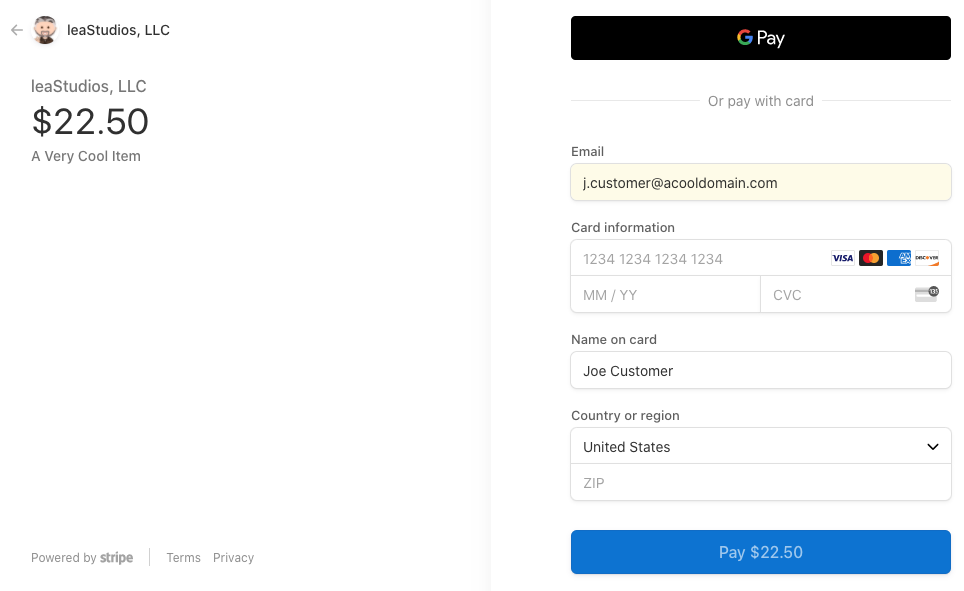
Ou, vous pourriez même accepter les paiements par débit ACH :
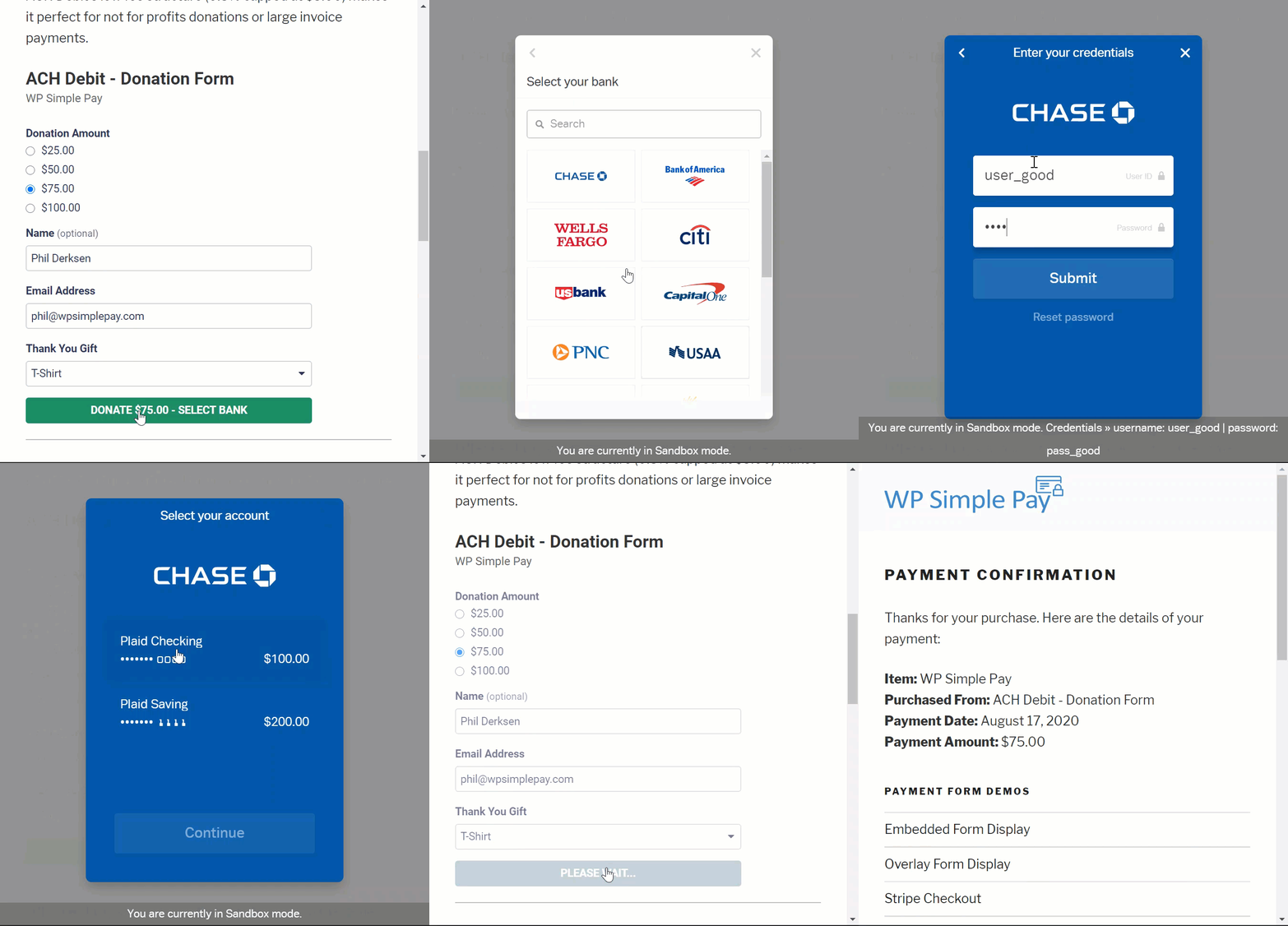
WP Simple Pay peut également vous aider à accepter les paiements en utilisant :
- iDEAL
- Prélèvement SEPA
- Alipay
- Bancontact
- giropay
- Przelewy24
Et plus !
#7. Détails personnalisés de confirmation de paiement
Le pire avec la plupart des logiciels de traitement des paiements est qu'ils envoient des réponses par e-mail sous forme de modèles horribles. Et il n'y a pas grand-chose que vous puissiez modifier dans cet e-mail. Ainsi, les e-mails envoyés semblent complètement hors de la marque.
Avec WP Simple Pay, vous pouvez créer un modèle personnalisé pour les e-mails de confirmation de paiement.
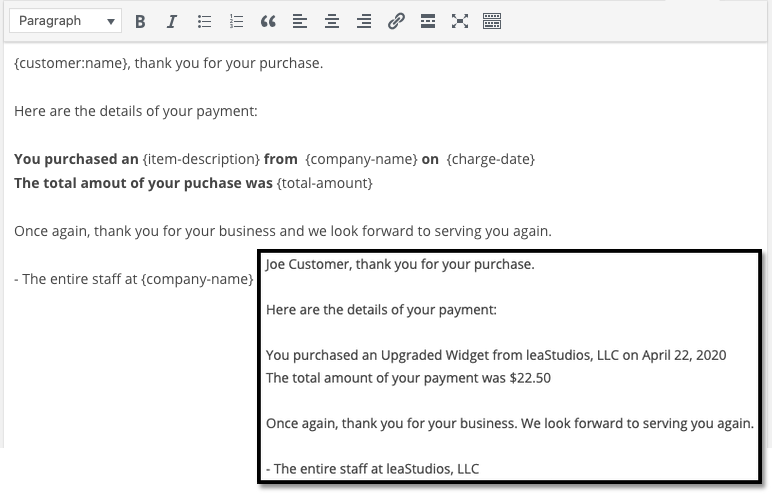
Pour rester dans la marque, vous pouvez simplement créer un modèle qui correspond au message et au style de votre marque. Si vous voulez être plus sophistiqué, vous pouvez même envoyer des informations supplémentaires telles que des clés de licence à l'aide de champs personnalisés.
#8. Paramètres de localisation et de devise
Un autre problème majeur avec de nombreux plugins Stripe est que vous ne pouvez accepter les paiements que dans votre devise locale. Ce n'est pas un problème causé par Stripe. Stripe accepte plus de 30 langues, 45 pays et 135 devises. Le conflit provient de plugins mal codés.
Donc, si vous êtes en Inde, par défaut, vous DEVEZ créer des formulaires de paiement qui acceptent les paiements en INR, même si vous souhaitez fixer le prix de votre produit en USD.
Avec WP Simple Pay, vous pouvez définir votre langue et votre devise locales ainsi que votre devise préférée.
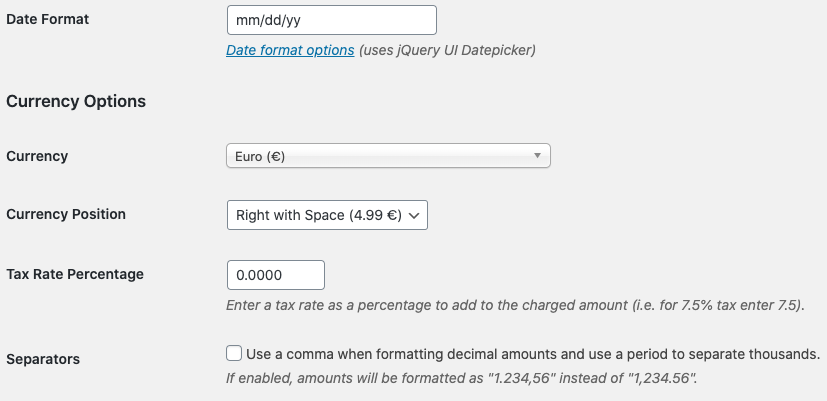
C'est aussi simple que ça !
Tarifs
Il ne reste qu'une dernière considération avant de rendre notre verdict final.
Combien coûte réellement WP Simple Pay ?
En fait, c'est assez abordable :
Vous pouvez commencer avec le plan Personnel à 99,50 $/an. Et si vous avez besoin de plus de fonctionnalités ou si vous avez besoin de paiements Stripe pour plusieurs sites, optez pour le plan Professionnel à 299,50 $/an ou le plan Plus à 199,0 $/an.
WP Simple Pay dispose également d'une version Lite qui est entièrement gratuite. Donc, si vous voulez avoir une idée du plugin avant de l'acheter, allez la découvrir. Mais si vous êtes sérieux dans le développement de votre entreprise, nous vous recommandons d'opter pour l'un des plans payants.
Verdict final
WP Simple Pay est-il le plugin de paiement Stripe n°1 pour WordPress ?
Notre verdict : Oui, il l'est.
La quantité de fonctionnalités avancées que vous obtenez, même avec le plan Personnel, est incroyable. Si vous deviez le développer sur mesure pour votre site, cela coûterait une fortune. Et vous n'obtenez même pas bon nombre des fonctionnalités de paiement par abonnement avec de nombreux plugins Stripe disponibles.
Donc, si vous êtes sérieux dans la génération de revenus sur votre site, nous vous recommandons d'utiliser WP Simple.
Et pendant que nous parlons de gagner de l'argent, vous devriez également configurer des notifications push sur votre site. Vous pouvez utiliser les notifications push pour augmenter votre trafic, votre engagement et vos ventes de manière autonome.
Jetez simplement un œil à ces ressources et vous comprendrez ce que nous voulons dire :
- 7 façons éprouvées de monétiser votre blog en 2021
- Quand utiliser (et quand NE PAS utiliser) les notifications push (2021)
- Comment ajouter des notifications push Web à votre site WordPress
Nous recommandons PushEngage pour commencer vos campagnes de notifications push. PushEngage est le logiciel de notifications push n°1 au monde.
Alors, si ce n’est pas déjà fait, commencez dès aujourd’hui avec PushEngage.


