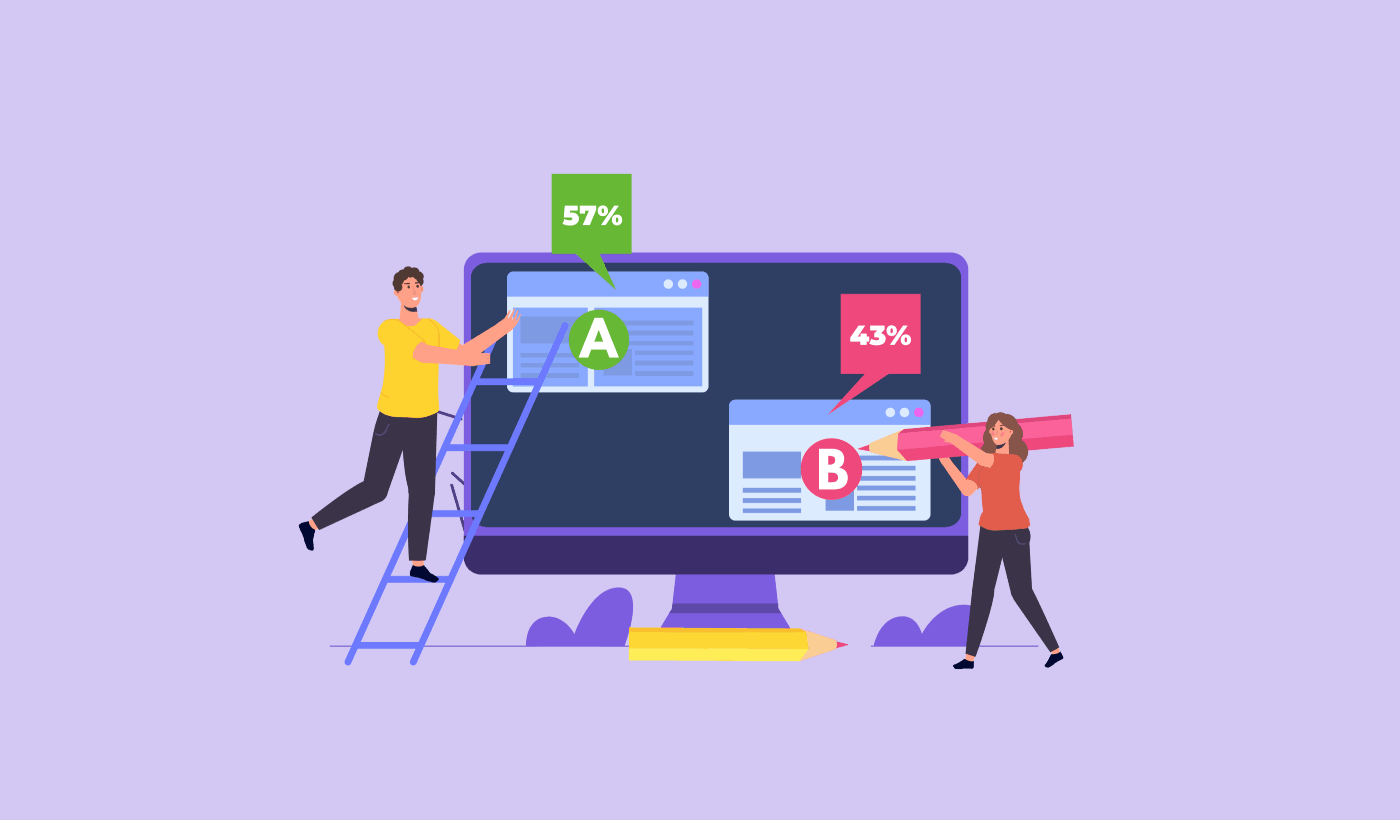
Vous cherchez un guide simple pour les tests A/B des notifications push ?
Les tests A/B peuvent vous aider à déterminer exactement ce à quoi votre public réagit le plus. Mais comment faire avec les notifications push ? La plupart des logiciels de notifications push sont équipés d'outils de test A/B.
Mais...
- Que tester ?
- Quels résultats sont de bons résultats ?
- Peut-on le faire sans API et sans code ?
En bref : Que devez-vous savoir avant de vous lancer dans les tests A/B des notifications push ?
Nous allons répondre à toutes ces questions et à d'autres dans cet article. Alors, plongeons dans le vif du sujet.
Qu'est-ce que le test A/B des notifications push ?
Les tests A/B des notifications push sont une méthode d'optimisation de vos conversions à partir des campagnes de notifications push. Vous pouvez choisir d'optimiser différentes parties de vos notifications push en fonction du type de résultats que vous souhaitez améliorer.
L'idée derrière les tests A/B (ou tests fractionnés) des notifications push est très simple.
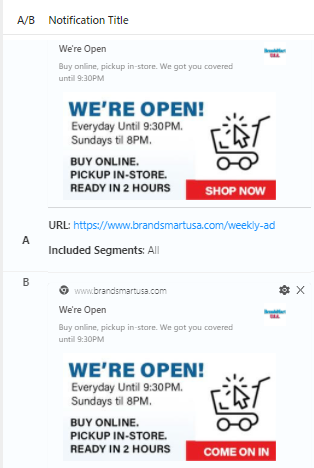
Vous envoyez une version de votre notification (version A) à 50 % de votre public et une autre version avec de légères modifications (version B) au reste de votre public. Et vous voyez quelle notification push fonctionne le mieux pour votre public.
Si vous êtes malin, vous pouvez même limiter vos tests A/B à un petit segment de votre public pour améliorer les performances de votre campagne. C'est ce qu'on appelle le test A/B intelligent.
Dans les tests A/B intelligents, vous effectuez le test sur une partie de votre audience totale. Nous recommandons d'effectuer un test A/B intelligent sur 30 % de votre audience. De cette façon, vous envoyez la version A à 15 % de votre audience, et la version B à un autre 15 %. La notification push qui obtient les meilleurs résultats est automatiquement envoyée au reste de votre audience.
Ainsi, dans les tests A/B intelligents, vous pouvez envoyer la notification push gagnante à 85 % de votre audience au lieu de l'envoyer à 50 %. Cela améliore instantanément les performances globales de votre campagne et sa configuration est très simple.
Que peut-on tester en fractionné dans les notifications push ?
Il est temps de répondre à la grande question avec les tests A/B de notifications push. Que pouvez-vous tester en A/B dans une notification push ?
Les métriques de performance les plus courantes pour les notifications push sont :
- Taux de clics : Le taux de clics d'une notification push correspond à la fréquence à laquelle vos abonnés ont vu votre notification push, puis ont cliqué dessus.
- Taux de visualisation : Le taux de visualisation d'une notification push correspond à la fréquence à laquelle un abonné a reçu votre notification push et l'a vue avant son expiration.
- Conversions d'objectifs : Vous pouvez définir des objectifs pour votre campagne et configurer le suivi des objectifs pour vos campagnes. Les conversions d'objectifs mesurent le nombre de fois où vous avez atteint votre objectif.
Pour augmenter vos taux de visualisation, vous voulez utiliser une grande image dans vos notifications push. L'utilisation d'images dans vos notifications les rend instantanément plus attrayantes.

Vous pouvez également expérimenter avec des mots percutants dans le titre de votre notification push.

Ainsi, vous pouvez tester en A/B des notifications avec et sans images. Vous pouvez également tester les taux de visualisation en testant A/B des notifications push avec et sans mots percutants dans le titre.
Si vous cherchez à améliorer votre taux de clic, vous devez vous concentrer sur le message principal et travailler à le rendre très pertinent. Principalement, cela concerne l'une des deux choses suivantes :
- La segmentation de vos abonnés
- Ne pas envoyer trop de notifications push
Et il n'y a rien à tester en A/B dans ce domaine. Mais vous pouvez tester en A/B vos taux de clic avec les boutons d'appel à l'action (CTA) de vos notifications push. Essayez de tester en A/B des notifications push avec un ou aucun CTA par rapport à une notification avec deux CTA.
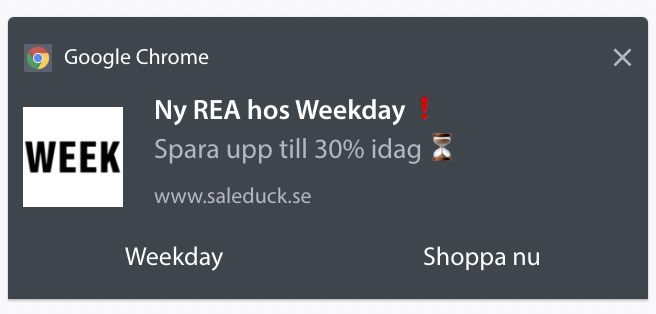
Si vous n'êtes pas sûr de la manière de créer plusieurs CTA, consultez cet article sur la façon d'ajouter des boutons à vos notifications push.
Avec les conversions d'objectifs, il s'agit principalement de configurer des notifications push e-commerce pertinentes. Donc, encore une fois, il n'y a pas BEAUCOUP à tester en fractionné ici. Cela dit, si vous pouvez optimiser vos notifications push pour obtenir plus de clics vers une très bonne offre, vos conversions d'objectifs augmenteront. Vous pouvez obtenir plus de clics axés sur la conversion en testant votre texte de notification push.
Comment démarrer avec les tests A/B des notifications push
Maintenant que nous savons ce qu'est le test A/B des notifications push et ce que vous devriez tester, examinons comment vous pouvez commencer rapidement.
Étape n°1 : Sélectionner un service de notification push
Nous vous recommandons d'utiliser PushEngage pour envoyer vos notifications push.

PushEngage est le logiciel de notifications push n°1 au monde.
Les notifications push vous aident à augmenter le trafic de votre site web et l'engagement en mode automatique. Et si vous gérez une boutique en ligne, PushEngage vous aide également à augmenter vos ventes en vous aidant à créer des notifications push e-commerce automatisées.
Vous pouvez commencer gratuitement, mais si vous êtes sérieux au sujet de la croissance de votre entreprise, vous devriez acheter un plan payant. De plus, avant d'acheter un service de notification push, vous devriez consulter ce guide sur les coûts des notifications push.
Voici un aperçu rapide de ce que vous obtenez avec PushEngage :
- Campagnes automatisées à forte conversion
- Options multiples de ciblage et de planification de campagnes
- Suivi des objectifs et analyses avancées
- Tests A/B intelligents
- Un responsable du succès dédié
Vous verrez que PushEngage est sans aucun doute le meilleur choix si vous souhaitez générer du trafic, de l'engagement et des ventes pour votre entreprise. Consultez cette comparaison des meilleurs services de notifications push si vous avez des doutes. Et si vous avez un budget limité, vous pouvez toujours faire preuve d'un peu plus de créativité avec vos notifications push.
Étape n° 2 : Créer une notification push
Accédez à votre tableau de bord PushEngage et allez dans Campaign » Push Broadcasts, puis cliquez sur le bouton Create a New Push Broadcast :

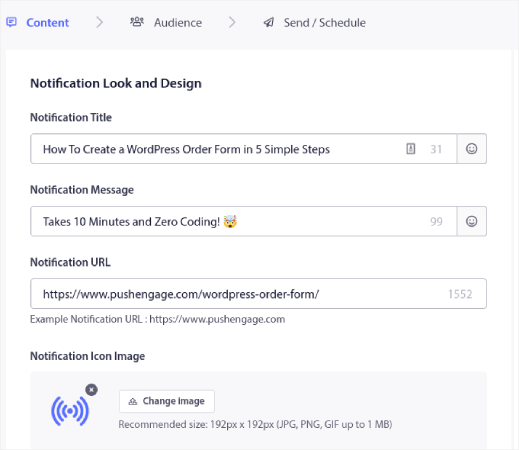
Sous l'onglet Content, ajoutez le contenu de votre notification push :
Étape n° 3 : Ajouter un test A/B
Cliquez sur le lien Ajouter un test A/B pour créer instantanément un test A/B pour votre notification push :
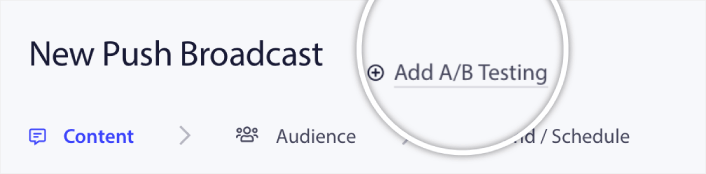
Et ensuite, vous pouvez simplement créer deux versions de votre notification push :
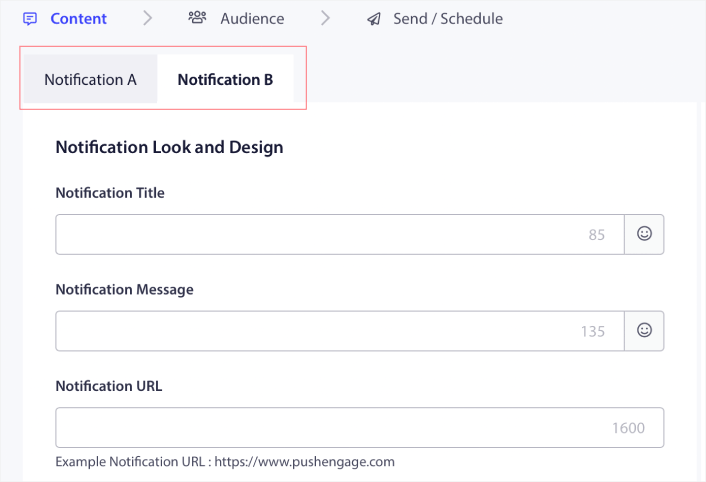
Et vous pouvez modifier tout ce que vous voulez dans votre version B. Si vous faites défiler vers le bas, vous pouvez même tester en A/B les boutons d’action de votre notification push. Une fois que vous avez terminé de configurer le contenu des deux versions, cliquez sur le bouton Enregistrer et sélectionner les segments.
Vous pouvez sélectionner une audience personnalisée ici :
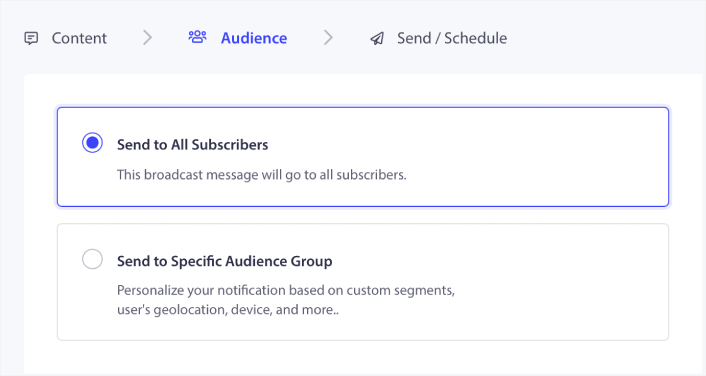
Ou, vous pouvez l’envoyer à tous vos abonnés aux notifications push. Lorsque vous avez terminé, cliquez sur le bouton Envoyer/Planifier.
Étape n° 4 : Créer un test A/B intelligent
Ici, vous pouvez activer les tests A/B intelligents :
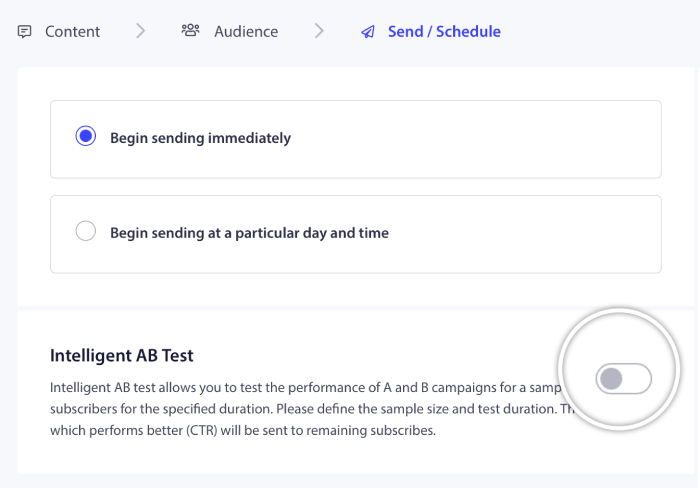
Activez le test A/B intelligent et définissez la taille de l'échantillon pour le test.
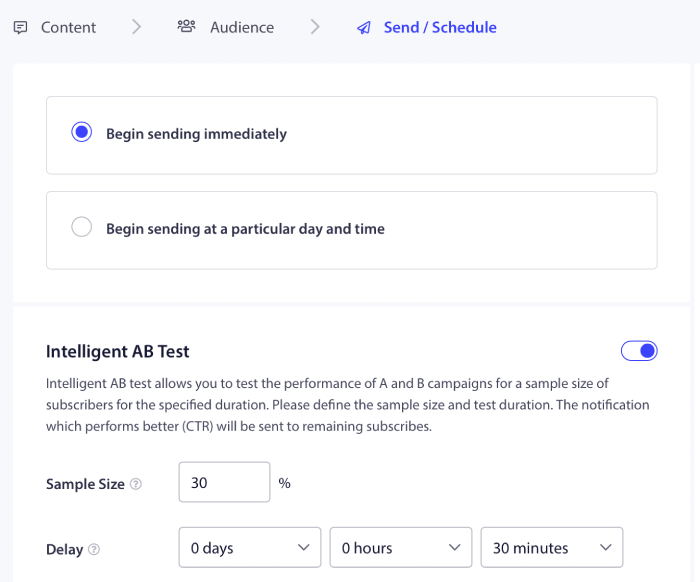
Et planifiez ou envoyez simplement votre notification push. Vous avez terminé !
Bonnes pratiques pour les tests A/B
Examinons rapidement quelques-unes des meilleures pratiques pour les tests A/B afin que vous puissiez tirer le meilleur parti de vos expériences.
- Testez les bons éléments : Avant de créer un test A/B, assurez-vous de ce que vous voulez optimiser. N'essayez pas d'optimiser 5 métriques différentes en même temps, sinon vous ruinerez l'expérience avec trop de variables.
- Faites attention à la taille de l’échantillon : La taille de l’échantillon que vous utilisez pour votre test A/B peut beaucoup changer. Vous ne voulez pas effectuer de tests sur 5 % de votre public total, car les résultats ne seront pas statistiquement significatifs. Et vous ne voulez pas que le public test soit si important que vos performances globales chutent non plus. Les tests A/B intelligents sont parfaits pour cet équilibre.
- Assurez-vous que vos données sont fiables : Parfois, vous verrez d’excellents résultats lors de vos tests A/B. Mais nous vous recommandons d’utiliser un calculateur de signification statistique pour savoir si vos données sont réellement fiables.
- Planifiez correctement vos tests : Si vous planifiez un test A/B pendant le Black Friday et que vous vous attendez à ce que les résultats soient comparables à ceux d’un mercredi quelconque, vous obtiendrez des informations très trompeuses.
- Testez un élément à la fois : Si vous testez trop d’éléments d’une notification push en même temps, vous ne saurez pas ce qui crée la différence.
Utilisez ces pratiques simples pour créer un processus autour de vos tests A/B. Bien sûr, nous vous recommandons d’utiliser d’abord les meilleures pratiques pour les notifications push, puis d’améliorer vos performances avec les tests A/B de notifications push par la suite.
Que faire après avoir appris les tests A/B de notifications push
C'est tout pour cette fois, les amis !
À ce stade, vous avez déjà commencé les tests A/B de notifications push.
Maintenant, il ne reste plus qu’à générer du trafic vers votre site afin de pouvoir obtenir des abonnés aux notifications push pour effectuer des tests A/B. L’envoi de notifications push est un excellent moyen de générer du trafic répété vers votre site. Si cela vous intéresse, vous devriez également consulter ces articles :
- Coût des notifications push : Est-ce vraiment gratuit ? (Analyse des prix)
- Comment obtenir plus de trafic vers votre blog WordPress (9 méthodes faciles)
- Comment augmenter votre taux d'opt-in pour les notifications push Web (7 méthodes)
Nous vous recommandons d'utiliser PushEngage pour envoyer vos notifications push. PushEngage est le logiciel de notification push n°1 au monde. Donc, si ce n'est pas déjà fait, commencez dès aujourd'hui avec PushEngage.


