Qu'est-ce que l'URL d'exclusion dans l'opt-in de notification push ?
Vous pouvez afficher l'opt-in sur des pages sélectionnées de votre site Web en ajoutant l'URL appropriée sur votre tableau de bord PushEngage. Il vous permet d'envoyer une notification ciblée à des segments pour optimiser votre campagne de notification push.
Comment fonctionne l'URL d'exclusion dans la notification push ?
Pour installer la notification push Web PushEngage, vous devez ajouter le code JS au HTML de votre site Web. Nous avons le code présent dans le tableau de bord.

Une fois que vous avez ajouté le code mentionné ci-dessus au HTML de votre site Web, votre installation sera terminée et vous obtiendrez l'opt-in pour l'abonnement. L'opt-in pour l'abonnement s'affichera sur chaque page de votre site Web. Pour éviter cette répétition, nous avions précédemment recommandé d'ajouter le code aux pages sélectionnées où vous souhaitez afficher l'opt-in. Mais avec notre récente mise à jour, vous n'avez pas besoin d'ajouter le code à des pages sélectionnées. Vous pouvez transmettre l'URL de la page où vous souhaitez afficher l'opt-in à votre tableau de bord PushEngage et l'opt-in apparaîtra uniquement sur ces pages sélectionnées.
Pour ce faire, accédez à Paramètres > Paramètres d'abonnement > Gestion de l'opt-in
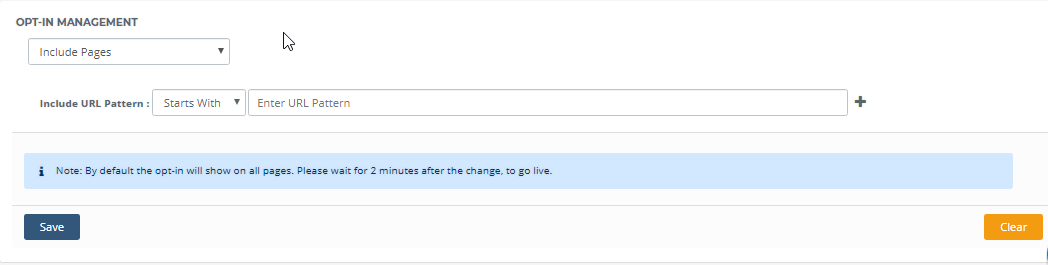
Par exemple, vous êtes un site Web de commerce électronique et vous souhaitez afficher l'opt-in sur la page d'accueil, la page Ajouter au panier, mais pas sur la page de remerciement, vous pouvez utiliser la fonctionnalité de gestion de l'opt-in. Dans le modèle d'URL d'inclusion, ajoutez l'URL de votre page d'accueil et de la page Ajouter au panier, tandis que dans les modèles d'URL d'exclusion, ajoutez l'URL de la page de remerciement.
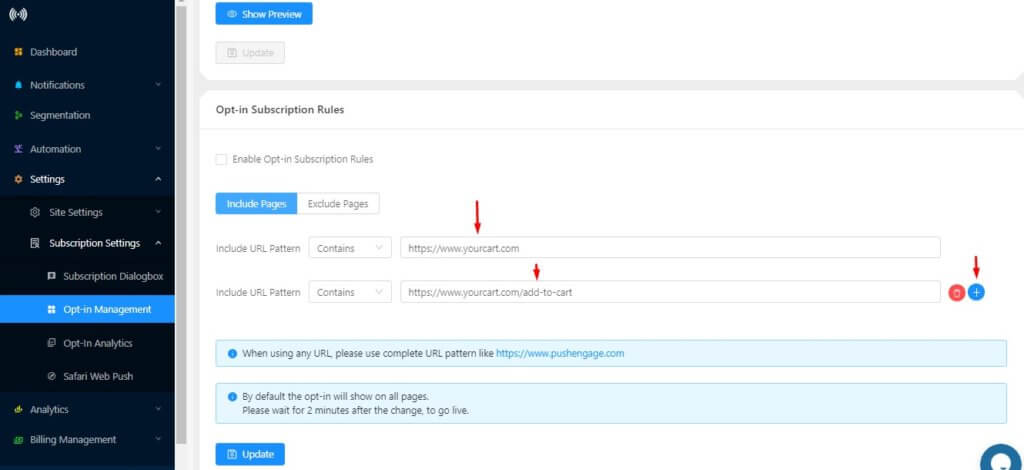
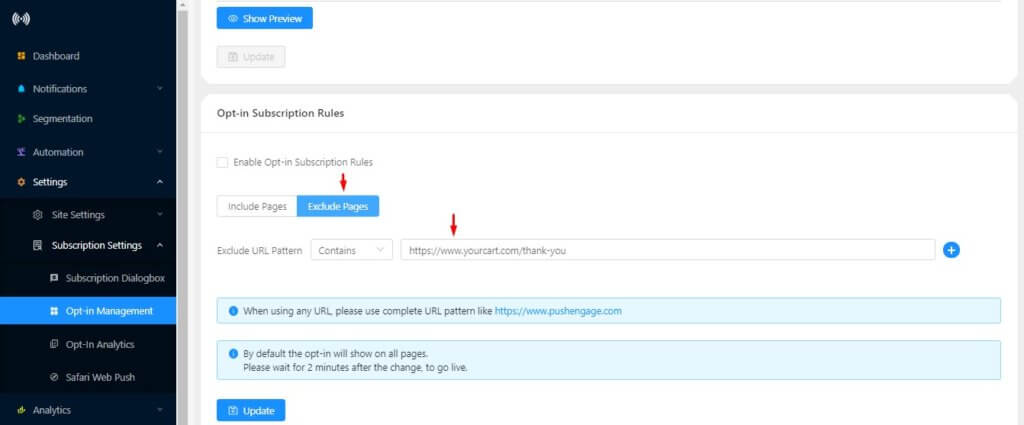
Une fois terminé, cliquez sur Mettre à jour. L'opt-in apparaîtra maintenant uniquement sur la page d'accueil et la page Ajouter au panier.
De la même manière, vous pouvez transmettre l'URL des pages où vous souhaitez afficher l'opt-in et l'enregistrer.
Qui est concerné ?
Ceci est pour tous les utilisateurs de Pushengage et est également disponible dans le plan gratuit.