
Vous avez du mal à obtenir plus d'avis pour votre entreprise ? Vous ne savez pas comment encourager les clients à laisser des avis ?
La mauvaise nouvelle : vous n'êtes pas le seul.
PushEngage est le logiciel de notifications push web n°1 sur le marché…
… et même nous avons dû lutter par le passé pour obtenir plus d'avis et de preuves sociales pour notre produit !
La bonne nouvelle : nous avons résolu le problème par essais et erreurs.
Et nous allons partager 10 façons exceptionnelles d'obtenir plus d'avis dans cet article. Pas de blabla. Juste des conseils concrets que vous pouvez commencer à utiliser dès maintenant.
Donc, si vous ne savez pas encore comment encourager les clients à laisser des avis, accrochez-vous.
Vous allez vivre une aventure. Alors, plongeons directement dans le vif du sujet.
- Pourquoi les avis sont-ils importants pour votre entreprise ?
- #1. Ne les faites pas réfléchir
- #2. Présentez vos avis existants
- #3. Envoyez une campagne de notification push pour les commentaires sur les produits
- #4. Envoyez un e-mail et demandez un avis
- #5. Utilisez le système Review Rabbit pour obtenir plus d'avis
- #6. Intégrez des codes QR dans les fichiers téléchargeables
- #7. Publiez vos avis sur les réseaux sociaux
- #8. Utilisez les avis pour envoyer des recommandations de produits
- #9. Répondez à vos avis : bons, mauvais et laids
- #10. ASTUCE BONUS : Créez une page de témoignages
Pourquoi les avis sont-ils importants pour votre entreprise ?
Avant de vous dire pourquoi les avis sont importants pour votre entreprise, nous aimerions vous présenter le concept de preuve sociale.
La preuve sociale est l'idée que la majorité des gens suivront les actions de la masse. Elle existe depuis des siècles et c'est un moyen simple de renforcer la confiance des gens au point d'acheter quelque chose (ou d'adhérer à quelque chose).
Dans le marketing moderne, la preuve sociale peut être :
- Études de cas
- Témoignages
- Influence sur les réseaux sociaux
- Icônes de confiance
- Points de données indiquant le succès
Et surtout, les avis.
Si vous hésitez encore sur l'importance des avis, alors vous êtes au mauvais endroit. Voici un article sur les statistiques des avis en ligne. Vous devriez le consulter avant de continuer à lire cet article.
Si vous êtes nouveau dans le concept de preuve sociale, vous devriez consulter TrustPulse. TrustPulse est une application de preuve sociale pour développer votre entreprise grâce à un marketing honnête et à la preuve sociale. L'application elle-même est très simple à utiliser et vous pouvez voir votre entreprise se développer chaque jour.
NOTE : S'il vous plaît, n'essayez pas de « faire semblant jusqu'à ce que ça marche » avec la preuve sociale. La fausse preuve sociale fonctionne rarement et peut entraver la croissance de votre entreprise à long terme.
9 façons d'obtenir plus d'avis et de preuves sociales
Maintenant que vous comprenez le quoi et le pourquoi de l’obtention de plus d’avis, passons aux choses sérieuses. Comment encourager les clients à laisser des avis sur votre entreprise ?
Continuez simplement à lire (l’astuce bonus est épique) !
#1. Ne les faites pas réfléchir
« Ne les faites pas réfléchir » est une philosophie de conception de la fin des années 90 qui vise à offrir une excellente expérience client. Mais dans ce contexte, cela signifie que vous devez rendre très simple le fait de laisser un avis sur votre site web.
Faites-nous confiance : « Ne les faites pas réfléchir » est le conseil commercial le plus judicieux que vous recevrez jamais. Faites réfléchir vos visiteurs à ce qu’il faut faire ensuite, et ils ne seront jamais clients. Et si vos clients ne sont pas sûrs de la manière de laisser un avis, vous pouvez parier qu’ils ne le feront pas !
Voici un exemple de processus difficile pour laisser un avis :
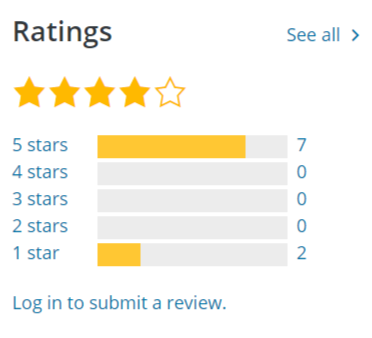
Si vous avez déjà utilisé WordPress, vous savez exactement ce que c’est. C’est ce que vous voyez lorsque vous souhaitez laisser un avis sur n’importe quoi sur WordPress.org. C’est tellement frustrant de voir que vous devrez faire plus de choses pour laisser un avis.
Maintenant, considérez ceci à la place :
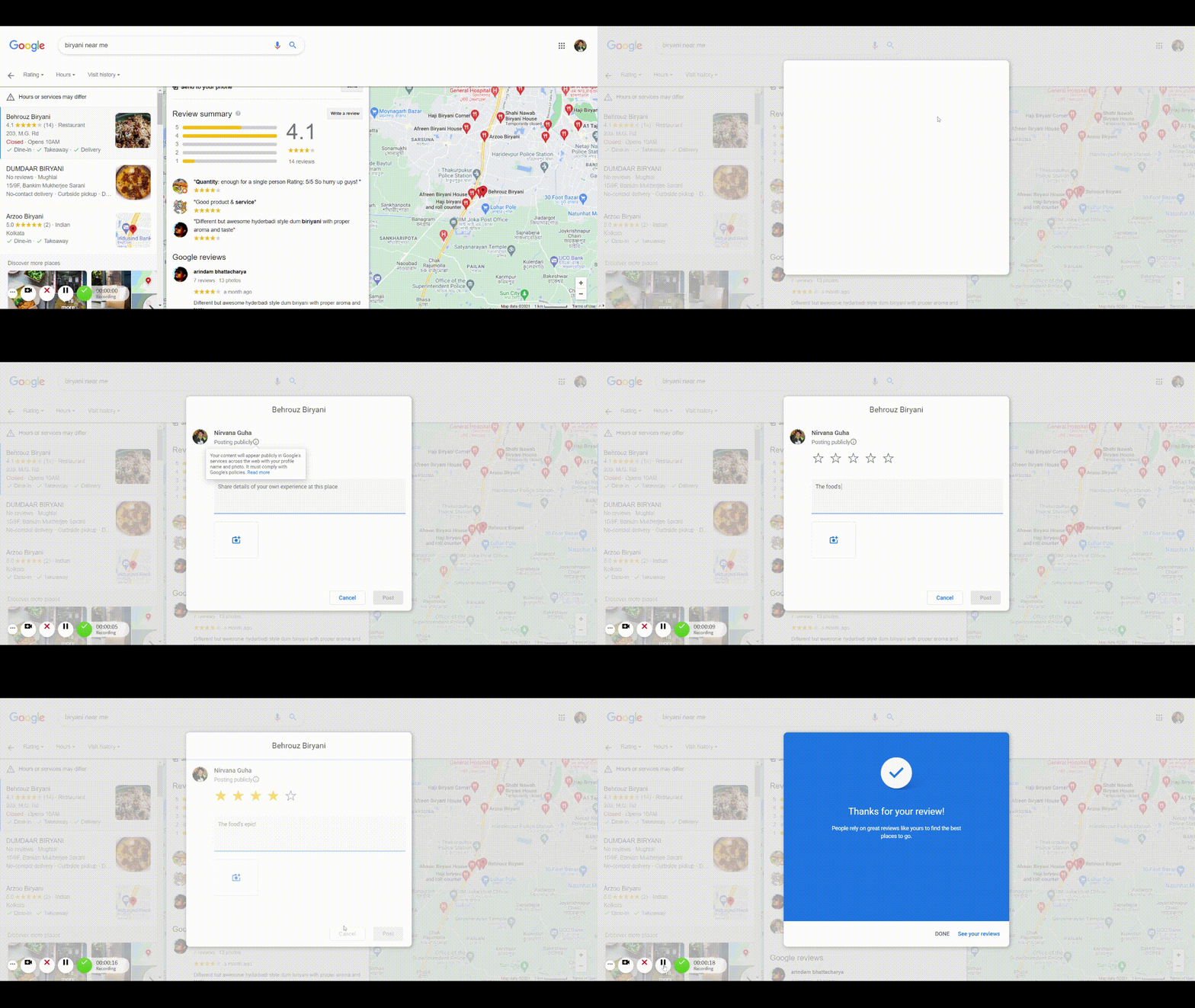
Il est tellement plus facile de laisser un avis Google.
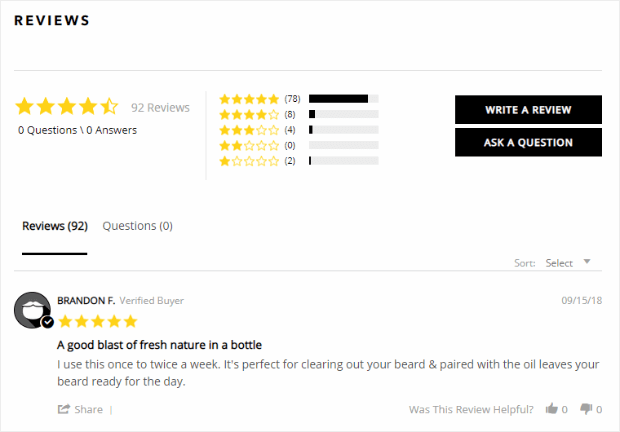
Bien sûr, vous n’avez pas nécessairement besoin d’utiliser les avis Google. Vous pouvez simplement créer un moyen très simple de laisser des avis comme le fait Beardbrand sur ses pages produits :
#2. Présentez vos avis existants
Le but de la preuve sociale est de l’afficher ouvertement. Vous avez déjà vu à quel point il est pratique de collecter des avis Google. Maintenant, il est temps d’utiliser ces avis à votre avantage. Vous pouvez intégrer vos avis Google sur votre site web pour augmenter vos conversions.
Encore une fois, les avis Google sont les seuls que vous devriez présenter. Vous pouvez également afficher clairement l’avis de votre site web sur la page produit. Pour la plupart des entreprises, il existe de nombreux autres endroits pour recueillir des avis.
Par exemple, PushEngage est souvent évalué sur G2Crowd :

Alors, naturellement, nous le montrons sur notre page de tarification. Allez y jeter un coup d’œil !
Vous voulez aller plus loin ? Utilisez StoreAgent.ai pour générer automatiquement des résumés d’avis produits alimentés par l’IA.
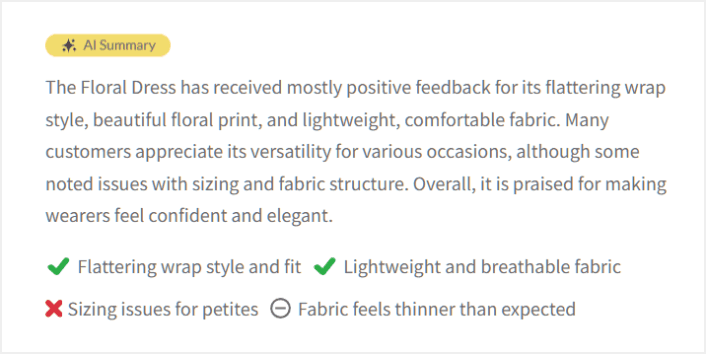
StoreAgent.ai comprend que les avis sont importants pour votre entreprise. Mais au lieu de submerger les nouveaux visiteurs avec de longues listes d’avis, StoreAgent crée un aperçu clair et concis de ce que disent vos clients, directement sur vos pages produits. C’est le moyen le plus rapide de renforcer la confiance et d’augmenter les conversions en utilisant la preuve sociale que vous avez déjà.
Astuce de pro : N’oubliez pas les avis et témoignages de clients sur vos flux de médias sociaux. Ils ont beaucoup de valeur, et vous pouvez également intégrer vos avis de médias sociaux sur votre site web.
#3. Envoyez une campagne de notification push pour les commentaires sur les produits
Vous ne pouvez pas attendre en espérant que vos clients laissent un avis. La chose intelligente à faire est simplement de demander un avis.
Mais bien sûr, cela peut être un vrai casse-tête de demander manuellement si vous avez beaucoup de nouveaux clients chaque jour. C'est exactement pourquoi une campagne de notification push pour les commentaires sur les produits est si utile. Elle est entièrement automatisée et si vous la faites correctement, les campagnes de commentaires sur les produits fonctionnent vraiment :
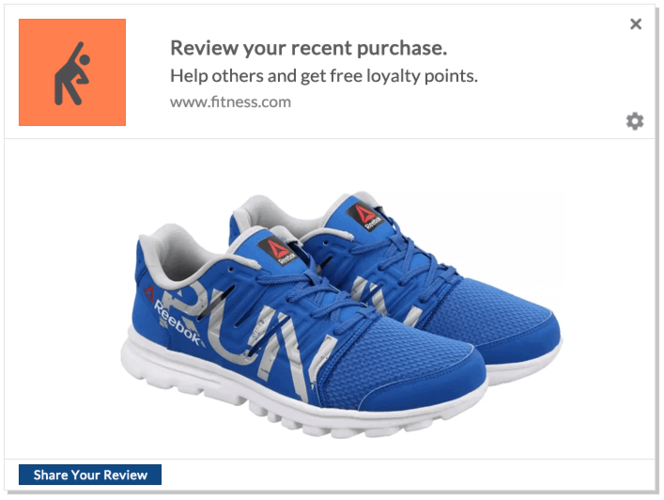
Nous recommandons d’utiliser PushEngage pour toutes vos campagnes de notifications push. PushEngage est le logiciel de notifications push web n°1 sur le marché et il est conçu pour aider les petites entreprises à réussir.
Depuis votre tableau de bord PushEngage, allez dans Campagne » Campagnes de déclenchement et cliquez sur Créer une nouvelle campagne de déclenchement :

Dans la liste des modèles de campagne, cliquez sur Campagne de déclenchement personnalisée :

Donnez un nom à votre campagne que vous pourrez reconnaître. Ensuite, créez le contenu de votre campagne de notification push :
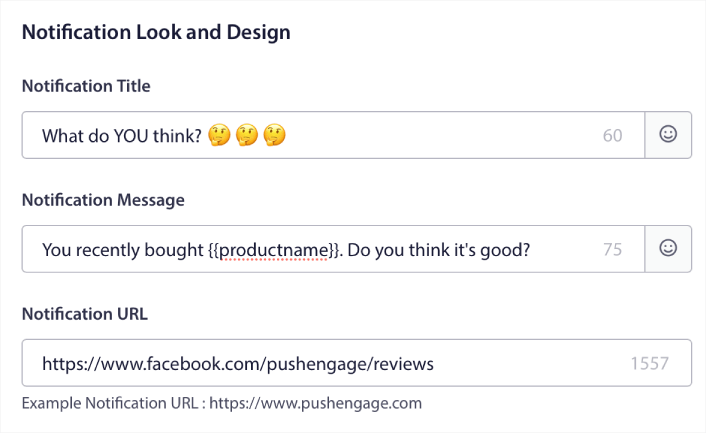
Puisqu'il s'agit d'une campagne déclenchée, vous pouvez créer autant de suivis que vous le souhaitez jusqu'à ce que vous obteniez un avis de vos clients.
Ensuite, allez dans l'onglet Paramètres de déclenchement pour configurer les déclencheurs de campagne :
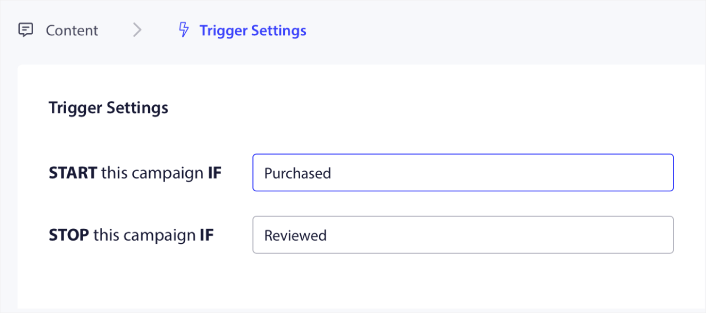
Configurez la campagne pour qu'elle démarre lorsque le client achète votre produit et s'arrête lorsqu'il laisse un avis. Vous devrez utiliser l'API PushEngage pour définir les événements Achat et Avis.
Et enfin, intégrez le code à votre site web. Vous pouvez obtenir le code pour l’événement de démarrage de campagne, l’événement d’arrêt de campagne et le suivi des objectifs en cliquant sur le bouton Code d’intégration.
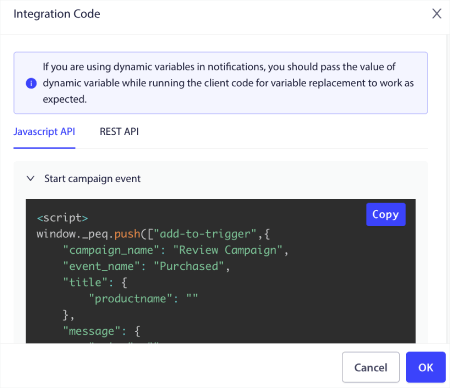
C'est tout ! Chaque fois que quelqu'un achète un produit sur votre site web, une campagne automatisée demandant des avis sera déclenchée.
#4. Envoyez un e-mail et demandez un avis
Cette idée est similaire à la précédente – mais en utilisant des campagnes par e-mail à la place.
Encore une fois, vous voudrez automatiser l’ensemble du processus et vous aurez besoin d’un fournisseur de services d’e-mail avec une automatisation des flux de travail pour envoyer des campagnes d’e-mails de revue de produits.
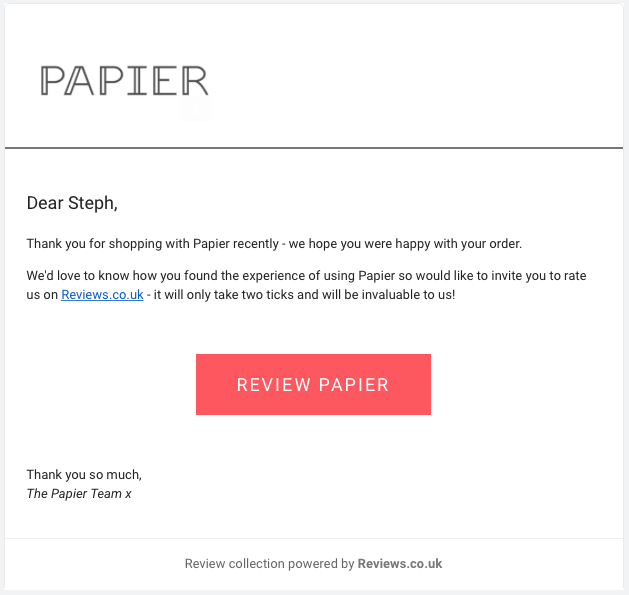
Nous vous recommandons d'utiliser Drip pour envoyer des e-mails de commentaires sur les produits.
Rendez-vous sur Drip pour créer une nouvelle campagne. Après avoir rédigé vos e-mails demandant un avis, vous devrez créer une automatisation de flux de travail :
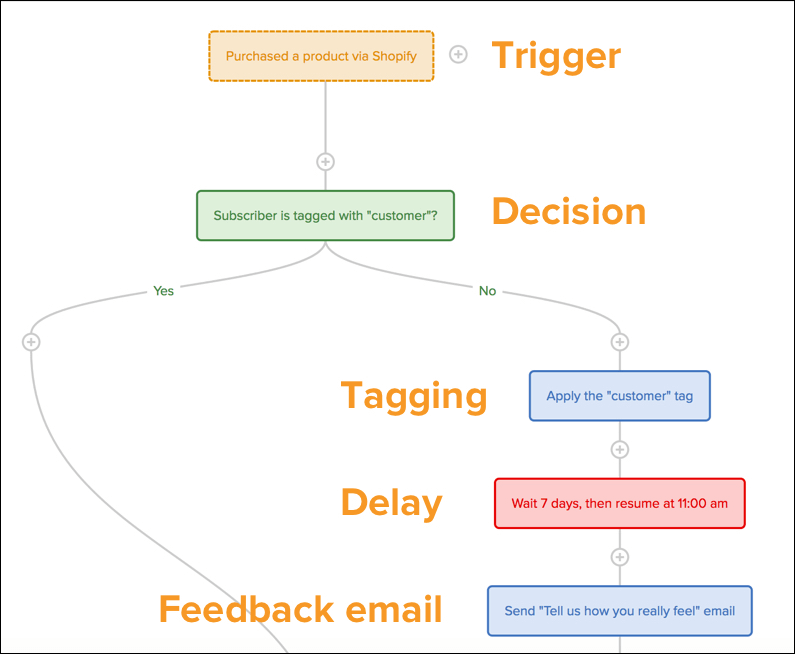
Consultez cet article si vous avez besoin d'aide pour configurer votre campagne d'avis sur les produits sur Drip.
#5. Utilisez le système Review Rabbit pour obtenir plus d'avis
Nous adorons avoir des nouvelles de nos clients. C’est exactement pourquoi nous utilisons un système appelé « Review Rabbit ».
Cela semble très sophistiqué, mais le système Review Rabbit est juste une façon de récompenser vos utilisateurs avec de superbes prix, coupons, réductions et offres…
… JUSTE pour avoir laissé un avis !
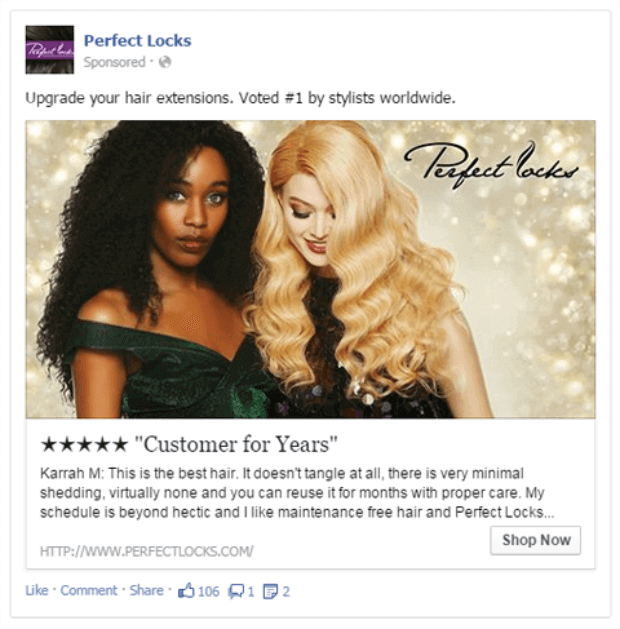
Vous donnez et vous recevez, puis vous recevez encore plus.
Ainsi, vous pouvez créer des concours pour encourager vos clients à écrire des avis. Ou, vous pouvez simplement envoyer des campagnes d’e-mails ou de notifications push, ou même des campagnes sur les réseaux sociaux pour recueillir plus d’avis.
NOTE : L’idée est de récompenser les clients pour avoir laissé un avis. Peu importe s’il est bon, mauvais ou horrible. Nous en parlerons dans une section ultérieure, mais pour l’instant, retenez simplement de récompenser tout le monde pour avoir pris le temps de donner son avis sur votre produit.
#6. Intégrez des codes QR dans les fichiers téléchargeables
C’est une idée originale. Ou plutôt, une idée QRiginale (désolé pour le jeu de mots) !
Nous allons vous montrer comment intégrer un code QR dans n’importe quel fichier téléchargeable comme un PDF. Le fichier ne doit pas nécessairement être un PDF. Il peut pratiquement s’agir de n’importe quel fichier téléchargeable.
La plupart des entreprises créent des fichiers téléchargeables comme aimant à prospects (un pot-de-vin pour collecter des e-mails à des fins de marketing). Mais elles oublient d’utiliser les fichiers téléchargeables comme espace publicitaire. Vous savez avec certitude que quiconque télécharge un fichier va l’ouvrir, n’est-ce pas ?
Tout d’abord, vous voudrez créer un formulaire d’avis mobile sur WPForms pour collecter les avis :
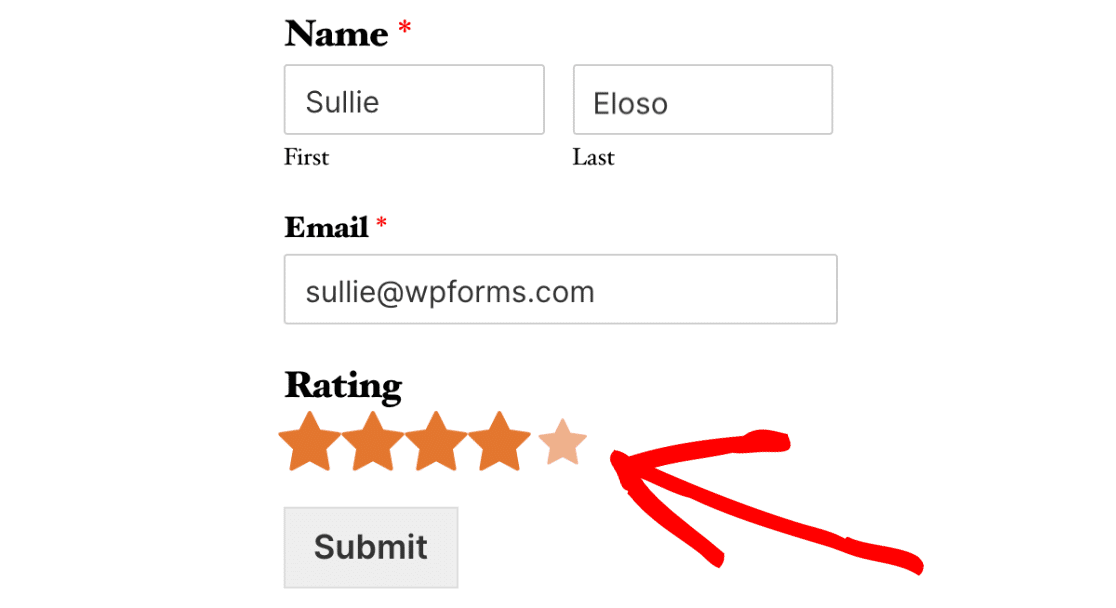
Après avoir publié votre formulaire, ajoutez-le à une nouvelle page spécialement dédiée à la collecte d’avis et de commentaires.
Enfin, vous voudrez utiliser un générateur de code QR gratuit pour créer un code QR à partir de l’URL de la page de commentaires. Il suffit de coller votre URL et d’utiliser le code QR généré automatiquement :
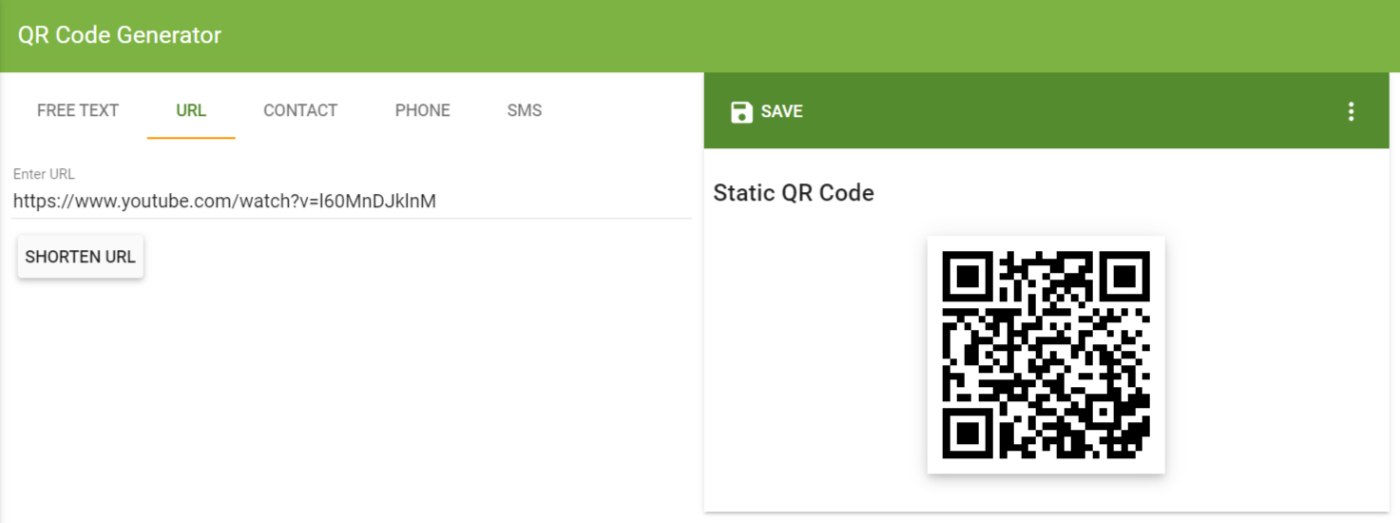
Maintenant, vous pouvez simplement coller ce code QR dans votre fichier téléchargeable.
Ou, si vous utilisez Canva pour concevoir vos publications et vos fichiers téléchargeables, vous pouvez également utiliser leur générateur de code QR intégré. Cliquez sur Applications et recherchez Code QR dans la barre de recherche :
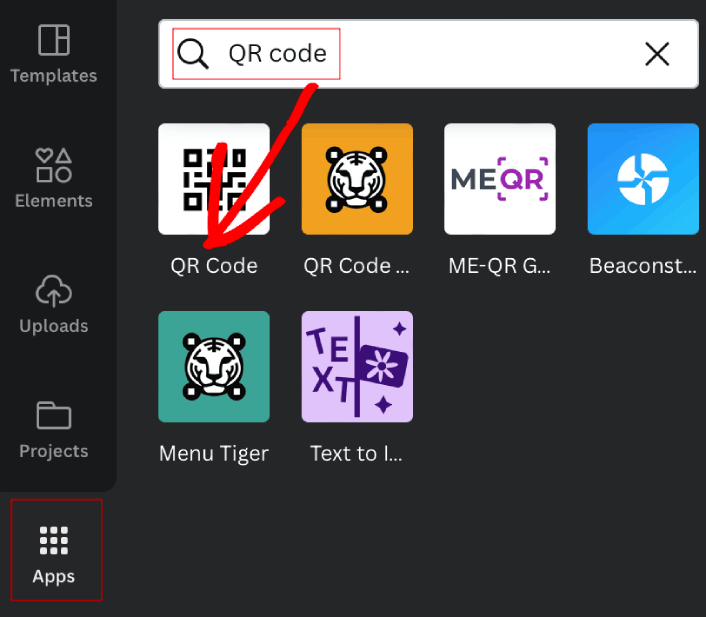
Ensuite, collez simplement votre URL et Canva génère automatiquement le code QR pour vous :
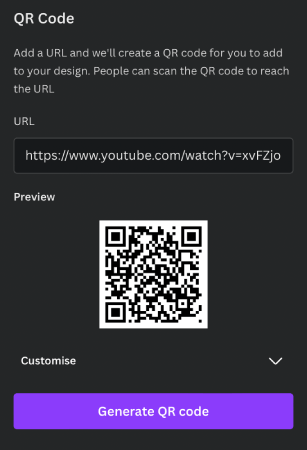
Pas besoin de télécharger et d’importer le code QR depuis un autre endroit.
#7. Publiez vos avis sur les réseaux sociaux
Affichez vos avis sur les réseaux sociaux pour encourager les clients à laisser leurs propres avis.
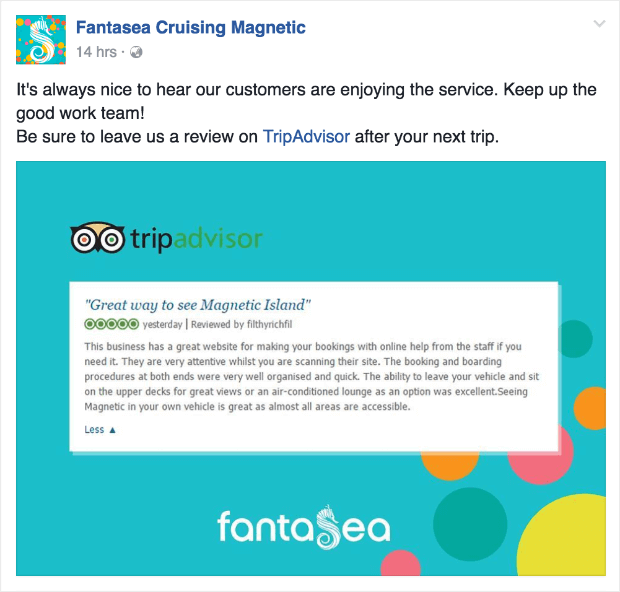
C’est aussi simple que ça.
Cela remplit un double objectif.
D’une part, vous encouragez plus de personnes à laisser des avis sur vos fils d’actualité sociaux en montrant à tout le monde que vous appréciez leurs commentaires.
Et d’autre part, vous pouvez réaliser beaucoup de ventes car les avis agissent comme une preuve sociale. Le meilleur, c’est que c’est sur les réseaux sociaux. La preuve sociale est très pertinente sur les réseaux sociaux et peut générer un canal de revenus passifs en quelques minutes.
#8. Utilisez les avis pour envoyer des recommandations de produits
Saviez-vous que vous pouvez définir des déclencheurs personnalisés sur PushEngage pour envoyer du contenu ultra pertinent pour votre audience ? L'une des façons les plus intéressantes d'utiliser les déclencheurs personnalisés est d'utiliser vos avis pour envoyer des recommandations de produits ou de contenu.
Voici un exemple pour un site web de commerce électronique :

Bien sûr, vous pouvez utiliser la même idée pour envoyer des recommandations de contenu si vous êtes un éditeur :
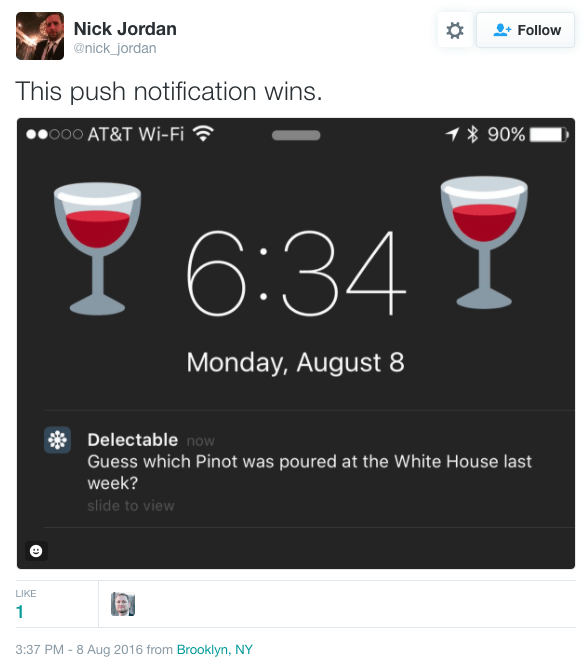
Épique, non ? Vous devrez utiliser l'API Javascript PushEngage pour créer un déclencheur personnalisé qui recommande des produits similaires chaque fois que quelqu'un laisse un avis 5 étoiles pour votre produit.
ATTENTION : Il s'agit d'une campagne très avancée et vous aurez besoin de l'aide d'un développeur professionnel. Avant de configurer cette campagne, parlez à votre responsable du succès client PushEngage pour obtenir des instructions plus détaillées si vous n'êtes pas vous-même un développeur.
#9. Répondez à vos avis : bons, mauvais et laids
Tout le monde aime un bon avis. Mais ce qui est plus important, c'est le nombre de MAUVAIS avis que vous accumulez pour votre produit.
Voici une petite leçon sur les avis pour n'importe quel produit :
- Les avis 1 étoile, 2 étoiles et 5 étoiles sont majoritairement biaisés
- Les avis 3 étoiles indiquent des clients véritablement insatisfaits
- Les avis 4 étoiles proviennent généralement de clients qui aiment votre produit, mais qui ne sont pas ravis
Garder ces 3 faits simples à l'esprit est le premier point de départ.
Les avis biaisés ne sont pas une mauvaise chose. Cela vous donne un excellent moyen de montrer ce qui fonctionne ou de trouver de nouvelles façons d'améliorer votre produit ou votre marketing.
Dans quelques cas rares, vous pourriez très bien montrer vos mauvais avis aussi !
Voici une façon fantastique de transformer vos avis 1 étoile en une publicité épique pour votre marque :

Ceci est une vraie publicité d'un centre de ski. Épique, non ?
Bien sûr, ce n'est pas exactement la norme. Voici un bon processus à suivre pour les avis négatifs :
- Excusez-vous rapidement pour limiter les dégâts
- Indiquez au client comment vous contacter
- Si vous n'êtes pas sûr à 100 % du problème, parlez-en davantage au client
- Une fois que vous comprenez le problème, communiquez très clairement comment vous allez le résoudre
Astuce de pro : Ne supprimez pas les mauvais avis. Cela fait beaucoup plus de mal que de bien.
Le feedback le plus important (feedback authentique) provient généralement des avis 3 étoiles et 4 étoiles. Si vous y prêtez attention, vous pouvez extraire beaucoup d'idées de contenu et de fonctionnalités de produits de ces avis.
#10. ASTUCE BONUS : Créez une page de témoignages
Si vous mettez en œuvre les 9 conseils précédents, vous obtiendrez une avalanche de témoignages, d'avis et d'autres preuves sociales.
La meilleure façon de présenter votre preuve sociale est de créer une page dédiée aux témoignages, avis et études de cas.
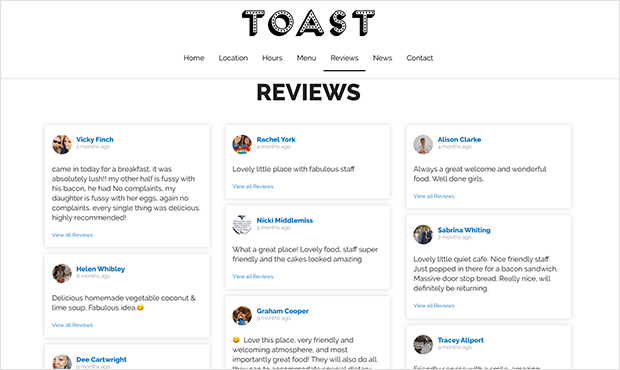
Voir des avis mis en avant donne envie aux clients d'écrire leurs propres avis.
Si vous avez besoin d'inspiration, consultez cet article sur des exemples de pages de témoignages GÉNIAUX. Faites-nous savoir dans les commentaires si vous l'avez trouvé utile.
Ou, vous pourriez consulter nos témoignages et études de cas. Nous avons aussi notre propre page de témoignages ! Pendant que vous y êtes, pourquoi ne pas essayer PushEngage aussi ? Vous obtiendrez toutes les raisons nécessaires de nos témoignages.
Conclusion
C'est tout pour cette fois.
Les avis et témoignages sont des outils importants pour améliorer et développer votre entreprise. Alors, n'oubliez pas de consulter cette liste d'outils logiciels de preuve sociale que vous pouvez utiliser.
Aussi, si vous êtes déjà client PushEngage, envoyez-nous un e-mail et laissez-nous un avis !
Si vous n'avez jamais essayé PushEngage, allez-y et essayez-le dès maintenant. PushEngage est le logiciel de notifications push n°1 sur le marché et vous pourrez créer des campagnes d'avis produits directement.
Bonne chance avec vos campagnes ! Commencez avec PushEngage dès aujourd'hui.


