Bonjour, Engagelings.
Nouvelles passionnantes : Nous venons de créer une intégration avec WPCode qui facilite grandement le lancement, la gestion, le suivi et l'optimisation des campagnes e-commerce pour tous les sites WordPress.
Si vous n'en avez pas encore entendu parler, WPCode est un plugin puissant qui vous permet d'insérer des extraits de code sur votre site Web sans aucune connaissance en codage. Il vous suffit de sélectionner un extrait de code dans sa bibliothèque et de choisir où sur votre site Web vous souhaitez l'insérer. Et le plugin fait tout le travail pour vous !
En surface, cela semble être une mise à jour mineure. Mais ce n'est pas le cas. Il y a beaucoup à découvrir. Nous l'avons également rendu très facile à utiliser. Beaucoup de travail a été consacré à cette mise à niveau et nous pensons que vous allez l'adorer.
Plongeons dans le vif du sujet.
Pourquoi devriez-vous vous soucier de notre intégration WPCode ?
Lancer des campagnes push e-commerce peut être un casse-tête. Il y a une tonne de détails dont vous devez vous occuper manuellement, tels que les variables et les balises qui aident à déclencher les campagnes. Et ensuite, vous devriez insérer manuellement le code dans le code de votre site Web sans le casser.
Mais les notifications push e-commerce sont des outils incroyablement puissants pour augmenter vos revenus et la valeur moyenne des commandes à des coûts très bas.
Nous avons donc pris en charge la complexité de la configuration de ces campagnes avec l'aide de nos amis de WPCode.
Pourquoi avons-nous ajouté des extraits de code e-commerce à WPCode ?
Au cours des dernières semaines, nous avons connu un énorme afflux de nouveaux clients. Bien sûr, nous sommes extrêmement ravis de cette évolution. Mais l'une des questions que nous avons reçues le plus souvent était : « Quel type de campagne convient le mieux à notre entreprise ? »
Et c'est une très bonne question.
La vérité est que vous pouvez utiliser presque toutes les différentes campagnes de diverses manières pour développer presque toutes les entreprises. Mais cela demande une certaine expérience et expertise en marketing pour connaître ces cas d'utilisation. Et la dernière chose que quiconque souhaite est d'avoir à apprendre une nouvelle technologie avant de pouvoir commencer.
Ainsi, avec nos extraits de code dans la bibliothèque WPCode, nous pouvons maintenant offrir la possibilité de lancer des campagnes push e-commerce en quelques clics simples. Cela inclut :
- Campagnes d'offre de bienvenue
- Campagnes d’abandon de panier
- Campagnes d'abandon de formulaire
- Campagnes d’abandon de navigation
- Campagnes de vente croisée
Et plus encore. Sans oublier que vous pouvez également configurer le suivi des objectifs pour vos campagnes de notification push en quelques clics également.
Et la partie la plus intéressante est que même nos utilisateurs gratuits auront accès à des modèles gratuits. Bien sûr, vous pouvez toujours mettre à niveau votre PushEngage
Comment accéder aux extraits de code
Vous pouvez sélectionner un extrait de code dans la bibliothèque d'extraits de code PushEngage. Allez dans PushEngage » Extraits de code :
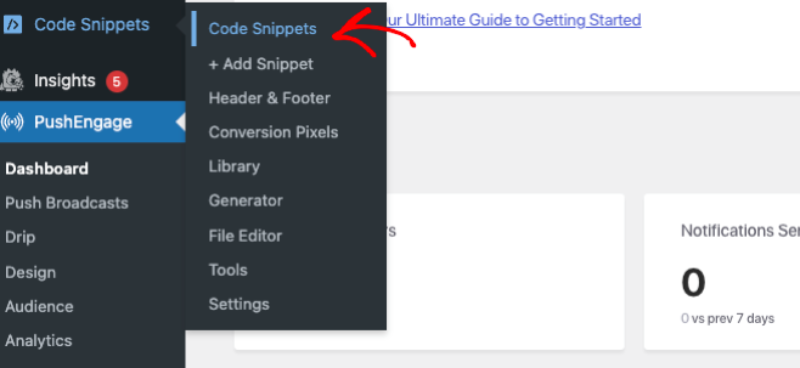
Si vous n'avez pas encore le plugin WPCode installé et activé, vous verrez un bouton Activer WPCode. Cliquez dessus pour télécharger le plugin WPCode gratuit. Vous devrez installer et activer WPCode avant de pouvoir continuer.
Une fois cela fait, vous pouvez simplement consulter les extraits de code dans la bibliothèque.
Cliquez sur le bouton Utiliser l'extrait pour un extrait de code, et vous serez redirigé vers l'écran Modifier l'extrait dans WPCode, où vous pourrez le personnaliser.
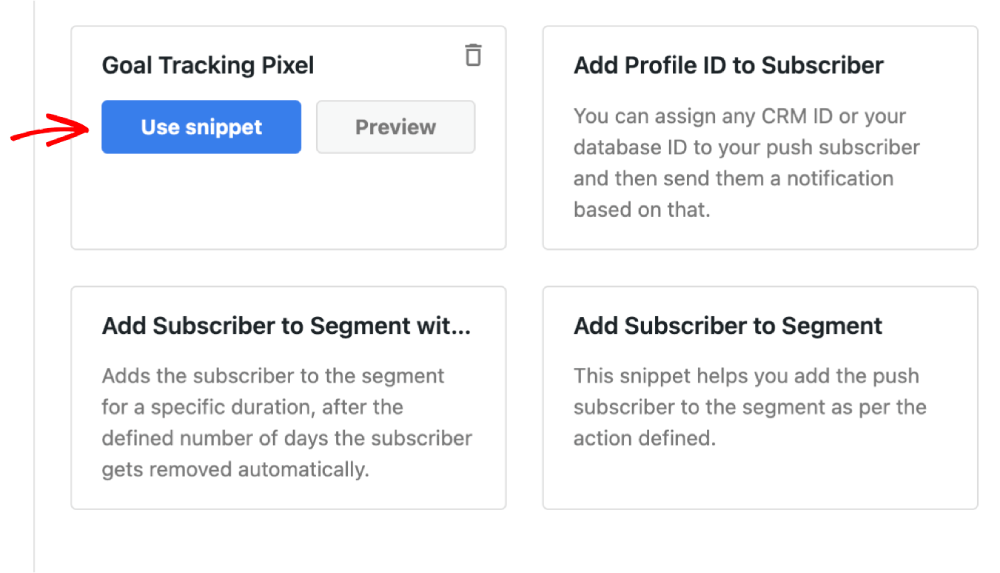
Allez-y et modifiez l'extrait comme bon vous semble.
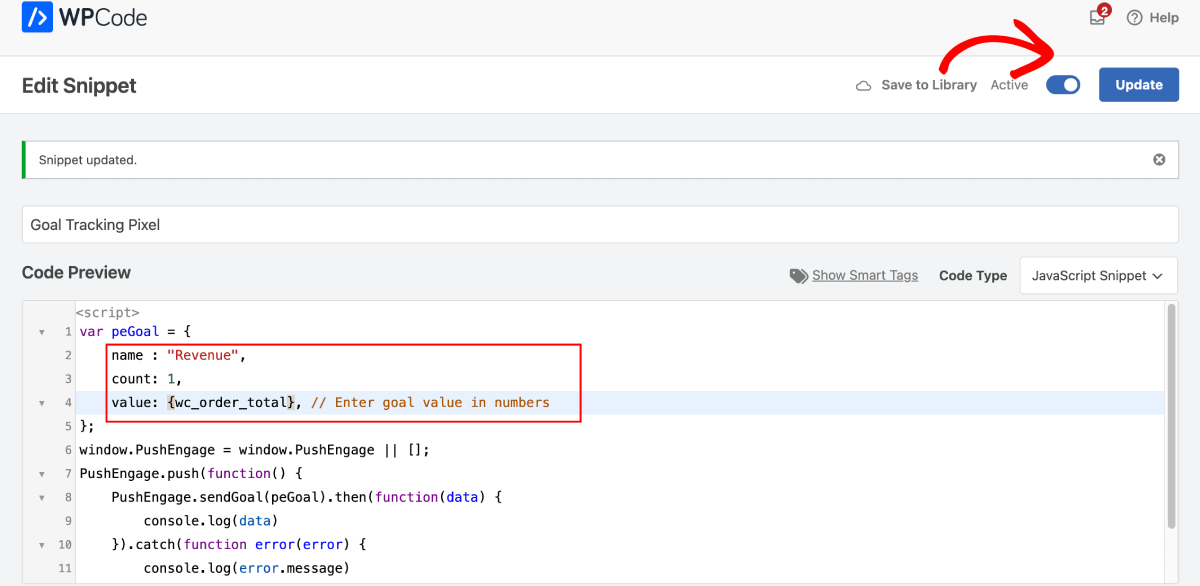
Cliquez ensuite sur Mettre à jour pour enregistrer l'extrait. Enfin, activez le bouton Activer pour installer l'extrait sur votre site.
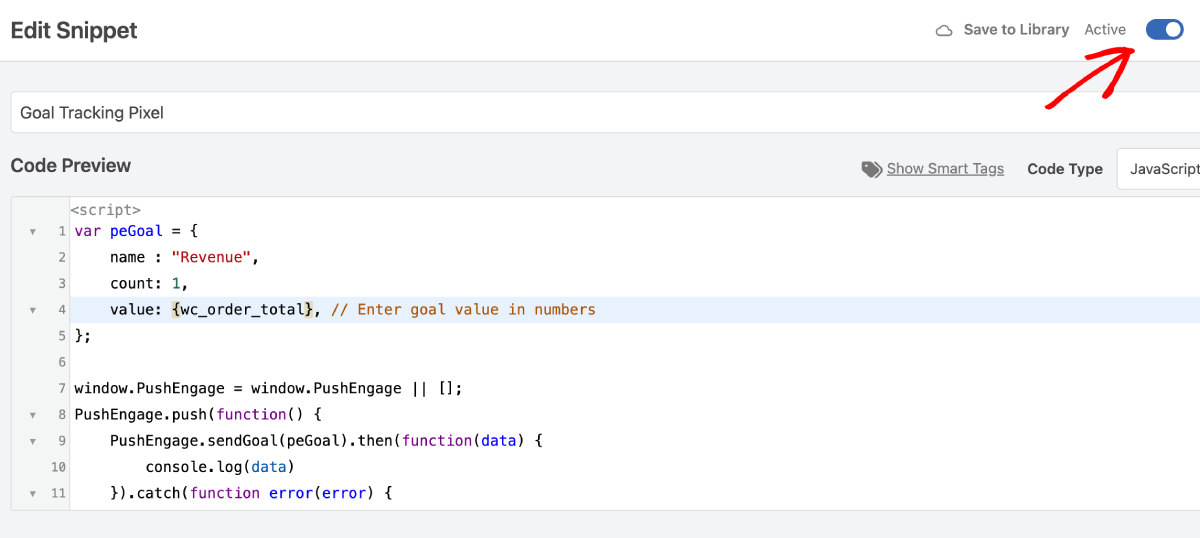
Et voilà !
Que pouvez-vous faire d'autre en utilisant ces extraits de code ?
Nous avons lancé un tas de ces extraits de code et nous vous invitons à les essayer. Vous pouvez créer des campagnes de notification push pour les sites construits avec WooCommerce et Easy Digital Downloads.
Vous devriez consulter la liste complète des extraits dans la bibliothèque WPCode.
En plus de créer de puissantes campagnes e-commerce, vous pouvez également :
- Configurer un pixel de suivi d'objectifs pour suivre les performances de vos notifications push
- Ajouter des abonnés à un segment pour envoyer automatiquement des notifications push
- Ajouter des abonnés à un segment pour une durée spécifique, supprimer des abonnés d'un segment
- Ajouter un identifiant CRM à chaque abonné aux notifications push
Tous ces extraits vous permettent de développer facilement votre entreprise en utilisant d'autres canaux tels que les notifications push d'application.
Quoi d'autre ?
Nous savons que développer une entreprise est un travail difficile. Chez PushEngage, nous cherchons toujours à améliorer notre produit et votre expérience. Nous avons lancé cette nouvelle fonctionnalité pour vous aider à tirer encore plus de valeur de votre abonnement PushEngage.
Merci beaucoup d'avoir lu cette annonce.
Si vous avez des questions, notre équipe de succès client est là pour vous aider. Lancez simplement une conversation sur le chat en direct ou consultez notre page de contact.
Et merci d'utiliser PushEngage. Que vous utilisiez la version gratuite ou la version Enterprise, vous êtes tout aussi important pour nous. Les nouveaux extraits de code sont conçus pour vous aider à réussir et nous vous souhaitons tout le meilleur.
Faites-nous part de vos réflexions dans les commentaires ci-dessous et si ce n'est pas déjà fait, commencez avec PushEngage dès aujourd'hui !


