Hello again, Engagelings!
If you’ve ever tried building automated push notification campaigns, you know the pain. You set up a drip autoresponder for your welcome sequence. Then you create a separate triggered campaign for cart abandonment. Then another for re-engagement. Before long, you’re juggling three different tools, cross-referencing timing logic in your head, and hoping nothing falls through the cracks.
Sound familiar? You’re not alone. It’s been one of the most requested improvements from PushEngage customers for over a year.
Today, we’re fixing it.
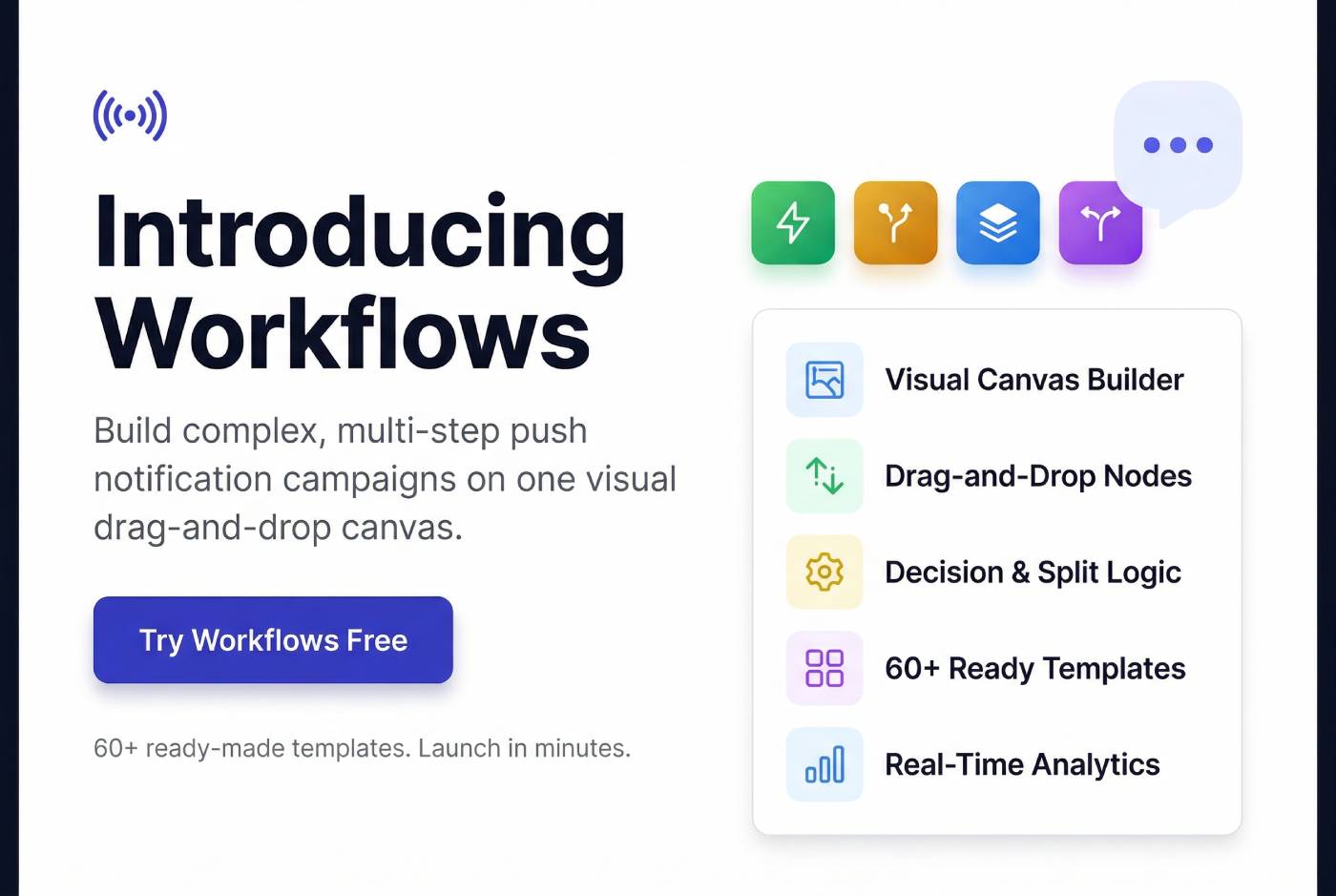
Introducing Workflows — a visual automation builder that replaces the need to stitch together separate drip autoresponders and triggered campaigns. One drag-and-drop canvas. One place to design, launch, monitor, and optimize your entire push notification strategy.
Orchestrate Multi-Channel Campaigns with Custom Workflows
Push notification automations are a super-effective, low-cost marketing tool to help you grow your repeat traffic, engagement, and sales on autopilot.
- What Is Workflows?
- Why We Built Workflows
- How It Works
- Reach the Right Subscribers at the Right Moment
- Logic Steps: Personalize Every Journey Automatically
- Do More Than Just Send Notifications
- 60+ Templates: Launch in Minutes, Not Hours
- Smart Settings for Real-World Campaigns
- Available on Every Plan
- Get Started with Workflows Today
What Is Workflows?
Workflows is PushEngage’s new visual automation builder. Think of it as a flowchart for your push campaigns — except every node actually does something. Send notifications, add subscribers to segments, split-test messaging, trigger webhooks, or even launch other workflows — all connected by drag-and-drop logic on a single canvas.
Whether you’re onboarding new subscribers, recovering abandoned carts, running A/B/C split tests on win-back messaging, or orchestrating multi-step lifecycle campaigns, Workflows gives you a single visual interface to build it all — without writing a single line of code.
Why We Built Workflows
Here’s the thing: most push notification platforms force you to think in silos. Time-based sequences live in one tool. Event-based sends live in another. And if you want to combine both with conditional logic? Good luck stitching them together.
The result? Campaigns that feel disconnected. Subscribers who get the wrong message at the wrong time. And marketing teams stuck managing complexity instead of driving results.
Workflows eliminates that friction entirely. One canvas replaces multiple tools. Time delays, behavioral triggers, conditional branching, split testing, and subscriber management — all in one place.
How It Works
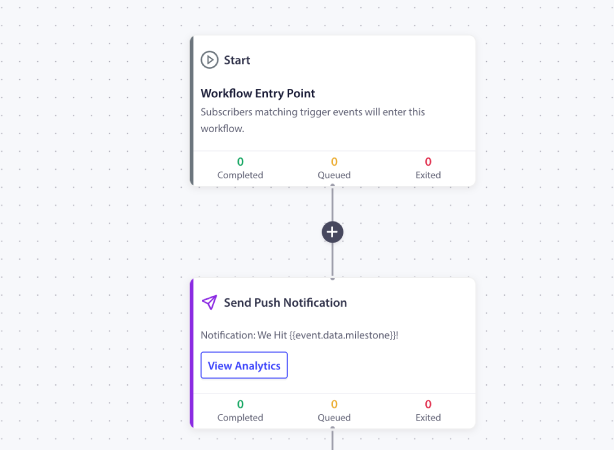
Every workflow follows the same fundamental structure: a Start trigger brings subscribers in, they move through a series of steps (actions, logic, and delays), and they eventually reach the End — or exit early based on conditions you define.
The visual canvas uses a flowchart-style interface. Click the + button between any two nodes to insert a new step. Each node shows live stats — Completed, Queued, and Exited — so you can monitor performance without leaving the editor.
You can start from scratch with a blank canvas, or choose from 60+ pre-built templates across 9 industry categories — from ecommerce cart recovery to SaaS trial onboarding to gaming re-engagement.
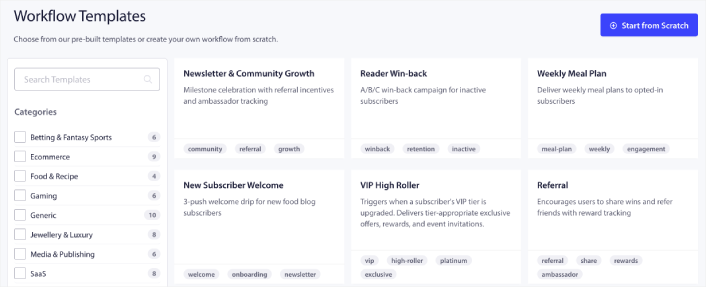
Templates come fully wired with node configurations, notification copy, wait durations, and branching logic. Customize the details and launch.
Reach the Right Subscribers at the Right Moment
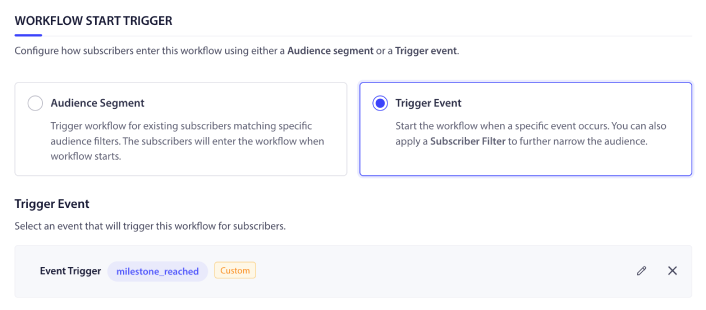
Every workflow begins with a trigger — the event or condition that determines who enters and when. Workflows supports two trigger modes:
Audience Segment
Target existing subscribers who match specific filters when the workflow activates. Combine attribute, segment, browser, and device filters using AND/OR logic for precise targeting. Perfect for launching campaigns to a known audience — like re-engaging all subscribers who haven’t clicked in 30 days.
Trigger Event
Start the workflow dynamically whenever a subscriber performs a specific action. Seven built-in trigger events cover the most common scenarios:
- Subscribes to push notifications — Welcome new subscribers the moment they opt in
- Added to segment — React when subscribers enter a segment (e.g., “VIP Customers”)
- Removed from segment — Trigger win-back flows when subscribers drop out of key segments
- Updates subscriber field or attribute — Respond to data changes in real time
- Completes a goal — Celebrate conversions or trigger next-step automation
- Performs custom event — Send any event via the PushEngage SDK or REST API for unlimited flexibility
You can also layer an optional Subscriber Filter on top of any trigger event. For example, trigger on “Completes a goal” but only allow subscribers in the “Premium” segment to enter. This gives you the precision of audience targeting with the real-time responsiveness of event-driven automation.
Logic Steps: Personalize Every Journey Automatically
This is where Workflows gets powerful. Logic steps let you control the flow of each subscriber’s journey with time delays, conditional branching, path splitting, and early exits.
Wait
Pause the subscriber’s journey for a defined period before moving to the next step. Space out your notifications strategically — send the welcome push immediately, wait 3 days, then send the second message. No more overwhelming subscribers with back-to-back notifications.
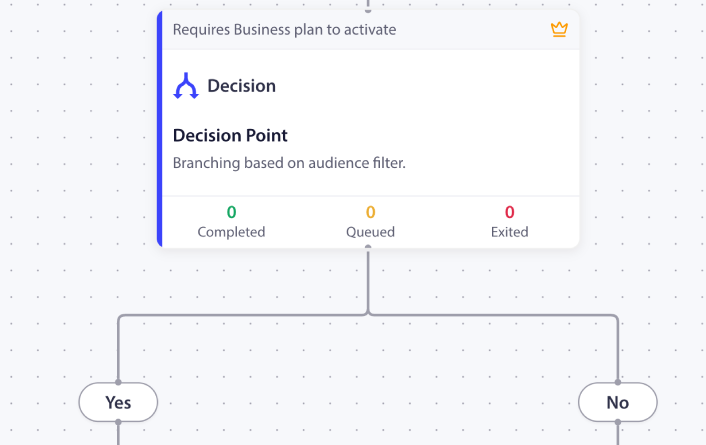
Decision
Add conditional Yes/No branching based on subscriber behavior or attributes. Did the subscriber click the previous notification? If yes, send the follow-up offer. If no, send a re-engagement nudge. Decision nodes let you build truly personalized journeys that adapt to what each subscriber actually does.
Split Path
Split your workflow into 2 or more parallel paths with configurable traffic distribution. Send 33% of subscribers down Path A with one message, 33% down Path B with a different angle, and 34% down Path C with a third variant. Each path tracks its own performance stats, and a Declare Winner button lets you end the test and route all future traffic to the winning path.
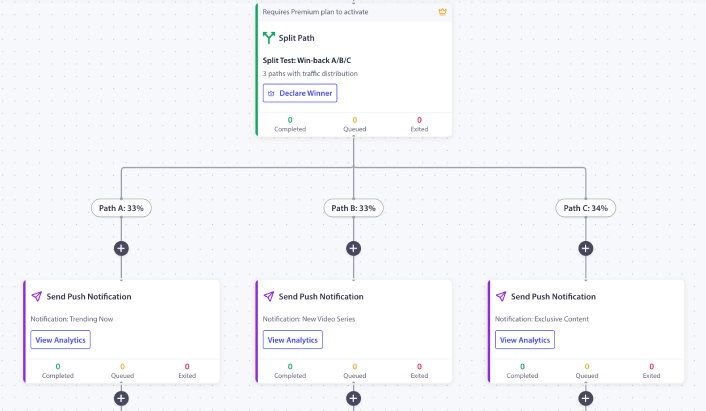
This is built-in A/B/C testing at the workflow level — no separate experiments to configure, no external tools to manage.
Exit
Remove subscribers from the workflow immediately when they meet specific conditions.
- Converted? Exit.
- Unsubscribed? Exit.
- Already re-engaged? Exit.
This keeps your workflows clean and ensures subscribers aren’t stuck in journeys that no longer apply to them.
Do More Than Just Send Notifications
Actions are the things your workflow actually does. And while sending push notifications is the core action, Workflows goes far beyond that.
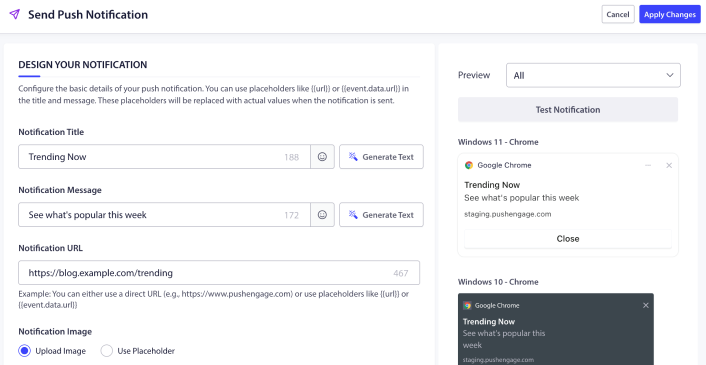
Send Push Notification
A full-featured notification composer built directly into the workflow editor. Set titles, messages, URLs, and images — with support for dynamic placeholders that resolve to real values when the notification fires. Add multiple CTA buttons, set custom display durations, auto-append UTM parameters for analytics attribution, and preview how your notification looks across 6 device/browser combinations before going live.
And yes, there’s an AI-powered Generate Text button to help you draft notification copy directly inside the editor.
Subscriber Management
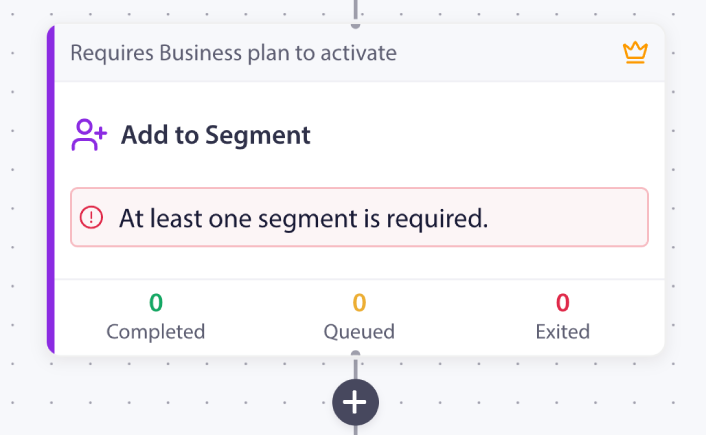
Add to Segment and Remove from Segment let you automatically tag subscribers based on their behavior as they move through the workflow. Combine these with Update Subscriber to record engagement scores, update preferences, or flag conversion events — all without leaving the canvas.
This is progressive profiling, built into your automation. As subscribers interact with your workflows, their data gets richer and your targeting gets sharper.
Workflow Orchestration
Start Workflow and Stop Workflow let you build interconnected automation systems. A master welcome workflow can kick off a separate “VIP Onboarding” workflow for high-value subscribers. A re-engagement workflow can stop a win-back sequence the moment the subscriber converts.
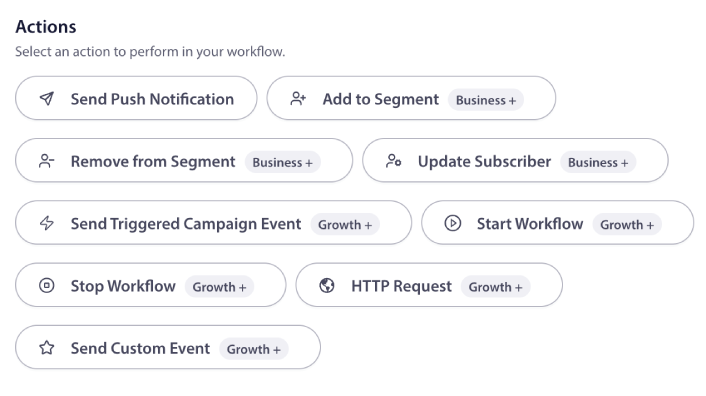
Send Custom Event takes this even further — fire events that other workflows or triggered campaigns can listen for, enabling event-driven orchestration across your entire PushEngage automation stack.
External Integrations
The HTTP Request action is a native webhook built into the workflow canvas. Update your CRM, log events in your analytics platform, trigger actions in Zapier or Make, notify a Slack channel, or sync data with your custom backend — all as part of the subscriber’s automated journey.
60+ Templates: Launch in Minutes, Not Hours
Don’t want to start from scratch? You don’t have to. Workflows ships with 60+ pre-built templates organized across 9 industry categories: Ecommerce, SaaS, Media & Publishing, Travel, Gaming, Betting & Fantasy Sports, Food & Recipe, Jewellery & Luxury, and Generic.
Each template is a fully wired workflow — complete with triggers, logic steps, notification copy, wait durations, and branching paths. Search by name or filter by use case (winback, onboarding, referral, ab-test, retention), click to load it into the editor, customize the details, and launch.
Some highlights:
- New Subscriber Welcome — A 3-push drip sequence to onboard subscribers and drive early engagement
- Reader Win-back — An A/B/C split test to find the most effective re-engagement message
- Cart Abandonment Luxury — A premium recovery flow designed for high-AOV brands
- Billing Failed Recovery — A dunning sequence to recover failed payments before they churn
- Trial Expiry Urgency — An escalating conversion sequence for SaaS trial users
- Cross-Channel Orchestration — Coordinate push + email for maximum impact
Smart Settings for Real-World Campaigns
Workflows includes settings that solve the practical problems marketers actually face:
- Subscriber Entry Rules let you control how often subscribers can re-enter a workflow. Choose single entry (once per 365 days) or multiple entry with an optional parallel entry toggle that lets subscribers start a new run even if a previous one is still in progress.
- Quiet Hours pause notification delivery during hours when subscribers are likely asleep or unavailable. Define a daily quiet window, and PushEngage applies it based on each subscriber’s local time zone — so a 10pm–8am quiet window works correctly for every subscriber, everywhere.
- Goal-Based Exits let subscribers automatically leave the workflow when they convert, re-engage, or meet any condition you define — even if they haven’t reached the End node. This means your win-back sequence stops the moment the subscriber comes back. No wasted messages. No awkward “we miss you” notifications to someone who just purchased.
- Scheduling gives you full control over when workflows start and stop. Launch immediately or schedule an exact start date. Set an end date or let it run indefinitely.
Available on Every Plan
Workflows is available across all PushEngage plans, with capabilities that scale as you grow:
- Free — Build simple workflows up to 5 steps with push notifications
- Business+ — Unlock Wait, Decision, Exit, and subscriber management actions (Add/Remove from Segment, Update Subscriber)
- Growth+ — Add workflow orchestration (Start/Stop Workflow), HTTP Request webhooks, Send Custom Event, and Send Triggered Campaign Event
- Premium+ — Everything above, plus Split Path for A/B/C testing at the workflow level
Whether you’re just getting started with push automation or running sophisticated multi-step campaigns, there’s a Workflows tier that fits.
Get Started with Workflows Today
Workflows is live in your PushEngage dashboard right now. Navigate to Campaign → Workflows to start building.
If you’re new to automation, grab one of the 60+ templates, customize it, and launch your first workflow in minutes. If you’re an experienced automation builder, start from scratch and design the exact journey your subscribers need.
Either way, you’re going from scattered campaigns to a single, visual, powerful automation engine — and your subscribers are going to notice the difference.


