PWA push notifications
for
every home screen.
Send push from your Progressive Web App to Android, desktop browsers, and Home Screen web apps on iPhone and iPad. PushEngage merges into the service worker you already have, so caching and offline mode keep working.
75,000+ businesses Android, desktop, and iOS 16.4+ 14-day money-back guarantee
Trusted by 75,000+ businesses








Why it works
Your PWA already installs like an app. Now it re-engages like one.
A PWA push notification is a standard web push message delivered through your app’s registered service worker, so it reaches people even after they close the tab or the Home Screen app.
No app store in the way
Visitors install your PWA from the browser and subscribe in the same visit. No store listing, no review queue, no second download before you can reach them.
Your service worker stays intact
A PWA gets one active service worker per scope. PushEngage adds its push handler to yours instead of replacing it, so caching, offline mode, and background sync keep working.
Marketing owns the campaigns
After the one-time setup, your team builds segments, drips, and triggered campaigns in the dashboard. No push server to run, no keys to rotate, no ticket per send.
How it works
How PWA push works with PushEngage, from service worker to sale.
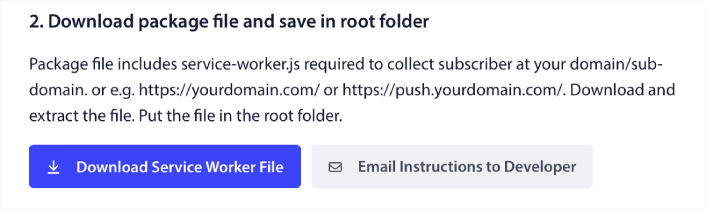
Merge the service worker. Keep your PWA.
If your PWA has no service worker yet, upload the PushEngage file to your root. If it already has one, add the single PushEngage line to your existing file and switch off PushEngage’s own registration in Advanced Settings. Your PWA registers one worker that does both jobs.
- No Firebase project, FCM setup, or VAPID key management
- PushEngage handles push subscriptions and token refresh
- The WordPress plugin registers the service worker for you

iPhone and iPad, handled
On iOS and iPadOS 16.4 and later, web push works for web apps added to the Home Screen and opened from their icon. The Add to Home Screen widget spots iOS visitors browsing in Safari and walks them through Share, then Add to Home Screen. When they open the app from the icon, your opt-in appears.
- Works in Safari, Chrome, and Edge on iOS 16.4+
- The permission prompt opens on a tap, as iOS requires
- Icon and app name come from your web app manifest
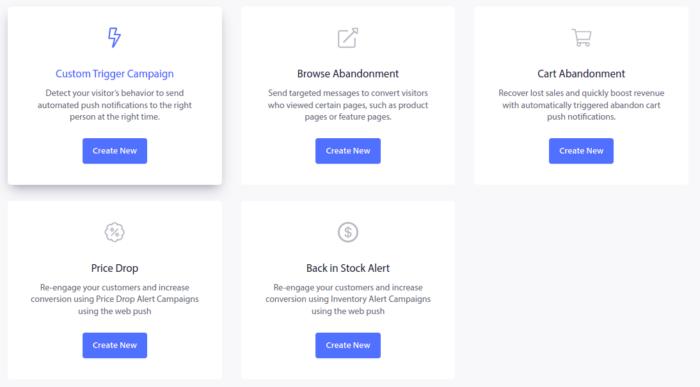
Campaigns that fire on behavior
Send broadcasts, schedule drips, or let behavior decide. Cart abandonment, browse abandonment, price-drop, and back-in-stock campaigns fire from what a subscriber actually did in your PWA, and Workflows chain the follow-ups.
- Opt-in prompts triggered by time on page, scroll depth, or a click
- Segments by behavior, device, and location
- Goal tracking ties revenue to the campaign that earned it
Where it works
PWA push on Android, desktop, and iOS: what each one needs.
The push standard is the same everywhere. What changes is how a visitor gets to the Allow click.
| Platform | Browsers | What the subscriber does | What PushEngage handles |
|---|---|---|---|
| Android | Chrome, Firefox, Edge, Samsung Internet, Opera | Clicks Allow on your opt-in, in the browser or the installed PWA | Opt-in design and timing, subscription, delivery |
| Desktop | Chrome, Firefox, Safari, Edge | Clicks Allow on your opt-in | Opt-in design and timing, subscription, delivery |
| iPhone and iPad (iOS / iPadOS 16.4+) | Safari, Chrome, Edge | Adds your site to the Home Screen, opens it from the icon, taps to allow | The Add to Home Screen widget, a tap-to-allow opt-in, delivery. You supply a web app manifest with display set to standalone or fullscreen (recommended rather than required on iOS 26+). |
Sources: PushEngage iOS and iPadOS web push setup guide and Add to Home Screen widget documentation. Your site must be served over HTTPS. iOS versions below 16.4 do not support web push.
What’s included
Everything your PWA push program needs, on one dashboard.
The same subscriber engine that runs web push for 75,000+ businesses, pointed at your PWA.
Smart opt-in prompts
Fire the prompt on time on page, scroll depth, or a click, with full design control. Not a cold browser pop-up on load.
Preview opt-in stylesAdd to Home Screen widget
Walks iOS visitors from Safari to your Home Screen app, with your own copy, colors, delay, and URL targeting.
Set up the widgetVisual Workflows
Drag-and-drop journeys for welcomes, cart recovery, and win-backs. The builder is on every plan, including Free.
Explore WorkflowsDynamic segmentation
Segment by behavior, device, location, and purchase history, so each push goes to the people it was written for.
See segmentationTriggered campaigns
Custom triggers on any event in your PWA, plus cart and browse abandonment on the Growth plan.
See triggered campaignsPrice-drop and back-in-stock
Alert subscribers the moment a watched product gets cheaper or returns. Available on the Growth plan.
See price-drop alertsA/B testing
Test headlines, images, and calls to action, then send the winner. Available at Premium and above.
See A/B testingGoal tracking and analytics
Revenue attribution per campaign and per workflow, on Premium and above.
See goal trackingDrips and timezone sending
Multi-step drip sequences, and sends that land at the same local time for every subscriber. Premium and above.
Compare plansIntegrations & developers
Any PWA framework. Plugins where you sell.
The service worker merge is the only step that touches code. Everything after it runs from the dashboard or the API.
React, Next.js, Angular, Vue, or vanilla JS
PushEngage works with the PWA you already built. Merge one line into your service worker, add the site code, and hand the dashboard to marketing.
For developersWordPress
The plugin installs PushEngage and registers the service worker.
WordPress pushShopify Plus
Cart and browse recovery, back-in-stock, and price-drop alerts for high-volume stores.
Shopify Plus appWooCommerce
Cart recovery and order campaigns from your WordPress admin.
WooCommerce recoveryHubSpot
Trigger push from HubSpot lists and events.
HubSpot integrationREST API
Documented endpoints for sends, subscribers, and segments.
API documentationNo root access?
A workaround for no-code PWA builders like Base44 that lock the site root.
Read the Base44 guideNative app SDKs
iOS, Android, Flutter, and React Native, on the same dashboard.
App push SDKsChrome extension
Compose and send campaigns from any page you are browsing.
Chrome extensionThe numbers
PWA push, in four numbers.
Pricing
Start free. Pay only for active subscribers.
PWA subscribers are web push subscribers, priced on the same public tiers. No per-message fees (each plan includes a monthly sending volume), and every paid plan carries a 14-day money-back guarantee.
Free
$0
Free forever, no card
- 1 site or app, 200 subscribers
- 30 campaigns (lifetime)
- 1 active workflow
Business
$8/month
from $8/month, billed yearly (first-year price)
- 1 site, up to 50,000 active subscribers
- Unlimited campaigns
- 5 workflows
Premium
$15/month
from $15/month, billed yearly (first-year price)
- 2 sites, up to 100,000 subscribers
- A/B testing, drip, goal tracking
- Timezone sending
Growth
$24/month
from $24/month, billed yearly (first-year price)
- 3 sites, up to 250,000 subscribers
- Cart and browse abandonment
- Back-in-stock and price-drop alerts
Enterprise pricing is custom. Prices shown are first-year rates. See every plan and the pricing calculator.
Side by side
Three ways to add push to a PWA, compared on what you run.
A capability comparison, not a price list. Build it yourself means the Push API, your own VAPID keys, and your own push server.
| Build it yourself | Your PWA builder’s push | PushEngage | |
|---|---|---|---|
| Service worker | You write the push handler into it | Bundled with the builder | One line merged into yours. Caching and offline logic stay put. |
| Keys and subscriptions | You generate VAPID keys and store subscriptions on your server | Handled by the builder | Handled by PushEngage, including token refresh |
| iPhone and iPad | You build the Add to Home Screen prompt | Varies by builder | Add to Home Screen widget plus a tap-to-allow opt-in |
| Opt-in prompt | Your own UI and timing logic | Varies by builder | Designed prompts on time on page, scroll depth, or click |
| Sending campaigns | Scripts against your push server | Often an API rather than a campaign dashboard | Dashboard broadcasts, drips, triggered campaigns, and Workflows |
| Revenue campaigns | Build each one | Varies by builder | Cart and browse abandonment, price drop, back-in-stock (Growth) |
| Attribution | Your own analytics | Varies by builder | Goal tracking per campaign and workflow (Premium and above) |
| Who runs it day to day | Engineering | Whoever owns the builder | Marketing, after a one-time setup |
PWA builders differ; check yours before you commit. PushEngage rows describe the public plans on the pricing page as of September 30, 2026.
Platform
PWA push is one channel. Here are the others.
The same dashboard runs web push notifications, mobile app push notifications, and in-app notifications. Choosing a vendor? See our push notification service or the push notification software checklist. Setting up by hand? Follow the step-by-step PWA push notifications guide.
Web push notifications
Browser push for your website on desktop and mobile, no install needed.
Web pushMobile app push notifications
SDKs for iOS, Android, Flutter, and React Native apps.
App pushIn-app notifications
Banners and modals inside your native app, no opt-in required.
In-app messagingPWA push notifications guide
The step-by-step setup: account, install code, service worker, opt-in, first campaign.
Read the guidePush notification service
Web push, app push, and in-app from one retention service built for eCommerce teams.
See the servicePush notification software
The buyer’s checklist for choosing a push notification platform.
Run the checklistiOS web push
How web push works on iPhone and iPad, and what to send.
iOS web pushPlatform overview
Every channel, feature, and integration on one page.
See the platformFAQ
PWA push notification questions, answered.
What are PWA push notifications?
PWA push notifications are standard web push messages delivered through a Progressive Web App’s registered service worker. Because the service worker runs in the background, subscribers receive them even when your PWA or its tab is closed.
Do PWA push notifications work on iPhone and iPad?
Yes, on iOS and iPadOS 16.4 and later, for web apps added to the Home Screen. The visitor adds your site to the Home Screen, opens it from the icon, and taps to allow notifications. It works in Safari, Chrome, and Edge. PushEngage’s Add to Home Screen widget guides iOS visitors through those steps, and your site needs a web app manifest with display set to standalone or fullscreen.
My PWA already has a service worker. Will PushEngage replace it?
No. A PWA can only have one active service worker per scope, so you add the PushEngage line to your existing service worker file and turn off PushEngage’s own registration in Advanced Settings. Your caching, offline mode, and background sync stay as they are. If your PWA has no service worker yet, upload the PushEngage file to your site root.
Do I need Firebase or VAPID keys?
No. PushEngage manages the keys, push subscriptions, and token refresh behind the scenes. You get a campaign dashboard instead of a Firebase console, and a REST API when your developers want programmatic control.
What if my PWA builder does not let me edit the site root?
Some no-code builders lock the root folder where a service worker normally lives. We publish a workaround for Base44 PWAs, and our team can help with other hosted builders.
Is PWA push different from web push?
It is the same web push standard. The difference is the delivery path: a PWA sends it through its own service worker, and on iPhone and iPad the site must be installed to the Home Screen first. Everything else, from opt-in design to segmentation, works the same way as web push on a regular website.
How much do PWA push notifications cost?
PWA subscribers are priced like web push subscribers. The Free plan covers 1 site, 200 subscribers, and 30 campaigns. Paid plans start from $8/month, billed yearly, and you pay only for active subscribers, never per message. Every paid plan has a 14-day money-back guarantee.
Do I need a developer?
Only for the service worker step, which is a one-time change. On WordPress the plugin handles it. After that, your marketing team builds segments, campaigns, and Workflows from the dashboard.
Bring your PWA users back, on every home screen.
Merge one line, pick an opt-in, send your first campaign. If PushEngage isn’t the best fit within 14 days, we refund 100%. No questions asked.
Free plan available Your service worker stays intact Pay only for active subscribers