プッシュ通知とアプリ内通知:中小企業にとってより効果的なのはどちらか?
答えは:簡単な答えはありません!それは、あなたがどのようなビジネスを運営しているか、世界のどこにいるか、ビジネスの範囲はどれくらいか、オーディエンスに何を伝えたいか、そしてオーディエンスは誰かによってすべて異なります。
そして、それは考慮すべきことがたくさんあります。
しかし、マーケティングキャンペーンから何を求めているかによって、あなたのビジネスにとって明確な答えが見つかるでしょう。そのため、この記事ではプッシュ通知とアプリ内通知を比較しました。
この記事では、次のことを比較します:
よろしいですか?早速始めましょう。
プッシュ通知とアプリ内通知のメディアタイプの違い
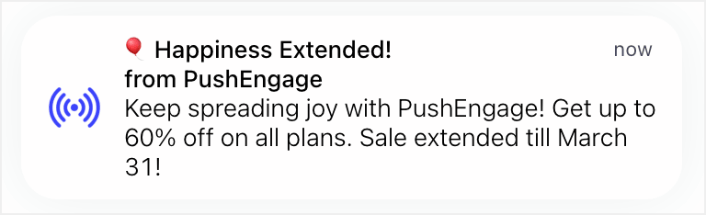
プッシュ通知は、スマートフォンのホーム画面や通知トレイなどに表示されるメッセージです。アプリ内通知は、通常、画面の上部または下部に表示される、アプリ内で確認できるメッセージです。
Webおよびアプリのプッシュ通知の場合:
- メディアタイプは通常、テキストとシンプルなグラフィック/アイコンに限定されます。
- プッシュ通知は、すべてのブラウザやデバイスでリッチメディア(画像、動画、インタラクティブコンテンツなど)を常にサポートしているわけではありません。
- プッシュ通知は、デバイスにすばやく配信できるように、簡潔で軽量に保つことが目標です。
アプリ内プッシュ通知の場合:
- アプリ内通知は、使用できるメディアタイプの柔軟性が高くなっています。
- テキストに加えて、アプリ内通知には画像、GIF、動画、さらにはインタラクティブな要素を含めることができます。
- プッシュ通知ほどユーザーを中断させることなく、より視覚的に魅力的で、より詳細な情報を提供することが目標です。
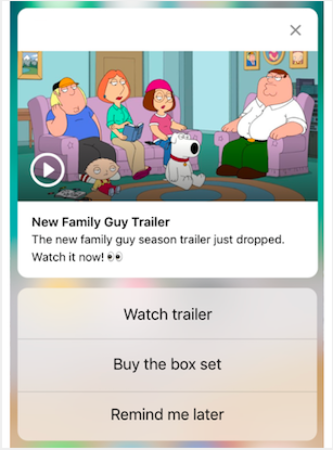
2つのメッセージの違いがわかりますか?アプリ内プッシュ通知キャンペーンでは、クリエイティブなアイデアを探求し、はるかに効果的にコミュニケーションするための多くのスペースがあります。
主な違いは、プッシュ通知はシンプルさと配信速度を優先するのに対し、アプリ内通知はよりリッチなメディアを活用して、アプリ内でより複雑な情報を伝えることができるという点です。
Webおよびアプリのプッシュ通知は、速報ニュースや友人からのメッセージなど、重要な更新について通知するのに適しています。しかし、アプリ内プッシュ通知は、アプリで利用可能な新しいコンテンツや機能を表示するなど、より役立ちます。
プッシュ通知とアプリ内プッシュ通知のコスト
プッシュ通知の価格は、SMS通知やメール通知よりもはるかに手頃です。これは、特に国際的な顧客や大量購入の場合に当てはまります。しかし、プッシュ通知とアプリ内通知についてはどうでしょうか?
アプリ内通知の実装は、プッシュ通知を使用するよりも一般的にコスト効率が高いです。多くのアプリ開発プラットフォームやフレームワークには、追加料金なしで基本的なアプリ内通知機能が含まれています。コストは、通知ごとの個別の費用ではなく、アプリ開発およびホスティング全体の料金に含まれていることがよくあります。
リッチメディアサポートや高度なターゲティングなどの高度なアプリ内通知機能には、追加料金がかかる場合があります。しかし、一般的に、アプリ内通知はプッシュ通知と比較して、使用ごとのコストが低くなります。
一方、プッシュ通知は、送信される通知の量に応じてスケールする従量課金モデルで価格設定されています。PushEngageの価格をご覧ください。
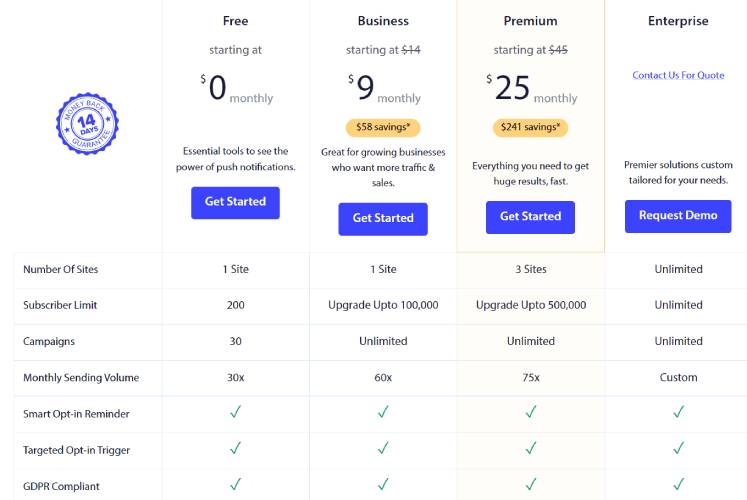
PushEngageは、世界No.1のプッシュ通知プラグインです。他の最高のプッシュ通知サービスと比較すると、明らかに優れていることがわかります。
プッシュ通知は、ウェブサイトのトラフィックとエンゲージメントを自動で増やすのに役立ちます。オンラインストアを運営している場合は、PushEngageが自動eコマースプッシュ通知の作成を支援することで、売上を伸ばすのにも役立ちます。
無料で開始できますが、ビジネスの成長に真剣に取り組んでいる場合は、有料プランを購入する必要があります。また、プッシュ通知サービスを購入する前に、プッシュ通知のコストに関するこのガイドを確認してください。
PushEngageで得られるものを簡単に見てみましょう。
ビジネスのトラフィック、エンゲージメント、売上を伸ばしたいのであれば、PushEngageが断然最良の選択肢であることがわかるでしょう。予算が限られている場合は、プッシュ通知で少しクリエイティブになることもできます。
PushEngageを使用すると、Webプッシュ通知、アプリプッシュ通知、Webアプリプッシュ通知を送信できます。
プッシュ通知とアプリ内通知の比較:どちらがパーソナライズしやすいか?
プッシュ通知とアプリ内キャンペーンのどちらも、自動化およびパーソナライズできるという点が素晴らしいです。しかし、プッシュ通知とアプリ内通知のパーソナライズに関しては、一般的にアプリ内通知の方が柔軟性とカスタマイズオプションが豊富です。
プッシュ通知のパーソナライズは、通常、メッセージテキスト、件名、小さなアイコンやグラフィックなどの基本的な要素に限定されます。プッシュ通知の書式設定、レイアウト、リッチメディアコンテンツのカスタマイズはより困難です。
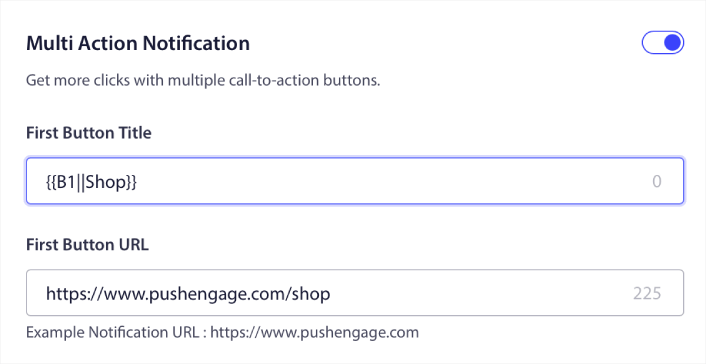
AppleやGoogleなどのプラットフォームが提供するプッシュ通知チャネルには、許可されるパーソナライズの種類に関するガイドラインと制限があります。
アプリ内通知は、はるかに堅牢なパーソナライズオプションを提供します。インスピレーションを得るには、これらのアプリ内通知の例をご覧ください。
アプリのインターフェース内で、アプリ内通知はカスタムデザイン、レイアウト、フォント、色、インタラクティブ要素で調整できます。画像、ビデオ、GIFなどのリッチメディアを含めることで、通知をより視覚的に魅力的でパーソナライズされたものにすることができます。
開発者は、プッシュ通知の限られたオプションと比較して、アプリ内通知の外観と動作をより細かく制御できます。要するに、アプリ内通知は、より高度なパーソナライズとカスタマイズを可能にします。
どのような自動化ワークフローを使用すべきか?
プッシュ通知とアプリ内通知が異なるタイミングで送信されることを理解したので、それらの自動化が異なる方法で機能することを理解する必要があります。
取得するキャンペーンが異なるという意味ではありません。どちらのチャネルでも、次のような同様のキャンペーンを設定できます。
しかし、作成する自動化の種類は大きく異なります。たとえば、毎週セールを行う場合は、スケジュールされたプッシュ通知を使用する必要があります。しかし、カタログに新しい製品へのリンクを送信する場合は、アプリ内通知の方が効果的です。
同様に、差し迫った自然災害の場合は、代わりにプッシュ通知を送信してください。

リアルな話:アプリ内通知とプッシュ通知キャンペーンの両方に同じ自動化ツールが提供されているからといって、それらが同等に効果的であるとは限りません。両方のマーケティングチャネルを最大限に活用するために、両方を組み合わせて使用してください。
このプッシュ通知とアプリ内通知の比較をどうするか?
今回は以上です、皆さん!
プッシュ通知は、あらゆるビジネスのトラフィック、エンゲージメント、および売上を増やすための優れた方法です。全体として、SMS通知よりもはるかに強力で手頃な価格です。そして、プッシュ通知を始めたばかりの場合は、PushEngageの使用をお勧めします。PushEngageは、市場でNo.1のプッシュ通知ソフトウェアです。
そして最も良い点は、PushEngageが中小企業が大企業と競争できるようにすることです。したがって、ビジネスを開始、成長、または拡大したい場合でも、あらゆる成長段階に適しています。
プッシュ通知を始めたばかりの場合は、これらの記事もいくつか確認してください。
- 顧客エンゲージメントを高めるための7つのスマートな戦略
- WordPressブログへのトラフィックを増やす方法(簡単な9つの方法)
- ウェブプッシュ通知のオプトイン率を高める方法(7つの方法)
- リターゲティングプッシュ通知を使用して収益を2倍にする方法
- プッシュ通知の並べ替え方法と、成果の出るキャンペーンの見つけ方
- プッシュ通知購読者リストをクリーンアップする方法(簡単)
- RSSプッシュ通知を自動送信する方法
AIアシスタントから実行する: このプレイブックのすべて—セグメントの構築、キャンペーンのスケジュール設定、結果の取得—は、PushEngage MCPサーバーを通じて機能します。Claude(またはMCP互換のアシスタント)をPushEngageアカウントに一度接続し、キャンペーンを説明すれば、あとはクリックするだけで完了します。具体的な例については、AIアシスタントからプッシュ通知を送信するを参照してください。
まだの方は、今すぐPushEngageを始めて次のレベルに進みましょう!


