自動操縦でパーソナライズされたプッシュ通知を送信する方法をお探しですか?
それを実現する最も簡単な方法は、属性を使用した自動ドリップキャンペーンを使用することです。属性は、パーソナライズされたプッシュ通知を動的に送信するために使用できるカスタム変数です。
少し複雑に聞こえたとしても、心配しないでください。
この記事では、属性を使用してパーソナライズされたプッシュ通知ドリップキャンペーンを簡単に設定する方法についてすべて説明します。
よさそうですね?さあ、始めましょう。
プッシュ通知属性とは?
プッシュ通知属性は、サブスクライバーの詳細を自動的に取得し、通知メッセージをパーソナライズする変数です。次のようなデータを追加することで、ドリップキャンペーンをカスタマイズできます。
- ユーザーの名
- 趣味
- 居住地
その他、実行中のキャンペーンの種類によって異なります。
プッシュ通知キャンペーンの送信にはPushEngageの使用をお勧めします。PushEngageは世界No.1のプッシュ通知ソフトウェアです。そのため、キャンペーンは安全な手に委ねられます。
プッシュ通知属性を使用しなくても、PushEngageではサブスクライバーの国名と都市名を使用してパーソナライズされたウェブプッシュ通知を送信できます。必要に応じて、すべてのサブスクライバーまたはカスタムセグメントにドリッププッシュ通知シーケンスを送信できます。PushEngageではジオセグメンテーションを使用したドリップキャンペーンを実行することもできます。
しかし、さらに一歩進めたい場合は、PushEngage Attributes APIを使用して、まったく異なるレベルのパーソナライゼーションを提供できます。
パーソナライズされたドリッププッシュ通知の送信方法
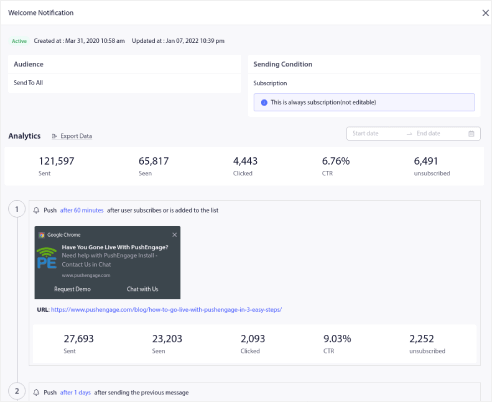
ドリップキャンペーンとは、自動的に送信される一連のプッシュ通知のことです。通常、ドリップシーケンスは次のいずれかの条件でトリガーされます。
- 初めて購読したとき
- サブスクライバーがセグメントに追加されたとき
サブスクライバーのアクションに基づいてドリップ通知をトリガーできます。ドリップキャンペーンとは何か、トリガーをオンにする方法を理解したので、Attribute APIを使用して次のようなパーソナライズされたドリップ通知を送信する方法を見てみましょう。
ケース#1:全サブスクライバーに送信
ドリップキャンペーンをすべてのサブスクライバーに送信する場合、プッシュ通知を購読しているすべての人がパーソナライズされたドリップ通知を受け取ります。クールなのは、配信スケジュールとともにシーケンス全体を作成できることです。
この条件では、ユーザーが購読するとすぐに、ハッシュに対する値の送信または属性の設定ができます。これはハッシュの応答を使用して行うことができます。
ケース#2:カスタムセグメントに送信
カスタムセグメントにドリップキャンペーンを送信することもできます。それが何であるかわからない場合は、カスタムセグメントの作成方法に関する記事を確認してください。このトリガー条件では、サブスクライバーがセグメントに入るとすぐに、セグメントの応答に対して値の送信または属性の設定ができます。
ケース#3:属性とジオロケーション
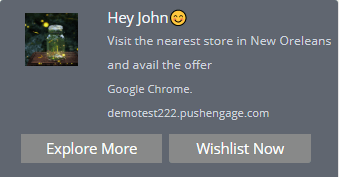
PushEngageを使用すると、通知のタイトルとメッセージでユーザーの国名と都市名の属性を使用することにより、カスタムドリップ通知をユーザーに送信できます。これらは、コーディングなしで、すべてのサブスクライバーに対して使用できる事前定義された属性です。同様に、通知フィールドにユーザーの名前やその他の詳細を追加することもできます。
ジオロケーション属性の場合、サブスクライバーがサブスクライブされた直後に、サブスクライバーハッシュに対して属性を設定する必要があります。
使用できるサンプルコードを簡単に見てみましょう。
 var newAttributes = {
 'name': 'Jon smith',
 'isAdmin': true,
 'lastActive': "2019-09-19T05:41:53.150Z",
};
このコードスニペットは、ユーザーの3つの新しい属性を作成することを目的としています。簡単に言うと、コードは名前、管理権限ラベル、および最後ののアクティブタイムスタンプを割り当てようとしています。これらはすべて、パーソナライズされたプッシュ通知を作成するために使用できるデータポイントです。
window._peq.push(['init', false, function(res) {
   if(res.statuscode==1) {
     //Get your subscriber hash in response
     console.log(res.subscriber_hash);
     window._peq.push(['set-attributes', newAttributes, function(res) {
       if(res.statuscode == 1) {
         // handle response
         console.log(res);
       }
     }]);
   }
}]);
ここでは、前のコードブロックで定義された新しい属性を新しいサブスクライバーに対して取得し、PushEngageサーバーに送信しようとしています。サブスクライバーがウェブサイトにユーザーとしてログインしたときに属性を取得することもできます。これらの属性が送信されると、PushEngageキャンペーンで属性を使用できます。
属性の詳細については、PushEngage Attributes APIドキュメントをご覧ください。
属性を使用したドリップ自動応答の設定方法
使用できるドリップキャンペーン属性の種類について少し理解したところで、PushEngageを使用して設定を進めましょう。まだPushEngageを使用していない場合は、今すぐ始めましょう。
PushEngageダッシュボードにログインし、Campaign » Drip Autorespondersに移動して、Create Drip Autoresponderをクリックします。

キャンペーンに名前を付けて、ドリップに通知を追加して作成を開始します。
次に、属性の使用を開始します。たとえば、通知にサブスクライバーの名前を追加したいとします。タグ {{name||there}}を使用できます。
属性タグは、ここで非常に単純なことを行います。各サブスクライバーについて、PushEngageは属性 nameとして保存されている名前を確認します。いずれかのサブスクライバーに対して有効な nameデータが見つからない場合、PushEngageはフォールバックオプション thereを使用します。
ご覧のとおり、例では通知メッセージフィールドに属性 {{PE_CITY}}を使用して、サブスクライバーの場所によって通知をパーソナライズしています。ジオロケーション属性を作成する必要はありません。PushEngageは各サブスクライバーの位置をハッシュに対して保存するためです。したがって、{{PE_COUNTRY}}と{{PE_CITY}}はデフォルトの属性です。
ドリップキャンペーンのマルチアクションボタンでも属性を使用できます。
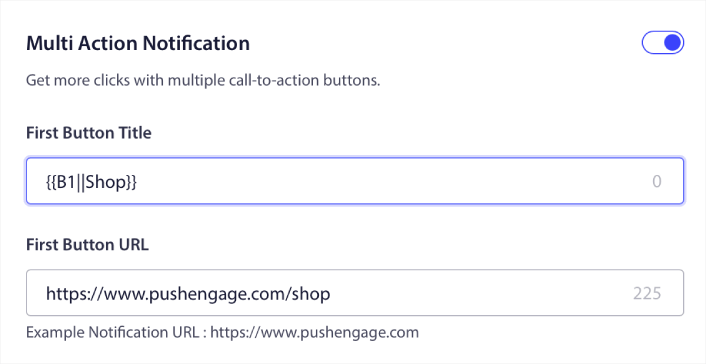
注意:属性値が欠落している場合に備えて、必ずデフォルト値を渡してください。
私たちの例で属性を使用したパーソナライズされたプッシュ通知は次のようになります。
このようなパーソナライズされたターゲット通知を送信すると、プッシュブロードキャスト通知やドリップキャンペーンと比較してCTRが高くなることに気づくでしょう。
次は何をしますか?
今回は以上です、皆さん!
作成した属性は、購読者をセグメント化する方法としても機能します。または、GTMを介して動的にセグメントを作成することもできます。次にそれを確認しますか?
プッシュ通知が初めての場合は、公開前に完全なプッシュ通知テストプロセスに従うべきです。これにより、訪問者が見て、壊れたユーザーエクスペリエンスについて不平を言う前に、一般的な問題をトラブルシューティングできます。
まだの方は、ぜひPushEngageをお試しください。PushEngageは世界No.1のプッシュ通知サービスです。ビジネスの成長に真剣に取り組んでいるなら、PushEngageに投資すべきです。


