Shopifyストアで閲覧放棄により売上を失っていませんか?
閲覧放棄とは、サイト訪問者がサイトを閲覧した後、何も購入せずに離脱してしまうことです。さらに悪いことに、カートに何も追加しないこともあります。では、どうすればよいでしょうか?
この問題に対処する簡単な方法の1つは、Facebook、Instagram、Google検索広告でリターゲティング広告を作成することです。しかし、それは非常に高価になる可能性があります。そして、それが機能するためには、経験豊富な広告主である必要があります。
閲覧放棄から回復する最も簡単な方法は、閲覧放棄プッシュ通知キャンペーンを作成することです。
この記事では、自動プッシュ通知を使用してShopifyで閲覧放棄から回復する方法を説明します。これは非常に簡単で、非常に手頃な価格です。
早速飛び込みましょう。
Shopify閲覧放棄キャンペーンの設定方法
このチュートリアルでは、PushEngage Shopifyアプリを使用してShopifyプッシュ通知を有効にする方法を説明します。

PushEngageは、市場でNo.1のウェブプッシュ通知ソフトウェアです。
プッシュ通知は、ウェブサイトのトラフィックとエンゲージメントを自動で増やすのに役立ちます。オンラインストアを運営している場合は、PushEngageが自動eコマースプッシュ通知の作成を支援することで、売上を伸ばすのにも役立ちます。
無料で始めることができますが、ビジネスの成長に真剣に取り組んでいる場合は、有料プランを購入する必要があります。また、プッシュ通知サービスを購入する前に、プッシュ通知の費用に関するこのガイドを確認してください。
PushEngageで得られるものを簡単に見てみましょう。
- コンバージョン率の高い自動キャンペーン
- 複数のターゲティングおよびキャンペーンスケジュールオプション
- 目標追跡と高度な分析
- スマートA/Bテスト
- 専任のサクセスマネージャー
ビジネスのトラフィック、エンゲージメント、売上を伸ばしたいのであれば、PushEngageが断然最良の選択肢であることがわかるでしょう。予算が限られている場合は、プッシュ通知で少しクリエイティブになることもできます。
まだの方は、今日からPushEngageを始めましょう。
ステップ1:ShopifyサイトにPushEngageをインストールする
Shopifyでは、コードを一行も書かずにeコマースウェブサイトを作成できます。デフォルトで利用できない機能や機能は、アプリを使用してインストールできます。したがって、アプリを使用してShopifyプッシュ通知を有効にすることができます。
Shopifyアカウントにアクセスし、[Apps]をクリックしてPushEngageアプリを検索してください。
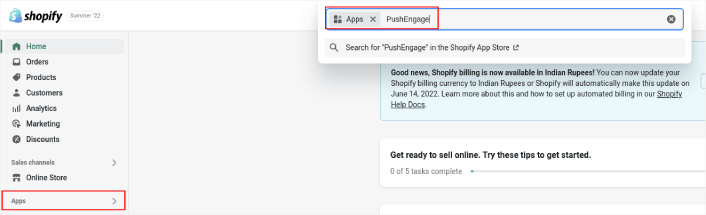
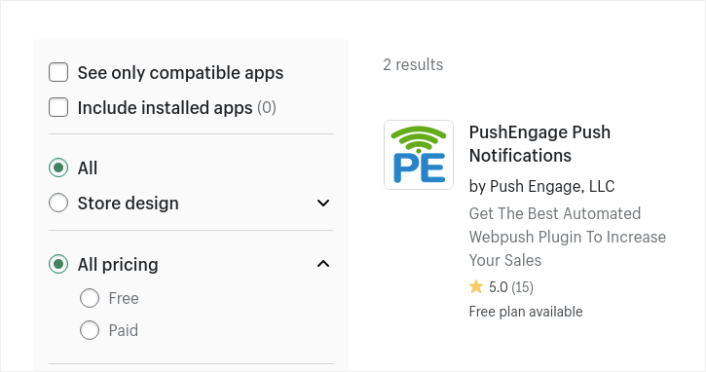
次に、PushEngage Push Notification Shopify Appを検索してください。
そして、アプリのインストールをクリックしてください。
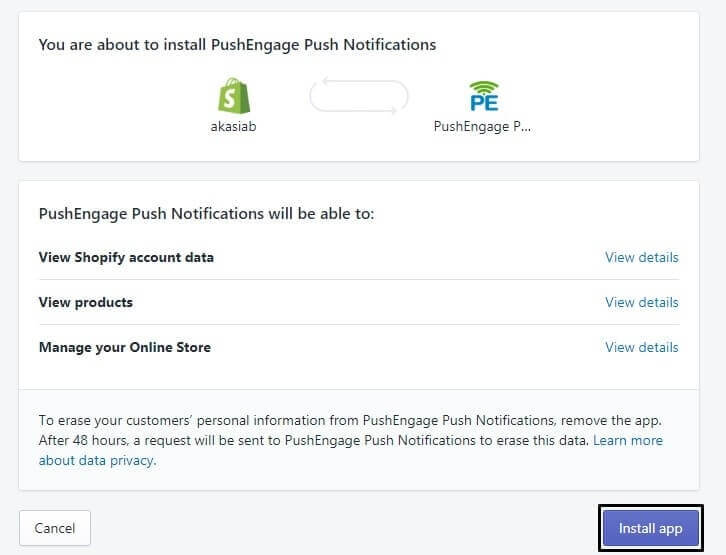
もうすぐ完了です。
次に、PushEngageダッシュボードにアクセスし、通知を即座に送信するようにPushEngageアカウントを構成します。PushEngageダッシュボード内に完了すべき7項目のチェックリストが表示されます。
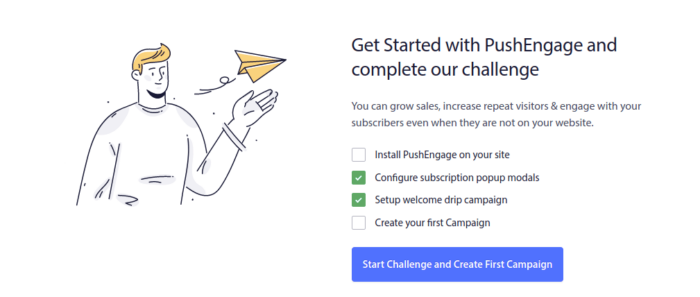
プッシュ通知ソフトウェアを初めて使用する場合は、セットアップを完了することをお勧めします。
ステップ2:閲覧放棄プッシュ通知キャンペーンを作成する
再度PushEngageダッシュボードにアクセスし、[Campaign] » [Triggered Campaigns]に移動して新しいトリガーキャンペーンを作成します。

次に、[Create New]ボタンをクリックして、新しい閲覧放棄キャンペーンを作成します。

次に、各通知の間に遅延を設定して、プッシュ通知のシーケンス全体を設定できるようになります。
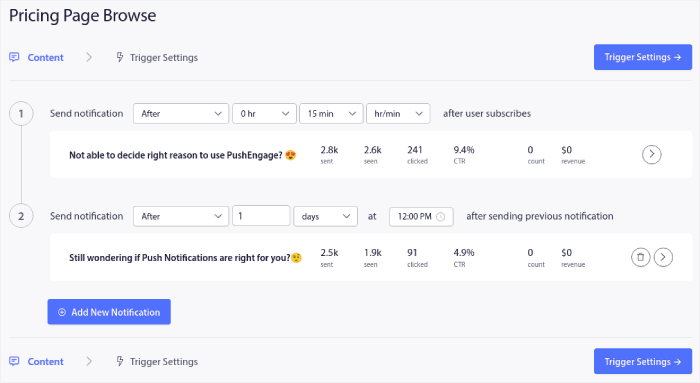
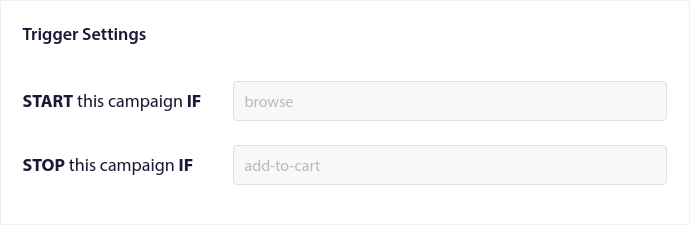
プッシュ通知に慣れていない場合は、プッシュ通知のベストプラクティスに関する記事を確認してください。プッシュ通知コンテンツに満足したら、[Trigger Settings]をクリックします。閲覧放棄キャンペーンの条件がシーケンスに事前設定されていることがわかります。
閲覧放棄キャンペーンをサイトに埋め込むために必要なコードスニペットを取得するには、[Integration Code]ボタンをクリックします。
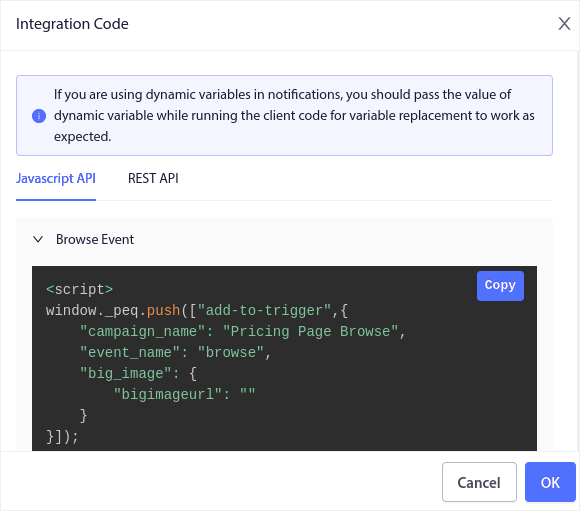
次に、コードをコピーしてサイトに貼り付けます。そのコードを追跡したいページのHTML セクションに貼り付けます。最後に、[Activate Triggered Campaign]ボタンをクリックします。
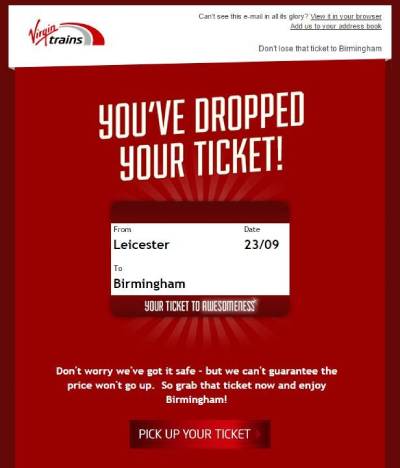
すべてのステップを完了すると、次のようなShopifyで閲覧放棄キャンペーンが作成されます。
ステップ3:プッシュ通知オプトインを設定する
最後に、PushEngageダッシュボードでデザイン » ポップアップモーダルに移動します。
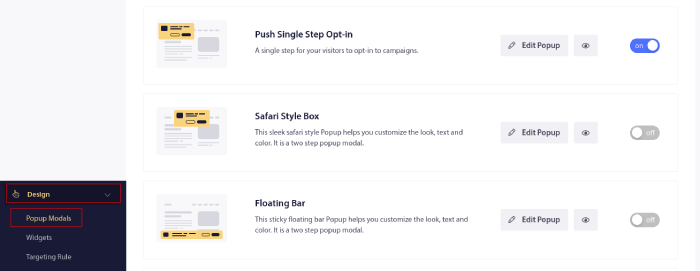
ここからプッシュ通知のオプトインをカスタマイズできます。ヘルプが必要な場合は、カスタムプッシュ通知オプトインの作成方法に関するこの記事を確認してください。
インスピレーションが必要な場合は、コンバージョン率の高いプッシュ通知オプトインに関するこの記事を確認できます。
キャンペーンの微調整:トリガー制限、UTM、目標追跡
上記の3つのステップで、動作するキャンペーンを公開します。キャンペーンを拡大する前に、キャンペーンが収益を増やすか購読解除につながるかを決定する3つのコントロールについて、トリガー設定でさらに5分間確認してください。
トリガー制限の設定
トリガー制限は、1人の買い物客が1日に受け取る通知の数を上限設定します。閲覧放棄者はカート放棄者よりも温度が低いので、低めに設定してください。1日に1〜2件が上限です。昼休みごとにストアを閲覧する買い物客が、訪問ごとに通知を受け取るべきではありません。デフォルトのテンプレート値は妥当ですが、ご自身のトラフィックパターンと照らし合わせて確認してください。
UTMパラメータの追加
同じ設定パネルで、キャンペーンにUTMパラメータを設定します。例:utm_source=push、utm_campaign=browse_abandonment。これらがないと、回復したセッションはアナリティクスでダイレクトトラフィックとして記録され、キャンペーンは何も回復していないように見えます。これにより、閲覧放棄予算が誤った理由で削減される可能性があります。
目標追跡の有効化
目標追跡をオンにして、シーケンス内のすべての通知がクリックだけでなく、回復した収益を報告するようにします。これにより、シリーズ内のどの通知がその枠を獲得し、どの通知を書き直すべきかがわかります。初めての場合は、プッシュ通知の目標追跡ガイドでセットアップの手順を確認してください。
制限、UTM、目標を設定したら、シーケンス自体を反復処理します。閲覧放棄プッシュ通知ガイドのセグメンテーションや高意図ブラウザー向けのクーポン予約などの戦略パターンは、Shopifyストアにそのまま適用できます。
Shopifyで閲覧放棄を設定した後にやること
完了したら、閲覧放棄メールキャンペーンに関する記事をご覧ください。インスピレーションを得て独自のキャンペーンを作成するための素晴らしいリソースです。
トラフィック、エンゲージメント、売上を増やすための費用対効果の高い方法を探している場合は、プッシュ通知キャンペーンを開始する必要があります。プッシュ通知は、あらゆるeコマースビジネスが迅速に成長するのに役立つ強力なマーケティングツールです。
納得できませんか?これらの素晴らしいリソースをチェックしてください:
- 放棄されたカートのプッシュ通知を設定する方法(簡単なチュートリアル)
- プッシュ通知を簡単にスケジュールする方法【5分ガイド】
- 10分未満で価格下落通知キャンペーンを作成する方法。
- ECプッシュ通知を活用して収益を増やす方法
PushEngageは世界No.1のプッシュ通知ソフトウェアです。そのため、プッシュ通知の作成とEコマースビジネスの成長にはPushEngageの使用をお勧めします。


