PushEngage registers a set of WordPress Abilities so AI assistants and MCP clients can operate your push notifications directly from your WordPress site. Each ability is a single, well-described action, such as sending a notification, listing segments, or pulling an analytics report, that an assistant can discover and call with your permission. This guide explains what the abilities are, what is required to use them, and everything an agent can do.
Before You Start
- You need the PushEngage plugin version 4.2.3 or later. This release registers PushEngage’s abilities against the WordPress Abilities API.
- Your site needs WordPress 7.0 or later. The Abilities API is part of WordPress core starting in 7.0.
- You must be an administrator. Every PushEngage ability requires the
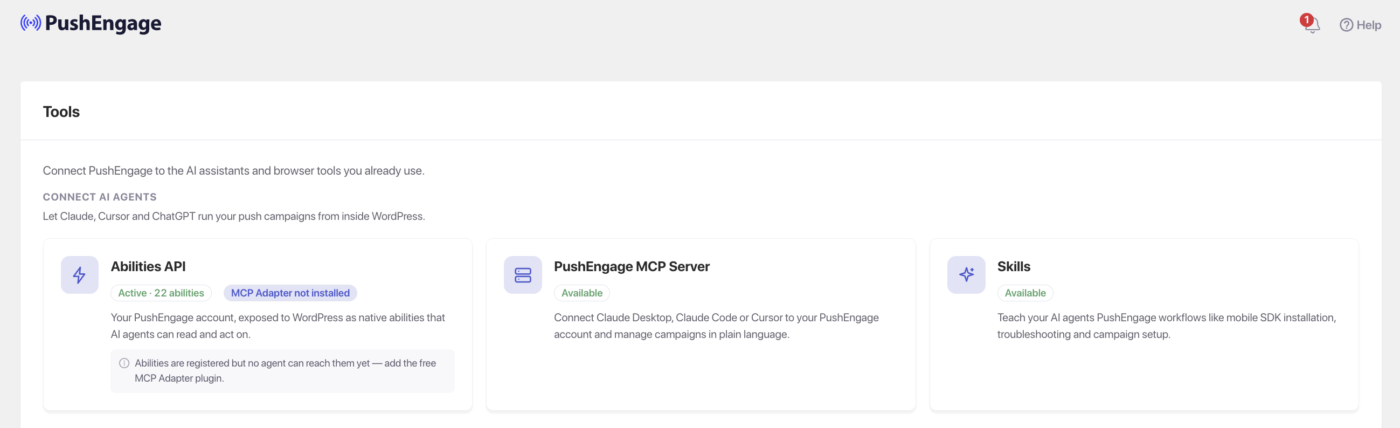
manage_optionscapability, and the assistant authenticates as a WordPress user through an application password. - To expose the abilities to an external AI client over MCP, add the free WP MCP Adapter plugin. You can see its status and the rest of your AI toolkit on the PushEngage Tools page at PushEngage » Tools.
- Some abilities are only available when WooCommerce is active.
How PushEngage Abilities Work
When your site loads, the PushEngage plugin registers a pushengage ability category and its abilities through the WordPress Abilities API. Each ability declares a single capability that an AI assistant can discover and call, in a machine-readable, MCP-compatible format.
Access is inherited from WordPress, not a separate system PushEngage built:
- Permission. Every ability requires the
manage_optionscapability, declared through the Abilities APIpermission_callback. The assistant is authenticated against a WordPress user with an application password, the standard WordPress mechanism since 5.6. An assistant connected as an administrator can run the abilities. One connected as a contributor cannot. - Confirmation. Only one ability is marked destructive, Send Notification, so an MCP-aware assistant confirms with you before firing a send. Settings updates and segment creation are non-destructive.
- Least privilege. Get Debug Log returns admin-grade content such as URLs and request payloads, and is gated to the same administrator permission as everything else. The assistant has the same access as the human admin running it, and no more.
To reach the abilities from an external assistant, install the free WP MCP Adapter, which bridges the registered abilities to the MCP protocol your assistant speaks. Until an adapter or MCP client is connected, the abilities are registered but no agent can reach them yet.
What an Agent Can Do
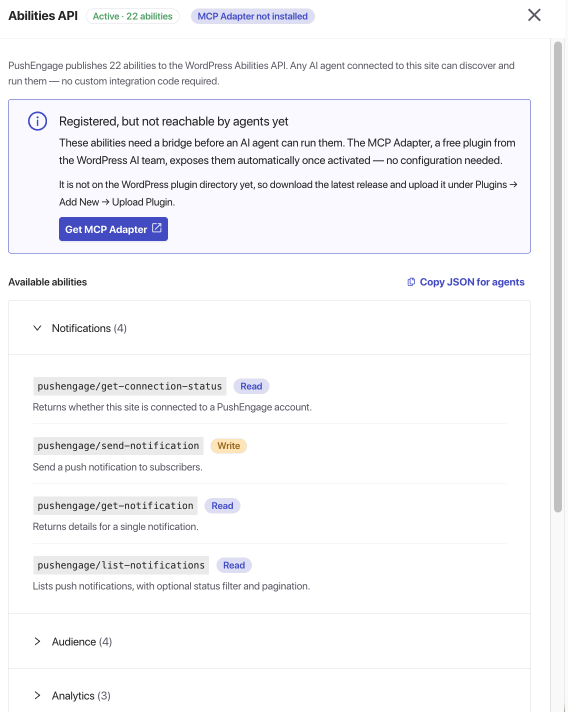
PushEngage registers 22 abilities, grouped below by the work they do. The exact number shown on your Tools page can differ based on what is active on your site, since some abilities register only when WooCommerce is present. “Type” shows whether an ability only reads data or also writes changes.
Send push notifications
| Ability | What it does | Type |
|---|---|---|
| Send Notification | Sends a push notification to subscribers. | Write |
| Get Notification | Returns details for a single notification. | Read only |
| List Notifications | Lists notifications, with optional status filter and pagination. | Read only |
| Get Connection Status | Returns whether the site is connected to a PushEngage account. | Read only |
Build and target segments
| Ability | What it does | Type |
|---|---|---|
| List Segments | Lists subscriber segments. | Read only |
| List Audience Groups | Lists audience groups available for targeting. | Read only |
| Create Segment | Creates a new subscriber segment. | Write |
| Add Subscribers to Segment | Adds subscribers to an existing segment. | Write |
Read your analytics
| Ability | What it does | Type |
|---|---|---|
| Get Notifications Summary | Returns aggregated send, view, and click counts across all notifications. | Read only |
| Get Analytics Overview | Returns subscribers, impressions, and clicks over a date range, grouped by day, week, or month. | Read only |
| Get Subscriber Analytics | Returns weekly active and total active subscribers. | Read only |
Configure auto-push
| Ability | What it does | Type |
|---|---|---|
| Get Auto Push Settings | Returns auto-push configuration, including enabled post types and feature flags. | Read only |
| Update Auto Push Settings | Updates auto-push, including the toggle, post types, icon, and feature flags. | Write |
| List Categories | Lists WordPress post categories, plus WooCommerce product categories when WooCommerce is active. | Read only |
| List Category Segment Mappings | Lists the mapping of WordPress categories to PushEngage segments. | Read only |
| Get Attribute Mappings | Returns the mapping of PushEngage subscriber attributes to WordPress user meta keys. | Read only |
Run WooCommerce and WhatsApp automations
These abilities are available only when WooCommerce is active. Get WhatsApp Status also requires valid WhatsApp credentials.
| Ability | What it does | Type |
|---|---|---|
| List Push Automation Campaigns | Lists WooCommerce push automation campaigns with admin and customer configs. | Read only |
| Update Push Automation Campaign | Enables, disables, or configures a WooCommerce push automation campaign. | Write |
| List WhatsApp Automation Campaigns | Lists WhatsApp automation campaigns configured for WooCommerce events. | Read only |
| Get WhatsApp Status | Returns whether WhatsApp integration credentials are valid. | Read only |
Diagnose and verify
| Ability | What it does | Type |
|---|---|---|
| Get Plugin Info | Returns plugin version, connection state, and key configuration. | Read only |
| Get Site Environment | Returns WordPress, PHP, and server details for diagnostics. | Read only |
| Get Debug Log | Lists debug log files, and reads a specific file when a file name is given. Administrator only, since log contents may include URLs and request payloads. | Read only |
What You Can Ask Your Assistant
Once an MCP client is connected, you describe the work in plain language and the assistant calls the right abilities. For example:
- “Find my engaged-shoppers segment, then send everyone in it a push titled ‘Flash sale ends midnight’ linking to my sale page.” The assistant lists segments to find the ID, then sends the notification, confirming before it fires.
- “Show me a week-by-week analytics report for the last 30 days, and which campaigns drove the most clicks.” The assistant pulls the analytics overview and maps sends to titles.
- “Disable my WooCommerce browse-abandonment campaign until Tuesday.” The assistant lists the automation campaigns and updates the right one.
- “Create a segment called pricing-page-visitors that captures anyone who visited /pricing in the last seven days.” The assistant creates the segment from your description.
Frequently Asked Questions
Who can use these abilities?
Only administrators. Every PushEngage ability requires the manage_options capability, and the assistant authenticates as a WordPress user through an application password. An assistant connected as an administrator can run the abilities, while one connected as a contributor cannot.
Do I need the MCP Adapter?
You need it to reach the abilities from an external AI client over MCP. The abilities register with the WordPress Abilities API on their own, but the free WP MCP Adapter is what bridges them to the MCP protocol your assistant speaks. You can check its status on the PushEngage Tools page.
Why does my Tools page show a different number of abilities?
PushEngage registers 22 abilities in total, but the WooCommerce push automation and WhatsApp abilities register only when WooCommerce is active, so the count shown on your site depends on what is active.
Will an agent change my account without asking?
Read-only abilities only return data. Only Send Notification is marked destructive, so an MCP-aware assistant confirms with you before firing a send. Settings updates and segment creation are non-destructive and run without a prompt.
Which plugin and WordPress versions do I need?
PushEngage 4.2.3 or later for the abilities, and WordPress 7.0 or later for the Abilities API. Keeping the plugin updated is recommended, since later versions refine the abilities and their AI and MCP responses.
If you run into any issues, please feel free to contact us by clicking here. Our support team will be able to help you.