The push notification service
built for eCommerce retention.
Web push, app push, PWA push, and in-app messages from one dashboard and one subscriber profile. Your marketing team launches cart recovery and win-back campaigns without an engineering ticket, and you pay only for active subscribers.
75,000+ businesses No engineering ticket to launch 14-day money-back guarantee
Trusted by 75,000+ businesses








Why retention teams pick it
Retention revenue, without the engineering queue.
Paid acquisition gets more expensive every quarter, so the customers you already paid for are the cheapest revenue you have. A push notification service earns its budget when marketing can run it every day, the bill follows the audience you can actually reach, and every send is tied to revenue.
Marketing owns the launch
Native apps and plugins for Shopify Plus, WooCommerce, and WordPress install in minutes. Campaigns, segments, and workflows are built in the dashboard, not in a sprint.
Pay only for active subscribers
No per-message fees. Web and app subscribers count together in one fixed tier, and unsubscribed devices stop counting, so a smaller list means a smaller bill.
One subscriber profile
Web push, app push, and in-app messages share the same segments, triggers, and analytics. You build an audience once and use it everywhere.
Revenue you can attribute
Goal tracking ties revenue to each campaign and workflow, and UTM parameters carry every click into GA4. Numbers finance can check.
Prices you can see today
Every tier from Free to Growth is published on the pricing page with a calculator. Enterprise is quoted for larger lists.
Built by Awesome Motive
The team behind WPForms, AIOSEO, OptinMonster, and MonsterInsights. Paid plans carry a 14-day money-back guarantee.
Channels
Four ways to reach a customer, one subscriber profile.
Register a subscriber once, then reach them in the browser, on the lock screen, from the home screen, or inside your app. WhatsApp automation and a chat widget run from the same account.
Web push notifications
Browser notifications on Chrome, Firefox, Edge, and Safari, on desktop and mobile. One Allow click, no app install, no email address.
Web push notificationsMobile app push notifications
Native iOS and Android push, with SDKs for Flutter and React Native, built on Apple Push Notification service and Firebase Cloud Messaging.
Mobile app push notificationsPWA push notifications
Push for progressive web apps through one service worker that handles both your PWA and push, including home-screen web apps on iOS 16.4 and later.
PWA push notificationsIn-app notifications
Banners, modals, and full-screen messages shown while someone uses your app. No opt-in needed, and no app release to ship a new message.
In-app notificationsHow it works
From first visit to recovered order.
Revenue automations that fire on real behavior
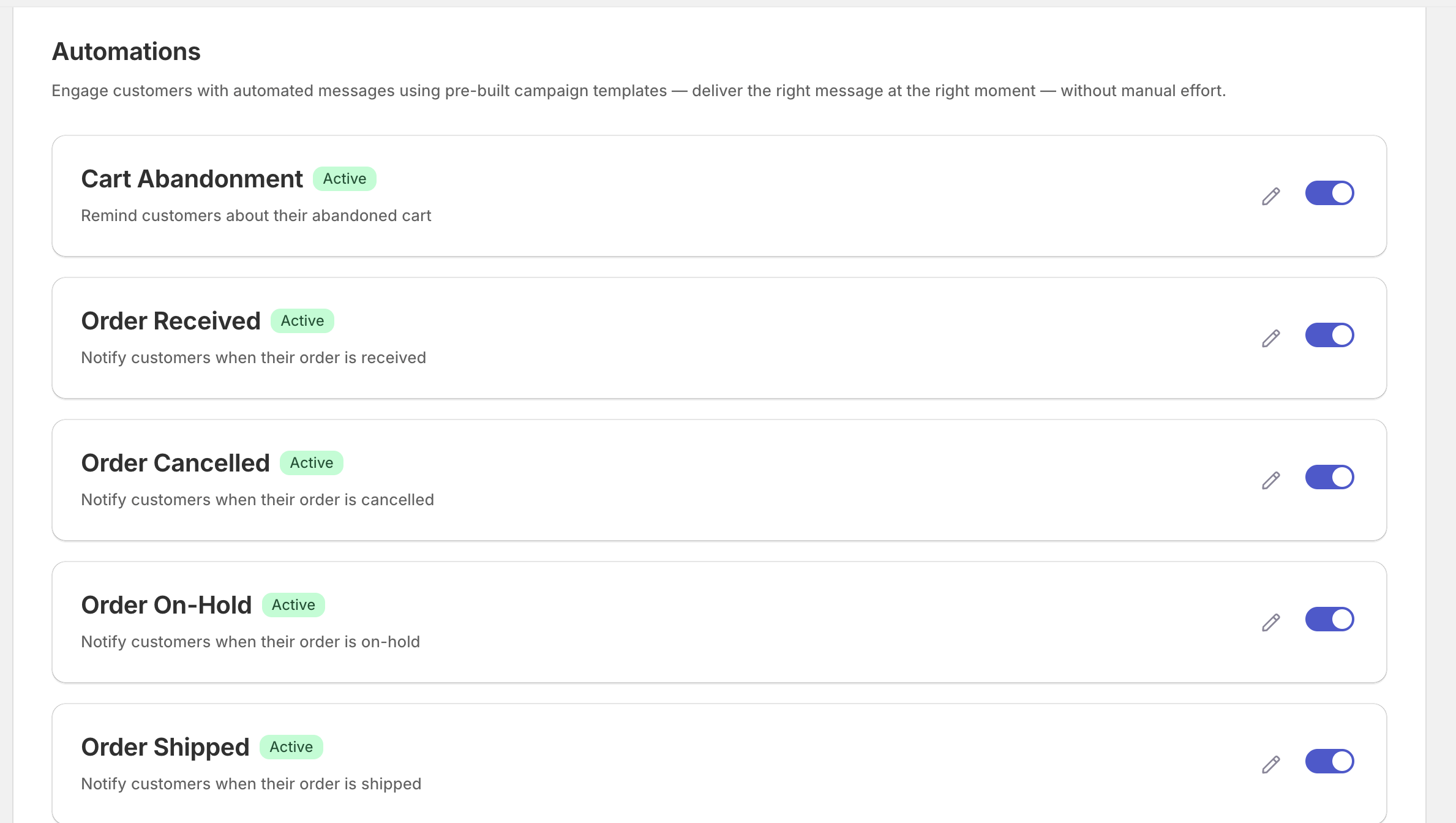
Cart abandonment, browse abandonment, back-in-stock, and price-drop alerts trigger from what shoppers actually do on your store. Order updates cover the moments after checkout.
- Smart cart and browse abandonment on the Growth plan
- Back-in-stock and price-drop alerts for products a shopper watched
- Order received, on-hold, shipped, and cancelled notifications
Journeys your team builds in an afternoon
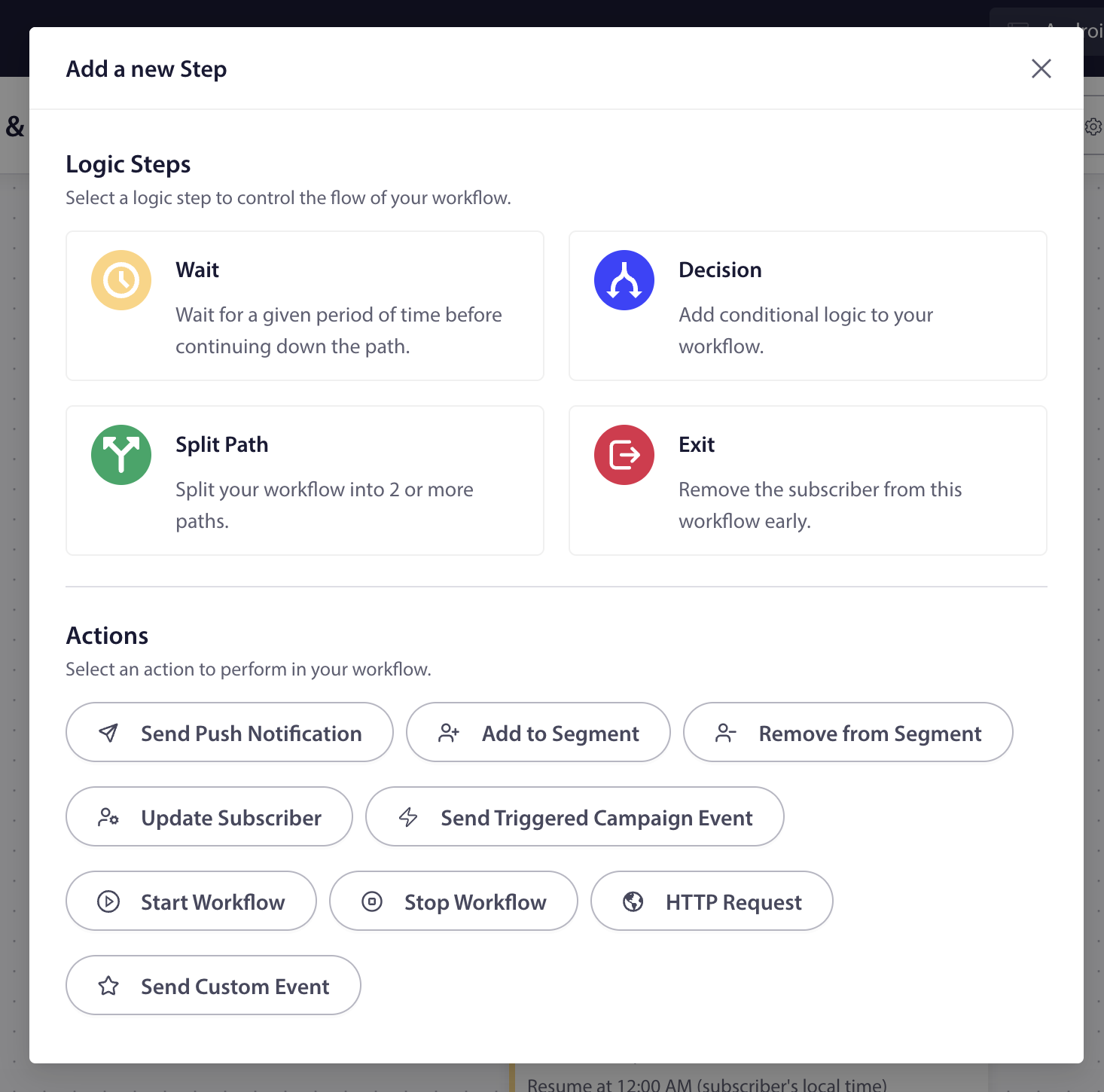
The visual Workflows builder is on every plan, including Free. Add waits, yes/no decisions, and exits (split paths on Premium and above), then send a push, update a segment, or call another system.
- Business: 5 active workflows with wait and decision steps
- Premium: split-path A/B tests, goal nodes, and workflow chaining
- Growth: unlimited workflows with HTTP request and custom event actions
Send to the shoppers who will act
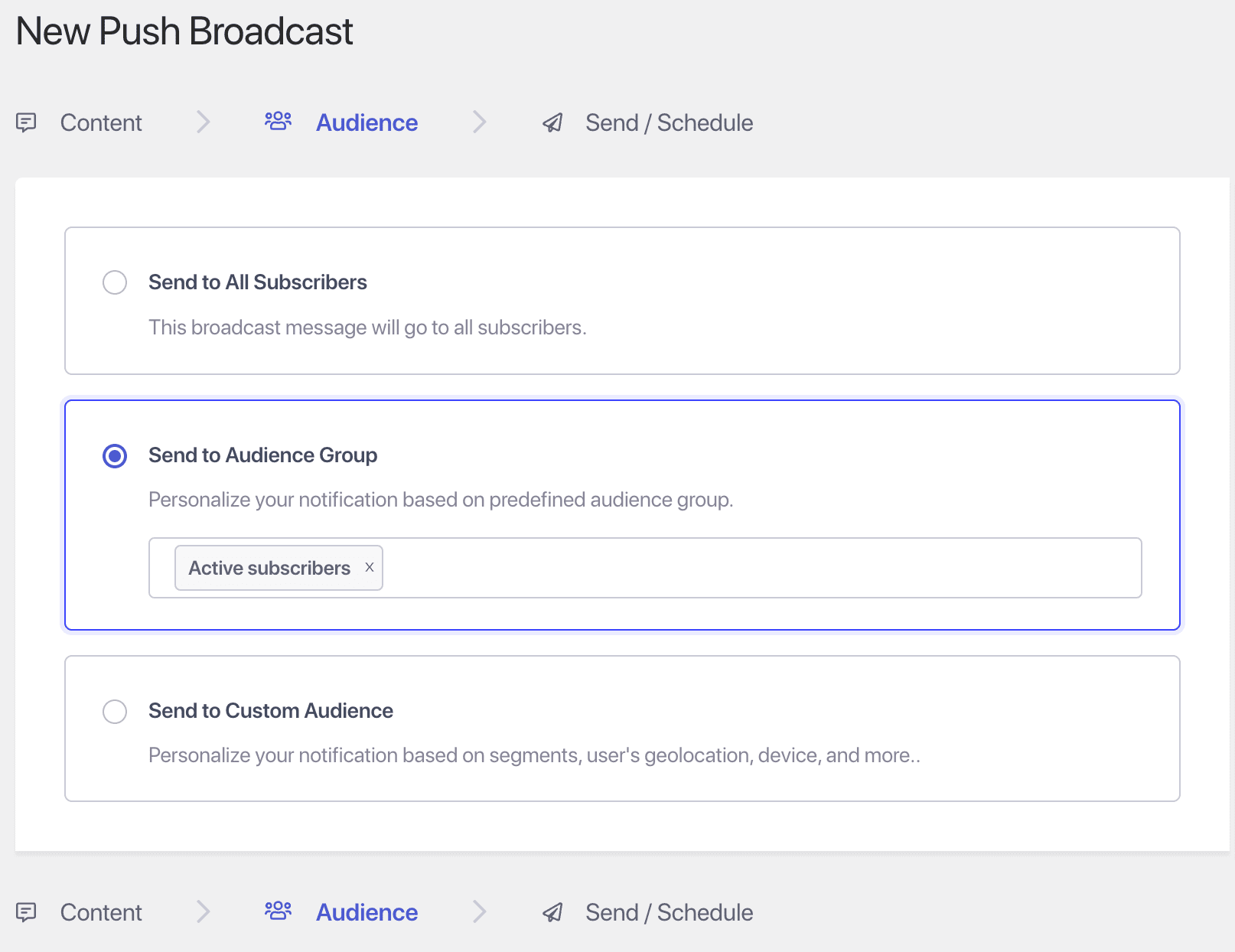
Segment by behavior, geography, device, and page visited, then combine segments into audience groups. Frequency caps keep triggered campaigns from overstaying their welcome.
- Dynamic segments and audience groups that update themselves
- Timezone sending on Premium and above
- Daily and weekly frequency caps on triggered campaigns

Test before you scale the send
Intelligent A/B testing sends your variants to a sample first, waits for the result, then sends the winner to everyone else. You set the sample size and the delay.
- Test titles, images, and calls to action
- A/B testing on Premium and above
- Goal tracking reports revenue per campaign
What’s included
Everything in the service, on one dashboard.
Plan gates are listed on the pricing page. The workflow builder, smart opt-ins, and GDPR tools are on every plan, including Free.
Smart opt-in prompts
Fire the permission prompt on time on page, scroll depth, or a click, with full design control. Not a cold browser pop-up on page load.
Preview opt-in stylesTriggered notifications
Any event on your site can fire a message while the shopper is still deciding: a page view, a cart change, a custom event.
See triggered notificationsAI Copywriter
Write notification copy yourself, or have AI Copywriter draft options for you to edit. Your call on every send.
Meet the AI CopywriterDynamic segmentation
Segment by behavior, geography, device, and purchase activity. Audience groups keep themselves current.
See segmentationA/B testing
Test headlines, images, and CTAs, and send the winner automatically. Premium and above.
See A/B testingGoal tracking and analytics
Revenue attribution per campaign and per workflow, next to clicks and conversions.
See goal trackingBrowse abandonment
Bring back shoppers who viewed a product and left without adding it to the cart. Growth plan.
See browse abandonmentPrice-drop alerts
Tell subscribers the moment a product they watched gets cheaper. Growth plan.
See price-drop alertsBack-in-stock alerts
Turn sold-out product views into orders when inventory returns. Growth plan.
See back-in-stock alertsGDPR compliance tools
Consent-first opt-ins and subscriber controls, on every plan.
See GDPR toolsChat widget
One widget with 21 messaging and contact channels plus custom links, so visitors reach you on the app they already use.
See the chat widgetWhatsApp automation
For markets where WhatsApp is the inbox, run WhatsApp campaigns (Growth plan) from the same account.
See WhatsApp automationAI, when you want it
Run campaigns from Claude, Cursor, or any browser tab.
The dashboard gives your team full control of every campaign. When you would rather ask than click, two tools connect AI to the same account, the same segments, and the same analytics.
PushEngage MCP server
A first-party MCP server gives Claude, Claude Code, Cursor, and other MCP clients access to your segments, campaigns, A/B tests, and analytics. Install with npx @pushengage/mcp and sign in securely. No API keys to paste.
Read about the MCP serverBrowser extension
For Chrome and Firefox. Reads the page you are on, writes three drafts in the tone you pick, fills every UTM field, and sends or schedules. Works with every plan.
Get the extensionFive SDKs
Web, iOS, Android, Flutter, and React Native, on one subscriber profile.
Developer hubREST API
Documented endpoints for campaigns, segments, and subscribers. No dashboard lock-in.
API documentationShopify Plus app
Cart and browse recovery, back-in-stock and price-drop alerts, and revenue attribution for high-volume stores.
Shopify Plus appCompare
How PushEngage compares with OneSignal, Braze, and Klaviyo.
Each is a good tool for a different buyer. This table sticks to what each vendor publishes, so you can check every cell yourself.
| PushEngage | OneSignal | Braze | Klaviyo push | |
|---|---|---|---|---|
| How the bill is calculated | Active subscribers, web and app combined, in fixed tiers. No per-message fees. | $19/month Growth base, plus $0.012 per mobile monthly active user and $0.004 per web push subscriber. | Not published. Pricing scales with monthly active users; quote from sales. | Check with Klaviyo. |
| Free way to start | Free plan: 1 site, 200 subscribers, 30 campaigns. | Free plan: mobile push up to 1,000 monthly active users. | Trial offered; no free plan listed. | Free up to 250 profiles, with $5 of mobile messages a month. |
| Web push | Yes Chrome, Firefox, Edge, Safari | Yes | Yes | No (not supported at this time, per Klaviyo) |
| Mobile app push | Yes iOS, Android, Flutter, React Native SDKs | Yes | Yes | Yes iOS and Android |
| In-app messages | Yes Business plan and above, Android SDK first | Yes | Yes | Check with Klaviyo |
OneSignal, Braze, and Klaviyo details checked on their own pricing and help pages on September 30, 2026. Features change, so confirm with each vendor before you buy. For a line-by-line cost comparison, see PushEngage vs OneSignal.
Pricing
Per-subscriber pricing, published for every tier.
Pay only for active subscribers. No per-message fees (each plan includes a monthly sending volume), no charge for campaigns you send, and the price for your exact list is one calculator away.
Free
$0
No card needed
- 1 site or app
- Up to 200 subscribers
- 30 campaigns (lifetime)
- 1 active workflow
Business
from $8/month
billed yearly (first-year price)
- 1 site or app
- Up to 50,000 active subscribers
- Unlimited campaigns
- 5 active workflows
Premium
from $15/month
billed yearly (first-year price)
- 2 sites or apps
- Up to 100,000 active subscribers
- A/B testing, drip campaigns, goal tracking
- Timezone sending
Growth
from $24/month
billed yearly (first-year price)
- 3 sites or apps
- Up to 250,000 active subscribers
- Cart and browse abandonment
- Back-in-stock and price-drop alerts
Prices shown are first-year prices, billed yearly. Enterprise is custom, for larger lists and dedicated support. Paid plans carry a 14-day money-back guarantee; there is no time-limited trial, and the free plan needs no card.
Calculate your priceFacts you can check
The service in four numbers.
Keep evaluating
Go deeper before you decide.
Push notification software checklist
Ten questions to put to every vendor on your shortlist, with our answers.
Push notification softwarePlatform overview
Every channel, feature, integration, and developer tool in one place.
See the platformPushEngage vs OneSignal
Real costs side by side at common list sizes, and how migration works.
Compare with OneSignalWorkflows
The visual builder for cart recovery, welcome, and win-back journeys.
Explore WorkflowsFAQ
Questions, answered.
What is a push notification service?
A push notification service sends short, clickable messages to a subscriber’s browser, phone lock screen, or app, and gives you the tools to target, schedule, and measure them. Delivery itself runs over Apple Push Notification service, Firebase Cloud Messaging, and the browsers’ push services. What you pay a service like PushEngage for is everything around delivery: opt-in prompts, segments, automations, testing, and revenue attribution.
How is PushEngage different from Firebase Cloud Messaging?
Firebase Cloud Messaging delivers messages to Android and iOS apps. PushEngage builds on Apple Push Notification service and Firebase Cloud Messaging and adds what a marketing team needs to use them: a campaign dashboard, segmentation, workflows, A/B testing, goal tracking, and web push, PWA push, and in-app messages on the same subscriber profile.
How much does PushEngage cost?
There is a free plan for 1 site with up to 200 subscribers and 30 campaigns. Business starts from $8/month, billed yearly (first-year price), for up to 50,000 active subscribers. Premium starts from $15/month and Growth from $24/month, billed yearly. Enterprise is custom. You pay only for active subscribers, never per message. The pricing page prices your exact list.
Which channels are included?
Web push notifications, mobile app push notifications for iOS and Android, PWA push notifications, and in-app notifications (Business plan and above). WhatsApp automation and a chat widget run from the same account.
Do we need developers to set it up?
Not for your website. Native plugins for Shopify Plus, WooCommerce, and WordPress install in minutes, and campaigns are built in the dashboard. Mobile app push and in-app messages need a one-time SDK integration in your app. After that, marketing runs campaigns without new releases.
Can we use AI to run campaigns?
Yes, if you want to. The PushEngage MCP server lets Claude, Claude Code, Cursor, and other MCP clients work with your segments, campaigns, A/B tests, and analytics. The browser extension drafts and sends a push from any Chrome or Firefox tab. Everything is also in the dashboard for teams that prefer to click.
Can we try PushEngage before we pay?
Yes, two ways. There is a free plan (1 site, 200 subscribers, 30 campaigns) that needs no card, and every paid plan has a 14-day money-back guarantee. If PushEngage isn’t the best fit, reach out within 14 days and we refund 100%. No questions asked.
Can we switch from OneSignal without losing subscribers?
Yes. We pull your list through OneSignal’s API, and our SDKs install next to your current setup, so nobody misses a notification during the move. The PushEngage vs OneSignal page has the details.
Bring customers back on a channel you own.
Start on the free plan, or pick a paid plan with a 14-day money-back guarantee. If it isn’t the best fit, we refund 100%.
Free plan, no card 14-day money-back guarantee Pay only for active subscribers