閲覧見送りプッシュ通知を設定するためのクイックガイドをお探しですか?
閲覧見送りプッシュ通知キャンペーンは、ウェブサイト訪問者に商品をカートに追加するよう促すことができる自動キャンペーンです。しかし、どのように設定するのでしょうか?複雑なプロセスなのでしょうか?どのプッシュ通知サービスを使用しますか?閲覧見送りキャンペーンは効果があるのでしょうか?
この記事では、これらの質問すべてにお答えします。また、コーディングなしで10分以内に閲覧見送りプッシュ通知を設定する方法もご紹介します。
さあ、始めましょう。
閲覧見送りプッシュ通知とは?
閲覧放棄通知とは、ウェブサイトを閲覧している人が何もアクションを起こさずに離脱した場合に送信される自動プッシュ通知です。訪問者に、ウェブサイトで興味を持っていたものがあったことを思い出させることで、コンバージョン率を大幅に向上させることができます。
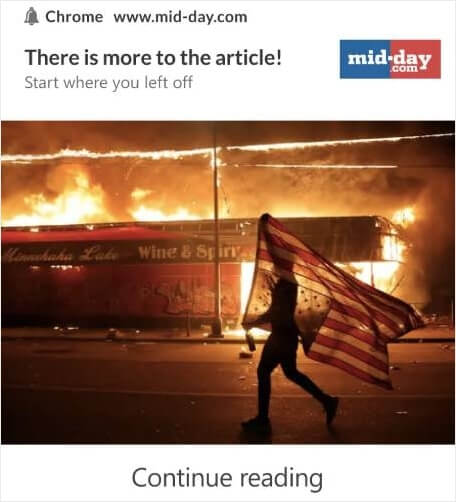
閲覧見送りキャンペーンは、eコマースサイトで最も一般的に使用されています。しかし、旅行ポータルやニュースサイト(または実際にはあらゆるウェブサイト)が使用できないわけではありません。何かを販売している場合は、販売機会損失を回収するために閲覧見送りプッシュ通知を設定する必要があります。
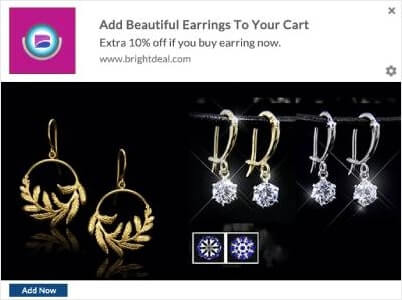
閲覧放棄通知は、訪問者がカートに何かを追加すると終了します。その後、カート放棄通知が引き継ぎ、顧客を購入へと導きます。
そこで閲覧見送りキャンペーンが登場します。ターゲットを設定し、説得し、コンバージョンさせることができる顧客は次のとおりです。
- 商品をウィッシュリストに追加したが、カートには追加していない
- 商品を複数回閲覧した
- 同じカテゴリの商品を3つ以上閲覧した
- サイトで特定の商品を検索した
- 商品ページに3分以上滞在したが、購入しなかった
最も素晴らしいのは、閲覧見送りプッシュ通知をサポートするために閲覧見送りメールを設定できることです。最高のメールマーケティングサービスのいずれかを利用できる限り、自動キャンペーンを簡単に設定できます。
そして、閲覧見送りキャンペーンでマーケティング活動から素晴らしい成果が得られると信じてください。
プロのヒント: 使用できる最も強力なeコマースプッシュ通知のリストを確認してください。これらの自動キャンペーンをできるだけ多く設定してください。
閲覧見送りプッシュ通知の設定方法
閲覧見送りキャンペーンとは何か、そしてなぜ作成すべきかを理解したので、設定方法を掘り下げてみましょう。PushEngageを使用して閲覧見送りキャンペーンを設定します。

PushEngageは世界No.1のプッシュ通知ソフトウェアです。
プッシュ通知は、ウェブサイトのトラフィックとエンゲージメントを自動で増やすのに役立ちます。オンラインストアを運営している場合は、PushEngageが自動eコマースプッシュ通知の作成を支援することで、売上を伸ばすのにも役立ちます。
無料で開始できますが、ビジネスの成長に真剣に取り組んでいる場合は、有料プランを購入する必要があります。また、プッシュ通知サービスを購入する前に、プッシュ通知のコストに関するこのガイドを確認してください。
PushEngageで得られるものを簡単に見てみましょう。
- コンバージョン率の高い自動キャンペーン
- 複数のターゲティングおよびキャンペーンスケジュールオプション
- 目標追跡と高度な分析
- スマートA/Bテスト
- 専任のサクセスマネージャー
PushEngageは、ビジネスのトラフィック、エンゲージメント、売上を伸ばしたい場合に、間違いなく最良の選択肢であることがわかります。予算が限られている場合は、プッシュ通知を少しクリエイティブにすることもできます。それでは、今すぐ閲覧見送りプッシュ通知を作成しましょう。
ステップ#1: 新しい閲覧自動応答者を作成する
PushEngageダッシュボードに移動し、キャンペーン » トリガーキャンペーンに移動します。次に、新しい閲覧自動応答の作成:をクリックします。
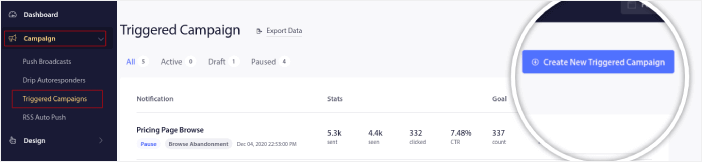
次に、キャンペーンタイプのリストから閲覧放棄キャンペーンタイプを選択し、新規作成をクリックします。

ステップ#2: プッシュ通知のシリーズを作成する
これで、キャンペーン設定ダッシュボードが表示されるはずです。コンテンツの下でキャンペーンを作成します。
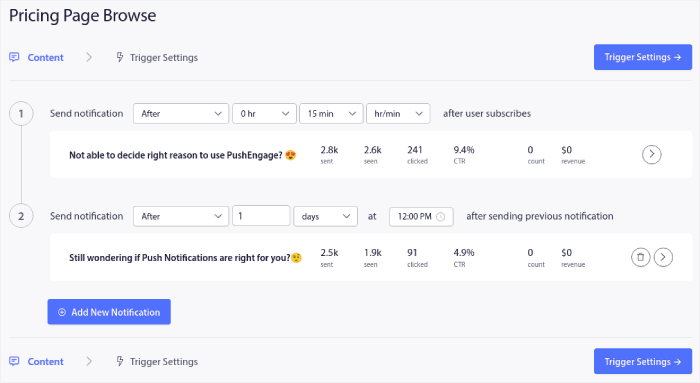
ほとんどは簡単です。キャンペーンに名前を付け、閲覧見送りプッシュ通知のシーケンスを作成します。
ステップ#3: 閲覧見送りのトリガーを設定する
完了したら、トリガー設定をクリックします。閲覧見送りのトリガーを設定する時間です。
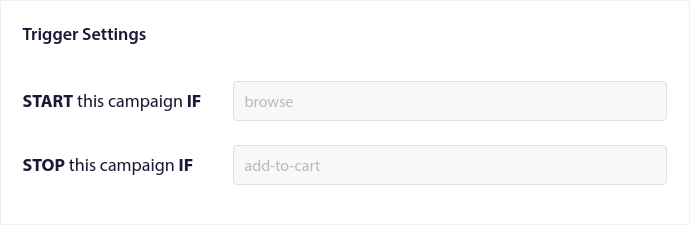
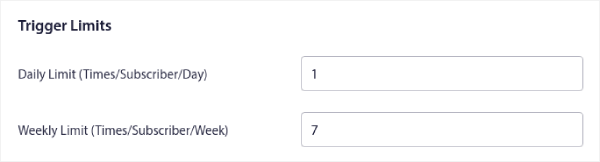
これらは、閲覧放棄キャンペーンテンプレートのデフォルト値です。そのため、ここで何も変更する必要はありません。トリガー制限は、プッシュ通知を送信したい頻度に基づいて設定できます。
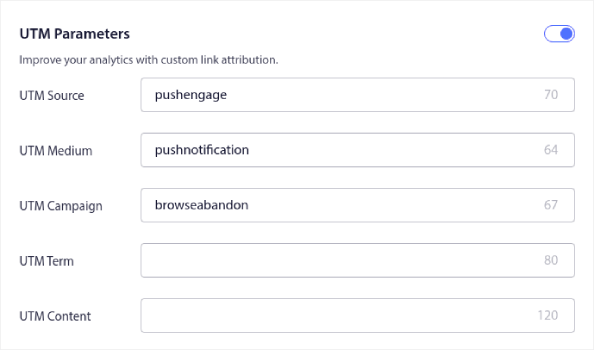
また、ここでUTMパラメータを設定することもできます。
また、目標追跡も有効にします。
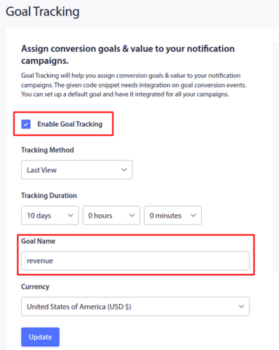
プッシュ通知分析が初めての場合は、プッシュ通知の目標追跡に関するガイドを確認してください。
ステップ4:プッシュ通知ポップアップモーダルを設定する
最後に、PushEngageダッシュボードでデザイン » ポップアップモーダルに移動します。
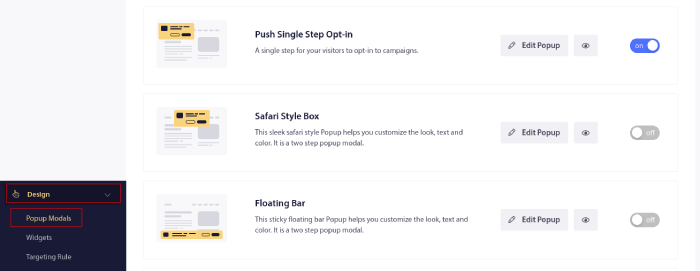
ここからプッシュ通知のオプトインをカスタマイズできます。ヘルプが必要な場合は、カスタムプッシュ通知オプトインの作成方法に関するこの記事を確認してください。
インスピレーションが必要な場合は、コンバージョン率の高いプッシュ通知オプトインに関するこの記事を確認してください。
コンバージョンを向上させる閲覧放棄戦略をチェックする
上記のセットアップでキャンペーンが開始されます。収益を回復させる閲覧放棄キャンペーンと、購読者を失うキャンペーンを分けるのは、戦略レイヤーです。誰をターゲットにし、どのくらいの頻度で送信し、シーケンス内の各通知に何を含めるかです。カート放棄者よりもファネルの上位にいる閲覧放棄者は、より多くのオーディエンスを持ちますが、より冷淡であり、怠惰なターゲティングは購読解除で罰せられます。
閲覧深度でセグメント化する
すべてのブラウザーが通知に値するわけではありません。深度シグナルにターゲティングを集中させます。同じ商品を2回見た、1つのカテゴリで3つ以上の商品を閲覧した、またはサイト内検索を実行した買い物客は、意図を示しています。1ページをざっと見た買い物客はそうではありません。高深度セグメントのみに送信することで、クリック率を上げ、購読解除率を下げ、コピーで正確なカテゴリを参照できるようになります。たとえば、探索したカテゴリに新しいランニングシューズが入荷したことを思い出させるなどです。
購入サイクルに合わせて頻度を調整する
買い物客が市場にいる期間によって、送信できる通知の数が決まります。アパレルなどの低価格で高頻度の製品の場合、決定は1〜2日以内に行われるため、48時間で2回の通知が適切な範囲です。家具や電化製品などの高価格で低頻度の購入の場合、調査期間は長くなり、目標はシフトします。即時チェックアウトをプッシュするのではなく、異議に回答し、買い物客をリード(たとえば、コンサルテーションやライブチャット)に移動させるためにシーケンスを使用します。
シリーズの各通知に1つのジョブを与える
買い物客が商品ページを離れる上位3つの理由を見つけ、それぞれを対象とした通知を1つ作成します。実績のあるローテーションは次のとおりです。
- リマインダー。商品画像付きの簡単なプッシュ。多くのブラウザーは、興味がないのではなく、中断されただけです。
- 在庫状況の更新。在庫切れのサイズや色を閲覧した場合、在庫が戻った瞬間に通知します。これは、セットの中で最も意図の高いトリガーです。
- 限定クーポン。高深度ブラウザーにのみコードを提供します。全員に割引を送信すると、リスト全体が意図的に放棄して待つように訓練されます。
- クロスセル。閲覧したカテゴリのアクセサリーまたは関連製品を提案します。元の製品が他で購入された場合でもコンバージョンします。
- 価格の安心感。隠れたコストが既知の異議である場合、表示価格を超える追加料金がないことを示す1つの通知でそれを削除します。
- 人間的なオファー。高額商品の場合は、チェックアウトページではなく、ライブチャットまたは無料コンサルテーションに誘導します。
トリガー制限でシーケンスをキャップして、買い物客が1日に1〜2通以上の通知を受け取らないようにします。買い物客がカートに追加した瞬間、このキャンペーンのジョブは完了し、カート放棄シーケンスが引き継がれます。まだ構築していない場合は、カート放棄を減らす方法に関するガイドから始め、プッシュシーケンスを、アドレスを持つ購読者向けの閲覧放棄メールとペアにします。
閲覧放棄プッシュ通知を作成した後にやること
これで、eコマースプッシュ通知の力を理解したので、独自のキャンペーンを作成する時が来ました。しかし、キャンペーンを開始する前に、まず素晴らしいプッシュ通知の例をいくつか学ぶべきです。
また、プッシュ通知が初めての場合は、キャンペーンを作成する前にプッシュ通知のベストプラクティスに関する記事を確認してください。私たちが積極的に推奨するベストプラクティスの一部は次のとおりです。
- 好奇心を刺激してクリック率を向上させる
- 各プッシュ通知をパーソナライズする
- リッチメディアで目立つ
- 休眠中のプッシュ購読者を再活性化する
- 顧客に常に情報を提供する
- 可能な限り絵文字を使用する
- 緊急性を演出する
プロのヒント:eコマースプッシュ通知が初めての場合は、レビューを増やす方法に関するこの記事も確認してください。
プッシュ通知キャンペーンの作成にはPushEngageの使用をお勧めします。PushEngageは市場でNo.1のプッシュ通知ソフトウェアであり、あなたのキャンペーンは安全な手に委ねられます。
まだの場合は、今すぐPushEngageを始めましょう。


