ウェブプッシュ通知をあなたのウェブサイトに追加する方法をお探しですか?
プッシュ通知は、ほとんど労力をかけずに、自動で多くのトラフィック、エンゲージメント、売上を生成するのに役立ちます。しかし、それをどうやって行うのか、という大きな疑問があります。
この記事では、これまで一度も行ったことがなくても、ウェブサイトにプッシュ通知を追加する方法をご紹介します。
この記事では、PushEngageを使用してウェブサイトにプッシュ通知を設定します。PushEngageは世界No.1のプッシュ通知ソフトウェアです。そのため、キャンペーンは安全に管理されます。
さあ、始めましょう。
サイトにプッシュ通知をインストールする方法
この記事の結果として期待できることのプレビューから始めましょう。これらの手順に従えば、この記事の終わりまでには、次のようなサイトからプッシュ通知を送信できるようになるはずです。
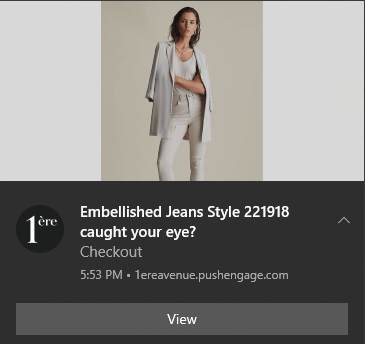
ウェブサイトが何で構築されているかは関係ありません。サイトを開発するためにどのような技術スタックを使用しても、常にサイトにプッシュ通知をインストールできます。次のいくつかのセグメントでそれらすべてをカバーします。
さあ、始めましょう。
ステップ1:PushEngageアカウントの設定
PushEngage のホームページにアクセスし、開始ボタンをクリックします。

PushEngageを試すために無料プランを選択するか、ビジネスの成長に真剣に取り組んでいる場合は有料プランを選択できます。有料プランには、より多くのキャンペーンオプションと、さらに大きな購読者リストを構築する機能が付属しています。
アカウントにサインアップしたら、PushEngageダッシュボードにアクセスし、設定 » サイト設定 » インストール設定に移動します。
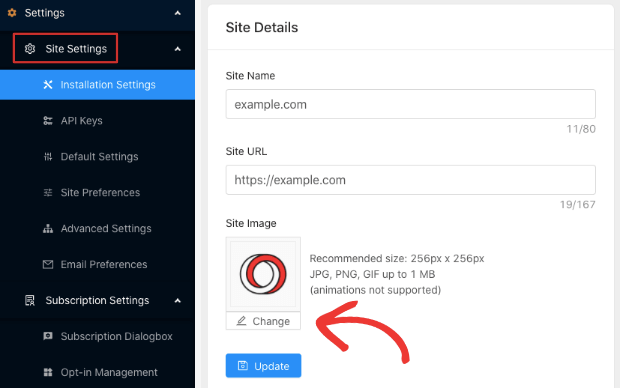
ここでサイトの詳細とブランディングを設定します。プッシュ通知用のロゴとサイトURLを設定してください。プッシュ通知を適切にテストできるように、今すぐこれを行う必要があります。
ステップ2:PushEngageからインストールコードを取得する
次に、PushEngageダッシュボードにアクセスしてインストールコードを取得する必要があります。設定 » サイト設定 » インストール設定に移動します。
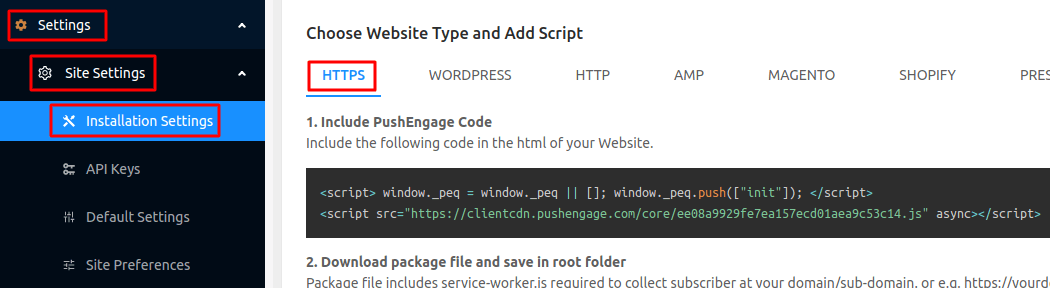
ここで物事が少し技術的になり始めます。
このタブ内には、さまざまな種類のウェブサイトに対して異なるコードを取得できることがわかります。
あなたのサイトに合ったものを探し、コピーしてください。
タブに記載されていないCMSでサイトを実行している場合は、サイトにSSL証明書がインストールされているかどうかに基づいて、HTTPまたはHTTPSタブのいずれかに移動できます。
HTTPSサイトを使用している場合、このステップの非常に重要な部分は、サーバーのルートフォルダにアクセスできることです。HTTPSサイトでプッシュ通知を機能させるには、同じタブからservice-wroker.jsファイルをダウンロードする必要があります。そして、それをルートフォルダにアップロードしてください。
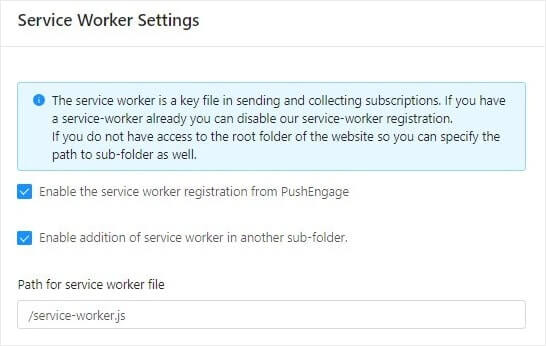
注意: サービスワーカーファイルをルートフォルダにアップロードできない場合は、ファイルを別のフォルダにアップロードするオプションがあります。PushEngage ダッシュボード » 設定 » サイト設定 » 詳細設定 に移動してください。
サービスワーカー設定 の指示に従うだけで、うまくいきます。
これで完了です!
プラグインを使用せずに、WordPressにWebプッシュ通知を正常にインストールしました。
ステップ#3:サイトのHTMLにインストールコードを配置する
基本的に、どのような種類のウェブサイトをお持ちでも、このインストールコードをウェブサイトのHTML<head>に配置したいはずです。そして、これを実行するプロセスはプラットフォームによって異なります。ウェブサイトにウェブプッシュ通知をインストールする方法に関するプラットフォーム固有のガイドが必要な場合は、これらのリソースを確認してください。
- WordPressにプッシュ通知をインストールする
- WooCommerceにプッシュ通知をインストールする
- Wixにプッシュ通知をインストールする
- Zohoにプッシュ通知をインストールする
- Volusionにプッシュ通知をインストールする
- Weeblyにプッシュ通知をインストールする
- ClickFunnelsにプッシュ通知をインストールする
- PrestaShopにプッシュ通知をインストールする
- OpenCartにプッシュ通知をインストールする
- CS-Cartにプッシュ通知をインストールする
- Squarespaceにプッシュ通知をインストールする
HTMLで構築されたカスタムサイトを実行している場合は、コードをどこに配置すればよいか正確にわかります。しかし、サイトのヘッドにインストールコードを配置するプロセスは、CMSまたはウェブサイトビルダーによって異なります。
一部のCMSでは、ダッシュボードから直接インストールコードを挿入できます。PrestaShopのような他のインスタンスでは、代わりにPushEngage APIキーを使用する必要があります。したがって、他のサイトの場合は、これらのプラットフォーム固有のチュートリアルに従うことをお勧めします。
ステップ4:PushEngageオプトインの設定
最後に、PushEngageダッシュボードで、設定 » サブスクリプション設定 » サブスクリプションダイアログボックス » 編集に移動します。
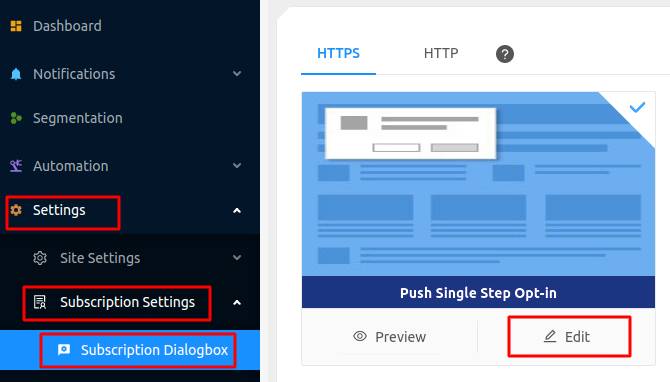
ここからプッシュ通知のオプトインをカスタマイズできます。ヘルプが必要な場合は、カスタムプッシュ通知オプトインの作成方法に関するこの記事を確認してください。
インスピレーションが必要な場合は、コンバージョン率の高いプッシュ通知オプトインに関するこの記事を確認できます。
ステップ5:ウェルカム通知の作成
オプトインの設定が完了すると、サイトは購読者を取得できるようになります。
しかし、プッシュ通知が正しく機能していることをどのように確認できますか?
設定がスムーズに進んだかどうかを確認するために、ウェルカムプッシュ通知を作成することをお勧めします。ウェルカム通知とは、新しい購読者に送信して、購読を確認し、歓迎するためのプッシュ通知です。
設定 » サイト設定 » インストール設定に移動し、ウェルカムメッセージを設定します。
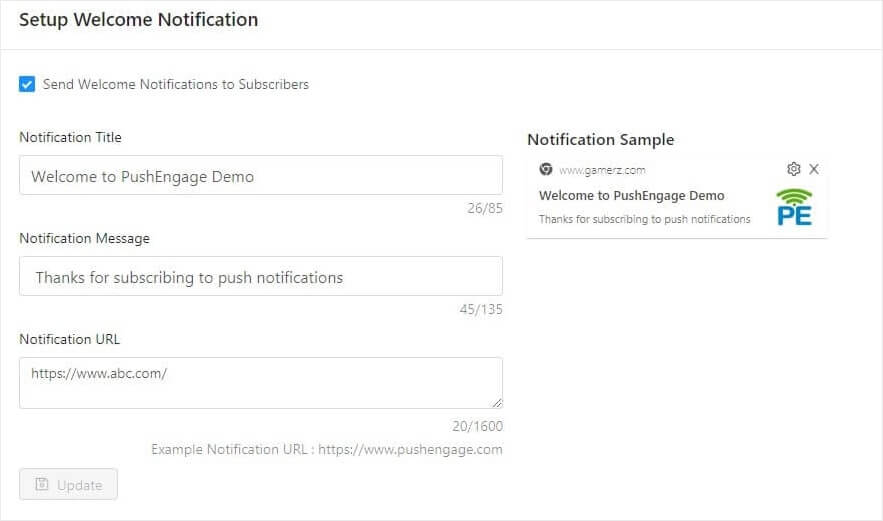
最後に、サイトに戻り、すべてがスムーズに機能しているかどうかを確認するために、独自のプッシュ通知を選択してください。
これで完了です!
ウェブサイトにウェブプッシュ通知を正常に設定しました。PushEngageダッシュボードに戻り、プッシュ通知キャンペーンの作成を開始する時間です。
まとめ
今回は以上です、皆さん!
プッシュ通知が初めての場合は、公開する前にプッシュ通知テストの本格的なプロセスに従う必要があります。これにより、訪問者が見て問題が発生する前に一般的な問題をトラブルシューティングできます。
このいずれかで困った場合は、カスタマーサクセスマネージャーにご連絡いただくことをお勧めします。どのような問題でも喜んでお手伝いさせていただきます。
まだの方は、ぜひPushEngageをお試しください。PushEngageは世界No.1のプッシュ通知サービスです。ビジネスの成長に真剣に取り組んでいるなら、PushEngageに投資すべきです。


