
オンラインで書類を販売してお金を稼ぐ方法についての資料をお探しですか?
適切なプラットフォームの選択、eコマースサイトの構築、販売する商品の作成、価格設定モデルの検討など、多くのことをすでに経験してきました。しかし、オンラインでデジタル製品を販売するには、実にさまざまな方法があることに気づくでしょう。
WordPressでデジタルダウンロードを販売するのに役立つプラグインはたくさんあります。
しかし、販売を開始するために適切なプラグインをどのように選択しますか?プラグインは無料ですか?必要な機能はすべて揃っていますか、それとも実際に販売を開始するために後で他のプラグインを購入する必要がありますか?
最も混乱する部分は…です。
検討しているプラグインは、そもそもデジタルダウンロード用ですか?それとも、主に物理的な商品を販売するための一般的なストアプラグインであり、必要のない多くの不要な設定に悩まされることになりますか?
心配いりません。この記事では、WordPressでドキュメントを販売してお金を稼ぐ方法をステップバイステップでご紹介します。一番良いところは?設定は10分以内で完了できます!
さあ、始めましょう。
オンラインで書類販売を開始すべき理由
自分の言葉を金に変えることを考えたことはありますか?🌟
メモを書き留める、傑作を創作する、知恵を共有するなど、あなたのコンテンツを渇望している世界があります。そして、何だと思いますか?オンラインで書類販売を開始するために、テクノロジーの達人である必要も、派手な機材に投資する必要もありません。
必要なのは、しっかりしたインターネット接続だけです。これで準備完了です。
ここからが本題です:
- 手間なし、利益増:オンライン書類なら、印刷代がかかりません。さらに、東京やトロントの誰かに数秒でコンテンツを発送できることを想像してみてください。それがウェブの力です!
- その場で更新:ミスをしましたか?心配いりません。再印刷の手間なく、オンライン書類を修正・更新できます。
- 多様性がスパイス:便利なワークシート、おしゃれなテンプレート、おばあちゃんの秘密のパイのレシピまで、あらゆる書類に需要があります。信じられませんか?人気商品は以下の通りです:
- クールなワークシート(予算プランナーや自己啓発ガイドなど)
- 履歴書テンプレートまたはプレゼンテーションスライド
- 電子書籍またはハウツーガイド
そしてリストは続きます!
フォーマット?シンプルにしましょう:
.PDFや.DOCXのような奇妙な拡張子について疑問に思ったことはありませんか?それらは、コンピューターが書類を読むための単なる方法です。アイスクリームの異なるフレーバーのようなものだと考えてください。🍦
簡単なチートシートをご紹介します:
- .DOCX/.DOC & .GDOC:WordまたはGoogleドキュメントと考えてください。履歴書やテンプレートのように、人々が変更したい可能性のあるものに最適です。
- .PDF:ガイドや、単に読みたいものに最適です。編集はできません!
- .EPUB:これは電子書籍用です。Kindleで読むようなものです。
- .XLSX/.XLS & .GSHEET:ExcelまたはGoogleスプレッドシート。数字を扱う人やデータ愛好家向けです!
- .PPT, .GLSLIDES & .KEY:プレゼンテーションスライド。誰もが派手なビジュアルを必要としていますからね!
どれを選ぶか迷っていますか?読者のことを考えてください。読者が単に読みたいだけであれば、PDFを選びましょう。いじくり回したいのであれば、.DOCXが良いかもしれません。両方ある場合は、ZIPファイルにまとめてください。
WordPressで書類販売を開始する方法
ドキュメントをオンラインで販売すべき理由がわかったところで、始め方を説明します。初めての方でも心配いりません。この記事は完全な初心者向けです。あとは、手順に従うだけです。
始めましょう。
ステップ#1:適切なプラグインの選択
WordPressで最も人気のあるeコマースプラグインはWooCommerceです。物理的な商品を販売している場合は、間違いなくWooCommerceを使用すべきです。しかし、あなたは物理的な商品を販売しているわけではありません。
この記事は、WordPressでデジタル商品を販売する方法についてすべて説明しています。デジタル製品の場合、Easy Digital Downloadsよりも優れたeコマースプラグインはありません。
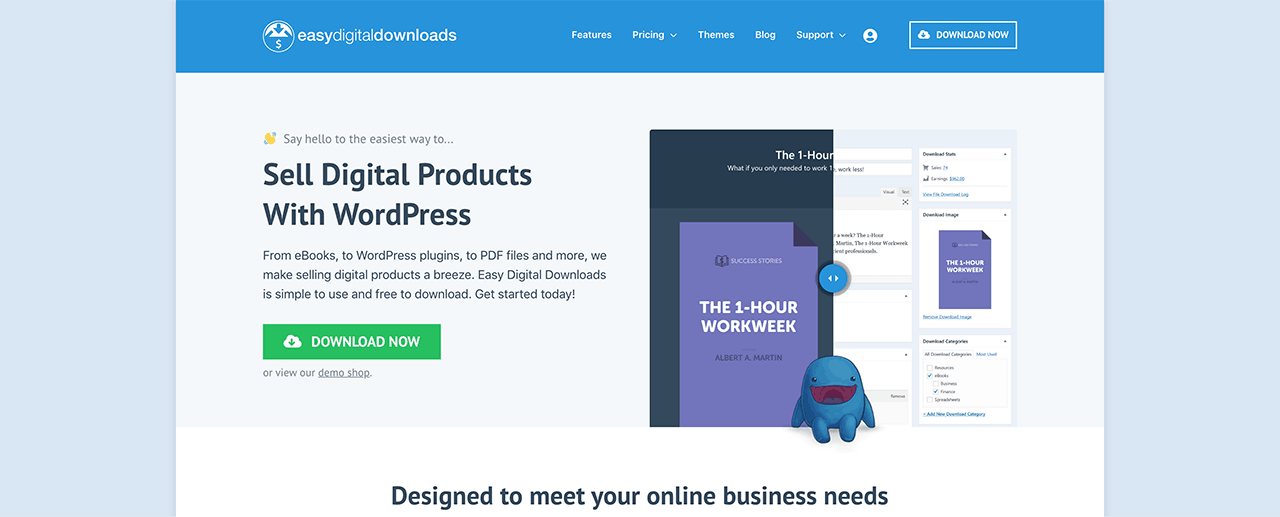
Easy Digital Downloadsは、デジタル製品の販売に完全に焦点を当てています。そのため、WooCommerceにある不要なオプションやUIに対処する必要はありません。Easy Digital Downloadsを使用してオンラインストアをセットアップするのは非常に簡単で、プラグインを使用して以下を含むあらゆるデジタル製品を販売できます:
- ソフトウェア
- 電子書籍とPDF
- ドキュメント
- ビデオ
- オーディオおよび音楽ファイル
- 写真、グラフィックデザイン、デジタルアート
そして、太陽の下にあるほぼすべての種類のメディアファイル。また、次のような多くのクールな機能も利用できます:
- 複数の支払いゲートウェイ統合
- プラグインやゲームなどのライセンスモデル用のソフトウェアライセンス作成ツール
- サブスクリプションモデルビジネス向けの定期支払い
- マーケットプレイスサイト向けのマルチベンダープラットフォーム
- より速く成長するためのメールマーケティング統合
- フリーランサー向けのカスタム納品物
- アフィリエイトおよびマーケットプレイスベンダー向けの手数料
- 製品レビュー
- 顧客向けのカスタムウォレット
- インスタント製品比較表
- 製品ショーケース
その他。機能の全リストと、これらの機能をどれだけ簡単に使用できるかについては、Easy Digital Downloadsのレビューをご覧ください。
ステップ 2:Easy Digital Downloads の設定
Easy Digital Downloads を使用する理由がわかったところで、プラグインの設定方法を見ていきましょう。まず、プラグインをインストールしてください。方法がわからない場合は、WordPress プラグインのインストール方法に関するこの記事をご覧ください。
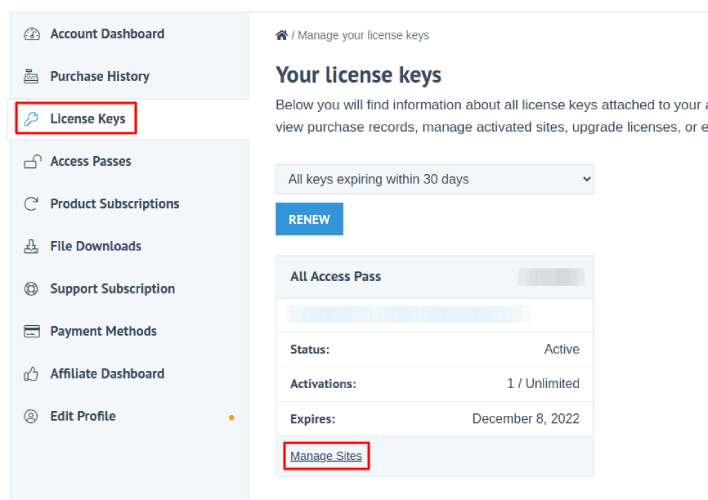
次に、Easy Digital Downloads のダッシュボードに移動し、ライセンスキーに移動して、サイトの管理をクリックします。
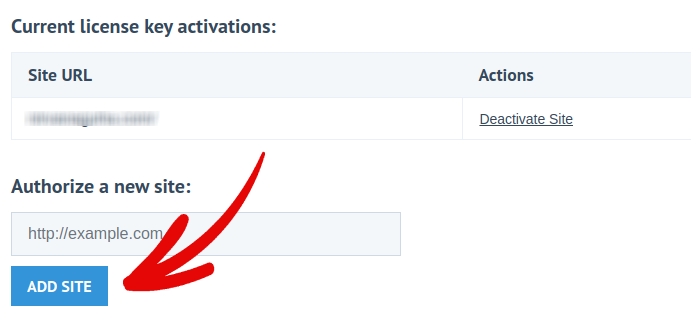
そして、ダッシュボードにサイトを追加します。
その後、支払い処理業者を設定するだけです。WordPress のダッシュボードに戻ります。WordPress のダッシュボードに ダウンロード という新しいセクションが表示されるはずです。
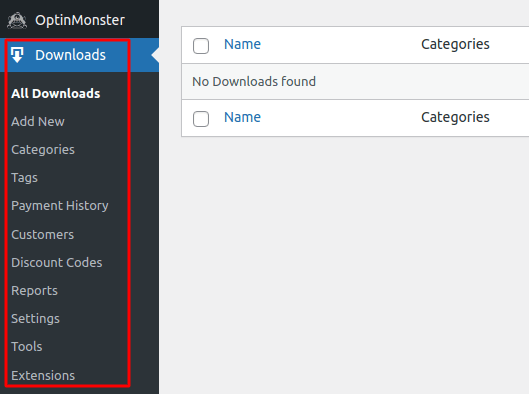
ダウンロード » 設定 をクリックし、次に 支払いゲートウェイ タブをクリックして、支払いゲートウェイを選択して設定します。
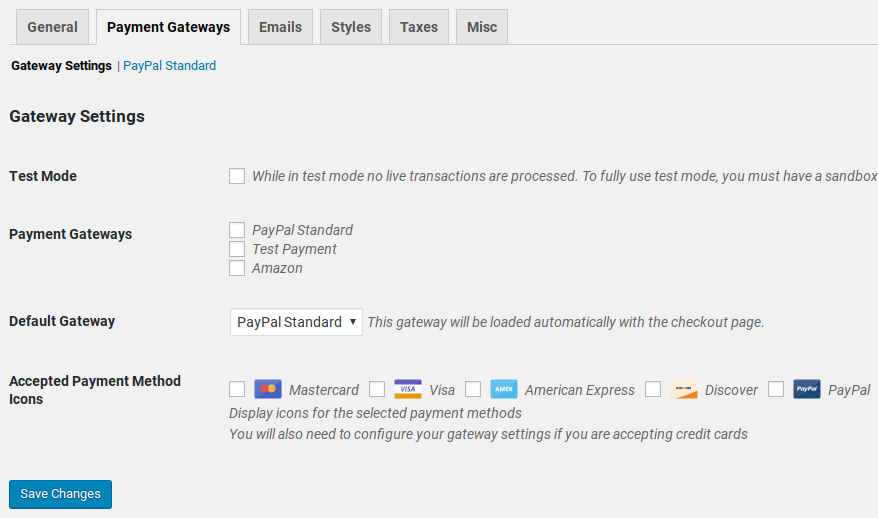
これで完了です!
ステップ3:ストアに書類を追加する
ストアの準備ができたので、デジタル製品をストアに追加し始めましょう。
デフォルトでは、Easy Digital Downloadsはeコマースストアのページを作成および設定します。主要なチェックアウトページ、成功ページ、取引失敗ページ、購入履歴ページは事前定義されています。そのため、ストアに商品をアップロードする準備ができています。
ダウンロード » 追加 に移動します。
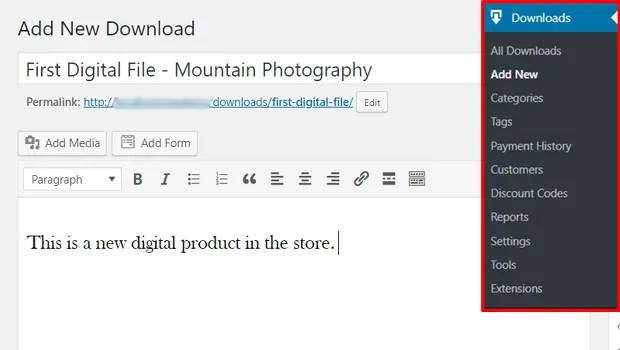
まず、製品のタイトルと説明を入力します。次に、下にスクロールして ダウンロード価格 セクションで製品の価格を設定します。次に、製品のファイルをアップロードします。
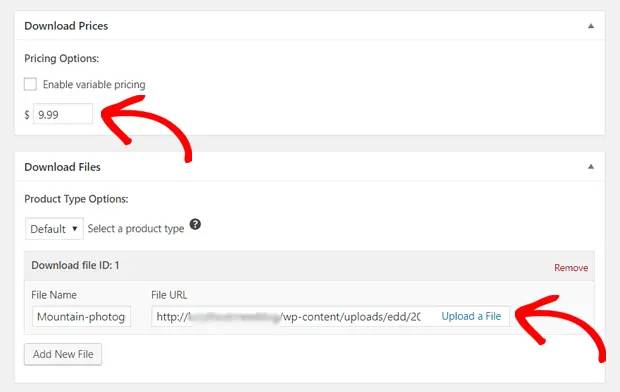
次に、製品の素敵なアイキャッチ画像をアップロードします。これは製品リストに表示される画像です。非常に魅力的なデザインをアップロードして、価値を高めましょう。
次に、ダウンロード設定までスクロールして、ダウンロードオプションを確認します。ドキュメントを限定版製品として販売している場合は、製品のダウンロードに制限を設定できます。そうでない場合は、デフォルトオプションを使用してください。
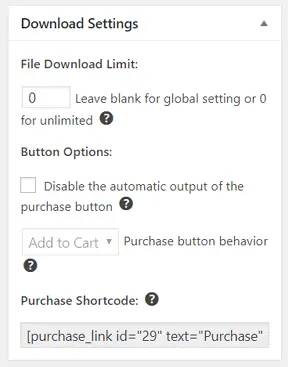
最後に、製品に適した製品カテゴリまたはタグを追加します。
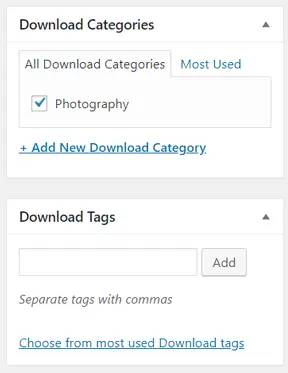
これで完了です!公開 をクリックして、最初のデジタル製品を公開してください。
カスタマイズなしの場合、製品ページは次のようになります。
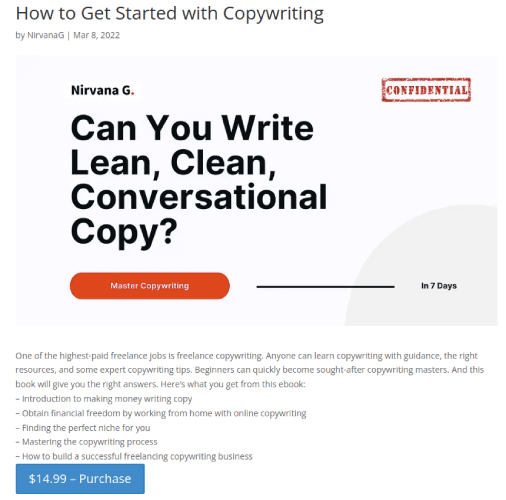
今すぐページをカスタマイズしてください。
WordPressでさらに速く書類販売を開始する方法
これで製品が公開されたので、ドキュメントをオンラインで販売する時期です。
売上を増やす素晴らしい方法は、自動プッシュ通知キャンペーンを作成することです。プッシュ通知は、サイトへのリピートトラフィック、エンゲージメント、および売上を増やすための非常に優れたツールになります。プッシュ通知キャンペーンに慣れていない場合は、より速く成長するのに役立つこれらの素晴らしいリソースを確認してください。
- コンバージョン率の高いプッシュ通知オプトインの7つの例
- ウェブサイトでWebプッシュ通知を設定する方法
- Webプッシュ通知を使用して購読者を購入者に転換する方法
- Web通知WordPressプラグインをサイトに追加する方法
プッシュ通知キャンペーンには PushEngage の使用をお勧めします。PushEngage は世界No.1のプッシュ通知ソフトウェアです。そのため、キャンペーンは安全な手に委ねられ、プッシュ通知で非常にクリエイティブになることができます。この例のように:

ビジネスの成長に真剣に取り組んでいるなら、PushEngageに投資すべきです。


