ウェブサイトのエンゲージメントを最大化するために、さまざまな種類の通知を使用しようとしていますか?
時間のかかるSEOキャンペーンなしで、新しいブログ記事を公開するたびに自動的に無料トラフィックを獲得できることを想像してみてください。WordPressサイトを運営しているなら、コンテンツを宣伝し、読者にコンテンツに戻ってきてもらうのがどれほど大変かはすでにわかっているはずです。
この記事では、公開するたびにリピート訪問者、エンゲージメント、売上を獲得する方法を紹介します。そして、有料広告やSEOに厳密に依存する必要がないように、さまざまな種類の通知を使用してこれを行います。
よさそうですね?さあ、始めましょう。
さまざまな種類の通知を理解する
さまざまな種類の通知を成功裏に使用する方法の詳細に入る前に、プッシュ通知マーケティング戦略の基本を見てみましょう。シンプルでわかりやすく説明します。したがって、プッシュ通知の経験がなくても心配しないでください。
プッシュ通知とは?
プッシュ通知とは、購読者のデバイスに表示され、ワンクリックで購読者をあなたのコンテンツにリダイレクトする、短くてクリック可能なポップアップメッセージです。
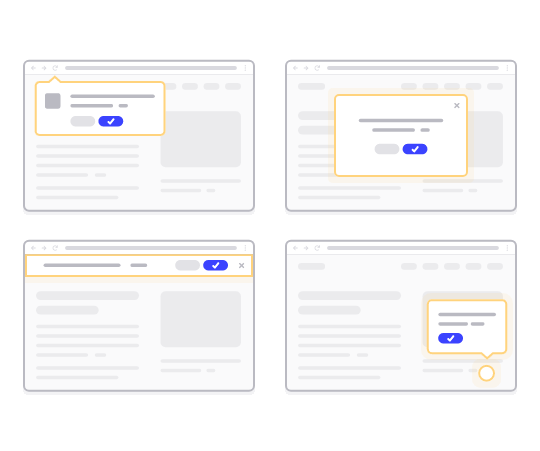
最も良い点は、購読者がブラウザを使用していない場合でも、さまざまな種類の通知が配信されることです。メールの一斉送信のようなものですが、ウェブプッシュ通知を使用すると、購読者はメッセージを表示するためにアプリを使用する必要はありません。
簡単に言うと: WordPressプッシュ通知は、プッシュ通知ポップアップからオプトインした人に、コンテンツへのクリック可能なリンクを送信する簡単な方法です。
プッシュ通知シーケンスを使用すると、オーディエンスはあなたを無視する言い訳がなくなります。ソーシャルメディアサイトとは異なり、広告料を支払わせるためにリーチを制限するアルゴリズムはありません。
ウェブプッシュ通知の最もクールな点は、リードマグネットやメールオプトインフォームを補完するために使用できることです。プッシュ通知購読者を収集するためにポップアップを使用することさえできます。
プッシュ通知を使用するメリット
プッシュ通知がビジネスにとってなぜ重要なのかを説明しましょう。
コンテンツを作成して、それが軌道に乗るのをどれくらいの頻度で待っていますか?検索エンジンやソーシャルメディアでサイトのトラフィックを爆発的に増やそうと待っているなら、知っておくべきことがあります:
- SEOは爆発的な成長をもたらしません。SEOは、時間をかけて着実に成長をもたらします。
- 検索およびソーシャルメディア広告は「Pay to Play」です。トラフィックのスパイクしか得られません。そのトラフィックをリターゲティングするには、さらに支払う必要があります。
- ソーシャルメディアのバイラル化は困難です。そして、それが起こるかどうかを知る方法はありません。
では、トラフィックの獲得がそれほど難しい場合、どのように売上を伸ばしますか?売上はさておき、サイトのエンゲージメントを予測可能に成長させるにはどうすればよいでしょうか?
答えはプッシュ通知キャンペーンです。プッシュ通知キャンペーンの主なメリットをいくつかご紹介します:
- ユーザーエンゲージメントの向上
- 顧客と購読者の維持
- コンバージョン率の向上
- 適切なユーザーをターゲットにする
- 実行可能な指標を追跡する
- カスタマーケア戦略の改善
- ブランドの一貫性の強化
この記事では、これらのメリットをどのように活用できるかを詳しく説明します。実際の例を確認したい場合は、プッシュ通知のメリットに関するこの記事を確認してください。
マーケティングに使用できるさまざまな種類の通知
通知は、オーディエンスとエンゲージし、コンバージョンを促進し、顧客に情報を提供するためのマーケティングにおける強力なツールです。マーケティング目的で使用できるさまざまな種類の通知があります。それらを確認しましょう。
Eメール通知
メール vs プッシュ通知:どちらが良いですか?全体的なマーケティング戦略に応じて、メールマーケティングとプッシュ通知マーケティングの両方を同時に使用することを強くお勧めします。メール通知を使用して以下を送信できます:
- プロモーションメール:製品、割引、特別オファーを宣伝するためのメールを送信します。
- トランザクションメール:確認メール、注文更新、パスワードリセットは、トランザクション通知の例です。
これに加えて、オーディエンスを教育するためのニュースレターを送信することもできます。始めるのに良い場所は、メールマーケティングサービスを選択し、サイトにブログ購読ウィジェットを設定することです。通知を使用してポッドキャストを宣伝することもできます。
プッシュ通知
ウェブプッシュ通知の平均オプトイン率は6%を超えています。これは、メールキャンペーンのオプトイン率の約3倍です。一般的に、送信できるプッシュ通知には2つのタイプがあります:
- モバイルプッシュ通知:アプリが閉じている場合でも、ユーザーのモバイルデバイスに表示されます。
- ウェブプッシュ通知:ウェブブラウザを介して配信され、デスクトップとモバイルのユーザーにリーチできます。
アプリ内通知は、エンゲージメントを高め、顧客維持率を向上させるための優れた方法です。
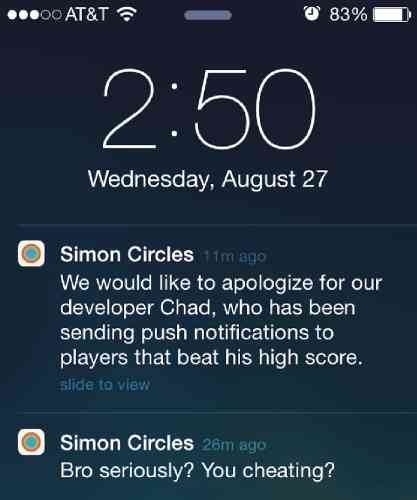
アプリ内売上を伸ばすための素晴らしい方法でもあります。Android、iOSおよびiPadOS通知を送信できます。もちろん、これらすべては、ビジネス用のアプリがあることを前提としています。ただし、アプリではなくウェブサイトを実行しているだけであれば、ウェブプッシュ通知を送信することができます。
アプリ内通知とは異なり、多くの異なる種類の通知を送信するには、明示的に同意を得る必要があります。ここでプッシュ通知ポップアップが役立ちます。
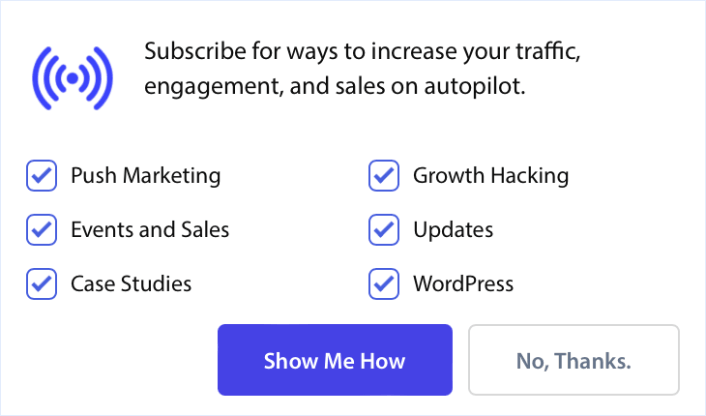
そして、プッシュ通知購読者を収集したら、寝ている間でも収益を生み出す自動プッシュキャンペーンを送信することさえできます!
SMS通知
顧客に更新、プロモーション、またはリマインダーをテキストメッセージで送信できます。SMSキャンペーンはマルチメディアメッセージには適していません。実際、SMSで送信できるのはクリック可能なテキストリンクのみです。
ウェルカムSMSの例を次に示します。
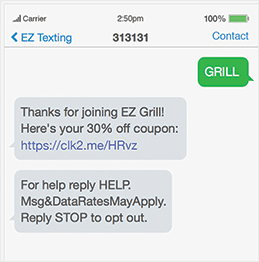
一方、プッシュ通知は、さまざまなメディアタイプを使用してさまざまな種類のメッセージを表現するのに非常に柔軟です。ウェルカムプッシュ通知キャンペーンの例をご覧ください。
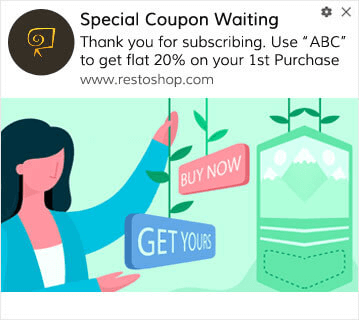
2つのメッセージの違いがわかりますか?プッシュ通知キャンペーンでは、クリエイティブなアイデアを探求し、はるかに効果的にコミュニケーションするための十分なスペースがあります。もちろん、SMSキャンペーンを作成するためのトップクラスのコピーライターがいれば、テキストだけでもかなりのことができます。
ソーシャルメディア通知
ソーシャルメディア通知とは、ユーザーがソーシャルメディアプラットフォーム上で情報を入手し、エンゲージし、プラットフォームのコンテンツやアクティビティとつながり続けるために送信されるメッセージまたはアラートです。これらの通知は、ユーザーがソーシャルメディアプロフィールやフォローしているアカウントに関連するさまざまなアクティビティ、更新、インタラクションについて通知するため、ユーザーエンゲージメントにおいて重要な役割を果たします。
送信できるもの:
- ソーシャルメディア投稿:ソーシャルメディアプロフィールで最新情報、プロモーション、ニュースを共有します。
- ダイレクトメッセージ:顧客と個人的にエンゲージするためにプライベートメッセージを送信します。
通知の効果的な使用は、個人や企業がつながりを構築および維持し、コンテンツを共有し、オンラインコミュニティに参加するのに役立ちます。
チャット通知
サイトにライブチャットボックスを設置することは、ウェブサイトのエンゲージメントにとって非常に効果的な ツール になります。ライブチャットソフトウェアを使用すると、トリガーを設定してチャットボックスを簡単に設置できます。
- 顧客が商品ページやチェックアウトページに多くの時間を費やしている場合
- 顧客が商品をカートに追加したが、支払いができない場合
- カートの価値が高い顧客にクーポンや割引を提供する場合
これらの自動トリガーをすべて作成してチャット通知を送信し、多くの潜在顧客を非常に迅速にコンバージョンさせることができます。自動トリガーのいずれかが発火すると、チャットボックスが顧客に通知します。そこから、カスタマーサービス担当者が引き継ぎ、顧客が購入決定を下すのを支援できます。
チャット通知を開始するには、最高のライブチャットソフトウェアに関する記事をご覧ください。
位置情報に基づいた通知
ジオロケーションプッシュ通知は、購読者の位置に基づいてトリガーされる自動プッシュ通知です。ジオロケーション通知は、プロモーション、情報更新、トランザクション通知と同様に役立ちます。
位置情報プッシュ通知は、その場所に住んでいる購読者に送信される通知です。そして、PushEngageを使用して、国、州、都市、または地域に基づいてセグメント化することで、購読者をターゲットにすることは非常に簡単です。
PushEngageダッシュボードでは、購読者がいる国をデモグラフィック概要で確認できます。
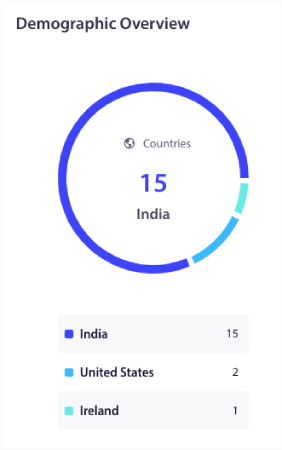
この国のリストを使用して地理的セグメントを作成できます。地理的セグメンテーションにより、次のことが可能になります:
- 購読者のタイムゾーンでプッシュキャンペーンを送信し、エンゲージメントを向上させる
- コンバージョン率を高めるために、その顧客セグメントにのみ関連するローカルオファーを実行する
- クリック率を高めるために、ローカル言語でキャンペーンを作成する
最も良い点は、PushEngageでセグメントを作成する必要さえありません。新しいキャンペーンを作成するたびに、オーディエンスタブに移動し、カスタムオーディエンスに送信の下でターゲットにしたい国を選択します。
プッシュブロードキャストを送信したいとしましょう。PushEngageダッシュボードに移動し、Campaign » Push Broadcasts に進んで、Create New Push Broadcast ボタンをクリックします。
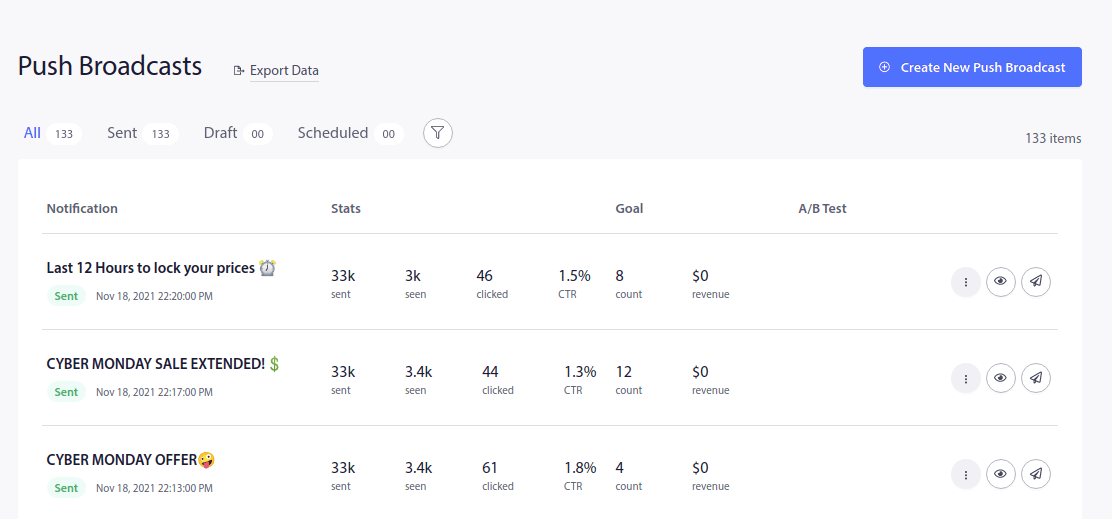
次に、プッシュ通知を作成します:
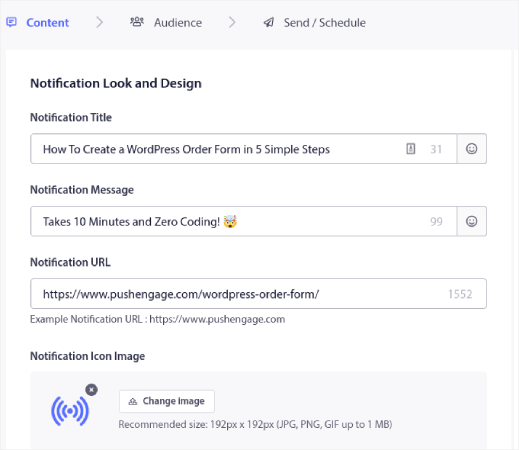
Audience タブに移動し、下にスクロールして Send to Custom Audience を選択します。最後に、ターゲティングルールを Country に設定し、ターゲットにしたい国を選択します。
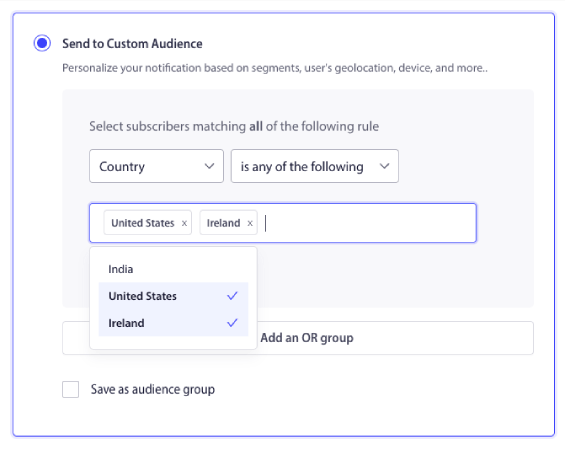
PushEngageには、購読者がいる国のみが表示されます。そのため、ジオロケーションによる購読者のリターゲティングは非常に簡単です。そして今、場所だけで異なる種類の通知を送信できます!
イベント通知
ロイヤリティプログラムのティアに到達するなど、特定のユーザーのアクションやマイルストーンに基づいて通知を送信できます。これらはより高度なキャンペーンですが、カスタム構築されたソリューションと通知APIを使用して行うことができます。その他の一般的なユースケースには次のようなものがあります。
- イベントリマインダー:今後のイベント、ウェビナー、セールについて顧客に通知します。
- イベントアップデート:イベントやカンファレンス中にリアルタイムのアップデートを送信します。
イベント通知は、個人のカレンダー、ビジネススケジューリングツール、ソーシャルネットワーキングプラットフォーム、イベント管理アプリケーションなど、さまざまなコンテキストで一般的に使用されます。しかし、毎週のセールのような定期的なイベントを宣伝するためにも使用できます。
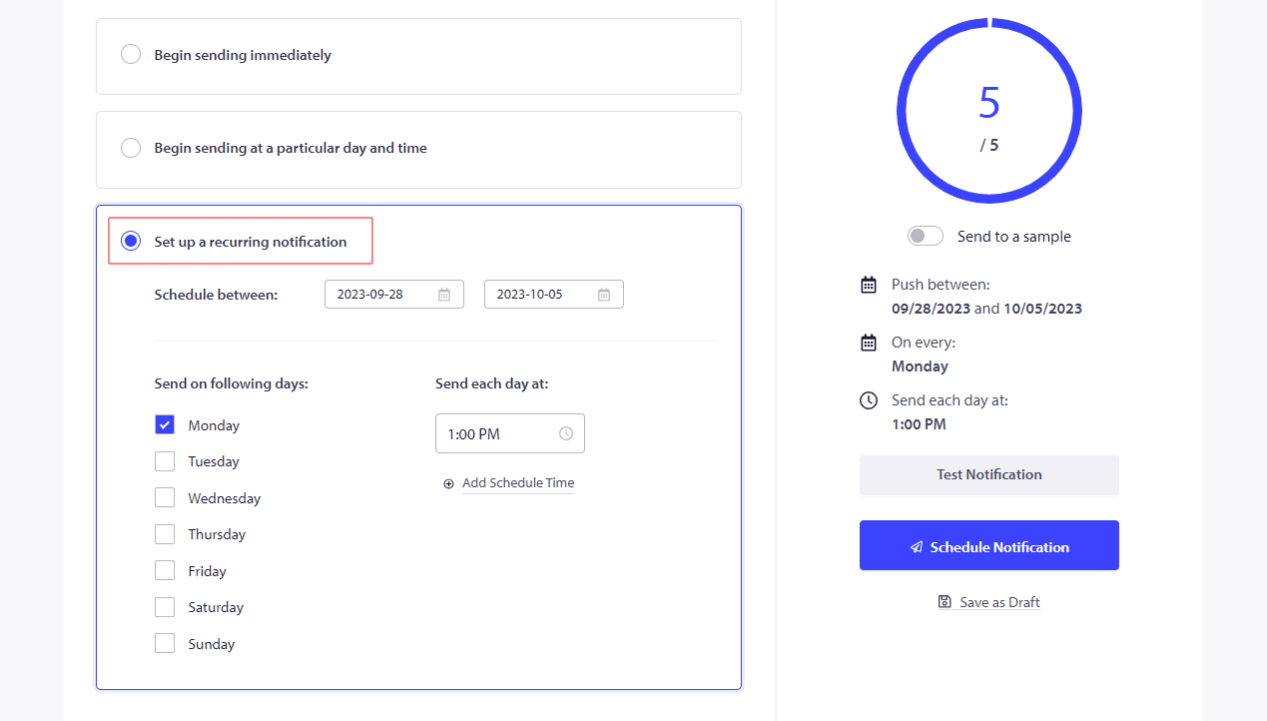
プッシュ通知をスケジュールして、完全に自動で固定間隔で送信するように設定できます。
放棄されたカート通知
WooCommerceのカート放棄とは、見込み客が商品をカートに追加したが、何らかの理由で購入しないことです。Eコマースのファネル用語では、チェックアウトプロセスを開始したが、完了しなかったことを指します。
ショッピングカートに残された商品についてユーザーにリマインドし、購入を完了するように促すことができます。
もちろん、放棄されたカートを回復するためにさまざまな種類の通知を作成できます。しかし、すべての放棄されたカート通知はトリガーキャンペーンであり、自動的に送信されます。そのため、一度設定すれば完了です。その後、失われた売上を永遠に回復し続けることができます。カート放棄通知の設定方法については、簡単なチュートリアルをご覧ください。カート放棄通知の設定方法。
レビューとフィードバックのリクエスト
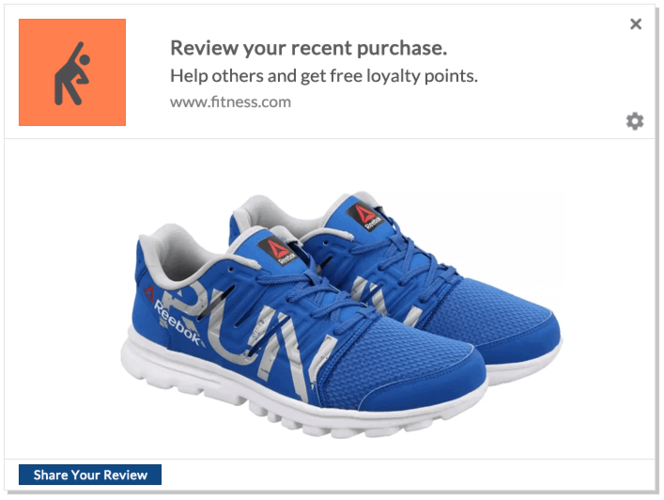
顧客がレビューを残してくれるのを待っていても無駄です。賢いやり方は、単にレビューを依頼することです。
しかしもちろん、毎日多くの新規顧客がいる場合、手動で依頼するのは大変な作業です。だからこそ、商品フィードバックプッシュ通知キャンペーンは非常に役立ちます。完全に自動化されており、正しく行えば、商品フィードバックキャンペーンは本当に効果があります。
さまざまな種類の通知を送信するには、PushEngageの使用をお勧めします。PushEngageは市場でNo.1のWebプッシュ通知ソフトウェアであり、中小企業の成功を支援するために構築されています。
PushEngageダッシュボードから、Campaign » Trigger Campaigns に進み、Create New Triggered Campaign をクリックします。

キャンペーンテンプレートのリストから、Custom Trigger Campaign をクリックします。

認識できるキャンペーン名を入力します。次に、プッシュ通知キャンペーンのコンテンツを作成します。
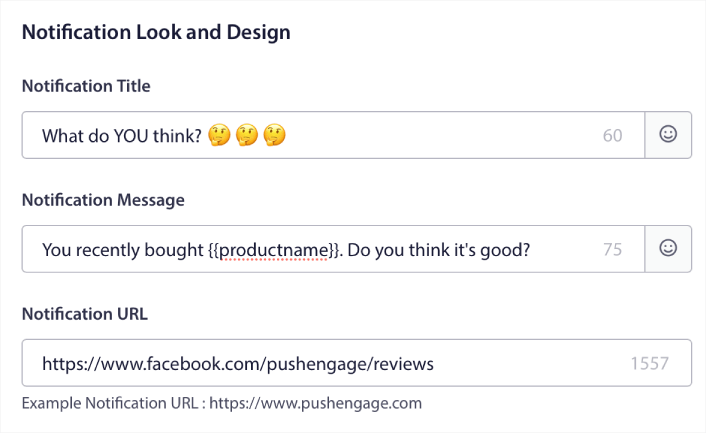
トリガーキャンペーンなので、顧客からレビューが得られるまで、好きなだけフォローアップを作成できます。
次に、Trigger Settings タブに移動して、キャンペーンのトリガーを設定します。
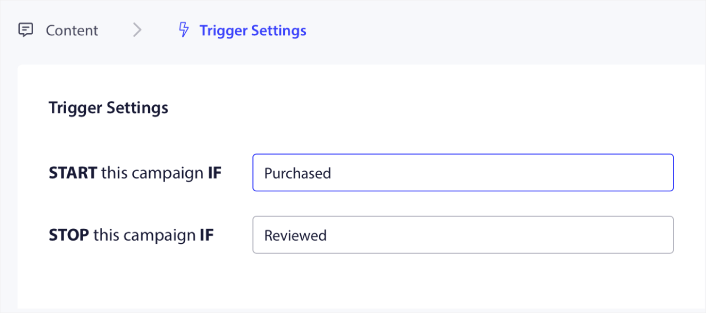
顧客が製品を購入したときにキャンペーンを開始し、レビューを残したときに停止するように設定します。Purchase および Review イベントを定義するには、PushEngage APIを使用する必要があります。
そして最後に、コードをウェブサイトに統合します。 キャンペーン開始イベント、 キャンペーン停止イベント、および 目標追跡 のコードは、 統合コード ボタンをクリックすることで取得できます。
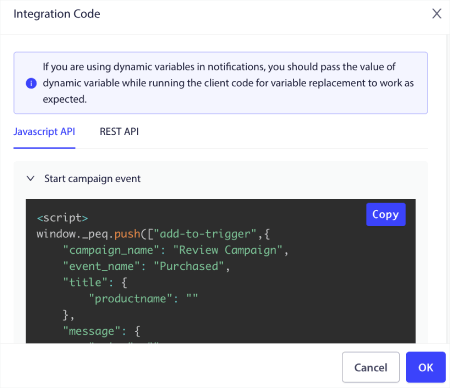
これで完了です!誰かがあなたのウェブサイトで商品を購入するたびに、レビューを求める自動キャンペーンがトリガーされます。 より多くのレビューを獲得する ために他の方法を使用することもできます。しかし、通知を送信することから始めるのは良いでしょう。
紹介通知
プッシュ通知は、アフィリエイトマーケティングにおいても極めて重要な役割を果たします。単に売上を伸ばしたり、商品を宣伝したりするだけでなく、信頼を築き、ブランドの評判を高めるのにも役立ちます。顧客に友人の紹介を奨励し、紹介が成功した場合に報酬を与えましょう。
プッシュ通知をアフィリエイトマーケティング戦略に組み込むことで、オーディエンスとつながり、コンバージョンを加速させるダイナミックな方法を解き放つことができます。
主な考慮事項の概要は次のとおりです。
- ターゲットを絞ったプッシュ通知で顧客維持率を向上させる:プッシュ通知は、顧客維持のためのゴールデンチケットです。これらの短いメッセージは、オーディエンスに直接話しかけることができます。新製品、プロモーション、限定セールについて常に知らせてください。そうすることで、リピート購入を促進し、ブランドロイヤルティを育むことができます。
- タイムリーなメッセージで情報を提供し、誘惑する:プッシュ通知は、新製品、アップデート、期間限定オファーについて顧客に迅速に通知するための秘密兵器です。注意を引き、パーソナライズされたと感じるメッセージを作成します。これにより、関心を引くだけでなく、行動を促し、アフィリエイト売上の増加につながります。
- ユーザーフレンドリーなプッシュ通知プラットフォームを活用する:PushEngageのようなユーザーフレンドリーなプッシュ通知プラットフォームが多数あり、幸運です。これらのプラットフォームは、あなたの生活を楽にするように設計されています。リードを収集し、オーディエンスをセグメント化し、プッシュ通知を簡単に送信できます。その結果?アフィリエイトマーケティングキャンペーンは、これまで以上に強力になります。
- ブラウザ通知の魔法を活用する:ユーザーのブラウザに表示される小さなメッセージであるブラウザ通知の力を過小評価しないでください。それらは、オーディエンスへの直接的かつリアルタイムの接続です。アフィリエイトオファーへの誘導やコンバージョン率の向上に活用してください。
プッシュ通知をアフィリエイトマーケティング戦略に組み込むことで、顧客エンゲージメントを強化し、クリック率を急上昇させ、最終的にはアフィリエイト売上を大幅に向上させることができます。
私たちは、 アフィリエイトマーケティングのプッシュ通知 に関する完全なガイドを作成しました。次にぜひチェックしてください!
パーソナライズされた通知
パーソナライズされた通知は、顧客データを使用して、ターゲットを絞った推奨事項、パーソナライズされたオファー、誕生日のお祝いを送信します。
プッシュ通知属性は、サブスクライバーの詳細を自動的に取得し、通知メッセージをパーソナライズする変数です。次のようなデータを追加することで、ドリップキャンペーンをカスタマイズできます。
- ユーザーの名
- 趣味
- 居住地
その他、実行中のキャンペーンの種類によって異なります。
プッシュ通知属性を使用しなくても、PushEngageでは、購読者の国名と都市名を使用してさまざまな種類の通知を送信できます。必要に応じて、すべての購読者またはカスタムセグメントにドリッププッシュ通知シーケンスを送信できます。PushEngageでは、 ジオセグメンテーションを使用したドリップキャンペーン を実行することもできます。
しかし、さらに一歩進めたい場合は、 PushEngage属性API を使用して、まったく異なるレベルのパーソナライゼーションを提供できます。
緊急性と希少性の通知
すべてのお客様の中で最も強力なキャンペーンの1つは、 価格下落キャンペーン と 在庫アラート キャンペーンです。
このような通知です。

eコマースプッシュ通知キャンペーンが初めての場合は、 価格下落アラートの作成方法 に関するこの記事をぜひご覧ください。
本当に役立ちます。
ついでに、 在庫アラートの作成方法 もチェックして、お気に入りの商品が在庫切れになることを顧客に通知することをお勧めします。
ソーシャルプルーフ通知
メッセージにソーシャルプルーフを追加すると、より多くの売上につながる可能性があります。
1つの優れた用途は、 ウィッシュリストにある商品を人々に購入してもらう ことです。
こちらをご覧ください。
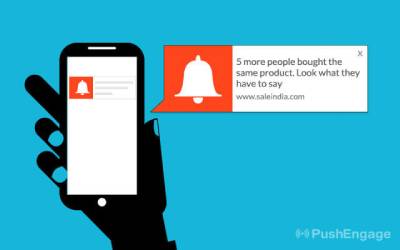
このシンプルな通知は、顧客のFOMO(取り残されることへの恐れ)を再び刺激し、すでに欲しいと思っている商品を購入するように促すことができます。最近の購入や肯定的なレビューを示す通知を表示して信頼を築きましょう。または、 最高のソーシャルプルーフプラグイン をチェックして始めることができます。
コンテンツ通知
新しいブログ投稿、ビデオ、その他のコンテンツを購読者に通知します。多くのニュースサイトや出版社にとって、トラフィックからの広告収入が主な収入源です。それがあなたの場合、休眠中の購読者を再活性化することで、非常に短時間で多くの追加収入を生み出すことができます。
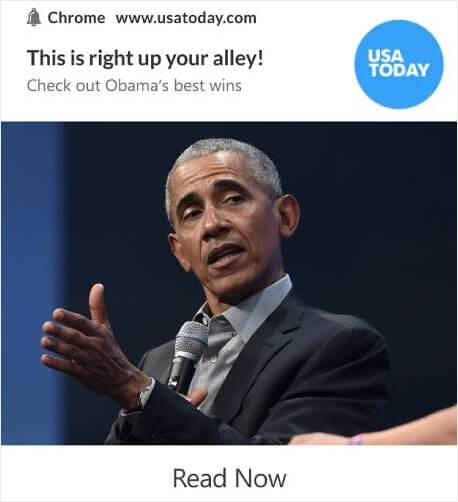
そして、さまざまな種類の通知を使用してそれを行うことができます。
プロのヒント: コンテンツからの収入源を1つだけに頼るのは、決して良い考えではありません。広告収入に大きく依存している場合は、より多くのお金を稼ぐことができる Google AdSenseの代替手段 に関するこの記事をご覧ください。
クロスセルおよびアップセル通知
クロスセルは、顧客の注文金額を増やす最も簡単な方法の1つです。クロスセルとは、顧客がすでに購入している商品に関連する商品を顧客に購入してもらうことです。
通常、元の製品と提案された製品は同じ価格帯にあります。
もちろん、Gadgetsdealが行っているようなクロスセルキャンペーンを開始することもできます。
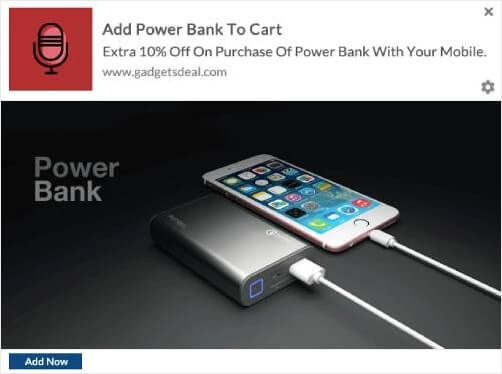
誰かが携帯電話をカートに追加するたびに、Gadgetsdealは追加割引でパワーバンクをクロスセルします。顧客にとっては素晴らしい取引であり、Gadgetsdealは単一の通知で即座により多くのお金を稼ぎます!
通知をマーケティングに利用する場合、スパム行為やオーディエンスを煩わせることを避けるために、ユーザーの好み、タイミング、関連性を考慮することが重要です。よく考えられた通知戦略は、顧客エンゲージメントを高め、ビジネスの成長を促進することができます。
通知を送信するサービスを選択する
プッシュ通知キャンペーンを作成する前に、プッシュ通知サービスを選択する必要があります。プッシュ通知サービスは、コーディングなしでプッシュキャンペーンを作成できるソフトウェアです。
さまざまな種類の通知を送信するには PushEngage を使用することをお勧めします。

PushEngage は世界No.1のプッシュ通知プラグインです。
プッシュ通知は、ウェブサイトのトラフィックとエンゲージメントを自動で増やすのに役立ちます。オンラインストアを運営している場合は、PushEngageが自動eコマースプッシュ通知の作成を支援することで、売上を伸ばすのにも役立ちます。
無料で開始できますが、ビジネスの成長に真剣に取り組んでいる場合は、有料プランを購入する必要があります。また、プッシュ通知サービスを購入する前に、プッシュ通知のコストに関するこのガイドを確認してください。
PushEngageで得られるものを簡単に見てみましょう。
- コンバージョン率の高い自動キャンペーン
- 複数のターゲティングおよびキャンペーンスケジュールオプション
- 目標追跡と高度な分析
- スマートA/Bテスト
- 専任のサクセスマネージャー
ビジネスのトラフィック、エンゲージメント、売上を伸ばしたいのであれば、PushEngageが断然最良の選択肢であることがわかるでしょう。予算が限られている場合は、プッシュ通知で少しクリエイティブになることもできます。
注:WordPressサイトを実行している場合は、PushEngage WordPressプラグインをインストールしてアクティブ化する必要があります。
始めましょう!
ステップ#1:無料のPushEngageアカウントを作成する
PushEngageにアクセスし、今すぐ無料で始める:をクリックしてください。
無料プランで始めることができます。しかし、ターゲットを絞ったプッシュ通知を送信したい場合は、グロースプランを選択する必要があります。希望するプランがわかったら、始めるをクリックしてPushEngageアカウントを作成してください。
ステップ#2:PushEngageにサインアップする
次に、PushEngageアカウントを作成します。メールアドレスまたはGmail IDでサインアップすることから始めます。

次に、アカウントの詳細を入力します。

そして、プランを購入するためにクレジットカード情報を追加します。

無料アカウントを選択した場合、プランをアップグレードすることを選択するまで、クレジットカードに請求されることはありません。これで、PushEngageダッシュボードにアクセスする準備が整いました。 登録を完了してすぐにアクセスをクリックするだけです。
以前にOneSignalやPushAlertを使用したことがある場合、PushEngageはダッシュボードからよりクリーンなエクスペリエンスを提供することがわかります。OneSignalダッシュボードは高度なキャンペーン向けではありません。そのためには、OneSignalプラグインよりもAPIが必要になります。
ステップ3:さまざまな種類の通知を送信するためのWordPressプラグインをインストールする
注意:WordPressサイトを運営していない場合は、インストールガイドを確認して開始してください。
アカウントの作成は完了しました。それでは、プッシュ通知エンゲージメント率を追跡できるPushEngageダッシュボードにアクセスして、進めてください。

サイト設定 » サイト詳細をクリックし、セットアップ手順はこちらをクリックボタンをクリックしてください:

WordPressタブをクリックし、PushEngage WordPressプラグインをインストールボタンをクリックして、ウェブサイトにプラグインをインストールしてください。

ここが素晴らしい点です: PushEngageアカウントを作成したときに、すでにウェブサイトをPushEngageアカウントと同期しています。そのため、PushEngageダッシュボードのインストールリンクをクリックして、PushEngage WordPressプラグインをウェブサイトに自動的にインストールしてください。
ステップ#4:WordPressウェブサイトをPushEngageに接続する
PushEngage WordPressプラグインのインストールと有効化が完了すると、PushEngageのオンボーディングウィザードが表示されます。

ウィザードは非常にわかりやすいです。新規ユーザーの場合は、新規?無料アカウントを請求をクリックしてください。すでにサインアップ済みの場合、既存のアカウントを接続をクリックしてください。
次に、サインアップ中にサイトを登録した場合、登録済みサイトを接続の下にあるサイトを選択ドロップダウンからサイトを選択できます:

または、 プレミアムプラン以上をお持ちの場合は、新規サイトを登録をクリックして新しいサイトを追加できます。次のステップでは、オンボーディングウィザードが他の 必須のWordPressプラグインをインストールするように促します。

各ステップを正しく実行すると、ウィザードからこの成功メッセージが表示されます。

これで、キャンペーンやプッシュ通知ポップアップモーダルを作成する準備が整いました。
さまざまな種類の通知のコンテンツを作成する
コピーライターが教えたくない、ちょっとした秘密があります…
コピーライティングは、ほとんど標準的なパターンによって推進されています。外見上クリエイティブに見えるものは、実際にはよく知られたパターンにすぎません。そして、魅力的なコンテンツがあれば、リピートでより多くのトラフィック、エンゲージメント、そして売上を得ることができます。
最も成功しているキャンペーンのコンテンツのさまざまな部分を見てみましょう。
さまざまな種類の通知のための魅力的なメッセージを作成する
Netflixは、一気見できるコンテンツの王様です。そして、彼らのプッシュ通知はまさに驚異的です。
しかし、彼らはどのようにそれを実現しているのでしょうか?
Netflixは、パーソナライズされたコンテンツのレコメンデーションを送信するのと同じくらい、パーソナライズされたプッシュ通知を送信します。
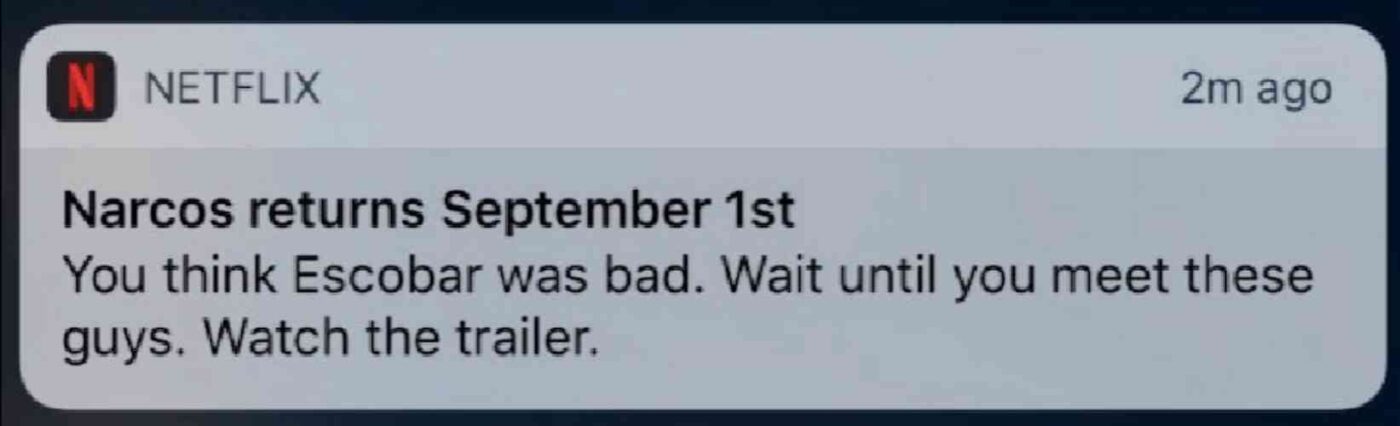
ナルコスファンの誰でも、その通知が何を意味するかを知っています。このようなコピーは、ナルコスの物語にすでに精通している既存のファン層に訴えかけるため、瞬時に彼らを興奮させます。
では、ここでの重要な教訓は何でしょうか?
パーソナライズされたレコメンデーション + ストーリー主導のコピー = 高エンゲージメント。
そして、熱狂的なファンの既存のデータベースがなくても問題ありません。この方法は、加入者リストが少ない中小企業にも有効です。より多くのインスピレーションを得るために、これらのプッシュ通知コピーの例を確認してください。
パーソナライゼーションの活用
パーソナライズされたプッシュ通知は、購読者に「自分向けに特別に作られた」と感じさせます。一番良い点は? 当社の顧客は、パーソナライズされたキャンペーンで約8%のコンバージョン率を達成しています。
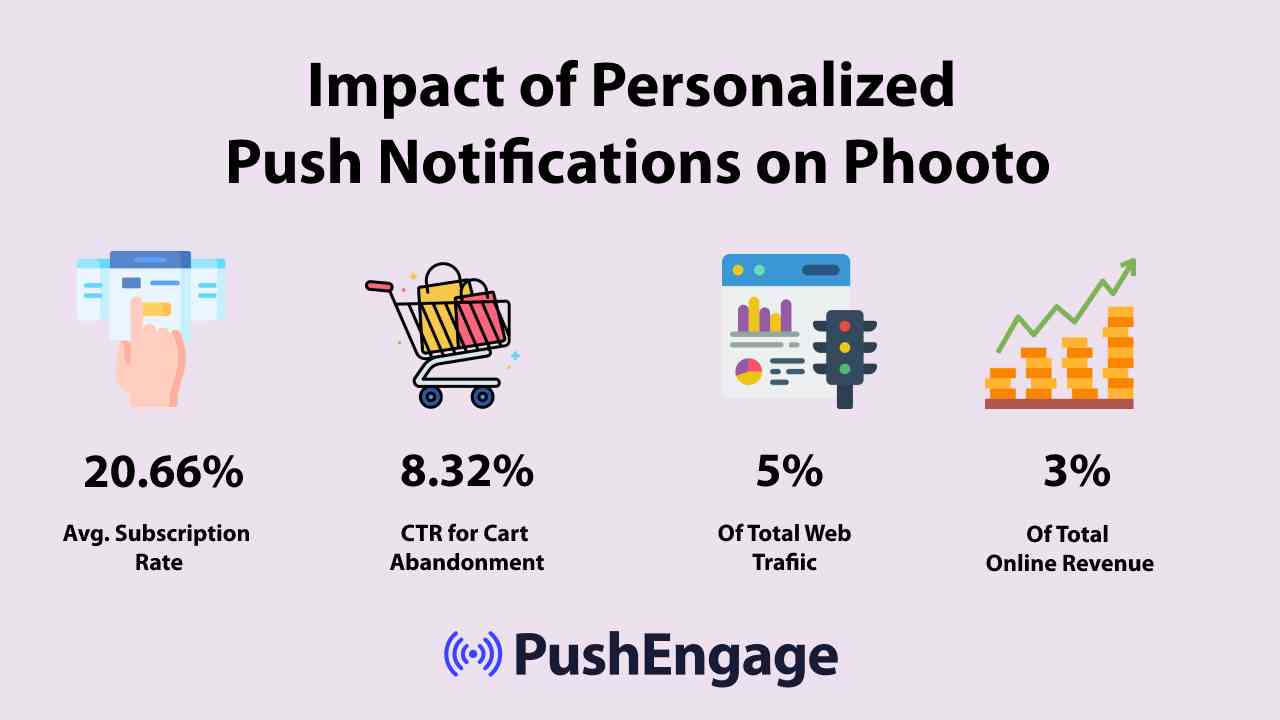
明らかに、パーソナライズされたプッシュ通知は、オンラインでのビジネスの方法を変えることができます。
しかし、ある研究によると、eコマースサイトでのパーソナライゼーション体験の70%は、ユーザーがアカウントにログインした場合にのみ発生します。しかし、理想的には、ログインしていない場合でもパーソナライズされた体験を提供したいはずです。
プッシュ通知は、顧客がサイトにアクセスしているかどうかにかかわらず、オンラインであるときにいつでも顧客にリーチするのに役立ちます。
さまざまな種類の通知のためのさまざまなコンテンツテーマを使用する
コンテンツテーマは、人々がプッシュ通知を購読するように促す素晴らしい方法です。ブラックフライデーのようなさまざまな機会をコンテンツテーマとして使用できます。
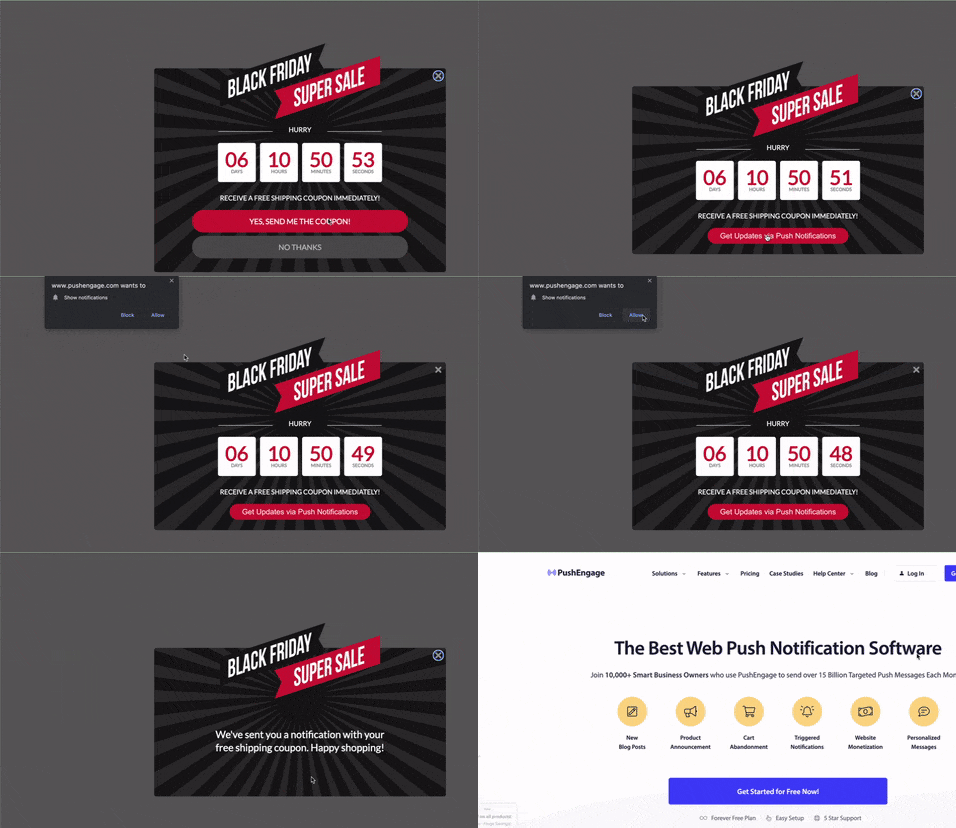
また、イベントベースのセグメンテーションを使用して、さまざまな種類のターゲットを絞ったプッシュキャンペーンを送信することもできます。さらに良いことに、これらのセグメントを使用してサイトにサブスクリプションウィジェットを作成することもできます。

A サブスクリプション管理ウィジェットでは、訪問者がどの種類のプッシュ通知を受け取りたいかを選択できます。

さらに、購読時に購読者を自動的にセグメント化するプッシュ通知ポップアップを作成することもできます。
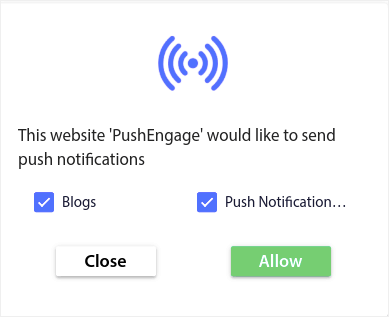
コンテンツテーマを使用すると、関連性の高いコンテンツのみを購読者に送信できます。これにより、購読率とエンゲージメント率の両方を向上させることができます。
プロのヒント: コンテンツテーマを多様化することを忘れないでください。複数のプッシュ通知オプトインを作成して、さまざまな種類のユーザーをターゲットにすることができます。複数のカスタムオプトインを作成することは、既存のコンテンツからプッシュ購読者を増やすための素晴らしい方法です。
購読者オプトイン戦略の構築
カスタムコンテンツは、さまざまな種類の通知を最大限に活用するための最も簡単な方法の1つです。しかし、それだけでは十分ではありません。購読者リストを成長させ続けるための明確な戦略も必要になります。オプトイン戦略の最も重要な部分のいくつかを詳しく見ていきましょう。
明確な行動喚起の実装
行動喚起ボタンは、ウェブサイト訪問者に購読してもらうための最も簡単な方法です。デフォルトでは、プッシュ通知ポップアップは訪問者に購読を求めます。しかし、コピーは好きなように変更できます。
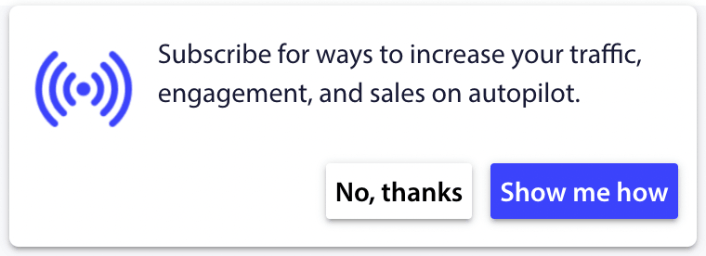
さらに、ブランドカラーを含む、見た目や感触をカスタマイズすることもできます。
プロのヒント: プッシュ通知のアクションボタンを使用すると、クリック率を大幅に向上させることができます。
通知のタイミングと頻度
プッシュ通知は送りすぎると逆効果になることがあります。
送信すべきプッシュ通知の数は、業界によって異なります。とはいえ、お客様に送信する最善の方法は、1日あたり最大2件、週あたり5件までです。
1日あたり平均1件の通知がさらに効果的です。
もちろん、購読者に本当に重要なことを伝える場合を除きます。
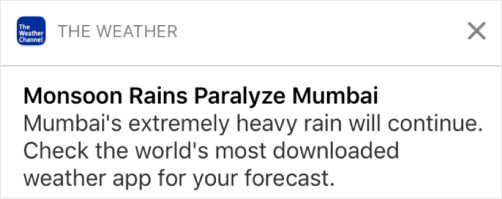
あまりにも攻撃的になり、購読者を不快にさせてしまう可能性があります。それはプッシュ通知の購読者を失うための素晴らしい方法です。しかし、顧客とつながる必要があります。そして、プロモーション通知とトランザクション通知を送る必要があります。
さらに詳しいヒントについては、プッシュ通知をどれくらい送信すべきかに関するこの記事をご覧ください。
プッシュ通知をさまざまな方法でスケジュール設定することもできます。

プッシュ通知の送信をスケジュールするのは非常に簡単です。
- 直ちに
- 特定の日時
- 繰り返しイベントとして
通知の送信数とプッシュ通知の送信タイミングを知ることで、解約率を劇的に減らすことができます。
プロのヒント: プッシュ購読者がエンゲージしなくなったら、リターゲティングキャンペーンを開始して再エンゲージさせることができます。それでもうまくいかない場合は、いつでも購読者リストをクリーンアップできます。
さまざまな種類の通知のA/Bテスト
スプリットテストは、さまざまな種類の通知の中から選択するのに良い方法です。それはあなたにとって何が機能しているかを理解するための素晴らしい方法です。しかし、プッシュ通知で何をスプリットテストできるのでしょうか?
プッシュ通知の最も一般的なパフォーマンス指標は次のとおりです。
- クリック率:プッシュ通知のクリック率は、購読者がプッシュ通知を見てクリックした頻度です。
- 表示率:プッシュ通知の表示率は、購読者がプッシュ通知を受信し、期限切れ前に表示した頻度です。
- 目標コンバージョン:キャンペーンの目標を設定し、キャンペーンの目標追跡を設定できます。目標コンバージョンは、目標を達成した回数の測定値です。
表示率を高めるには、プッシュ通知に大きな画像を使用してください。通知に画像を使用すると、すぐに魅力が増します。
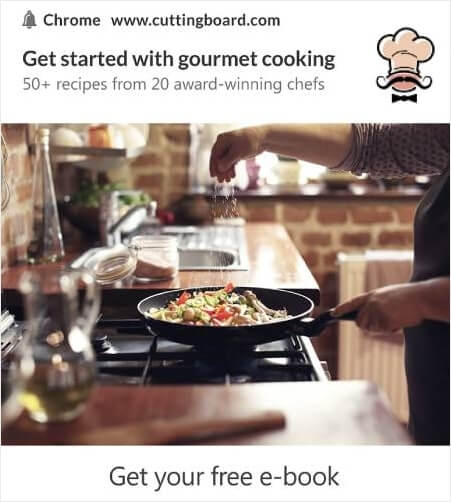
プッシュ通知のタイトルでパワーワードを試すこともできます。
したがって、画像ありとなしで通知をA/Bテストできます。また、タイトルにパワーワードありとなしでプッシュ通知をスプリットテストすることにより、表示率をテストすることもできます。
クリック率を改善したいのであれば、コアメッセージに焦点を当て、それを非常に的確なものにすることを目指しましょう。これは主に、次の2つのうちのいずれかです。
そして、その分野でA/Bテストできることは何もありません。しかし、プッシュ通知のCTA(Call to Action)ボタンでクリック率をA/Bテストすることはできます。CTAが1つまたは0個のプッシュ通知と、CTAが2個のプッシュ通知をA/Bテストしてみてください。
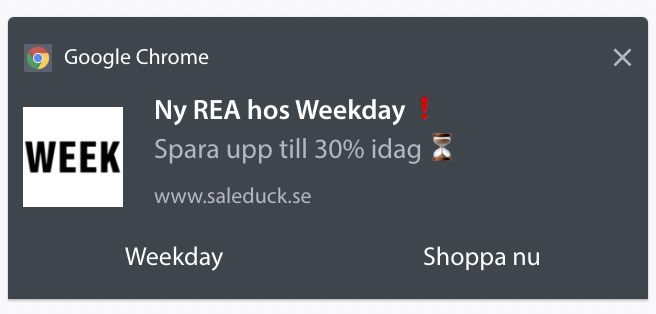
複数のCTAを作成する方法がわからない場合は、プッシュ通知にボタンを追加する方法に関するこの記事をご覧ください。
目標コンバージョンでは、関連性の高いeコマースプッシュ通知を設定することがほとんどです。したがって、ここでも分割テストできることは多くありません。とはいえ、優れたオファーへのクリック率を高めるためにプッシュ通知を最適化できれば、目標コンバージョンは増加します。
さまざまな種類の通知の結果を改善する
時間をかけて、プッシュ通知ポップアップのオプトイン率を改善できます。優れたプッシュ通知サービスがあれば、詳細なオプトイン分析が得られます。
あらゆるコンバージョンツールキットには、独自のポップアップ分析機能が付属しています。では、なぜプッシュ通知ポップアップが異なる必要があるのでしょうか?
素晴らしい点は次のとおりです…
プッシュ通知キャンペーンだけでなく、オプトインの分析も取得できます!
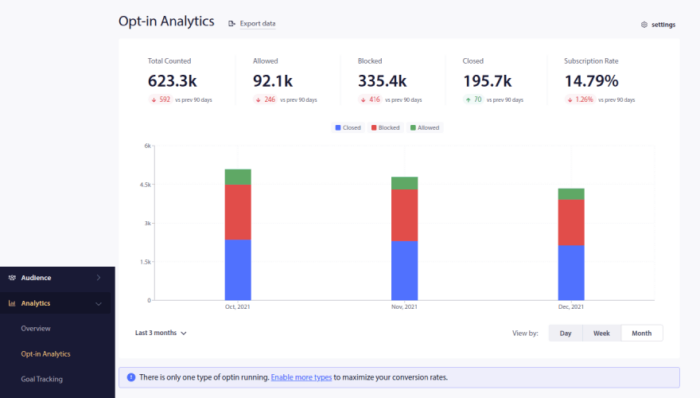
オプトイン分析に注意を払うことは、プッシュ通知購読者を取得するための良い方法です。同時に、プッシュ通知キャンペーンに関するフィードバックを購読者から収集することも推奨します。
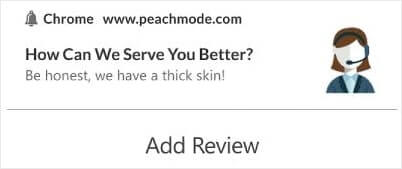
キャンペーンに関するレビューやフィードバックを収集するために、フォーム付きのシンプルなランディングページを作成できます。
さまざまな種類の通知に関するプライバシーの懸念
GDPRによると、EUの居住者または市民の個人情報を収集または処理する前に、明示的な同意を得る必要があります。
さて、プッシュ通知はメールに似ていますが、さらに制約があります。プッシュ通知は購読者にのみ送信できます。メールとは異なり、購読していない人にランダムにプッシュ通知を送信することはできません。
さまざまな種類の通知を送信することになるため、GDPRとプッシュ通知ソフトウェアが出会うのは、消費者データを収集することになります。
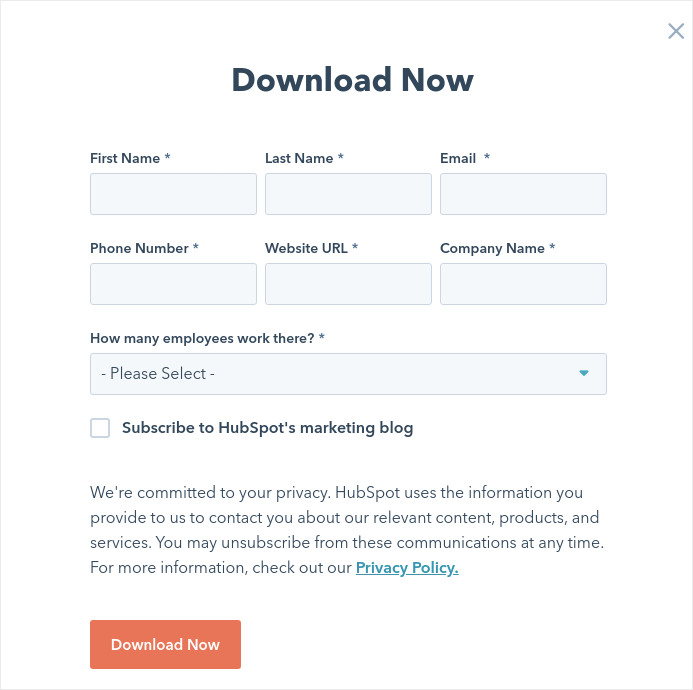
もちろん、メールのオプトインと同じではありません。メールのオプトインでは、メールアドレスをキャプチャする必要がありますが、追加のデータを大量にキャプチャできます。HubSpotの例をご覧ください:
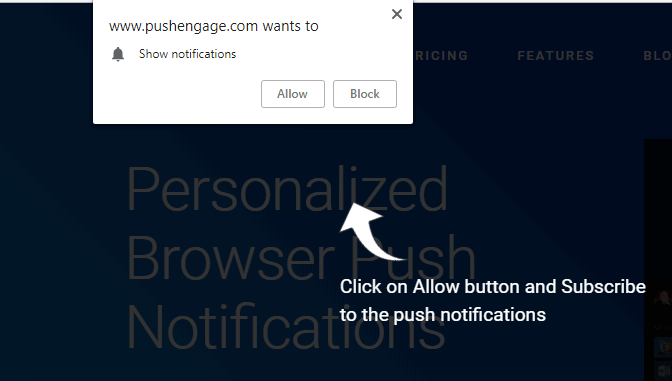
しかし、プッシュ通知では、デバイスとIPアドレスの組み合わせをキャプチャして、顧客のデバイスに固有のキーを生成します。「許可」をクリックしてプッシュ通知をオプトインすると、これが起こります:
さらに、PushEngageは購読者のジオロケーションを保存できるため、パーソナライズされたプッシュ通知キャンペーンを作成できます。これには、購読時の国、州、都市が含まれます。
しかし、ご存知のとおり、これは完全に同意に基づいています。誰かがプッシュ通知を選択すると、マーケティング通知を送信することに同意したことになります。したがって、プッシュ通知は、同意を最優先するパラダイムで動作するため、定義上すでにGDPRに準拠しています。
さまざまな種類の通知を設定した後にやること
さまざまな種類の通知を送信する方法がわかったので、キャンペーンの構築を開始する時間です。プッシュ通知を効果的に使用する方法の他の例を確認することから始めましょう。
- 利用できるウェブサイトのウェルカムメッセージのベスト21例
- Webプッシュ通知WordPressプラグインをサイトに追加する方法
- 今すぐ使える、素晴らしいプッシュ通知の例75選
- インスピレーションを得るための15のプッシュ通知コピー例
- コンバージョン率の高いプッシュ通知オプトインの7つの例(2022年)
- 今すぐ盗める!クリエイティブなプッシュ通知の11の例
プッシュ通知キャンペーンを最大限に活用するには、プッシュ通知のベストプラクティスに関する記事も参照してください。
しかし、プッシュ通知を送信し始めない限り、これらのどれもあなたのブランドにとって大きな変化をもたらすことはありません。
ですので、まだ始めていない場合は、今日からPushEngageを使い始めましょう!


