
プッシュ通知の見た目を、そのパフォーマンスと同じくらい良くしたいと思いませんか? Androidの通知色をカスタマイズすることは、ブランドを際立たせるための迅速な方法であり、特にモバイルでオーディエンスにリーチするたびに、ブランドを際立たせることができます。これは、エンゲージメントの取り組み全体に大きな影響を与える、些細なディテールの1つです。
一番良いところは? 設定はわずか数分で完了します。
このクイックガイドでは、わずか数ステップでアプリのAndroid通知色を変更する方法を説明します。
早速始めましょう。
Androidモバイルアプリのプッシュ通知キャンペーンを今すぐ送信!
プッシュ通知は、リピートトラフィック、エンゲージメント、売上を自動で伸ばすのに役立つ、非常に効果的で低コストなマーケティングツールです。
アプリにカスタムAndroid通知色を追加する理由
もちろんです!簡単に説明しましょう:
あなたのアプリを物語のキャラクターだと想像してみてください。そして、そのキャラクターを群衆の中で認識してもらいたい方法を考えてみてください。そこでカスタムAndroid通知色の出番です!
- ブランドイメージ:アプリの通知がその色と一致すると、キャラクターがシグネチャー衣装を着ているようなものです。これにより、すぐに認識できるようになり、ユーザーとの信頼とロイヤルティが構築されます。
- 目立つ:通知で溢れる世界では、あなたの通知は目立つ必要があります。カスタムカラーはメッセージが目を引くのに役立ち、ユーザーが更新の海の中でそれに気づくようにします。
- ユーザーを幸せにする:人々は、自分のために作られたと感じるものを愛しています。ユーザーに通知色の選択肢を与えることで、コントロール感とパーソナライゼーションの感覚を与えます。幸せなユーザーは、アプリとのエンゲージメントをより多く意味します。
- みんなを助ける:誰もが同じように色を見るわけではありません。さまざまな色のオプションを提供することで、世界をどのように見ているかに関わらず、誰もが通知を簡単に見つけて理解できるようにしています。
- メッセージを伝える:色は言葉なしで多くのことを伝えることができます。たとえば、落ち着いた青は情報提供的なものを合図するかもしれませんが、大胆な赤は緊急のアクションが必要であることを意味するかもしれません。通知が誰もが理解できる言語を話しているようなものです。
- 先を行く:混雑したアプリストアでは、すべての小さなディテールが重要です。カスタム通知色を提供することは、ユーザーが何を求めているかに注意を払っていることを示します。これにより、アプリは他のアプリよりも輝きを増します。
したがって、Androidアプリにカスタム通知色を追加することで、見た目を良くするだけでなく、ユーザーとのより強いつながりを築き、アプリを見つけやすくし、競争の激しいアプリの世界でそのエッジを与えています。さらに、設定はあなたが思うよりも簡単で、人々があなたのアプリとどのようにやり取りするかに大きな違いをもたらす可能性があります。
カスタムAndroidプッシュ通知色を追加する方法
AIコーディングアシスタントとの連携PushEngage Agent Skillsは、Claude Code、Cursor、およびSKILL.md互換のエージェントにこのSDKの統合とデバッグを教えます。出荷後は、PushEngage MCPサーバーにより、同じアシスタントがキャンペーン(セグメント、送信、A/Bテスト、レポート)を実行できます。Replit、Lovable、またはBoltで構築していますか?オープンソースのvibe-coding kitsには、すぐに使えるデモストア、Flutterスターター、およびPushEngageが事前に接続されたワンプロンプトデモが含まれています。
Android通知色がアプリにとって何を意味し、なぜ追加すべきかを理解したので、コーディングなしで簡単にそれを追加する方法を見てみましょう。
ステップ1:Androidアプリプッシュ通知サービスを選択する
プッシュ通知は、訪問者がウェブサイトを離れた後も接続を維持するのに役立つマーケティングツールです。プッシュ購読者にターゲットを絞った通知を送信したり、さまざまな顧客セグメントに合わせて通知をパーソナライズしたりすることもできます。しかし、どのAndroidプッシュ通知サービスを選択すべきでしょうか?
プッシュ通知キャンペーンの送信にはPushEngageの使用をお勧めします。

PushEngage は世界最高のプッシュ通知サービスです。無料版だけでなく、ターゲットを絞ったプッシュメッセージでサイトを離れた訪問者とつながることができます。
PushEngageがプッシュ通知サービスおよびツールとして第一選択肢である理由は次のとおりです。
- 非常に使いやすい
- 設定にほとんどまたは全くコーディングを必要としない、事前構築済みテンプレートを備えたビジュアルキャンペーンビルダーがあります。
- あらゆる種類のサイト向けに、完全に自動化されたプッシュ通知キャンペーンを簡単に設定できます。
- AndroidおよびiOS SDKを完備しており、アプリプッシュキャンペーンを迅速に開発、展開、分析、管理できます。
- クリック率を高めるためのパーソナライズされたプッシュ通知を送信するための複数のオプションが組み込まれています。
- カスタム目標追跡、UTMパラメータ、高度な分析機能を備えています。
- 強力なプッシュ通知A/Bテストオプションがあります。
これはほんの始まりにすぎません。さらに進む前に、PushEngageの機能の全リストを確認してください。PushEngageの最も素晴らしい点は、購入を決定する前に試すことができる、永久無料プランがあることです。
プロのヒント:サービスを購入する前に、プッシュ通知のコスト分析に関する記事を確認してください。
ステップ2:PushEngage Androidアプリプッシュ通知を設定する
これまでは、アプリプッシュ通知を送信するためにスケルトンSDKを使用する必要がありました。これらのSDKを使用する問題は、非常に基本的なものであることです。
理論的には、それらを使用してあらゆる種類のモバイルアプリプッシュキャンペーンを送信できます。しかし、それには以下を構築する必要があります。
- キャンペーンを管理するためのインターフェース
- キャンペーンパフォーマンスを追跡するための分析スイート
- リッチメディアおよびアプリ内リダイレクトリンク(またはディープリンク)のより良いサポート
- マーケティングチームと開発チームの両方を連携させるプロセス
すべては、単一の成長チャネルを導入するためです。古いツールを使用してモバイルアプリのプッシュ通知を送信することは、手間がかかり、高価で、リソースを大量に消費し、時間のかかるものです。そしてもちろん、開発と管理を行うには、チームに深いコーディングスキルが必要です。
新しいPushEngage Android SDKを使用すると、同じ信頼性の高いソフトウェアを使用してモバイルアプリプッシュを送信し、優れた配信率を実現できます。しかし、アプリとのカスタム統合を非常に簡単に構築できる、いくつかのレイヤーを上に構築しました。そして、PushEngageはSDK全体を管理します。そのため、統合を管理するためだけに多大な時間とお金を費やす必要はありません。
あなたがする必要があるのは、構築することだけです!
PushEngageのSDKを使用してモバイルアプリプッシュ通知を送信するようにアプリを設定すると、PushEngageダッシュボードから直接ブロードキャスト通知を送信できます。はい、アプリにコードを追加し、アプリとPushEngage API間のコネクタを開発する必要があります。しかし、それが完了すれば、次のような、あらかじめ構築されたソフトウェアインターフェイスからモバイルアプリプッシュキャンペーンを簡単に作成できます。
- エンゲージメントの高いプッシュキャンペーンタイプ
- コンバージョン率の高い実績のあるキャンペーンテンプレート
- 公開するたびにコンテンツを宣伝するための自動キャンペーン
- 複数のターゲティングおよびキャンペーンスケジュールオプション
- 補完的な成長チャネルとしてのWebプッシュキャンペーン
- データに基づいたパーソナライゼーションを使用したオーディエンス維持率の向上
- 目標追跡と高度な分析
- スマートA/Bテスト
- 専任のサクセスマネージャー
その他多数。Androidモバイルプッシュキャンペーンの開発における手間を省きました。
ステップ3:Android通知色を追加または編集する
Androidモバイルアプリのプッシュ通知のカスタムカラーを簡単に設定できます。PushEngageダッシュボードに戻り、キャンペーン » ブロードキャストに移動して、新しいプッシュブロードキャストを作成をクリックします。

Androidオプションの下にあるアクセントカラーに移動します。
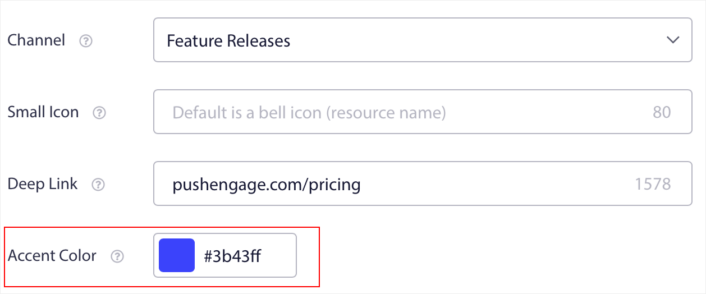
任意のアクセントカラーのRGBまたは16進数コードを使用できます。通知を送信するたびに、ここで選択したAndroid通知カラーが、行動喚起ボタンのテキストと小さなアイコンに表示されます。
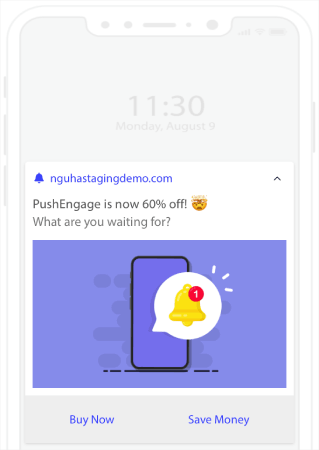
つまり、Androidプッシュ通知を送信する際に、ブランドデザインガイドラインを非常に簡単に維持できます。しかも、管理する必要のない使いやすいインターフェースからすべて実行できます!
そして最も素晴らしい点は、無料ユーザーでも無料テンプレートの一部にアクセスできることです。もちろん、いつでもPushEngageをアップグレードできます。
それでは、ウェルカムプッシュ通知キャンペーンを作成しましょう。PushEngageダッシュボードに移動し、**キャンペーン »** に進んでください。
Android通知色を追加した後にやること
Android通知カラーの追加方法がわかったので、次は独自のキャンペーン作成を開始する番です。ただし、キャンペーンを開始する前に、まず素晴らしいプッシュ通知の例をいくつか学ぶべきです。
また、プッシュ通知が初めての場合は、キャンペーンを作成する前にプッシュ通知のベストプラクティスに関する記事を確認してください。私たちが積極的に推奨するベストプラクティスの一部は次のとおりです。
- 好奇心を刺激してクリック率を向上させる
- 各プッシュ通知をパーソナライズする
- リッチメディアで目立つ
- 休眠中のプッシュ購読者を再活性化する
- 顧客に常に情報を提供する
- 可能な限り絵文字を使用する
- 緊急性を演出する
プッシュ通知キャンペーンの作成には PushEngage の使用をお勧めします。PushEngage は市場で 1 位の プッシュ通知ソフトウェアであり、キャンペーンは安全に管理されます。
まだの場合は、今すぐPushEngageを始めましょう。


