こんにちは、Engagelings。
嬉しいニュースです:PushEngageでRSSプッシュ通知の大幅なアップグレードを追加しました。
以前にRSS自動プッシュキャンペーンを開始し、非常に人気がありました。しかし、RSS通知でできることには制限がありました。そこで、RSSフィードキャンペーンに、より強力な機能を追加しました。
主な変更点を簡単に見てみましょう:
- 複数のRSSフィードを作成する
- RSSプッシュ通知をいつでも開始/一時停止/削除する
- RSSフィードに大きな画像を追加する
- RSSフィードプッシュ通知用の大きな画像を動的に選択する
- RSSフィードから通知アイコンを動的に設定するか、ブランドアイコンをアップロードする
- RSSフィードを指定した間隔でスクレイピングして、最新のコンテンツを自動的に宣伝する
- よりパーソナライズされた配信のためにターゲットとしたいオーディエンスグループを選択する
- 通知の有効期限ルールを追加する
- カスタムUTMパラメータを設定する
- 各RSSフィードキャンペーンの詳細なキャンペーン分析を取得する
また、非常に使いやすくしました。このアップグレードには多くの作業が費やされており、きっと気に入っていただけると思います。メジャーアップデートでもあるため、解き明かすべきことがたくさんあります。
さあ、始めましょう。
RSSプッシュ通知を送信する理由
常にコンテンツを作成し、ブログを管理するのは大変な仕事です。しかし、真剣なビジネスを運営しているなら、コンテンツを作成するだけでは不十分であることを知っているはずです。コンテンツを宣伝することもできなければなりません。
そして、プッシュ通知は費用対効果の高い方法で購読者を獲得するための素晴らしい方法です。プッシュ通知がマーケティングツールとして優れている理由は、完全に自動化できることです。
そこでRSSプッシュ通知が登場します。
RSSプッシュ通知を正しく設定すれば、サイトにコンテンツを公開するたびに、購読者は自動的にコンテンツに誘導するプッシュ通知を受け取ることができます。
ただし、誤解しないでください。RSSプッシュ通知は、他の自動プッシュ通知キャンペーンよりもパーソナルではありません。そのため、成長を最大化するために、さまざまなキャンペーンを組み合わせて使用することをお勧めします。たとえば、eコマースサイトを運営している場合は、eコマースプッシュ通知を有効にする必要があります。
複数のRSSフィード通知を作成する
サイトにPushEngageをインストールしたら、PushEngageダッシュボードに移動し、キャンペーン » RSS自動プッシュにアクセスして、新しいキャンペーンを作成をクリックします。
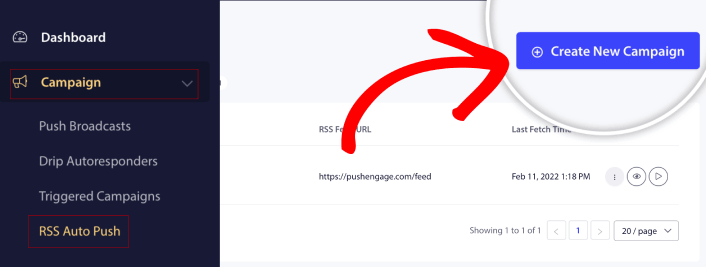
この新しいアップグレードにより、さまざまなセグメントやオーディエンスグループに対して、複数のRSSフィード通知を作成して送信できるようになりました。あなたのサイトにはRSSフィードが1つしかないわけではありません。サイトのコンテンツの各カテゴリのRSSフィードを作成することができます。
そして、これにはほとんど時間がかかりません。しかし、複数のフィードを作成することで、よりパーソナライズされたRSSプッシュ通知を送信できます。
例えば、それぞれスーパーカー、バイク、トラックにしか興味がない3つのオーディエンスグループがいるとします。各カテゴリの異なるRSSフィードURLを簡単に作成し、購読者が実際に興味のあるコンテンツに関するプッシュ通知を送信できます。
その結果?シンプルなRSS自動プッシュキャンペーンでも、サイトエンゲージメントの急増が見られるでしょう!
RSSキャンペーンをいつでも開始、一時停止、削除する
RSSキャンペーン、さらにはメールRSSキャンペーンにおける最大の課題は、スケジューリングでした。送信する投稿数を制御するのは非常に困難でした。そして、キャンペーンを一時停止することはさらに困難でした。
今までは!
PushEngageを使用すると、RSSフィードキャンペーンをいつでも簡単に開始、一時停止、または削除できます。複数のキャンペーンを実行している場合は、非常に便利な機能です。
たとえば、ブラックフライデーのプッシュ通知キャンペーンを実行しているとしましょう。購読者はプロモーションオファーのみに集中する必要があります。しかし同時に、ホリデーシーズンが終わるまで新しいコンテンツの公開を停止することはできません。RSSフィードキャンペーンを一時停止するのに最適な時期です。
複数のRSSキャンペーンを実行できるようになったため、プロモーションでターゲットにしていない購読者には、通常のコンテンツを送信し続けることもできます。
簡単な画像カスタマイズオプション
RSSフィードから直接、通知アイコンと通知の大きな画像の両方をカスタマイズできます。通知アイコンについては、アイコンを手動でアップロードできます。
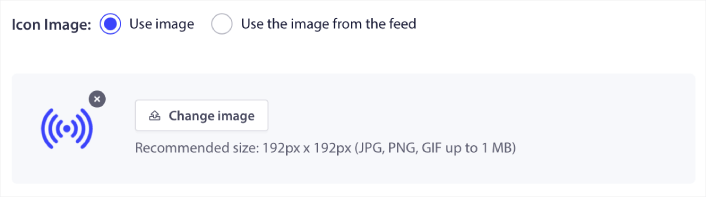
または、PushEngageがRSSフィードから通知アイコンを動的にスクレイピングするようにパターンを設定することもできます。
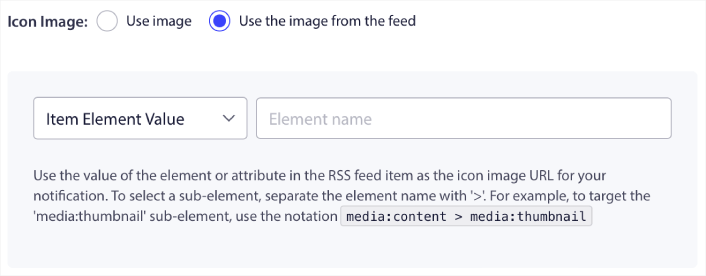
同様に、PushEngageが投稿の大きな画像を自動的に見つけるようにすることもできます。

または、RSSフィードから取得して、どのような大きな画像にしたいかをカスタマイズすることもできます。
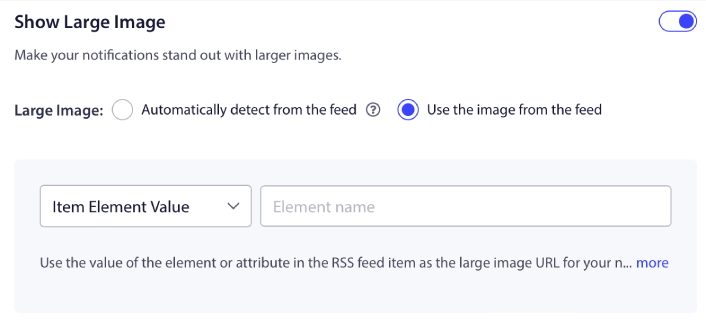
注意:高度な画像スクレイピングオプションは、RSSフィードのXMLを読み取ることができる場合にのみ使用してください。XMLに慣れていない場合は、PushEngageに通知の大きな画像を決定させ、通知アイコンを手動でアップロードする必要があります。
RSS通知の頻度を設定する
各RSSキャンペーンのキャンペーン頻度を設定することもできます。
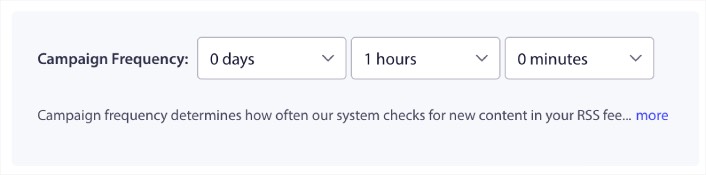
キャンペーン頻度は、RSSフィードキャンペーンがブログの新しいコンテンツをどれくらいの頻度で検索して自動プッシュ通知を送信するかを示します。最小値は15分、最大値は7日です。
ニュースエージェンシーでない限り、2日に1回コンテンツを宣伝することをお勧めします。ニュースエージェンシーの場合は、15分に設定してください。PushEngageは、RSSフィードキャンペーンを設定して公開した後でのみ新しいコンテンツを検索することに注意してください。
プッシュ通知の有効期間を設定する
プッシュ通知の有効期間とは、通知が自動的に削除されるまで、購読者の通知トレイに表示される期間のことです。
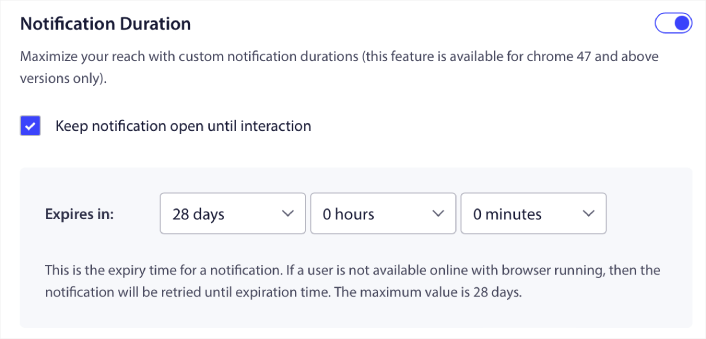
未読通知の山で購読者を圧倒したくない場合は、プッシュ通知が数日で期限切れになるようにするのが最善でしょう。
ブロードキャスト通知や他の自動プッシュ通知とは異なり、RSSプッシュ通知をタイムゾーンや特定の送信時間でスケジュールすることはできません。そのため、購読者が操作するまで通知を開いたままにしておくオプションがあり、有効期限内でも可能です。
UTMパラメータを設定して通知を追跡する
UTMパラメータを設定して、プッシュ通知を追跡することもできます。
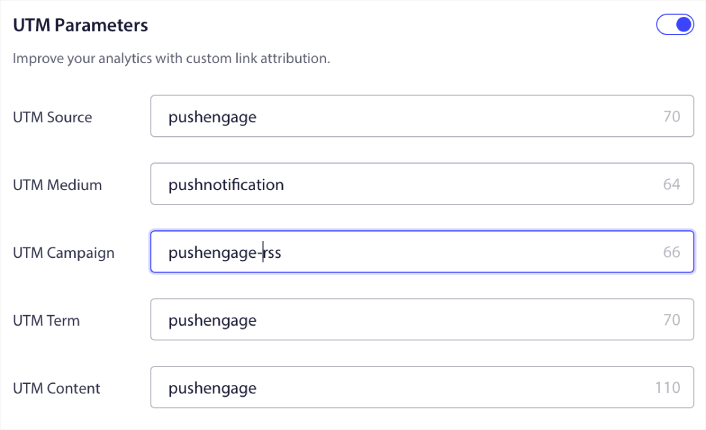
これにより、Googleアナリティクスでこれらのプッシュ通知からのトラフィックを簡単に属性付けできます。もちろん、PushEngageダッシュボードから直接、キャンペーン全体の詳細な分析を取得することもできます。
特定のオーディエンスグループをターゲットにする
RSSプッシュ通知の最大のアップグレードは、ターゲット通知を送信するためのオーディエンスグループを選択できるオプションです。RSSフィードキャンペーンをすべての購読者に送信することも、オーディエンスグループを作成して、RSSフィードからでもパーソナライズされたプッシュ通知を送信することもできます。
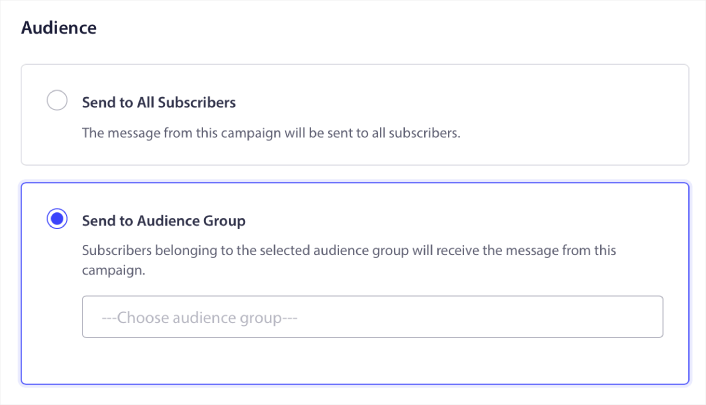
これで、一度設定すれば自動プッシュ通知を送信できます。しかし、特定のオーディエンスにどのようなコンテンツを宣伝したいかを選択できるため、さらに優れています。
他に何か?
ビジネスを成長させることは大変な仕事であることを私たちは知っています。PushEngageでは、製品とお客様のエクスペリエンスを常に改善する方法を探しています。この新機能は、PushEngageサブスクリプションからさらに多くの価値を引き出すのに役立つようにリリースされました。
このお知らせをお読みいただき、誠にありがとうございます。
ご不明な点がございましたら、カスタマーサクセスチームがお手伝いいたします。ライブチャットで会話を開始するか、 お問い合わせページをご覧ください。
そして、PushEngageをご利用いただきありがとうございます。無料版をご利用の場合でも、エンタープライズ版をご利用の場合でも、お客様は私たちにとって同様に重要です。新しいRSS自動プッシュ機能は、お客様の成功を支援するために設計されており、お客様の成功を心よりお祈り申し上げます。
以下のコメントでご意見をお聞かせください。まだお済みでない場合は、 今日からPushEngageを始めましょう!


