こんにちは、Engagelings。
エキサイティングなお知らせ:Shopifyアプリの料金プランを更新し、エキサイティングな新機能を追加しました。しかも、これまで以上に手頃な価格でeコマースビジネスを成長させることが容易になりました!
エキサイティングに聞こえますか?ここでは多くのことを掘り下げていきます。それでは、始めましょう。
PushEngageの新しいShopify料金プランとは?
現在、無料プランとグロースプランの2つの料金プランがあります。
無料プランは、月間利益が100ドル未満の新規eコマースビジネスに最適です。PushEngageダッシュボードの操作感を試すのにも適しています。
一方、グロースプランは月額わずか4ドルから5,000人のサブスクライバーに対応しており、アカウントを最大100,000人のサブスクライバーまでアップグレードできます。100,000人を超える場合は、エンタープライズアカウントについてお問い合わせください。
しかし、これ以外にも多くのことがあります。まず、クリック数やプッシュメッセージの送信数ではなく、サブスクライバーリストに基づいて課金されます。これは大きな違いです。PushEngageでは、以下のメリットがあります:
- 予測可能なコスト:サブスクライバーベースの料金モデルでは、サブスクライバーリストのサイズに基づいて正確な支払い額がわかります。これにより、予測不可能に変動する可能性のあるインプレッションベースのモデルと比較して、予算編成とコスト予測がはるかに容易になります。
- 量より質に重点を置く:インプレッションごとに支払う場合、より多くの価値を得るために、エンゲージメントの低いユーザーや非アクティブなユーザーに対しても、できるだけ多くの通知を送信するインセンティブが生じます。サブスクライバーベースの料金設定では、通知でユーザーを飽和させるのではなく、質の高いエンゲージされたサブスクライバーベースの構築に重点が移ります。
- 目標との整合性の向上:プッシュ通知の主な目的は、サブスクライバーベースに効果的にリーチし、エンゲージすることです。サブスクライバーごとの支払いは、インプレッションという曖昧な指標に基づいてコストを計算するのではなく、この目標に直接料金モデルを整合させます。
- 過剰請求の回避:インプレッションベースの料金設定では、ユーザーに実際に見られたりエンゲージされたりすることのない通知に対して支払いを行い、無駄な支出につながる可能性があります。サブスクライバーベースの料金設定により、アクティブで同意したオーディエンスに対してのみ支払うことができます。
- 透明性と管理:コストが購読者数のみに基づいていることを知ることで、プッシュ通知の支出に対する透明性と管理性が向上します。これは、多くの外部要因の影響を受ける可能性のある指標(インプレッション)によってコストが決まるのではなく、より良い方法です。
これに加えて、購読者リストをクリーンアップして非アクティブな購読者を削除し、支払いを減らして送信ボリュームを最大化することもできます(これについては後述)。
Shopifyプッシュキャンペーンの作成方法
PushEngage Shopifyアプリのインストールが完了したら、Shopifyの検索バーでそれを検索してください。

PushEngageダッシュボードに移動するには、PushEngage Push Notificationsをクリックしてください。

ここでは、好きなeコマースプッシュ通知キャンペーンを作成できます。
コンバージョン率の高いShopifyキャンペーンの送信方法
eコマースキャンペーンは、Shopify連携が真価を発揮する場所です。非常にシンプルで簡単です。PushEngageダッシュボードにアクセスし、キャンペーン » トリガーキャンペーン:に移動してください。
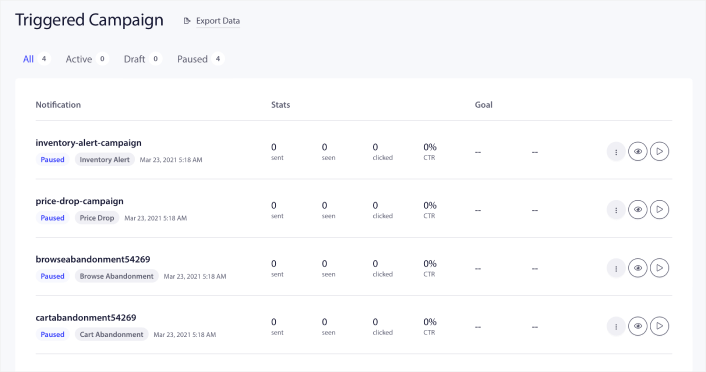
アカウントには、デフォルトで4つの事前構築済みトリガーキャンペーンが付属していることがわかります。
- 値下げアラート
- 在庫アラート
- 閲覧放棄キャンペーン
- カート放棄キャンペーン
各キャンペーンを編集し、コンテンツセクションに入力して有効にするだけです。事前構築済みのキャンペーンテンプレートには、すでにコンバージョン率の高いコピーが含まれています。しかし、すべてのお客様に、マーケティング戦略に合わせてコンテンツを編集していただくようお願いしています。
シーケンス内のプッシュ通知のいずれかをクリックすると、通知を好きなだけカスタマイズできます:
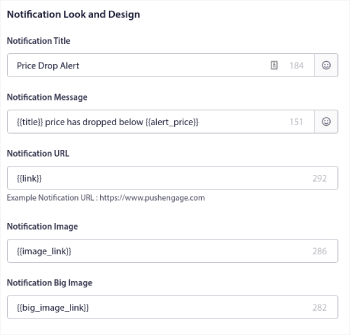
よりスムーズなコンバージョンを実現するために、複数のボタンを追加することもできます。
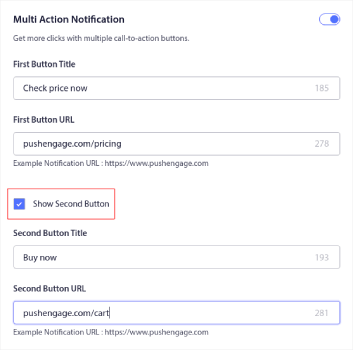
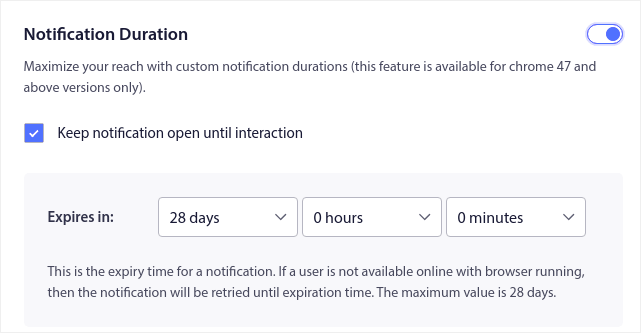
また、通知期間でカスタム通知期間を設定できます。
コンテンツタブでの作業が完了したら、トリガー設定ボタンをクリックして、プッシュ通知がいつ送信されるかを構成します。
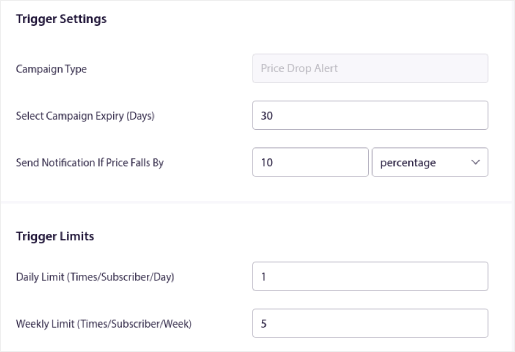
このプロセスは、すべてのeコマースキャンペーンで同じです。キャンペーンをカスタマイズして有効にするだけです。APIキー、手動コード統合、開始までの障壁は一切なく、10分以内に完了できます!
注:カート放棄キャンペーンでは、キャンペーンから生成されたコンバージョンと収益を報告する事前構築済みの収益トラッカーも利用できます。この機能を有効にするために何もする必要はありません。カート放棄キャンペーンを実行するだけです。
プッシュブロードキャストの送信方法
時折、特定の期間限定オファーやプロモーションを発表するためにプッシュブロードキャストを送信したい場合があります。キャンペーン » ブロードキャストに移動し、新しいプッシュブロードキャストを作成をクリックしてください。

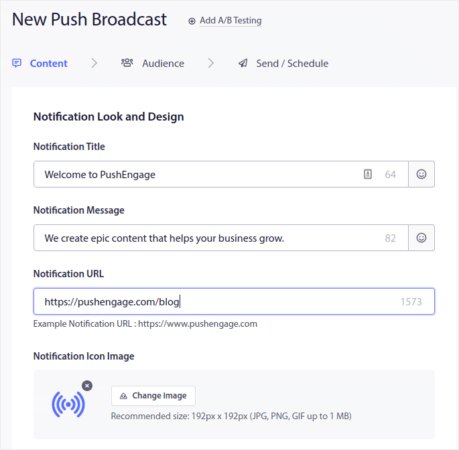
次に、送信する新しいプッシュ通知を作成します。コンテンツタブでコンテンツをカスタマイズしてください。
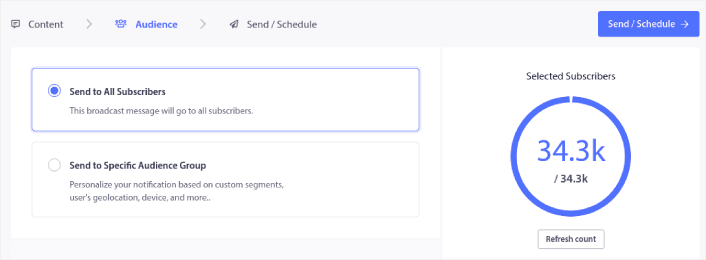
次に、オーディエンスでオーディエンスを選択します。
最後に、送信/スケジュールで、通知を定期的なプッシュ通知としてスケジュールできます。

カスタムの日、日付、時刻を含む、プッシュ通知の任意のスケジュールを簡単に作成できます。
RSS自動プッシュキャンペーンの設定方法
コンテンツを継続的に作成し、ブログを管理するのは大変な仕事です。しかし、真剣なビジネスを運営しているなら、コンテンツを作成するだけでは不十分であることを知っているはずです。コンテンツを宣伝することもできなければなりません。しかし、コンテンツを自動的に宣伝してeコマースビジネスの収益を拡大する方法は?
そして、プッシュ通知は、費用対効果の高い方法で購読者を獲得するための優れた方法です。プッシュ通知がマーケティングツールとして非常に優れている点は、完全に自動化できることです。そこで、RSSプッシュ通知が登場します。
PushEngageダッシュボードに移動し、キャンペーン » RSS自動プッシュに移動します。
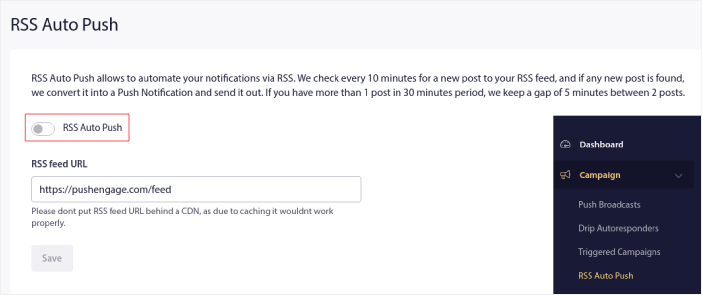
トグルボタンをクリックしてRSS自動プッシュを有効にし、RSSフィードURLを貼り付けます。それが完了したら、RSSを検証をクリックして、RSSフィードが受け入れられたことを確認します。完了したら、保存をクリックします。
これで、新しい投稿を公開するたびに、プッシュ通知の購読者は新しいコンテンツに関するプッシュ通知を自動的に受け取ります。
Shopifyでサブスクライバーコストを削減する方法
非アクティブな購読者を削除することで、ShopifyのPushEngageプランのコストを削減できます。購読者ごとに料金が発生するため、理由なくコストを膨らませてしまうことがないように、不要な購読者を削除するオプションも提供しています。
プッシュエンゲージダッシュボードに移動し、Audience » Subscribersに移動すると、同じオプションが表示されます。通知を受信、表示、またはクリックしなかった購読者を任意の日数で削除できます。
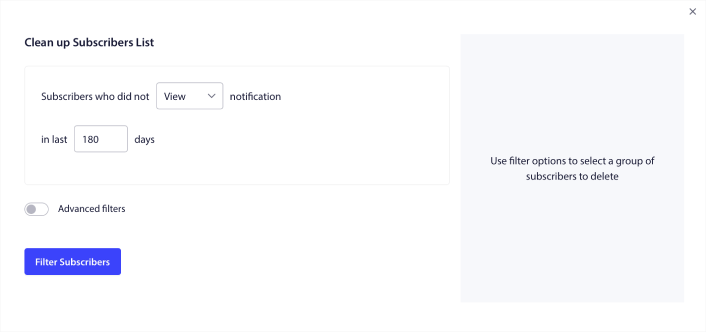
通知を表示していない購読者は240日後に削除することをお勧めします。さらに具体的な削除のために高度なフィルターを使用することもできます。
高度なフィルターには以下が含まれます:
- 属性: プラットフォームやその他の識別データなどの特定の属性を持つ購読者を削除します。
- セグメント: セグメント全体または一連のセグメントを削除します
- ブラウザ: 特定のブラウザから購読者を削除します。
- デバイス: デスクトップまたはモバイルデバイスからエンゲージする購読者を削除します。
- 国: 特定の国から購読者を削除します。
- 都道府県: 特定の都道府県から購読者を削除します。
- 都市: 特定の都市から購読者を削除します。
- 登録日: 特定の日付より前または後に登録したユーザーを対象とします。エンゲージしていない新規登録者を再ターゲティングするのに最適です。
- 最終送信日時: 特定の期間より前に最後に通知を受信した購読者を対象とします。
- 最終閲覧日時: 特定の期間より前に最後に通知を閲覧した購読者を対象とします。
- 最終クリック日時: 特定の期間より前に最後に通知をクリックした購読者を対象とします。
- 総送信回数: ライフタイムの通知受信総数が特定の回数以下である購読者を対象とします。プッシュ通知をまったく受信しなくなった購読者を対象とするのに最適です。
- 総閲覧回数: ライフタイムの通知閲覧総数が特定の回数以下である購読者を対象とします。通知は受信するものの、まったく確認しない購読者を対象とすることを目的としています。
- 総クリック回数: ライフタイムの通知クリック総数が特定の回数以下である購読者を対象とします。通知をまったくクリックしない購読者を絞り込みます。
- 購読者ハッシュ: 特定の購読者をリストから削除することを目的としています。リストからメールを削除するのと似ています。
これらのフィルターを個別に適用しても、あまり意味がないかもしれません。しかし、複数のフィルターを組み合わせて特定のオーディエンスメンバーを選択することができます。たとえば、1年以上購読しているが、一度も通知をクリックしたことがない購読者を削除したいとします。その場合、「登録日」フィルターと「総クリック回数」フィルターを組み合わせることができます。
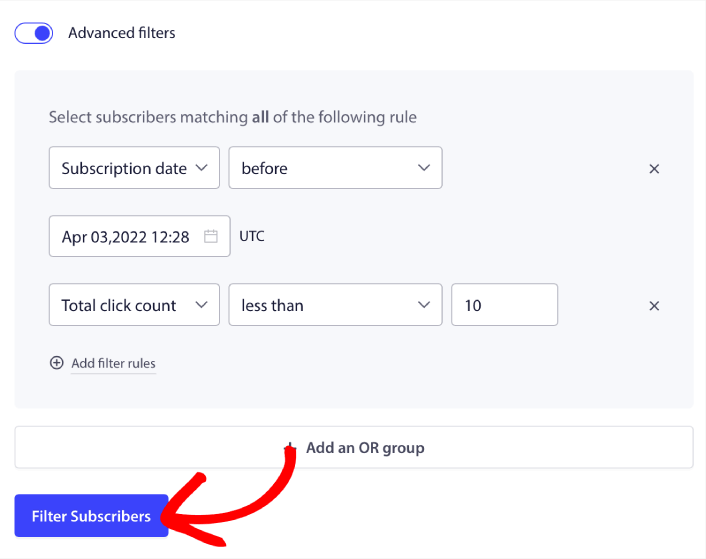
複数のタイプの非アクティブユーザーを絞り込む場合は、「+ ORグループを追加」ボタンをクリックして、複数のタイプのユーザーを対象とすることができます。
Shopifyでサブスクリプション管理ウィジェットを作成する方法
購読管理ウィジェットは、プッシュエンゲージのユニークな機能であり、購読者やウェブトラフィックがどのような種類の通知を受信したいかを選択できます。
PushEngageダッシュボードに移動し、デザイン » ウィジェットに移動して、購読管理ウィジェットを有効にします。

Edit Widgetボタンをクリックしてウィジェットをカスタマイズします。まず、Look and Designの下で、ブランドのデザイン言語に合わせてウィジェットの外観をカスタマイズすることから始めます。
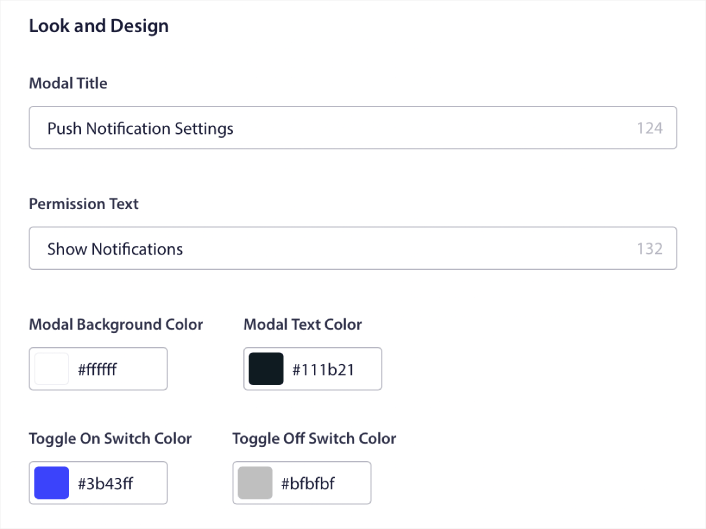
訪問者がデフォルトのポップアップモーダルから購読しなくても、常に表示される完全にカスタムなポップアップモーダルを作成できます。ポップアップトリガーボタンのサイズが合わない場合は、Trigger Buttonの下でカスタマイズすることもできます。
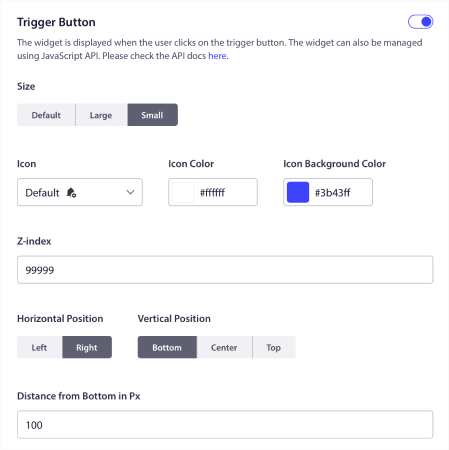
そして最もクールなのは、Trigger Button Display Rulesの下で、ウィジェットを表示する特定のページを選択できることです。

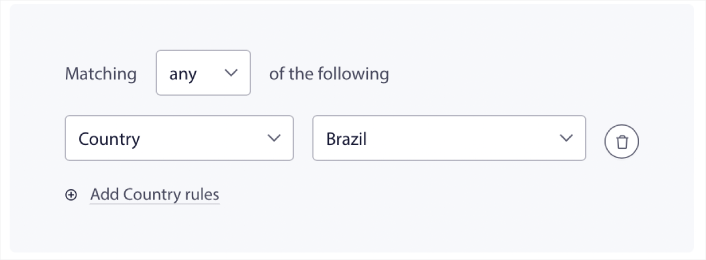
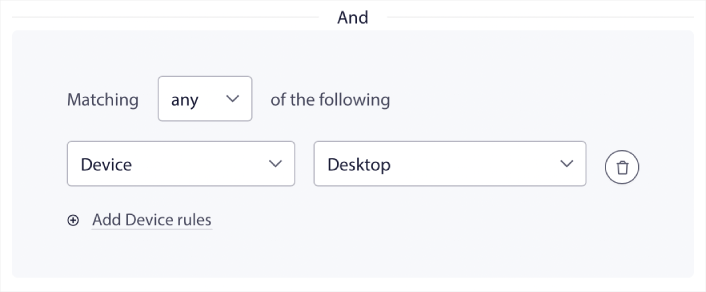
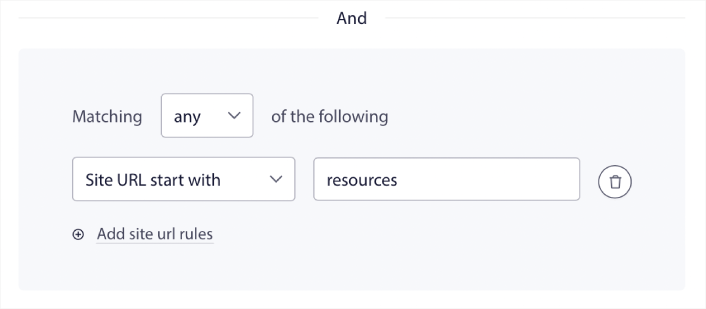
デフォルトでは、ボタンはすべてのページに表示されます。 しかし、特定のターゲットを設定することで、ウィジェットの特定のバージョンを表示するためのカスタムターゲティングルールを作成できます。
場所:
デバイス:
そしてサイト上のURL:
さらに進んで、Segment Preferencesの下で、購読者が受信したい通知の種類を選択できるようにすることもできます。
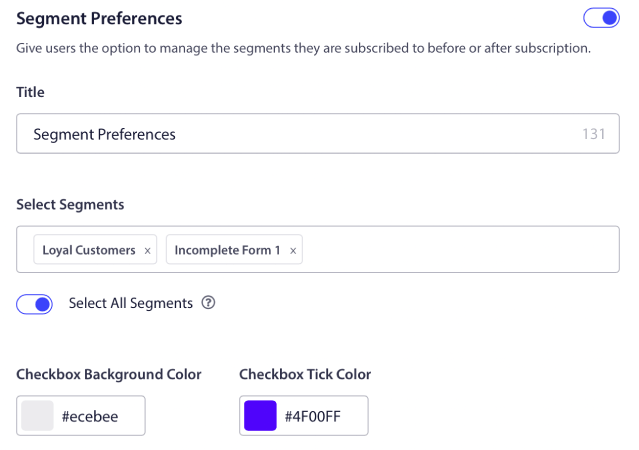
Select All Segmentsを有効にすると、購読者はデフォルトで選択されたすべてのセグメントに自動的に追加されます。
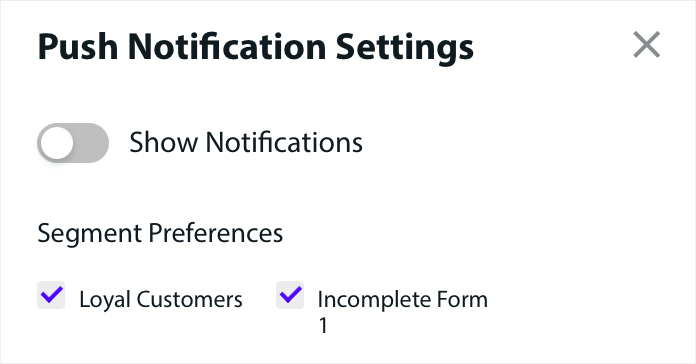
これは、リターゲティングリストを構築するための素晴らしい方法です。
サイトでeCommerceプッシュ通知を実行している場合、それらの多くはトリガープッシュ通知になります。これには以下が含まれます。
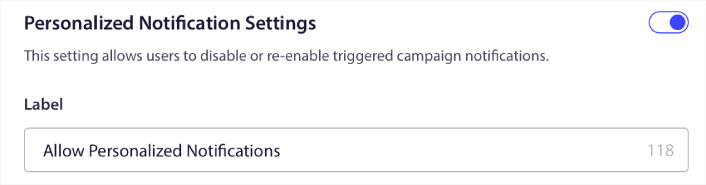
カスタムトリガープッシュ通知キャンペーンさえも可能です。購読管理ウィジェットを使用すると、購読者がパーソナライズされた通知を表示したいかどうかを選択できるようになりました。

Personalized Notification Settingsの下のオプションを有効にするだけです。
アプリプッシュ通知でビジネスを成長させる方法
ストア用のAndroidまたはiOSアプリ、あるいはWebアプリを実行している場合は、モバイルアプリプッシュ通知とWebアプリプッシュ通知を使用して、さらに迅速に売上を伸ばすことができます。
注:PushEngageの強力なSDKを使用して、AndroidおよびiOSアプリにモバイルプッシュ通知を追加することもできます。キャンペーンの送信と管理のためのインターフェースを構築および管理する必要はありません。すべて同じダッシュボードから実行できます。
モバイルアプリのプッシュ通知は、アプリからユーザーのモバイルデバイスに直接送信されるメッセージであり、アプリがアクティブに使用されていない場合でも、更新、リマインダー、またはパーソナライズされたコンテンツを提供します。これらは、ユーザーの指先にタイムリーで関連性の高い情報を提供することで、ユーザーエンゲージメントを高めます。
もちろん、これはアプリを持っているか、将来的にビジネス用のモバイルアプリをリリースするプロセスにある場合にのみ役立ちます。ビジネスを成長させるためにアプリをリリースすることに迷っている場合は、今が適切な時期かもしれません。アプリが直面する最大の課題の1つは、顧客エンゲージメントです。そしてPushEngageは、その痛みを完全に解消するのに役立ちます。
より深く、より頻繁なエンゲージメントのためには、アプリプッシュが好ましいです。時折の更新やアラートには、Webプッシュが効果的です。この目的のために、アプリ通知キャンペーンは、より優れたリッチメディアおよびインタラクティブコンテンツを提供します。アプリのプッシュ通知は、Webプッシュ通知ではほとんど使用できないデータに依存しています。
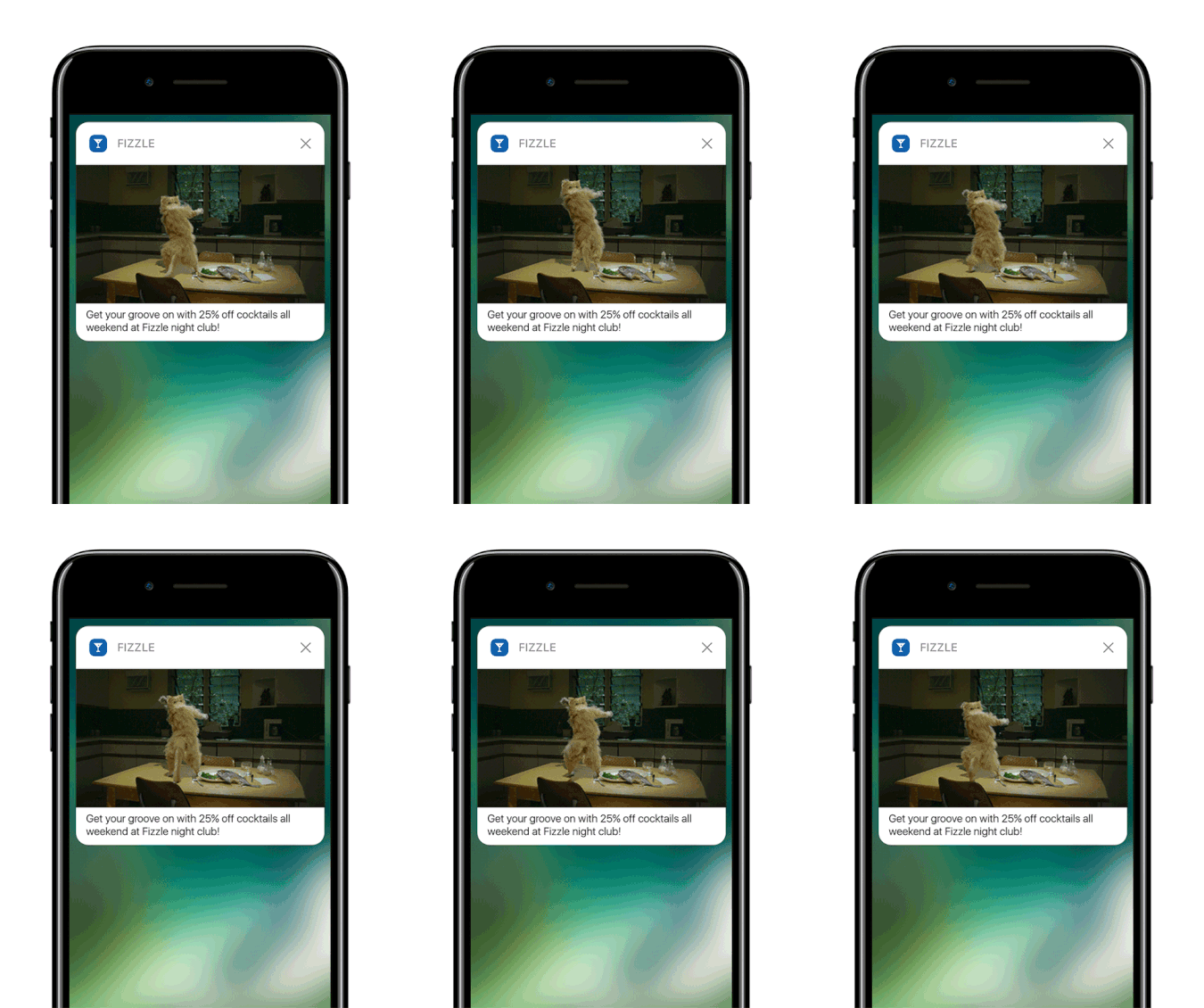
公平を期すために言えば:パーソナライズされたWebプッシュ通知を作成できます。しかし、アプリプッシュはパーソナライゼーションにおいて、はるかに深く掘り下げることができます。
モバイルアプリのプッシュ通知は、単なるコミュニケーションツールを超えて、ユーザーエクスペリエンスを向上させ、エンゲージメントを促進し、ユーザーとのパーソナルなつながりを構築するための強力なメカニズムです。
これらは、アプリがユーザーを維持し、エンゲージメントを高める上で効果に大きく貢献できるインタラクティビティとパーソナライゼーションのレベルを可能にします。
- ユーザーエンゲージメントの向上:
- コンテキストの関連性:アプリのプッシュ通知は、非常にコンテキストに敏感になる可能性があります。ユーザーデータ(場所、行動、好みなど)を利用して、タイムリーで関連性の高い通知を送信します。たとえば、フィットネスアプリは、通常ランニングに行くときにモチベーションを高めるメッセージを送信する場合があります。
- 行動トリガー:特定のユーザーのアクションまたは非アクションによって通知をトリガーできます。これにより、カートに残した購入を完了するようにユーザーにリマインドするなど、望ましい行動を奨励する上で非常に効果的です。
- リッチなユーザーエクスペリエンス:
- マルチメディア統合: 基本的なテキストメッセージとは異なり、アプリの通知には画像、音声、さらには動画を含めることができます。この豊富なメディア統合により、より魅力的で楽しいものになります。
- インタラクティブな要素: 一部の通知では、ユーザーはロック画面または通知領域から直接操作できます。メッセージへの返信、投稿への「いいね」、さらには音楽再生の制御などのアクションが含まれる場合があります。
- パーソナライズされたコミュニケーション:
- カスタマイズされたコンテンツ: データ分析を使用することで、アプリは高度にパーソナライズされた通知を送信できます。これは、名前を使用するような簡単なものから、閲覧履歴に基づいて製品を推奨するような複雑なものまであります。
- セグメンテーションとターゲティング: アプリは、さまざまな基準に基づいてユーザーをセグメント化し、ターゲットを絞った通知を送信できます。これにより、ユーザーは自分の興味やニーズに関連する通知を受け取ることができます。
- 顧客維持とロイヤルティ:
- 定期的なエンゲージメント: ユーザーに情報を提供し、関与し続けることで、アプリの通知は顧客維持を大幅に改善できます。
- ロイヤルティ特典: 通知は、ロイヤルティプログラム、特別オファー、特典についてユーザーに通知するための効果的な方法であり、それによって顧客ロイヤルティを高めます。
- 分析インサイト:
- ユーザー応答データ: アプリは、ユーザーが通知とどのようにやり取りするかを追跡でき、ユーザーの好みや行動に関する貴重な洞察を提供します。
- A/Bテスト: このデータは、さまざまな通知戦略をA/Bテストして、何が最も効果的かを確認するために使用でき、より効果的なコミュニケーションにつながります。
- 運用効率:
- 自動化されたコミュニケーション: 通知は特定の基準に基づいて自動化でき、手動介入の必要性を減らし、タイムリーなコミュニケーションを保証します。
ユーザーデータと行動を活用することで、アプリプッシュ通知はビジネスが顧客と対話する方法を変革し、コミュニケーションをより関連性の高い、タイムリーで効果的なものにすることができます。このエンゲージメントとパーソナライゼーションの深さが、アプリプッシュ通知を際立たせ、あらゆるモバイルアプリケーションのデジタルコミュニケーション戦略において貴重な資産となっています。
さらに詳しいガイドが必要な場合は、iOSアプリのプッシュ通知の設定方法とAndroidアプリのプッシュ通知の設定方法に関するドキュメントをご確認ください。
他に何か?
ビジネスを成長させることは大変な仕事であることを私たちは知っています。PushEngageでは、製品とお客様のエクスペリエンスを常に改善する方法を探しています。この新機能は、PushEngageサブスクリプションからさらに多くの価値を引き出すのに役立つようにリリースされました。
このお知らせをお読みいただき、誠にありがとうございます。
ご不明な点がございましたら、カスタマーサクセスチームがお手伝いいたします。ライブチャットで会話を開始するか、 お問い合わせページをご覧ください。
PushEngageをご利用いただきありがとうございます。無料版をご利用の場合でも、エンタープライズ版をご利用の場合でも、お客様は私たちにとって同様に重要です。新しいコードスニペットは、お客様の成功を支援することを目的としており、お客様の今後のご多幸をお祈り申し上げます。
私たちは、あなたの生活をよりシンプルにするための、さらに壮大な統合機能を考案中です。ぜひ、以下のコメントであなたの考えをお聞かせください。今後見たい特定の統合機能をリクエストすることもできます。
まだの方は、今すぐ PushEngage を使い始めましょう!


