You can move your web push subscribers from OneSignal to PushEngage. Because web push subscriptions are tied to your domain and encrypted, they cannot simply be copied over and used right away, so this guide explains the path that works and what to expect afterward. Migration is handled together with our team, so you are not doing this alone.
Before You Start
- Create an account with PushEngage and complete installation from Site Settings » Installation.
- Have access to your OneSignal account.
- Know roughly how many subscribers you have, so we can confirm the right path for your account.
- After migration, plan to upgrade your PushEngage plan to fit your subscriber count before you start sending.
Why Key-Based Import Usually Is Not an Option with OneSignal
To take over an existing web push subscription with keys, a new provider would need the subscriber’s endpoint and VAPID keys. OneSignal no longer provides VAPID keys to users, which normally blocks that kind of import.
Even where original keys are available, keys alone do not deliver full messages. A browser cannot decrypt a message for a migrated subscriber until that subscriber returns to your site. Before that, a subscriber would only see a generic message such as “This site has been updated in the background.” For that reason, the reliable path from OneSignal is silent resubscribe.
How Silent Resubscribe Works
- Complete PushEngage installation from Site Settings » Installation.
- Your existing subscribers are re-subscribed to PushEngage quietly the next time they visit your site. They are not shown the opt-in popup again, because a subscriber who already granted notification permission does not need to grant it again.
- As subscribers return, they are recovered under PushEngage over time.
- Upgrade your plan to fit your subscriber count, refresh your dashboard, and start sending.
If you would rather ask subscribers for permission again as part of the switch, see Ask Before Resubscribing When Migrating to PushEngage.
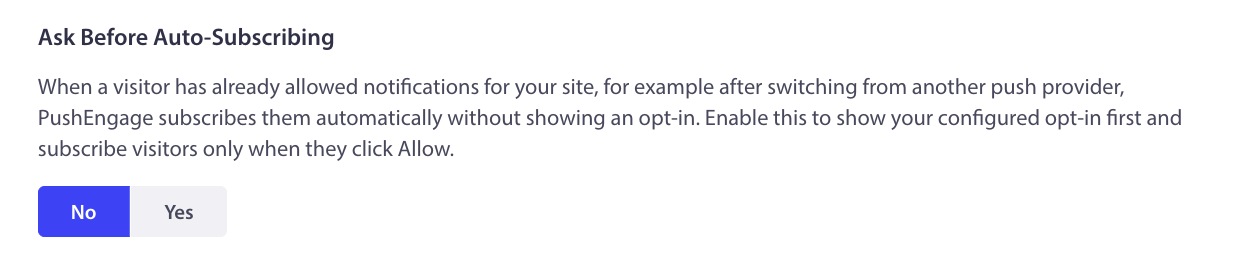
Navigate to Site Settings » Site Details and scroll to Ask Before Auto-Subscribing and Toggle to Yes.
What to Expect After Migration
Migration is not a switch that is fully on the moment it completes. Reachability starts lower and climbs over time.
Think of a subscriber’s service worker as the delivery address of someone with no phone. The only way they learn something has arrived is when the mailman actually knocks. In the same way, a migrated subscriber’s service worker only updates when that person next visits your site, whether they come back on their own or land there from a push or an email. Until that visit happens, that subscriber shows up as lower reachability. As migrated subscribers return over the following days, your reachability rises gradually. Sending campaigns and keeping up your normal email and on-site activity helps subscribers come back sooner.
Frequently Asked Questions
Can I import my OneSignal subscribers using VAPID keys?
Usually not, because OneSignal no longer shares VAPID keys. Even if keys were available, they would not deliver full messages until each subscriber returned to your site, so silent resubscribe is the path we recommend.
Will my subscribers see a second opt-in popup?
No. Silent resubscribe re-subscribes people who already gave permission without showing the opt-in popup again.
Why is my reachable count lower right after migration?
Because a subscriber’s service worker only updates when they next visit your site. Until then they count as lower reachability, and the number rises as people come back over the following days.
When can I start sending?
Once migration is underway and you have upgraded to a plan that fits your subscriber count, you can start sending. New sends also help migrated subscribers return to your site, which improves reachability.
If you run into any issues, please feel free to contact us by clicking here. Our support team will be able to help you.