Bonjour, Engagelings.
Excellente nouvelle : nous venons d'ajouter une nouvelle façon pour vous de gagner plus d'argent grâce à PushEngage.
Vous pouvez désormais envoyer des notifications push web pour iOS.
Apple a publié iOS et iPadOS 16.4, qui prend en charge les notifications push web pour les applications web ajoutées à l'écran d'accueil sur les appareils iPhone et iPad. Bien sûr, ce n'est pas forcément très excitant pour tout le monde, n'est-ce pas ?
En fait, cela signifie que vous pouvez désormais envoyer des campagnes push web aux utilisateurs d'iPhone et d'iPad visitant votre site web.
Nous l'avons également rendu très facile à utiliser. Beaucoup de travail a été consacré à cette mise à niveau et nous pensons que vous allez l'adorer. C'est aussi une mise à jour majeure, il y a donc BEAUCOUP à découvrir.
Plongeons dans le vif du sujet.
Qu'est-ce que le Web Push iOS et pourquoi devriez-vous vous en soucier ?
Excellente nouvelle ! Les notifications push web sont désormais prises en charge sur les navigateurs Safari, Google Chrome et Edge pour iPhone et iPad avec iOS et iPadOS 16.4.
Pour recevoir ces notifications pratiques sur les appareils iOS, les utilisateurs doivent d'abord ajouter votre site web à leur écran d'accueil. Une fois cela fait, ils peuvent facilement ouvrir l'application web en appuyant simplement sur son icône.
Le meilleur, c'est que l'application web s'ouvre comme n'importe quelle autre application native sur iOS et iPadOS, offrant une expérience transparente aux utilisateurs.
Bien sûr, vos utilisateurs devront opter pour vos notifications push, comme pour tout autre type de campagne push. Et ne vous inquiétez pas, la gestion de ces autorisations est un jeu d'enfant !
Vos utilisateurs d'applications web peuvent facilement gérer leurs paramètres de notification, de la même manière qu'ils le font pour toute autre application sur leur iPhone et iPad.
Ainsi, avec cette dernière mise à jour, vous pouvez engager et informer vos utilisateurs plus efficacement sur les appareils iOS et iPadOS en utilisant les notifications push web. C'est un changement majeur pour l'expérience utilisateur et l'engagement !
Choses à faire avant d'envoyer des notifications push iOS
Pour que ces campagnes push web soient opérationnelles sur les appareils iOS, vous devez remplir quelques exigences essentielles :
- Fichier Manifeste d'Application Web : Votre application web doit servir un fichier « manifest.json », et dans ce fichier, assurez-vous que le membre « display » est défini sur « standalone » ou « fullscreen ». Cette étape garantit que l'application web s'ouvre comme une application native, offrant une expérience transparente.
- iOS ou iPadOS 16.4 ou version ultérieure : Vos utilisateurs doivent disposer d'iOS ou d'iPadOS version 16.4 ou une version ultérieure. Cette mise à jour permet la prise en charge des notifications push web sur leurs appareils.
- Installation sur l'écran d'accueil : Les utilisateurs doivent installer l'application web sur leur écran d'accueil. Pour ce faire, ils peuvent appuyer sur le bouton Partager, ce qui ouvrira le menu Partager, puis sélectionner « Ajouter à l'écran d'accueil ». Une fois ajoutée, l'application web sera facilement accessible depuis leur écran d'accueil.
- Geste utilisateur pour l'autorisation : Pour recevoir des notifications push, l'utilisateur doit accorder l'autorisation. Cela nécessite un geste de l'utilisateur, tel que cliquer ou appuyer sur un bouton dans l'application web. Une fois le geste effectué, l'invite d'autorisation native apparaîtra, permettant à l'utilisateur d'autoriser la réception des notifications push.
En répondant à ces exigences, vous pourrez faire fonctionner vos campagnes push web de manière fluide sur les appareils iOS, améliorant ainsi votre engagement et tenant vos utilisateurs informés en toute simplicité !
Si votre site web est déjà une Progressive Web App (PWA), vous n'avez pas besoin d'apporter de mises à jour supplémentaires pour vous préparer aux notifications push web sur iOS/iPadOS. En cas de doute, vérifiez auprès de votre équipe de développement ou utilisez Lighthouse dans Chrome DevTools.
Et si vous avez besoin d'un guide plus détaillé, vous devriez consulter notre documentation.
Qu'est-ce que cela signifie pour vos campagnes ?
Maintenant que vous avez terminé avec succès les étapes nécessaires pour les notifications push web sur iOS et iPadOS, il est temps de commencer à envoyer ces notifications à l'aide du tableau de bord PushEngage.
Envoyez des notifications push web d'aspect soigné
Avec les notifications push web sur iOS, l'expérience est similaire à celle des autres applications natives. Ces notifications apparaîtront comme des notifications "heads-up" à l'écran, et les utilisateurs pourront également les trouver dans le centre de notifications et même sur l'écran de verrouillage. Il est donc facile pour les utilisateurs de rester informés de vos messages !
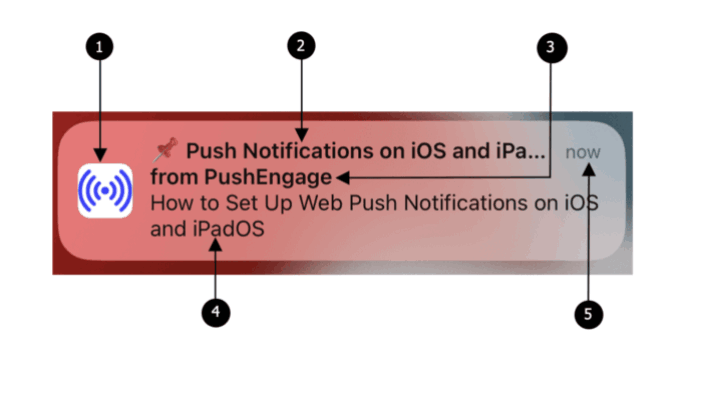
Les notifications push web sur iOS et iPadOS comportent les éléments suivants :
- Icône : L'icône affichée est celle spécifiée dans le fichier manifeste. Malheureusement, elle ne peut pas être modifiée pour des messages individuels, alors assurez-vous de définir l'icône souhaitée dans le manifeste.
- Titre : Le titre de la notification est limité à 30-40 caractères. S'il dépasse cette limite, il sera tronqué, alors gardez-le concis et percutant.
- Nom de l'application : Le nom de l'application affiché dans la notification est celui indiqué dans le fichier manifeste. Comme pour l'icône, il ne peut pas être modifié pour des messages individuels.
- Message : Le texte de la notification est limité à 120-150 caractères. S'il dépasse cette limite, il sera tronqué. Rédigez un message convaincant et bref pour tirer le meilleur parti de l'espace disponible.
- Horodatage : La notification affiche également un horodatage, indiquant il y a combien de temps la notification a été délivrée à l'appareil de l'utilisateur. Cela aide les utilisateurs à comprendre la fraîcheur du message.
Garder ces éléments à l'esprit lors de la création de vos notifications push web garantira que vos messages sont concis, visuellement attrayants et engagent efficacement vos utilisateurs iOS et iPadOS.
Lorsqu'une notification apparaît et que vous cliquez dessus, vous serez rapidement dirigé vers la page de destination spécifique de l'application web. C'est un flux transparent qui maintient l'engagement des utilisateurs et les aide à trouver rapidement le contenu qui les intéresse.
Obtenez plus d'abonnés
Une application Web sur l'écran d'accueil sur iOS et iPadOS nécessite une interaction directe de l'utilisateur, telle que le tapotement sur un bouton de la page pour afficher la boîte de dialogue d'abonnement pour autorisation. Suivez ces étapes pour tester que l'invite d'autorisation fonctionne :
- Ouvrez l'application web en appuyant sur l'icône de l'application depuis l'écran d'accueil de votre appareil.
- Attendez que la boîte de dialogue d'abonnement PushEngage apparaisse sur la page.
- Cliquez sur le bouton "Autoriser" dans la fenêtre modale Popup PushEngage pour afficher l'invite de permission.
- Cliquez sur le bouton "Autoriser" dans l'invite de permission.
Une fois que vous avez testé en profondeur vos fenêtres modales popup, vous êtes prêt à collecter de nouveaux abonnés.
Alors, allez-y et profitez au maximum des notifications push web sur iOS avec PushEngage. Tenez vos utilisateurs informés, connectés et revenez pour en savoir plus grâce à cette fonctionnalité puissante et conviviale !
Envoyez des messages plus ciblés et personnalisés
Vous pouvez désormais envoyer des notifications push web à un public entièrement nouveau. Auparavant, il était tout simplement impossible d'envoyer des notifications push web aux appareils iOS. Jusqu'à la récente mise à jour, iOS ne prenait même pas en charge cette fonctionnalité.
Mais maintenant, vous pouvez créer des campagnes push web automatisées puissantes et à forte conversion pour les utilisateurs de votre application web iOS.
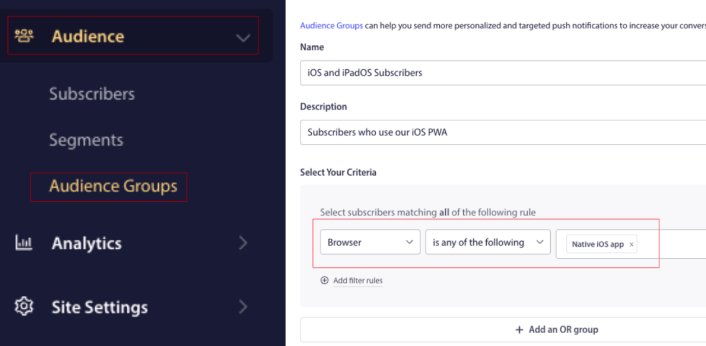
De plus, vous pouvez créer des campagnes push ciblées en créant un groupe d'audience pour vos utilisateurs iOS et iPadOS uniquement :
Donc, cela signifie plus de :
- Trafic répété
- Engagement
- Ventes
Et toute autre métrique commerciale que PushEngage vous aide déjà à atteindre.
Surveillez vos chiffres dans la section analytique de votre compte PushEngage. Nous prévoyons que la plupart d'entre vous qui utilisez une PWA verrez une augmentation de vos chiffres d'engagement.
Quoi d'autre ?
Nous savons que développer une entreprise est un travail difficile. Chez PushEngage, nous cherchons toujours à améliorer notre produit et votre expérience. Nous avons lancé cette nouvelle fonctionnalité pour vous aider à tirer encore plus de valeur de votre abonnement PushEngage.
Merci beaucoup d'avoir lu cette annonce.
Si vous avez des questions, notre équipe de succès client est là pour vous aider. Lancez simplement une conversation sur le chat en direct ou consultez notre page de contact.
Et merci d'utiliser PushEngage. Que vous utilisiez la version gratuite ou la version Enterprise, vous êtes tout aussi important pour nous. La nouvelle fonctionnalité de ciblage est conçue pour vous aider à réussir et nous vous souhaitons tout le meilleur.
Faites-nous part de vos réflexions dans les commentaires ci-dessous et si ce n'est pas déjà fait, commencez avec PushEngage dès aujourd'hui !


