The Best WordPress Push Notifications Plugin
Supercharge your repeat traffic, website engagement, and conversions with the best WordPress push notifications plugin in the world.

Send Advanced Push Campaigns from a Simple, Easy-to-Use WordPress Push Notifications Plugin
Focus on growing your business instead of mastering yet another marketing tool. Our push notifications plugin comes with features that you simply can’t get from other plugins.
WordPress Metabox
Easily manage push notifications from the WordPress post editor.
- Draft push notifications from Gutenberg
- Use segments and audience groups in WordPress
- Auto-send push broadcasts when you publish
- Schedule your push broadcasts inside WordPress
Dashboard Overview Widget
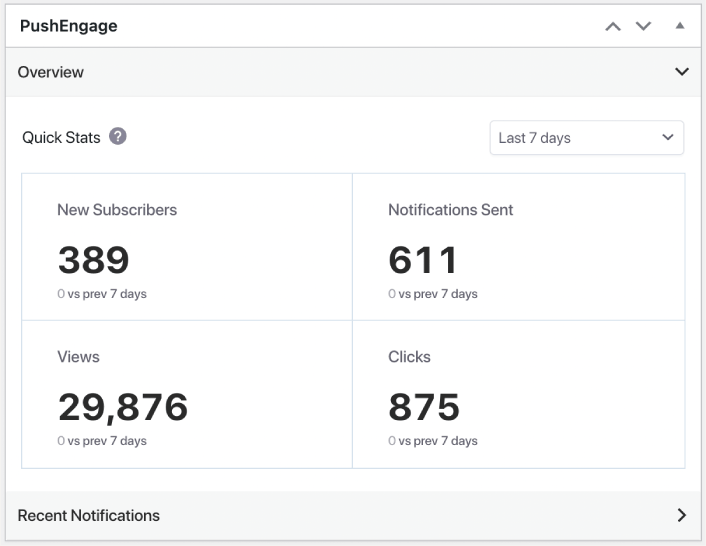
Get a full view of your push notification performance metrics right from your WordPress dashboard. You can see how many subscribers you gained, how many clicks and views your campaigns had, and even how many notifications you sent.
Autopush with Post Type Settings
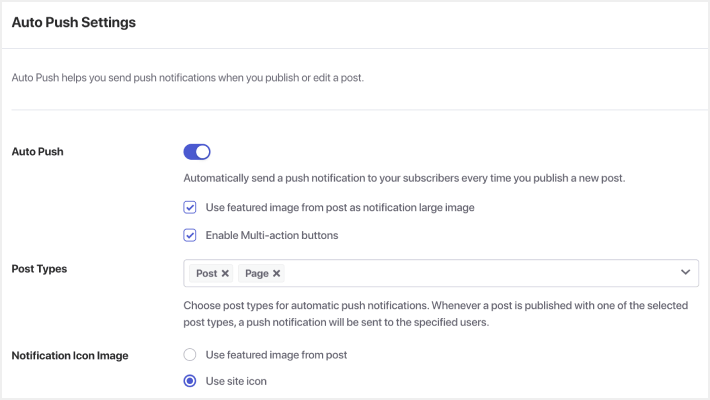
Select the post types you want to promote using push campaigns. You can set the featured image as the notification large image, the site icon as the notification icon, and even add multiple action buttons. It even works for custom post types!
LoanMart has really focused on the drip campaign tools that Push Engage provides. We love that we can set up a robust series of messages that new subscribers will see for weeks and even months after they initially visited our website.

We considered several browser notification platforms, and PushEngage was the only one that fully satisfied our use case and would be ROI positive considering LTVs. For opted-in users, PushEngage has helped us increase user retention and LTV.

Being able to retarget our customer base with more effective messages lead us to improve the quality of our traffic and drive to more sales. We were to able to achieve our marketing goals by increasing our ROI.

PushEngage is quick and easy to implement. It provides results promptly and the analytics presents them in a clear and understandable fashion. The ability to tailor your target audience is particularly impressive as you are able to increase your engagement rates as you use the software.

PushEngage is our best converting paid traffic channels. The open-rate is about 400% better than sending out newsletters and also the time to create a push notification is far more effective.

The fine stuff I liked about PushEngage is, they are innovative and they are bringing all the power of email marketing into push notifications. The segmentation feature of PushEngage has helped a lot in properly segmenting users based on their topic of interest.

Category Segmentation
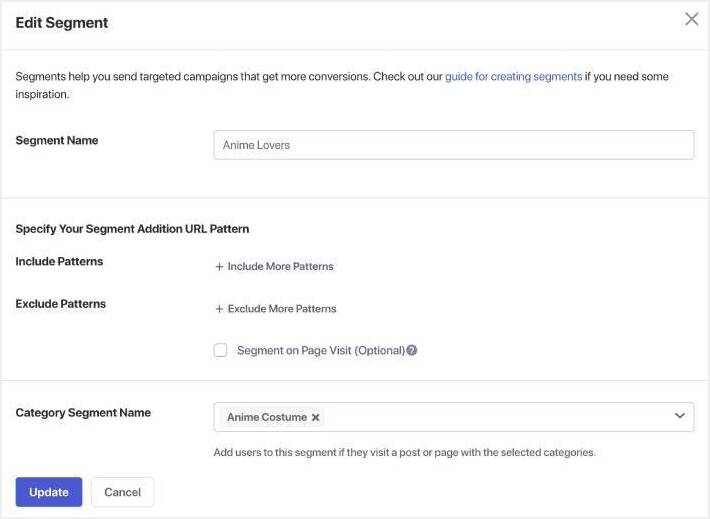
Turn your WordPress post categories into segments for your push campaigns. Category segmentation a super simple and easy way to target your subscribers by their interests.
Watch your view and clicks skyrocket with a few simple clicks.

Test Notifications and Live Previews
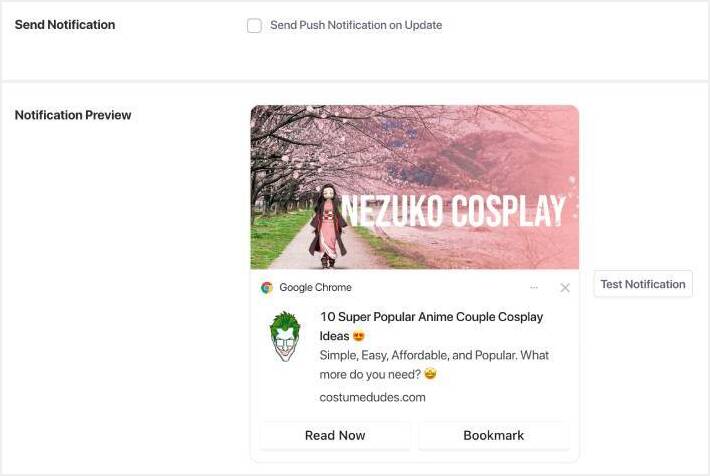
Preview push notifications before sending them to your audience. You can get live previews of how your notifications look on different operating systems including:
- Windows 11
- MacOS and iPadOS
It’s like having a What You See Is What You Get (WYSIWYG) builder for your push campaigns.
Custom UTM Parameters
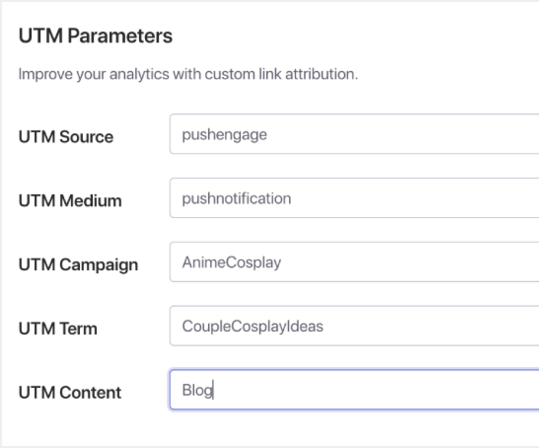
Our WordPress push notifications plugin comes with a Goal Tracking feature makes it easy to track conversions. And now you can set custom UTM parameters to each notification for even better tracking.
The best part? You can do it from inside the post editor.
Create Custom Audience Groups
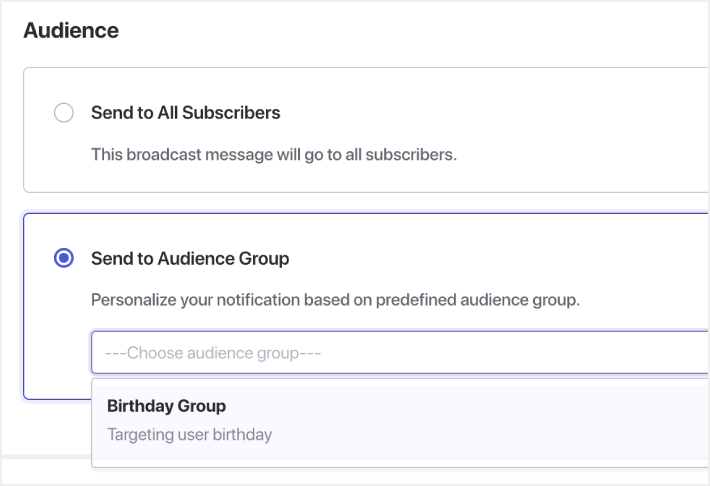
Get even more targeting options by applying powerful filters across multiple segments. You can create audience groups based on:
- Subscriber behavior
- Device and browser
- Geolocation
- Engagement metrics







What Makes Us the Most Powerful WordPress Push Notifications Plugin?
PushEngage has all the features you need to send targeted push notifications to grow your business. That’s what makes us the best WordPress push notifications plugin on the market.

Triggered Notifications
Detect your visitor’s behavior to send automated push notifications to the right person at the right time.

Cart Abandonment Reminder
Recover lost sales and quickly boost revenue with automatically triggered abandon cart push notifications.

Custom Domains & Branding
Build recognition and trust in your brand while boosting engagement with custom domains and branding.
Dynamic Segmentation
Segment push notifications to target the right subscribers at the right time so you can maximize your results.
A/B Testing
Easily experiment with any element and unlock the full potential of push notifications to grow your business.
Goal Tracking & Analytics
Get all the actionable data you need to grow your traffic, sales, and revenue with confidence.

Automatic Drip Campaigns
Send a series of web push notifications and turn casual subscribers into paying customers.

Personalization
Drive more traffic, sales, and revenue by sending push notifications that are custom tailored to your users’ needs.

Deep Ecommerce Integrations
Send ecommerce-centric push notifications to unlock maximum revenue from each visitor.

TurboSend & Scheduling
Promote time-sensitive offers by sending push notifications in your visitor’s time zone.

GDPR Compliant
PushEngage offers several tools that make it easy to comply with GDPR and other privacy regulations.

Offline Notifications
Send a push notification any time and your subscribers will see it as soon as they come online.
WordPress Push Notifications Plugin
Get all the actionable data you need to grow your traffic, sales, and revenue with confidence.
Android Push Notifications
Get all the actionable data you need to grow your traffic, sales, and revenue with confidence.
iOS App Push Notifications
Get all the actionable data you need to grow your traffic, sales, and revenue with confidence.

AI Text Generation
Instantly generate high-converting push notification copy with AI-powered suggestions tailored to your audience.
Flutter Push Notifications SDK
Flutter Push Notifications SDK One codebase, both platforms. Push wired in an afternoon. The PushEngage Flutter SDK adds production-grade push to iOS and Android from a single integration: documented APIs, webhooks, and a dashboard your marketing team can actually use. … Continue reading
Transactional Push Notifications
Transactional Alerts “Where’s my order?” Answered before they ask. Order confirmations, shipping updates, delivery notices, and account alerts as push notifications: delivered in seconds, opened at rates email never sees, and off your support queue. See Plans See the Demo … Continue reading
Browse Abandonment Campaigns
Browse Abandonment Campaigns 70% browse and bounce. Retarget them without ad spend. Most of the traffic you paid for looks at products and leaves without carting. Browse abandonment campaigns bring them back automatically, on a channel you own instead of … Continue reading
Price Drop Alerts
Price Drop Alerts They loved it. They left at the price. Tell them the moment it drops. Price drop alerts fire automatically when a product a shopper viewed, carted, or ordered before gets cheaper. Relevance does the selling; you just … Continue reading
Back-in-Stock Alerts
Back-in-Stock Alerts Sold out isn’t lost demand. Unless you stay silent. When inventory returns, back-in-stock alerts notify every shopper who wanted the product while it was gone, before they buy it somewhere else. See Plans See the Demo “We are … Continue reading
WooCommerce Order Notifications
WooCommerce Order Notifications Orders update in real time. So should your customers. The PushEngage plugin turns WooCommerce order events into instant push updates: confirmed, shipped, delivered. Customers stay informed and your inbox stays quiet. See Plans See the Demo “Web … Continue reading
Welcome Series
Welcome Series Interest peaks at hello. Convert it before it cools. A new subscriber is never more interested than the day they click Allow. The welcome series meets that moment with a multi-step drip: introduce, educate, incentivize, convert. See Plans … Continue reading
Re-engagement Drip
Re-engagement Drips Silence is a signal. Answer it automatically. Re-engagement drips watch for inactivity — no visit in 30 days, no login in a week — and run a win-back sequence tuned to how long someone’s been gone. Set the … Continue reading
RSS Auto-Push
RSS Auto-Push You hit publish. Your readers already know. RSS auto-push watches your feed and notifies every subscriber within seconds of a new post. No scheduling, no manual sends, no algorithm deciding who sees your work. See Plans See the … Continue reading
Behavior Segments
Behavior Segments Your subscribers are telling you. Segments that listen. Every page view, cart event, and purchase sorts subscribers into living segments automatically. Campaigns target what people do, not what a stale export says they did. See Plans See the … Continue reading
Page-Level Chat Targeting
Page-Level Chat Targeting One widget everywhere is noise on half your pages. Targeting rules decide who sees which chat widget, and where: WhatsApp on product pages, support channels on docs, and a clear checkout with no distractions. See Plans See … Continue reading
Multi-Agent Chat
Multi-Agent Chat Right question, right teammate. Multi-agent chat routes each visitor to the person who can actually help: sales questions to sales, support to support, each language to its speaker, straight into the channels your team already answers. See Plans … Continue reading
Custom Chat Styling
Custom Chat Styling A color picker isn’t a brand. Most chat tools stop at swatches. PushEngage widgets give you custom icons, branded avatars, layouts, gradients, fonts, and full CSS, so the widget reads as part of your site, not a … Continue reading
Smart Opt-In Prompts That Turn Traffic Into Subscribers
Smart Opt-In Prompts A 3% opt-in rate isn’t a traffic problem. It’s a timing problem. PushEngage opt-in prompts fire when a visitor has shown intent: after 20 seconds on page, at 60% scroll, on a click, or at exit. A … Continue reading
TurboSend Timezone Delivery: Every Subscriber’s 9 AM
TurboSend Timezone Delivery One send time. Every subscriber’s morning. TurboSend holds each notification and fires it when the scheduled hour arrives in the subscriber’s own timezone, detected automatically at opt-in. São Paulo gets it at 9 AM BRT, Mumbai at … Continue reading
Order Notifications That End Where’s-My-Order Tickets
Transactional Order Notifications Answer “where’s my order?” before anyone asks. When an order is placed, paid, shipped, or delivered, the Shopify or WooCommerce webhook fires and PushEngage routes the update to the channel that customer actually checks: web push, app … Continue reading
Agent Scheduling and Business Hours for the Chat Widget
Agent Scheduling for Chat A chat option no one answers is worse than none. The PushEngage chat widget routes visitors to WhatsApp, Messenger, email, or SMS, the channels your team already answers, with no hosted inbox to staff. Agent scheduling … Continue reading
GDPR and CCPA Compliance, Built Into the Architecture
GDPR & Privacy Compliance Compliance isn’t a feature. It’s the architecture. Every PushEngage subscriber exists because a browser or OS logged an explicit permission grant. Data storage defaults to a subscription token and behavior events, nothing personal, and export and … Continue reading
Finally, a Push Notifications WordPress Plugin Works Like a Plugin Instead of a Bridge to the Software Dashboard
Looking for a WordPress push notifications plugin? It’s important to keep in mind the benefits that using a plugin can offer. Here’s a quick look at what the PushEngage WordPress push notifications plugin can do for your business:
- Boost website engagement: Keep your audience engaged with personalized push notifications that drive traffic back to your website.
- Increase conversions: Use targeted push notifications to promote your products and services and increase conversions.
- Streamline marketing: Manage all your push notifications right in your WordPress dashboard for streamlined marketing.
- Improve user experience: Allow users to manage their push notification subscriptions and receive personalized notifications that are relevant to their interests.
- Save time: Automate push notifications with autopush and scheduling features, saving you time and effort.
- Track performance: Use custom UTM parameters to track your push notification campaigns and make data-driven decisions.
By using a push notification plugin, you can take advantage of these benefits and supercharge your website engagement, increase conversions, and streamline your marketing efforts. With personalized push notifications, you can keep your audience engaged and coming back for more, while also promoting your products and services to drive conversions.
You can also save time and effort by automating push notifications and track the performance of your campaigns with custom UTM parameters.
Why Is PushEngage’s WordPress Plugin Such a Big Deal?
For the longest time, WordPress push notification plugins have done only one thing – connect a WordPress site to a software dashboard. Well, that’s all changed with PushEngage. With the PushEngage WordPress plugin, you get a fully functioning WordPress plugin that allows you to create custom push campaigns right from your WordPress post editor.
You get to use the same WordPress dashboard that you’re already familiar with and not worry about having learn yet another software product.
Not to mention, it’s super easy to use. All you do is scroll down to the metabox section at the end of the post or page that you want to promote. And just create a custom campaign with powerful targeting and tracking options.
The coolest part is that the PushEngage plugin won’t slow down your site at all.
Choosing the perfect push notification plugin doesn’t have to be complicated. Let’s break it down in plain and simple terms.
- Features that Matter: Want to send notifications at specific times? Target different user groups? Or maybe test which messages work best? Look for a plugin that offers the features you need.
- Easy Peasy, User-Friendly: No one wants a plugin that’s a headache to use. Find one with a friendly interface so you can set it up hassle-free.
- Make It Yours with Customization: Your notifications should match your brand’s style. Check if the plugin lets you customize the look and content.
- Get Targeted: Send notifications to specific user groups with ease. Look for a plugin that offers segmentation options.
- Automate and Schedule: Save time by automating notifications and scheduling them for the right moments.
This is why PushEngage’s plugin is such a big deal. We check all these boxes right from your WordPress site without ever having to go back and forth between your site and the PushEngage web app.
Grow Your Business Faster with Smart Goal Tracking & Analytics
Increase the value of every web visit with Push Notifications that are hard to miss.
- Forever Free Plan
- Easy Setup
- 5 Star Support

Over 500 billion notifications sent

Secure and GDPR Compliant
Trusted by customers in 150+ countries