A chat option no one answers
is worse than none.
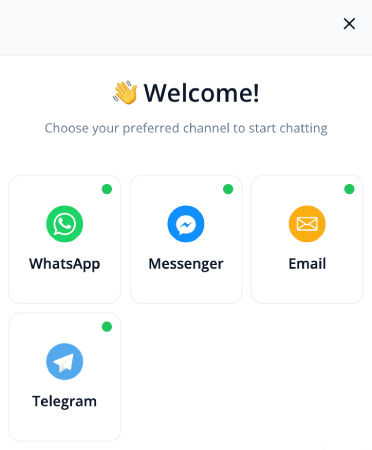
The PushEngage chat widget routes visitors to WhatsApp, Messenger, email, or SMS, the channels your team already answers, with no hosted inbox to staff. Agent scheduling adds the honesty layer: each channel and each agent gets business hours, and the widget only shows what is live right now.

“We are able to reach our customer base in almost an instant. Email would have been too slow to put together in an emergency.” John Smith · CEO
75,000+ businesses No inbox to staff, no per-seat pricing 14-day money-back guarantee

Trusted by 75,000+ businesses in 150+ countries








Why it works
Set expectations the widget can actually keep.
A visitor who opens a chat and waits twenty minutes leaves more frustrated than one who never saw the option. Scheduling keeps the promise the widget makes.
Hours per channel, hours per agent
Your WhatsApp line can show 9 to 6 on weekdays while the email option stays up around the clock. Each agent’s channels follow their own schedule, configured from the dashboard.
Async options fill the gaps
Outside staffed hours, the widget keeps routing to channels that work asynchronously, like email. The question still gets captured; it just lands where you will actually see it.
No inbox, no camping
This is not a hosted chat dashboard with agents waiting in a queue. Conversations continue in the messaging apps your team already checks, and scheduling decides when each door is open.
How it works
Routing logic that respects the clock.

The widget your visitors see changes with your day
During staffed hours, high-intent buyers land straight in your WhatsApp. After hours, the same widget leads with email. Nobody taps a channel that goes nowhere, so nobody churns on silence.
- Channels appear and disappear on schedule
- Mobile and desktop visibility controls
- All configured from the dashboard, no deploys
Scheduling stacks with targeting and routing
Business hours combine with page-level targeting and multi-agent assignment: the sales WhatsApp shows on product pages while its owner is on shift, and the support address covers everything else.
- Page-level URL rules pick the channel per page
- Multi-agent assignment by page and language
- Custom styling keeps it looking built in-house
What’s included
Exactly what you’re buying, on one dashboard.
Agent scheduling is one rule in the chat widget’s routing brain: the same platform that brings visitors back with push decides which conversation doors are open while they are on the page.
Business hours per channel and agent
Set hours per channel and per agent so the widget only shows options that are live right now. Nothing goes unanswered because no dead option appeared.
See how scheduling worksThe inboxless chat widget
Routes visitors to WhatsApp, Messenger, email, SMS and more: 21 channels plus custom links. You reply from the inbox you already check; there is no hosted inbox to staff.
See the chat widgetPage-level targeting
Sales WhatsApp on product pages, support email on the docs. Per-URL rules configured from the dashboard, no code needed.
Read about page targetingMulti-agent routing
Route buyers to sales and support questions to the right teammate, by page and language. The conversation goes where the answer lives.
Set up multi-agent routingCustom styling and icons
Custom icons, brand colors, and layout controls make the widget look built in-house, whatever hours it keeps.
See styling optionsWhatsApp in the widget
High-intent buyers land straight in your WhatsApp, mid-decision, while the line is staffed to answer them.
Add WhatsApp to your widgetChat and push, one dashboard
The visitor who chats today is the push subscriber you re-engage after they leave. Both channels share one dashboard and one active-subscriber pricing line.
Explore web pushSetup and integrations
Installs wherever you run your site. One snippet, any platform.
One-click install on WordPress and WooCommerce. Shopify embed included. Paste one line of JS to add the widget anywhere else.
WordPress plugin
Install the PushEngage plugin and the chat widget is ready in minutes, right from your WordPress admin. Scheduling rules live in the dashboard, not in a config file.
Get the WordPress plugin
Shopify and Shopify Plus
Native embed, no code required. The widget goes live on your storefront the same afternoon.
Shopify Plus app
WooCommerce
Installed alongside the PushEngage WooCommerce plugin. Chat and push share one setup flow.
WooCommerce setupAny site, one JS snippet
Not on WordPress or Shopify? Paste one line of JS into your site’s head and the widget is live. Works on any CMS or custom build.
See all setup options21 chat channels plus custom links
WhatsApp, Messenger, Telegram, Instagram, email, SMS, and more, each on its own schedule. Visitors pick their channel; your team replies from the inbox they already use.
See all channelsThe numbers
Every open door has someone behind it.
“PushEngage is quick and easy to implement. The ability to tailor your target audience is particularly impressive as you are able to increase your engagement rates as you use the software.”
 Alex Avery
Database Marketing Executive
Alex Avery
Database Marketing Executive
Chat family
More from the chat toolkit.
The inboxless chat widget
Route visitors to 21 messaging and contact channels, plus custom links, with no hosted inbox to staff.
See the chat widgetPage-level chat targeting
Serve the right channel on the right page, by URL rule, with no code required.
Read the guideMulti-agent chat routing
Assign conversations to the right teammate by page and language.
Set up multi-agent routingWhatsApp chat widget
Route on-site visitors to a WhatsApp conversation in the app they already check.
Set up WhatsApp chatFAQ
Questions, answered.
What do visitors see outside business hours?
Only the channels that are actually live. Scheduled channels disappear when nobody is on shift, and asynchronous options like email can stay up around the clock so the question still gets captured.
Is this a hosted chat platform with agent seats?
No. The PushEngage widget is inboxless: it routes each visitor to WhatsApp, Messenger, email, or SMS, where your team replies from the inbox they already check. There are no seats and no per-agent pricing.
Can different agents keep different hours?
Yes. Business hours are set per channel and per agent, so a sales WhatsApp line and a support address can follow completely different schedules.
Do I need a developer to change the schedule?
No. Hours, channels, targeting, and routing are all dashboard configuration. Ops can change the schedule without a deploy.
Does scheduling work with page-level targeting?
Yes, the rules combine. A product page can show the sales WhatsApp only during staffed hours while the rest of the site leads with email.
Show the door only when someone can open it.
Set up in minutes. If PushEngage isn’t the best fit within 14 days, we refund 100%. No questions asked.
Free plan available Set up in minutes Pay only for active subscribers