Push-уведомления были излюбленным инструментом маркетологов для связи с аудиторией в различных отраслях. Они позволяют мгновенно отправлять веб-push-сообщения подписчикам. Чтобы собрать больше подписчиков, мы всегда делились методами оптимизации и лучшими практиками для повышения коэффициента подписки и получения максимального CTR. В дополнение к поведению браузера, а также для увеличения подписки, мы внедрили напоминания о согласии на подписку.
Почему вам нужно напоминание о согласии на push-подписку
Сталкиваетесь ли вы с низким коэффициентом подписки на ваши веб-push-уведомления? Этому есть много причин. Вы можете следовать руководству по согласию на подписку, чтобы увеличить коэффициент подписки. Поскольку подписка происходит на уровне браузера, многое зависит от поведения браузера.
Однако, чтобы гарантировать, что ваш посетитель никогда не упустит возможность подписаться на ваши веб-push-уведомления, мы создали напоминание о согласии на подписку. Как следует из названия, оно действует как напоминание.
При включенном напоминании система будет автоматически подталкивать посетителя к подписке на ваши push-уведомления. Это напрямую повлияет на коэффициент подписки на ваши веб-push-уведомления.
Подписка — это единственный барьер между вашим сайтом и подписчиком. Вся ценность push-уведомлений в браузере зависит от того, насколько успешно будет пройдено это одно окно браузера.
Как работает напоминание о согласии на push-подписку?
С помощью напоминания о согласии на подписку вы можете включить всплывающее окно с напоминанием для посетителя о подписке на ваши веб-push-уведомления. Отметьте флажок и обновите настройки в соответствии с вашей маркетинговой стратегией.
Вы можете настроить текст сообщения, которое хотите показать посетителям вашего веб-сайта, а затем установить время. Перед включением необходимо выполнить две настройки:
- Какую задержку вы хотите установить перед показом напоминания?
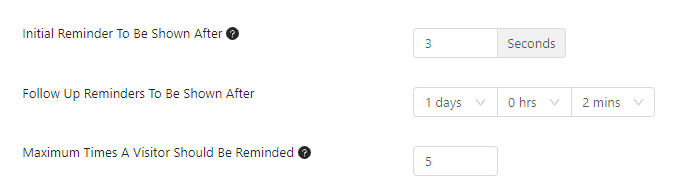
- Установите правило для «Последующих напоминаний», которые вы хотите показать позже. Здесь вы можете определить количество дней, часов и минут, когда вы хотите показать его посетителям.
Самые важные настройки — это установка количества напоминаний. Если вы установили количество напоминаний равным 5, пользователь не получит напоминание после 5 раз, включая правило, которое вы установили ранее в разделе «Последующие напоминания».
Пожалуйста, убедитесь, что вы установили определенное количество, иначе напоминание будет появляться каждый раз, когда посетитель заходит на веб-сайт.
Напоминание должно быть установлено с учетом посетителей, которые вообще не хотят подписываться на уведомления и которые могут подписаться позже или после посещения веб-сайта «n» раз. Если посетитель получает напоминание при каждом посещении, он может раздражаться.
Напоминание о согласии на подписку может появляться двумя способами –
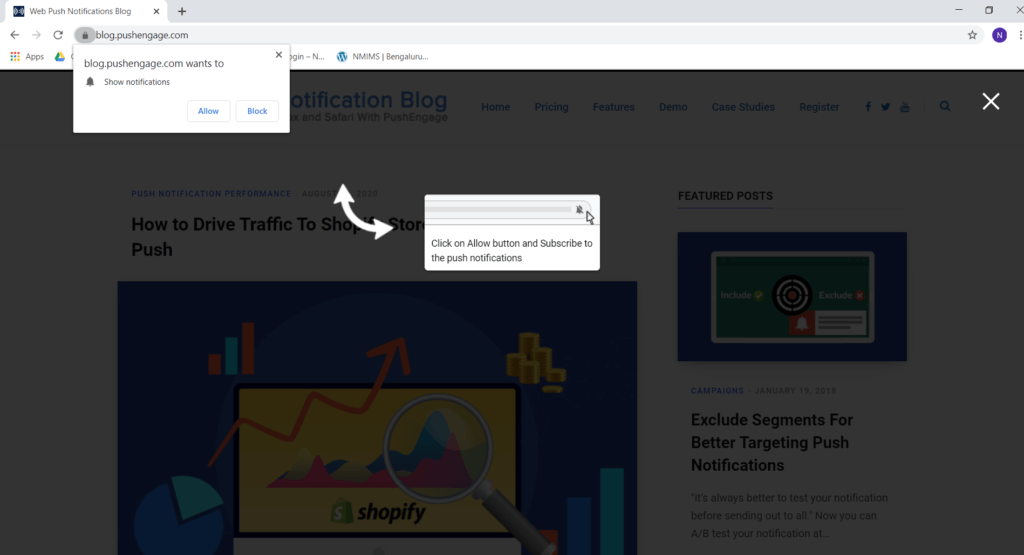
- Указание настроек «Просмотр информации о сайте». Это для пользователей, которые видят нативное согласие. Стандартное согласие, которое пользователь видит для подписки на уведомления.
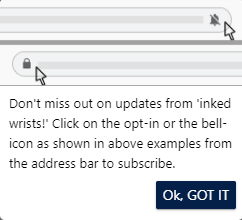
- Оптимизированный запрос на подписку – на адресной строке. Это для пользователей, которые обычно не подписываются на уведомления. Браузер показывает им значок колокольчика в правом верхнем углу адресной строки, после нажатия на который они видят встроенный запрос на подписку, через который могут подписаться на уведомления.
Шаги по реализации напоминаний о запросе на подписку
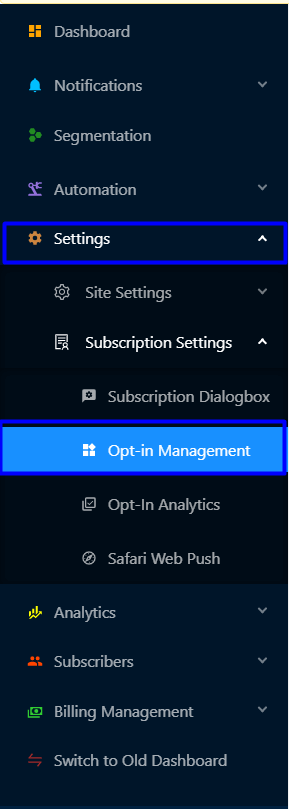
Шаг 1 – Войдите в свою панель PushEngage и перейдите в Настройки > Настройки подписки > Управление запросами на подписку.
Шаг 2 – Прокрутите вниз до раздела «Напоминания о запросе на подписку». Затем включите «Напоминание о запросе» с помощью флажка и добавьте описание.

Шаг 3 – Установите начальное напоминание, последующее напоминание, которое будет показано позже, и максимальное время, в течение которого вы хотите напоминать посетителю о подписке.
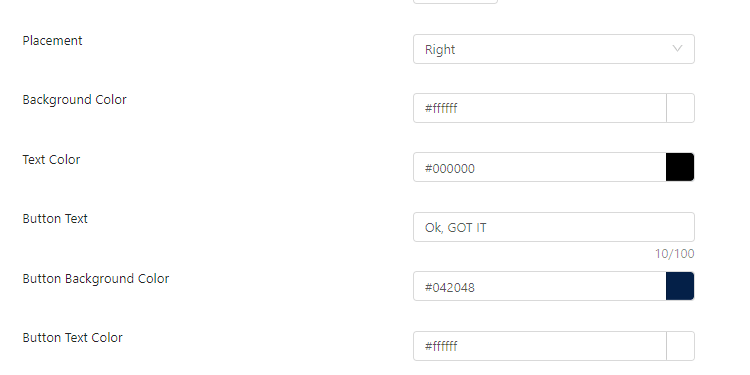
Шаг 4 – Затем выберите размещение, цвет фона, цвет текста, текст кнопки, цвет фона кнопки, цвет текста кнопки из палитры и нажмите «Обновить».
Обратите внимание: вы не можете включить оверлей подписки, пока эта функция включена. Если она включена, напоминание о запросе на подписку будет автоматически отключено, а оверлей подписки имеет более высокий приоритет.
Эта функция доступна для всех планов. Если вы также хотите включить сертификат .p12 для вашей учетной записи, чтобы собирать подписчиков из браузера Safari, но у вас нет учетной записи разработчика Apple, свяжитесь с вашим менеджером по работе с клиентами или отправьте нам письмо по адресу [email protected].


