
Ищете эффективное руководство о том, как получить больше подписчиков на Twitch?
Twitch начинал как сообщество для стриминга игр и развлечений. Но теперь он превратился в более комплексную платформу для стриминга, где вы можете продвигать свой бизнес. Будь то через рекламу на Twitch или путем создания собственного контента, это действительно отличная маркетинговая платформа.
Вы можете продвигать свой блог, продукты или услуги и превращать этих людей в подписчиков блога, лидов и клиентов. Но как это сделать? С чего начать? Привлечение подписчиков может быть довольно сложным для нового канала.
В этой статье мы рассмотрим простые способы привлечения большего числа подписчиков на Twitch. И вам не потребуется никакого предыдущего опыта, чтобы максимально использовать наши советы.
Звучит неплохо? Давайте погрузимся.
Получите страховку от теневого бана с помощью веб-push-уведомлений уже сегодня!
Push-уведомления — это сверхэффективный, недорогой маркетинговый инструмент, который поможет вам автоматически увеличить повторный трафик, вовлеченность и продажи.
- Зачем наращивать аудиторию на Twitch?
- Простые идеи о том, как получить больше подписчиков на Twitch
- #1. Проведите конкурс с розыгрышем на Twitch
- #2. Соблюдайте регулярное расписание стримов
- #3. Создавайте более длинные стримы на актуальные темы
- #4. Создайте привлекательный макет для Twitch
- #5. Создайте целевую страницу для ваших стримов
- #6. Избегайте теневого бана, собирая подписчиков веб-push
- #7. Добавьте кнопки подписки Twitch на ваш сайт
- #8. Продвигайте свой канал Twitch в своей рассылке
- #9. Публикуйте стримы на YouTube
- #10. Создайте канал с клипами на YouTube
- #11. Сделайте ваши стримы интерактивными
- #12. Сотрудничайте с другими стримерами Twitch
- Что делать, когда вы знаете, как получить больше подписчиков на Twitch
Зачем наращивать аудиторию на Twitch?
Согласно отчету Earthweb, в 2022 году на Twitch было 140 миллионов активных пользователей в месяц. Ежедневно на Twitch просматривается 71 миллион часов контента. Если вы ведете блог или малый бизнес, это означает миллионы людей, которые могут быть заинтересованы в вашем контенте.
Таким образом, если вы не наращиваете аудиторию на Twitch, вы просто упускаете миллионы потенциальных клиентов. Приятно то, что Twitch очень интерактивен. Поэтому вы можете легко убедить своих подписчиков на Twitch подписаться на ваши другие социальные сети. Или даже посетить ваш веб-сайт.
Лояльная аудитория с большей вероятностью купит у вас. Другими словами, если вы поймете, как получить больше подписчиков на Twitch, вы также сможете развивать свой бизнес напрямую через продажи, промоакции, купоны и предложения.
Простые идеи о том, как получить больше подписчиков на Twitch
Если вы не уверены, как получить больше подписчиков на Twitch, эти простые и эффективные идеи помогут вам начать движение в правильном направлении. Однако не следует начинать использовать все эти идеи одновременно. Во-первых, это может быть изнурительно без команды. А во-вторых, нужно выяснить, что больше всего нравится вашей аудитории.
PushEngage — это плагин для push-уведомлений №1 в мире. Получите его бесплатно!
Некоторые из этих советов лучше всего работают, если у вас также есть веб-сайт на WordPress. Поэтому, если у вас еще нет веб-сайта, создайте его прямо сейчас на WordPress. Это очень просто сделать, и вы сможете гораздо быстрее развивать свой бизнес.
Вам также стоит ознакомиться с нашим списком лучших плагинов WordPress для Twitch, прежде чем начинать.
#1. Проведите конкурс с розыгрышем на Twitch
Один из самых простых способов привлечь больше зрителей и подписчиков на Twitch — провести конкурс с розыгрышем призов. Все любят розыгрыши, и они могут легко сделать ваш бренд вирусным.
Хотя эта идея предназначена не только для геймеров, конкурсы проще проводить для видеоигр и игровых стримов.
Самое крутое в любом розыгрыше — это то, что вы можете проводить его на нескольких платформах. Вы можете одновременно провести розыгрыш на YouTube, чтобы охватить максимальную аудиторию.
Мы рекомендуем проводить розыгрыш на вашем веб-сайте, а не в прямом эфире на Twitch. Это помогает несколькими удобными способами. Вы получаете:
- Больше контроля над вашим розыгрышем
- Более длительные сроки проведения конкурса
- Легкое продвижение любого продукта
- Больше подписчиков на других каналах
- Автоматизацию розыгрыша с помощью программного обеспечения
Если у вас есть сайт на WordPress, вы должны использовать RafflePress для проведения ваших конкурсов.

RafflePress — это самый мощный плагин для проведения розыгрышей на WordPress. С этим плагином вы получаете визуальный конструктор для создания и проведения вирусных конкурсов. Это также единственный удобный для начинающих плагин для розыгрышей на WordPress. На наш взгляд, платная версия плагина стоит каждой копейки. Но вы также можете начать бесплатно.
Лучшая часть в том, что вы получаете мощные готовые шаблоны, разработанные для:
- Увеличения вашей базы подписчиков по электронной почте
- Привлечения друзей с помощью «сарафанного радио»
- Проведения розыгрыша перед запуском вашего сайта
- Развития вашей страницы на Facebook
- Увеличения числа ваших подписчиков в Twitter
- Развития вашего канала на YouTube
- Увеличения числа ваших подписчиков в Instagram
- Привлечения большего числа подписчиков на Twitch
И вы можете сделать все это без написания кода, если установите цели перед запуском конкурса. Посмотрите наш обзор RafflePress, где мы более подробно изучили функции плагина.
#2. Соблюдайте регулярное расписание стримов
Лучшее время для стриминга на Twitch, чтобы охватить самую большую аудиторию — с 16:00 до 18:30. Именно тогда большинство людей возвращаются домой из школы и с работы. Но это также очень конкурентное время. Если вы ищете подходящее время для стриминга без конкуренции, попробуйте после полуночи.
Регулярные стримы с постоянным расписанием помогут вам расти НАМНОГО быстрее, чем стриминг, когда вам захочется. Конечно, если весь ваш бренд построен вокруг «несерьезного отношения к себе», вы можете делать все, что хотите. Но у этого есть свои проблемы. Во-первых, ваши подписчики не всегда знают, когда вы собираетесь начать стрим.
Под регулярными стримами мы не подразумеваем, что вы должны стримить каждый день. Все, что мы имеем в виду, это то, что у вас должен быть общедоступный календарь с датой вашего следующего стрима. Вы можете создать календарь стримов на Twitch:
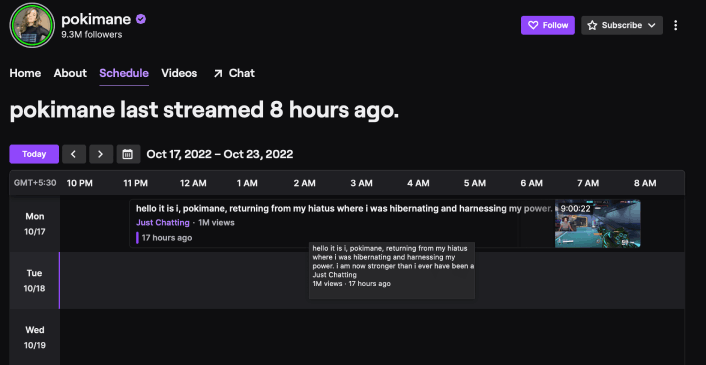
Или вы можете создать календарь на своем сайте WordPress. Существует множество плагинов календаря WordPress, которые вы можете использовать. Но мы рекомендуем использовать Sugar Calendar.

Sugar Calendar — один из лучших плагинов календаря для WordPress, которые вы когда-либо найдете. Это легкий плагин, который очень легко настроить и использовать.
Sugar Calendar предоставляет вам все основные функции любого плагина календаря WordPress. Но если вам нужно еще больше функций, вы всегда можете приобрести дополнительные надстройки для расширения функциональности.
Популярные функции включают:
- События календаря
- Время начала и окончания встреч и приемов
- Часовые пояса событий
- Интеграция с Google Календарем
И многое другое! Sugar Calendar также имеет мощную надстройку для продажи билетов на мероприятия, которая позволяет продавать билеты, управлять записями участников и легко интегрироваться со Stripe для приема платежей.
Если вы управляете сайтом членства, вы также можете использовать Sugar Calendar для настройки форм подачи мероприятий. И, конечно же, плагин также легко интегрируется с другими плагинами WordPress и маркетинговыми платформами, такими как WooCommerce, WPForms, Gravity Forms, Google Calendar и другими.
#3. Создавайте более длинные стримы на актуальные темы
Еще один эффективный способ привлечь больше подписчиков на Twitch — стратегически выбирать, что вы транслируете. На Twitch есть категории для:
- Просто общение
- Музыка
- Спорт
- Подкасты
- Криптовалюта
- Еда и напитки
- Ремесла
И многое другое. Ваш контент не обязательно должен быть о вашем продукте. Пока он является полезным или развлекательным для вашей целевой аудитории, вы получите больше подписчиков. Если вы независимый создатель, то проверьте, что популярно на Twitch, прежде чем начать создавать контент.
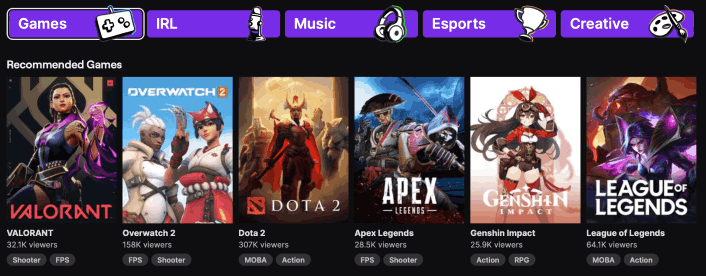
И как только вы найдете свою нишу, убедитесь, что транслируете не менее двух часов подряд.
Даже если у вас большая аудитория, трансляции часто не достигают большого количества людей в первые 20 минут. Поэтому короткие трансляции могут означать меньшую аудиторию. И у вас будет меньше шансов убедить зрителей подписаться на ваш канал.
#4. Создайте привлекательный макет для Twitch
Трансляции на Twitch очень конкурентны. Поэтому вам придется выделиться из толпы, чтобы привлечь внимание. Один из простых способов сделать это — создать свой собственный макет Twitch. Макет трансляции определяет, какие элементы вашей трансляции будут отображаться и где.
Вы можете довольно быстро создать макет на Canva.
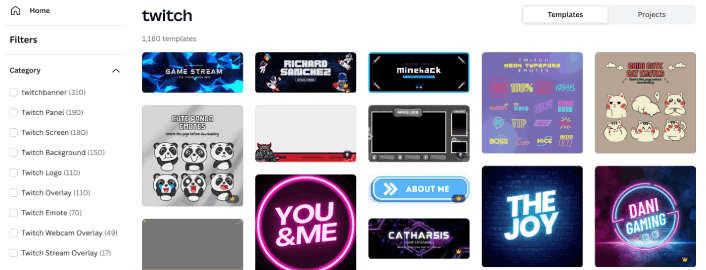
Чтобы ваш макет выглядел более профессионально, включите:
- Логотип трансляции
- Баннер Twitch
- Оверлей
- Вступительные и заключительные сцены
- Фон Twitch
И если вы серьезно относитесь к увеличению числа подписчиков на Twitch, создайте несколько забавных эмодзи для своего сообщества.
#5. Создайте целевую страницу для ваших стримов
Вы можете легко встроить свои видео Twitch в WordPress. Вы можете либо скопировать и вставить код встраивания Twitch, либо использовать плагин, чтобы сделать это автоматически для вас.
Добавление вашей трансляции Twitch на ваш сайт — отличный способ привлечь больше подписчиков на Twitch. Любой посетитель сайта сможет смотреть вашу трансляцию в прямом эфире на вашем сайте, когда вы это сделаете. Или он сможет перейти на Twitch и подписаться на вас.
Хорошая сторона наличия собственной целевой страницы подкаста заключается в том, что вы можете удерживать своих подписчиков гораздо легче, чем на Twitch.
Теперь, когда вы знаете, что создавать, пришло время запустить вашу целевую страницу для подкаста. Для этого руководства мы настоятельно рекомендуем использовать SeedProd для создания ваших целевых страниц.

SeedProd — это лучший конструктор целевых страниц для WordPress. Он идеально подходит для бизнеса, блогеров и владельцев веб-сайтов, которые хотят создавать высококонверсионные целевые страницы без каких-либо навыков разработки.
С SeedProd вы получаете готовые шаблоны для высококонверсионных целевых страниц, которые вы можете опубликовать мгновенно. Это включает шаблоны для:
- Продающие страницы
- Страницы «Скоро открытие»
- Страницы 404
- Страницы обслуживания
- Целевые страницы Kickstarter
- Страницы захвата
- Страницы благодарности
- Страницы вебинаров
- Целевые страницы приложений
И многое другое!
Ознакомьтесь с этим руководством, чтобы создать целевую страницу для подкаста, которая превратит трафик вашего веб-сайта в подписчиков Twitch и соберет подписчиков по электронной почте для ремаркетинга. Вы также можете собирать подписчиков с помощью push-уведомлений браузера.
#6. Избегайте теневого бана, собирая подписчиков веб-push
Push-уведомления могут помочь вам получать повторный трафик на ваш сайт или на ваши трансляции Twitch. Алгоритм Twitch ранее подавлял охват прямых трансляций без видимой причины, не уведомляя всех подписчиков. Если вас когда-либо теневой бан, вы поймете, что именно мы имеем в виду.
Это не проблема, специфичная для Twitch. Большинство платформ для прямых трансляций имеют странные алгоритмы, которые случайным образом решают замедлить ваш рост. Если у вас нет лояльной фан-базы или ТОНА очень влиятельных друзей-стримеров, теневой бан может полностью уничтожить ваш канал.
Вы можете полностью избежать этой проблемы, собирая подписчиков push-уведомлений. Мы рекомендуем использовать PushEngage для отправки ваших push-уведомлений.

PushEngage помогает вам автоматически увеличивать трафик и вовлеченность вашего веб-сайта.
А если у вас интернет-магазин, PushEngage также поможет вам увеличить продажи, создавая автоматические push-уведомления для электронной коммерции.
Вы можете начать бесплатно, но если вы серьезно относитесь к развитию своего бизнеса, вам следует приобрести платный план.
Вот что вы можете получить от платного плана:
- Высококонверсионные кампании включая автоматические цепочки писем, кампании по брошенной корзине, оповещения о снижении цен и оповещения о наличии товара
- Более высокие лимиты подписчиков, чтобы вы могли беспрепятственно расширять списки подписчиков push-уведомлений
- Более высокие лимиты отправки, чтобы вы могли отправлять больше push-уведомлений в различных кампаниях по мере роста вашего бизнеса
- Больше способов таргетинга кампаний, включая отправку по часовому поясу клиента, пользовательские триггерные кампании и персонализированные теги Smart Tags
- Отслеживание целей и расширенная аналитика, чтобы постоянно улучшать рентабельность инвестиций в ваши push-уведомления
- A/B-тестирование, которое позволяет тестировать ваш текст, изображения или правила отображения, чтобы увидеть, что конвертируется лучше всего
- Персональный менеджер по успеху для помощи с скриптами успеха, автоматизацией поведения и кампаниями последующих действий
И эти функции созданы для того, чтобы помочь малому бизнесу расти.
Чтобы продвигать вашу трансляцию Twitch, мы рекомендуем настроить RSS push-уведомления. Таким образом, каждый раз, когда вы публикуете трансляцию на своем сайте, push-уведомление будет отправлено всем вашим подписчикам с уведомлением о том, чтобы они проверили ее.
Вы также можете использовать веб-push-уведомления для кросс-продвижения ваших других каналов в социальных сетях.
#7. Добавьте кнопки подписки Twitch на ваш сайт
Если посетители вашего веб-сайта не могут легко найти вашу учетную запись Twitch, они, вероятно, не посетят и не подпишутся на ваш канал. Поэтому имеет смысл упростить подписку на вас в Twitch с вашего веб-сайта.

Простой способ сделать это — использовать плагин для социальных сетей, который создает кнопки подписки на вашем сайте WordPress. Если вы являетесь партнером Twitch, то привлечение большего числа пользователей Twitch также является отличным способом заработать больше на подписках.
Совет профессионала: Вы также можете создавать кнопки «нажми, чтобы подписаться» для увеличения списка ваших push-уведомлений. Затем вы можете отправлять подписчикам push-уведомлений уведомления, которые направляют их непосредственно на ваши трансляции или мероприятия в социальных сетях.
#8. Продвигайте свой канал Twitch в своей рассылке
Вы также можете использовать свою рассылку для продвижения своего канала Twitch. Простой способ сделать это — создать всплывающее окно, которое сегментирует ваших подписчиков, когда они попадают на ваши встроенные видео Twitch.
Таким образом, когда вы отправляете рассылки с просьбой к зрителям Twitch подписаться на вас в Twitch, вы знаете, что они уже заинтересованы в ваших видео. Мы рекомендуем использовать OptinMonster для создания ваших всплывающих окон.

OptinMonster является одним из пионеров в области всплывающих окон WordPress. Они практически изменили способ генерации лидов по электронной почте в индустрии маркетинга.
OptinMonster имеет практически все, что вам нужно для начала, роста и масштабирования вашего процесса генерации лидов по электронной почте.
Вот краткий обзор того, что вы можете делать с помощью этого набора инструментов:
- Плавно наращивайте свою базу подписчиков для ремаркетинга
- Превращайте посетителей, пришедших впервые, в постоянных читателей
- Уменьшить количество брошенных корзин и брошенных просмотров
- Создавайте предложения с ограниченным сроком действия с реальными таймерами обратного отсчета
- Увеличьте количество загрузок электронных книг и продаж цифровых продуктов
- Создать воронку для прямых трансляций
- Улучшите вовлеченность на сайте с помощью игровых всплывающих окон
- Перенаправляйте трафик на страницы и в сообщения, которые приносят вам доход
- Создайте список реальных лидов и удалите поддельные адреса электронной почты с помощью двухэтапных подписок
Мы написали обзор OptinMonster. Так что, если вы хотите ознакомиться с функциями более подробно, вперед и ознакомьтесь.
Совет: Многие стримеры отображают количество своих подписчиков с помощью оверлеев для трансляций. Но вы также можете создать небольшой раздел в своей рассылке, чтобы показать его и попросить подписчиков вашей рассылки поделиться вашими трансляциями с новыми зрителями.
#9. Публикуйте стримы на YouTube
YouTube по-прежнему является самой используемой платформой для видеоконтента. Хотя стриминг на YouTube относительно нов, он все еще остается мощной поисковой системой для видео. Поэтому, даже если вы стримите на Twitch, вам также на 100% следует одновременно стримить и на YouTube.
Есть высокая вероятность, что ваши YouTube-видео появятся в результатах поиска, и вы сможете привлечь массу трафика из поисковых систем за пределами YouTube. Это означает еще больше новых подписчиков на Twitch для вас.
Вы можете загрузить трансляцию на YouTube, используя функцию премьеры видео. Или вы можете делать это в прямом эфире на обеих платформах, используя платформу для прямых трансляций, такую как Streamyard.
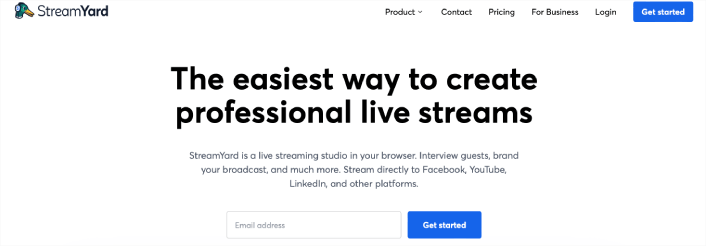
Streamyard позволяет создавать прямые трансляции и одновременно загружать их на несколько платформ. Вы также можете одновременно взаимодействовать с чатами обеих платформ. Таким образом, вы не пожертвуете качеством ради охвата.
#10. Создайте канал с клипами на YouTube
Все знают, что нужно создавать несколько YouTube-каналов. Хотя бы ради дохода от рекламы. На случай, если один канал будет демонетизирован, вы все равно сможете зарабатывать на жизнь с помощью другого. Но большинству создателей контента трудно придумывать идеи для другого канала, а затем создавать для него совершенно новый контент.
Но создание канала с клипами довольно просто. Все, что вам нужно сделать, это создавать увлекательные клипы из трансляций на вашем основном канале. Это привлекает дополнительный трафик на ваш основной YouTube-канал, а также на ваш Twitch-канал.
Чтобы пойти еще дальше, вы можете создавать только YouTube Shorts для канала с клипами, как это делает Микайла. Микайла — стример на Twitch, которая также загружает клипы на YouTube, чтобы привлечь массу дополнительного трафика на свои видео на Twitch. Обязательно посмотрите ее контент, и вы поймете, что мы имеем в виду.
Вы также должны продвигать свои трансляции на платформах социальных сетей, таких как TikTok и Instagram. Твиты со ссылками на ваши прямые трансляции также могут помочь вам привлечь подписчиков на Twitch.
#11. Сделайте ваши стримы интерактивными
Стриминг фокусируется почти исключительно на живой аудитории. Поэтому лучший совет, который мы можем вам дать, — это слушать свою аудиторию. Часто взаимодействуйте с ней и активно задавайте вопросы.
Большинство вашей аудитории стриминга будет отправлять вам сообщения в прямом чате. И они отчаянно хотят быть замеченными, услышанными и признанными. Прежде всего, они хотят чувствовать себя ценными. Если вы не будете взаимодействовать с ними и не дадите им этого признания, они уйдут к кому-то другому.
Мероприятия — отличный способ увеличить взаимодействие с аудиторией. Прекрасным примером является участие стендап-комика Самая Райны и международного мастера Сагара Шаха из ChessbaseIndia в международном шахматном турнире, организованном сестрами Ботез. Они транслировали все мероприятие в прямом эфире, и чат взорвался поддержкой и обожанием.
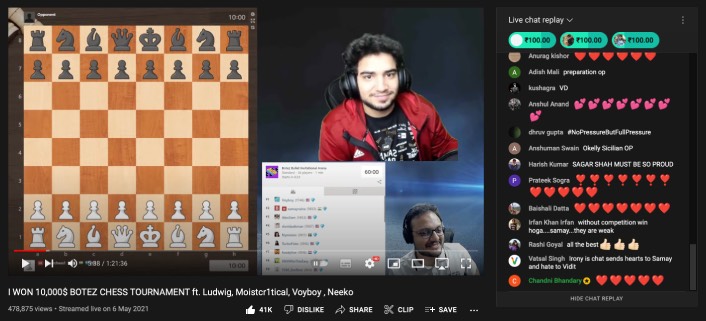
Конечно, они регулярно транслируют другие шахматные события и собственный контент. Но такая игра, как шахматы, имеет естественный барьер для входа. Вы должны знать игру, чтобы понимать, что происходит на событии.
Если эти двое могут привлечь огромную аудиторию, транслируя шахматы, что мешает вам транслировать собственный контент?
Совет профессионала: Не забывайте упоминать своих новых подписчиков.
#12. Сотрудничайте с другими стримерами Twitch
Вы можете многому научиться у других стримеров Twitch. Если вы сможете сотрудничать с известными стримерами, вы все равно увеличите количество своих подписчиков за счет кросс-промоушена. Но что еще более важно, вы получите доступ к инфлюенсерам, которые прошли через ваши трудности. И это может быть очень ценно.

Попробуйте связаться с другими стримерами в вашей нише и построить отношения, которые в конечном итоге могут перерасти в живое сотрудничество. Этот подход может занять время, но он того стоит ради аудитории, которую вы получите в долгосрочной перспективе. Возьмите то, чему вы научились у своих коллабораций, и добавьте свой собственный поворот.
Для новых стримеров коллаборации могут стать отличной возможностью узнать секреты стриминга от популярных стримеров.
Если вы игровой стример, который любит стримить игры, то вы уже знаете, что вам следует стримить популярную игру, такую как Minecraft или Fortnite. Представьте, если бы вы могли стримить с Ninja и узнать его секреты стриминга.
Вы можете не только использовать их социальные сети, чтобы получить больше подписчиков на Twitch, но и узнать, как популярные создатели контента оптимизируют свой контент и свои каналы.
Что делать, когда вы знаете, как получить больше подписчиков на Twitch
Теперь, когда вы знаете, как получить больше подписчиков на Twitch, вам следует настроить процесс создания контент-календаря для вашего канала. Придерживайтесь календаря, и вы увидите увеличение вовлеченности и активных подписчиков.
Говоря о вовлеченности, вам также следует начать использовать push-уведомления, чтобы повысить вовлеченность вашего веб-сайта даже за пределами конкурсов. Мы рекомендуем использовать PushEngage для отправки push-уведомлений. PushEngage — это программное обеспечение для push-уведомлений № 1 в мире.
Не убедились? Сначала ознакомьтесь с этими статьями:
- Кампании с отложенными письмами и автоответчики для веб-push-уведомлений
- 5 преимуществ использования кампании push-уведомлений о брошенных корзинах
- Как превратить подписчиков в покупателей с помощью push-уведомлений в браузере
Если у вас также есть канал Twitch, вам стоит ознакомиться с лучшими плагинами WordPress для Twitch. И если вы еще этого не сделали, начните использовать PushEngage уже сегодня!


