
Ищете лучший плагин карт WordPress для вашего сайта?
С помощью мощного плагина карт Google вы можете изменять темы карт, добавлять несколько местоположений, создавать пользовательские маркеры и многое другое. Конечно, вы можете использовать HTML для встраивания карты на свой сайт. Но это имеет свои ограничения.
Итак, главный вопрос: какой плагин карт WordPress подходит для вашего сайта? Нужен ли вам платный плагин? Достаточно ли бесплатных плагинов? И как выбрать один из сотен плагинов WordPress на рынке?
В этой статье мы представим вам лучшие плагины для встраивания карт на ваш сайт WordPress. Мы даже дадим вам наш главный выбор.
Звучит неплохо? Давайте погрузимся.
Лучшие плагины карт для WordPress
Здесь мы включили бесплатные и платные плагины карт, чтобы вы могли выбрать лучший вариант для вашего бизнеса. Давайте посмотрим на лучшие плагины карт WordPress на рынке. Некоторые из них являются очень популярными плагинами и входят в наш список лучших плагинов WordPress.
#1. WPForms
WPForms — лучший плагин для создания форм WordPress. Мы протестировали множество плагинов для форм WordPress, и ни один из них не сравнится с функциональностью или простотой использования WPForms.
Вы можете использовать конструктор форм с перетаскиванием в WPForms для создания и публикации:
- Опросы и голосования
- Многошаговые формы
- Формы с условной логикой
- Кампании по брошенным формам
- Целевые страницы форм
- Шаблоны форм
- Автономные формы
- Разговорные формы
Pro-версия WPForms поставляется с мощным дополнением Geolocation, которое позволяет добавлять карту на контактные формы вашего веб-сайта без какого-либо пользовательского HTML-кода. Все, что вам нужно сделать, это подключить его к Google Places или Mapbox.
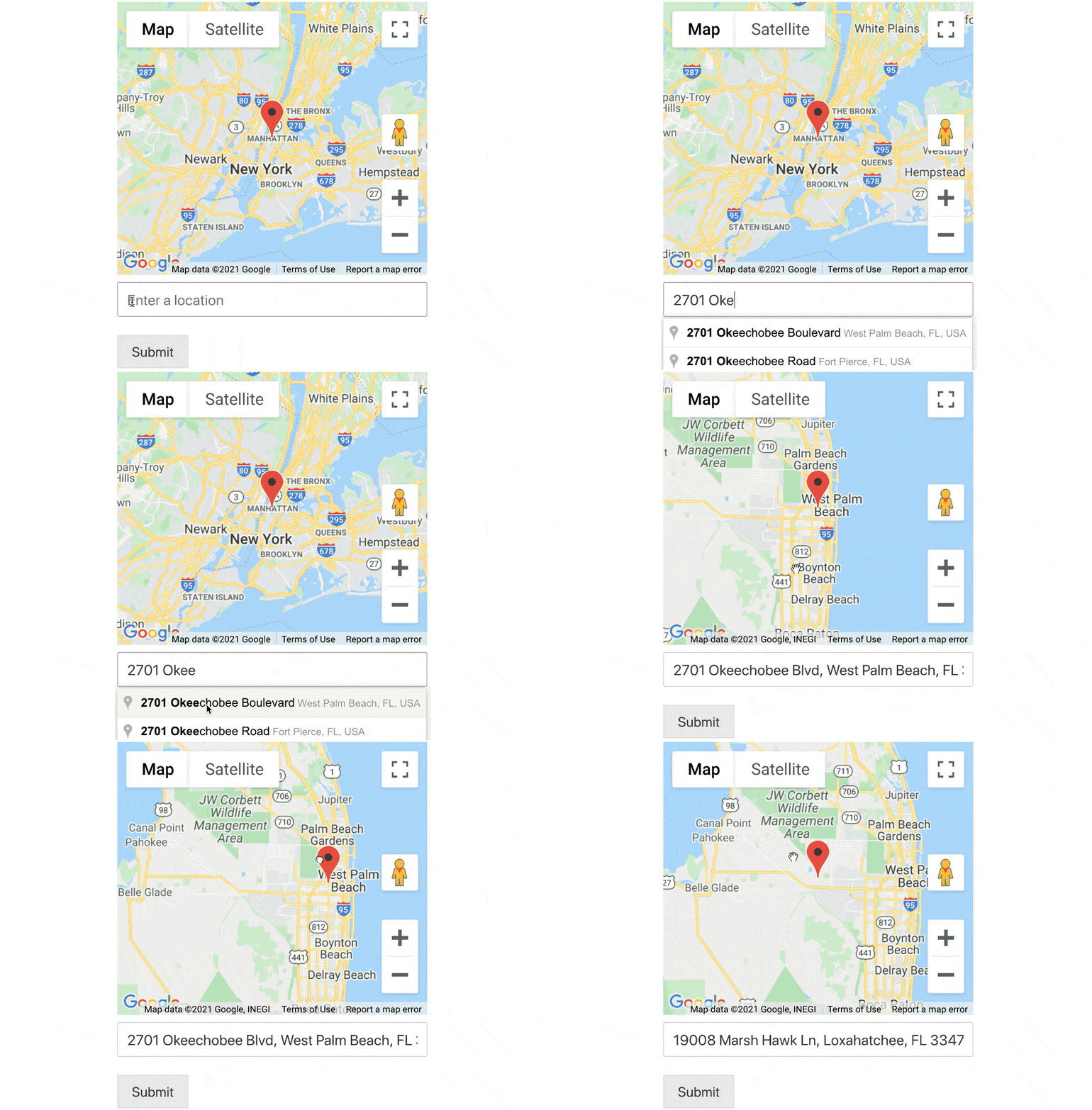
Вы можете даже создавать формы автозаполнения адресов в WordPress. Создайте форму WordPress с помощью WPForms, и вы сразу поймете, почему мы так любим этот плагин.
#2. SeedProd

SeedProd — лучший плагин WordPress для создания конвертируемых целевых страниц.
Вы получаете конструктор целевых страниц с функцией перетаскивания, который содержит множество опций для создания страниц электронной коммерции и целевых страниц. В отличие от конструкторов веб-сайтов WordPress, вы можете настраивать каждый аспект вашей целевой страницы, включая навигационные меню, нижние колонтитулы и стили. SeedProd также работает с любой темой WordPress и создает удобные для мобильных устройств целевые страницы.
С SeedProd вы получаете готовые шаблоны для высококонверсионных целевых страниц, которые вы можете опубликовать мгновенно. Это включает шаблоны для:
- Продающие страницы
- Страницы «Скоро открытие»
- Страницы 404
- Страницы обслуживания
- Страницы захвата
- Страницы входа
- Страницы благодарности
- Страницы вебинаров
- Страницы видео
И многое другое! Основное преимущество использования блока Google Maps SeedProd заключается в том, что вам не нужно копировать и вставлять какой-либо шорткод, чтобы отображать карты на ваших веб-страницах. Вы можете просто перетащить блок Google Maps, добавить свое местоположение, настроить параметры карты, и готово!
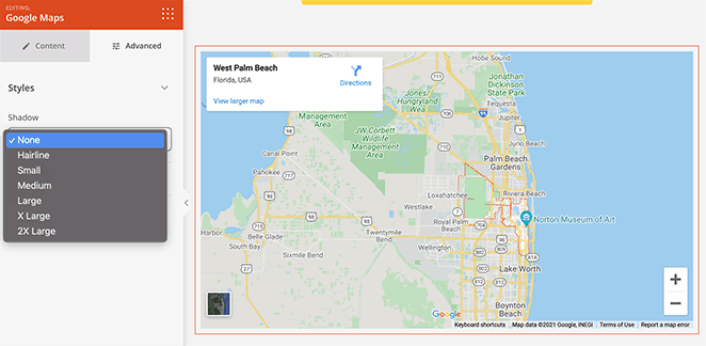
Нам нравится использовать SeedProd, и мы даже написали подробный обзор плагина SeedProd. Ознакомьтесь с ним!
#3. Maps Marker Pro
Maps Marker Pro — это премиальный плагин Google Maps для WordPress. Он позволяет создавать карту с несколькими местоположениями и пользовательскими маркерами. Если Google Maps вам не подходит, вы также можете использовать Bing Mapbox и OpenStreetMap.
Плагин поставляется с некоторыми очень мощными функциями, включая:
- Несколько типов карт
- Различные типы поддержки геокодирования
- Фильтры для удобной навигации по карте
- Анимированные кластеры маркеров для каждой карты
- Отслеживание GPX
- Сортировка маркеров по дате, имени и расстоянию
- Возможность делиться картами офлайн через QR-коды
Он также совместим с WPML Translation и другими плагинами перевода WordPress. Таким образом, вы можете легко создавать карты на нескольких языках.
#4. WP Go Maps

WP Go Maps — популярный плагин для добавления карт Google в WordPress. Это freemium-плагин с множеством мощных функций для создания настраиваемых карт Google на ваших веб-сайтах.
Вы можете создать карту Google с несколькими маркерами с помощью его бесплатной версии. Но мы рекомендуем использовать Pro-версию, которая поставляется с более продвинутыми функциями, такими как:
- Карты рельефа, дорожные, гибридные и спутниковые
- Настройки для настройки цвета карты, высоты, ширины, выравнивания и уровня масштабирования
- Предварительно созданные шаблоны карт для локаторов магазинов и карт маршрутов
- Блок карты для конструктора страниц Elementor
- Параметры для добавления собственной темы карты
- Настройки для добавления описаний, ссылок и изображений к маркерам карты
- Настройки категорий с расширенной фильтрацией для классификации ваших карт
- Импорт и экспорт CSV для всех маркеров карты
Но даже бесплатный плагин — отличный вариант для вас, если вы просто хотите встроить карту на страницу контактов вашего сайта.
#5. Mapify Pro

Mapify Pro — по словам одного из их клиентов, «самое сексуальное» программное обеспечение для карт в мире. Мы не знаем насчет сексуальности, но оно, безусловно, мощное. Плагин поставляется как в версиях Lite, так и Pro.
С помощью MapifyLite вы можете создавать стандартные карты с изображениями, видео и пользовательскими маркерами, а для более продвинутых функций карты вы можете попробовать использовать его Pro-версию. Вот краткий обзор того, чего ожидать от платной версии:
- Добавьте видео и фотогалерею к любой карте
- Функция кластеризации для нескольких местоположений
- Отображение настроенных всплывающих подсказок карты
- Предоставляет возможность делиться местоположениями на карте в социальных сетях
- Добавьте каталог местоположений под картой для лучшего взаимодействия
- Параметры стилизации для всплывающих подсказок и окон
- 100% адаптивные карты
MapifyPro использует свой собственный уникальный API карт. Другими словами, он не зависит от Google Maps API для отображения карт в WordPress. В результате он не подвержен частым изменениям политики Google, и карты на вашем сайте продолжают работать независимо ни от чего.
Какой лучший плагин карт для WordPress?
Без сомнения, SeedProd — лучший плагин Instagram для WordPress. Если учитывать баланс между ценой, производительностью и функциями, то действительно нет конкурентов. Мы рекомендуем вам приступить к встраиванию карт на ваш сайт прямо сейчас.
После того, как это будет сделано, вам останется только генерировать трафик на ваш сайт.
Простой способ сделать это — начать использовать push-уведомления. Отправка push-уведомлений — отличный способ генерировать повторный трафик на ваш сайт. Если вас это интересует, вам также стоит ознакомиться с этими статьями:
- Стоимость push-уведомлений: действительно ли это бесплатно? (Анализ цен)
- Как привлечь больше трафика на ваш блог WordPress (9 простых способов)
- Как повысить коэффициент согласия на получение push-уведомлений (7 способов)
- Как добавить плагин веб-уведомлений WordPress на ваш сайт
Мы рекомендуем использовать PushEngage для отправки ваших push-уведомлений. PushEngage — это программное обеспечение для push-уведомлений №1 в мире. Так что, если вы еще этого не сделали, начните работу с PushEngage сегодня.


