Ищете способ увеличить средний чек?
Средний чек (AOV) — один из самых простых показателей в электронной коммерции для анализа роста бизнеса. Но как его увеличить? Действительно ли увеличение среднего чека помогает вашему бизнесу?
В этой статье мы подробнее рассмотрим, что такое средний чек, почему его следует оптимизировать, и несколько очень простых способов увеличить ваш средний чек.
Звучит неплохо? Давайте погрузимся.
PushEngage — это плагин для push-уведомлений №1 в мире. Получите его бесплатно!
- Что такое средний чек?
- Является ли средний чек лучшим показателем в электронной коммерции?
- Способы увеличить средний чек вашего магазина
- #1. Установите минимальную сумму заказа для бесплатной доставки
- #2. Объединяйте товары и создавайте наборы
- #3. Предлагайте сопутствующие товары и дополнительные продажи
- #4. Увеличьте средний чек с помощью программ лояльности
- #5. Добавьте чат в реальном времени на ваш сайт
- #6. Используйте сегментацию аудитории для увеличения конверсий
- #7. Предлагайте более дешевые альтернативы (Downsell)
- #8. Используйте всплывающее окно при уходе для увеличения продаж
- #9. Добавьте кнопку «Подписаться» во всплывающее окно
- #10. Создайте приветственную кампанию
- #11. Создавайте ограниченные по времени предложения
- #12. Демонстрируйте социальное доказательство в процессе оформления заказа
- #13. Добавьте несколько вариантов оплаты
- Что делать после увеличения среднего чека
Что такое средний чек?
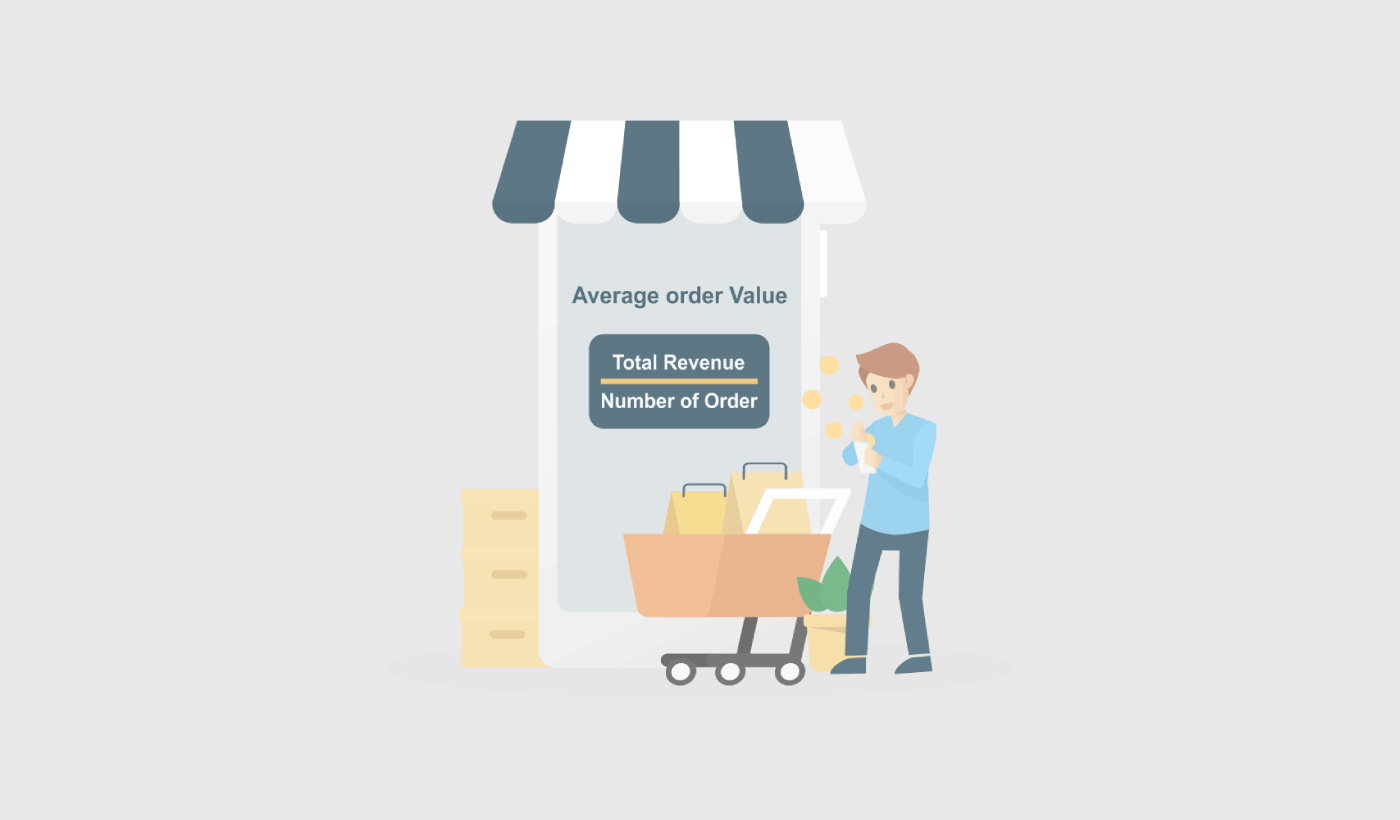
Средний чек (AOV) — это показатель, который измеряет среднюю сумму денег, потраченную за один заказ на веб-сайте или в магазине электронной коммерции. Вы можете рассчитать его, разделив общий доход на количество заказов.
Например, если магазин получил 100 заказов и общий доход составил 10 000 долларов, средний чек составит 100 долларов (10 000 долларов / 100 заказов).
Средний чек важен для вашего бизнеса, поскольку он помогает понять ценность вашей клиентской базы и выявить возможности для увеличения продаж. Увеличивая средний чек, ваш бизнес может получать больше дохода от каждого клиента, что может помочь увеличить общий объем продаж и прибыльность.
Существует несколько стратегий, которые вы можете использовать для увеличения среднего чека, например, предложение скидок на комплекты, продажа сопутствующих товаров и использование пакетных цен. Эффективно применяя эти стратегии, вы можете увеличить продажи и со временем повысить средний чек. Мы скоро поговорим об этом подробнее.
Является ли средний чек лучшим показателем в электронной коммерции?
Хотя увеличение среднего чека (AOV) может быть полезным способом развития бизнеса, следует учитывать несколько потенциальных недостатков. Увеличение среднего чека может:
- Привести к увеличению затрат на привлечение клиентов: для увеличения среднего чека вам может потребоваться больше инвестировать в маркетинг и привлечение клиентов. Это может увеличить стоимость привлечения новых клиентов, что может повлиять на общую прибыльность бизнеса.
- Быть неустойчивым в долгосрочной перспективе: увеличение среднего чека может быть неустойчивой стратегией в долгосрочной перспективе, поскольку клиенты в конечном итоге могут достичь точки, когда они не захотят тратить больше за каждый заказ. Поэтому лучше всего сосредоточиться на среднем чеке во время сезонных распродаж.
- Привести к недовольству клиентов: если вы слишком сильно сосредоточитесь на увеличении среднего чека, вы можете раздражать своих клиентов, подталкивая их к покупке большего количества товаров, чем им нужно или хочется. Это может привести к недовольству клиентов и потенциально навредить репутации вашего бизнеса.
- Не всем бизнесам это может быть выгодно: В зависимости от характера вашего бизнеса и его продуктов, увеличение среднего чека может быть нецелесообразным. Например, если вы продаете недорогие товары, вам может быть сложнее увеличить средний чек, чем бизнесам, продающим более дорогие товары.
В целом, важно тщательно взвесить потенциальные недостатки увеличения среднего чека и применять сбалансированный подход. Краткосрочный рост может привести к потере лояльных клиентов, что окажет долгосрочное влияние на ваш бизнес.
Способы увеличения среднего чека вашего магазина
Теперь, когда вы понимаете, что такое средний чек и почему он важен, пришло время узнать, как его увеличить. Имейте в виду, что почти все наши советы требуют того или иного маркетингового инструмента. Прежде чем начать оптимизировать свой средний чек, вам нужно быть на 100% уверенным, что вам вообще стоит на нем фокусироваться.
#1. Установите минимальную сумму заказа для бесплатной доставки
Бесплатная доставка может принести вам много продаж. Но если вы хотите увеличить средний чек, вам нужно перестать предлагать ее для ваших более дешевых товаров. Один из способов сделать это — установить минимальную сумму заказа для бесплатной доставки.

Минимальная сумма заказа (MOV) для бесплатной доставки — это минимальная сумма денег, которую клиент должен потратить в вашем магазине, чтобы получить бесплатную доставку своего заказа. Вы можете использовать эту маркетинговую стратегию, чтобы побудить клиентов тратить больше денег на вашем сайте.
Когда вы устанавливаете минимальную сумму заказа, вы сокращаете расходы на доставку и обработку каждого заказа. Снижение затрат облегчает поддержание прибыльности.
Еще одна причина внедрить минимальную сумму заказа для бесплатной доставки — побудить ваших клиентов покупать больше товаров в одном заказе. Это может довольно легко увеличить средний чек.
#2. Объединяйте товары и создавайте наборы
Комплектация товаров — распространенная стратегия увеличения среднего чека (AOV) бизнеса. Объединяя товары и продавая их как пакет, вы часто можете продать больше товаров по более высокой цене, чем если бы вы продавали их по отдельности.
Вот несколько советов по использованию комплектации товаров для увеличения вашего среднего чека:
- Выбирайте взаимодополняющие товары.
- Предлагайте скидки на комплекты.
- Используйте цены на комплекты.
Если вы будете придерживаться этих трех основных принципов, вы сможете создавать пакеты, которые будут продаваться как горячие пирожки. Это отличный способ увеличить ваш средний чек.
#3. Предлагайте сопутствующие товары и дополнительные продажи
По данным Amazon, 35% их продаж приходится на кросс-сейл. Push-уведомления для кросс-сейла — это кампании, которые автоматически предлагают дополнительные товары вашим клиентам. Push-уведомления для кросс-сейла помогают увеличить продажи, поскольку вероятность продажи существующему клиенту на 60-70% выше.
Апселлинг — это метод побуждения пользователей перейти на более дорогой продукт или улучшенную версию продукта, который они уже покупают. Кросс-селлинг — это продажа связанных или дополнительных товаров клиенту.
Кросс-селлинг и апселлинг — самые эффективные методы маркетинга. Вы можете легко увеличить свой средний чек (AOV), используя кампании кросс-селлинга и апселлинга. Один из простых способов сделать это — создать push-уведомления для кросс-селлинга, подобные этому:
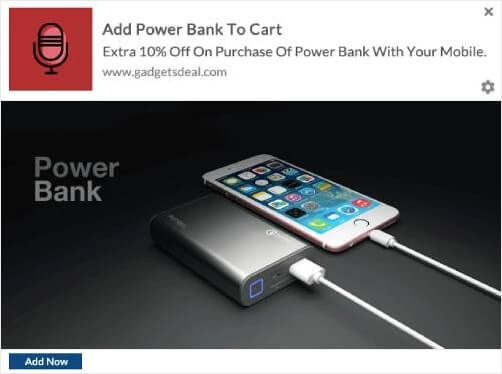
Ознакомьтесь с этой статьей, чтобы получить пошаговое руководство по созданию push-уведомлений для кросс-селлинга. Вы можете использовать ту же технику для создания уведомлений об апселлинге.
#4. Увеличьте средний чек с помощью программ лояльности
Проверка реальности: Удержать существующего клиента дешевле, чем привлечь и ввести в курс дела нового клиента. Если вы постоянно сосредоточены на привлечении новых клиентов, возможно, стоит также направить часть бюджета и времени на удержание существующих клиентов.
Итак, что вы можете сделать? Один очень простой способ заставить ваших клиентов чувствовать себя важными и ценными — это создать программу лояльности. И нет, программы лояльности предназначены не только для авиакомпаний. Почти каждый крупный бренд сейчас имеет программу вознаграждений. Один из простых способов сделать это — использовать push-уведомления, подобные этому:
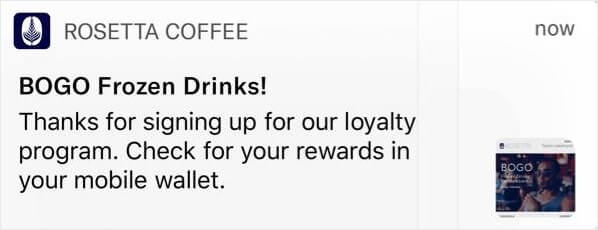
А если вы хотите пойти дальше, вы можете по-разному вознаграждать своих лояльных клиентов.
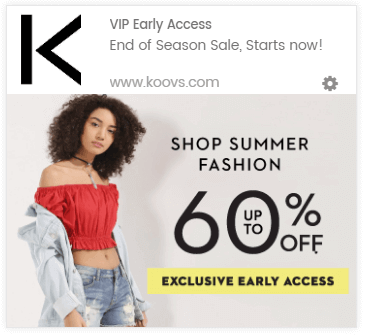
Если вы новичок в программах лояльности и никогда раньше не настраивали их, попробуйте использовать Yotpo. Yotpo помогает создавать мгновенные программы лояльности для вашего веб-сайта. И вам не нужно знать никакого кода для его реализации.
#5. Добавьте чат в реальном времени на ваш сайт
Наличие чат-виджета на вашем сайте может быть очень эффективным инструментом для вовлечения посетителей сайта. Используя инструмент живого чата на вашем сайте, вы можете легко настроить триггеры чат-виджета для:
- Клиенты тратят много времени на страницу продукта или оформления заказа
- Клиенты добавляют товары в корзину, но не могут их оплатить
- Клиенты с высокой стоимостью корзины, чтобы предложить купон или скидку
Все это автоматизированные триггеры, которые могут помочь вам очень быстро конвертировать множество потенциальных клиентов. Мы рекомендуем использовать LiveChat.
LiveChat — это инструмент живого чата для маркетинга и продаж в режиме реального времени. Если вы продаете товары онлайн или собираете лиды для агентства, мы настоятельно рекомендуем использовать этот плагин.
Чат-виджет уведомит ваших клиентов, когда сработает один из автоматизированных триггеров. И с этого момента представитель службы поддержки клиентов сможет взять на себя управление и помочь клиентам принять решение о покупке.
#6. Используйте сегментацию аудитории для увеличения конверсий
Сегментация вашей аудитории по интересам и поведению делает ваши кампании более привлекательными для кликов. Если вы отправляете предложения и акции, которые более релевантны вашей аудитории, ваши конверсии взлетят до небес.
Например, если вы сегментируете подписчиков push-уведомлений, вы получите гораздо больше кликов по ним.
Автоматическая сегментация подписчиков упрощает отправку персонализированных кампаний push-уведомлений. Таким образом, вы можете повысить количество кликов по push-уведомлениям, что, в свою очередь, приведет к увеличению возвращающегося трафика на ваш сайт.
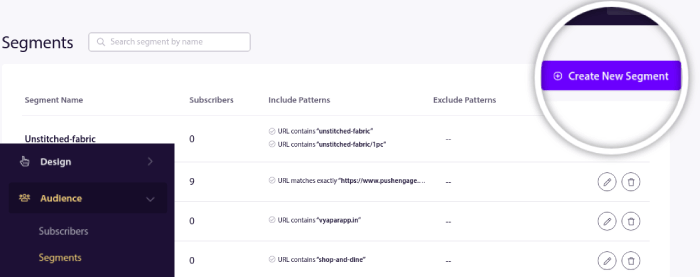
И это очень легко настроить с помощью PushEngage. Обычно для создания сегментов вам пришлось бы использовать JavaScript API. С PushEngage у вас все еще есть такая возможность, но самый простой способ сделать это — через вашу панель управления PushEngage. Перейдите в раздел Audience » Segments и нажмите Create a New Segment:
И создайте правило, которое автоматически сегментирует ваших подписчиков на основе просматриваемых ими URL:
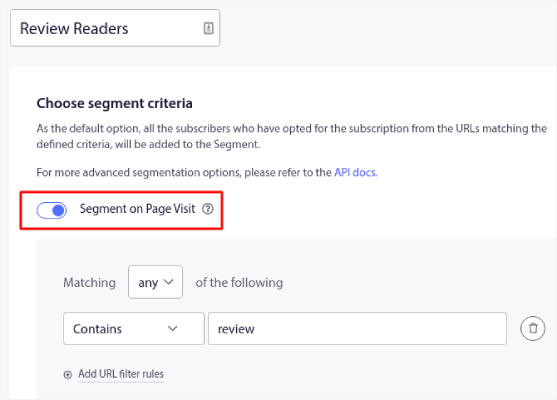
В примере мы создали сегмент под названием «Sample Segment», который автоматически сегментирует подписчиков при посещении URL-адресов на вашем сайте со словом «examples». Вы можете использовать здесь практически любое ключевое слово.
Когда вы будете довольны правилом, нажмите Create.
#7. Предлагайте более дешевые альтернативы (Downsell)
Даунселлинг — это техника продаж, при которой вы пытаетесь убедить клиента приобрести менее дорогой продукт или услугу вместо того, который он изначально хотел. Это может быть сделано по разным причинам, например, если у клиента нет бюджета на более дорогой вариант, или если менее дорогой вариант так же хорошо удовлетворяет его потребности.
Представьте себе магазин, который продает конфеты и сигареты на кассе. Даунселлинг лучше всего работает для импульсивных покупок и дополнений. Есть несколько стратегий, которые вы можете использовать при даунселлинге дополнений:
- Объясните ценность менее дорогого варианта: Объясните, как дополнение с более низкой ценой по-прежнему удовлетворяет потребности клиента и обеспечивает ценность.
- Выделите недостатки более дорогого варианта: Укажите на любые недостатки или ненужные функции более дорогого дополнения, которые клиенту могут не понадобиться.
- Предложите альтернативы: Предложите другие варианты или дополнения, которые могут лучше соответствовать потребностям и бюджету клиента.
- Используйте дефицит или срочность: Создайте ощущение срочности, упомянув ограниченную доступность или предложение, действующее ограниченное время, для менее дорогого варианта.
Важно быть честным и прозрачным с клиентом и никогда не давить на него, чтобы он принял решение. Вместо этого сосредоточьтесь на том, чтобы помочь ему сделать осознанный выбор, который наилучшим образом соответствует его потребностям и бюджету.
#8. Используйте всплывающее окно при уходе для увеличения продаж
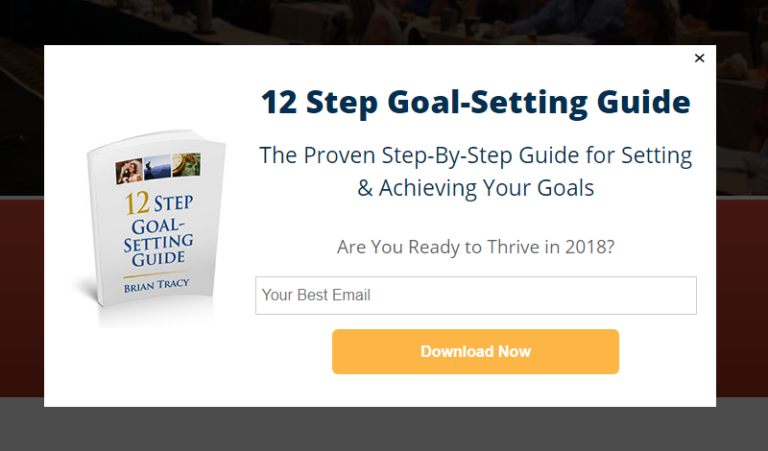
Всплывающие окна при намерении уйти (exit intent popups) — это маркетинговый инструмент, предназначенный для привлечения внимания посетителей веб-сайта, которые собираются покинуть его. Эти всплывающие окна обычно появляются, когда посетитель перемещает курсор за пределы окна браузера или прокручивает страницу до конца, указывая на то, что он собирается уйти.
Всплывающие окна при намерении уйти (exit intent popups) — это маркетинговый инструмент, предназначенный для привлечения внимания посетителей веб-сайта, которые собираются покинуть его. Эти всплывающие окна обычно появляются, когда посетитель перемещает курсор за пределы окна браузера или прокручивает страницу до конца, указывая на то, что он собирается уйти.
Всплывающие окна при намерении уйти могут использоваться для того, чтобы убедить посетителей остаться на сайте и совершить покупку или предпринять другое желаемое действие. Важно использовать всплывающие окна при намерении уйти с осторожностью и таким образом, чтобы это не нарушало пользовательский опыт. Чрезмерное использование всплывающих окон или их использование таким образом, чтобы они были навязчивыми или раздражающими, может привести к негативному пользовательскому опыту и в конечном итоге навредить вашим усилиям по продажам.
#9. Добавьте кнопку «Подписаться» во всплывающее окно
Push-уведомления помогают вам автоматически увеличивать трафик вашего сайта и вовлеченность. И если вы управляете интернет-магазином, PushEngage также помогает вам увеличить продажи, помогая создавать автоматические push-уведомления для электронной коммерции.
Вы можете начать бесплатно, но если вы серьезно относитесь к развитию своего бизнеса, вам следует приобрести платный план. Кроме того, прежде чем покупать какую-либо службу push-уведомлений, ознакомьтесь с этим руководством по стоимости push-уведомлений.
Вот краткий обзор того, что вы получаете с PushEngage:
- Высококонверсионные автоматизированные кампании
- Множеством вариантов таргетинга и планирования кампаний
- Отслеживанием целей и расширенной аналитикой
- Интеллектуальным A/B-тестированием
- Выделенный менеджер по успеху
Вы увидите, что PushEngage — это, без сомнения, лучший выбор, если вы хотите увеличить трафик, вовлеченность и продажи для своего бизнеса. И если у вас ограничен бюджет, вы всегда можете немного проявить креативность с вашими push-уведомлениями.
Сначала добавьте блок HTML в ваше всплывающее окно из боковой панели в OptinMonster.
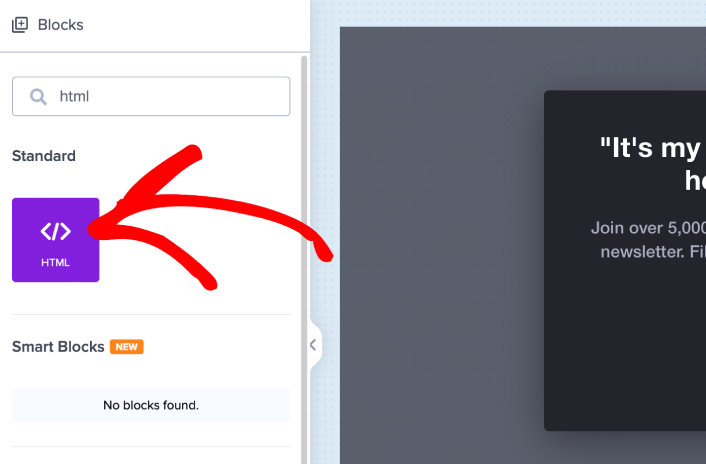
Здесь мы добавим код для сбора подписчиков push-уведомлений. Сначала вставьте следующий код, чтобы создать кликабельную кнопку:
<button onclick="subscribeOnClickButton()" style="border: none; width: 100%; padding-left: 15%; padding-right:15%; text-align: center; display: inline-block; color: white;">Get Updates via Push Notifications</button>Вставьте код туда, где указано, что можно добавить HTML:
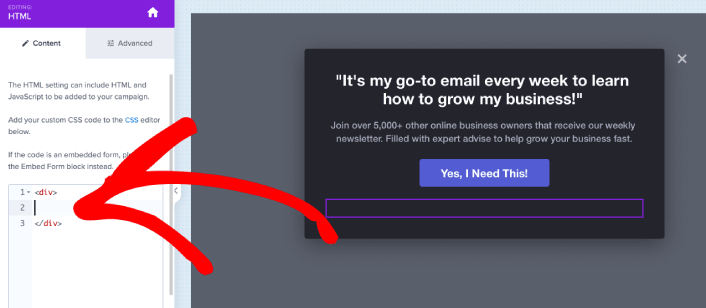
Конечно, вы можете поэкспериментировать со стилями, чтобы сделать его более привлекательным. Далее мы сделаем так, чтобы кнопка собирала подписчиков push-уведомлений при нажатии.
Перейдите на главную страницу PushEngage и нажмите кнопку Начать:

Затем выберите бесплатный план, чтобы попробовать PushEngage, или выберите платный план, если вы серьезно относитесь к развитию своего бизнеса. Платные планы включают больше опций для кампаний и возможность создавать еще большие списки подписчиков.
В вашей панели управления PushEngage перейдите в раздел Настройки сайта » Детали сайта и нажмите кнопку Нажмите здесь для инструкций по настройке. В разделе Любой сайт вы получите код установки:
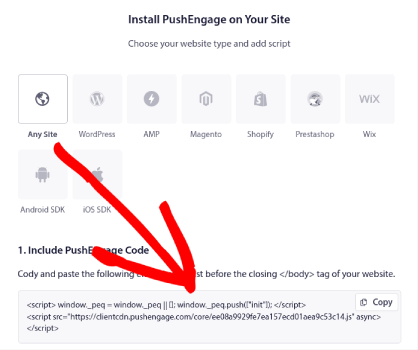
ВНИМАНИЕ: Вам нужно скопировать код, который вы получите из вашей панели управления. Код уникален для каждого пользователя PushEngage. Вы не сможете скопировать код из изображения и собирать подписчиков push-уведомлений.
Когда у вас будет код в вашей панели управления PushEngage, возьмите второй скрипт и добавьте к нему дополнительный код. Ваш окончательный код должен выглядеть примерно так:
<script src="https://clientcdn.pushengage.com/core/02a6e92667ae2279fcba8932356c1d93.js" async></script>
<script> window._peq = window._peq || [];
function subscribeOnClickButton(){
window._peq.push(['subscribe',{}.pe,function(res){
console.log(res);
}]);
}
</script>
Добавьте этот код в блок HTML в OptinMonster сразу после кода вашей кнопки и между блоком кода <div></div>, и вы закончите!
#10. Создайте приветственную кампанию
Приветственное сообщение на веб-сайте — это идеальный способ возобновить взаимодействие с вашей аудиторией, не будучи навязчивым. Ваши подписчики ЗАХОТЯТ способ подтвердить, что они действительно подписаны на ваши электронные письма и push-уведомления. Создание автоматической последовательности приветственных push-уведомлений — идеальный способ начать работу с посетителями веб-сайта.
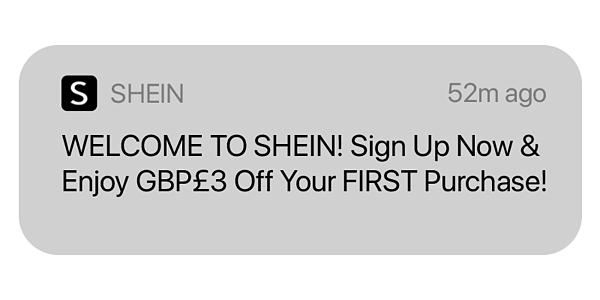
Мы подробно рассмотрим, как много вы можете сделать с этой простой кампанией, когда будем разбирать наши примеры.
Но пока просто знайте, что если вы еще не создали приветствие для своего веб-сайта, вам действительно нужно начать прямо сейчас. Использовать можно не только электронные письма и push-уведомления. Если вы используете всплывающие окна на своем веб-сайте, вам следует ознакомиться с приветственными ковриками.
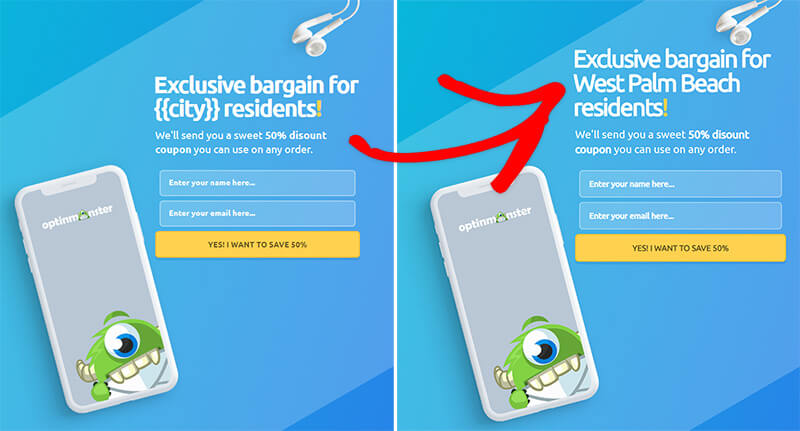
Если вы пытаетесь создавать потрясающие всплывающие окна с приветственными сообщениями, вам следует начать работу с OptinMonster. OptinMonster — это лучший в мире набор инструментов для оптимизации конверсии, и с его помощью очень легко создавать всплывающие окна для привлечения большего числа посетителей веб-сайта в качестве подписчиков электронной почты.
Вы получаете множество расширенных опций, таких как использование имени пользователя, местоположения, дат и многого другого для персонализации ваших приветственных всплывающих окон. И самое приятное то, что вы можете нацеливаться на новых и вернувшихся посетителей с помощью различных кампаний, чтобы более органично их конвертировать.
#11. Создавайте ограниченные по времени предложения
Если у вас скоро будет распродажа, вы просто обязаны добавить на свой сайт таймер обратного отсчета. Мы протестировали анимированные таймеры для увеличения наших собственных продаж, и результаты невероятны.
Использование таймера обратного отсчета может быть эффективным способом увеличения продаж, создавая ощущение срочности и побуждая клиентов совершить покупку до истечения времени таймера.
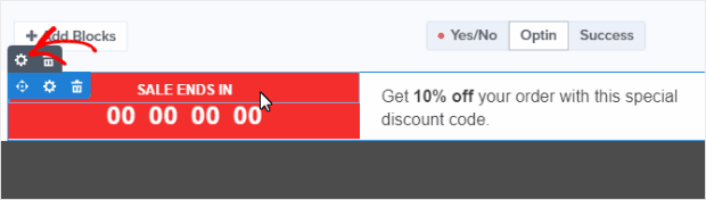
Продолжительность вашего таймера обратного отсчета должна соответствовать характеру вашего предложения. Если вы предлагаете скидку, действующую ограниченное время, может подойти таймер, который отсчитывает несколько часов или день. Для более значительного предложения вы можете использовать таймер, который отсчитывает неделю или больше.
#12. Демонстрируйте социальное доказательство в процессе оформления заказа
Социальное доказательство — это практика информирования посетителей вашего веб-сайта о том, что другие люди доверяют вашему бизнесу и покупают у вас. Существует несколько форм социального доказательства, которые вы можете включить на свой веб-сайт, например:
- Кейс-стади
- Отзывы
- Отзывы
- Ленты Instagram
- Упоминания в Twitter
- Видео YouTube
И многое другое. Мы рекомендуем использовать TrustPulse для создания всплывающих окон, подобных этому, для социального доказательства:
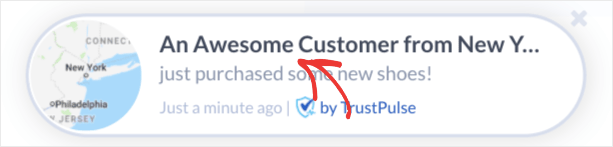
Для тех из вас, кто только открывает для себя, что такое TrustPulse, вот краткая информация...
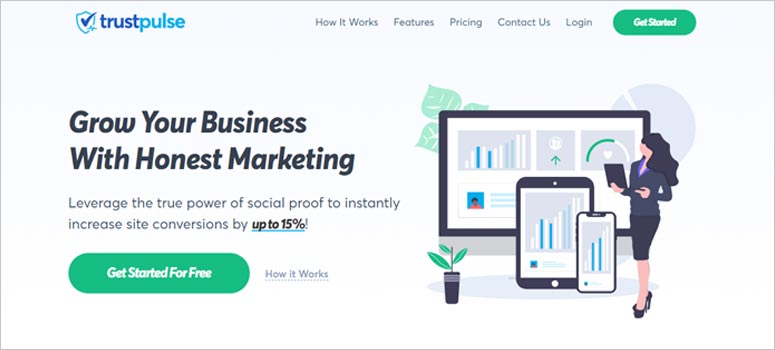
TrustPulse — это программное обеспечение для социального доказательства, которое можно добавить на любой сайт. Оно создает всплывающие окна с социальным доказательством, которые мгновенно помогают увеличить конверсию сайта. TrustPulse отлично подходит для сайтов, которые продают товары онлайн. Но он настолько прост, мощен и удобен в использовании, что вы также можете установить TrustPulse на сайт блога для увеличения вовлеченности.
Ознакомьтесь с нашим полным обзором TrustPulse, чтобы лучше понять, как вы можете использовать его для создания социального доказательства для вашего сайта.
#13. Добавьте несколько вариантов оплаты
Stripe позволяет принимать платежи по кредитным картам на вашем сайте WordPress. Самое приятное то, что платежный шлюз поддерживает несколько форматов оплаты, включая регулярные платежи.
Чтобы было ясно: вашим клиентам не нужна учетная запись Stripe для оплаты кредитной картой. Они могут просто совершать покупки на вашем сайте, как и с любым другим процессором кредитных карт.
Его также используют некоторые из крупнейших мировых брендов, включая Target, Lyft и UNICEF. Так что вы можете быть уверены, что ваши платежи всегда будут обработаны.
Но причина №1, по которой нам так нравится Stripe, — это их прозрачность. Нет никаких скрытых комиссий. Если вы раньше использовали PayPal для приема платежей, вы знаете, насколько проблематичными могут быть скрытые комиссии у других платежных процессоров и шлюзов. Мы рекомендуем использовать WP Simple Pay для обработки ваших платежей.
WP Simple Pay — это именно то, что следует из названия. Он упрощает онлайн-платежи на вашем сайте WordPress. Он прост в использовании, очень надежен и не требует кодирования для настройки.
Самое приятное? WP Simple Pay помогает вам сосредоточиться на создании продуктов и их продаже, не беспокоясь о приеме платежей со всего мира. Это также один из лучших плагинов WordPress для Stripe в мире.
Вся информация о клиентах и платежах хранится в вашей учетной записи Stripe, а не на вашем веб-сайте WordPress. В результате плагин не будет раздувать ваш сайт, как другие альтернативы. WP Simple Pay предлагает самый простой способ добавить платежи Stripe на ваш сайт WordPress.
А настройка WP Simple Pay очень проста.
Вот краткий обзор основных функций WP Simple Pay Pro:
- Конструктор форм оплаты
- Конструктор страниц оплаты Stripe Checkout
- Платежи с произвольной суммой
- Опции подписки с произвольной суммой
- Скидки по промокодам
- Альтернативные способы оплаты
- Настраиваемый процесс подтверждения платежа
И многое другое! Вы можете подробнее ознакомиться с функциями в нашем обзоре WP Simple Pay Pro.
Что делать после увеличения среднего чека
Теперь, когда вы знаете, как увеличить средний чек заказа, вам следует рассмотреть и другие важные метрики электронной коммерции. Один из самых простых способов развивать бизнес в сфере электронной коммерции — использовать push-уведомления. Ознакомьтесь с нашей статьей о push-уведомлениях для электронной коммерции после внедрения тактик, описанных в этой статье.
Push-уведомления — это мощный маркетинговый инструмент, который поможет вам привлечь больше трафика, повысить вовлеченность и увеличить продажи. Не убедились? Ознакомьтесь с этими отличными ресурсами, чтобы начать:
- Как настроить push-уведомления о брошенной корзине (простое руководство)
- Как установить плагин WordPress для веб-уведомлений на ваш сайт
- Как проводить A/B-тестирование push-уведомлений (лучшие практики)
- 7 лучших практик push-уведомлений для мгновенного трафика
- 21 лучший плагин WordPress для электронной коммерции (бесплатные и платные)
Мы рекомендуем использовать PushEngage для отправки push-уведомлений. Просмотрев все эти ресурсы, вы поймете, что PushEngage — это программное обеспечение №1 для push-уведомлений на рынке. Так что, если вы еще этого не сделали, начните использовать PushEngage сегодня!


