Здравствуйте, Engagelings.
Отличные новости: мы запускаем новую функцию под названием "Виджет управления подписками".
Почему? Благодаря вам!
Именно так, мы значительно улучшаем пользовательский опыт (он же: ваш опыт). Теперь вы можете предложить подписчикам простой способ управлять:
- Хотят ли они получать от вас уведомления
- Типами уведомлений, которые их интересуют
Мы также сделали очень простым отображение виджета управления подписками в PushEngage. Мы очень гордимся этой новой классной функцией, и думаем, что она вам понравится. И это крупное обновление, так что есть МНОГОЕ, что нужно изучить.
Давайте начнем.
Зачем использовать виджет управления подписками
Одна из самых больших проблем с программным обеспечением для push-уведомлений заключается в том, что вам очень сложно получить разрешение на отправку определенных типов уведомлений от ваших подписчиков. В результате существует реальный риск отправки слишком большого количества push-уведомлений или отправки нерелевантных сообщений.
Та же проблема существует и с email-маркетингом. Но, по крайней мере, с программным обеспечением для email-маркетинга вы можете создавать пользовательские ссылки для добавления подписчиков в определенный сегмент списка рассылки. С push-уведомлениями эта функция просто недоступна.
Ну… раньше не была. До сих пор.
Мы только что создали решение огромной проблемы, которую никто другой даже не пытается решить!
Виджет управления подписками демократизирует ваш список подписок на push-уведомления. Ваши посетители теперь могут выбирать, какие уведомления они хотят получать. Ваши подписчики полюбят вас за то, что вы прислушиваетесь к их желаниям, а вы сможете зарабатывать ЗНАЧИТЕЛЬНО больше, отправляя целевые и высокорелевантные push-уведомления.
И вы можете сократить количество обращений в службу поддержки от недовольных подписчиков, пытающихся отписаться от push-уведомлений.
Легко начните использовать виджет управления подписками
Чтобы начать, перейдите в свою панель управления PushEngage и выберите Дизайн » Виджеты, а затем включите Виджет управления подписками:

Нажмите кнопку Edit Widget (Редактировать виджет), чтобы настроить ваш виджет. Начните с настройки внешнего вида вашего виджета, чтобы он соответствовал языку дизайна вашего бренда, в разделе Look and Design (Внешний вид и дизайн):
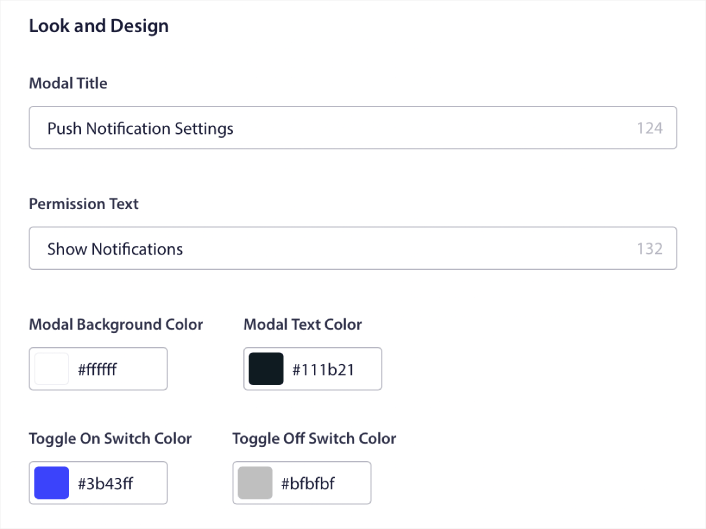
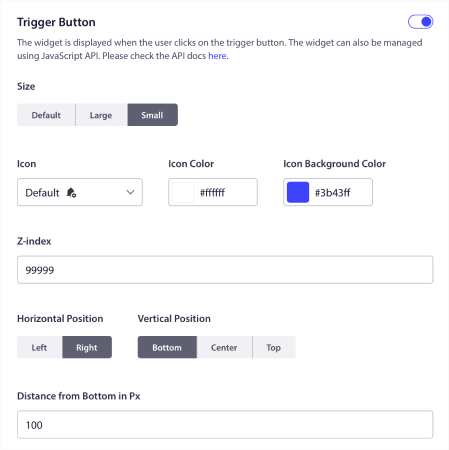
Вы можете создать полностью настраиваемое модальное окно, которое остается видимым, даже если ваши посетители не подписываются через ваше стандартное модальное окно. Если размер кнопки запуска всплывающего окна кажется вам неудобным, вы можете настроить его в разделе Кнопка запуска:
Выберите, где показывать виджет управления подписками
И самое интересное, вы также можете выбрать конкретные страницы для отображения виджета в разделе Правила отображения кнопки запуска:

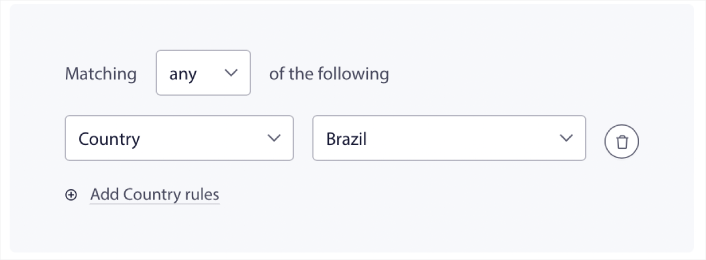
По умолчанию кнопка будет отображаться на всех страницах. Но вы можете создавать пользовательские правила таргетинга, чтобы показывать определенные версии виджета, нацеливаясь на конкретные:
Местоположения:
Устройства:
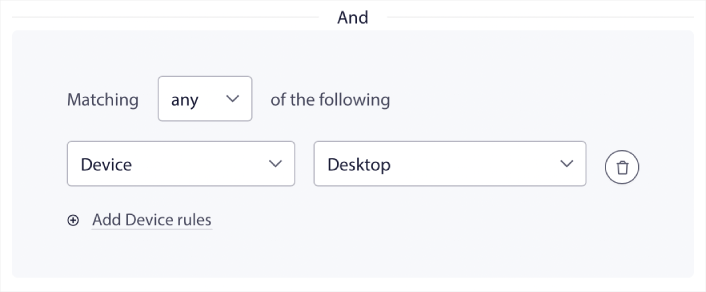
И URL на вашем сайте:
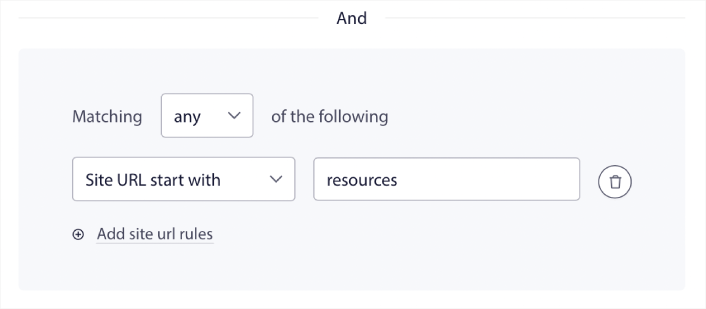
Простые опции отписки
Вы также можете предоставить своим подписчикам простой способ отписаться от ваших push-уведомлений в разделе Опция отписки:
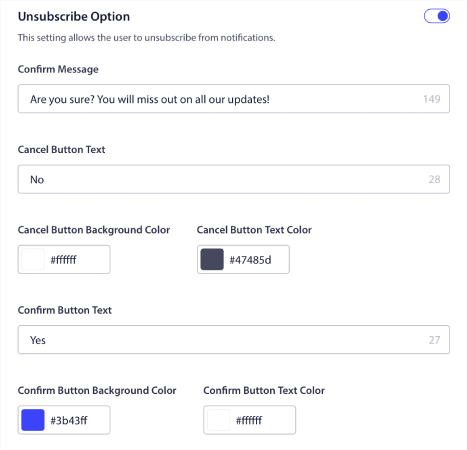
Опять же, вы можете полностью настроить внешний вид и дизайн, а также сообщения, чтобы они соответствовали вашим фирменным стандартам. Любой посетитель, отписавшийся от ваших push-уведомлений, также может повторно подписаться с помощью виджета управления подписками.
Позвольте подписчикам устанавливать предпочтения push-уведомлений
Чтобы вывести все на новый уровень, вы также можете позволить вашим подписчикам выбирать, какие типы уведомлений они хотят получать, в разделе Настройки сегментов:
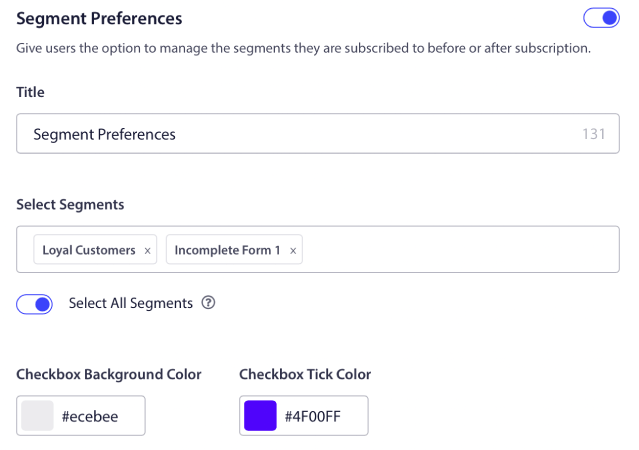
Если вы включите опцию Выбрать все сегменты, ваши подписчики будут автоматически добавляться ко всем выбранным сегментам по умолчанию:
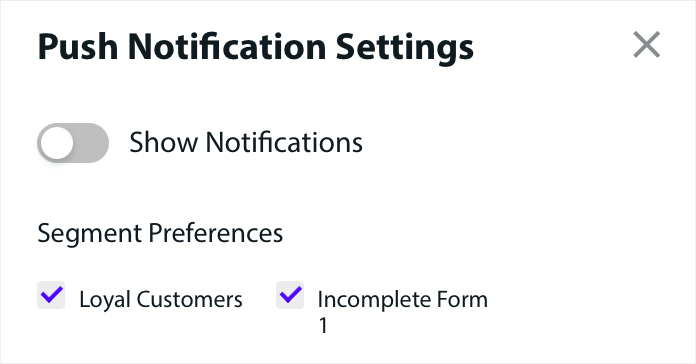
Это невероятно мощная функция для новостных и блог-сайтов.
Запросите разрешение на отправку персонализированных push-уведомлений
Если вы используете push-уведомления для электронной коммерции на своем сайте, многие из них будут триггерными push-уведомлениями. К ним относятся:
- Push-уведомления о брошенном просмотре
- Push-уведомления о брошенной корзине
- Уведомления о снижении цен
- Оповещения о поступлении товара
И даже пользовательские кампании триггерных push-уведомлений.
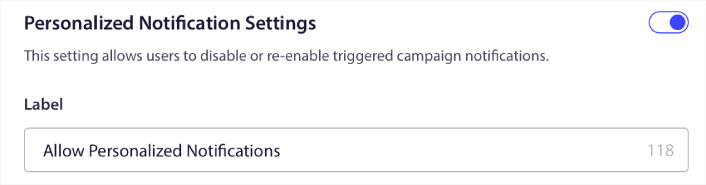
С помощью нашего нового виджета управления подписками вы теперь можете позволить вашим подписчикам выбирать, хотят ли они видеть персонализированные уведомления:

Просто включите опцию в разделе Настройки персонализированных уведомлений:
Что еще?
Мы знаем, что развитие бизнеса — это тяжелая работа. В PushEngage мы всегда стремимся улучшать наш продукт и ваш опыт. Мы запустили эту новую функцию, чтобы помочь вам получить еще больше пользы от вашей подписки на PushEngage.
Большое спасибо за прочтение этого объявления.
Если у вас возникнут вопросы, наша команда по работе с клиентами готова помочь. Просто начните разговор в Live Chat или ознакомьтесь с нашей контактной страницей.
И спасибо, что пользуетесь PushEngage. Независимо от того, используете ли вы бесплатную или корпоративную версию, вы так же важны для нас. Виджет управления подписками предназначен для того, чтобы помочь вам добиться успеха, и мы желаем вам всего наилучшего.
Сообщите нам свое мнение в комментариях ниже, и если вы еще этого не сделали, начните использовать PushEngage сегодня!


