Ищете подробный обзор All in One SEO?
Эта статья поможет вам, независимо от того, ищете ли вы SEO-плагин для вашего нового сайта WordPress или ищете лучшую альтернативу вашему текущему SEO-плагину.
All in One SEO позиционирует себя как SEO-плагин №1 в мире для WordPress. Но так ли это на самом деле?
Что ж, мы сами используем плагин All in One SEO. Поэтому мы решили протестировать его и докопаться до сути этой загадки старомодным способом, приложив немного усилий!
Давайте погрузимся в полный обзор All in One SEO.
PushEngage — это плагин для push-уведомлений №1 в мире. Получите его бесплатно!
Краткий обзор All in One SEO
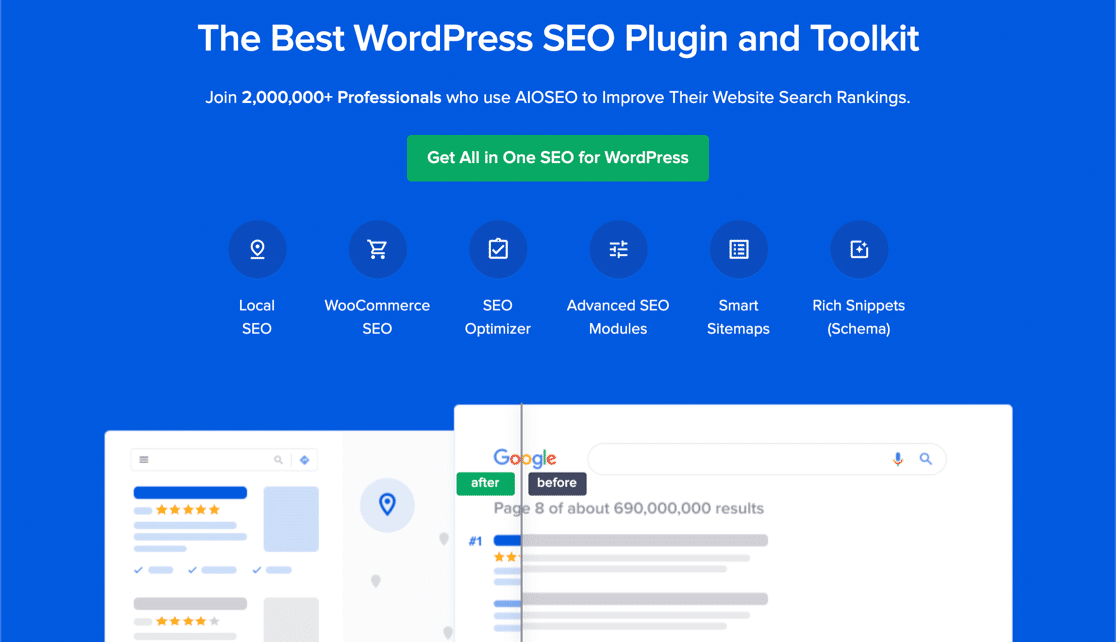
All in One SEO (AIOSEO) — один из самых признанных SEO-плагинов в сообществе WordPress. Исходная версия была полностью переработана с добавлением множества новых функций и надстроек. Так что, если вы использовали AIOSEO в прошлом, вам нужно снова проверить плагин.
AIOSEO не только обладает мощными SEO-функциями, достаточными для внедрения последних лучших практик SEO, но и предоставляет расширенные настройки SEO для решения конкретных проблем SEO прямо из коробки. Это включает:
- Модули локального SEO для малого бизнеса с местной аудиторией
- SEO для WooCommerce для интернет-магазинов
- SEO-оптимизатор внутри вашего редактора WordPress
- Умные карты сайта для мгновенной индексации в поисковых системах
- Плагин Schema, чтобы ваш контент ранжировался в расширенных сниппетах
И многое другое!
Короче говоря: All in One SEO позволяет вам правильно настроить SEO для WordPress, никогда не нанимая эксперта. И если верить 3+ миллионам клиентов All in One SEO (включая нас), AIOSEO — это фантастическое программное обеспечение для поисковой оптимизации для любых SEO-требований.
Он идеально подходит для блогеров и владельцев малого бизнеса, поскольку помогает им позаботиться об SEO без необходимости нанимать профессионала.
Помните: Вы можете интегрировать Google Search Console только с All in One SEO. Если вам нужна более подробная аналитика веб-сайта, вам следует рассмотреть возможность установки плагина MonsterInsights для установки Google Analytics на ваш сайт WordPress.
Как настроить All in One SEO
Одна из главных причин, по которой мне нравится AIOSEO, — это его чрезвычайная простота использования. Тот факт, что все делается в один клик, делает его еще более эпичным.
После загрузки и установки плагина вы получите мастер настройки:
А процесс настройки займет менее 10 минут.
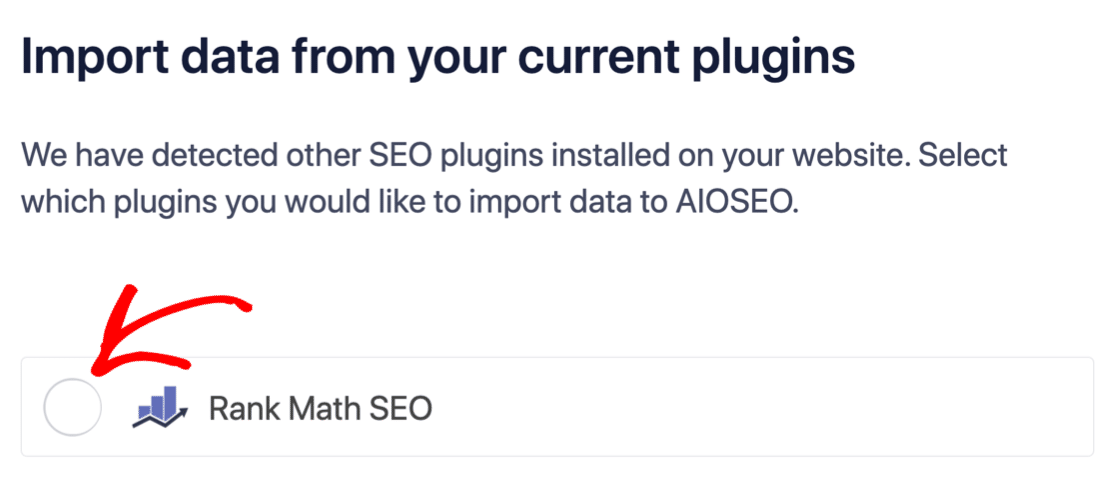
Но что, если вы переходите с другого SEO-плагина? Каждый плагин по-разному обрабатывает метаданные. Значит ли это, что вам придется делать все с нуля? Все ли ваши предыдущие усилия пропали даром?
Нет! Если All in One SEO обнаружит другой SEO-плагин во время мастера настройки, он предложит скопировать основные настройки для вас:
В конце настройки мастер настройки предложит вам деактивировать ваш старый SEO-плагин. Таким образом, не будет конфликтов плагинов и ошибок:
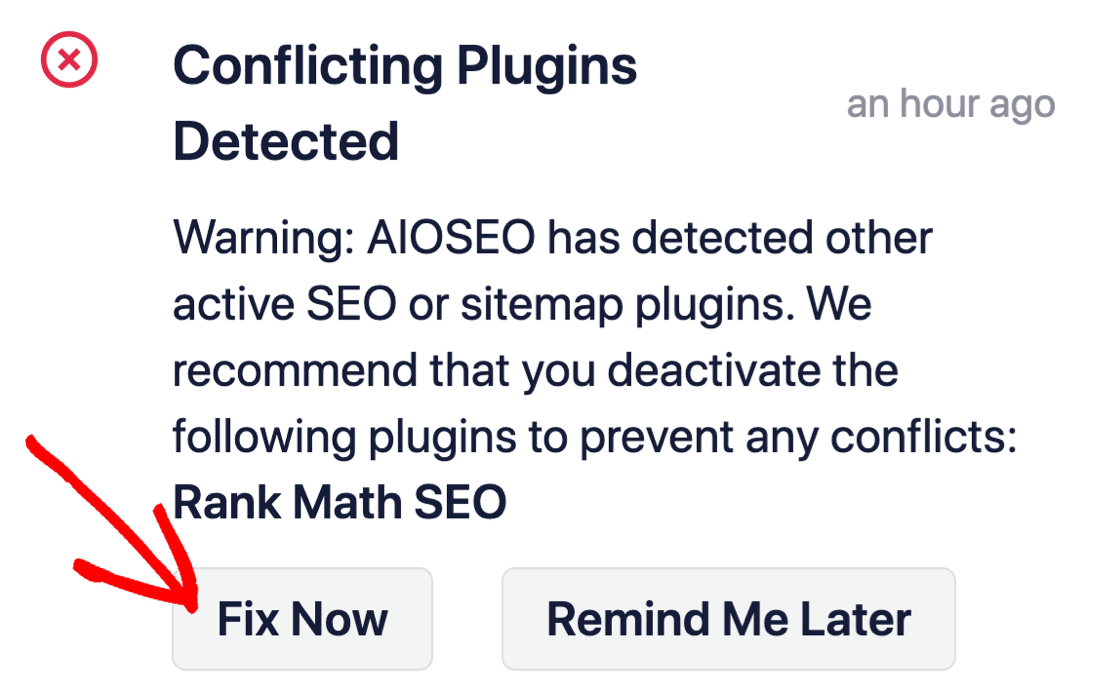
Нажатие кнопки Исправить сейчас не удалит настройки вашего старого SEO-плагина. Оно просто деактивирует плагин, чтобы предотвратить конфликты.
Что All in One SEO может сделать для вашего бренда?
В этом обзоре мы не будем рассматривать абсолютно каждую функцию AIOSEO. Честно говоря, функций слишком много, чтобы мы могли рассмотреть их все. Поэтому мы сосредоточимся на тех функциях, которые мы использовали для улучшения наших позиций.
Мы считаем, что All in One SEO — это лучший SEO-плагин для WordPress. Но мы рекомендуем прочитать этот подробный обзор All in One SEO перед его установкой на ваш сайт WordPress.
Посмотрите сами:
№ 1. Чек-лист аудита сайта
После установки плагина AIOSEO вы получаете Чек-лист аудита сайта, который позволяет получить мгновенный обзор общего состояния SEO вашего сайта.
На практике SEO-аудит — это очень сложная задача, которая вручную может занять часы. Но с All in One SEO вы получаете мгновенный обзор вместе с практическими рекомендациями по улучшению вашего SEO:
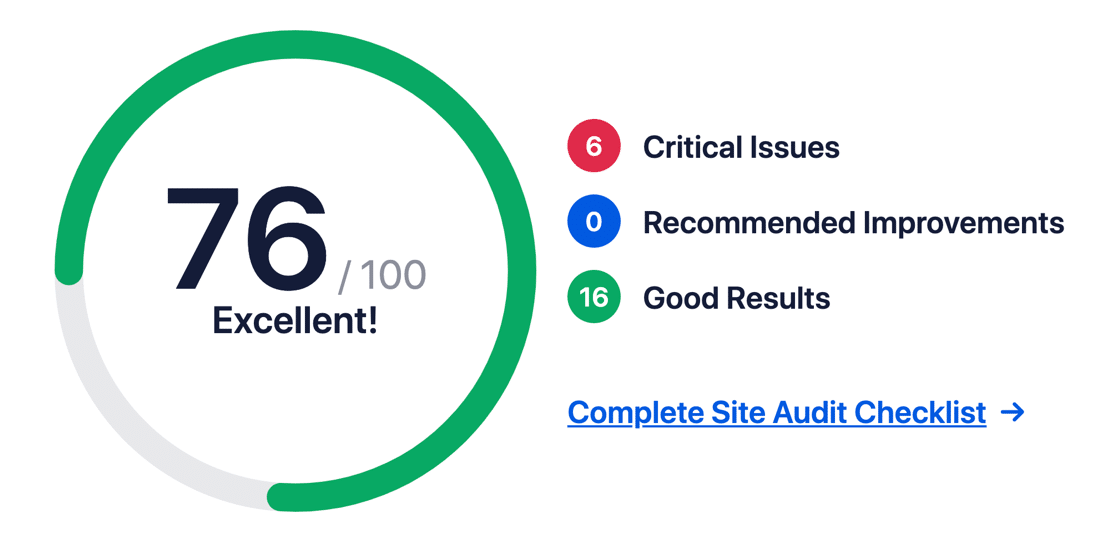
Вам следует обратить внимание на критические проблемы, поскольку именно они могут уже вредить вашим позициям. Глубокий анализ контента охватывает теги заголовков, контент записей и даже теги Open Graph.
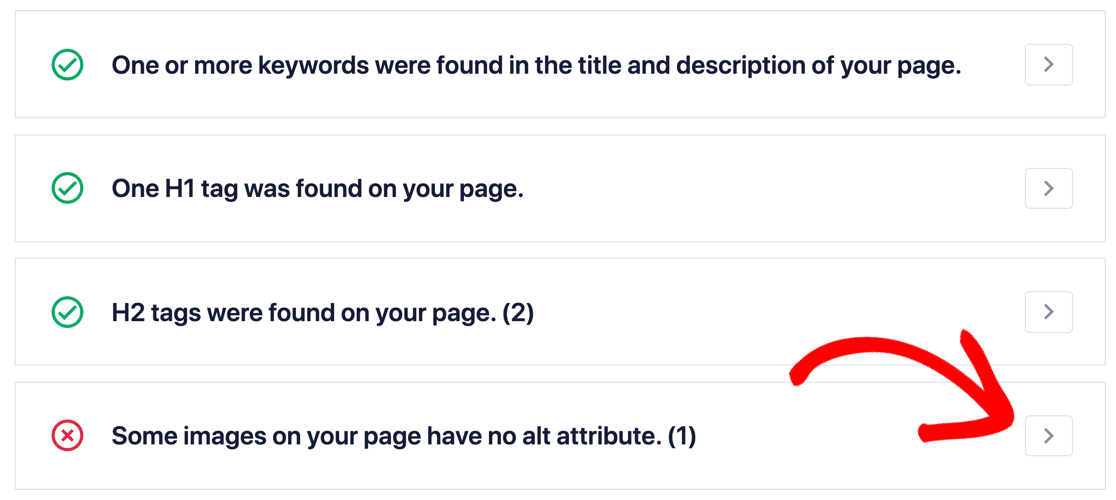
Вы хотите получить оценку не менее 60-80 по этому аудиту.
№ 2. Предварительный просмотр страницы результатов поиска (SERP)
Основная проблема многих SEO-плагинов для WordPress заключается в том, что вы не можете увидеть, как ваш контент отображается в поисковой системе. С AIOSEO Pro вы получаете предварительный просмотр того, как выглядят ваши страницы и записи, когда пользователь ищет ваш целевой ключевой запрос.
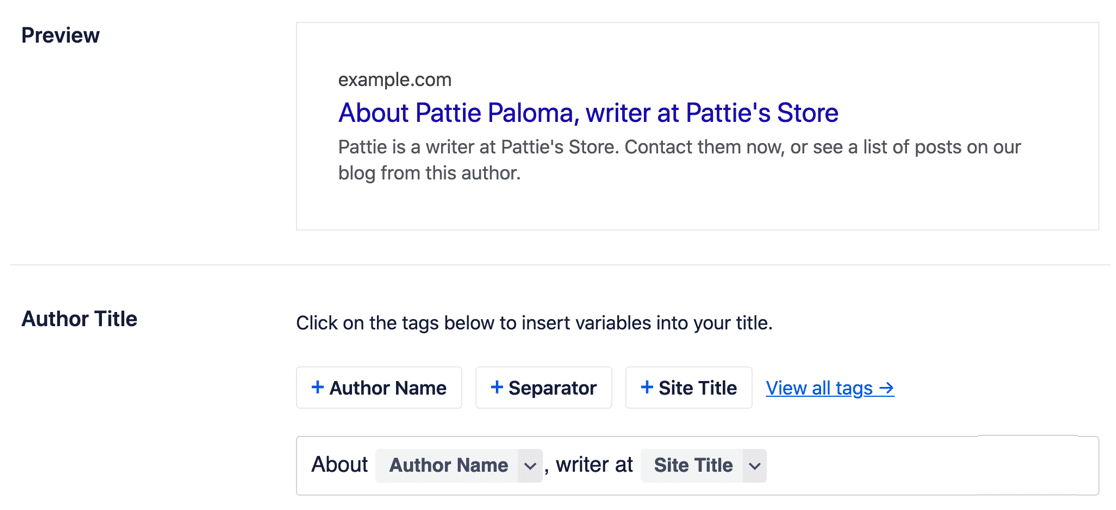
Вы даже можете настроить динамические заполнители или теги для настройки заголовка и описания:
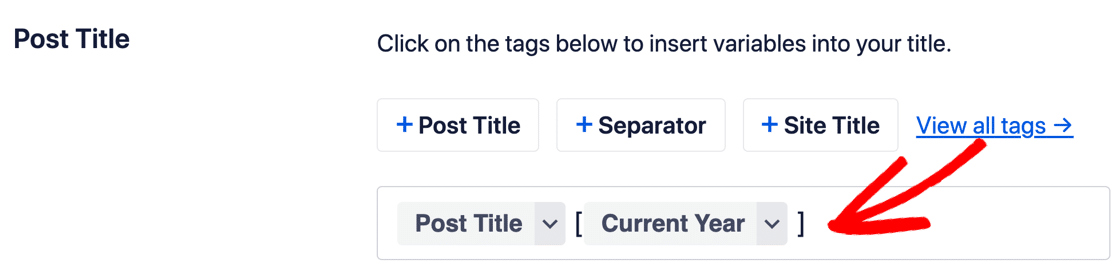
Вы также можете настроить информацию о Графе знаний, которая по сути является метаданными о вашем бизнесе. Это облегчает Google поиск этой информации и ее отображение в результатах. Это включает:
- Ваше имя или название вашего веб-сайта
- Номер телефона
- Логотип
- Часы работы
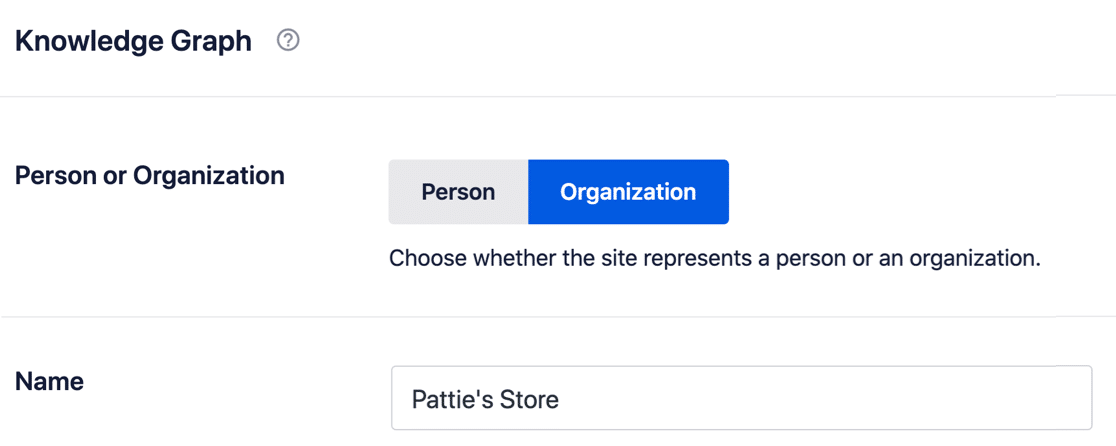
Это наиболее полезно для локального SEO, но вы можете использовать это для указания информации о бизнесе, если у вас также есть физические офисы.
№ 3. Интеграция с социальными сетями
Страница настроек Социальные сети позволяет вам контролировать, как ваши записи отображаются в социальных сетях, которые вы используете для продвижения своего контента.
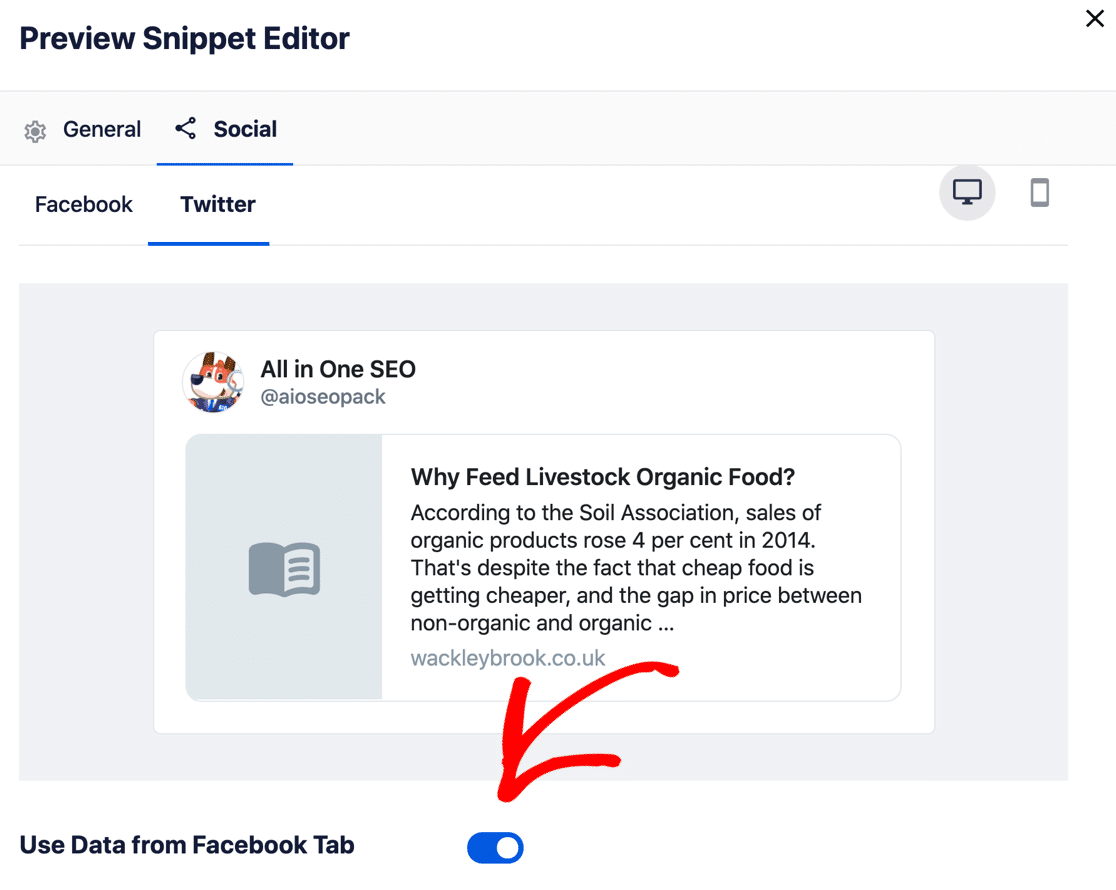
Вы можете настроить этот контент на каждой странице и в каждой записи или просто дублировать свои настройки для всех учетных записей в социальных сетях. Самое крутое то, что вы можете использовать заголовок записи в качестве заголовка публикации в социальных сетях, если вы не хотите создавать пользовательский контент.
#4. Несколько карт сайта для лучшей индексации
All in One SEO позволяет создавать 4 различных типа карт сайта:
- Общие
- Видео
- Google Новости
- RSS
Почему? Карты сайта имеют решающее значение для поисковых систем, чтобы правильно индексировать ваш сайт и весь его контент. Вам не нужно включать все четыре карты сайта, но вы определенно захотите использовать общую карту сайта, чтобы контролировать типы записей, которые обнаруживает Google.
И даже тогда вы можете контролировать тип контента, который Google будет индексировать, включая таксономии:
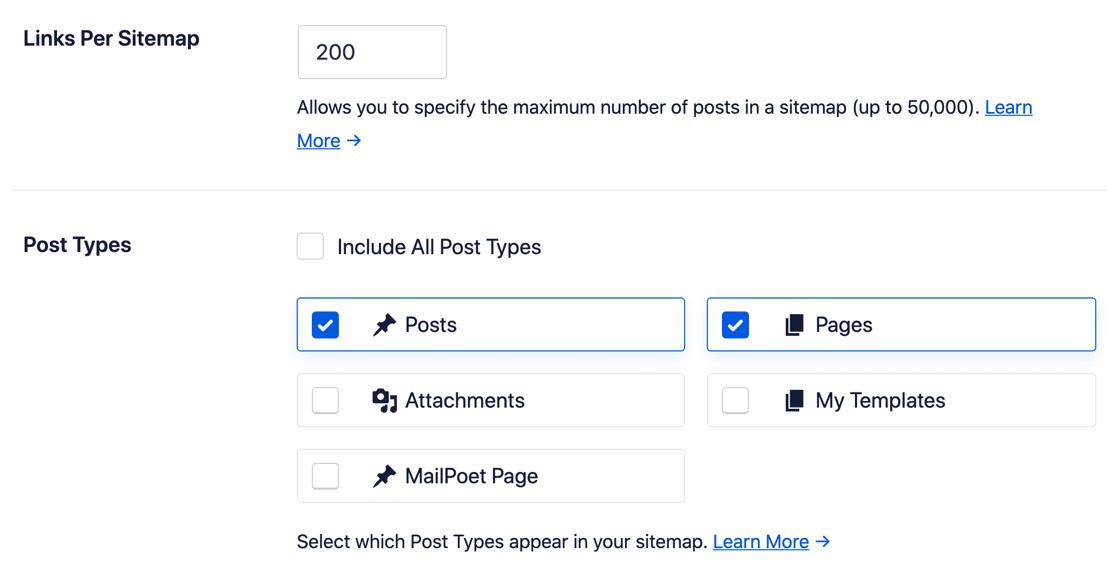
Вы также можете использовать расширенные настройки для:
- Включения или исключения определенных URL-адресов, записей, страниц, изображений и даже ключевых слов из вашей карты сайта
- Управления приоритетом каждого URL
- Установки частоты обновлений
- Ручной установки даты последнего изменения
И многого другого! Вы даже можете довольно легко создавать карты сайта новостей для вашего сайта WordPress.
Совет: Вы также можете скрыть страницы в WordPress от поисковых систем, таких как Google и Bing, с помощью All in One SEO. Ознакомьтесь с нашей статьей о том, как скрыть страницы в WordPress, для получения более подробной информации.
#5. Мгновенные перенаправления URL
Вы когда-нибудь удаляли страницу или запись в WordPress? Если да, то вы должны знать, что каждый раз, когда вы это делаете, ваш сайт выдает ошибку 404 всем, кто пытается посетить этот контент.
Правильный способ удалить страницу — перенаправить URL на другой URL после ее удаления.
Но проблема в том, что существует несколько протоколов для перенаправления канонических URL, и вам нужно знать, что вы делаете... если вы делаете это вручную.
С AIOSEO весь этот процесс автоматизирован с помощью их менеджера перенаправлений:
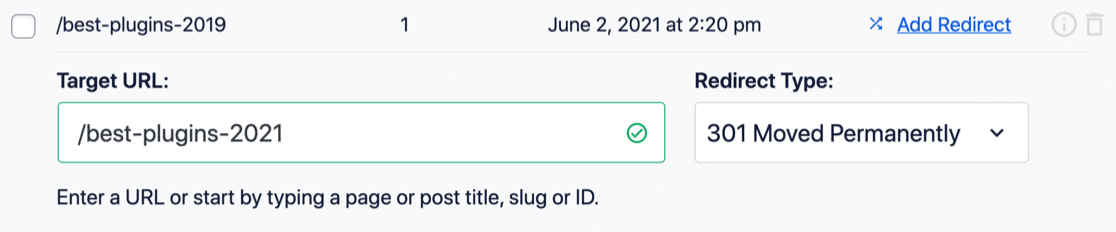
All in One SEO также может создавать автоматические перенаправления, и это один из лучших плагинов для перенаправления 301 для WordPress. Например, если вы удаляете запись в блоге, AIOSEO вмешается и попросит вас создать перенаправление со старого URL на другой.
#6. Локальное SEO
Дополнение Local SEO для All in One SEO позволяет продвигать местный бизнес с помощью SEO.
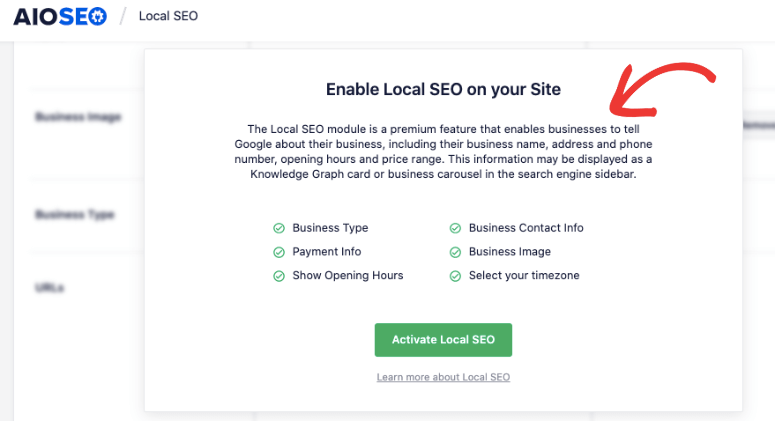
Поскольку большая часть локального SEO строго зависит от результатов локального поиска, таких как результаты Google Maps, Граф знаний становится чрезвычайно важным. Используя AIOSEO, вы можете обновить свои:
- Адрес бизнеса
- Услуги
- Контактная информация
- ИНН или НДС
- Способы оплаты
- Ценовой диапазон
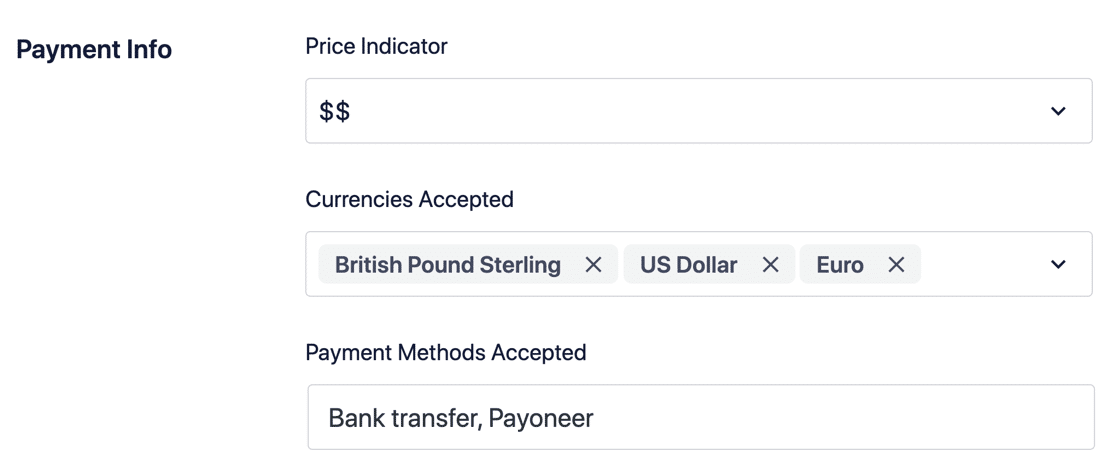
Таким образом, любые локальные поисковые запросы о вашем бренде или услугах, которые вы предоставляете, всегда дают релевантную информацию, и ваш бизнес хорошо представлен.
#7. Внутренняя оптимизация (On-Page Optimization)
Одним из наиболее важных компонентов SEO является внутренняя оптимизация (on-page SEO). AIOSEO позволяет вам каждый раз создавать SEO-контент, используя TruSEO.
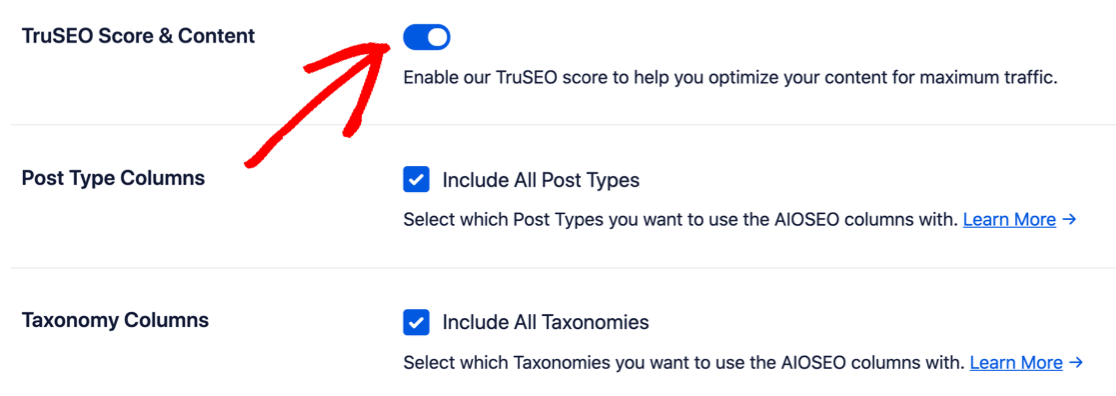
TruSEO — это инструмент анализа SEO, встроенный в ваш редактор WordPress. Он полностью совместим с Gutenberg и предоставляет практические рекомендации по улучшению SEO всего, что вы публикуете.
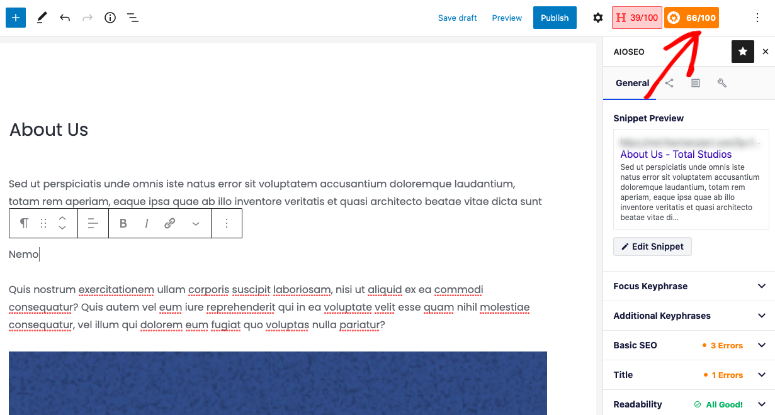
По умолчанию TruSEO отключен. Вам нужно будет активировать его на странице Общие настройки плагина:
TruSEO оценивает ваш контент на основе:
- Релевантность ключевых слов
- Базовое SEO
- Оптимизация заголовка
- Читаемость
И дает вам действенные способы его улучшения:
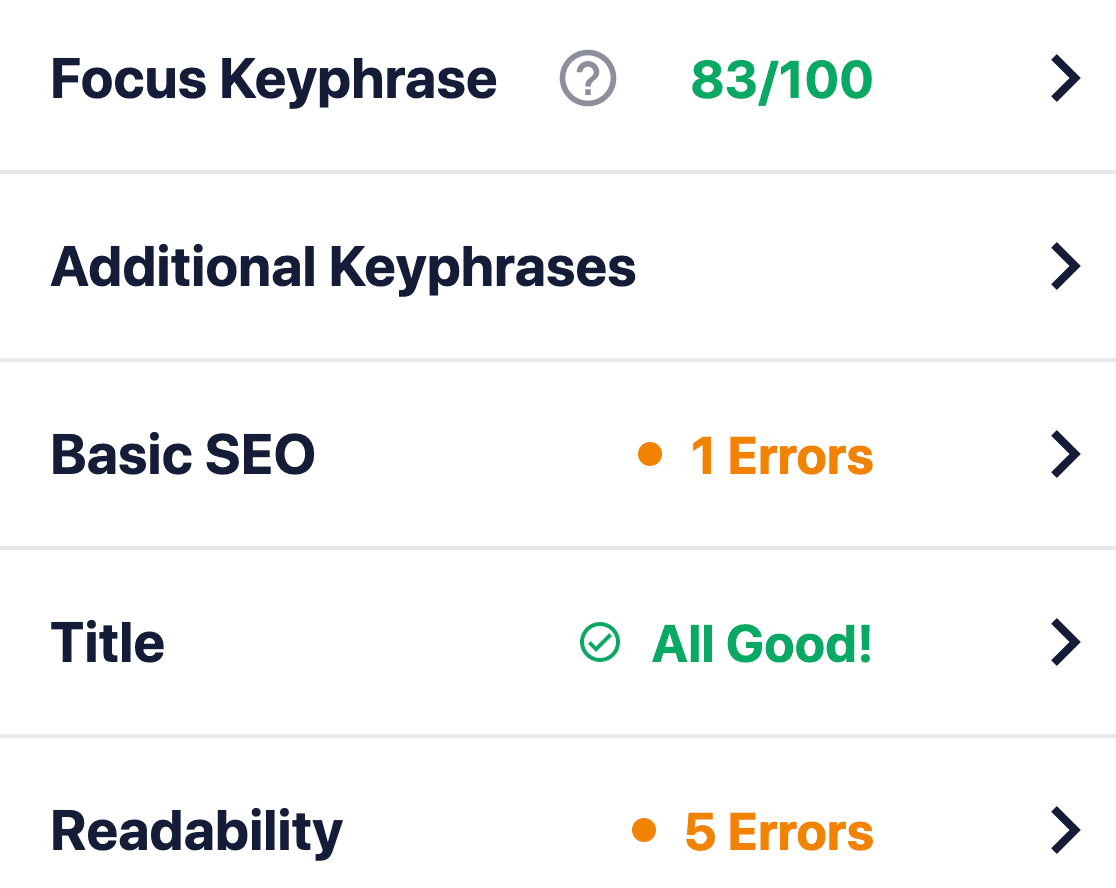
TruSEO более сложен, чем другие SEO-плагины, и учитывает гораздо больше факторов для создания оценки. Конечно, не существует «единого правила» для SEO, поскольку алгоритм поиска Google постоянно меняется. Но со временем основная идея создания SEO-контента основана на этих четырех критических факторах.
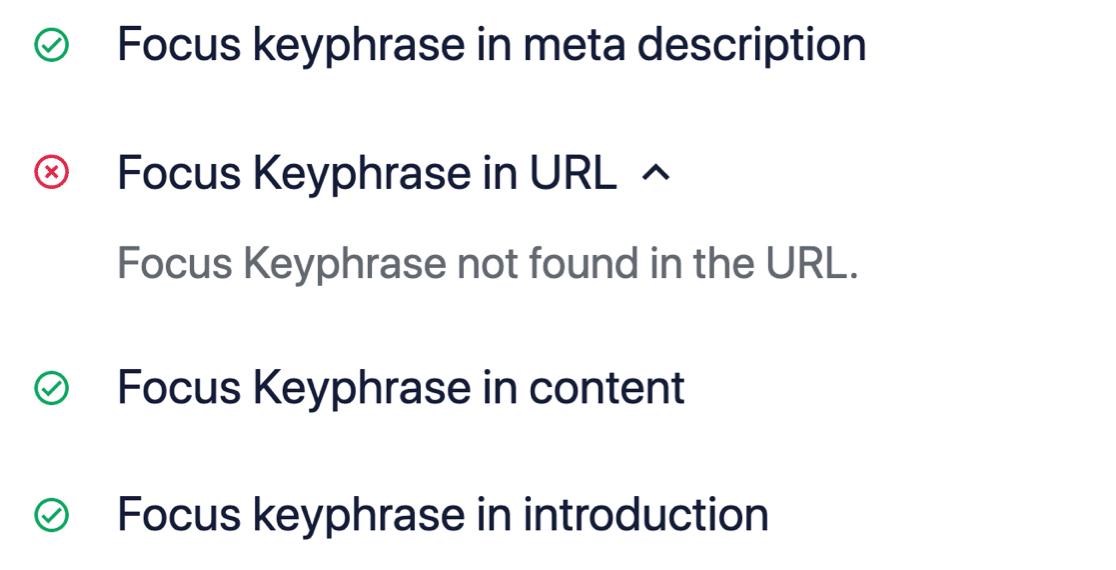
Если мы раскроем блок «Базовое SEO», вы получите предложения по оптимизации вашего контента, SEO-заголовка и мета-описания для ключевого слова или фразы:
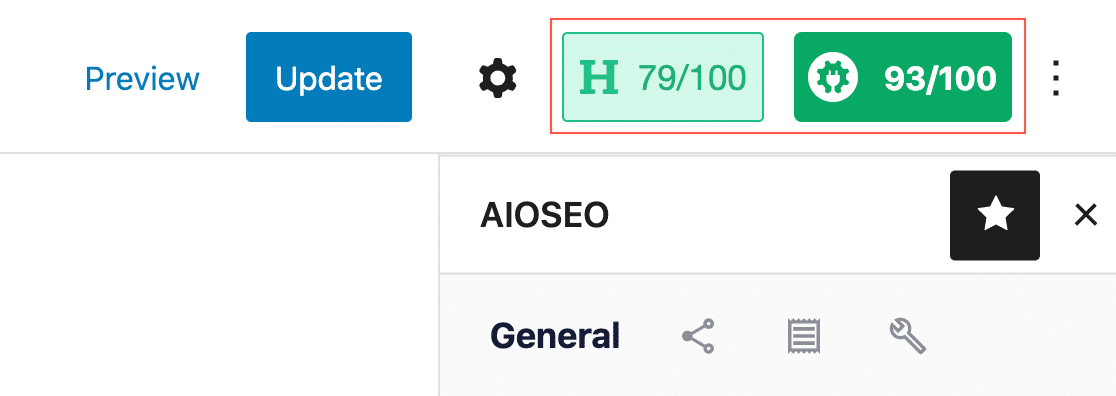
Примечание: TruSEO на 100% совместим с MonsterInsights. Если вы используете анализатор заголовков MonsterInsights, теперь вы можете получить оценку контента и оценку заголовка с первого взгляда:
Очень круто!
#8. Разметка Schema для расширенных сниппетов
Избранные сниппеты занимают самую ценную маркетинговую площадь в результатах поиска. Они особенно важны, если большая часть вашей аудитории использует ваш веб-сайт с мобильных устройств, потому что избранный сниппет занимает весь экран на мобильном устройстве.
Вот в чем загвоздка: избранный сниппет — это лишь ОДИН тип расширенного сниппета.
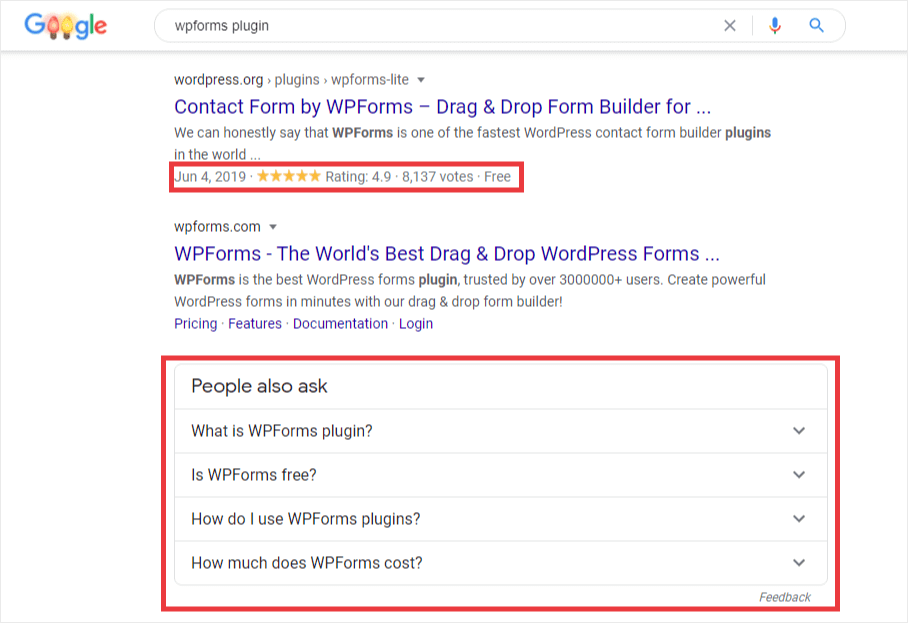
И хотя расширенные сниппеты не гарантируют автоматически, что вы получите избранный сниппет или даже лучшие позиции напрямую, внешний вид в поиске увеличивает коэффициент кликабельности вашего веб-сайта. Обычно, чтобы получить расширенные сниппеты, вам нужно немного научиться кодировать, чтобы включить Microdata или JSON-LD в HTML вашего сайта.
Но All in One SEO очень упрощает автоматическую вставку разметки Schema:
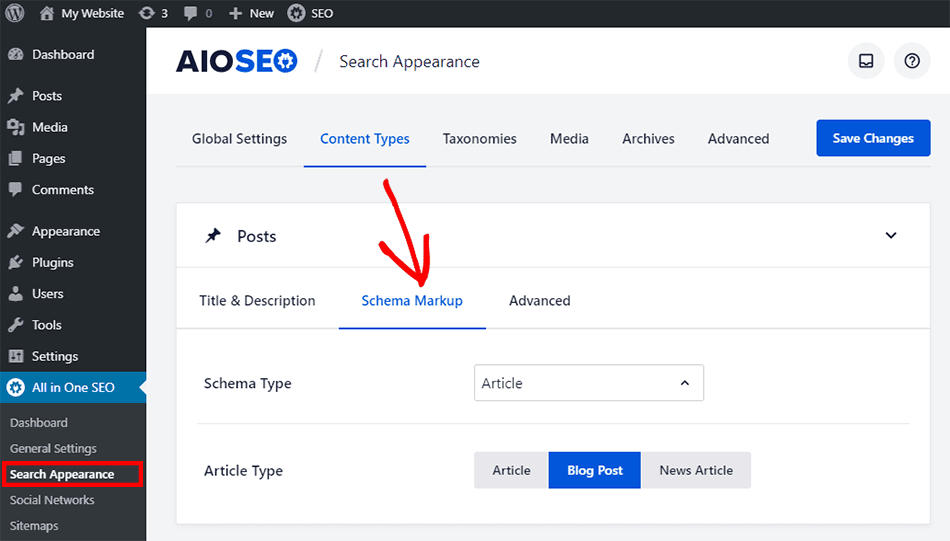
Это так же просто, как выбрать правильные типы контента и разметки. Плагин позаботится обо всем остальном.
#9. Редактор Robots.txt
Файл robots.txt управляет тем, как поисковые системы сканируют ваш сайт. Запрещая поисковым системам сканировать ненужные страницы вашего веб-сайта, такие как страница администратора WordPress, файлы плагинов и папки тем, вы можете гораздо быстрее индексировать свои важные страницы.
Robots.txt также содержит расположение XML-карт сайта. Таким образом, редактор robots.txt — это один из самых простых SEO-инструментов с большим влиянием для начинающих.
И настроить это очень просто прямо из панели управления WordPress с помощью AIOSEO:
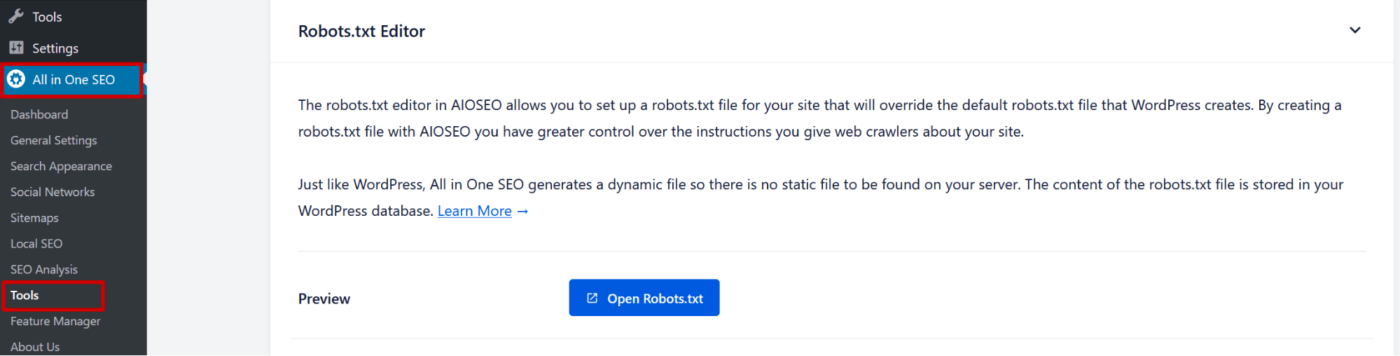
Обычно вам пришлось бы найти файл robots.txt на вашем сервере, чтобы изменить его.
Здесь это вопрос простого указания и нажатия на то, что вы хотите сканировать, а что нет:
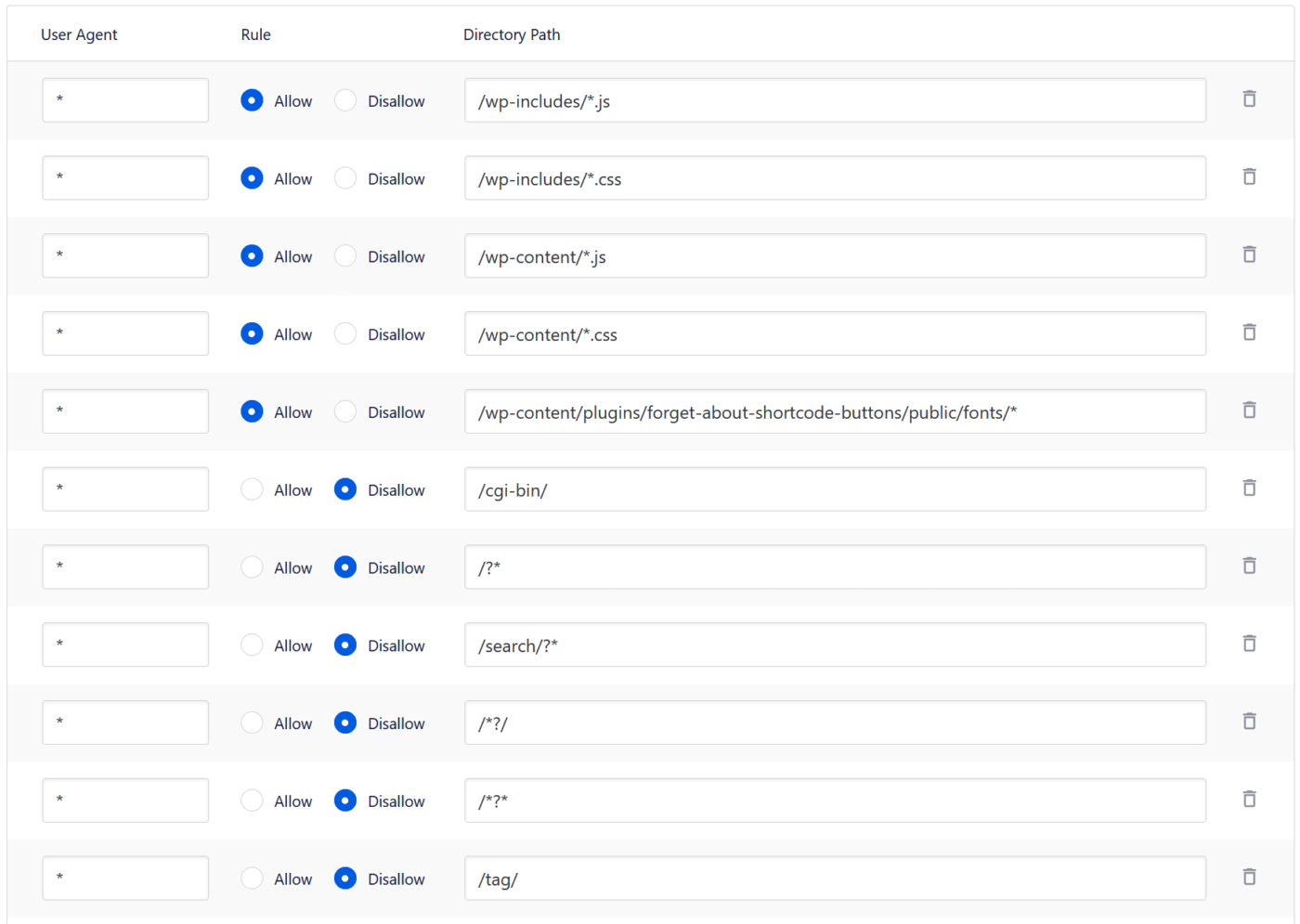
И всё это из вашей панели управления WordPress!
#10. SEO для WooCommerce
AIOSEO имеет действительно отличный аддон для SEO WooCommerce, который позволяет оптимизировать заголовки товаров, описания товаров и изображения товаров для увеличения трафика и кликов.
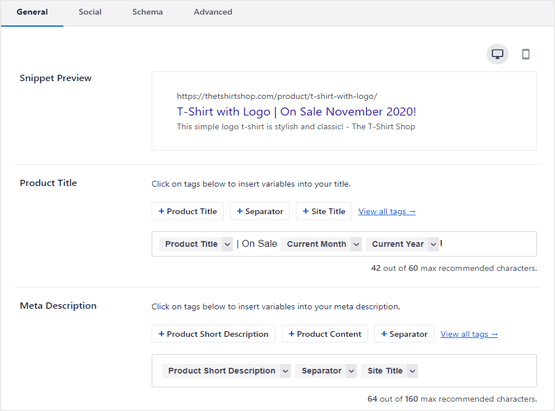
И, как и с любым другим типом контента, вы можете использовать теги для создания динамических заголовков и описаний. Вы также можете добавить «хлебные крошки» для удобной навигации по вашему сайту.
#11. SEO для изображений
Вы хотите автоматически установить альтернативный текст и атрибут title для всех изображений в контенте ваших записей и страниц?
AIOSEO может помочь вам с этим:
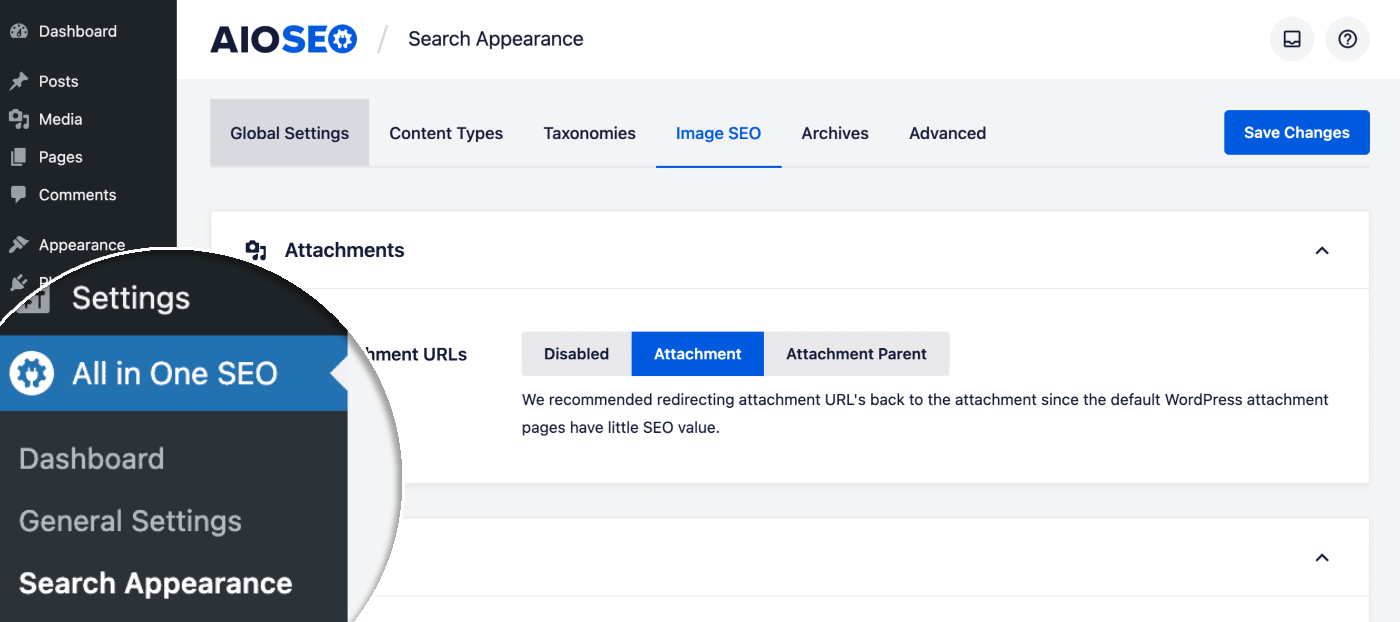
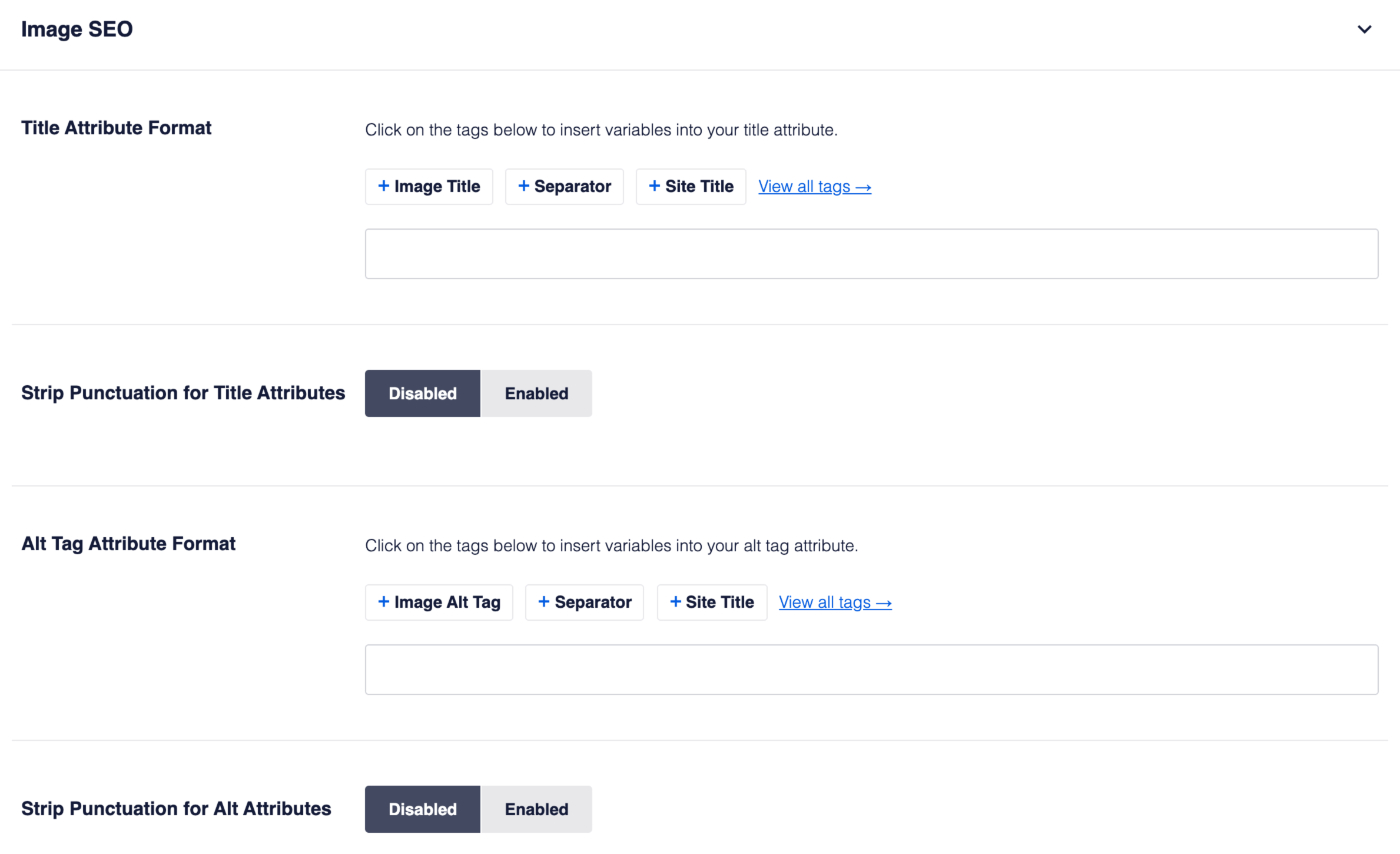
Перейдите на вкладку «SEO для изображений» и используйте теги для создания динамических заголовков изображений и alt-тегов или создавайте пользовательские заголовки и alt-теги для каждого изображения на лету:
Совет от профессионала: Вы также можете сделать некоторые из ваших изображений кликабельными и перенаправлять часть трафика на ваш YouTube-канал. Внешние ссылки также могут помочь с SEO для видео.
#12. Контент RSS для SEO
Скрейперы контента всегда ищут популярные новые посты, чтобы их украсть.
Когда они перепубликуют ваш пост в блоге, используя вашу RSS-ленту, ваш SEO-рейтинг может быть необратимо поврежден. All in One SEO позволяет легко добавлять автоматические кредиты в конец каждого поста в вашей RSS-ленте, чтобы вы могли быть уверены, что Google должным образом оценит вашу работу.
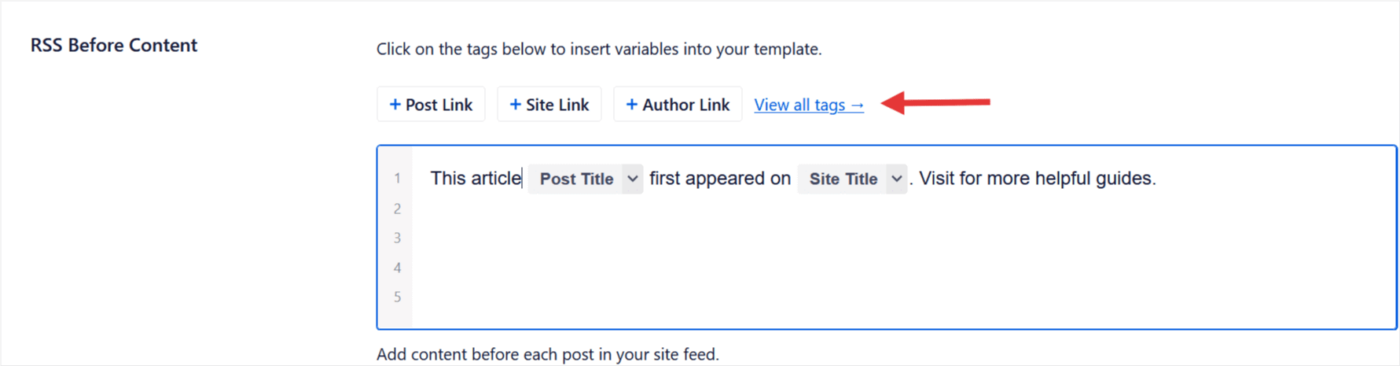
И это, по сути, всё, что вам нужно сделать!
#13. Отслеживание позиций по ключевым словам
Вы также получаете встроенный трекер SEO-рейтинга, чтобы оставаться в курсе ваших SEO-рейтингов.
Помните: Вы можете интегрировать Google Search Console только с All in One SEO. Если вам нужна более подробная аналитика веб-сайта, вам следует рассмотреть возможность установки плагина MonsterInsights для установки Google Analytics на ваш сайт WordPress.
Перейдите в раздел Статистика поиска в плагине WordPress, чтобы увидеть обзор ваших позиций по ключевым словам в WordPress:
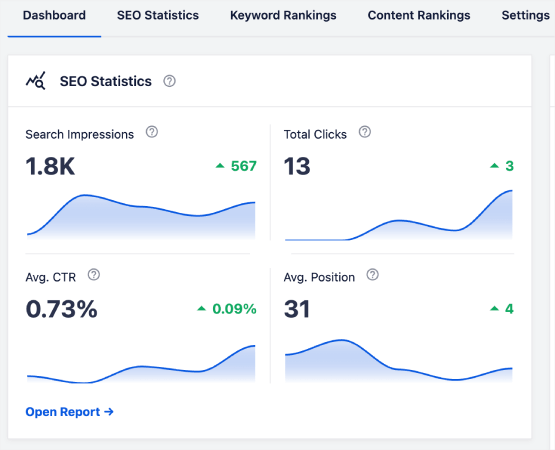
На главной панели также есть раздел Позиции по ключевым словам , который показывает обзор ваших Топ-ключевых слов и Топ выигрышных/проигрышных ключевых слов.
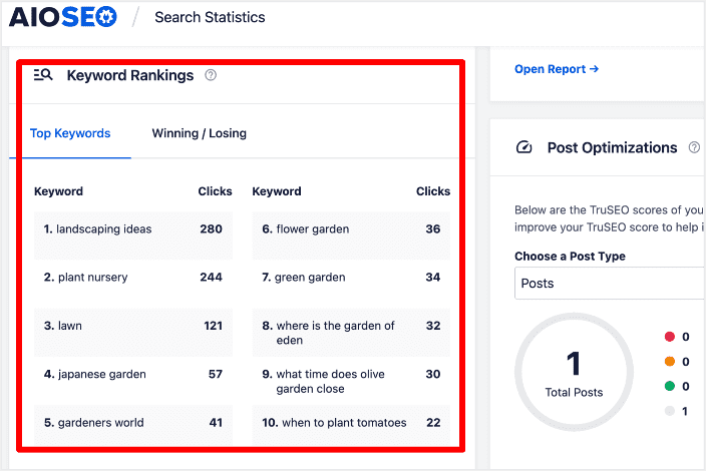
Выяснить, какие ключевые слова теряют позиции, — это как найти недостающие части головоломки. Это помогает понять, что происходит с этими страницами, и спланировать стратегию, чтобы вернуть эти позиции.
После того как у вас появится общее представление о производительности ваших ключевых слов, следующим шагом будет открытие отчета Позиции по ключевым словам. Здесь вы также можете увидеть подробную статистику позиций вашего контента.
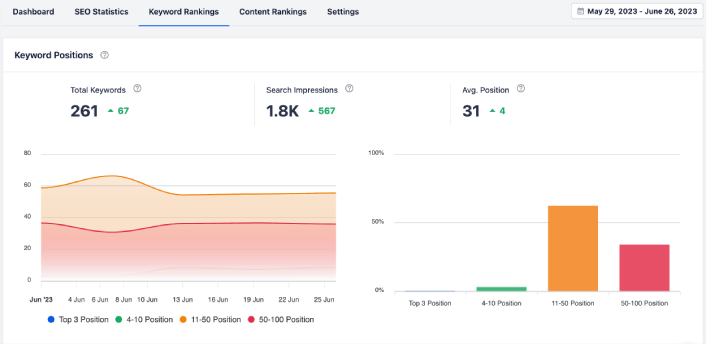
Если прокрутить дальше вниз, вы даже сможете увидеть точные посты, которые набирают или теряют позиции в поиске. Более того, вы можете отфильтровать ваши лучшие ключевые слова по кликам и мгновенно проверить их позиции.
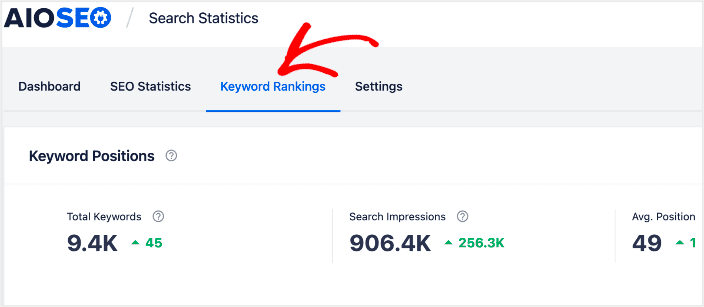
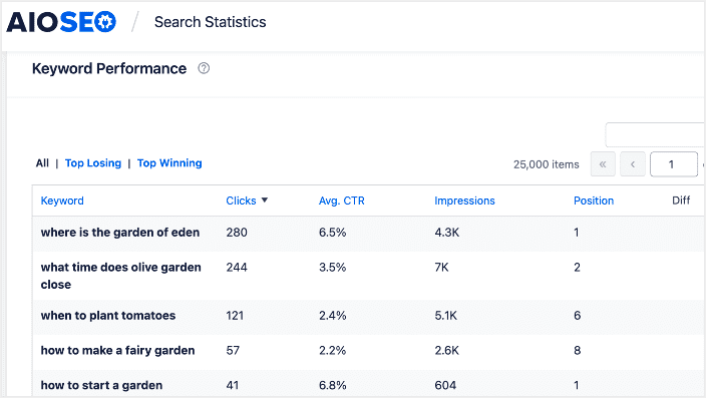
Здесь вы получаете подробный отчет обо всех ваших ключевых словах и их производительности в SERP. Прокрутка вниз до раздела Производительность ключевых слов позволяет глубже изучить, как работают отдельные ключевые слова.
Это место, где вы получаете полный отчет обо всех словах, которые вы используете, и о том, насколько хорошо они работают в результатах поиска. Прокручивая вниз до раздела Производительность ключевых слов, вы глубже погружаетесь в то, как каждое слово работает само по себе.
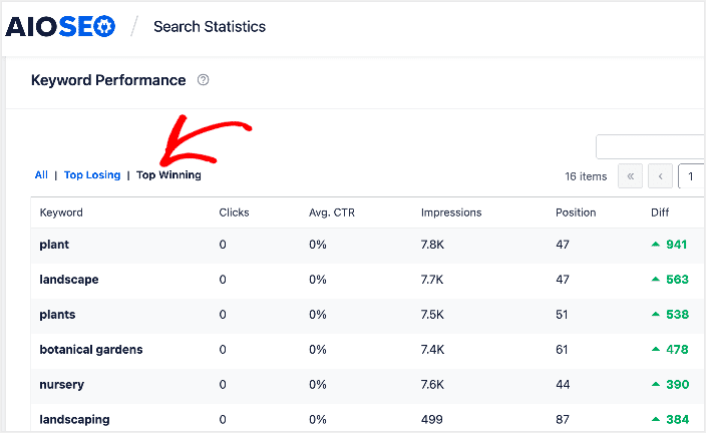
Если вы нажмете на вкладку Топ выигрышных, вы увидите ключевые слова, которые улучшают свои позиции.
Помимо проверки ваших топ выигрышных ключевых слов, вы также можете отслеживать ваши топ проигрышные ключевые слова. Нажмите вкладку Топ проигрышных в отчете Производительность ключевых слов, чтобы сделать это.
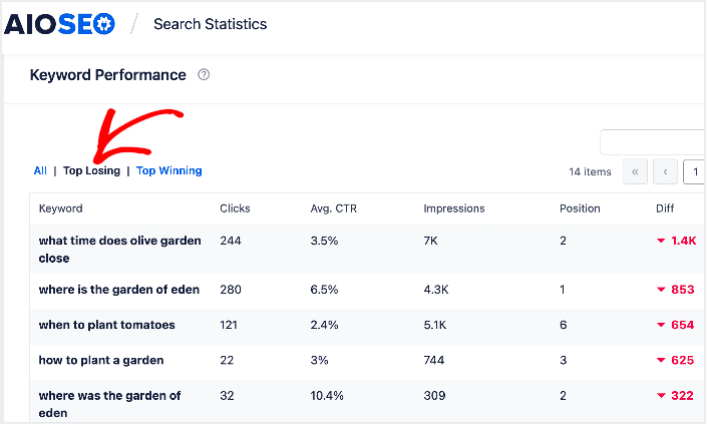
Этот раздел показывает ключевые слова, которые теряют позиции в рейтинге. Это жизненно важная информация, так как она показывает вам, какие ключевые слова и контент нужно оптимизировать. Если ваши позиции по ключевым словам падают, вам нужно немедленно обновить контент.
#14. Менеджер функций
Как вы уже видели, All in One SEO имеет МНОГО функций:
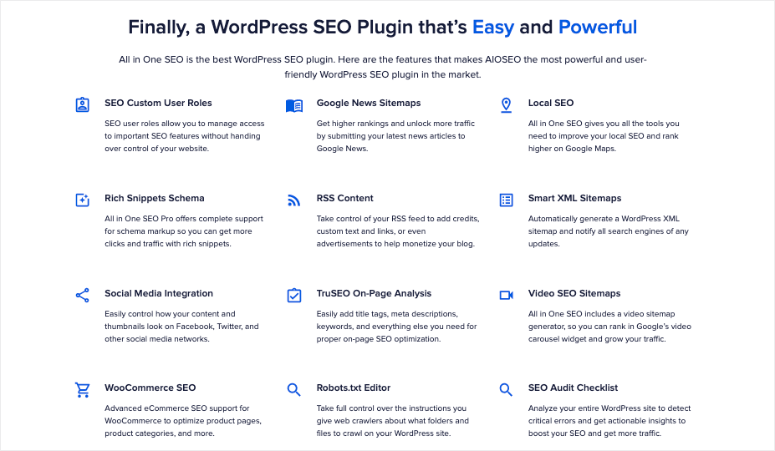
И вам может не понадобиться всё сразу. Вот почему AIOSEO предоставляет вам Менеджер функций для активации или отключения определенных функций в премиум-версии:
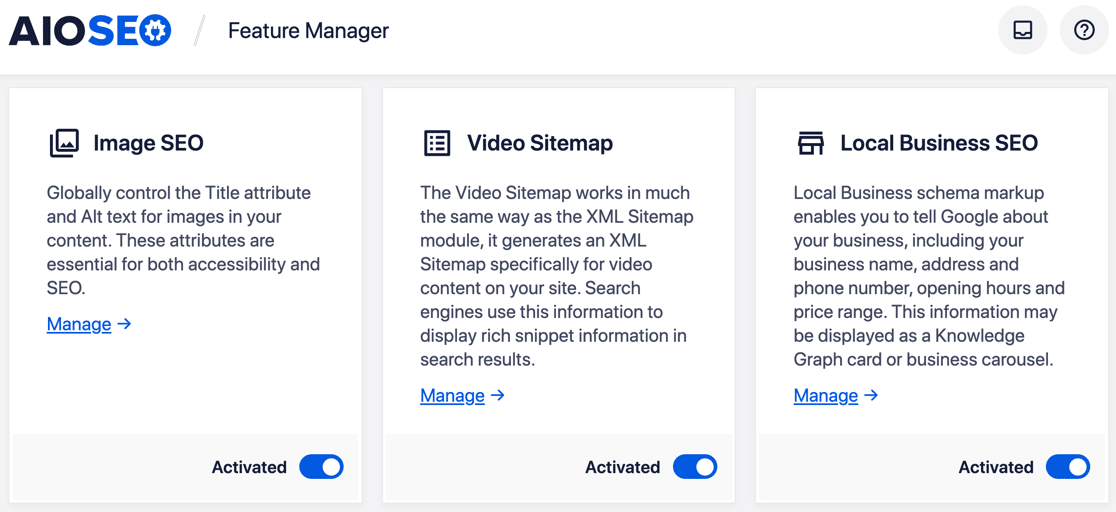
Многие из этих функций являются аддонами, и многие из этих дополнительных функций ориентированы на конкретные случаи использования. Это включает SEO для AMP-сайтов. Вы также получаете помощник по ссылкам для улучшения вашей стратегии внутренней перелинковки. Поэтому стоит просмотреть эти аддоны, чтобы настроить те, которые вам нужны, и отключить те, которые вам не нужны.
Совет от профессионала: Наряду с All in One SEO, вы можете улучшить оптимизацию контента с помощью таких инструментов, как SEOBoost. SEOBoost — это инструмент контент-маркетинга, созданный той же командой, что и AIOSEO. Его функции на базе ИИ предоставляют действенные рекомендации по размещению ключевых слов, заголовкам и читаемости, чтобы помочь вам достичь высоких позиций.
Цены на All in One SEO
Есть еще один фактор, который следует учитывать, прежде чем мы вынесем вердикт. Сколько стоит профессиональная версия All in One SEO?
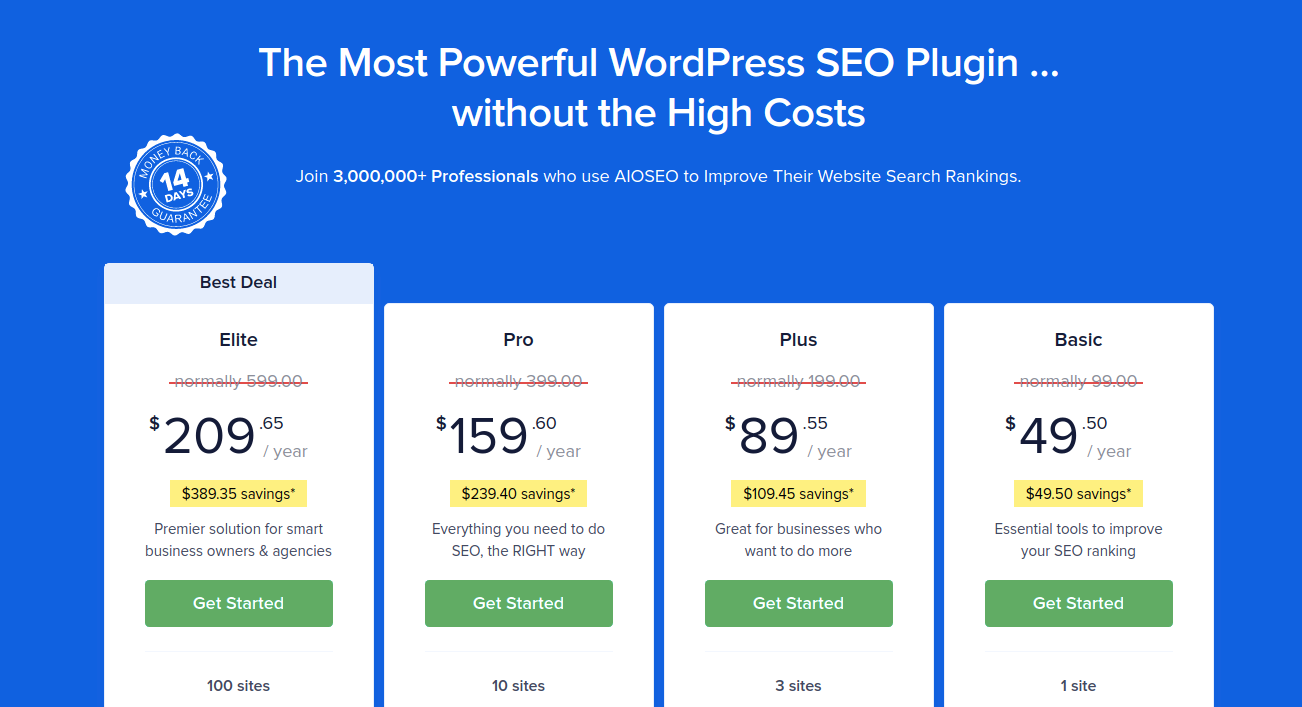
Если учесть его доступность и все функции, которые предлагает All in One SEO, становится ясно, что плагин отлично подходит для малого бизнеса. И самое приятное то, что вы можете использовать бесплатную версию, если у вас хобби-сайт.
Является ли All in One SEO лучшим SEO-плагином для WordPress?
All in One SEO — это мощный, простой в использовании и доступный инструмент. Он также оснащен функционалом в одно нажатие, который помогает автоматизировать SEO без найма специалиста. Он очень доступен, и вы получаете первоклассную поддержку. Поэтому он идеально подходит для малого бизнеса, стремящегося к росту. По нашему мнению, это делает его лучшим SEO-плагином для WordPress.
В то же время его SEO-настройки намного проще в использовании, чем у Yoast SEO или Rank Math. Если вы интегрируете AIOSEO с Semrush, вы можете импортировать ключевые фразы непосредственно на свой сайт. Пенни за пенни, All in One SEO — это хорошая инвестиция, если вы хотите увеличить органический трафик на свой сайт.
Кстати, вы уже пробовали использовать push-уведомления на своем сайте? Push-уведомления — это действительно отличные инструменты для увеличения повторного трафика и вовлеченности на сайте. Мы рекомендуем использовать PushEngage для отправки push-уведомлений.
PushEngage — это программное обеспечение для push-уведомлений №1 в мире. Так что, если вы еще этого не сделали, начните использовать PushEngage сегодня!


