
Ищете руководство по отслеживанию кликов для увеличения вашего партнерского дохода?
Google Аналитика 4 отслеживает некоторые клики по ссылкам, но не все из них отслеживаются по умолчанию. Вы можете настроить отслеживание пользовательских событий, но для этого придется использовать пользовательский код или Google Tag Manager. А затем отчетность о росте может стать настоящим кошмаром.
Хорошая новость в том, что вы можете настроить отслеживание кликов за 3 простых шага для вашего сайта WordPress. Вам не понадобится никакой пользовательский код, а настройка займет максимум несколько минут.
В этой статье мы рассмотрим этот метод с использованием мощных плагинов WordPress, созданных для того, чтобы помочь вам расти.
Звучит неплохо? Давайте погрузимся.
Как настроить отслеживание кликов с помощью Google Аналитики
Как мы уже упоминали, отслеживание кликов в Google Аналитике с использованием пользовательских событий может быть очень сложным. Но здорово то, что вы можете использовать плагин Google Аналитики для WordPress, чтобы автоматически создать для вас пользовательское событие. Мы рекомендуем использовать MonsterInsights для настройки отслеживания кликов на вашем сайте.
MonsterInsights — лучший плагин Google Аналитики для WordPress. Если вы не знакомы с Google Аналитикой 4 (GA4), вам понадобится разработчик для настройки Google Аналитики и конфигурации отслеживания кликов.
MonsterInsights делает весь процесс использования Google Аналитики в WordPress очень простым. Любой может легко настроить Google Аналитику и сконфигурировать расширенное отслеживание с помощью MonsterInsights.
Вы можете использовать плагин для отслеживания:
- Кликов по партнерским ссылкам
- Кликов по ссылкам «Добавить в корзину»
- Отправки форм
- Загрузки файлов
- Кликов по исходящим ссылкам
- Кликов по кнопкам «Позвонить»
- Кликов по кнопкам призыва к действию
- Кликов по кнопкам воспроизведения видео
И многого другого! Самое приятное то, что вы можете видеть подробные отчеты прямо в панели управления WordPress. Давайте посмотрим, как вы можете это сделать.
Шаг №1: Установите плагин MonsterInsights
Для начала вам нужно скачать MonsterInsights и установить его на ваш WordPress.
Если вы не знаете, как это сделать, ознакомьтесь с этой статьей о том, как установить плагин WordPress. Затем вам нужно будет следовать инструкциям мастера настройки для завершения установки плагина.
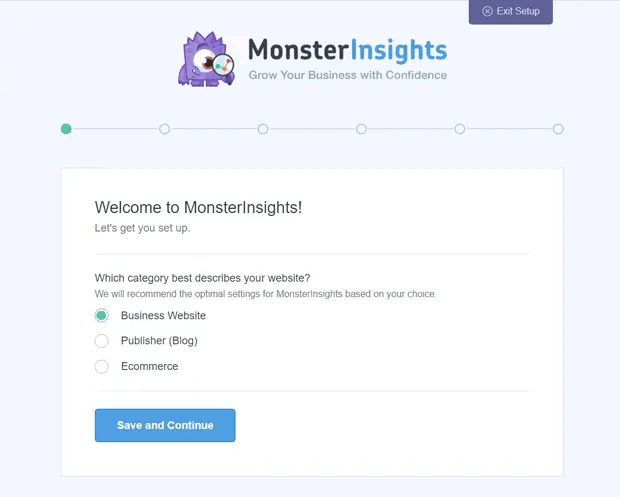
Если вам нужны более подробные инструкции, ознакомьтесь с нашей статьей о том, как настроить Google Аналитику на WordPress. После настройки вы сможете просмотреть сводный отчет для вашего сайта на панели управления WordPress.
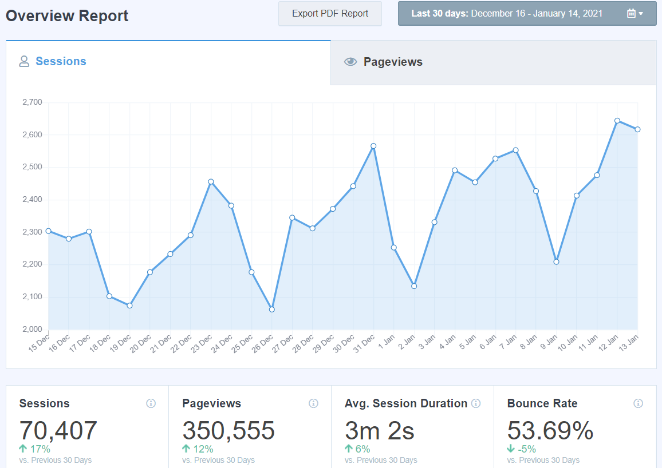
Чтобы просмотреть подробные отчеты для вашего сайта, вам нужно перейти в раздел Insights » Reports на панели управления WordPress.
Шаг №2: Установите Pretty Links Pro
Pretty Links Pro — это сервис маскировки ссылок для партнерских ссылок. Большинство партнерских ссылок либо уродливы на вид, либо выглядят невероятно спамными. Это дает вашим читателям очень мало причин кликать по партнерским ссылкам.
Но с Pretty Links Pro вы можете создавать…
Вы угадали: более красивые партнерские ссылки!
Но это еще не все, что делает для вас плагин. Pretty Links Pro — это центральный узел управления для всех ваших партнерских ссылок. Популярные функции включают:
- Полномасштабная панель управления для автоматизации процесса создания партнерских ссылок
- Автоматизированный процесс создания коротких ссылок для всех ваших страниц и записей
- Мгновенное связывание указанных ключевых слов с предопределенными партнерскими ссылками
- A/B-тестирование ссылок, чтобы увидеть, какой результат показывает наилучшую эффективность
- Несколько вариантов перенаправления URL
Pretty Links в основном полезен блогерам, подкастерам, продавцам, маркетологам в социальных сетях и практически любому создателю контента, которому нужен лучший контроль над своими внутренними ссылками. Но если вы создаете свою партнерскую программу или даже если вы партнерский маркетолог, Pretty Links — это чистое золото.
После скачивания и установки плагина перейдите в панель управления WordPress. Затем перейдите в раздел Pretty Links » Options » Links » Base Slug Prefix:
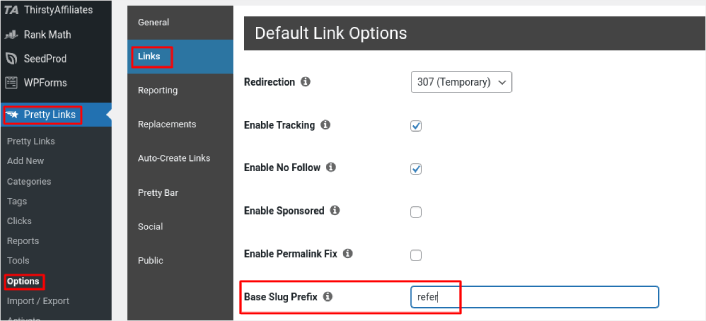
Префикс базового ярлыка позволяет создавать префикс URL для всех ваших партнерских ссылок. В нашем примере мы используем префикс ‘refer’. Таким образом, партнерские ссылки, которые мы создаем с помощью Pretty Links, будут следовать шаблону https://pushengage.com/refer/affiliate-offer.
Поскольку слово ‘refer’ будет частью всех ваших партнерских ссылок, их станет очень легко отслеживать.
Шаг № 3: Включите отслеживание кликов в MonsterInsights
Перейдите в раздел Insights » Reports » Publishers в вашей панели управления WordPress. Здесь вы можете настроить отслеживание партнерских кликов, отфильтровав префикс, который вы создали с помощью Pretty Links Pro.
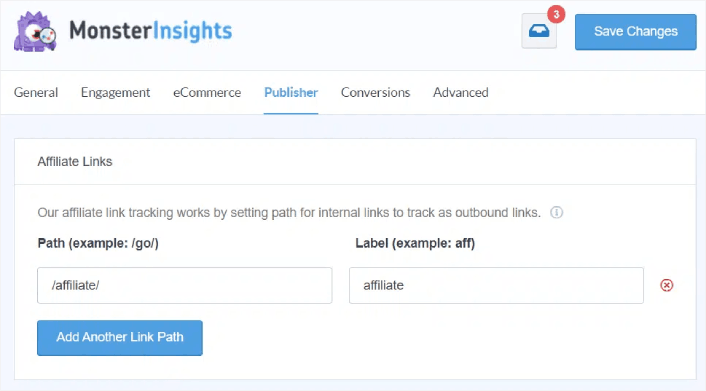
В поле Path вы можете указать префикс, который хотите отслеживать.
Когда закончите, нажмите Save Changes.
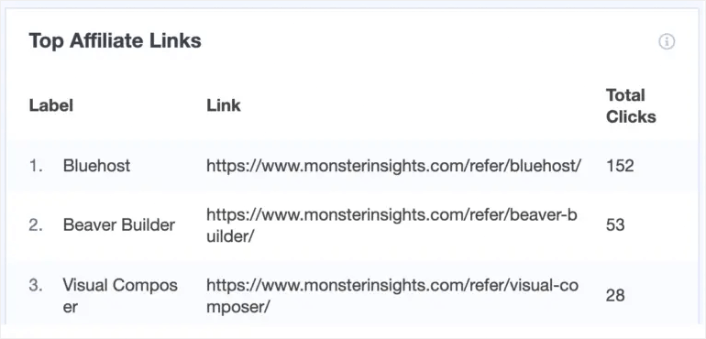
Вот и все! Вы закончили. MonsterInsights автоматически создаст пользовательское событие в Google Analytics и начнет отслеживать клики по вашим партнерским ссылкам. Самое приятное то, что вы можете просмотреть отчет прямо из панели управления WordPress, перейдя по адресу Insights » Reports » Publishers.
Что делать после настройки отслеживания партнерских кликов
После настройки отслеживания кликов на вашем сайте WordPress для измерения кликов по партнерским ссылкам, вам следует начать продвигать свои партнерские предложения. Один из самых простых способов сделать это — использовать push-уведомления. Push-уведомления — отличный маркетинговый инструмент для привлечения повторного трафика, повышения вовлеченности и увеличения продаж на вашем сайте.
Ознакомьтесь с этими невероятными ресурсами, чтобы начать:
Совет от профессионала: Вам также стоит ознакомиться с нашей статьей о том, как зарабатывать на партнерском маркетинге, если вы создаете совершенно новый бизнес.
Если вы только начинаете работать с push-уведомлениями, вам следует начать с PushEngage. PushEngage — лучшее программное обеспечение для push-уведомлений в мире. Так что, если вы еще этого не сделали, начните с PushEngage сегодня.


