
Looking for WordPress SEO plugins to grow your site’s traffic?
Les plugins SEO peuvent rendre les tâches techniques majeures super faciles si vous ne connaissez rien au codage. Même les tâches techniques plus petites, telles que la création d'un sitemap ou la modification d'un fichier robots.txt, peuvent être automatisées à l'aide d'un bon plugin.
But which one should you choose? There are so many SEO plugins out there and they all claim to be the best. Some of them are only good for specific tasks.
Comment savoir de quel plugin vous avez besoin ? Devriez-vous simplement mordre la balle et en utiliser un ? Le problème avec cette approche, cependant, est que beaucoup de ces plugins peuvent être assez chers.
In this article, we’re going to give you the best WordPress SEO plugins in the market and if you read all the way through, we’ll even give you our top choice!
Plongeons dans le vif du sujet.
How to Choose WordPress SEO Plugins
When choosing a WordPress SEO plugin, there are several factors you should consider. Here are some tips to help you make the right decision:
- Features: Look for a plugin that offers a comprehensive set of features to optimize your website for search engines. Some essential features to consider include XML sitemap generation, meta tags optimization, keyword analysis, content optimization suggestions, and social media integration.
- Compatibility: Ensure that the plugin is compatible with your version of WordPress. Check the plugin’s documentation or reviews to see if users have reported any compatibility issues.
- Ease of use: Choose a plugin with an intuitive and easy-to-use interface. It should provide clear instructions and make it simple to configure and optimize your website’s SEO settings.
- Performance: Consider the plugin’s impact on your website’s loading speed and overall performance. Opt for a lightweight and well-coded plugin that won’t slow down your site.
- Support and Updates: Look for a plugin that is actively supported and regularly updated by its developers. This ensures that any bugs or compatibility issues are addressed promptly and that the plugin stays up to date with the latest SEO practices.
- Reputation and Reviews: Check user reviews and ratings for the plugin you’re considering. Look for feedback from reputable sources or other WordPress users to get an idea of the plugin’s effectiveness and reliability.
- Premium vs. Free: Decide whether you’re willing to invest in a premium SEO plugin or prefer to stick with a free one. Premium plugins often offer more advanced features and dedicated support, but there are also many free plugins that can fulfill basic SEO requirements.
Ultimately, the best SEO plugin for your WordPress site will depend on your specific needs and preferences. Consider your budget, desired features, and the level of support you require before making a decision.
Best WordPress SEO Plugins
Now that we understand what to look for in WordPress SEO plugins, let’s dive right into the list.
PushEngage est le plugin de notifications push n°1 au monde. Obtenez-le gratuitement !
Before we get into it, you should know that no plugin in the market takes care of absolutely everything SEO. Sometimes, you’ll need to mix and match plugins to get the most use out of them. And if you’re on a budget, prioritize buying the plugins according to your strategy and actual SEO needs.
That said, let’s check out the plugins.
#1. All in One SEO

All in One SEO is one of the best SEO content optimization tools you’ll ever find.
Non seulement AIOSEO est suffisamment puissant pour mettre en œuvre les meilleures pratiques SEO actuelles, mais vous bénéficiez également d'options avancées pour résoudre des problèmes SEO spécifiques dès le départ. Cela comprend :
- Modules SEO locaux pour les petites entreprises ayant une audience locale
- SEO WooCommerce pour les boutiques en ligne
- Un optimiseur SEO à l'intérieur de votre éditeur WordPress
- Smart Sitemaps pour un indexation instantanée sur les moteurs de recherche
- Un plugin Schema pour que votre contenu se classe dans les Rich Snippets
And a lot more! Check out our full review of All in One SEO for a closer look at the features.
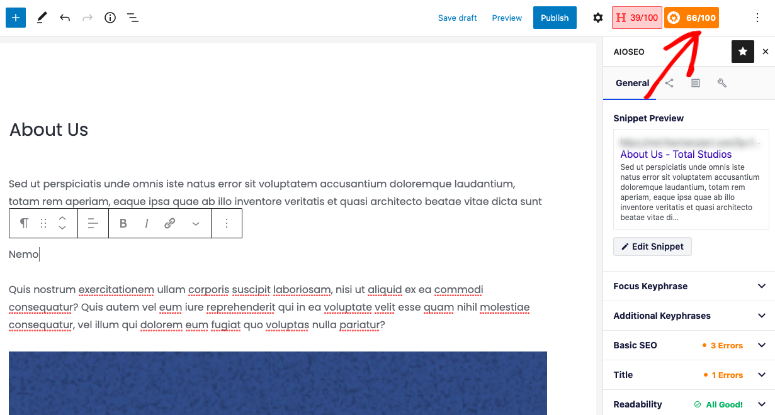
To top things off, AIOSEO allows you to build SEO content every time using TruSEO.
TruSEO is an SEO advisor built into your WordPress editor. It’s completely Gutenberg-friendly and it provides actionable insights to improve the SEO on anything you publish.
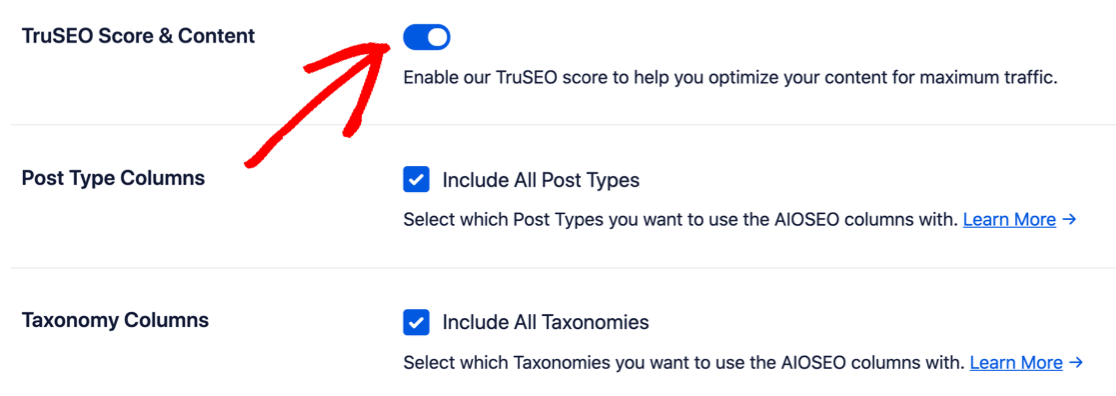
Par défaut, TruSEO est désactivé. Vous voudrez l'activer sur la page des Paramètres Généraux du plugin :
TruSEO note votre contenu en fonction de :
- Pertinence du mot-clé
- SEO de base
- Optimisation du titre
- Lisibilité
Et vous donne des moyens concrets de l'améliorer :
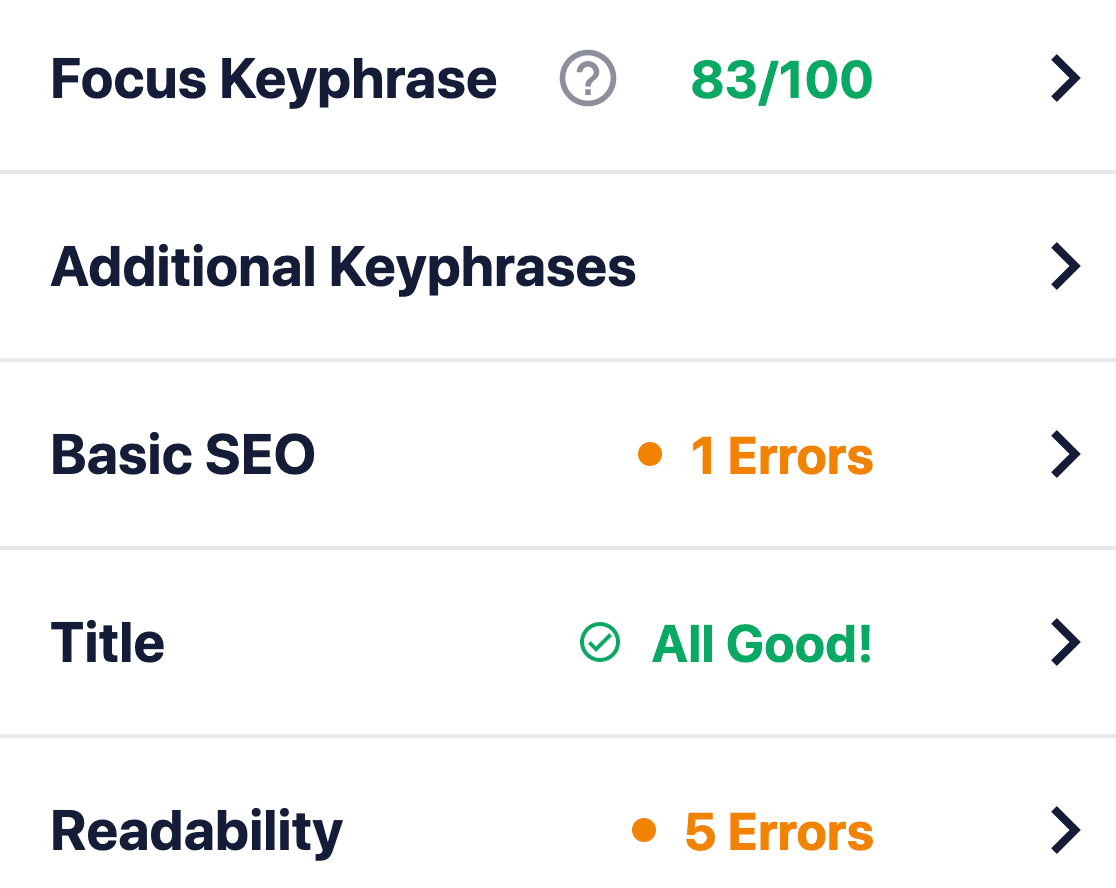
TruSEO is more sophisticated than other SEO plugins and it takes many more factors into account to create a score. Of course, there is “one single rule” to SEO because Google’s search algorithm is constantly changing. But over time, the fundamental idea behind creating SEO content is based on these four critical factors.
If we expand the Basic SEO box, you can get suggestions to optimize your content further:
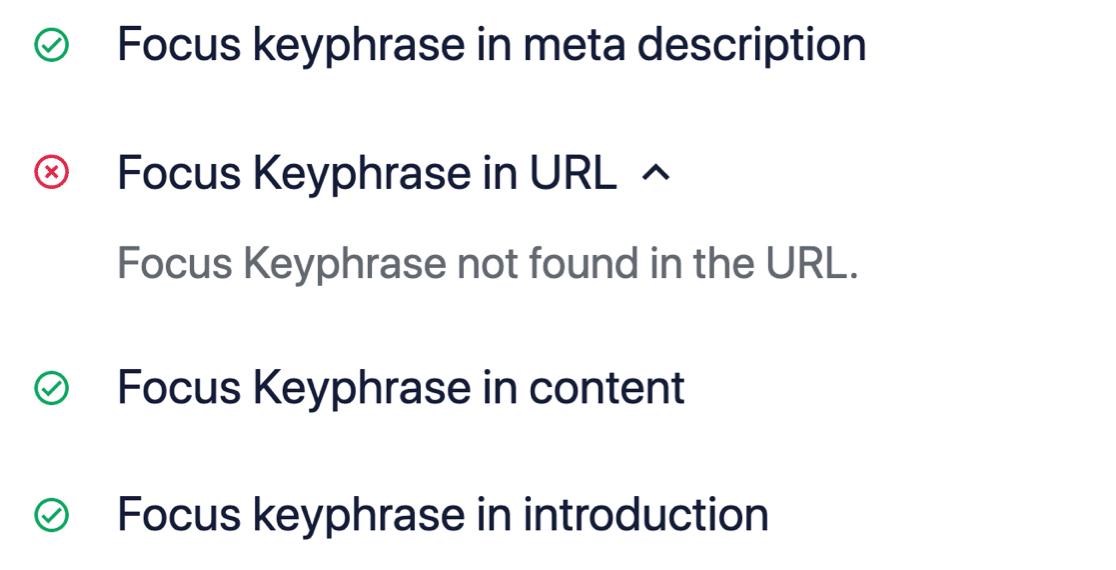
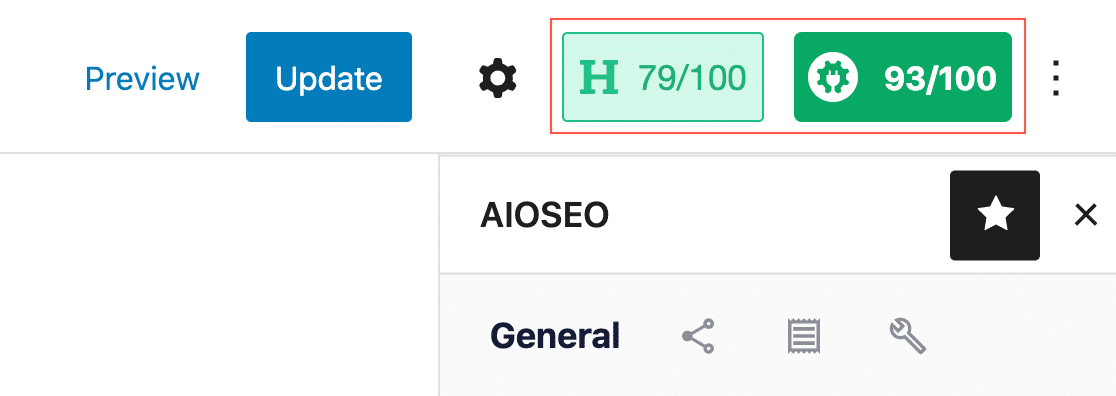
Note latérale : TruSEO est 100% compatible avec MonsterInsights. Si vous utilisez le MonsterInsights Headline Analyzer, vous pouvez maintenant obtenir un score de contenu et un score de titre en un coup d'œil :
Check out our review of All in One SEO for a closer look its features. Or, get started with AIOSEO today!
#2. Yoast SEO Premium
Yoast SEO has to be one of the most popular SEO plugins in the WordPress industry. Even the free version of Yoast is fairly good. But you have to get the premium version to access more technical features such as its redirect manager.
Like AIOSEO, Yoast SEO is a complete SEO toolkit for WordPress sites. But we really prefer AIOSEO for a lot of different reasons. Check out this comparison between Yoast and AIOSEO and you’ll see what we mean.
You can edit page and post titles, meta descriptions, alt tags for images, and other content optimization tools. The pro version can also help you add Schema to your website and manage your internal links easily.
Short version: Yoast is a premium plugin that was built to be a full SEO suite. In that way, it’s a lot like AIOSEO. But All in One SEO is just better at helping WordPress users with their SEO issues. So, if you have to pick an SEO suite, you might as well pick the best in the business.
#3. Schema Pro
Schema Pro comes with 20+ Schema markup types and you can add all these markup types to your site without writing a single line of code. It’s also one of the best Schema plugins for WordPress. You don’t have to add any code manually. The plugin will automatically generate the code for you.
Schema Pro even maps organizational data such as page title, featured image, author, and data. You can simply edit these defaults to suit your content, and Schema Pro will add error-free code across your website.
If you want to create Custom Schema for your custom post types, you can do that as well! Of course, you’ll need to learn JSON-LD to create custom code, but you have the option just in case you have in-house developers.
The plugin also integrates with the Google Structured Data Testing Tool to test your Schema and check if you’re likely to get a rich snippet. Schema Pro is a paid plugin, but it’s well worth the money it charges.
Get started with Schema Pro today!
#4. Rank Math
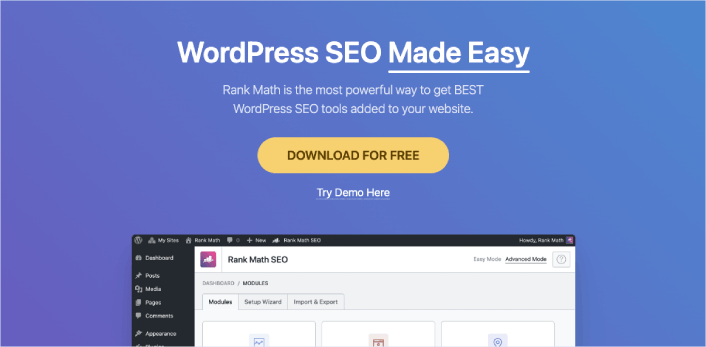
If you’re looking for a user-friendly WordPress SEO plugin for your website, Rank Math is a fantastic option. It’s designed to help you optimize your site for both search engines and social media platforms. The best part is, it’s really easy to use!
Rank Math comes with a setup wizard that guides you through the process, making it a breeze to get started. Plus, if you’ve been using other SEO plugins, you can easily import your data into Rank Math during the setup. It’s all about making your life easier!
With Rank Math, you can effortlessly add important elements like meta titles, descriptions, and Open Graph metadata to your blog posts. These elements play a key role in how your content appears in search engine results and on social media. So, it’s crucial to have them optimized, and Rank Math makes it super simple.
But that’s not all! This plugin also helps you generate an XML sitemap, which is like a roadmap for search engines, making it easier for them to discover and index your website. It even allows you to connect with Google Search Console, giving you valuable insights and data about your site’s performance in search.
One more cool feature of Rank Math is its ability to control access to plugin features based on user roles. This means you can decide who gets to use specific SEO settings and tools on your site. It’s all about maintaining control and keeping things organized.
Now, it’s worth mentioning that Rank Math is a great alternative to AIOSEO, another popular WordPress SEO plugin. But remember, you don’t need to use multiple SEO plugins on your site. Just pick the one that suits your needs the best and stick with it.
Get started with Rank Math today.
#5. Frase

Frase is an AI content optimization tool that helps you research, write, and optimize your content. Of all three offerings, we only recommend using Frase to optimize your existing content.
We don’t recommend using their AI-based content writer at all. The results look and feel like a bot. And it tries too hard to please a search engine rather than helping your customers. Not to mention, a general writing AI won’t have your industry expertise and knowledge.
You can also autogenerate an outline for your content. The AI scrapes the top 20 Google search results for your keyword and compiles what you should cover in your content. This includes headlines, specific sections, and keywords to include in your content.
The content optimization tool is pretty good, though. You can import your articles using their URLs into a browser-based editor. Then, the AI suggests what keywords to insert into your content, how many times you should insert them, and how many pages in the top 20 Google search results include that keyword.
#6. SEMrush

SEMrush est un autre outil SEO puissant. Mais il agit également comme l'un des meilleurs outils d'analyse de sites Web au monde.
Avec SEMrush, vous pouvez obtenir les informations dont vous avez besoin sur le trafic que génèrent les mots-clés et les sujets. Vous pouvez décider sur quoi vous concentrer pour développer votre trafic organique grâce à ce type d'intelligence analytique.
SEMrush vous offre :
- Obtenez plus de 21 milliards de mots-clés pour 130 pays
- Effectuez un audit approfondi du site Web avec plus de 130 points de contrôle
- Obtenez des recommandations pour améliorer votre contenu afin d'augmenter les classements de recherche
- Suivez et analysez les sites Web et les stratégies marketing des concurrents
- Créez et suivez vos campagnes PPC
- Rédigez, planifiez et publiez du contenu sur les réseaux sociaux
- Créez et planifiez des rapports en marque blanche ou personnalisés
L'une des choses les plus intéressantes à propos de SEMrush est que vous obtenez des informations basées sur l'IA sur la façon d'obtenir de meilleurs classements pour vos mots-clés. Vous obtenez même des suggestions de mots-clés à inclure dans les articles existants.
#7. Ahrefs

Ahrefs is an SEO content optimization tool for SEO professionals. It’s one of the best SEO tools we’ve ever come across for content auditing, SEO research, and competitor analysis. It’s also a great tool to build backlinks to your content.
Bien qu'Ahrefs soit plutôt un outil autonome, vous pouvez également utiliser leur plugin WordPress.
En utilisant Ahrefs, vous pouvez :
- Auditer le contenu de votre site
- Trouver de nouveaux mots-clés à cibler
- Suivez le classement des mots-clés depuis un tableau de bord
- Étudiez ce que vos clients recherchent en ligne
- Analysez le contenu le plus performant dans votre niche
Et tout cela depuis un tableau de bord facile à utiliser. Si vous débutez en SEO, vous pouvez également consulter leur matériel de formation. Mais si vous avez déjà une certaine expérience en SEO, vous pouvez utiliser Ahrefs pour obtenir une croissance explosive si vous suivez un bon processus SEO.
Which of These WordPress SEO Plugins is Best for You?
Hands down, the best WordPress SEO plugin is All in One SEO. Penny for a penny, you get the best features you could ever need for your site’s SEO without any of the bloated codebase of a poorly coded plugin. If you need a tool exclusively for keyword research and analysis, SEMrush is the way to go.
Obtenir du nouveau trafic est le meilleur moyen d'obtenir de nouveaux prospects et ventes. Mais vous avez également besoin d'autres ingrédients pour développer votre entreprise. Commencez à utiliser les notifications push pour générer du trafic, de l'engagement et des ventes répétés sur votre site.
Jetez un œil à ces ressources impressionnantes et vous comprendrez ce que nous voulons dire :
- Campagnes goutte à goutte et auto-répondeurs pour les notifications push web
- 5 avantages de l'utilisation d'une campagne de notification push d'abandon de panier
- Comment convertir les abonnés en acheteurs à l'aide des notifications push web
- Comment ajouter un plugin WordPress de notifications Web à votre site
Et si vous débutez avec les notifications push, nous vous recommandons d'utiliser PushEngage. PushEngage est le logiciel de notification push n°1 au monde. Vos campagnes seront donc entre de bonnes mains.


Your information is exactly what I was looking for, so thank you very much for providing it. Would you mind telling me what program you use to create your amazing, fast website? For my business, I also want to create a simple website, but I need help deciding on a name and hosting provider. Asphostportal is reputed to have a stellar reputation. Exist any other options? If so, what would you suggest?
I’d recommend getting PHP hosting and installing WordPress to build a site for your business. ASP websites usually require some serious technical skills. If you’re not sure where to begin, you should check out this article on How to Create a Website .