Ищете быстрый и простой способ сортировать push-уведомления и находить ваши наиболее эффективные кампании?
Сортировка ваших push-кампаний по показателям эффективности помогает понять, что работает, а что нет. Что еще более важно, вы можете использовать свои лучшие кампании как основу для новых кампаний.
Функция сортировки не является стандартной для всех сервисов push-уведомлений. Даже если вы получите эту функцию, вы, возможно, не сможете использовать ее без использования их API-сервиса. Это означает, что вам понадобится разработчик, чтобы сделать это для вас.
Если у вас есть штатный разработчик, это хорошо. Но если нет, мы настоятельно рекомендуем перейти на PushEngage. PushEngage позволяет фильтровать ваши кампании несколькими простыми щелчками мыши.
В этой статье мы шаг за шагом покажем вам, как сортировать push-уведомления и находить ваши лучшие кампании.
Зачем фильтровать и сортировать push-уведомления?
Вы можете фильтровать и сортировать push-уведомления, чтобы найти наиболее эффективные кампании или даже наименее эффективные кампании.
Эпичность этих фильтров заключается в том, что вы можете увидеть:
- Типы push-уведомлений, которые вы отправляете чаще всего
- Насколько хорошо работают определенные типы уведомлений
- Определите сезонные тенденции в эффективности кампаний
- Какие типы кампаний нуждаются в немедленной оптимизации
И вы можете сделать это несколькими простыми щелчками мыши!
Вы также можете сортировать push-уведомления по Недавно созданным или Старым. Таким образом, вы можете очень легко находить конкретные кампании, даже после фильтрации по диапазону дат.
Позволяет ли ваш сервис push-уведомлений сортировать кампании?
Не каждый сервис push-уведомлений позволяет фильтровать и сортировать push-уведомления. По крайней мере, не напрямую. Иногда вы можете сделать это с помощью их API-сервиса. Но это сложно сделать, если у вас нет штатного разработчика.
Хороший способ проверить — просто спросить у вашего поставщика услуг, есть ли у них опция очистки. Но велика вероятность, что у них не будет доступных опций.
Мы рекомендуем вам немедленно перейти на PushEngage.

PushEngage — лучший сервис push-уведомлений в мире. И мы говорим не только о бесплатной версии. Он позволяет вам связываться с посетителями после того, как они покинут ваш сайт, с помощью целевых push-сообщений.
PushEngage — наш первый выбор для сервисов и инструментов push-уведомлений, потому что он:
- Очень прост в использовании
- Эффективен на HTTP и HTTPS сайтах
- Поставляется с визуальным конструктором, который требует минимального или нулевого кодирования для настройки
- Легко настраивайте полностью автоматизированные кампании push-уведомлений для любого типа сайта
- Имеет множество опций для отправки персонализированных push-уведомлений для более высоких показателей кликабельности
- Оснащен отслеживанием пользовательских целей, UTM-параметрами и расширенной аналитикой
И это лишь малая часть. Ознакомьтесь с полным списком функций PushEngage, прежде чем двигаться дальше.
Самое невероятное в PushEngage — это то, что у него есть бесплатный тариф, которым вы можете воспользоваться, прежде чем принимать решение о покупке.
Бесплатного плана PushEngage достаточно, чтобы довести ваш бизнес до точки, когда вы легко сможете позволить себе платные тарифы. Они начинаются с 9 долларов в месяц в течение первого года (1000 подписчиков, оплата ежегодно) и масштабируются в зависимости от количества ваших подписчиков; 100 000 подписчиков — это премиум-план, а текущие цифры указаны на странице с ценами.
Общая стоимость перехода довольно низкая. Поэтому мы настоятельно рекомендуем вам немедленно перейти на PushEngage. Функция очистки — это не единственная причина для покупки плана PushEngage. Вы получаете множество расширенных функций, которые другие инструменты push-уведомлений просто не предлагают.
Как быстро фильтровать и сортировать уведомления
Теперь, когда вы перешли на PushEngage, пришло время очистить список подписчиков push-уведомлений.
Если вы новичок в отслеживании эффективности push-уведомлений, у нас есть для вас очень хорошие новости. Вы можете легко сортировать и фильтровать свои push-рассылки.
Перейдите в свою панель управления PushEngage и выберите Push Broadcasts:

Здесь вы заметите, что есть опция фильтрации:
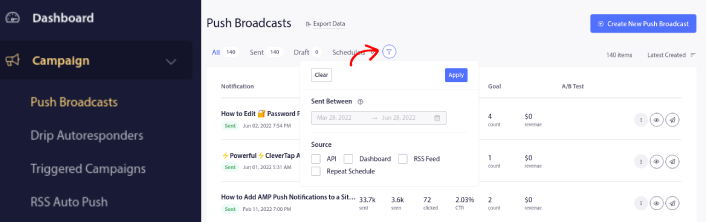
Вы можете фильтровать отправленные вами push-рассылки по дате и источнику:
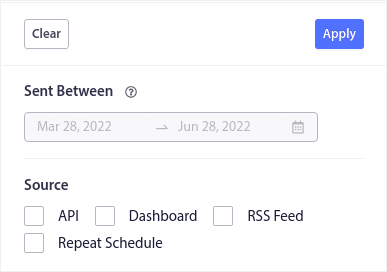
Допустим, у вас есть кампания push-уведомлений к Черной пятнице, охватывающая несколько дней.
Теперь вы можете получить четкое представление о том, какие уведомления сработали лучше всего, а какие — не очень. И эта информация может помочь вам оптимизировать ваши текущие рассылки и кампании.
Если вы новичок в использовании push-уведомлений, вы должны знать, что вы можете только A/B-тестировать push-рассылки. Но вы можете использовать опции сортировки и фильтрации для применения оптимизаций даже к вашим автоматизированным кампаниям. Это действительно отличный способ настроить лучшие практики push-уведомлений для вашей отрасли и бренда.
Что делать после сортировки push-уведомлений
После сортировки push-уведомлений вы можете изучить подробную аналитику, а затем вернуться к оптимизации кампаний push-уведомлений и развитию вашего бизнеса.
Мы также рекомендуем вам уделить время чтению наших статей и узнать, как улучшить ваши автоматические push-уведомления. Начните с нашей статьи о лучших практиках push-уведомлений.
Если вы новичок в push-уведомлениях, вам следует пройти полный процесс тестирования push-уведомлений перед запуском. Это поможет вам устранить распространенные проблемы до того, как ваши посетители увидят их и начнут жаловаться на сломанный пользовательский интерфейс. И, безусловно, вам следует настроить Google Analytics для отслеживания push-уведомлений.
Ретаргетинг push-уведомлений для таргетинга подписчиков, которые нажали на них или нет. Сообщите нам, как это работает для вас. А пока ознакомьтесь с этими ресурсами:
- Как увеличить количество кликов по вашим push-уведомлениям с помощью любопытства
- Как персонализировать каждое push-уведомление
- Как выделиться с помощью медиафайлов в ваших push-уведомлениях
- Как реактивировать неактивных подписчиков push-уведомлений
- Как использовать push-уведомления для информирования клиентов
- Как использовать эмодзи в ваших push-уведомлениях для увеличения количества кликов
- Как увеличить конверсию, создавая ощущение срочности
И если вы еще этого не сделали, начните работу с PushEngage.


