Сегментация клиентов Shopify начинается в вашей админ-панели. Откройте страницу «Клиенты», нажмите «Сегменты», и вы найдете список, который автоматически обновляется каждый раз, когда покупатель соответствует условию или перестает ему соответствовать — дата первой покупки, количество заказов, прогнозируемый уровень расходов, географическое положение. Shopify встроил это, и это действительно полезная отправная точка.
Проблема в том, что происходит после создания сегмента. Каждое руководство по сегментации клиентов Shopify направляет вас к электронной почте. Настройте поток Klaviyo. Создайте пользовательскую аудиторию Meta. Отправьте трансляцию. Это не ошибка, но это неполно — и для менеджера по удержанию, пытающегося сократить разрыв между CAC и частотой повторных покупок, неполнота означает упущенную выручку.
В этой статье рассказывается о том, что дает встроенная сегментация Shopify, как создать пять наиболее важных для удержания сегментов и — то, о чем почти никто не говорит — как запускать эти сегменты через веб-пуш, WhatsApp и электронную почту в виде скоординированной последовательности, которая восстанавливает брошенные корзины, возвращает ушедших покупателей и генерирует измеримую выручку по каждому сегменту.
Что дает встроенная сегментация Shopify (и где она останавливается)
Встроенный конструктор сегментов клиентов Shopify использует ShopifyQL — структурированный язык фильтров — для создания динамических списков на основе правил. Вы комбинируете имена фильтров (например, number_of_orders, predicted_spend_tier, customer_countries), операторы (>=, =, CONTAINS) и значения в запрос. Список сегментов автоматически обновляется по мере того, как клиенты соответствуют критериям или перестают им соответствовать.
Из коробки Shopify предоставляет стандартные сегменты: покупатели за последние 90 дней, покупатели, совершившие первую покупку, VIP-клиенты (с высоким прогнозируемым расходом), клиенты, не совершавшие покупок в течение года, и другие. Это функциональные отправные точки.
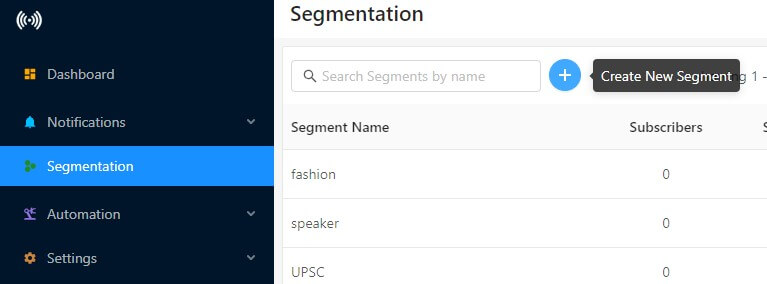
Когда вы устанавливаете PushEngage в своем магазине Shopify, на вашей панели PushEngage автоматически создаются два дополнительных сегмента по умолчанию: Customers (подписчики, совершившие хотя бы одну покупку) и Leads (подписчики, еще не совершившие покупку). Это разделение происходит немедленно, не требует настройки и дает вам самое важное различие для удержания клиентов — людей, которые уже доверили вам свои деньги, совершив покупку, и людей, которым нужна еще одна причина для конверсии. Полная логика этих настроек по умолчанию, включая то, как использовать группы аудиторий для их объединения с географическими критериями и критериями устройства, описана в руководстве PushEngage по сегментации по умолчанию для Shopify. Сегменты доступны во всех планах PushEngage; группы аудиторий доступны в планах Business и выше.
То, чего не дает вам встроенная сегментация Shopify, — это активация по нескольким каналам. Она может экспортировать сегмент в пользовательскую аудиторию Meta. Она может питать поток электронной почты. Но она не скажет вам, когда отправлять push-уведомление пользователю, бросившему корзину, какому клиенту с высоким LTV следует первым отправить сообщение в WhatsApp или как выстроить последовательность этих каналов, чтобы первое касание через push не каннибализировало электронное письмо, которое должно прийти через 4 часа. Эта логика последовательности находится вне админки Shopify — и именно здесь происходит восстановление выручки.
Четыре типа сегментов, которые повышают удержание клиентов на Shopify
Прежде чем создавать конкретные сегменты, полезно понять, какие измерения сегментации действительно предсказывают поведение выручки на Shopify. Есть четыре, которые имеют значение:
Поведенческие сегменты группируют клиентов по действиям, которые они совершили или не совершили в вашем магазине. Просмотр без покупки, брошенная корзина и просмотр без покупки — все это относится сюда. Эти сегменты требуют высокой срочности: сигнал намерения свежий, а окно для восстановления короткое (часы, а не дни).
Сегменты истории покупок (основа RFM-анализа) оценивают клиентов по давности (как давно они совершили последнюю покупку), частоте (как часто они покупают) и денежной стоимости (общая или средняя сумма расходов). Чемпионы (высокие показатели по всем трем параметрам) нуждаются в обслуживании на уровне лояльности. Клиенты в группе риска (покупали раньше, но стали неактивными) нуждаются в последовательности восстановления перед полным уходом. В электронной коммерции сегментация повышает CTR push-уведомлений на 218% — основная причина именно в этом: история покупок говорит вам, что ценит клиент и сколько времени он обычно ждет между покупками, что позволяет точно рассчитать время следующего касания.
Сегменты этапа жизненного цикла соответствуют тому, где находится клиент в отношениях: новый подписчик (подписался, без покупок), покупатель впервые, повторный покупатель, лояльный, в группе риска, ушедший. Срочность активации и тон сообщения резко различаются в зависимости от этапа.
Географические сегменты и сегменты устройств находятся на более низком уровне, но имеют операционное значение: кампания push-уведомлений для флэш-распродажи должна запускаться в местном часовом поясе подписчика; push-уведомление в приложении должно запускаться только для мобильных сегментов.
Отраслевые ориентиры последовательно показывают, что сегментированные кампании превосходят массовые рассылки: сегментированные push-уведомления обеспечивают более высокий CTR и доход на отправку, чем несегментированные массовые рассылки, а снижение частоты массовых рассылок при повышении релевантности сегмента обычно улучшает как CTR, так и удержание подписчиков. Направление последовательно во всех категориях электронной коммерции — величина зависит от качества списка и релевантности предложения.
Создание конкретных сегментов Shopify: пять, которые вам нужны в первую очередь
Вот пять сегментов клиентов Shopify, которые охватывают наиболее ценные сценарии использования для удержания, с логикой фильтра ShopifyQL для каждого.
1. Покупатели впервые (за последние 90 дней)
Это клиенты в окне «медового месяца» конверсии — наиболее вероятно совершат повторную покупку, если вы свяжетесь с ними до того, как угаснет воспоминание о первой покупке.
Логика фильтра: number_of_orders = 1 AND days_since_last_order <= 90
2. Повторные покупатели (2+ заказа)
Ваши самые проверенные покупатели. Эта группа служит ориентиром для вашей базовой лояльности и является подходящей аудиторией для кампаний с ранним доступом для VIP-клиентов и запуска продуктов.
Логика фильтра: number_of_orders >= 2
3. Клиенты с высоким средним чеком
Клиенты, чей средний чек превышает верхний квартиль вашего магазина. Для магазина со средним чеком в 75 долларов это может быть 150 долларов и выше. Эти клиенты уже продемонстрировали готовность тратить деньги; они являются подходящей аудиторией для продвижения премиальных продуктов или наборов.
Логика фильтра: average_order_value >= 150.00 (скорректируйте порог в соответствии с данными вашего магазина)
4. Бросившие корзину и просмотр (на основе событий PushEngage)
Встроенный конструктор сегментов Shopify работает с завершенными покупками. Чтобы сегментировать поведение по брошенной корзине и просмотру, вам необходимо отслеживание на уровне событий. PushEngage фиксирует их с помощью событий JavaScript, срабатывающих во время сеанса в магазине — когда подписчик добавляет товар в корзину или просматривает страницу продукта, а затем уходит без покупки, PushEngage динамически создает сегмент. Никаких дополнительных приложений или настроек тегов, кроме установки PushEngage Shopify, не требуется.
5. Ушедшие покупатели (нет покупок за 90+ дней)
Клиенты, которые покупали раньше, но затихли. Это ваша целевая аудитория для возвращения. Возврат известного покупателя стоит доли стоимости привлечения нового — математика удержания проста.
Логика фильтра: number_of_orders >= 1 AND days_since_last_order > 90
Каждый из этих пяти сегментов напрямую соответствует последовательностям push-уведомлений и WhatsApp в следующем разделе. Создайте их один раз, и автоматизация будет постоянно использовать их.

Активация сегментов через веб-push: последовательности по типу сегмента
Здесь соединяются конструктор сегментов Shopify и уровень автоматизации PushEngage. Каждый сегмент получает определенную последовательность push-уведомлений, а не одноразовую рассылку.
Брошенные корзины → 3-этапная последовательность веб-push
- Этап 1: через 30 минут после брошенной корзины. Простое напоминание, без скидки.
- Этап 2: через 4 часа, если покупки нет. Включите ограниченное по времени предложение или социальное доказательство («87 человек просмотрели это сегодня»).
- Этап 3: через 24 часа, если покупки по-прежнему нет. Сообщение «последний шанс» с самым сильным стимулом.
3-этапная последовательность стабильно восстанавливает в 2–3 раза больше дохода от корзин, чем однократная 1-часовая рассылка, поскольку каждое окно задержки учитывает разные причины отказа — отвлечение, колебания цены, сравнение с конкурентами. Вы можете увидеть, как это происходит в примерах push-уведомлений для электронной коммерции из реальных кампаний.
Брошенные просмотры → 2-этапная последовательность веб-push
- Этап 1: через 1 час после просмотра без добавления в корзину. По категории или конкретному продукту.
- Касание 2: +48 часов, если нет повторного визита. Переориентируйте на сопутствующие товары или пополнение запасов.
Ушедшие покупатели → серия для возвращения
- Касание 1: +7 дней после вашего среднего окна повторной покупки. Сообщение «Мы скучаем» с конкретной рекомендацией продукта на основе предыдущей категории покупок.
- Касание 2: +14 дней, если нет ответа. Более сильное предложение, явная срочность.
Новые подписчики (лиды) → приветственная серия
- День 1: Приветствие + история бренда. Пока не настаивайте на покупке в первый день, если они только что подписались — дайте им получить первое полезное сообщение.
- День 3: Знакомство с продуктом или предложение бестселлера. Первое сообщение, ориентированное на конверсию.
- День 7: Социальное доказательство или пример использования. Укрепите доверие перед первой покупкой.
Чемпионы и лояльные → VIP и кампании с ранним доступом
Этим подписчикам не нужны серии для возвращения. Им нужно чувствовать себя признанными. Уведомления о раннем доступе для конкретных сегментов (запуск новых продуктов, распродажи только для членов клуба) до того, как их увидит общий список, оказывают непропорциональное влияние на лояльность и LTV. CTR push-уведомлений для VIP-сегментов обычно в 2 раза превышает базовый показатель для массовых рассылок. Правильное программное обеспечение для поведенческой сегментации делает эти сегменты автоматическими.
PushEngage предоставляет все это в виде настраиваемых шаблонов автоматизации — вы устанавливаете триггеры и время; платформа обрабатывает логику отправки и маршрутизацию доставки. Полная библиотека шаблонов доступна на странице интеграции PushEngage с Shopify.
Добавление WhatsApp и электронной почты для завершения многоканального цикла
Push-серии, описанные выше, хорошо работают сами по себе. Они работают лучше, когда подключаются к WhatsApp и электронной почте в качестве уровня эскалации.
Принцип прост: разные подписчики взаимодействуют по разным каналам, и клиент, который не кликнул ваше push-уведомление через 30 минут, не обязательно не заинтересован — он мог быть не за своим компьютером. Сообщение в WhatsApp через 4 часа, когда он снова будет у своего телефона, может перехватить его там, где push не смог.
Скоординированная высокоценная серия для ушедших клиентов выглядит так:
- День 7 (превышен порог ухода): сообщение для возвращения через веб-push — низкая стоимость, немедленная доставка.
- День 10 (нет ответа на push): сообщение в WhatsApp с персонализированной рекомендацией продукта — более высокое воспринимаемое усилие, более высокий процент открытий.
- День 14 (нет покупки): электронное письмо с самым сильным предложением в серии — канал, который большинство клиентов как минимум откроют, даже если не перейдут по ссылке.
Причина, по которой это важно с операционной точки зрения: если вы используете три отдельных инструмента (платформа электронной почты, инструмент SMS/WhatsApp, push-платформа), каждый требует своей собственной конфигурации сегментов и логики последовательности. Вы поддерживаете три отдельные базы подписчиков, три отдельные автоматизации и три отдельные конвейера атрибуции. Объединение SMS с электронной почтой в рабочих процессах возвращения клиентов повышает конверсию примерно на 50% по сравнению только с электронной почтой — и это число еще больше растет, когда push добавляется как самый быстрый первый контакт.
PushEngage управляет веб-пушами, пушами приложений, WhatsApp и живым чатом из единого движка сегментации. Вы определяете сегмент один раз — например, ушедшие покупатели с высоким LTV, совершившие покупку за последние 12 месяцев, но ни одной за последние 90 дней — и это же определение используется для пуш-уведомлений, WhatsApp и email-последовательностей из одной панели управления. Нет необходимости перестраивать список во втором инструменте.
В качестве практической отправной точки для того, что PushEngage может сделать для вашего магазина Shopify, поток многоканальной активации является одной из первых возможностей для изучения.
Измерение эффективности сегментов: метрики, доказывающие ROI
После того как ваши последовательности на основе сегментов будут запущены, возникнет вопрос измерения: какие сегменты приносят доход и какова стоимость повторной активации?
Ключевые показатели эффективности (KPI), имеющие значение для каждого сегмента:
Стоимость восстановленной корзины — сумма в долларах, представляющая собой брошенные корзины, которые были конвертированы после пуш-последовательности. Это самая прямая статья расходов на ROI для сегментов брошенных корзин. Отслеживайте ее на уровне последовательности, а не только на уровне кампании.
Повторные покупки по сегментам — ведущий индикатор того, что ваши последовательности возврата клиентов переводят ушедших покупателей обратно в активный статус. Сравните 90-дневный коэффициент повторных покупок для сегмента риска, получившего ваш пуш для возврата, с теми, кто его не получил.
CTR по сегментам по сравнению с базовым уровнем трансляции — ваш CTR по несегментированным пушам является вашим базовым уровнем. CTR по конкретным сегментам показывает, какие комбинации аудитории и предложений работают. Высокий CTR при низкой конверсии указывает на несоответствие сообщений; высокий CTR при высокой конверсии указывает на сегмент, в который стоит инвестировать больше.
LTV подписчика по уровню сегмента — удержание чемпионов почти ничего не стоит, а они приносят наибольший доход. Новые подписчики стоят дороже всего за конверсию. Отслеживание LTV по сегментам позволяет перенаправить инвестиции в автоматизацию на цели повторной активации с самой высокой отдачей.
Коэффициент подписки по источнику привлечения — если подписчики, полученные через форму подписки при брошенной корзине, имеют более высокий LTV, чем подписчики, полученные через баннер на главной странице, это говорит вам, на чем следует сосредоточить оптимизацию конверсии подписки.
Отчетность PushEngage о доходах от каждого уведомления связывает каждую отправку пуша с последующей активностью покупок, поэтому вы можете отнести конкретную сумму к третьему касанию вашей последовательности брошенных корзин — а не только к кампании в целом. Такая детализация делает разговор об окупаемости инвестиций (ROI) заслуживающим доверия при обзоре бюджета. Вы не утверждаете, что «пуш приносит доход»; вы показываете, что этот конкретный сегмент в это время принес X долларов восстановленного дохода при стоимости Y долларов за уведомление.
Для более широкого контекста стратегии сегментации электронной коммерции — включая то, как типы сегментации вписываются в полную программу удержания клиентов — основной пост охватывает основополагающую структуру, на которой строится это руководство для Shopify. (Примечание: опубликуйте эти два поста вместе — основной пост в настоящее время находится в статусе черновика в WP.)
Начало работы: установите PushEngage, позвольте сегментам работать автоматически
Практическая отправная точка для всего в этом руководстве — установка одного приложения Shopify.
PushEngage устанавливается из Shopify App Store менее чем за пять минут — в один клик, без запроса инженеру. После установки сегменты «Клиенты» и «Потенциальные клиенты» немедленно отображаются на вашей панели PushEngage, заполняясь в реальном времени из ваших подписок и истории покупок.
Оттуда:
- Включите стандартную автоматизацию брошенной корзины. Предварительно создана с использованием 3-этапной логики времени, описанной выше. Вы настраиваете текст и время; триггер и логика доставки уже настроены.
- Настройте последовательность возврата для неактивных покупателей. Фильтр сегмента «в зоне риска» настраивается — установите порог окна повторной покупки, и последовательность будет автоматически запускаться для любого подписчика, который его пересекает.
- Создайте пользовательские сегменты из этого руководства. Используйте логику фильтра ShopifyQL в H2 3 для покупателей, совершающих первую покупку, постоянных покупателей и клиентов с высоким средним чеком. Каждый из них подается в соответствующую автоматизацию push-уведомлений.
- Добавьте последовательности WhatsApp для сегментов с наивысшей ценностью. Как только push-уведомления будут работать, и у вас появятся базовые данные о производительности, добавьте WhatsApp в качестве второго касания специально для вашего сегмента неактивных клиентов с высоким LTV — именно здесь наиболее явно проявляется увеличение конверсии от многоканальной эскалации.
Бесплатный план PushEngage поддерживает до 200 подписчиков с доступом ко всем каналам и реальным автоматизациям — этого достаточно, чтобы протестировать последовательности «сегмент-push-WhatsApp» перед переходом на платный план.
Для моделей сегментации клиентов, которые применяются на разных платформах, а не только на Shopify, эта справка более подробно описывает таксономию сегментации push-уведомлений.
Пробел, который оставляет каждое другое руководство по сегментации клиентов Shopify, — это уровень активации. Ваши сегменты ценны только настолько, насколько срабатывает при пересечении клиентом порога сегмента. Создание списка — первый шаг; последовательность push-уведомлений — это то, что превращает список в восстановленную выручку.
Динамическая сегментация PushEngage обрабатывает оба аспекта — определение сегмента и многоканальную последовательность — с одной платформы, в магазине Shopify, который вы уже используете. Вот как сегментация клиентов Shopify становится источником дохода, а не просто списком.


